1. Bitcoin and Cryptocurrencies: Full dataset, filtering, and reproducibility
Since the launch of Bitcoin in 2008, hundreds of similar projects based on the blockchain technology have emerged. We call these cryptocurrencies (also coins or cryptos in the Internet slang). Some are extremely valuable nowadays, and others may have the potential to become extremely valuable in the future1. In fact, on the 6th of December of 2017, Bitcoin has a market capitalization above $200 billion.
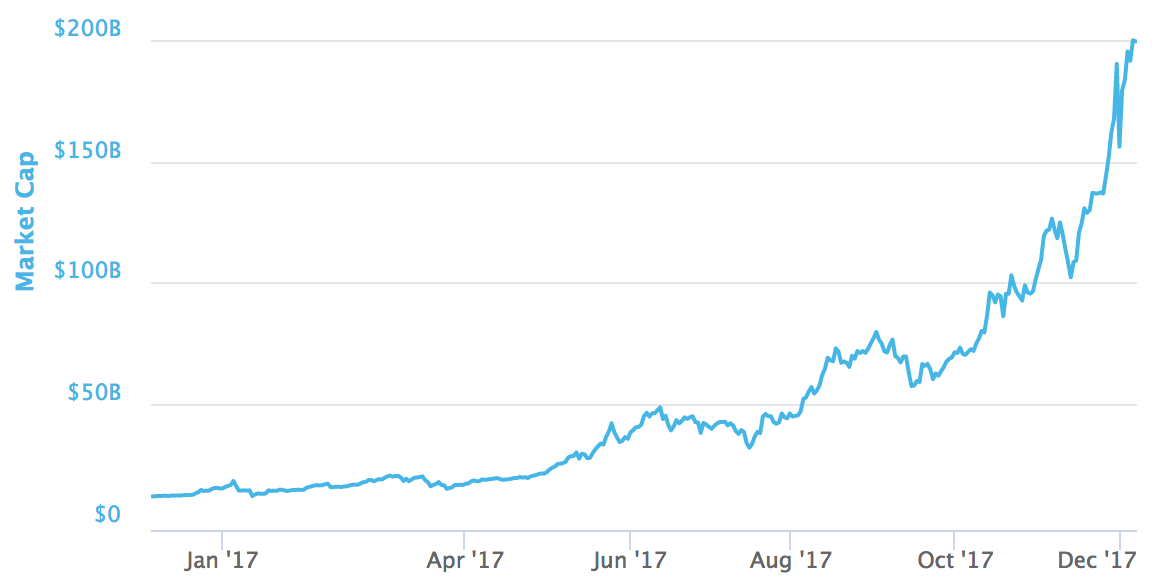
The astonishing increase of Bitcoin market capitalization in 2017.
*1 WARNING: The cryptocurrency market is exceptionally volatile2 and any money you put in might disappear into thin air. Cryptocurrencies mentioned here might be scams similar to Ponzi Schemes or have many other issues (overvaluation, technical, etc.). Please do not mistake this for investment advice. *
2 Update on March 2020: Well, it turned out to be volatile indeed :D
That said, let's get to business. We will start with a CSV we conveniently downloaded on the 6th of December of 2017 using the coinmarketcap API (NOTE: The public API went private in 2020 and is no longer available) named datasets/coinmarketcap_06122017.csv.
# Importing pandas
import pandas as pd
# Importing matplotlib and setting aesthetics for plotting later.
import matplotlib.pyplot as plt
%matplotlib inline
%config InlineBackend.figure_format = 'svg'
plt.style.use('fivethirtyeight')
# Reading datasets/coinmarketcap_06122017.csv into pandas
dec6 = pd.read_csv('datasets/coinmarketcap_06122017.csv')
# Selecting the 'id' and the 'market_cap_usd' columns
market_cap_raw = dec6[['id', 'market_cap_usd']]
# Counting the number of values
market_cap_raw.count()1 hidden cell
# Filtering out rows without a market capitalization
cap = market_cap_raw.query('market_cap_usd > 0')

# Counting the number of values again
market_cap_raw.count()
1 hidden cell
#Declaring these now for later use in the plots
TOP_CAP_TITLE = 'Top 10 market capitalization'
TOP_CAP_YLABEL = '% of total cap'

# Selecting the first 10 rows and setting the index
cap10 = cap[:10].set_index('id')
# Calculating market_cap_perc
cap10 = cap10.assign(market_cap_perc = lambda x: (x.market_cap_usd / cap.market_cap_usd.sum())*100)
# Plotting the barplot with the title defined above
ax = cap10.market_cap_perc.plot.bar(title=TOP_CAP_TITLE)
# Annotating the y axis with the label defined above
ax.set_ylabel(TOP_CAP_YLABEL);
1 hidden cell
# Colors for the bar plot
COLORS = ['orange', 'green', 'orange', 'cyan', 'cyan', 'blue', 'silver', 'orange', 'red', 'green']

# Plotting market_cap_usd as before but adding the colors and scaling the y-axis
ax = cap10.market_cap_usd.plot.bar(title=TOP_CAP_TITLE, logy=True, color = COLORS)
# Annotating the y axis with 'USD'
ax.set_ylabel('USD')
# Final touch! Removing the xlabel as it is not very informative
ax.set_xlabel('');
1 hidden cell
# Selecting the id, percent_change_24h and percent_change_7d columns
volatility = dec6[['id', 'percent_change_24h', 'percent_change_7d']]
# Setting the index to 'id' and dropping all NaN rows
volatility = volatility.set_index('id').dropna()
# Sorting the DataFrame by percent_change_24h in ascending order
volatility = volatility.sort_values('percent_change_24h')
# Checking the first few rows
volatility.head()
1 hidden cell
#Defining a function with 2 parameters, the series to plot and the title
def top10_subplot(volatility_series, title):
    # Making the subplot and the figure for two side by side plots
    fig, axes = plt.subplots(nrows=1, ncols=2, figsize=(10, 6))

    # Plotting with pandas the barchart for the top 10 losers
    ax = volatility_series[:10].plot.bar(color="darkred", ax=axes[0])
    # Setting the figure's main title to the text passed as parameter
    fig.suptitle(title)
    # Setting the ylabel to '% change'
    ax.set_ylabel('% change')
    # Same as above, but for the top 10 winners
    ax = volatility_series[-10:].plot.bar(color="darkblue", ax=axes[1])
    # Returning this for good practice, might use later
    return fig, ax

DTITLE = "24 hours top losers and winners"

# Calling the function above with the 24 hours period series and title DTITLE
fig, ax = top10_subplot(volatility.percent_change_24h, DTITLE)
1 hidden cell
# Sorting in ascending order
volatility7d = volatility.sort_values("percent_change_7d")
WTITLE = "Weekly top losers and winners"

# Calling the top10_subplot function
fig, ax = top10_subplot(volatility7d.percent_change_7d, WTITLE);
1 hidden cell