
Our biggest-ever sale. 60% off AI & data skills
Buy Now

Berlatih dan lacak kemajuan Anda.
Lanjutkan dengan GoogleDengan melanjutkan, Anda menyetujui Ketentuan Penggunaan, Kebijakan Privasi dan bahwa data Anda disimpan di AS.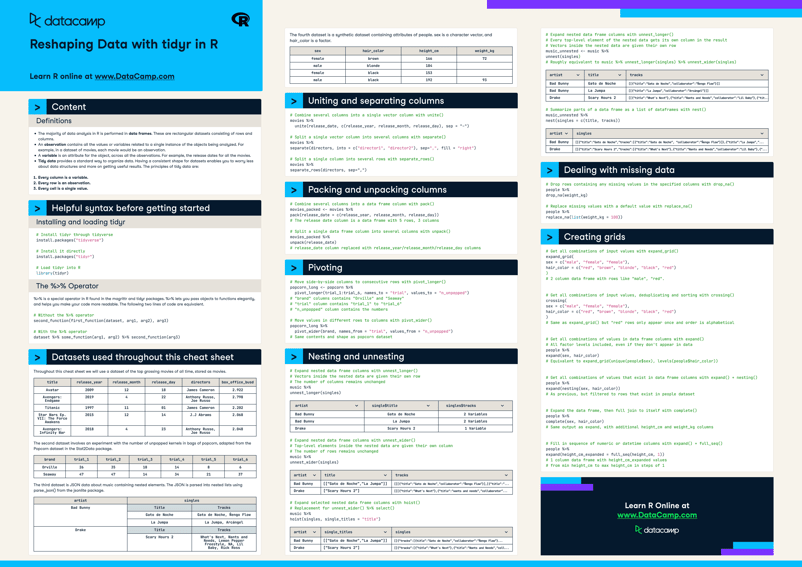
Simpan lembar contekan ini di ujung jari Anda
Unduh PDF# Install tidyr through tidyverse
install.packages("tidyverse")
# Install it directly
install.packages("tidyr")
# Load tidyr into R
library(tidyr)%>% is a special operator in R found in the magrittr and tidyr packages. %>% lets you pass objects to functions elegantly, and helps you make your code more readable. The following two lines of code are equivalent.
# Without the %>% operator
second_function(first_function(dataset, arg1, arg2), arg3)
# With the %>% operator
dataset %>% some_function(arg1, arg2) %>% second_function(arg3)Throughout this cheat sheet we will use a dataset of the top grossing movies of all time, stored as movies.
|
title |
release_year |
release_month |
release_day |
directors |
box_office_busd |
|
Avatar |
2009 |
12 |
18 |
James Cameron |
2.922 |
|
Avengers: Endgame |
2019 |
4 |
22 |
Anthony Russo,Joe Russo |
2.798 |
|
Titanic |
1997 |
11 |
01 |
James Cameron |
2.202 |
|
Star Wars Ep. VII: The Force Awakens |
2015 |
12 |
14 |
J. J. Abrams |
2.068 |
|
Avengers: Infinity War |
2018 |
4 |
23 |
Anthony Russo,Joe Russo |
2.048 |
The second dataset involves an experiment with the number of unpopped kernels in bags of popcorn, adapted from the Popcorn dataset in the Stat2Data package.
|
brand |
trial_1 |
trial_2 |
trial_3 |
trial_4 |
trial_5 |
trial_6 |
|
Orville |
26 |
35 |
18 |
14 |
8 |
6 |
|
Seaway |
47 |
47 |
14 |
34 |
21 |
37 |
The third dataset is JSON data about music containing nested elements. The JSON is parsed into nested lists using parse_json() from the jsonlite package.
|
artist |
singles | |
|
Bad Bunny |
title |
tracks |
|
Gato de Noche |
Gato de Noche, Ñengo Flow | |
|
La Jumpa |
La Jumpa, Arcángel | |
|
Drake |
title |
tracks |
|
Scary Hours 2 |
What's Next, Wants and Needs, Lemon Pepper Freestyle, NA, Lil Baby, Rick Ross | |
The fourth dataset is a synthetic dataset containing attributes of people. sex is a character vector, and hair_color is a factor.
|
sex |
hair_color |
height_cm |
weight_kg |
|
female |
brown |
166 |
72 |
|
male |
blonde |
184 | |
|
female |
black |
153 | |
|
male |
black |
192 |
93 |
# Combine several columns into a single vector column with unite()
movies %>%
unite(release_date, c(release_year, release_month, release_day), sep = "-")# Split a single vector column into several columns with separate()
movies %>%
separate(directors, into = c("director1", "director2"), sep=",", fill = "right")# Split a single column into several rows with separate_rows()
movies %>%
separate_rows(directors, sep=",")# Combine several columns into a data frame column with pack()
movies_packed <- movies %>%
pack(release_date = c(release_year, release_month, release_day))
# The release date column is a data frame with 5 rows, 3 columns# Split a single data frame column into several columns with unpack()
movies_packed %>%
unpack(release_date)
# release_date column replaced with release_year/release_month/release_day columns# Move side-by-side columns to consecutive rows with pivot_longer()
popcorn_long <- popcorn %>%
pivot_longer(trial_1:trial_6, names_to = "trial", values_to = "n_unpopped")
# "brand" columns contains "Orville" and "Seaway"
# "trial" column contains "trial_1" to "trial_6"
# "n_unpopped" column contains the numbers# Move values in different rows to columns with pivot_wider()
popcorn_long %>%
pivot_wider(brand, names_from = "trial", values_from = "n_unpopped")
# Same contents and shape as popcorn dataset# Expand nested data frame columns with unnest_longer()
# Vectors inside the nested data are given their own row
# The number of columns remains unchanged
music %>%
unnest_longer(singles)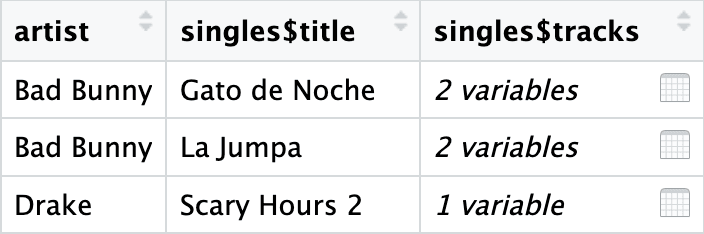
# Expand nested data frame columns with unnest_wider()
# Top-level elements inside the nested data are given their own column
# The number of rows remains unchanged
music %>%
unnest_wider(singles)
# Expand selected nested data frame columns with hoist()
# Replacement for unnest_wider() %>% select()
music %>%
hoist(singles, single_titles = "title")
# Expand nested data frame columns with unnest_longer()
# Every top-level element of the nested data gets its own column in the result
# Vectors inside the nested data are given their own row
music_unnested <- music %>%
unnest(singles)
# Roughly equivalent to music %>% unnest_longer(singles) %>% unnest_wider(singles)
# Summarize parts of a data frame as a list of dataframes with nest()
music_unnested %>%
nest(singles = c(title, tracks))
# Drop rows containing any missing values in the specified columns with drop_na()
people %>%
drop_na(weight_kg)# Replace missing values with a default value with replace_na()
people %>%
replace_na(list(weight_kg = 100))# Get all combinations of input values with expand_grid()
expand_grid(
sex = c("male", "female", "female"),
hair_color = c("red", "brown", "blonde", "black", "red")
)
# 2 column data frame with rows like "male", "red".# Get all combinations of input values, deduplicating and sorting with crossing()
crossing(
sex = c("male", "female", "female"),
hair_color = c("red", "brown", "blonde", "black", "red")
)
# Same as expand_grid() but "red" rows only appear once and order is alphabetical# Get all combinations of values in data frame columns with expand()
# All factor levels included, even if they don't appear in data
people %>%
expand(sex, hair_color)
# Equivalent to expand_grid(unique(people$sex), levels(people$hair_color))# Get all combinations of values that exist in data frame columns with expand() + nesting()
people %>%
expand(nesting(sex, hair_color))
# As previous, but filtered to rows that exist in people dataset# Expand the data frame, then full join to itself with complete()
people %>%
complete(sex, hair_color)
# Same output as expand, with additional height_cm and weight_kg columns# Fill in sequence of numeric or datetime columns with expand() + full_seq()
people %>%
expand(height_cm_expanded = full_seq(height_cm, 1))
# 1 column data frame with height_cm_expanded values
# from min height_cm to max height_cm in steps of 1
cheat sheets
 Richie Cotton• 7 mnt
cheat sheets
 Karlijn Willems• 7 mnt

cheat sheets
Karlijn Willems• 7 mnt


