track

Have this cheat sheet at your fingertips
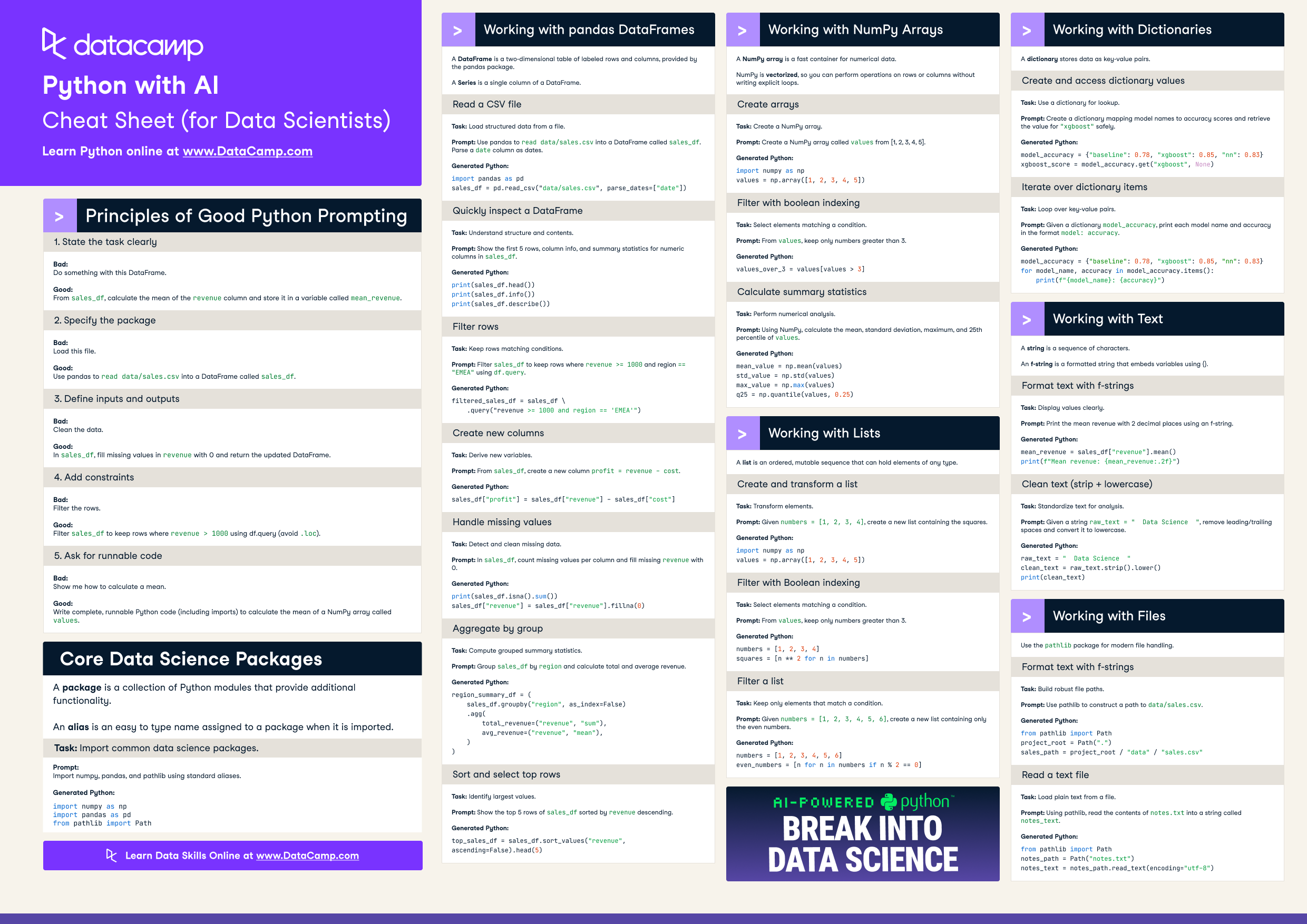
Download PDFWriting Python for data science is faster when AI handles the syntax. This cheat sheet covers prompting principles that produce reliable code, plus ready-to-run snippets for the packages and data structures you use every day: pandas, NumPy, lists, dictionaries, strings, and file paths.
Principles of good Python prompting
When using AI to generate Python, vague prompts produce fragile code. Clear prompts produce reliable code.
1. State the task clearly
Bad:
Do something with this DataFrame.
Good:
From sales_df, calculate the mean of the revenue column and store it in a variable called mean_revenue.
2. Specify the package
Bad:
Load this file.
Good:
Use pandas to read data/sales.csv into a DataFrame called sales_df.
3. Define inputs and outputs
Bad:
Clean the data.
Good:
In sales_df, fill missing values in revenue with 0 and return the updated DataFrame.
4. Add constraints
Bad:
Filter the rows.
Good:
Filter sales_df to keep rows where revenue > 1000 using df.query (avoid .loc).
5. Ask for runnable code
Bad:
Show me how to calculate a mean.
Good:
Write complete, runnable Python code (including imports) to calculate the mean of a NumPy array called values.
Core data science packages
A package is a collection of Python modules that provide additional functionality. An alias is an easy-to-type name assigned to a package when it is imported.
Import common packages
Prompt:
Import numpy, pandas, and pathlib using standard aliases.
Generated Python:
import numpy as np
import pandas as pd
from pathlib import Path
Working with DataFrames (pandas)
A DataFrame is a two-dimensional table of labeled rows and columns, provided by the pandas package. A Series is a single column of a DataFrame.
Read a CSV file
Prompt:
Use pandas to read data/sales.csv into a DataFrame called sales_df. Parse a date column as dates.
Generated Python:
import pandas as pd
sales_df = pd.read_csv("data/sales.csv", parse_dates=["date"])
Quickly inspect a DataFrame
Prompt:
Show the first 5 rows, column info, and summary statistics for numeric columns in sales_df.
Generated Python:
print(sales_df.head())
print(sales_df.info())
print(sales_df.describe())
Filter rows
Prompt:
Filter sales_df to keep rows where revenue >= 1000 and region == "EMEA" using df.query.
Generated Python:
filtered_sales_df = sales_df.query("revenue >= 1000 and region == 'EMEA'")
Create new columns
Prompt:
From sales_df, create a new column profit = revenue - cost.
Generated Python:
sales_df["profit"] = sales_df["revenue"] - sales_df["cost"]
Handle missing values
Prompt:
In sales_df, count missing values per column and fill missing revenue with 0.
Generated Python:
print(sales_df.isna().sum())
sales_df["revenue"] = sales_df["revenue"].fillna(0)
Aggregate by group
Prompt:
Group sales_df by region and calculate total and average revenue.
Generated Python:
region_summary_df = (
sales_df.groupby("region", as_index=False)
.agg(
total_revenue=("revenue", "sum"),
avg_revenue=("revenue", "mean"),
)
)
Sort and select top rows
Prompt:
Show the top 5 rows of sales_df sorted by revenue descending.
Generated Python:
top_sales_df = sales_df.sort_values("revenue", ascending=False).head(5)
Working with NumPy arrays
A NumPy array is a fast container for numerical data. NumPy is vectorized, so you can perform operations on rows or columns without writing explicit loops.
Create arrays
Prompt:
Create a NumPy array called values from [1, 2, 3, 4, 5].
Generated Python:
import numpy as np
values = np.array([1, 2, 3, 4, 5])
Filter with boolean indexing
Prompt:
From values, keep only numbers greater than 3.
Generated Python:
values_over_3 = values[values > 3]
Calculate summary statistics
Prompt:
Using NumPy, calculate the mean, standard deviation, maximum, and 25th percentile of values.
Generated Python:
mean_value = np.mean(values)
std_value = np.std(values)
max_value = np.max(values)
q25 = np.quantile(values, 0.25)
Working with lists
A list is an ordered, mutable sequence that can hold elements of any type.
Create and transform a list
Prompt:
Given numbers = [1, 2, 3, 4], create a new list containing the squares.
Generated Python:
numbers = [1, 2, 3, 4]
squares = [n ** 2 for n in numbers]
Filter a list
Prompt:
Given numbers = [1, 2, 3, 4, 5, 6], create a new list containing only the even numbers.
Generated Python:
numbers = [1, 2, 3, 4, 5, 6]
even_numbers = [n for n in numbers if n % 2 == 0]
Working with dictionaries
A dictionary stores data as key-value pairs.
Create and access dictionary values
Prompt:
Create a dictionary mapping model names to accuracy scores and retrieve the value for "xgboost" safely.
Generated Python:
model_accuracy = {"baseline": 0.78, "xgboost": 0.85, "nn": 0.83}
xgboost_score = model_accuracy.get("xgboost", None)
Iterate over dictionary items
Prompt:
Given a dictionary model_accuracy, print each model name and accuracy in the format model: accuracy.
Generated Python:
model_accuracy = {"baseline": 0.78, "xgboost": 0.85, "nn": 0.83}
for model_name, accuracy in model_accuracy.items():
print(f"{model_name}: {accuracy}")
Working with text
A string is a sequence of characters. An f-string is a formatted string that embeds variables using {}.
Format text with f-strings
Prompt:
Print the mean revenue with 2 decimal places using an f-string.
Generated Python:
mean_revenue = sales_df["revenue"].mean()
print(f"Mean revenue: {mean_revenue:.2f}")
Clean text (strip and lowercase)
Prompt:
Given a string raw_text = " Data Science ", remove leading/trailing spaces and convert it to lowercase.
Generated Python:
raw_text = " Data Science "
clean_text = raw_text.strip().lower()
print(clean_text)
Working with file paths
Use the pathlib package for modern file handling.
Construct file paths
Prompt:
Use pathlib to construct a path to data/sales.csv.
Generated Python:
from pathlib import Path
project_root = Path(".")
sales_path = project_root / "data" / "sales.csv"
Read a text file
Prompt:
Using pathlib, read the contents of notes.txt into a string called notes_text.
Generated Python:
from pathlib import Path
notes_path = Path("notes.txt")
notes_text = notes_path.read_text(encoding="utf-8")