
치트 시트를 손쉽게 활용하세요
PDF 다운로드Key definitions
When working with dates and times, you will encounter technical terms and jargon such as the following:
- Date: Handles dates without time.
- POSIXct: Handles date & time in calendar time.
- POSIXlt: Handles date & time in local time.
- Hms: Parses periods with hour, minute, and second
- Timestamp: Represents a single pandas date & time
- Interval: Defines an open or closed range between dates and times
- Time delta: Computes time difference between different datetimes
The ISO8601 datetime format
The ISO 8601 datetime format specifies datetimes from the largest to the smallest unit of time (YYYY-MM-DD HH:MM:SS TZ). Some of the advantages of ISO 8601 are:
- It avoids ambiguities between MM/DD/YYYY and DD/MM/YYYY formats.
- The 4-digit year representation mitigates overflow problems after the year 2099.
- Using numeric month values (08 not AUG) makes it language-independent, so dates make sense throughout the world.
- Python is optimized for this format since it makes comparison and sorting easier.
Packages used in this cheat sheet
Load the packages and dataset used in this cheat sheet.
import datetime as dt
import time as tm
import pytz
import pandas as pdIn this cheat sheet, we will be using 3 pandas series — iso, us, non_us, and 1 pandas DataFrame parts
| iso | us | non_us | ||
| 1969-07-20 20:17:40 | 07/20/1969 20:17:40 | 20/07/1969 20:17:40 | ||
| 1969-11-19 06:54:35 | 11/19/1969 06:54:35 | 19/11/1969 06:54:35 | ||
| 1971-02-05 09:18:11 | 02/05/1971 09:18:11 | 05/02/1971 09:18:11 |
| parts | ||
| year | month | day |
| 1969 | 7 | 20 |
| 1969 | 11 | 19 |
| 1971 | 2 | 5 |
Getting the current date and time
# Get the current date
dt.date.today()
# Get the current date and time
dt.datetime.now()Reading date, datetime, and time columns in a CSV file
# Specify datetime column
pd.read_csv("filename.csv", parse_dates = ["col1", "col2"])
# Specify datetime column
pd.read_csv("filename.csv", parse_dates = {"col1": ["year", "month", "day"]})Parsing dates, datetimes, and times
# Parse dates in ISO format
pd.to_datetime(iso)
# Parse dates in US format
pd.to_datetime(us, dayfirst=False)
# Parse dates in NON US format
pd.to_datetime(non_us, dayfirst=True)
# Parse dates, guessing a single format
pd.to_datetime(iso, infer_datetime_format=True)
# Parse dates in single, specified format
pd.to_datetime(iso, format="%Y-%m-%d %H:%M:%S")
# Parse dates in single, specified format
pd.to_datetime(us, format="%m/%d/%Y %H:%M:%S")
# Make dates from components
pd.to_datetime(parts)Extracting components
# Parse strings to datetimes
dttm = pd.to_datetime(iso)
# Get year from datetime pandas series
dttm.dt.year
# Get day of the year from datetime pandas series
dttm.dt.day_of_year
# Get month name from datetime pandas series
dttm.dt.month_name()
# Get day name from datetime pandas series
dttm.dt.day_name()
# Get datetime.datetime format from datetime pandas series
dttm.dt.to_pydatetime()Rounding dates
# Rounding dates to nearest time unit
dttm.dt.round('1min')
# Flooring dates to nearest time unit
dttm.dt.floor('1min')
# Ceiling dates to nearest time unit
dttm.dt.ceil('1min')Arithmetic
# Create two datetimes
now = dt.datetime.now()
then = pd.Timestamp('2021-09-15 10:03:30')
# Get time elapsed as timedelta object
now - then
# Get time elapsed in seconds
(now - then).total_seconds()
# Adding a day to a datetime
dt.datetime(2022,8,5,11,13,50) + dt.timedelta(days=1)Time Zones
# Get current time zone
tm.localtime().tm_zone
# Get a list of all time zones
pytz.all_timezones
# Parse strings to datetimes
dttm = pd.to_datetime(iso)
# Get datetime with timezone using location
dttm.dt.tz_localize('CET', ambiguous='infer')
# Get datetime with timezone using UTC offset
dttm.dt.tz_localize('+0100')
# Convert datetime from one timezone to another
dttm.dt.tz_localize('+0100').tz_convert('US/Central') Time Intervals
# Create interval datetimes
start_1 = pd.Timestamp('2021-10-21 03:02:10')
finish_1 = pd.Timestamp('2022-09-15 10:03:30')
start_2 = pd.Timestamp('2022-08-21 03:02:10')
finish_2 = pd.Timestamp('2022-12-15 10:03:30')
# Specify the interval between two datetimes
pd.Interval(start_1, finish_1, closed='right')
# Get the length of an interval
pd.Interval(start_1, finish_1, closed='right').length
# Determine if two intervals are intersecting
pd.Interval(start_1, finish_1, closed='right').overlaps(pd.Interval(start_2, finish_2, closed='right'))Time Deltas
# Define a timedelta in days
pd.Timedelta(7, "d")
# Convert timedelta to seconds
pd.Timedelta(7, "d").total_seconds()치트 시트를 손쉽게 활용하세요
PDF 다운로드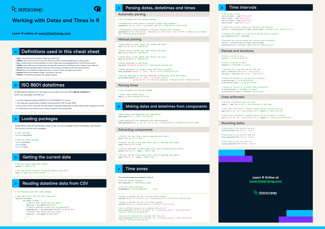




Manipulating date and time data is an essential skill set for any data practitioner in Python. Working with date and time data effectively allows practitioners to analyze, visualize, and forecast time series data. In this cheat sheet, we’ll cover the basics of working with date and time data in Python.