
강의
Claude Code 101
3시간
27.8K
Vibe-coding with Claude Code works fine on small jobs. You describe a change, the agent writes it, and you check the result. The trouble starts when a feature touches many files at once. By then, the hard part is the design decision, not the implementation.
Spec-driven development handles that design decision in writing, before any code runs. You write a short spec that says what the change should do. You turn the spec into a plan of numbered tasks. Claude Code then writes code against the plan, one task at a time, with a human review between every step.
This tutorial teaches the workflow end-to-end. It walks through three open-source setups that run it inside Claude Code: Superpowers, GitHub Spec Kit, and BMAD-METHOD.
If you're new to Claude Code, I recommend starting with the Claude Code 101 course. To get hands-on experience with various AI coding tools, check out our AI for Software Engineering skill track.
Spec-driven development is a workflow built on three documents in order: one that tells what a change should do, a plan that specifies the steps, and code written against the plan, with a human review between every pair.
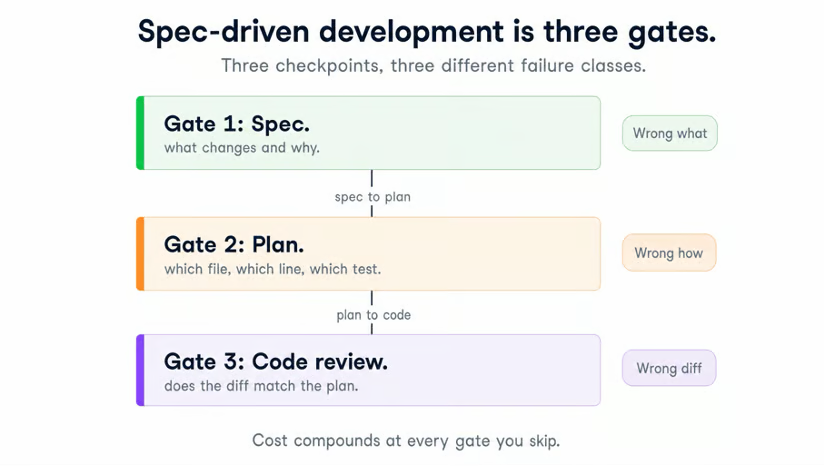
The three review points a feature passes through in spec-driven development.
A spec is a short document, written in plain language before any code, that says what a change should do. Take a feature like "let users export their data." A spec for it pins down the answers an agent would otherwise guess at. It lists
Here is the real opening of a spec Claude Code wrote for a workout-shape-verification change in a Telegram-based accountability app of mine. The change replaces a brittle heart-rate threshold with a check on the shape of the heart-rate curve over time:
# Workout Shape-Based Verification — Design Spec

**Created:** 2026-05-05
**Status:** Draft
**Supersedes (partially):** [2026-03-17-calisthenics-verification-design.md]
  — replaces the absolute-HR thresholds for the Workout activity type.
  Run / Ride / Walk verification is unchanged.

## Problem

The current Workout verifier accepts an activity only if absolute heart-rate
levels clear fixed cutoffs: avg ≥ 120, max ≥ 140, range ≥ 30, suffer_score ≥ 3.
Two failures in production:

1. **False-negative risk.** As cardiovascular fitness improved
   (resting HR ~80), real calisthenics sessions with disciplined rest now
   average 115–125 bpm. Recent sessions have come within 4 bpm of the 120 floor.

<!-- ... continues for hundreds of lines through Solution, Risks,
 	Out of scope, and What is removed / added / changed / unchanged -->
The plan is the next document. It breaks the spec above into numbered tasks that the agent can work on one at a time, each task naming a file, a change, an order, and a test. Where the spec answers "what," the plan answers "in what steps."
The code comes last, written against the plan one task at a time.
Three documents. A human review sits between every pair. You review the spec before it becomes a plan. You review the plan before it becomes code. You review the code before it merges.
You may have used Claude Code's built-in plan mode (press Shift+Tab twice to enter it) and wondered why this is different. Plan mode produces a plan inside a single chat turn. The plan lives in memory, with no persisted spec and no review step between phases.
Spec-driven development persists the spec and the plan as files on disk. Each one passes a human review before the next phase starts, and the artifacts survive across sessions. Plan mode compresses two phases of software development into one chat turn. That works on small jobs and fails as soon as the codebase grows and starts serving real users.
Vibe-coding works on prototypes, single files, and throwaway scripts. It gets worse in real applications with users to answer to and in existing large codebases. The line worth drawing is at about 4 files. Any change touching that many files needs a spec, as do any refactor with a coherent end state, or any task where "what should this do exactly?" is the hard part.
The failure has a clear cause. A vague prompt like "add photo sharing to my app" makes the model guess at thousands of unstated requirements.
Take a single one of those requirements: notification preferences. The product manager assumes per-channel toggles. The backend builds an on/off switch. The frontend assumes OS-level integration. Four reasonable readings of three words, four different products.
Each review step in spec-driven development catches a different class of mistake before it gets expensive. The spec review catches scope creep and wrong-root-cause framings. The plan review catches half-finished implementations and conflicting patterns. The code review catches plans that read fine but break on the first failing test.
|
Failure mode |
What goes wrong |
Caught at |
|
Scope creep mid-task |
Agent expands the feature past the original ask |
Spec review |
|
Half-finished implementations |
Agent declares done at 80% with stubs and TODOs |
Plan review |
|
Conflicting patterns |
The agent picks a different pattern than the rest of the codebase |
Plan review |
|
Wrong-root-cause fixes |
Agent patches a symptom instead of the underlying bug |
Spec review |
|
Plans that break on contact |
Plan reads fine, but doesn't survive the first failing test |
Code review |
The payoff is real, and it builds slowly. The spec phase costs hours of writing before any code runs, and the first few features feel slower than vibe-coding. My own break-even point came around the fourth or fifth feature. By then, the specs were catching design mistakes I would otherwise have shipped and rewritten a week later.
The next three sections walk through three open-source approaches that run this workflow inside Claude Code. They are ordered from lightest to heaviest in the structure they enforce.
Superpowers is the lightest of the three. It is the one I use day to day, and the one we will cover in the most detail.
Superpowers is a Claude Code plugin by Jesse Vincent (obra/superpowers, MIT license), with around 194k stars on GitHub.
It ships a set of skills. A Claude skill, in Claude Code, is a named instruction file that the agent loads on demand to follow a specific workflow. Superpowers ships skills that hold Claude Code to the spec-driven loop instead of letting it jump straight to code.
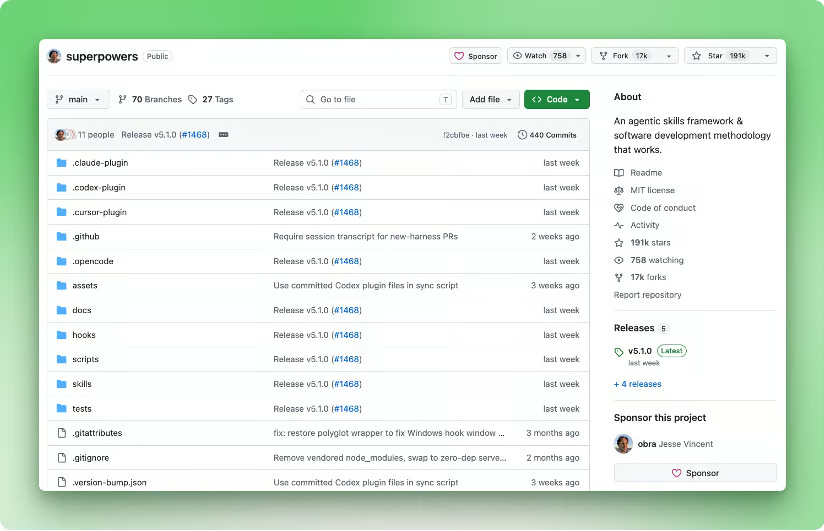
The Superpowers project page on GitHub.
Install it through Claude Code's official plugin marketplace:
/plugin install superpowers@claude-plugins-officialA SessionStart hook auto-loads the using-superpowers skill, so the workflow is active the moment you start typing. (Claude code hooks are scripts the agent runs at a specific lifecycle event.) There is nothing to wire up per project.
Afterward, four skills manage your daily work:
|
Skill |
What it does |
|
|
Talks through the design with you and produces the spec document |
|
|
Turns the approved spec into a numbered task list |
|
|
Executes the plan one task at a time, with a test-first cycle and a code-review subagent after each task |
|
|
Runs an independent code-review subagent over the full diff before merge |
A subagent is a separate Claude Code instance that the parent dispatches to do focused work in its own context window. The reviewer subagents in the table above run as subagents, so they read the code cold, without the parent's framing.
You invoke the four skills by describing what you want in plain language. The brainstorming skill hears "let's discuss this new feature" and kicks off the spec conversation on its own. The others trigger the same way.
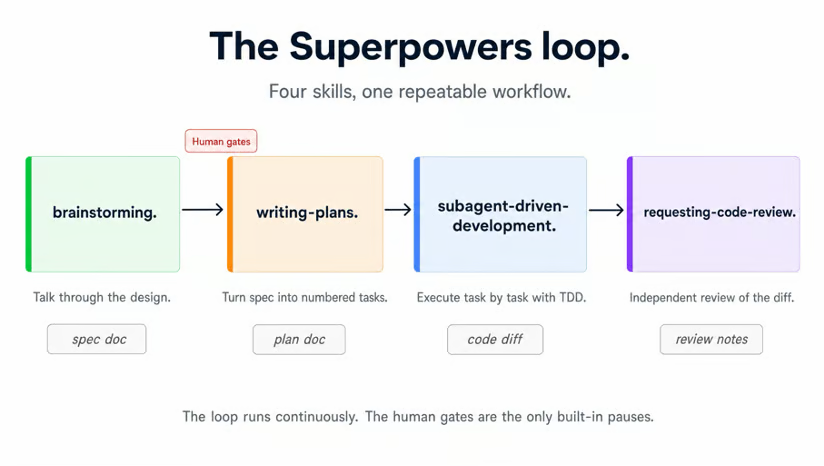
The four Superpowers skills in order, with the two human review points sitting between brainstorming and writing-plans.
The walkthrough below uses the same workout-shape-verification feature from the spec excerpt above.
I open Claude Code and type:
Let's discuss a new feature. The Workout verifier in make-me-work uses absolute heart-rate cutoffs and is now misfiring as my resting HR drops. I want to replace the absolute cutoffs with a check on the shape of the HR curve over the session.The brainstorming skill takes over and asks ten or so questions back, among them:
Two human review points land here. The first is the design review, where I confirm the answers I gave match what I want. The second is the spec review. I read the file Claude has written and approve it before any plan work begins.
I run the writing-plans skill. It reads the approved spec and writes a plan file with four parts:
I review the plan, push back on tasks that look out of order or too coarse, and approve.
I run subagent-driven-development. From this point the loop runs without me. For each task in the plan, the skill:
If the reviewer flags an issue, the loop fixes it before moving to the next task. There is no human review point inside this stage. The reviews that matter for this stage are the two before it.
Once the plan is done, I run requesting-code-review. A fresh subagent reads the whole diff against the spec and the plan, and posts a review. I take the suggestions before merging.
When a task in the plan reveals a contradiction with the spec, the loop stops and asks. I can edit the spec (or let Claude do it) and regenerate the affected tasks. The other option is a one-off correction in the task itself. Superpowers does not silently work around spec errors.
Here is the spec for the workout-shape-verification feature, open in an editor:
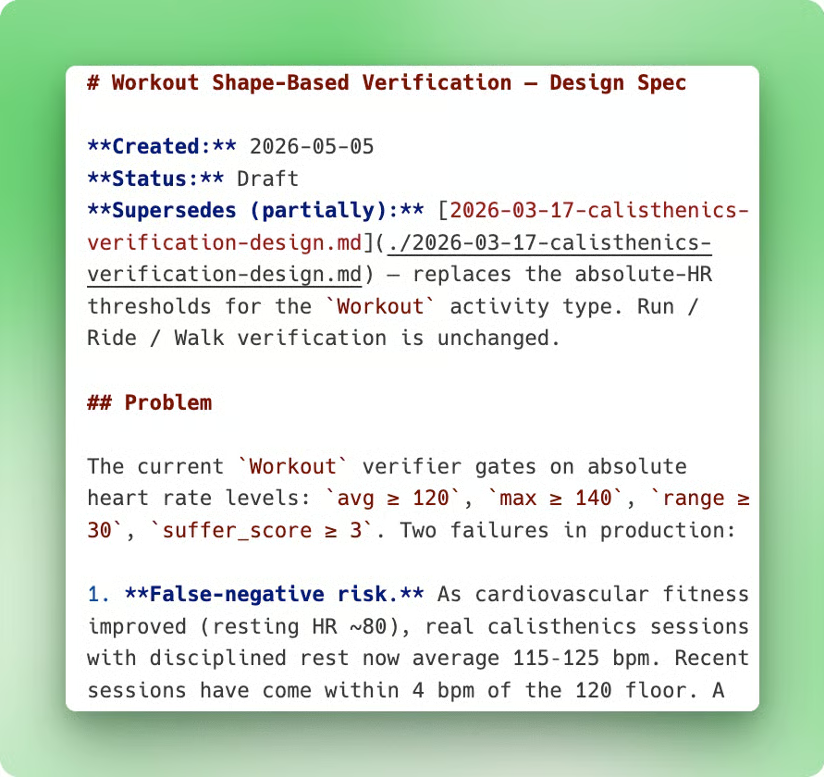
The spec file as it lands on disk after the brainstorming skill writes it.
The header carries the Created, Status, and Supersedes fields that the brainstorming skill writes by default. The Problem section follows. None of it is code. The file continues beyond the screenshot through sections for the proposed solution and the constraints on what the change should and should not touch.
The matching plan opens with its User Journey:
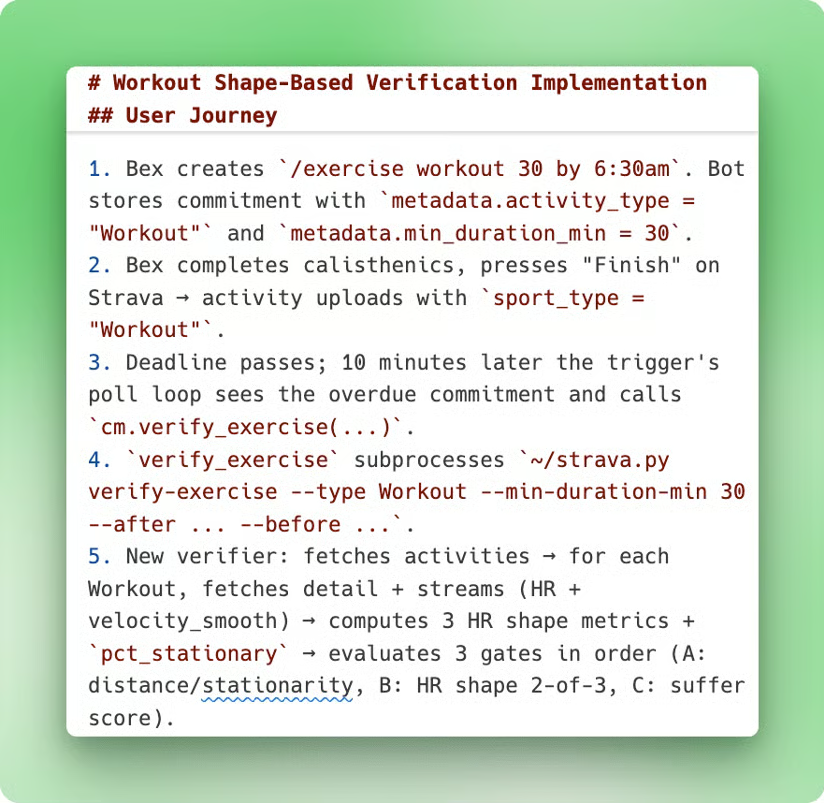
The plan file that the writing-plans skill produces from the approved spec.
The journey walks the demo path five steps at a time, naming the exact commands, files, and arguments at every step. The numbered tasks that follow translate each step into checkbox sub-steps that the subagent-driven-development skill can work through.
The two documents pair up like this:
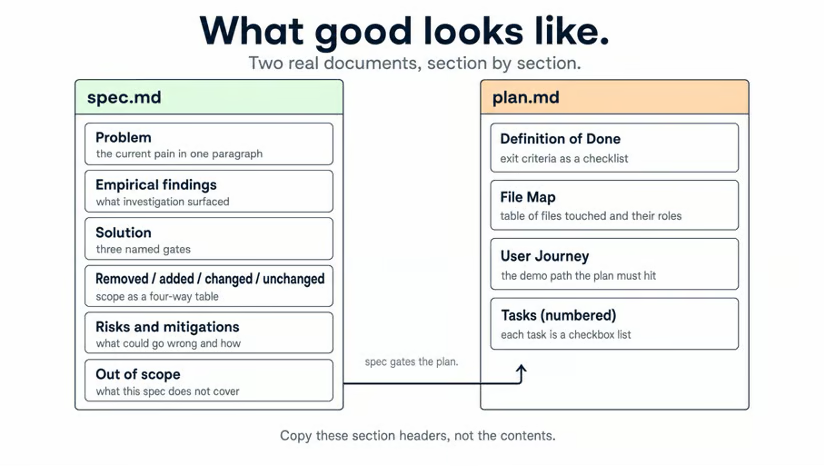
Spec and plan side by side. The spec answers what changes and why. The plan answers in what steps.
For larger specs and plans, I add one step the official loop does not have: a red-team pass. Before I sign off, I have one or several Opus subagents read the spec cold, looking for holes from different angles. That is a personal habit, not a Superpowers feature. It has caught enough bad assumptions that I keep it.
Superpowers fits solo work on a single repo. It works best when the whole codebase fits in one Claude Code session, and you will actually read a 2-page spec. The detailed comparison lives in How to choose between them further down. The short version: Superpowers struggles with multi-repo features and with work that needs clear role separation.
One developer caught a fourth failure mode in a public complaint about the plugin: “Even the smallest of tasks takes forever, with Claude spinning up subagents and writing plans that are completely overkill. Changing some CSS now takes forever.”
The fix is to skip Superpowers for tiny changes. The skills only activate on the brainstorming trigger. A one-line CSS edit can go through Claude Code without ever invoking the spec loop. The real failure mode there is over-applying the workflow to work that does not need a spec.
Spec Kit is the choice when the spec has to outlast any single Claude Code session. It is also the right pick when people who never open Claude Code need to read the spec.
Spec Kit is a GitHub project (github/spec-kit, MIT license), maintained by GitHub itself, with over 100k stars. It ships a CLI plus a workflow that runs the same way across every major AI coding agent. Claude Code, Cursor, Aider, Cline, and Roo Code are all supported. The agent-neutral design is what lets the spec live outside Claude Code.
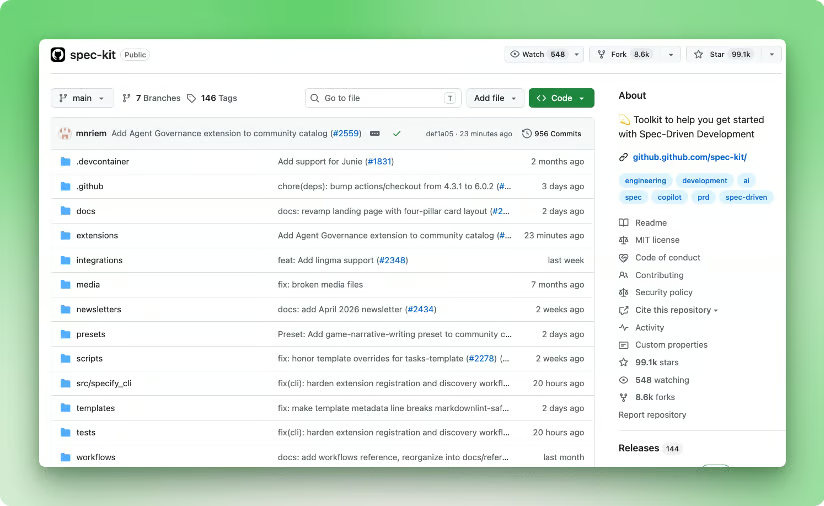
The Spec Kit project page on GitHub.
There is no official PyPI package yet, so install the CLI from the Git tag with uv:
uv tool install specify-cli --from git+https://github.com/github/spec-kit.git@vX.Y.ZReplace vX.Y.Z with the current release tag. The package is specify-cli, and the command it registers is specify.
The workflow runs through nine slash commands that the CLI installs into your agent's slash-command list. Six are core to the loop, three are optional for cases the core loop does not cover.
|
Slash-Command |
Type |
Description |
|
|
Core |
writes the project rules that every later artifact has to follow |
|
|
Core |
produces the spec |
|
|
Core |
produces the architecture document |
|
|
Core |
produces the numbered task list |
|
|
Core |
turns those tasks into GitHub issues |
|
|
Core |
works the tasks one at a time |
|
|
Optional |
asks the user follow-up questions when the spec has gaps |
|
|
Optional |
looks for contradictions across spec, plan, and tasks |
|
|
Optional |
runs a quality check on the artifacts before implementation |
The separator between command group and verb is a dot, not a colon: /speckit.specify, not /speckit:specify.
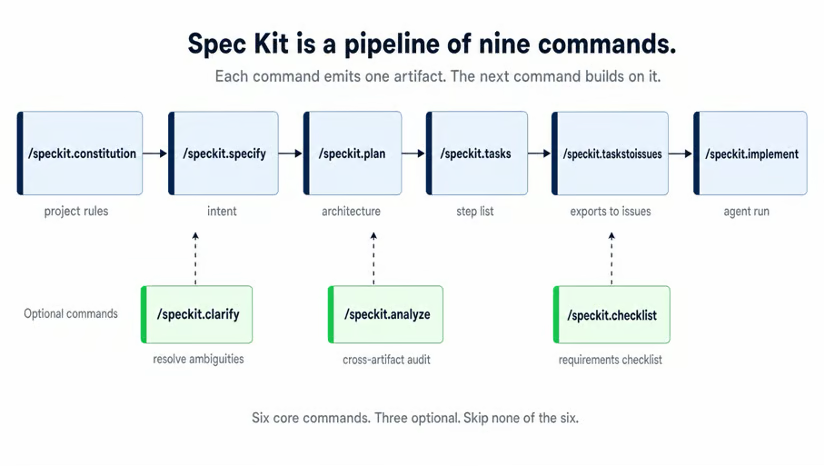
The nine Spec Kit slash commands: six core commands on the pipeline, three optional commands hanging off it.
The artifacts these commands produce are the same spec and plan you saw in the Superpowers section, also written to disk and tracked by Git. The difference is portability: Spec Kit's artifacts are designed to work with any AI coding agent, not just Claude Code, and the workflow is built for stakeholder review via GitHub pull requests rather than as a byproduct of a single tool's loop.
On a solo project, you probably will not need the Spec Kit. Reach for it when:
Where Spec Kit organizes artifacts, BMAD organizes people. It splits the spec-to-code workflow into four phases, each run by a named role-agent.
BMAD-METHOD (bmad-code-org/BMAD-METHOD, MIT license, about 47k stars) is on version 6. The acronym, in the project's own docs, expands to "Breakthrough Method for Agile AI-Driven Development." It runs on top of Claude Code and other agents, and it installs as a module ecosystem. The default install gives you a core module that carries six role-agents, four workflow phases, and 34 or more named workflows.
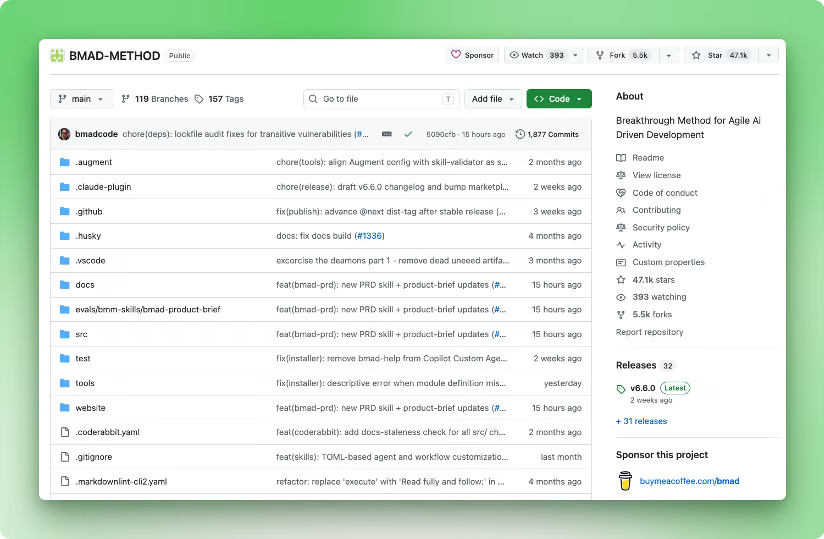
The BMAD-METHOD project page on GitHub.
Install BMAD with Node:
npx bmad-method installThe six role-agents are prompt personas the user activates by name from inside the agent host. In Claude Code, that means typing the activation command BMAD installs. Check the README for the exact syntax, which shifts between releases.
Once activated, the agent takes on that role's instructions, voice, and outputs until you switch personas. The six are:
Two roles you might expect are missing in v6: there is no Scrum Master agent and no standalone QA agent. Sprint planning and story prep fall to the Developer agent, and QA test generation is a workflow that the Developer triggers.
The artifact set is heavier than a single spec. You get:
The PRD and the architecture document together play the same role as the Superpowers spec. The split puts them across two role-agents and into a more formal format. The artifact set as a whole covers a full software-development lifecycle, with each feature inheriting context from the layer above.
The v6 workflow runs in four phases.
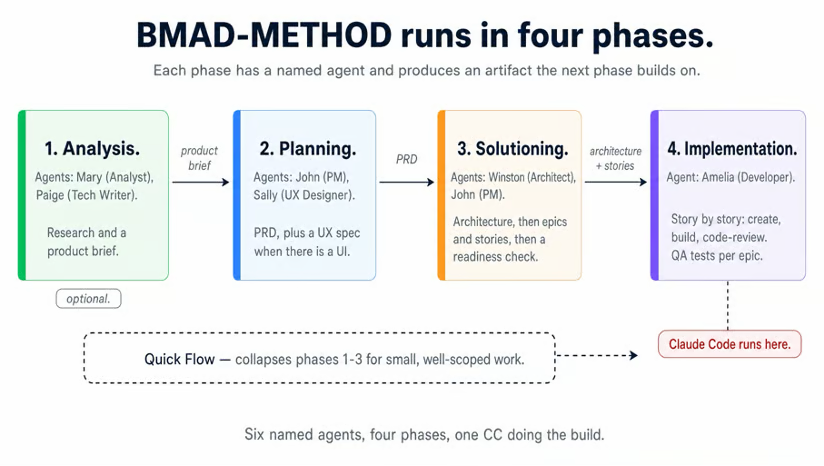
The four BMAD phases and the role-agent running each one. The Quick Flow track skips the first three phases for small work.
Phase 1, analysis, is optional. Mary (Analyst) and Paige (Tech Writer) run research and produce a product brief. Skip the phase if you already know what you are building.
Phase 2, planning, is required. John (PM) writes the PRD. Sally (UX Designer) adds a UX spec when the feature has a UI.
Phase 3, solutioning, is Winston's phase. The Architect drafts the architecture first, then John breaks requirements into epics and stories. Putting stories after the architecture is a v6 choice that sizes them against real implementation boundaries. Winston then runs an implementation-readiness check that ends in a PASS, CONCERNS, or FAIL verdict.
Phase 4, implementation, is where Amelia (Developer) works story by story: create the story, build it, and code-review it. Once a full epic is done, she triggers a QA test generation workflow across the whole epic. This is the phase where Claude Code does the actual coding, working as Amelia.
For small, well-scoped work, BMAD ships a "Quick Flow" track that activates Amelia directly and skips the first three phases. The activation command is in the BMAD README (the exact syntax shifts between releases). Quick Flow produces no PRD and no architecture document, just a short story and the code that satisfies it. It is the answer to the "this is overkill for a button change" objection.
When the spec turns out to be wrong mid-implementation, BMAD loops back through Winston's Phase 3 verdict. A FAIL sends you back to Phase 2 to rewrite the PRD. A CONCERNS proceeds with Winston's noted risks attached to the story. The split lets you keep moving on small inconsistencies and stop hard on large ones.
BMAD pays off on long-running projects with real users to answer to. It also fits multi-developer teams, handing work off between people. The phase-and-role separation has to save more time than it costs.
It is the wrong fit for a one-person side project. On solo work, the four-phase, six-agent split is mostly overhead. There is no second person on the team for the role separation to matter.
|
Framework |
Install |
Where the work lives |
Best for |
|
Superpowers |
|
Skills auto-loaded inside Claude Code |
Solo work, single-repo features, long unattended runs |
|
GitHub Spec Kit |
|
Nine /speckit.* slash commands producing spec, plan, and tasks artifacts on disk |
Cross-team spec review, spec-to-code traceability |
|
BMAD-METHOD |
|
Six named role-agents across four phases (Analysis, Planning, Solutioning, Implementation) |
Long-running projects, a real PM in the loop, multi-dev handoffs |
Three rules decide the choice.
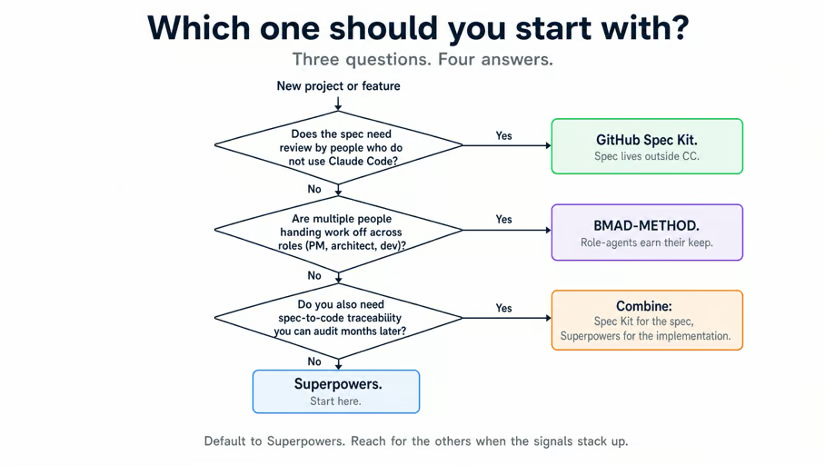 Three questions about your project, four framework choices on the other side.
There is a fourth option that the decision tree names: combine Spec Kit with Superpowers. Use Spec Kit for the spec phase so the artifacts live in Git for cross-team review. Then point Superpowers' subagent-driven-development skill at the Spec Kit plan file in one line of config. You get the durable spec from Spec Kit alongside the tight implementation loop from Superpowers.
Spec-driven development is three documents in order. The spec says what to build, the plan says in what steps, and the code follows the plan. A human review sits between every pair.
Run the decision tree above to pick a framework, which, for most readers, will land on Superpowers. Install it and pick one feature you would otherwise vibe-code, something that touches 3 to 5 files. Run it end-to-end through brainstorm, spec, plan, and execute. One real run teaches the workflow better than any description.
If you want to refresh Claude Code fundamentals first, DataCamp has a practical Claude Code tutorial, a best-practices guide covering plan mode, CLAUDE.md, and TDD, and a deep dive on plan mode itself.
Top AI Software Engineering Courses
강의
강의
트랙
튜토리얼
Dario Radečić
15분
튜토리얼
Tim Lu
15분
튜토리얼
Bexruz (Bex) Tuychiev
14분
튜토리얼
Aashi Dutt
12분
튜토리얼
Bexruz (Bex) Tuychiev
12분
튜토리얼
Aashi Dutt
10분