You'll probably know the Jupyter notebooks pretty well - it's one of the most well-known parts of the Jupyter ecosystem! If you haven't explored the ecosystem yet or if you simply want to know more about it, don't hesitate to go and explore it here!.
For those who are new to Project Jupyter, the Jupyter Notebook Application produces documents that contain a mix of executable code, text elements, and even HTML, which makes it thé ideal place to bring together an analysis description and its results as well as to perform data analysis in real time. This, combined with its many useful functionalities, explains why the Jupyter Notebook is a one of the data scientist's preferred development environments environments that allows for interactive, reproducible data science analysis, computation and communication.
One of the other great things about the Jupyter notebooks?
They're super easy to get started with! You might have already noticed this when you read DataCamp's definitive guide to Jupyter Notebook. However, when you first enter in the application, you might have to find your way around the variety of functionalities that are presented to you: from saving your current notebook to adding or moving cells in the notebook or embedding current widgets in your notebook - without a doubt, there's a lot out there to discover when you first get started!
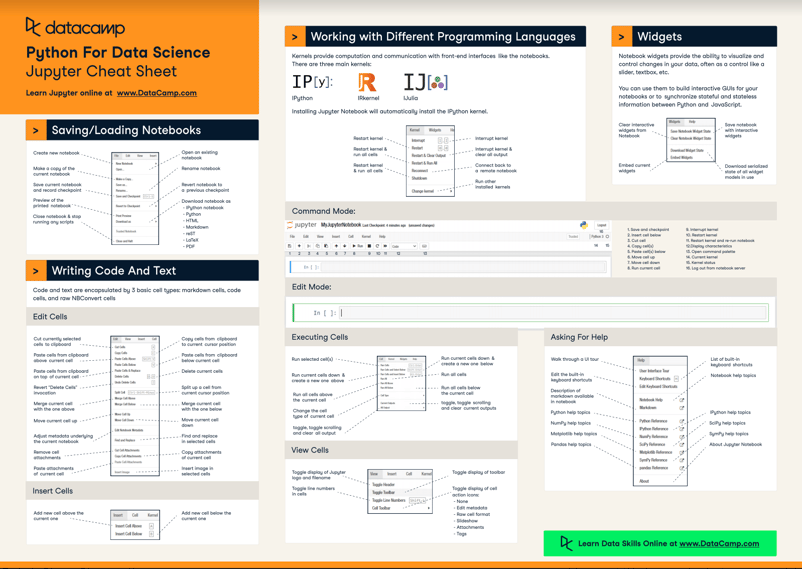
That's why DataCamp made a Jupyter Notebook cheat sheet for those who are just starting out and that want to have some help to find their way around.
Note also that the Jupyter Notebook Application has a handy "Help" menu that includes a full-blown User Interface Tour! -- No worries, we also included this in the cheat sheet :)
Check it out here:





You'll probably know the Jupyter notebooks pretty well - it's one of the most well-known parts of the Jupyter ecosystem! If you haven't explored the ecosystem yet or if you simply want to know more about it, don't hesitate to go and explore it here!.
For those who are new to Project Jupyter, the Jupyter Notebook Application produces documents that contain a mix of executable code, text elements, and even HTML, which makes it thé ideal place to bring together an analysis description and its results as well as to perform data analysis in real time. This, combined with its many useful functionalities, explains why the Jupyter Notebook is a one of the data scientist's preferred development environments environments that allows for interactive, reproducible data science analysis, computation and communication.
One of the other great things about the Jupyter notebooks?
They're super easy to get started with! You might have already noticed this when you read DataCamp's definitive guide to Jupyter Notebook. However, when you first enter in the application, you might have to find your way around the variety of functionalities that are presented to you: from saving your current notebook to adding or moving cells in the notebook or embedding current widgets in your notebook - without a doubt, there's a lot out there to discover when you first get started!
That's why DataCamp made a Jupyter Notebook cheat sheet for those who are just starting out and that want to have some help to find their way around.
Note also that the Jupyter Notebook Application has a handy "Help" menu that includes a full-blown User Interface Tour! -- No worries, we also included this in the cheat sheet :)
Check it out here: