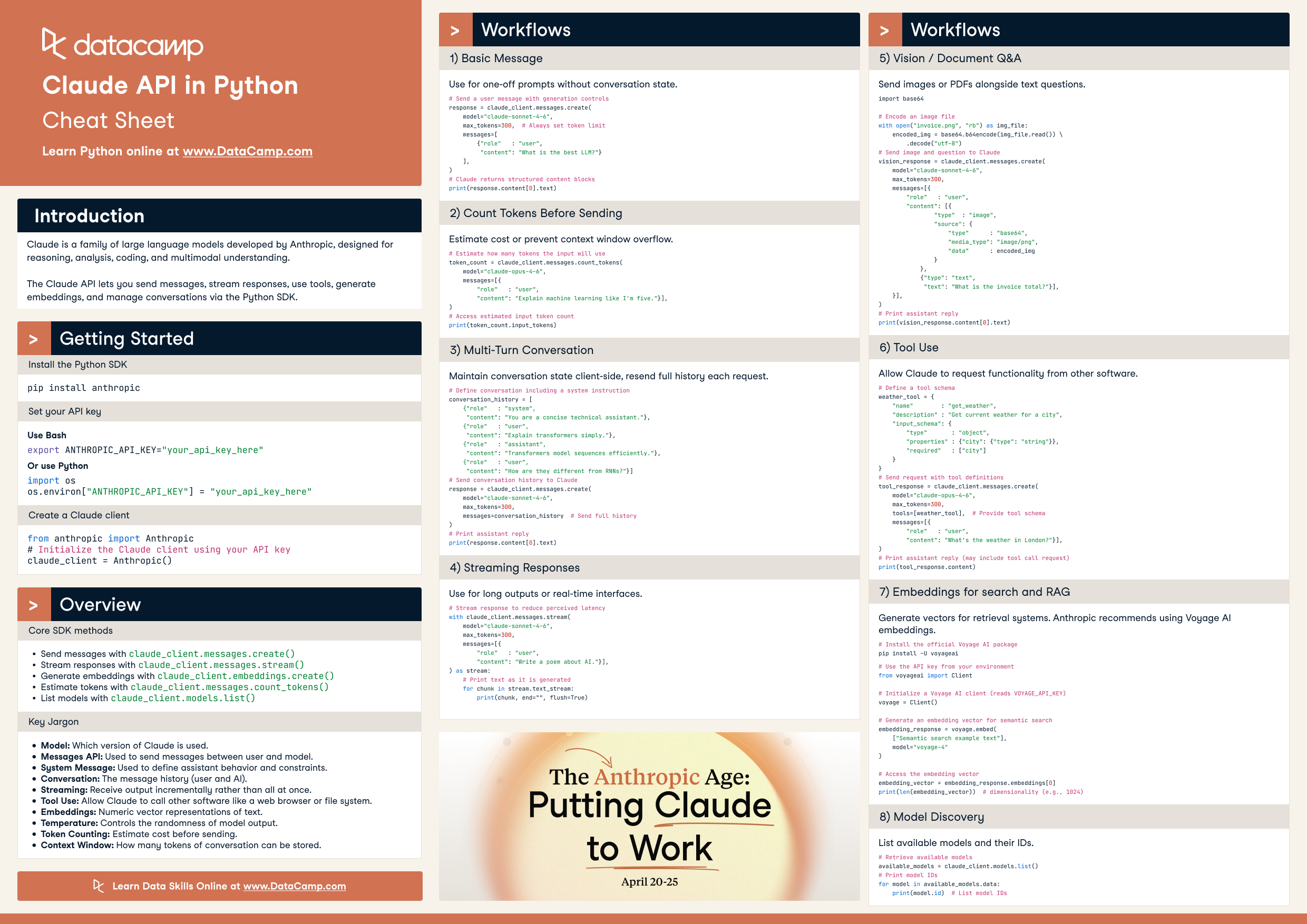
Build with the Claude API in Python. This cheat sheet covers the Anthropic SDK essentials — messages, streaming, vision, tool use, embeddings, and token counting — with ready-to-run code.
Claude is Anthropic's family of large language models for reasoning, analysis, coding, and multimodal understanding. This cheat sheet covers the Anthropic Python SDK essentials — sending messages, streaming, vision, tool use, embeddings, and token counting — with ready-to-run code.
Getting started
Install the Python SDK
pip install anthropic
Set your API key
Set it once in your shell:
export ANTHROPIC_API_KEY="your_api_key_here"
Or from Python:
import os
os.environ["ANTHROPIC_API_KEY"] = "your_api_key_here"
Create a Claude client
from anthropic import Anthropic

# Initialize the Claude client using your API key
claude_client = Anthropic()
Overview
Core SDK methods
Send messages with claude_client.messages.create()
Stream responses with claude_client.messages.stream()
Generate embeddings with claude_client.embeddings.create()
Estimate tokens with claude_client.messages.count_tokens()
List models with claude_client.models.list()
Key jargon
Model — a specific Claude checkpoint.
Messages API — the primary conversational endpoint.
System message — used to define assistant behavior and constraints.
Conversation — full message history sent every request.
Streaming — receive output incrementally.
Tool use — allow Claude to call external tools.
Embeddings — vector representations of text.
Temperature — controls the randomness of model output.
Token counting — estimate cost before sending.
Context window — maximum tokens allowed in a request (input + output).
Workflows
1. Basic message
Use for one-off prompts without conversation state.
# Send a user message with generation controls
response = claude_client.messages.create(
    model="claude-sonnet-4-6",
    max_tokens=300,  # Always set token limit
    messages=[
        {"role": "user",
         "content": "What is the best LLM?"}
    ],
)

# Claude returns structured content blocks
print(response.content[0].text)
2. Count tokens before sending
Estimate cost or prevent context window overflow.
# Estimate how many tokens the input will use
token_count = claude_client.messages.count_tokens(
    model="claude-opus-4-6",
    messages=[{
        "role": "user",
        "content": "Explain machine learning like I'm five."}],
)

# Access estimated input token count
print(token_count.input_tokens)
3. Multi-turn conversation
Maintain conversation state client-side and resend the full history each request.
# Define conversation including a system instruction
conversation_history = [
    {"role": "system",
     "content": "You are a concise technical assistant."},
    {"role": "user",
     "content": "Explain transformers simply."},
    {"role": "assistant",
     "content": "Transformers model sequences efficiently."},
    {"role": "user",
     "content": "How are they different from RNNs?"}
]

# Send conversation history to Claude
response = claude_client.messages.create(
    model="claude-sonnet-4-6",
    max_tokens=300,
    messages=conversation_history,  # Send full history
)

# Print assistant reply
print(response.content[0].text)
4. Streaming responses
Use for long outputs or real-time interfaces.
# Stream response to reduce perceived latency
with claude_client.messages.stream(
    model="claude-sonnet-4-6",
    max_tokens=300,
    messages=[{
        "role": "user",
        "content": "Write a poem about AI."}],
) as stream:
    # Print text as it is generated
    for chunk in stream.text_stream:
        print(chunk, end="", flush=True)
5. Vision and document Q&A
Send images or PDFs alongside text questions.
import base64

# Encode an image file
with open("invoice.png", "rb") as img_file:
    encoded_img = base64.b64encode(img_file.read()).decode("utf-8")

# Send image and question to Claude
vision_response = claude_client.messages.create(
    model="claude-sonnet-4-6",
    max_tokens=300,
    messages=[{
        "role": "user",
        "content": [
            {
                "type": "image",
                "source": {
                    "type": "base64",
                    "media_type": "image/png",
                    "data": encoded_img
                }
            },
            {"type": "text",
             "text": "What is the invoice total?"}
        ],
    }],
)

# Print assistant reply
print(vision_response.content[0].text)
6. Tool use
Allow Claude to request functionality from other software.
# Define a tool schema
weather_tool = {
    "name": "get_weather",
    "description": "Get current weather for a city",
    "input_schema": {
        "type": "object",
        "properties": {"city": {"type": "string"}},
        "required": ["city"]
    }
}

# Send request with tool definitions
tool_response = claude_client.messages.create(
    model="claude-opus-4-6",
    max_tokens=300,
    tools=[weather_tool],  # Provide tool schema
    messages=[{
        "role": "user",
        "content": "What's the weather in London?"}],
)

# Print assistant reply (may include tool call request)
print(tool_response.content)
7. Embeddings for search and RAG
Generate vectors for retrieval systems. Anthropic recommends using Voyage AI embeddings.
# Install the official Voyage AI package
pip install -U voyageai
# Use the API key from your environment
from voyageai import Client

# Initialize a Voyage AI client (reads VOYAGE_API_KEY)
voyage = Client()

# Generate an embedding vector for semantic search
embedding_response = voyage.embed(
    ["Semantic search example text"],
    model="voyage-4"
)

# Access the embedding vector
embedding_vector = embedding_response.embeddings[0]
print(len(embedding_vector))  # dimensionality (e.g., 1024)
8. Model discovery
List and pin models for stable production systems.
# Retrieve available models
available_models = claude_client.models.list()

# Print model IDs
for model in available_models.data:
    print(model.id)
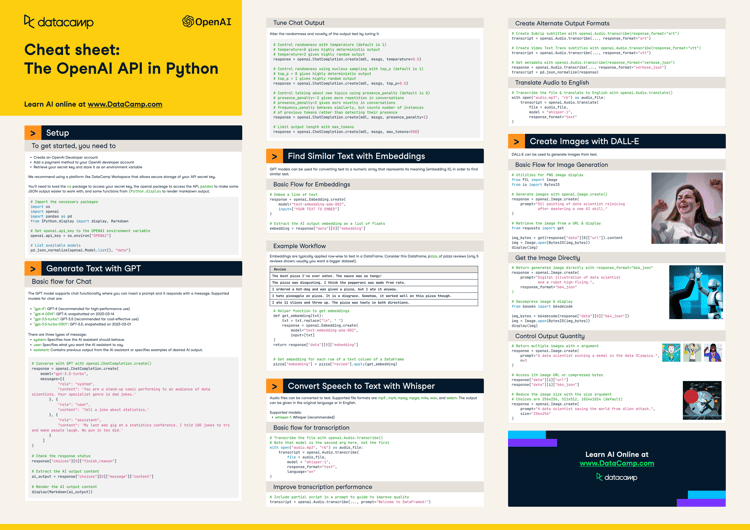
ChatGPT and large language models have taken the world by storm. In this cheat sheet, learn the basics on how to leverage one of the most powerful AI APIs out there, then OpenAI API.
The Python SDK provides convenient access to Anthropic's powerful conversational AI assistant Claude 2, enabling developers to easily integrate its advanced natural language capabilities into a wide range of applications.
To connect through the Claude 3.5 Sonnet API, obtain your API key from Anthropic, install the anthropic Python library, and use it to send requests and receive responses from Claude 3.5 Sonnet.
Learn about the Claude 3 models, detailed performance benchmarks, and how to access them. Additionally, discover the new Claude 3 Python API for generating text, accessing vision capabilities, and streaming.