
Our biggest-ever sale. 60% off AI & data skills
Buy Now

Practice and track your progress.
Continue with GoogleBy continuing, you accept our Terms of Use, our Privacy Policy and that your data is stored in the USA.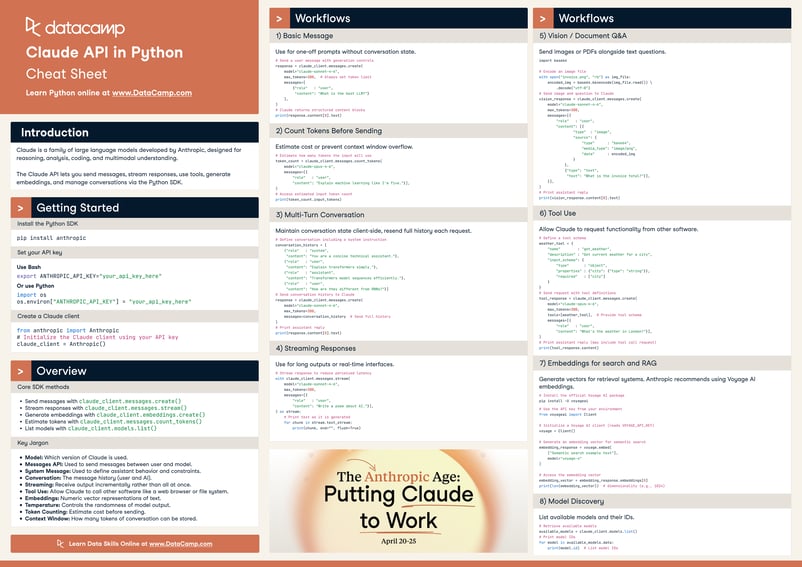
Have this cheat sheet at your fingertips
Download PDFClaude is Anthropic's family of large language models for reasoning, analysis, coding, and multimodal understanding. This cheat sheet covers the Anthropic Python SDK essentials — sending messages, streaming, vision, tool use, embeddings, and token counting — with ready-to-run code.
pip install anthropicSet it once in your shell:
export ANTHROPIC_API_KEY="your_api_key_here"Or from Python:
import os
os.environ["ANTHROPIC_API_KEY"] = "your_api_key_here"from anthropic import Anthropic
# Initialize the Claude client using your API key
claude_client = Anthropic()claude_client.messages.create()claude_client.messages.stream()claude_client.embeddings.create()claude_client.messages.count_tokens()claude_client.models.list()Use for one-off prompts without conversation state.
# Send a user message with generation controls
response = claude_client.messages.create(
model="claude-sonnet-4-6",
max_tokens=300, # Always set token limit
messages=[
{"role": "user",
"content": "What is the best LLM?"}
],
)
# Claude returns structured content blocks
print(response.content[0].text)Estimate cost or prevent context window overflow.
# Estimate how many tokens the input will use
token_count = claude_client.messages.count_tokens(
model="claude-opus-4-6",
messages=[{
"role": "user",
"content": "Explain machine learning like I'm five."}],
)
# Access estimated input token count
print(token_count.input_tokens)Maintain conversation state client-side and resend the full history each request.
# Define conversation including a system instruction
conversation_history = [
{"role": "system",
"content": "You are a concise technical assistant."},
{"role": "user",
"content": "Explain transformers simply."},
{"role": "assistant",
"content": "Transformers model sequences efficiently."},
{"role": "user",
"content": "How are they different from RNNs?"}
]
# Send conversation history to Claude
response = claude_client.messages.create(
model="claude-sonnet-4-6",
max_tokens=300,
messages=conversation_history, # Send full history
)
# Print assistant reply
print(response.content[0].text)Use for long outputs or real-time interfaces.
# Stream response to reduce perceived latency
with claude_client.messages.stream(
model="claude-sonnet-4-6",
max_tokens=300,
messages=[{
"role": "user",
"content": "Write a poem about AI."}],
) as stream:
# Print text as it is generated
for chunk in stream.text_stream:
print(chunk, end="", flush=True)Send images or PDFs alongside text questions.
import base64
# Encode an image file
with open("invoice.png", "rb") as img_file:
encoded_img = base64.b64encode(img_file.read()).decode("utf-8")
# Send image and question to Claude
vision_response = claude_client.messages.create(
model="claude-sonnet-4-6",
max_tokens=300,
messages=[{
"role": "user",
"content": [
{
"type": "image",
"source": {
"type": "base64",
"media_type": "image/png",
"data": encoded_img
}
},
{"type": "text",
"text": "What is the invoice total?"}
],
}],
)
# Print assistant reply
print(vision_response.content[0].text)Allow Claude to request functionality from other software.
# Define a tool schema
weather_tool = {
"name": "get_weather",
"description": "Get current weather for a city",
"input_schema": {
"type": "object",
"properties": {"city": {"type": "string"}},
"required": ["city"]
}
}
# Send request with tool definitions
tool_response = claude_client.messages.create(
model="claude-opus-4-6",
max_tokens=300,
tools=[weather_tool], # Provide tool schema
messages=[{
"role": "user",
"content": "What's the weather in London?"}],
)
# Print assistant reply (may include tool call request)
print(tool_response.content)Generate vectors for retrieval systems. Anthropic recommends using Voyage AI embeddings.
# Install the official Voyage AI package
pip install -U voyageai# Use the API key from your environment
from voyageai import Client
# Initialize a Voyage AI client (reads VOYAGE_API_KEY)
voyage = Client()
# Generate an embedding vector for semantic search
embedding_response = voyage.embed(
["Semantic search example text"],
model="voyage-4"
)
# Access the embedding vector
embedding_vector = embedding_response.embeddings[0]
print(len(embedding_vector)) # dimensionality (e.g., 1024)List and pin models for stable production systems.
# Retrieve available models
available_models = claude_client.models.list()
# Print model IDs
for model in available_models.data:
print(model.id)
cheat sheet
 Richie Cotton• 3 min

Tutorial
 Abid Ali Awan• 12 min

Tutorial
 Ryan Ong• 8 min
Continue your Claude API journey
Course
Learn how to work with Claude using the Anthropic API to solve real-world tasks and build AI-powered applications.
Course
Claude Code brings AI assistance to your terminal. Learn the workflows that turn it into a reliable tool for real software development.
Practice and track your progress.
Continue with GoogleBy continuing, you accept our Terms of Use, our Privacy Policy and that your data is stored in the USA.


