Free access is closing! 700+ free courses are waiting.
Ends in:
Start Now

Practică și urmărește-ți progresul.
Continuă cu GoogleContinuând, accepți Termenii de utilizare, Politica de confidențialitate și faptul că datele tale sunt stocate în SUA.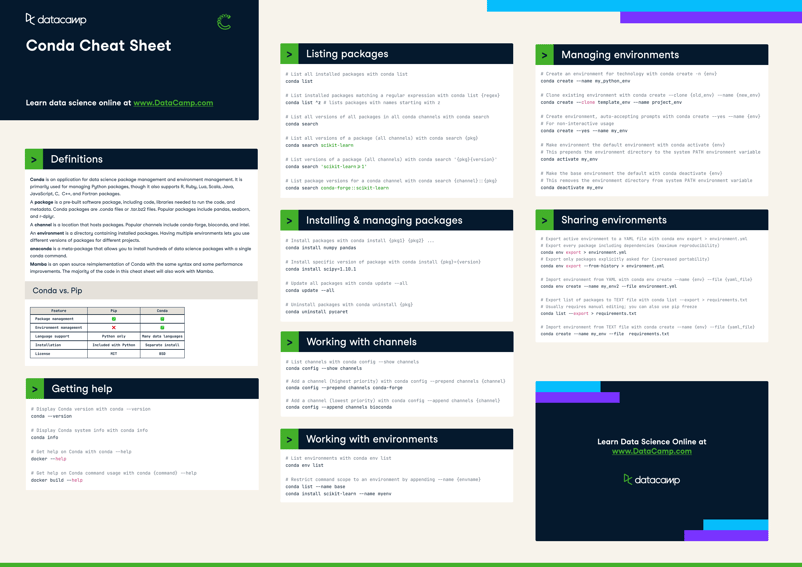
Ai acest cheat sheet la îndemână
Descarcă PDF|
feature |
pip |
Conda |
|
Package management |
✅ |
✅ |
|
Environment management |
❌ |
✅ |
|
Language support |
Python only |
Many data languages |
|
Installation |
Included with Python |
Separate install |
|
License |
MIT |
BSD |
# Display Conda version with conda --version
conda --version
# Display Conda system info with conda info
conda info
# Get help on Conda with conda --help
docker --help
# Get help on Conda command usage with conda {command} --help
docker build --help# List all installed packages with conda list
conda list
# List all installed packages matching a regular expression with conda list {regex}
conda list ^z # lists packages with names starting with z
# List all versions of all packages in all conda channels with conda search
conda search
# List all versions of a package (all channels) with conda search {pkg}
conda search scikit-learn
# List specific versions for a package (all channels) with conda search '{pkg}{version}'
conda search 'scikit-learn>=1'
# List package versions in a specific conda channel with conda search {channel}::{pkg}
conda search conda-forge::scikit-learn# Install packages with conda install {pkg1} {pkg2} ...
conda install numpy pandas
# Install specific version of package with conda install {pkg}={version}
conda install scipy=1.10.1
# Update all packages with conda update --all
conda update --all
# Uninstall packages with conda uninstall {pkg}
conda uninstall pycaret# List channels with conda config --show channels
conda config --show channels
# Add a channel (highest priority) with conda config --prepend channels {channel}
conda config --prepend channels conda-forge
# Add a channel (lowest priority) with conda config --append channels {channel}
conda config --append channels bioconda# List environments with conda env list
conda env list
# Add --name {envname} to other commands to restrict their use to that environment
conda list --name base
conda install scikit-learn --name myenv # Create an environment for technology with conda create -n {env}
conda create --name my_python_env
# Clone an existing environment with conda create --clone {old_env} --name {new_env}
conda create --clone template_env --name project_env
# Create an environment auto-accepting prompts with conda create --yes --name {env}
# For non-interactive usage
conda create --yes --name my_env
# Make environment the default environment with conda activate {env}
# This prepends the environment directory to the system PATH environment variable
conda activate my_env
# Make the base environment the default with conda deactivate {env}
# This removes the environment directory from the system PATH environment variable
conda deactivate my_env# Export active environment to a YAML file with conda env export > environment.yml
# Export every package including dependencies (maximum reproducibility)
conda env export > environment.yml
# Export only packages explicitly asked for (increased portability)
conda env export --from-history > environment.yml
# Import environment from YAML file with conda env create --name {env} --file {yaml_file}
conda env create --name my_env2 --file environment.yml
# Export list of packages to TEXT file with conda list --export > requirements.txt
# Usually requires manual editing; you can also use pip freeze
conda list --export > requirements.txt
# Import environment from TEXT file with conda create --name {env} --file {yaml_file}
conda create --name my_env --file requirements.txt
cheat sheet
 Karlijn Willems• 4 min.
cheat sheet
Karlijn Willems• 4 min.
cheat sheet
Karlijn Willems• 1 min.