La Semaine gratuite touche à sa fin ! Plus de 700 cours gratuits vous attendent.
Se termine dans
Commencer maintenant

S'entraîner et cursus vos progrès.
Continuer avec GoogleEn continuant, vous acceptez notre conditions d'utilisation, nos politique de confidentialité et que vos données soient stockées aux États-Unis.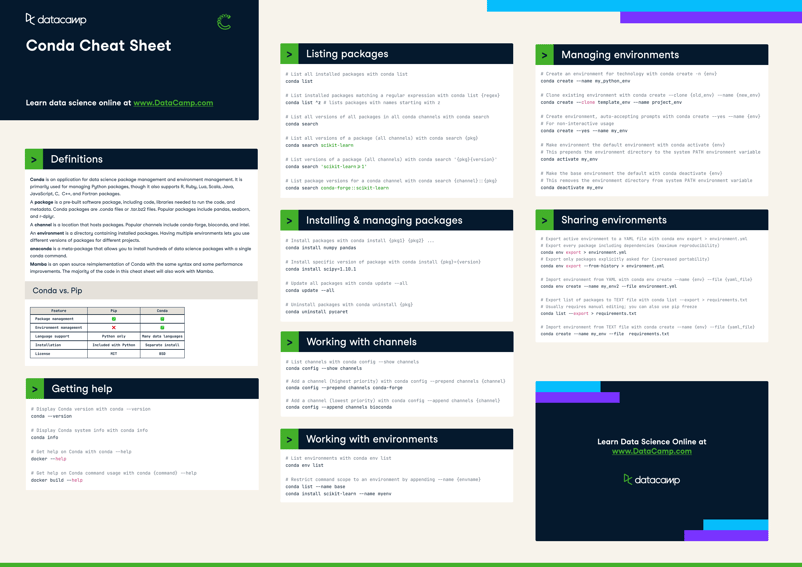
Gardez cette fiche mémo à portée de main
Télécharger le PDF|
feature |
pip |
Conda |
|
Package management |
✅ |
✅ |
|
Environment management |
❌ |
✅ |
|
Language support |
Python only |
Many data languages |
|
Installation |
Included with Python |
Separate install |
|
License |
MIT |
BSD |
# Display Conda version with conda --version
conda --version
# Display Conda system info with conda info
conda info
# Get help on Conda with conda --help
docker --help
# Get help on Conda command usage with conda {command} --help
docker build --help# List all installed packages with conda list
conda list
# List all installed packages matching a regular expression with conda list {regex}
conda list ^z # lists packages with names starting with z
# List all versions of all packages in all conda channels with conda search
conda search
# List all versions of a package (all channels) with conda search {pkg}
conda search scikit-learn
# List specific versions for a package (all channels) with conda search '{pkg}{version}'
conda search 'scikit-learn>=1'
# List package versions in a specific conda channel with conda search {channel}::{pkg}
conda search conda-forge::scikit-learn# Install packages with conda install {pkg1} {pkg2} ...
conda install numpy pandas
# Install specific version of package with conda install {pkg}={version}
conda install scipy=1.10.1
# Update all packages with conda update --all
conda update --all
# Uninstall packages with conda uninstall {pkg}
conda uninstall pycaret# List channels with conda config --show channels
conda config --show channels
# Add a channel (highest priority) with conda config --prepend channels {channel}
conda config --prepend channels conda-forge
# Add a channel (lowest priority) with conda config --append channels {channel}
conda config --append channels bioconda# List environments with conda env list
conda env list
# Add --name {envname} to other commands to restrict their use to that environment
conda list --name base
conda install scikit-learn --name myenv # Create an environment for technology with conda create -n {env}
conda create --name my_python_env
# Clone an existing environment with conda create --clone {old_env} --name {new_env}
conda create --clone template_env --name project_env
# Create an environment auto-accepting prompts with conda create --yes --name {env}
# For non-interactive usage
conda create --yes --name my_env
# Make environment the default environment with conda activate {env}
# This prepends the environment directory to the system PATH environment variable
conda activate my_env
# Make the base environment the default with conda deactivate {env}
# This removes the environment directory from the system PATH environment variable
conda deactivate my_env# Export active environment to a YAML file with conda env export > environment.yml
# Export every package including dependencies (maximum reproducibility)
conda env export > environment.yml
# Export only packages explicitly asked for (increased portability)
conda env export --from-history > environment.yml
# Import environment from YAML file with conda env create --name {env} --file {yaml_file}
conda env create --name my_env2 --file environment.yml
# Export list of packages to TEXT file with conda list --export > requirements.txt
# Usually requires manual editing; you can also use pip freeze
conda list --export > requirements.txt
# Import environment from TEXT file with conda create --name {env} --file {yaml_file}
conda create --name my_env --file requirements.txt
aide-mémoire
 Karlijn Willems• 4 min
aide-mémoire
Karlijn Willems• 4 min
aide-mémoire
Karlijn Willems• 1 min