This cheat sheet will cover an overview of getting started with R. Use it as a handy, high-level reference for a quick start with R. For more detailed R Cheat Sheets, follow the highlighted cheat sheets below.
R is one of the most popular programming languages in data science and is widely used across various industries and in academia. Given that it’s open-source, easy to learn, and capable of handling complex data and statistical manipulations, R has become the preferred computing environment for many data scientists today.
This cheat sheet will cover an overview of getting started with R. Use it as a handy, high-level reference for a quick start with R. You can also try this cheat sheet out interactively on DataCamp Workspace, just follow this link to do so!
?max: Shows the help documentation for the max function
?tidyverse: Shows the documentation for the tidyverse package
??"max": Returns documentation associated with a given input
str(my_df): Returns the structure and information of a given object
class(my_df): Returns the class of a given object
Using Packages in R
R packages are collections of functions and tools developed by the R community. They increase the power of R by improving existing base R functionalities, or by adding new ones.
install.packages(“tidyverse”): Lets you install new packages (e.g., tidyverse package)
library(tidyverse): Lets you load and use packages (e.g., tidyverse package)
The Working Directory
The working directory is a file path that R will use as the starting point for relative file paths. That is, it's the default location for importing and exporting files. An example of a working directory looks like ”C://file/path"
getwd(): Returns your current working directory
setwd(“C://file/path”): Changes your current working directory to a desired file path
Operators in R
Arithmetic Operators in R
Operator
Description
a + b
Sums two variables
a - b
Subtracts two variables
a * b
Multiply two variables
a / b
Divide two variables
a ^ b
Exponentiation of a variable
a %% b
The remainder of a variable
a %/% b
Integer division of variables
Relational Operators in R
Operator
Description
a == b
Tests for equality
a != b
Tests for inequality
a > b
Tests for greater than
a < b
Tests for smaller than
a >= b
Tests for greater or equal than
a <= b
Tests for smaller or equal than
Logical Operators in R
Operator
Description
!
Logical NOT
&
Element-wise Logical AND
&&
Logical AND
|
Element-wise Logical OR
||
Logical OR
Assignment Operators in R
Operator
Description
x <- 1
x = 1
Assigns a variable to x
Other Operators in R
Operator
Description
%in%
Identifies whether an element belongs to a vector
$
Allows you to access objects stored within an object
%>%
Part of magrittr package, it’s used to pass objects to functions
Getting Started with Vectors in R
Vectors are one-dimension arrays that can hold numeric data, character data, or logical data. In other words, a vector is a simple tool to store data.
Creating Vectors in R
Input
Output
Description
c(1,3,5)
1 3 5
Creates a vector using elements separated by commas
1:7
1 2 3 4 5 6 7
Creates a vector of integers between two numbers
seq(2,8,by = 2)
2 4 6 8
Creates a vector between two numbers, with a specified interval between each element.
rep(2,8,times = 4)
2 8 2 8 2 8 2 8
Creates a vector of given elements repeated a number of times.
rep(2,8,each = 3)
2 2 2 8 8 8
Creates a vector of given elements repeating each element a number of times.
Vector Functions in R
sort(my_vector): Returns my_vector sorted
rev(my_vector): Reverses the order of my_vector
table(my_vector): Count the values in a vector
unique(my_vector): Distinct elements in a vector
Selecting Vector Elements in R
my_vector[6]: Returns the sixth element of my_vector
my_vector[-6]: Returns all but the sixth element
my_vector[2:6]: Returns elements two to six
my_vector[-(2:6)]: Returns all elements except those between the second and the sixth
my_vector[c(2,6)]: Returns the second and sixth elements
my_vector[x == 5]: Returns elements equal to 5
my_vector[x < 5 ]: Returns elements less than 5
my_vector[x %in% c(2, 5 ,8 )]: Returns elements in the set {2, 5, 8}
Math Functions in R
log(x): Returns the logarithm of a variable
exp(x): Returns exponential of a variable
max(x): Returns the maximum value of a vector
min(x): Returns the minimum value of a vector
mean(x): Returns the mean of a vector
sum(x): Returns the sum of a vector
median(x): Returns the median of a vector
quantile(x): Percentage quantiles of a vector
round(x, n): Round to n decimal places
rank(x): Rank of elements in a vector
signif(x, n): Round off n significant figures
var(x): Variance of a vector
cor(x, y): Correlation between two vectors
sd(x): Standard deviation of a vector
Getting Started with Strings in R
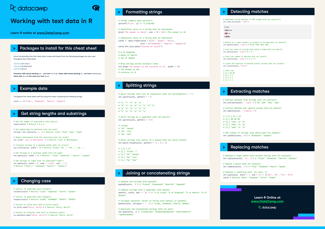
The “stringr” package makes it easier to work with strings in R - you should install and load this package to use the following functions.
Find matches
#Detects the presence of a pattern match in a string
str_detect(string, pattern, negate =FALSE)Được hỗ trợ bởi
#Detects the presence of a pattern match at the beginning of a string
str_starts(string, pattern, negate =FALSE)Được hỗ trợ bởi
#Finds the index of strings that contain pattern match
str_which(string, pattern, negate =FALSE)Được hỗ trợ bởi
#Locates the positions of pattern matches in a string
str_locate(string, pattern)Được hỗ trợ bởi
#Counts the number of pattern matches in a string
str_count(string, pattern)Được hỗ trợ bởi
Subset
#Extracts substrings from a character vector
str_sub(string, start =1L, end =-1L)Được hỗ trợ bởi
#Returns strings that contain a pattern match
str_subset(string, pattern, negate =FALSE)Được hỗ trợ bởi
#Returns first pattern match in each string as a vector
str_extract(string, pattern)Được hỗ trợ bởi
#Returns first pattern match in each string as a matrix with a column for each group in the pattern
str_match(string, pattern)Được hỗ trợ bởi
Mutate
#Replaces substrings by identifying the substrings with str_sub() and assigning them to the results.
str_sub()<- value Được hỗ trợ bởi
#Replaces the first matched pattern in each string.
str_replace(string, pattern, replacement)Được hỗ trợ bởi
#Replaces all matched patterns in each string
str_replace_all(string, pattern, replacement)Được hỗ trợ bởi
#Converts strings to lowercase
str_to_lower(string)Được hỗ trợ bởi
#Converts strings to uppercase
str_to_upper(string)Được hỗ trợ bởi
#Converts strings to title case
str_to_title(string)Được hỗ trợ bởi
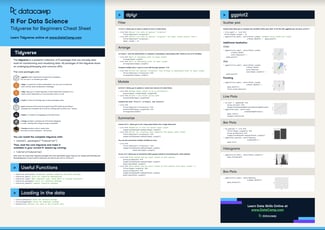
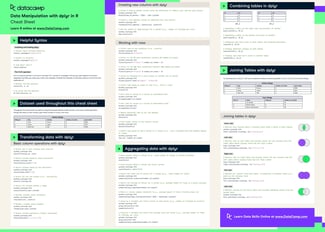
#Orders rows by values of a column from high to low
arrange(df, desc(x))Được hỗ trợ bởi
#Computes table of summaries
summarise(df, total = sum(x))Được hỗ trợ bởi
#Computes table of summaries.
summarise(df, total = sum(x))Được hỗ trợ bởi
#Use group_by() to create a "grouped" copy of a table grouped by columns (similarly to a pivot table in spreadsheets). dplyr functions will then manipulate each "group" separately and combine the results
df %>%
group_by(z)%>%
summarise(total = sum(x))Được hỗ trợ bởi
Welcome to our cheat sheet for working with text data in R! This resource is designed for R users who need a quick reference guide for common tasks related to cleaning, processing, and analyzing text data.
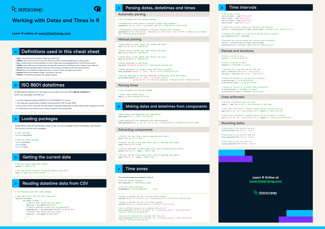
Welcome to our cheat sheet for working with dates and times in R! This resource provides a list of common functions and packages for manipulating, analyzing, and visualizing data with dates and times.




R is one of the most popular programming languages in data science and is widely used across various industries and in academia. Given that it’s open-source, easy to learn, and capable of handling complex data and statistical manipulations, R has become the preferred computing environment for many data scientists today.
This cheat sheet will cover an overview of getting started with R. Use it as a handy, high-level reference for a quick start with R. You can also try this cheat sheet out interactively on DataCamp Workspace, just follow this link to do so!