Miej tę ściągawkę zawsze pod ręką
Pobierz PDFRecords
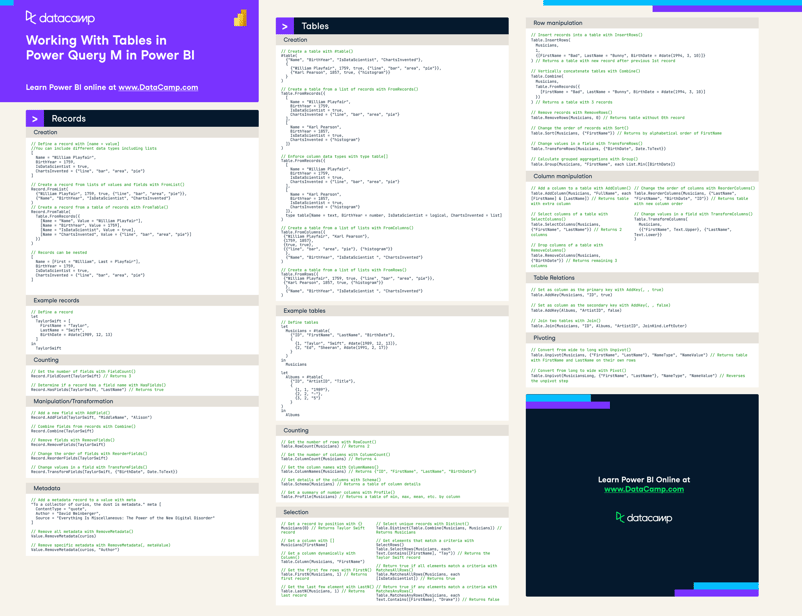
Creation
// Define a record with [name = value]
//You can include different data types including lists
[
Name = "William Playfair",
BirthYear = 1759,
IsDataScientist = true,
ChartsInvented = {"line", "bar", "area", "pie"}
]
// Create a record from lists of values and fields with FromList()
Record.FromList(
{"William Playfair", 1759, true, {"line", "bar", "area", "pie"}},
{"Name", "BirthYear", "IsDataScientist", "ChartsInvented"}
)
// Create a record from a table of records with FromTable()
Record.FromTable(
Table.FromRecords({
[Name = "Name", Value = "William Playfair"],
[Name = "BirthYear", Value = 1759],
[Name = "IsDataScientist", Value = true],
[Name = "ChartsInvented", Value = {"line", "bar", "area", "pie"}]
})
)
// Records can be nested
[
Name = [First = "William", Last = Playfair"],
BirthYear = 1759,
IsDataScientist = true,
ChartsInvented = {"line", "bar", "area", "pie"}
]
Example records
// Define a record
let
TaylorSwift = [
FirstName = "Taylor",
LastName = "Swift",
BirthDate = #date(1989, 12, 13)
]
in
TaylorSwiftCounting
// Get the number of fields with FieldCount()
Record.FieldCount(TaylorSwift) // Returns 3
// Determine if a record has a field name with HasFields()
Record.HasFields(TaylorSwift, "LastName") // Returns trueSelection
// Access a field with square brackets
TaylorSwift[FirstName] // Returns "Taylor"
// Dynamically access a field with Field()
Record.Field(TaylorSwift, "FirstName")
// Provide a deafult if the field isn't found with FieldOrDefault()
Record.FieldOrDefault(TaylorSwift, "Address", "N/A") // Returns "N/A"
// Get a subset of fields with SelectFields()
Record.SelectFields(TaylorSwift, {"FirstName", "LastName"})
// Returns [FirstName = "Taylor", LastName = "Swift"]
// Get all the field names with FieldNames()
Record.FieldNames(TaylorSwift) // Returns {"FirstName", "LastName", "BirthDate"}
// Get all the field values with FieldValues()
Record.FieldValues(TaylorSwift) // Returns {"Taylor", "Swift", #date(1989, 12, 13)}Manipulation/Transformation
// Add a new field with AddField()
Record.AddField(TaylorSwift, "MiddleName", "Alison")
// Combine fields from records with Combine()
Record.Combine(TaylorSwift)
// Remove fields with RemoveFields()
Record.RemoveFields(TaylorSwift)
// Change the order of fields with ReorderFields()
Record.ReorderFields(TaylorSwift)
// Change values in a field with TransformFields()
Record.TransformFields(TaylorSwift, {"BirthDate", Date.ToText})Metadata
// Add a metadata record to a value with meta
"To a collector of curios, the dust is metadata." meta [
ContentType = "quote",
Author = "David Weinberger",
Source = "Everything Is Miscellaneous: The Power of the New Digital Disorder"
]
// Remove all metadata with RemoveMetadata()
Value.RemoveMetadata(curios)
// Remove specific metadata with RemoveMetadata(, metaValue)
Value.RemoveMetadata(curios, "Author")Tables
Creation
// Create a table with #table()
#table(
{"Name", "BirthYear", "IsDataScientist", "ChartsInvented"},
{
{"William Playfair", 1759, true, {"line", "bar", "area", "pie"}},
{"Karl Pearson", 1857, true, {"histogram"}}
}
)
// Create a table from a list of records with FromRecords()
Table.FromRecords({
[
Name = "William Playfair",
BirthYear = 1759,
IsDataScientist = true,
ChartsInvented = {"line", "bar", "area", "pie"}
],
[
Name = "Karl Pearson",
BirthYear = 1857,
IsDataScientist = true,
ChartsInvented = {"histogram"}
]}
)
// Enforce column data types with type table[]
Table.FromRecords({
[
Name = "William Playfair",
BirthYear = 1759,
IsDataScientist = true,
ChartsInvented = {"line", "bar", "area", "pie"}
],
[
Name = "Karl Pearson",
BirthYear = 1857,
IsDataScientist = true,
ChartsInvented = {"histogram"}
]},
type table[Name = text, BirthYear = number, IsDataScientist = logical, ChartsInvented = list]
)
// Create a table from a list of lists with FromColumns()
Table.FromColumns({
{"William Playfair", "Karl Pearson"},
{1759, 1857},
{true, true},
{{"line", "bar", "area", "pie"}, {"histogram"}}
},
{"Name", "BirthYear", "IsDataScientist ", "ChartsInvented"}
)
// Create a table from a list of lists with FromRows()
Table.FromRows({
{"William Playfair", 1759, true, {"line", "bar", "area", "pie"}},
{"Karl Pearson", 1857, true, {"histogram"}}
},
{"Name", "BirthYear", "IsDataScientist ", "ChartsInvented"}
)
Example tables
// Define tables
let
Musicians = #table(
{"ID", "FirstName", "LastName", "BirthDate"},
{
{1, "Taylor", "Swift", #date(1989, 12, 13)},
{2, "Ed", "Sheeran", #date(1991, 2, 17)}
}
)
in
Musicians
let
Albums = #table(
{"ID", "ArtistID", "Title"},
{
{1, 1, "1989"},
{2, 2, "-"},
{3, 2, "5"}
}
)
in
AlbumsCounting
// Get the number of rows with RowCount()
Table.RowCount(Musicians) // Returns 2
// Get the number of columns with ColumnCount()
Table.ColumnCount(Musicians) // Returns 4
// Get the column names with ColumnNames()
Table.ColumnNames(Musicians) // Returns {"ID", "FirstName", "LastName", "BirthDate"}
// Get details of the columns with Schema()
Table.Schema(Musicians) // Returns a table of column details
// Get a summary of number columns with Profile()
Table.Profile(Musicians) // Returns a table of min, max, mean, etc. by columnSelection
// Get a record by position with {}
Musicians{0} // Returns Taylor Swift record
// Get a column with []
Musicians[FirstName]
// Get a column dynamically with Column()
Table.Column(Musicians, "FirstName")
// Get the first few rows with FirstN()
Table.FirstN(Musicians, 1) // Returns first record
// Get the last few element with LastN()
Table.LastN(Musicians, 1) // Returns last record
// Select unique records with Distinct()
Table.Distinct(Table.Combine(Musicians, Musicians)) // Returns Musicians
// Get elements that match a criteria with SelectRows()
Table.SelectRows(Musicians, each Text.Contains([FirstName], "Tay")) // Returns the Taylor Swift record
// Return true if all elements match a criteria with MatchesAllRows()
Table.MatchesAllRows(Musicians, each [IsDataScientist]) // Returns true
// Return true if any elements match a criteria with MatchesAnyRows()
Table.MatchesAnyRows(Musicians, each Text.Contains([FirstName], "Drake")) // Returns falseRow manipulation
// Insert records into a table with InsertRows()
Table.InsertRows(
Musicians,
1,
{[FirstName = "Bad", LastName = "Bunny", BirthDate = #date(1994, 3, 10)]}
) // Returns a table with new record after previous 1st record
// Vertically concatenate tables with Combine()
Table.Combine(
Musicians,
Table.FromRecords({
[FirstName = "Bad", LastName = "Bunny", BirthDate = #date(1994, 3, 10)]
})
) // Returns a table with 3 records
// Remove records with RemoveRows()
Table.RemoveRows(Musicians, 0) // Returns table without 0th record
// Change the order of records with Sort()
Table.Sort(Musicians, {"FirstName"}) // Returns by alphabetical order of FirstName
// Change values in a field with TransformRows()
Table.TransformRows(Musicians, {"BirthDate", Date.ToText})
// Calculate grouped aggregations with Group()
Table.Group(Musicians, "FirstName", each List.Min([BirthDate])Column manipulation
// Add a column to a table with AddColumn()
Table.AddColumn(Musicians, "FullName", each [FirstName] & [LastName]) // Returns table with extra column
// Select columns of a table with SelectColumns()
Table.SelectColumns(Musicians, {"FirstName", "LastName"}) // Returns 2 columns
// Drop columns of a table with RemoveColumns()
Table.RemoveColumns(Musicians, {"BirthDate"}) // Returns remaining 3 columns
// Change the order of columns with ReorderColumns()
Table.ReorderColumns(Musicians, {"LastName", "FirstName", "BirthDate", "ID"}) // Returns table with new column order
// Change values in a field with TransformColumns()
Table.TransformColumns(
Musicians,
{{"FirstName", Text.Upper}, {"LastName", Text.Lower}}
)
Table Relations
// Set as column as the primary key with AddKey(, , true)
Table.AddKey(Musicians, "ID", true)
// Set as column as the secondary key with AddKey(, , false)
Table.AddKey(Albums, "ArtistID", false)
// Join two tables with Join()
Table.Join(Musicians, "ID", Albums, "ArtistID", JoinKind.LeftOuter)Pivoting
// Convert from wide to long with Unpivot()
Table.Unpivot(Musicians, {"FirstName", "LastName"}, "NameType", "NameValue") // Returns table with FirstName and LastName on their own rows
// Convert from long to wide with Pivot()
Table.Unpivot(MusiciansLong, {"FirstName", "LastName"}, "NameType", "NameValue") // Reverses the unpivot step