

Curs
Concepte AWS
2 ore
53.4K
Practică și urmărește-ți progresul.
Continuă Cu GoogleEvery successful cloud infrastructure starts with a solid foundation. I've seen organizations struggle with cloud architectures that seemed functional at first but crumbled under pressure, costing them time, money, and trust. The AWS Well-Architected Framework exists precisely to prevent these problems in the first place.
In this tutorial, I'll walk you through the AWS Well-Architected Framework, its six foundational pillars, and practical implementation strategies that you can apply when architecting your first cloud solution or optimizing existing infrastructure. Understanding this framework will help you build systems that are secure, reliable, efficient, and cost-effective.
If you are new to AWS, I recommend getting started with our Introduction to AWS course.
Let's start by understanding what this framework actually is and why it matters.
The AWS Well-Architected Framework is a comprehensive set of best practices, design principles, and architectural guidelines developed by AWS Solutions Architects based on years of experience working with thousands of customers. It documents a set of foundational questions that help you understand if a specific architecture fits well with cloud best practices.
Think of it as a measuring stick for your cloud architecture. It’s not really an audit mechanism, but it provides a constructive conversation about architectural decisions. It describes AWS best practices and strategies to use when designing and operating a cloud workload, which helps you understand the trade-offs you're making and their potential consequences.
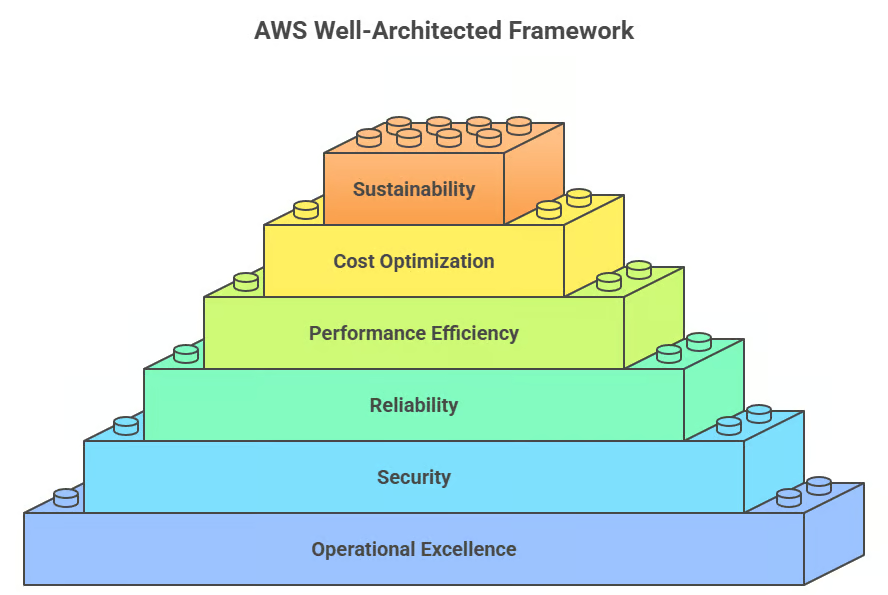
The framework was originally built around five pillars. AWS added sustainability as the sixth pillar in late 2021 to reflect the growing importance of environmental responsibility in cloud computing. We will explore each pillar later on.
The AWS Well-Architected Tool is available for free in the AWS Management Console, so you can regularly evaluate workloads, identify high-risk issues, and record improvements. This means you're not just reading about best practices, but you're actively measuring your architecture against them.
Now that we've covered the foundation, let's explore the six pillars that form the core of the framework. They work together to create robust, efficient cloud architectures. Each pillar addresses different aspects of building and maintaining cloud systems. Here's a quick overview:
|
Pillar |
Focus Area |
Key Outcome |
|
Operational Excellence |
Running and monitoring systems |
Deliver business value through improved processes |
|
Security |
Protecting data and systems |
Maintain confidentiality and integrity through risk management |
|
Reliability |
Recovering from failures |
Ensure consistent performance and quick recovery |
|
Performance Efficiency |
Optimizing resource usage |
Meet requirements while maintaining efficiency |
|
Cost Optimization |
Managing expenditure |
Deliver value at the lowest price point |
|
Sustainability |
Minimizing environmental impact |
Reduce energy consumption and carbon footprint |
Let's start with operational excellence, which focuses on running and monitoring systems to deliver business value. This pillar is about how you operate your systems day-to-day, which makes it the foundation upon which everything else builds.
The core design principles that guide operational excellence are:
I've found that organizations excelling in operational excellence can respond to incidents faster and deploy changes more confidently. When you treat operations as code, you gain repeatability and consistency, two crucial ingredients for scaling your cloud infrastructure.
Some key best practices to keep in mind:
With operational excellence as the foundation for how you run systems, security is the protective layer that makes sure those systems stay trustworthy. It’s obvious that secure systems are non-negotiable for any organization.
It focuses on protecting information and systems through risk assessments and mitigation strategies. To build a strong security posture in the cloud, you should follow these seven design principles:
What makes cloud security powerful is the ability to implement security at every layer automatically. Unlike traditional infrastructure, where security might be an afterthought, the Well-Architected approach weaves security into the fabric of your architecture from the start.
Building on the operational and security foundations we've established, reliability ensures that workloads perform their intended functions correctly and consistently, recovering quickly from failures to meet demands.
You can have excellent operations and tight security, but if your system isn't reliable, you're not delivering value. When architecting for reliability in the cloud, these design principles should guide your approach:
The beauty of cloud-based reliability is the ability to architect for failure rather than trying to prevent it entirely. By assuming failures will happen and building systems that recover automatically, you create architectures that are more resilient than traditional approaches.
Once you have reliable systems in place, performance efficiency focuses on using computing resources efficiently to meet system requirements and maintaining that efficiency as demand changes. This pillar is about delivering the right level of performance without over-provisioning or under-utilizing resources.
The key design principles for achieving performance efficiency are:
Performance efficiency connects directly to the next pillar because the resources you choose and how you use them have direct cost implications. This is where architectural decisions start showing up on your bill.
Now that we've addressed performance, let's see how to achieve it cost-effectively. Cost optimization involves running systems to deliver business value at the lowest price point while meeting your functional requirements. Notice this pillar doesn't say "cheapest", it says optimized. There's a crucial difference.
Some best practices involve:
In my experience, cost optimization is where the trade-offs between pillars become most visible. You might spend more on reliability features like multi-region deployments, but that investment protects revenue.
You might choose higher-performance instances that cost more but process workloads faster, ultimately reducing total cost. The key is making informed decisions about these trade-offs.
Finally, we arrive at sustainability, the newest pillar. The sustainability pillar focuses on minimizing the environmental impacts of running cloud workloads, particularly energy consumption and efficiency
There are some strategies you can follow to make your system more sustainable, such as:
While Amazon turned it into its own pillar, it often aligns with the other pillars and echoes them. More efficient code reduces both environmental impact and costs. Better utilization through right-sizing helps sustainability and cost optimization. Managed services often run more efficiently than self-managed infrastructure.
With a solid understanding of the six pillars, let's move into how you actually implement this framework in your organization. Understanding theory is one thing; applying it is where the real value emerges.
Before diving into a Well-Architected review, proper preparation sets you up for success. Think of this as laying the groundwork. The clearer your preparation, the more valuable your review will be:
With your team assembled and objectives clear, you're ready to conduct the actual review.
The review process is where you evaluate your architecture against AWS best practices.
Start by defining your workload scope clearly. Select which pillars to prioritize based on your objectives. Structure the review as a collaborative discussion, not an interrogation. Answer the review questions honestly for each pillar, taking notes to explain why certain practices are or aren't in place.
After the review, you'll have identified risks categorized as high, medium, or low. Look at reviews holistically to identify thematic issues that could be addressed through training or standardized mechanisms.
The AWS Well-Architected Tool is a free service providing a consistent process for measuring your architecture using AWS best practices.
Navigate to the tool in your AWS Management Console. Create a new workload with basic information. Select the lenses to apply (at a minimum, the AWS Well-Architected Framework lens), plus specialized lenses if applicable.
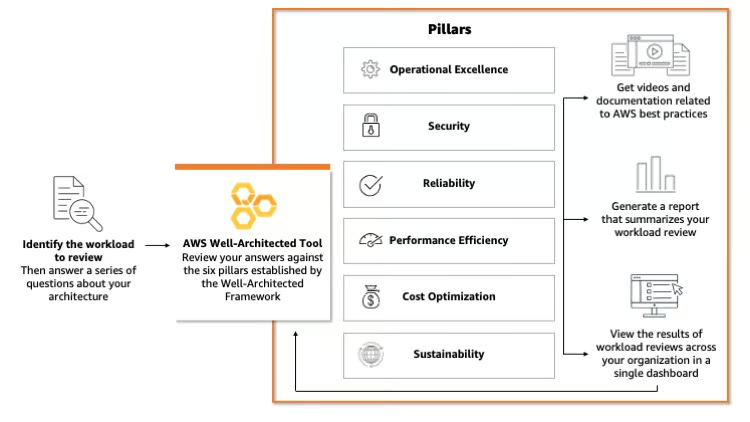
To create a new workload, open the AWS Well-Architected Tool in the AWS Management Console and click Define workload. The setup runs through three steps:
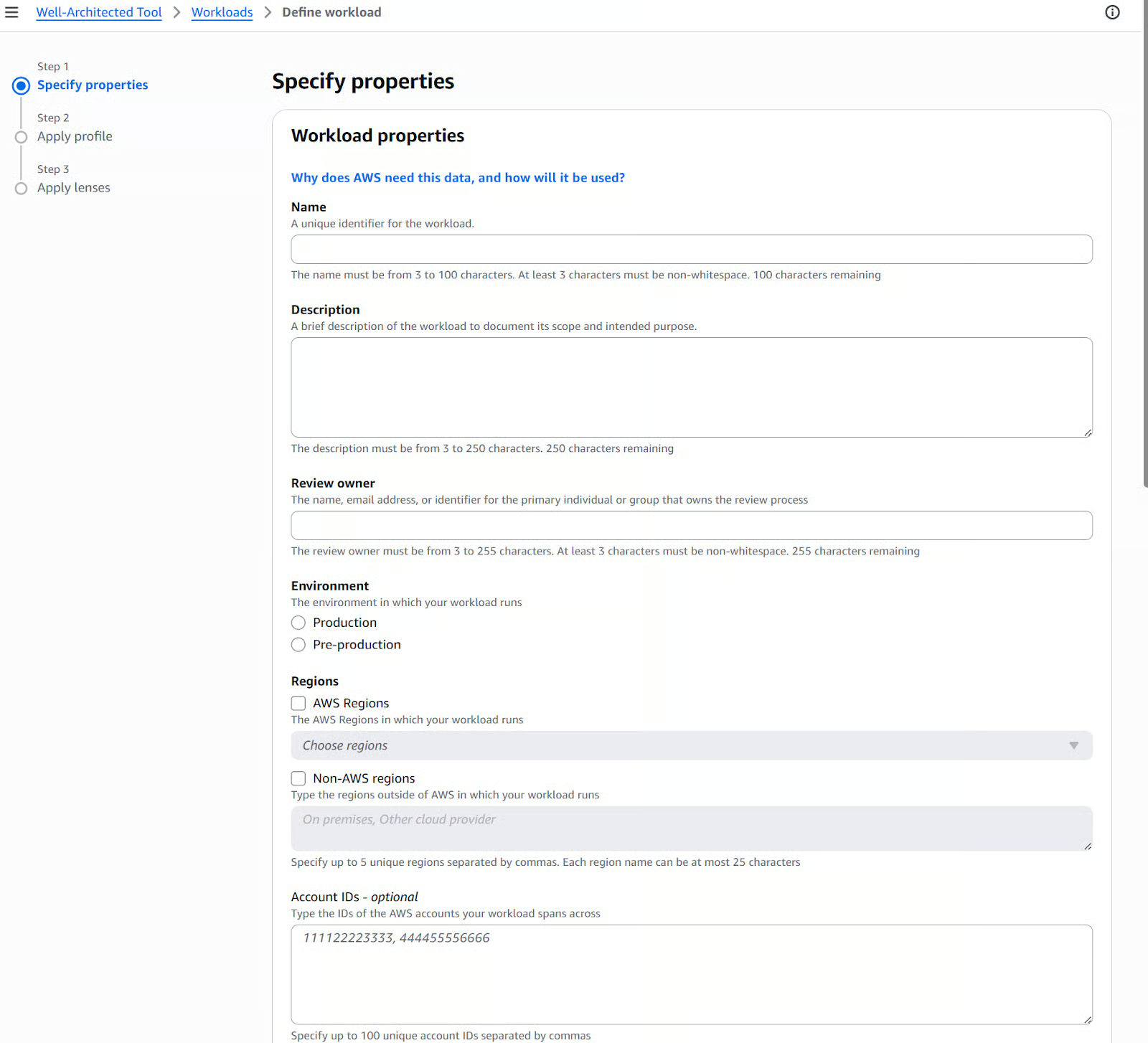
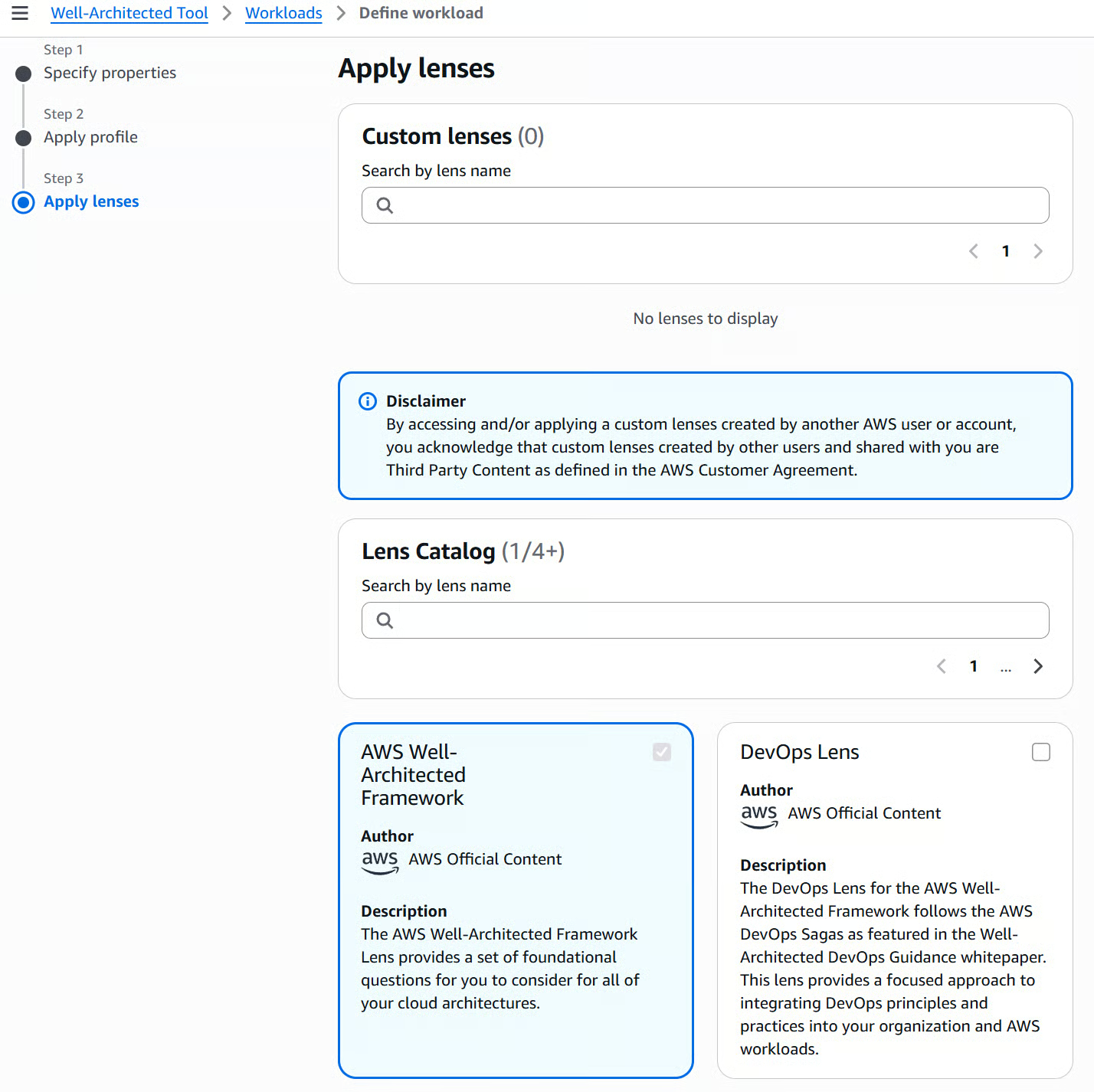
Once done, click Define workload to finish setup.
The workload contains a set of questions for each pillar. Work through the questions for each pillar to conduct the assessment. The tool provides context, best practice explanations, and resources like documentation and videos.
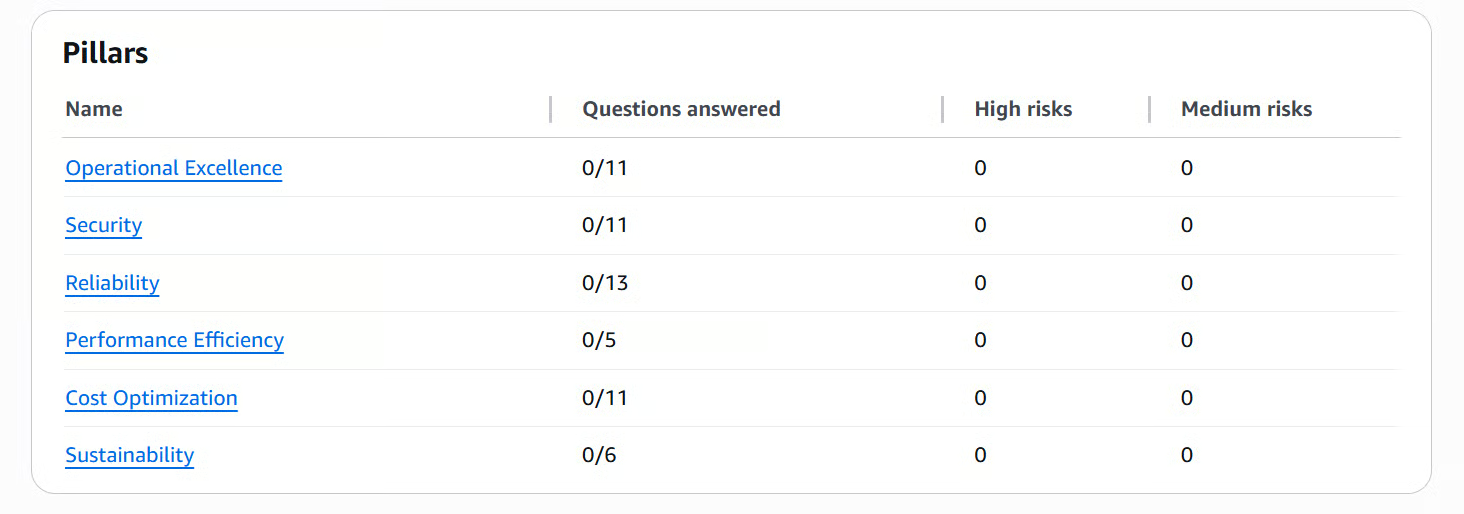
For each pillar, you'll find a set of questions to answer based on your specific workload. For instance, the Operational Excellence pillar contains 11 questions, and you will have some resources that guide you through the assessment process.
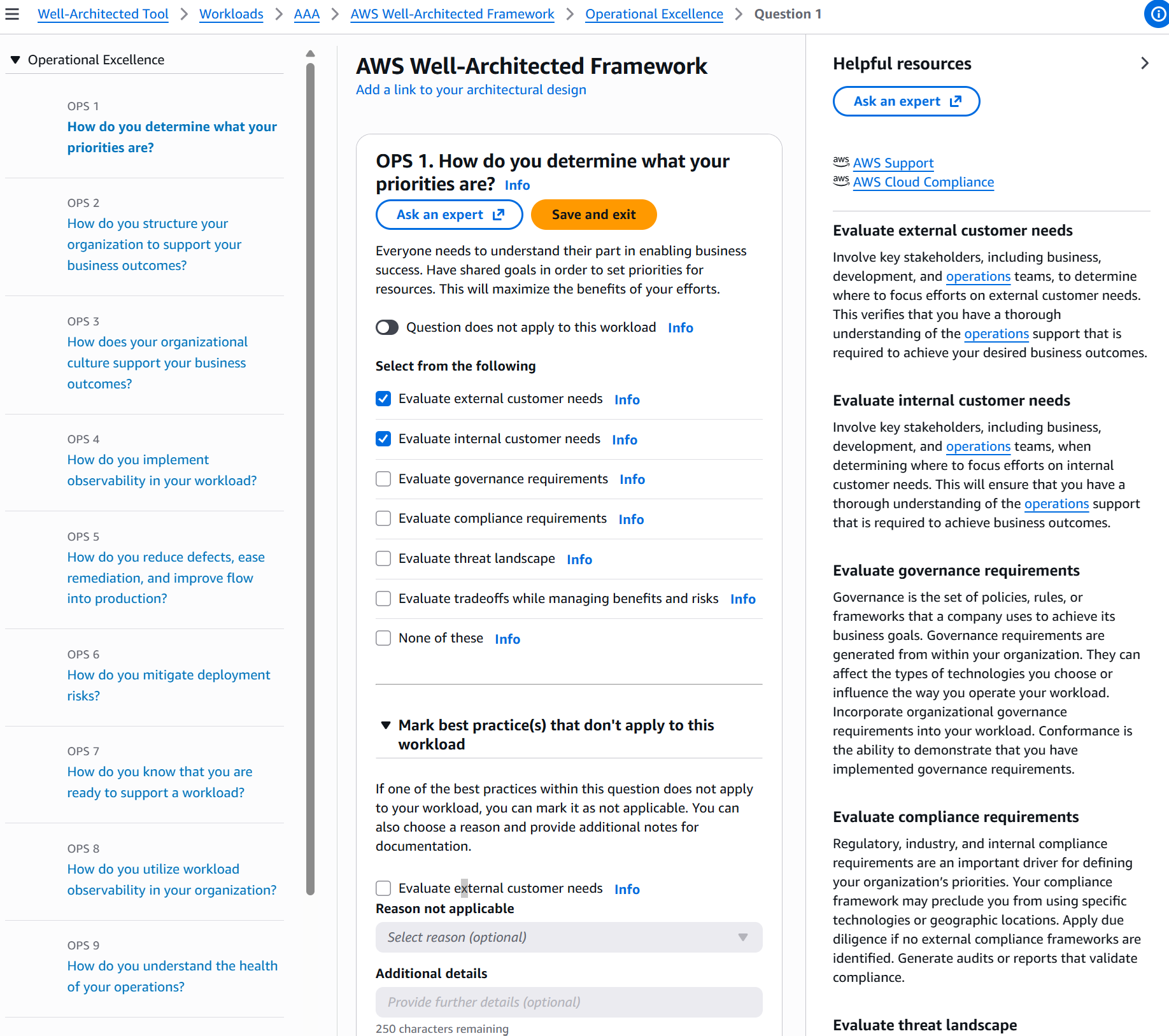
Each answer directly feeds into an automatic risk assessment, visible both at the individual question level and summarized in the pillar overview. Once you have worked through all pillars, the tool aggregates these results into a full report.
The generated report categorizes findings into four risk levels:
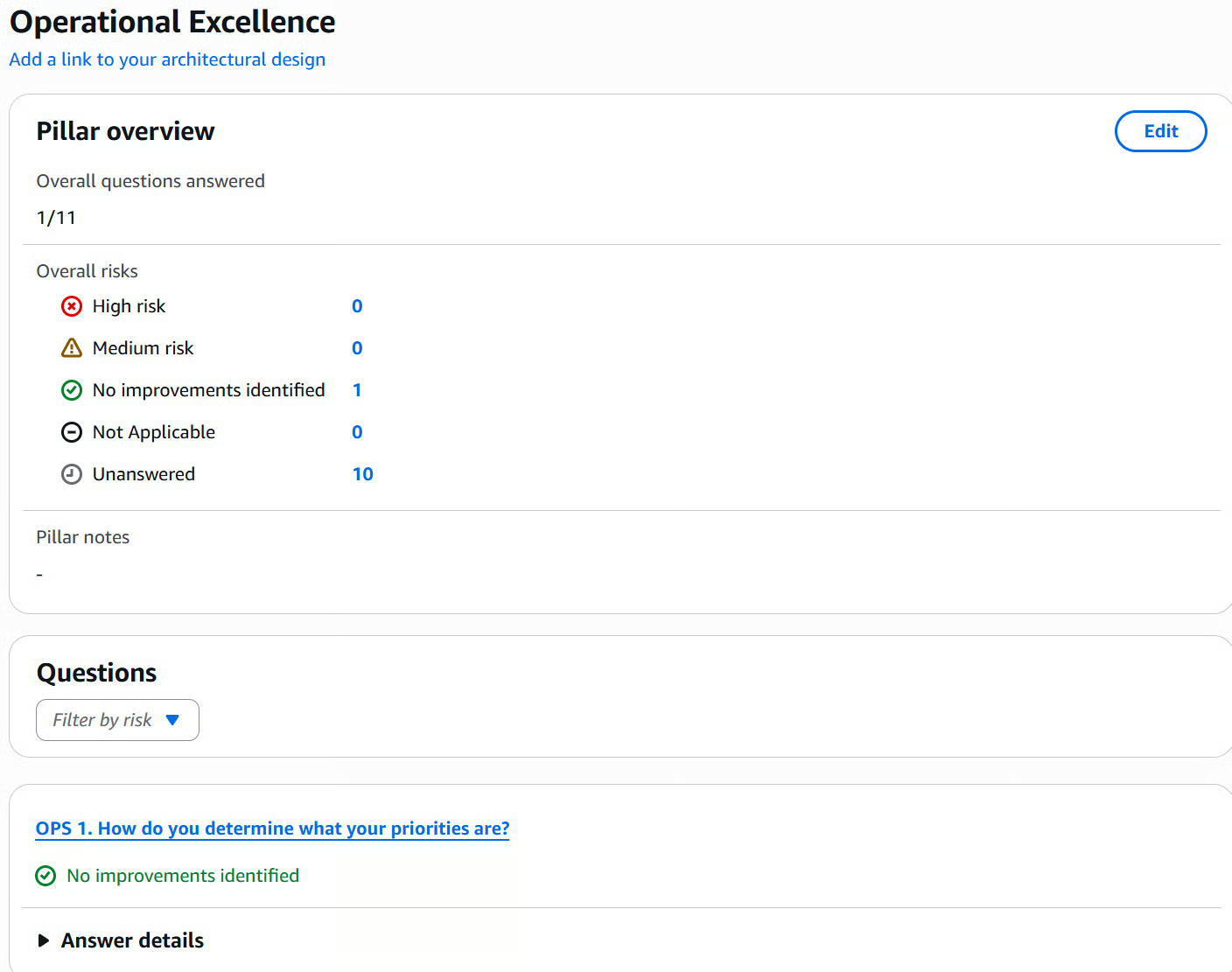
Use these findings to create an improvement plan, prioritizing issues based on business impact. The tool lets you track progress by creating milestones.
It also integrates with AWS Trusted Advisor and AWS Service Catalog AppRegistry for easier information discovery, and Cloud Intelligence Dashboards to visualize metrics across workloads.
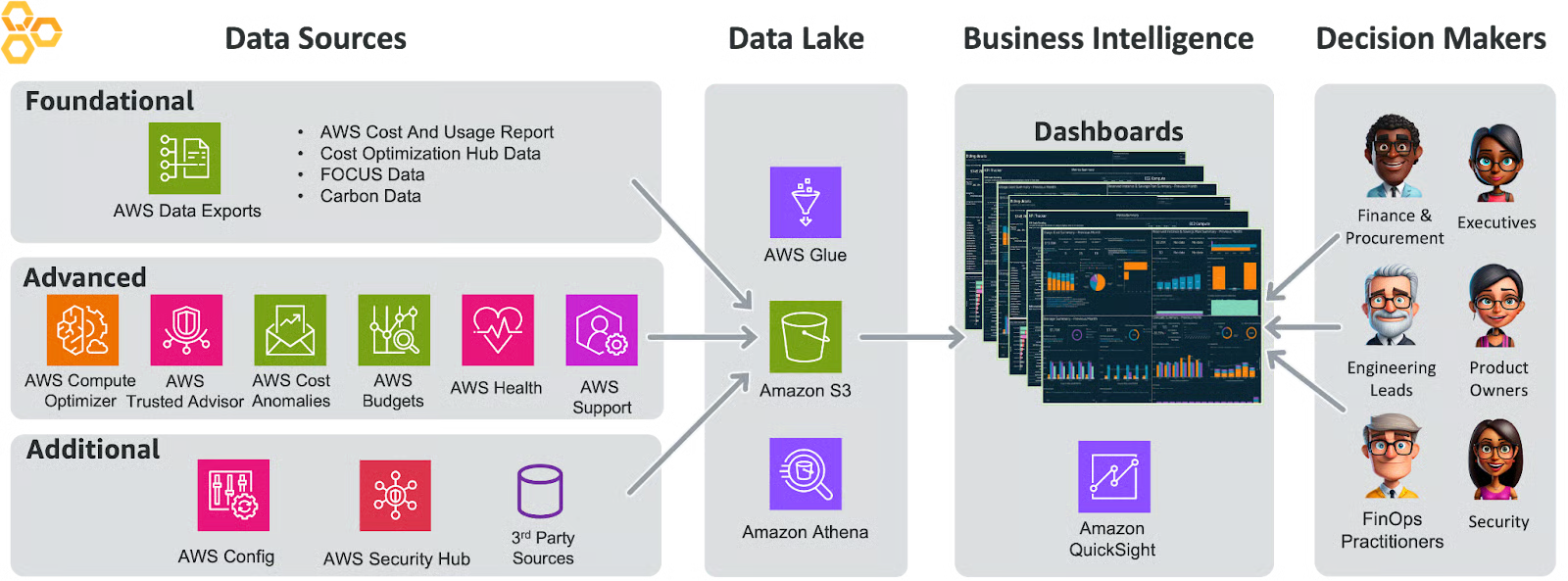
With all the theory and implementation steps covered, let's see how organizations apply these principles in practice. Real-world examples bring the framework to life and show you what success looks like.
Tricentis Flood underwent a Well-Architected Review conducted by AWS partner Cprime ahead of a SOC 2 compliance audit. The review identified improvements across security, reliability, and operations, which Tricentis immediately acted on.
They added intrusion detection, detailed network logging, and distributed computing and storage across multiple AWS availability zones and regions to ensure availability even if a data center goes offline. The review gave them a clear, prioritized remediation list exactly when they needed it.
QSRSoft, a restaurant technology company, had not completed a Well-Architected review in over five years. Their previous process required a team of six employees and 60 hours to review a single workload, so reviews kept getting postponed.
By partnering with Rego (an AWS partner) using AI-assisted tooling, the same review was completed in just 72 minutes, uncovering high-risk security vulnerabilities and scalability blockers, and resulting in the deployment of AWS Security Hub for ongoing automated monitoring.
Both cases illustrate the same point: the Well-Architected Tool surfaces real risks, and the sooner you run it, the cheaper those risks are to fix.
Even with clear benefits, implementing the framework isn't without obstacles. Here are the most common challenges organizations face and practical solutions to overcome them:
Team Resistance
The key here is psychological safety. Make it clear that finding issues is the goal, not a sign of failure. The best teams actively seek out problems while they're still manageable.
Time Constraints
This challenge often signals exactly when a review is most critical. If you're too busy to verify your architecture, you're potentially too busy to recover from architectural failures.
Expertise Gaps
Remember, you don't need to be an expert in all six pillars to conduct a valuable review. The tool guides you through the questions, and partners can fill knowledge gaps.
Unique Requirements
This is actually an opportunity, not a limitation. Custom lenses let you codify your organization's unique requirements into a reusable framework for consistency across all your workloads. I will show you how to do that later.
The Well-Architected Framework isn't a one-time exercise. It's an ongoing commitment to excellence. This is where many organizations differentiate themselves: not just by doing one review, but by embedding continuous improvement into their culture.
After all, your architecture develops constantly, new features are added, traffic patterns change, and AWS releases new services. Your Well-Architected practice should develop alongside it.
Regular reviews keep your architecture aligned with best practices as it changes. Think of reviews like regular health checkups. They catch small issues before they become big problems. Conduct reviews at key milestones:
For continuous delivery teams, integrate lightweight reviews before merging significant changes. This catches architectural drift early, when it's easiest to correct. Make Well-Architected compliance a requirement for production deployments. This way, you make sure that every workload starts on a strong foundation.
Reviews only create value when you act on their findings. Create feedback loops that turn review findings into specific improvements. After each review, develop a prioritized plan. Focus on high-impact, lower-effort improvements first to build momentum.
Share findings across teams. If multiple workloads have similar issues, you've identified a systemic problem that deserves a systemic solution. Perhaps updated standards, shared components, or training programs. Document lessons learned so other teams can benefit from your experience and avoid repeating the same mistakes.
This knowledge sharing transforms individual reviews into organizational learning.
Tracking improvements over time demonstrates the value of your Well-Architected initiative and helps justify continued investment. Use the AWS Well-Architected Tool's milestone feature to capture your architecture's state at specific points to create a clear before-and-after picture of your improvements.
Use Cloud Intelligence Dashboards to visualize metrics across workloads, making it easy to spot trends and identify which workloads need attention.
Track business metrics like system availability and mean time to recovery to demonstrate how improvements translate into value. These business outcomes matter more to stakeholders than technical metrics.
AWS Well-Architected Lenses extend framework guidance to specific domains. While the six pillars apply universally, lenses recognize that a machine learning workload has different considerations than a serverless application, which differs from a financial services platform. Each lens provides specialized questions and best practices tailored to these specific contexts.
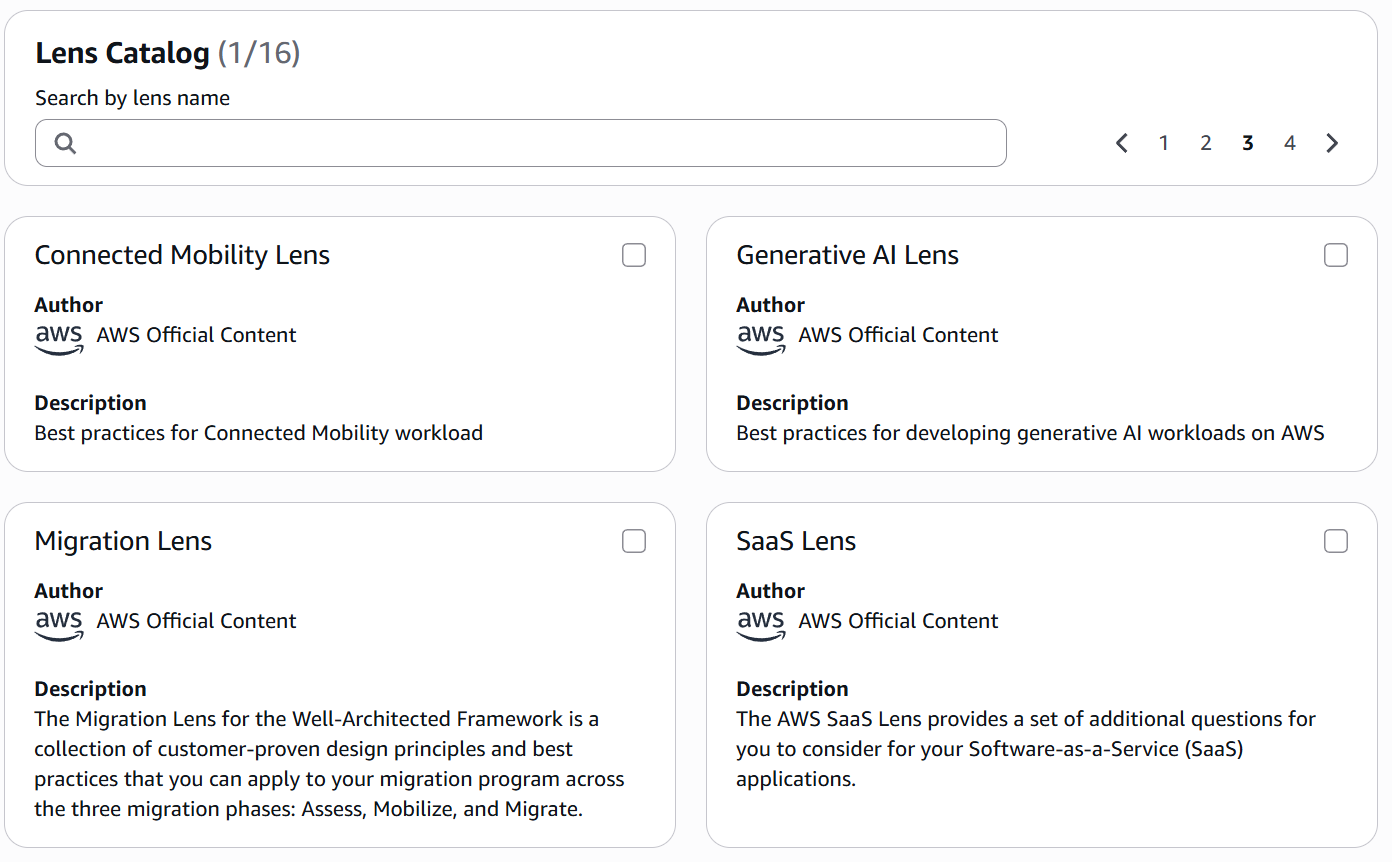
Currently, the framework contains 16 lenses, but in the table below, you can find the most commonly used lenses:
|
Lens |
Best For |
Key Focus Areas |
|
Machine Learning |
ML model development |
ML lifecycle, distributed training, bias assessment |
|
Serverless Applications |
Event-driven architectures |
Function design, API management, cost efficiency |
|
Generative AI |
LLM applications |
Responsible AI, model selection, prompt engineering |
|
Financial Services |
Regulated workloads |
Compliance, secure transactions |
|
SaaS |
Multi-tenant applications |
Scalability, tenant isolation, efficiency |
As you can see, the lenses address specialized needs beyond the core framework and help you optimize for specific technologies and industries. For instance, if you're building a machine learning platform, the ML Lens asks questions about data quality, model training, and deployment that don't appear in the general framework, but are critical for ML success.
While AWS-provided lenses cover many scenarios, you may need to address unique organizational needs. This is where custom lenses shine.
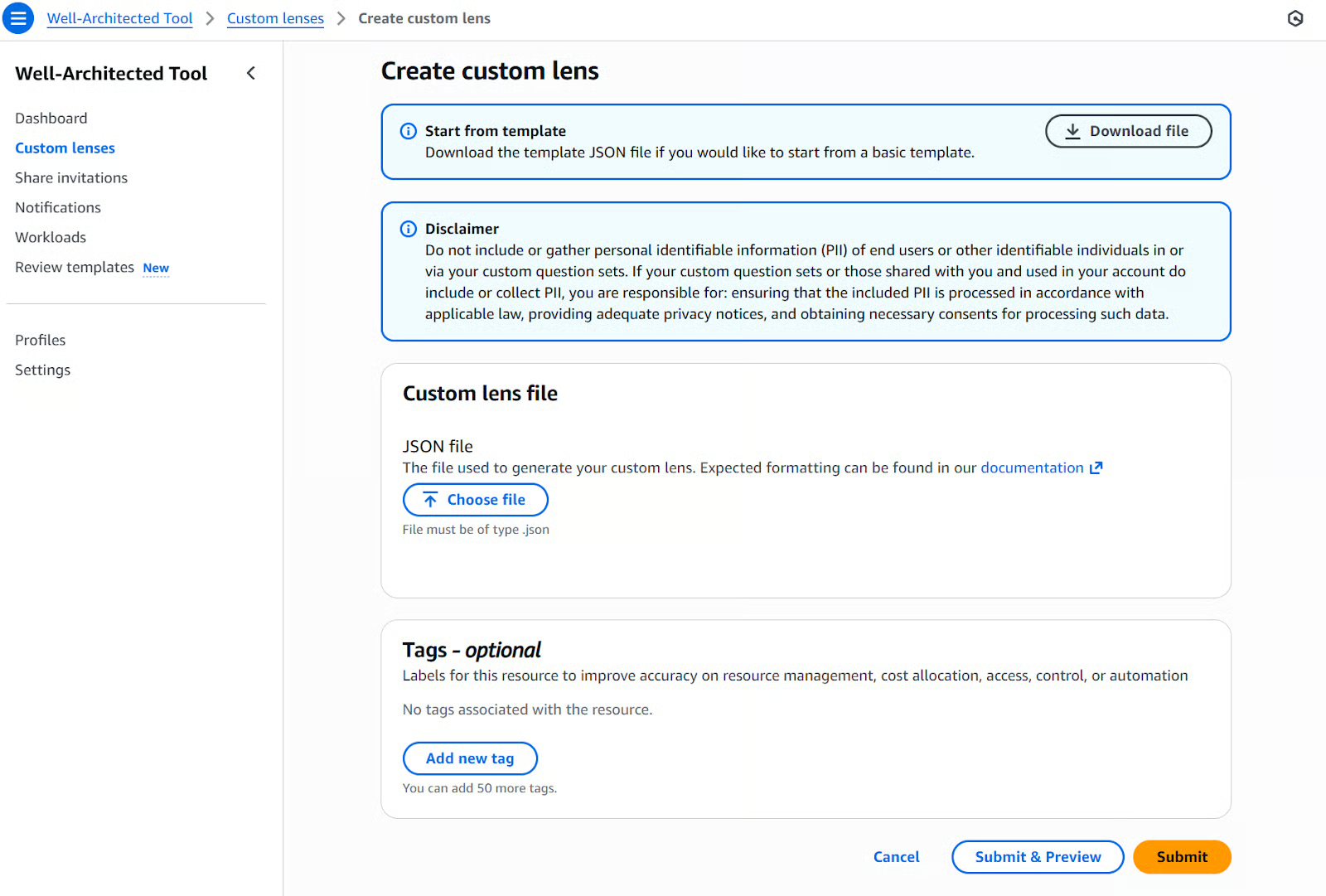
Custom lenses let you incorporate internal best practices, compliance requirements, and organizational policies directly into the framework. Create custom lenses for PCI compliance, HIPAA requirements, or specific security standards that are unique to your industry or business model.
To create a custom lens, follow this workflow:
Custom lenses can be shared across your organization, so you can make sure that every team applies your company's standards consistently.
For example, a healthcare organization might create a lens combining HIPAA compliance with internal security standards, asking questions about encryption key rotation policies, audit log retention, and incident response procedures specific to healthcare data breaches. Once created, every team in the organization can apply this lens to ensure compliance across all workloads.
The power of custom lenses is that they let you codify institutional knowledge. When your senior architects retire or move on, their expertise remains embedded in your custom lenses.
The AWS Well-Architected Framework provides a structured approach to building cloud architectures that are secure, reliable, high-performing, cost-effective, and sustainable. Applying the six pillars gives you a solid foundation for your cloud workloads.
The framework's real power lies in continuous improvement. Your first review identifies opportunities, and subsequent reviews track progress. This iterative approach transforms good architectures into great ones.
Start with a single workload, conduct a review, implement improvements, and measure results. The lessons learned inform how you architect future workloads. Remember that the framework is a guide for making informed decisions. You'll make trade-offs based on your context, and that's fine as long as you understand the implications.
By embracing the AWS Well-Architected Framework, you're developing the discipline for architectural excellence that will serve your organization for years to come.
To build on the content of this tutorial, I recommend taking our courses on Understanding Modern Data Architecture or AWS Security and Cost Management.
AWS Courses
Curs
Curs
Practică și urmărește-ți progresul.
Continuă Cu Googlearticol de blog
Benito Martin
12 min.
articol de blog
Srujana Maddula
13 min.
articol de blog
Eugenia Anello
articol de blog
Vikash Singh
11 min.
Tutorial
Vikash Singh
9 min.
Tutorial
Benito Martin


