Hoppa till huvudinnehåll

Cursor SDK Tutorial: Run Coding Agents With TypeScript

Use the Cursor SDK to run a local agent, then run a cloud agent that fixes a small bug in a GitHub repo and opens a pull request.
1 maj 2026  · 12 min läsa

Cursor announced its TypeScript SDK in late April 2026 and released it as a public beta. The package is published as @cursor/sdk and runs from Node environments such as scripts, CI jobs, and backend services.

The main difference from using Cursor in the editor is where the task starts. Instead of opening a chat and typing a prompt yourself, your code creates the agent, sends the task, streams events, waits for the result, and handles errors.

In this tutorial, we set up the SDK, run a local quickstart, then build the main project: a cloud agent that fixes a bug in a GitHub repo and opens a pull request. I keep the bug small on purpose so the SDK flow stays visible. After that, we cover the extension points and safety checks needed before adapting the pattern. The cloud project uses a companion repo with the launcher script and target project.

The SDK is in public beta, so check the official docs before reusing this code in a long term project.

What Is the Cursor SDK?

The Cursor SDK is a TypeScript package, @cursor/sdk, that lets you create and run Cursor agents from code. It gives you access to:

  • Local and cloud agents run.
  • Cursor's codebase tools, including indexing, search, grep, MCP servers, skills, hooks, and subagents.
  • The models available through your Cursor account, including Composer 2, GPT-5.5, and Claude.

The SDK uses the same agent system as the Cursor IDE, CLI, and web app. The difference is that you call it from TypeScript.

When to use the SDK

The SDK fits tasks that should start from code instead of from a person typing in the editor. I would reach for it for a CI job that asks an agent to inspect a failing test, a webhook that creates a branch for a bug fix, or an internal tool that runs a fixed agent task from a form.

SDK versus the Cursor app

The SDK is another way to use Cursor agents, alongside the Cursor IDE and the cursor agent CLI.

Use the IDE for editor chat. Use the CLI for terminal prompts. Use the SDK when TypeScript code needs to create the agent, send the task, and handle the result. As mentioned above, the CLI does not support external provider keys; the SDK also authenticates through a Cursor API key only.

How the Cursor SDK Fits Together

Before writing code, it helps to know the few objects and runtime choices the SDK exposes.
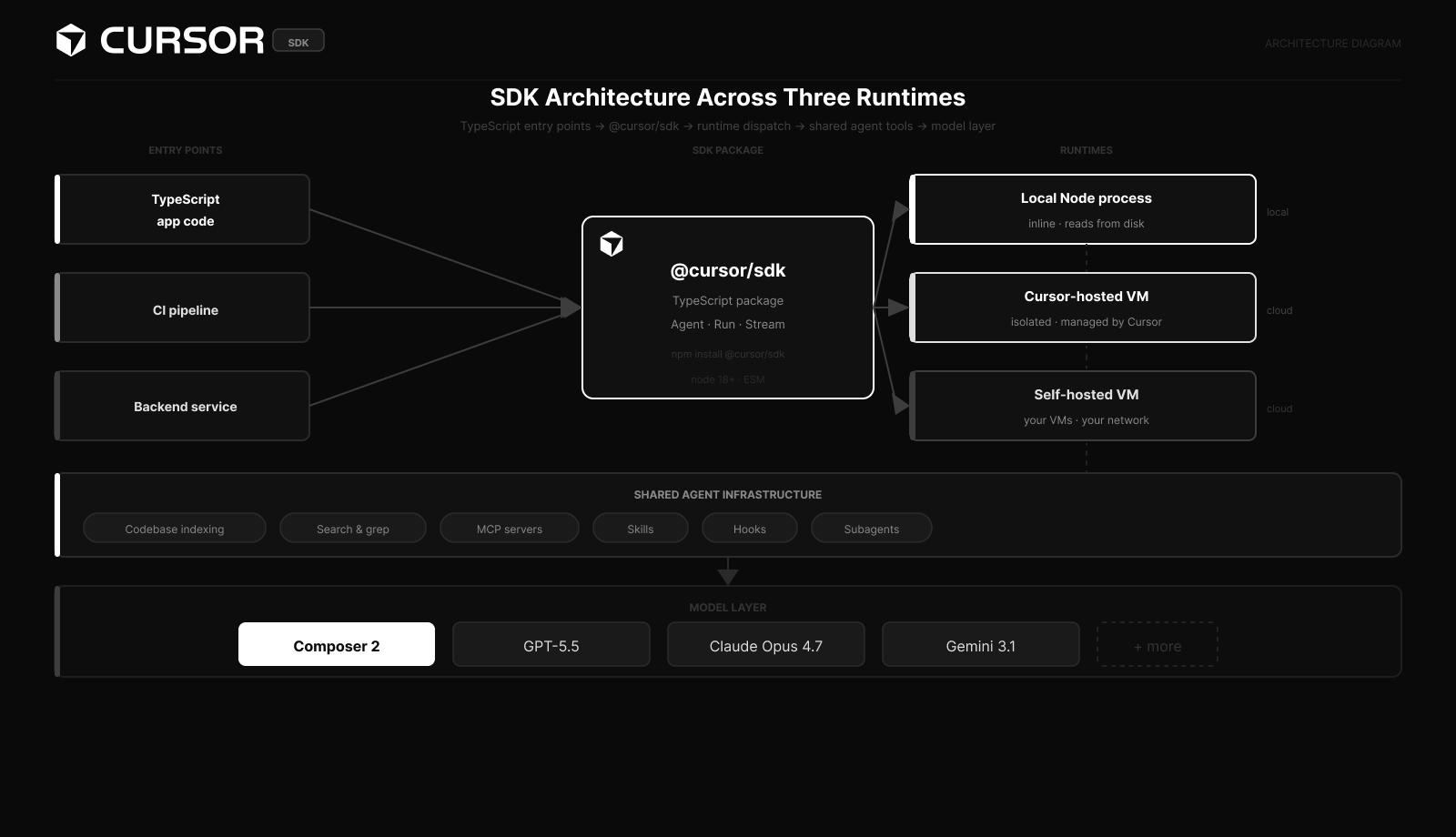
Diagram showing Cursor SDK code routing to local Node, Cursor cloud VM, or user managed VM, all sharing the same agent tools and model layer.

Cursor SDK architecture across three runtimes. Image by Author.

Three runtimes

The SDK supports three places an agent can run.

Runtime 

What it does

When to use it

Local 

Runs the agent inline in your Node process, with files read from disk

Dev scripts, CI checks against a working tree, fast iteration

Cursor cloud

Runs in an isolated VM with your repo cloned in, managed by Cursor

Parallel agents, longer tasks, runs that continue after disconnects

Self hosted cloud

Same shape as cloud but with your VMs and network

Teams that need code, secrets, and build output to stay inside their environment

In this article, we use local and Cursor cloud. Self hosted cloud, listed above, is mainly for Enterprise plans. The SDK code changes through the config key you pass: local or cloud.

Runtime, tools, and models

A run inside the SDK has three parts. The runtime is where it executes. The agent tools include indexing, search, MCP tool calls, skills, hooks, and subagents. The model is selected with model: { id: "composer-2" } or another id your account can use.

You set these pieces in the agent config.

Agent and Run

The two main objects in the SDK are the Agent and the Run. An agent holds conversation state, workspace config, and model settings. A run is one prompt sent to that agent, with its own stream, status, result, and cancel handle.

The split matters because cloud agents enforce one active run per agent. If you try to send a second prompt while the first is still going, the API returns 409 agent_busy. To run things in parallel, you create separate agents, not separate runs on the same agent.

Streaming events

Every run exposes a stream of events through run.stream(), which is an async iterator. Each event has a type field. In the current public beta, the SDK emits system, user, assistant, tool_call, thinking, status, request, and task events. There is no documented connection:reconnecting event; reconnects are handled inside the SDK.

For lower level updates, agent.send() also accepts onDelta and onStep callbacks.

Setting Up the Cursor SDK

The setup is just Node, TypeScript, and a Cursor API key.

Prerequisites

You need:

  • Node.js 22 or newer. The package formally supports Node 18 or newer, but Node 22 matches the official cookbook examples and supports the --env-file flag used below to load .env.

  • A Cursor account on Pro ($20/month) or above for cloud agents.

  • Basic TypeScript familiarity.

  • tsx to run TypeScript without compiling.

Install the SDK and the TypeScript tools:

Install the SDK

In a fresh folder:

npm init -y
npm install @cursor/sdk
npm install --save-dev typescript tsx @types/node

Add "type": "module" to your package.json so the imports work as ESM. Then add a tsconfig.json that supports top level await and explicit async disposal:

{
  "compilerOptions": {
    "target": "ES2022",
    "module": "NodeNext",
    "moduleResolution": "NodeNext",
    "lib": ["ES2022", "ESNext.Disposable"],
    "strict": true,
    "esModuleInterop": true
  }
}

Get a Cursor API key

The key was originally generated under cursor.com/dashboard/cloud-agents, but it has moved to cursor.com/dashboard/integrations. If a guide points to "Cloud Agents," check Integrations instead.
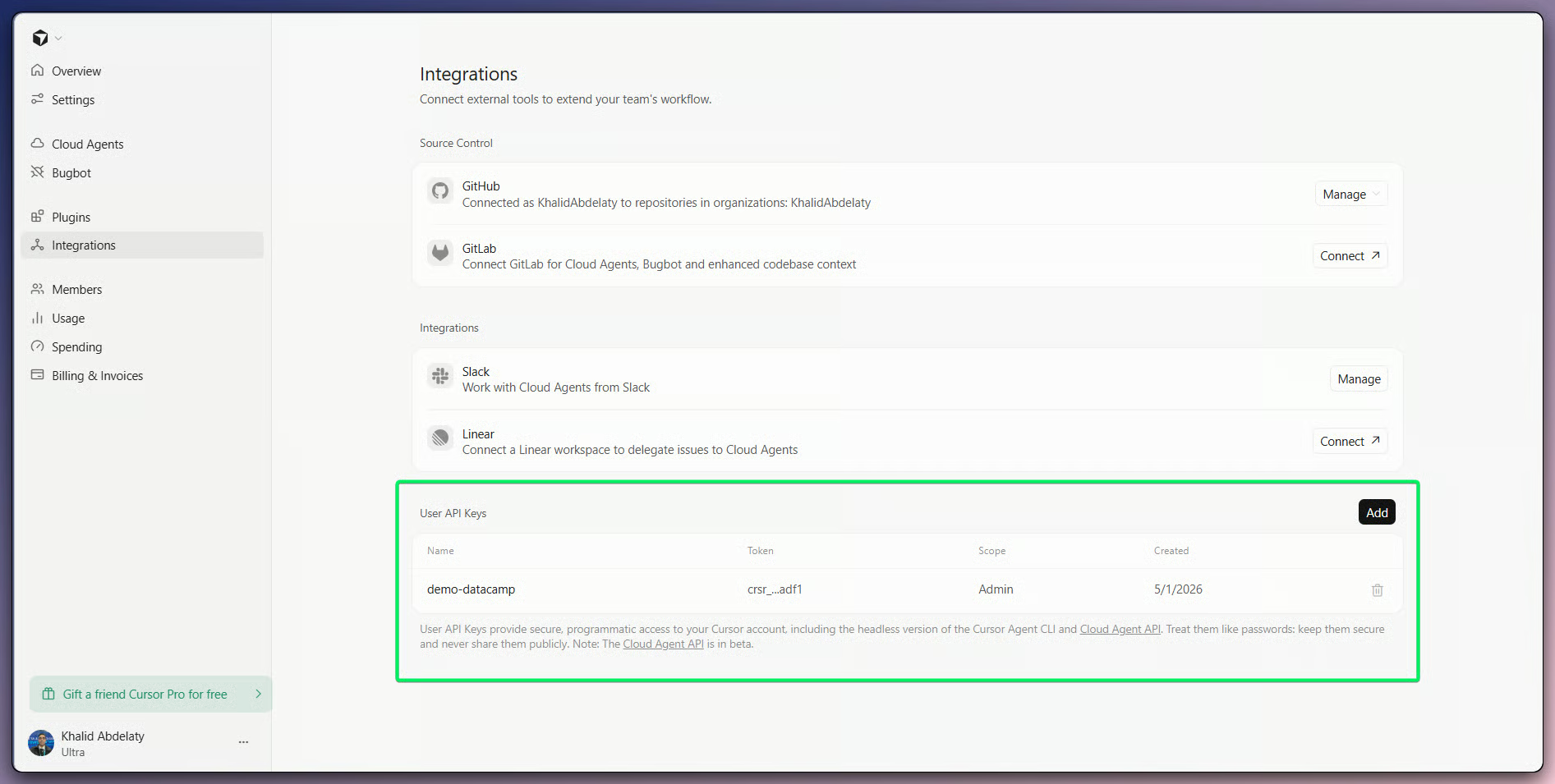
Cursor dashboard Integrations page with the User API Keys section highlighted and a Generate button visible.

Generate User API Keys from Integrations. Image by Author.

Generate a User API Key from there and store it as CURSOR_API_KEY:

echo 'CURSOR_API_KEY=crsr_your_key_here' > .env

Add .env to your .gitignore. The SDK reads process.env directly; it does not load .env files for you.

Project structure

Folder layout: package.json, tsconfig.json, .env, and src/ for your scripts. Add a .cursor/ folder for hooks, skills, and subagents when you need them.

Your First Local Cursor Agent

The first example is intentionally small. It creates a local agent, sends one prompt, streams the response, and disposes the agent.

Create a local agent

Create src/01-quickstart.ts:

import { Agent, type SDKMessage } from "@cursor/sdk";

const agent = await Agent.create({
  apiKey: process.env.CURSOR_API_KEY!,
  model: { id: "composer-2" },
  local: { cwd: process.cwd() },
});

Agent.create() returns a handle before the agent has done any work. local: { cwd: process.cwd() } points the agent at the current working directory. The SDK supports async disposal; in tutorial code, I prefer an explicit finally block because it avoids await using version questions.

Send a prompt and stream the response

Sending a prompt returns a Run object with its own stream and status. This example reads the stream in a for await loop and prints only the assistant text.

try {
  const run = await agent.send(
    `Write a terminal-friendly summary for a screenshot.

Output exactly:
Local agent summary
- Purpose: demonstrates a local Cursor SDK agent.
- Key files: src/01-quickstart.ts, package.json, tsconfig.json.
- SDK action: creates an agent and streams assistant text.

Rules:
Print exactly those three bullets.
No Markdown bold.
No extra explanation.`,
  );

  for await (const event of run.stream()) {
    if (event.type !== "assistant") continue;
    for (const block of event.message.content) {
      if (block.type === "text") {
        process.stdout.write(block.text);
      }
    }
  }

  const result = await run.wait();
  const duration = result.durationMs === undefined ? "" : `duration=${result.durationMs}ms`;
  console.log(`\n[done] status=${result.status}${duration}`);
} finally {
  await agent[Symbol.asyncDispose]();
}

The agent emits several event types, including thinking, tool_call, and status. This example filters for assistant text because that is the visible answer. event.message.content is typed and usable for streaming, but it is block based and may include tool calls. If you only need final text, skip the stream and read result.result after run.wait(). durationMs is public but optional, so the example handles it as optional.

Handle errors

The SDK throws typed errors that extend CursorAgentError. Common cases include AuthenticationError for a bad key, ConfigurationError for an invalid model id, RateLimitError, IntegrationNotConnectedError, and NetworkError.

import { CursorAgentError } from "@cursor/sdk";

try {
  // ... agent code
} catch (error) {
  if (error instanceof CursorAgentError) {
    console.error([${error.code ?? "unknown"}] ${error.message});
    if (error.isRetryable) {
      console.error("Retryable. Try again in a moment.");
    }
  } else {
    throw error;
  }
}

The isRetryable flag is what your retry logic should check. Network errors and rate limits are retryable; bad configuration and authentication are not.

Run it

Save the file and run it with Node's .env loader and tsx.

node --env-file=.env --import tsx/esm src/01-quickstart.ts

The --env-file=.env flag loads CURSOR_API_KEY before the script starts. The script should print assistant text, then a one line status footer. If you see an authentication error, check your .env and confirm the key was generated from the Integrations dashboard.

Streaming events from a local agent. Video by Author.

Building a Cloud Bug Fixing Agent

The next example moves from a local folder to a GitHub repo cloned in Cursor's cloud. The task is still small: fix a failing auth test and open a pull request.

When to reach for cloud

Cloud agents run in VMs managed by Cursor. They clone the repo, set up a development environment, and continue if your local script exits. When they finish, they can push a branch and open a pull request. The tradeoff is startup time and higher token use compared with a small local run.

Cloud run started from the SDK. Video by Author.

Cloud runs appear in Cursor Web and the desktop Agents Window while they work. SDK cloud agents are filtered out of the default list. In Cursor Web, use Filter > Source > SDK. In the desktop Agents Window, use the sidebar footer: Show > SDK. If you have the bc- agent id, you can also open it directly at https://cursor.com/agents/bc-... or through the desktop deep link. A simple rule is to use cloud when any of these is true:

  • The task may take longer than a local script session.
  • You want a PR or branch as the output, not just text.
  • You want to run multiple agents in parallel against the same repo.
  • The agent needs to run code (tests, builds) in an isolated environment.

For short local checks, use the local runtime.

Configure the agent

The cloud config replaces the local key with a cloud key. You list the repo to clone, optionally pin a starting branch, and set whether Cursor should open a PR when the run finishes.

import { Agent, CursorAgentError } from "@cursor/sdk";

const agent = await Agent.create({
  apiKey: process.env.CURSOR_API_KEY!,
  name: "Cloud bug fixer",
  model: { id: "composer-2" },
  cloud: {
    repos: [
      { url: "https://github.com/your-org/your-repo", startingRef: "main" },
    ],
    autoCreatePR: true,
  },
});

console.log(Started cloud agent ${agent.agentId});

repos is an array, but cloud v1 currently supports a single repo per agent. startingRef is the branch or commit the agent starts from. autoCreatePR: true asks Cursor to open a pull request when the run finishes. GitHub permissions, integration state, empty diffs, or repo rules can still leave you with a branch instead of a PR.

For the agent to clone the repo, your Cursor account needs the GitHub integration set up. If it is not connected, the SDK returns an IntegrationNotConnectedError with a helpUrl field.

Send the task and reconnect later

The pattern below sends a task and then waits on the result through Agent.getRun(). This lets another process reconnect later if the original script exits.

const run = await agent.send(
  "Find the failing test in the auth module, fix the bug, and add a regression test.",
);
console.log(Run ${run.id} in progress.);

const handle = await Agent.getRun(run.id, {
  runtime: "cloud",
  agentId: agent.agentId,
  apiKey: process.env.CURSOR_API_KEY!,
});

const result = await handle.wait();

const branch = result.git?.branches?.[0];
console.log(Status: ${result.status});
if (branch?.prUrl) {
  console.log(PR: ${branch.prUrl});
} else if (branch?.branch) {
  console.log(Branch: ${branch.branch});
}

You can stream the run for live output, but wait() is enough when you only need the result. When a PR is created, the URL is returned at result.git?.branches[0]?.prUrl; cloud v1 does not support multiple repos yet, so index 0 is the branch to check. If there is no PR URL, check branch?.branch and open the PR manually. Keep the run.id and agent.agentId if you plan to reattach later.

GitHub PR from cloud agent. Video by Author.

At this point, review the pull request like any other code change.

Local versus cloud at a glance

The two runtimes use the same SDK but behave differently.

Capability

Local

Cloud

Where it runs

Your Node process

A VM Cursor manages

File access

Your disk

Cloned repo only

Survives disconnects

No

Yes

Opens PRs

No

Yes, when repo permissions allow it

Returns artifacts

No

Yes (15-minute presigned URLs)

Use for

Iteration, CI on a checkout

Longer tasks, parallel runs, PR output

Use local runs for quick checks. Use cloud runs when you need a branch, PR, or artifact.

Other Examples

The bug fixer used the main SDK flow: create an agent, send a task, wait for a result, and review the output. Cursor's cookbook shows the same SDK calls in larger examples:

  • agent-kanban lists cloud agents, groups them by status or repo, and previews artifacts.

  • coding-agent-cli wraps local and cloud agents in a terminal tool.

  • app-builder runs a local agent from a chat UI and previews generated React code.

One detail to keep straight is artifact handling. Artifacts are available only on cloud runs. Local agents fit text output and quick checks. Cloud agents fit tasks that need files, branches, or PRs as output.

MCP, Skills, Hooks, and Subagents

The SDK can read the same project agent config that Cursor uses in the IDE. The bug fixer does not need all of it, but these pieces matter once the agent works in a real repo.

MCP servers

As mentioned earlier, MCP servers connect agents to external tools. You can pass servers inline in Agent.create() or define them in .cursor/mcp.json. If you pass mcpServers again in agent.send(), that run uses the servers from send() instead of the servers from Agent.create(). Use HTTP MCP servers for hosted tools. Use stdio MCP servers for tools that run beside the agent.

Skills

Skills are markdown files in .cursor/skills/ that give the agent project instructions, such as test framework choices, API conventions, or release rules. Use them for guidance that should apply to every run in the repo.

Hooks

Hooks live in .cursor/hooks.json and run at specific points in the agent loop. Common uses include formatting after file edits and blocking destructive shell commands before execution. For safety hooks, use fail closed behavior so a broken hook blocks the action.

Subagents

Subagents are named agents the main agent can call for focused work, such as code review or test writing. Define them in .cursor/agents/*.md or inline in Agent.create({ agents: { ... } }). Cloud agents load project subagents from the checked-out repo. Local agents need local.settingSources: ["project"] if you want them to read project .cursor/ config. Keep each subagent narrow.

Safety Checks

Before agents touch a real repo, set the boundaries first. This is the part I would not skip.

  • Scope permissions tightly. Agents can read files, run commands, and use any credentials you expose to them. Give agents repo scoped access, not broad service credentials.

  • Keep secrets out of prompts. Prompts can land in transcripts. Use environment variables for CURSOR_API_KEY and any other token, and remember that stdio MCP env values reach the runtime where the server executes.

  • Require human review. If a cloud agent can open PRs, branch protection should require a human reviewer before merge. Do not combine autoCreatePR: true with auto merge unless the repo is low risk.

  • Watch cost and model choice. SDK usage draws from Cursor's token based usage pool. As mentioned earlier, Composer 2 is one model option for coding tasks; call Cursor.models.list() if you need to see which model ids your account can use.

  • Log the run. run.conversation() returns a structured view of the agent's turns. Store it for runs you may need to debug or audit later.

Conclusion

This article covered npm install @cursor/sdk, a local quickstart, a cloud agent that opens a pull request, and the main extension points for repo agent behavior.

Use the SDK when code needs to start and manage the agent. If the task is only an editor conversation, the Cursor app is usually enough.

For comparison, our guides on the Claude Agent SDK and OpenAI Agents SDK cover agent APIs in other ecosystems.


Khalid Abdelaty's photo
Author
Khalid Abdelaty
LinkedIn

I’m a data engineer and community builder who works across data pipelines, cloud, and AI tooling while writing practical, high-impact tutorials for DataCamp and emerging developers.

FAQs

Does the Cursor SDK work with Python or another language?

Not officially. The SDK is TypeScript only as of the public beta; Python users should call the Cloud Agents REST API directly.

Can I use the SDK on the free Hobby plan?

Yes for local agents, within free tier rate limits and usage caps. No for cloud agents; those require Pro or above.

How do I cancel a run that is taking too long?

Call run.cancel(). The status moves to cancelled, the live stream aborts, and run.wait() resolves with the cancelled result.

Where do hooks fit if the SDK does not have a programmatic callback?

Hooks are repo policy, not per script logic. Put shared rules in .cursor/hooks.json, and keep run specific logic around agent.send() or run.wait() in your TypeScript code.

Is the SDK ready for production use?

Use it first for low risk tasks. The SDK surface is still in public beta. Pin @cursor/sdk, scope secrets, require review, and expect API changes before general availability.

Ämnen

Learn with DataCamp

track

AI Agent Fundamentals

6 timmar
Discover how AI agents can change how you work and deliver value for your organization!
Se detaljerRight Arrow
Starta kursen
Se merRight Arrow