Corso
Most tool releases are incremental. Cursor 3 is not. Released on April 2, 2026, it ships a new interface built around AI agents rather than files. The company is direct about what that means: the IDE is no longer the point.
That is a bigger claim than it sounds. Cursor started as a VS Code fork. The bet was that developers would pay for better AI assistance inside a familiar editor. It worked. Annualized revenue crossed $2 billion in early 2026. But usage data inside Cursor was already pointing somewhere else: agent users now outnumber Tab autocomplete users two to one. That ratio was reversed just a year ago.
I'll try to be specific about where it falls short, because the limitations here are less obvious than the features. There's one in particular worth flagging early, but we need to cover the interface first.
What Is Cursor 3?
Cursor's official description: "a unified workspace for building software with agents." The product is no longer built around files.
Earlier versions were built around the editor, with AI features added on top. The IDE stayed at the center; the AI was a tool you reached for. Cursor 3 adds the Agents Window, built from scratch around agents rather than retrofitted onto a file editor. The launch blog said as much: "a new interface...centered around agents."
One clarification that got lost in launch coverage: the VS Code-based IDE is still there. You can keep both open at the same time or switch back whenever you need it. The reasoning is practical: even when agents write 98% of the code, the remaining 2% (viewing files, debugging, small edits, go-to-definition, LSP support) turned out to be non-negotiable. According to Lee Robinson, VP of Developer Education at Cursor, the team "couldn't remove those." So they kept the editor and built the new interface alongside it. Cursor 3 is additive.
The Agents Window sits somewhere between a traditional IDE and an orchestration platform. You launch agents, assign them tasks across repos and environments, review what they produce, and decide what ships.
One thing to know before we get into features: Cursor is now available inside JetBrains IDEs via the Agent Client Protocol (ACP), as of March 4, 2026. The "Cursor versus VS Code" framing is already stale. To open the Agents Window: Cmd+Shift+P, search "Agents Window."
What's New in Cursor 3?
The 3.0 release is heavier on infrastructure than it is on UI polish. Here is what actually changed.
Unified agent workspace
All agent activity now lives in a single interface. The sidebar shows every agent currently running on your machine or in the cloud, including those kicked off from Slack, GitHub, Linear, mobile, and the web. One view.
The workspace is multi-repo by design. One agent can update frontend components while another patches a backend library. Before Cursor 3, that required separate IDE windows and constant context switching.
Two additions worth flagging: Agent Tabs let you view multiple agent chats side-by-side or in a grid. Agent chats are also now standard editor tabs, so split-pane and keyboard shortcuts work as expected. No relearning. Design Mode gets its own section below.
Running multiple agents in parallel
The /best-of-n command runs in the agent chat within the IDE, not the Agents Window. To use it, open a Git repository, open Agent Chat in the classic editor layout, and run /best-of-n followed by a comma-separated list of models and your task. For example: /best-of-n sonnet, gpt, composer fix the flaky logout test.
Cursor creates a separate Git worktree for each model so the runs cannot interfere with each other. When the job finishes, you can review the outputs, commit and push from the selected worktree, or run /apply-worktree to bring the changes back into your main working copy. You can also customize worktree setup per project through .cursor/worktrees.json.
Cursor now directs multi-model parallel runs through /best-of-n in the IDE agent chat, while the older selection flow is no longer the recommended path.
The /worktree command follows the same path: IDE agent chat, Git repo required, isolated worktree per agent.
The "best" pick reflects Cursor's evaluation heuristics, not necessarily yours. Read the outputs yourself.
One practical note: each model run is billed independently at its normal token rate with no bundled discount. Three models means three separate charges. I will cover the credit system in more detail later.
Local and cloud agent handoff
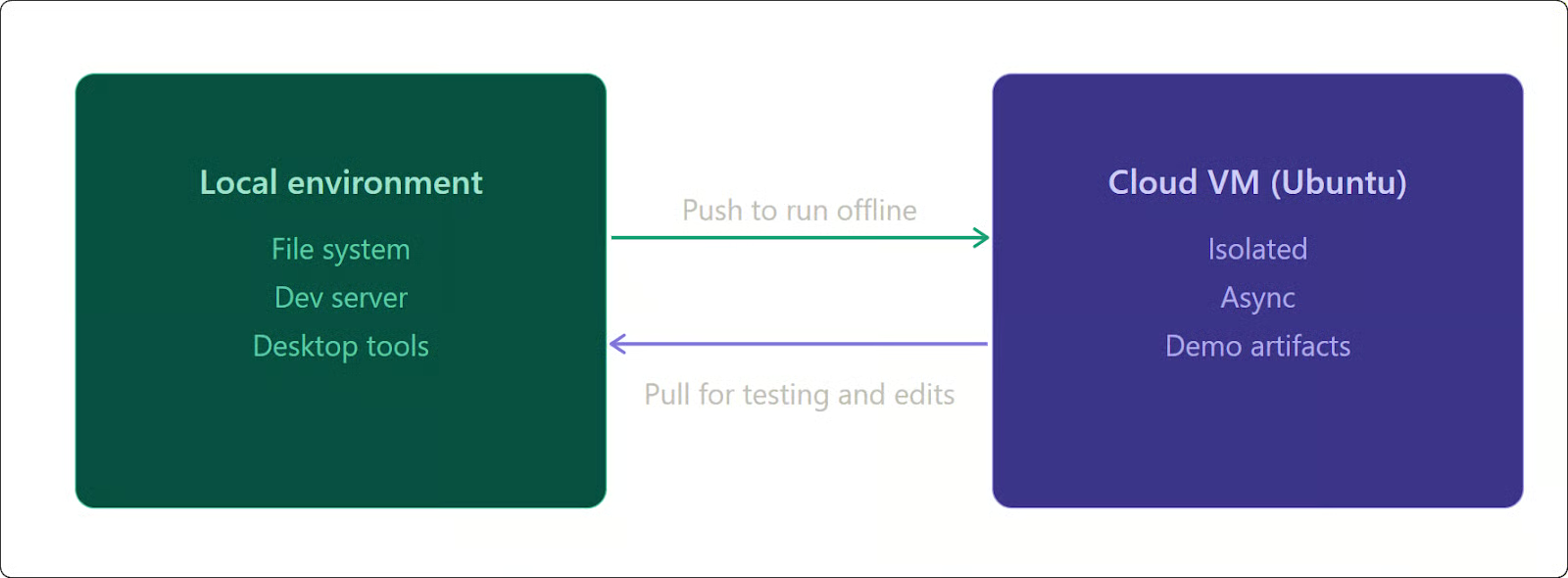
Cloud agents run on isolated Ubuntu virtual machines. The handoff works in both directions.
Moving from cloud to local gives you access to your file system, local dev server, and desktop testing tools. Pushing a session to the cloud lets long-running tasks keep running after you close your laptop. When the agent finishes, results are waiting in the Agents Window. Cloud agents also produce demos and screenshots of their work, which you can review before pulling anything back locally.

Agent sessions move bidirectionally between local and cloud. Image by Author.
For enterprise teams, self-hosted cloud agents became available on March 25, 2026. Code, tool execution, and build artifacts stay inside your own infrastructure. A worker process connects outbound to Cursor's cloud over HTTPS, with no inbound ports or VPN needed. Self-hosted agents are on the Enterprise plan; standard cloud agents are available on Pro and above.
You can define the cloud environment with a .cursor/environment.json file at the repo root. Store secrets in the Cursor Settings Secrets tab rather than in that file.
From commit to pull request in one flow
The new diffs interface lets you view word-level changes, stage commits, and open a pull request without leaving the Agents Window. Large-file diff rendering is faster and lighter on memory in 3.0.
When you use /worktree in the classic editor, each agent works on its own isolated worktree, so diffs are already clean when you get to review. No untangling of overlapping changes.
Cursor also announced a definitive agreement to acquire Graphite, a pull request management tool, on December 18, 2025. I almost left this out since the integration details are not confirmed, but the acquisition could reshape this workflow once it closes.
Design Mode and the integrated browser
Describing a UI change in text is slower than pointing at it. Design Mode fixes this.
Press Cmd+Shift+D to activate a selection tool over the integrated browser. Use Shift+drag to select an area, Cmd+L to inject a selected element into the agent chat, or Option+click to add it to the input field. The agent receives the HTML, the applied CSS, and the visual bounding box. Instead of writing a paragraph describing the layout problem, you select the element and say "tighten this."
The browser also includes Chrome DevTools. Agents can spin up a local dev server, click buttons, read console logs, and verify that their changes actually worked.
Composer 2: Cursor's Built-In Coding Model
Composer 2 launched on March 19, 2026, two weeks before Cursor 3. It is the model powering agents in the new workspace.
It is built on a Kimi K2.5 base from Moonshot AI, with continued pretraining and a 4x-scale reinforcement learning run on top. Cursor did not disclose the base model at launch. A user found it in API headers the next day. Co-founder Aman Sanger acknowledged the oversight: "It was a miss to not mention the Kimi base in our blog from the start. We'll fix that for the next model."
If benchmark numbers are not your thing, the short version is: Composer 2 is faster and cheaper than the third-party alternatives. Skip to the pricing table below.
On Cursor's own CursorBench, Composer 2 scores 61.3 versus 44.2 for Composer 1.5, roughly a 39% jump. It runs at over 200 tokens per second, partly due to custom GPU kernels Cursor builds in-house rather than relying solely on third-party inference stacks. CursorBench is not independently audited, so take the numbers with that in mind. GPT-5.4 beats it on harder tasks, but on CursorBench work (averaging 352 lines across eight files), Composer 2 outperforms Claude Opus 4.6 at roughly 90% lower cost per token. That cost gap is the more interesting number.
Here is the pricing breakdown:
|
Variant |
Input (per 1M tokens) |
Output (per 1M tokens) |
|
Composer 2 Standard |
$0.50 |
$2.50 |
|
Composer 2 Fast (default) |
$1.50 |
$7.50 |
On individual paid plans, Composer 2 has its own usage pool separate from credits for manually selected frontier models. It is spend-based rather than request-based. The full credit breakdown is in the pricing section below. The model has a 200,000-token context window with self-summarization: when the context fills up, it compresses to roughly 1,000 tokens and keeps going.
Composer 2 is purpose-built for agentic coding. It will not help with anything else.
Cursor 3 as an Agent-First Development Environment
Cursor CEO Michael Truell has described AI software development in three eras. First came Tab autocomplete, filling in repetitive code. Then synchronous agents, directing the model step by step. Now cloud agents run autonomously over longer timescales, with developers acting as directors rather than writers.
The usage data reflects that shift. As noted earlier, the agent-to-Tab ratio flipped between early 2025 and early 2026.
Truell's framing: "Cursor is no longer primarily about writing code. It is about helping developers build the factory that creates their software." That is a vision statement, not a product description. Most developers using Cursor 3 right now are still reviewing and correcting agent output constantly. I have not seen a codebase yet where the factory runs itself. But the interface is built for a version of that being closer than it sounds.
Key Features That Carry Over and Improve
The core features from earlier versions are still there and mostly unchanged.
Files and code understanding
Full Language Server Protocol (LSP) support remains. Go-to-definition, symbol search, hover documentation, and file navigation all work as they do in VS Code. Context references like @Files, @Folders, and @Docs are supported. The Agents Window does not remove file-level access; it adds a layer above it.
Cursor Marketplace and plugins
The Cursor Marketplace adds agent capabilities through one-click plugin installs. A plugin bundles some combination of Skills (prompts agents can invoke on demand), Subagents, MCP servers, Hooks, and Rules. Full breakdown in the Cursor docs.
Available plugins cover a wide range: AWS, Figma, Linear, Stripe, Vercel, Datadog, Snowflake, and more. Teams and Enterprise plans can set up private team marketplaces. For Enterprise, third-party plugin imports default to off unless an admin turns them on.
One gap that should not exist: there is no built-in UI for setting environment variables for Marketplace plugin MCP servers. The workaround is to add the server manually to ~/.cursor/mcp.json with an env field and disable the duplicate entry in Cursor Settings. It works, but it is the kind of thing that should not require a workaround in a paid product.
Automations
Automations, released March 5, 2026, are always-on agents triggered by external events: schedules, Slack messages, Linear issues, GitHub events, and PagerDuty incidents. The agent spins up a cloud sandbox and follows instructions using configured MCPs and models. When memory is turned on, the agent gets access to a persistent notepad (small text files like MEMORIES.md that survive between runs). The agent decides what to write down: progress, patterns it spotted, context from previous runs. The next run reads those notes and picks up from there. You can view and edit these files in the Automations section of the dashboard.
Cursor 3 Pricing and Plan Requirements
Not all features are available on every plan. Here is the current breakdown:
|
Plan |
Price |
Key Access |
|
Hobby |
Free |
Basic editor, limited completions, no cloud agents |
|
Pro |
$20/mo ($16/mo annual) |
Cloud agents, Composer 2, MCPs, $20 credit pool |
|
Pro+ |
$60/mo ($48/mo annual) |
Everything in Pro, ~3.5x usage ($70 API credit pool) |
|
Ultra |
$200/mo ($160/mo annual) |
Everything in Pro, 20x usage, priority features |
|
Teams |
$40/user/mo |
Pro features plus SSO, shared rules, team marketplace |
|
Enterprise |
Custom |
Pooled usage, SCIM, audit logs, self-hosted cloud agents |
Cloud agents and Composer 2 require Pro or above. Team Marketplaces need Teams or Enterprise, and self-hosted cloud agents are Enterprise-only.
Cursor runs two separate credit pools on individual paid plans: one for Auto mode and Composer usage, described by Cursor as "generous" without a published cap, and one for manually selected frontier models like Claude or GPT. When you pick a model manually, it draws from the credit pool. Auto mode does not.
A note for heavy users: developers on the Pro plan who run frequent agent sessions report actual spend closer to $40 to $50 a month once overages kick in. The $20 figure is the floor.
How Cursor 3 Changes Developer Workflows
Here is a concrete comparison for a standard backend API task:
|
Step |
Before Cursor 3 |
With Cursor 3 |
|
Setup |
Terminal, |
Open Agent Chat in the editor, run |
|
Implementation |
Write controller, service, and route files manually |
Agent pulls specs via MCP, generates schema-aware code |
|
Testing |
Run tests in terminal, read stack trace, fix import in IDE |
Agent reads test output, spawns subagent to fix failing dependency |
|
Review |
Open GitHub in browser, stage changes, create PR |
View diffs in sidebar, stage commits, open PR without leaving Cursor |
The shift is not from hard to easy. It is from writing to directing. You spend less time on implementation and more time defining requirements and reviewing output. Whether that trade is worth it depends on the task, and honestly on how much you trust the agent on a given day.
Long-running tasks benefit most. A refactor that would take hours in a terminal can go to a cloud agent, you close your laptop, the agent keeps going, and the diffs are waiting when you get back.
Cursor 3 vs. Previous Versions of Cursor
Early Cursor (2022 to 2024) was an IDE-first tool. AI-assisted file editing in a VS Code environment.
Cursor 1.0 (June 2025) was the first stable release. Cursor 2.0 (October 2025) brought the first Composer model and in-app browser. Cursor 2.5 (February 2026) added async subagents and the plugin marketplace. Cursor 2.6 (March 2026) added team marketplaces.
Cursor 3.0 makes the shift official. Cloud agents moved out of the Editor entirely and now live exclusively in the Agents Window. Worktree support also changed: the old dropdown UI was deprecated and replaced with the /worktree and /best-of-n commands, which run in the classic editor chat. If you have internal documentation on how to use the worktree dropdown or start cloud agents from inside the Editor, it is outdated.
Cursor used the 3.0 rebuild to clear performance debt from 2.x: memory and CPU leak patches, the React Compiler. Robinson described the result as faster and less prone to UI jank. Windows is fully supported, and the interface handles multiple workspaces in a single window.
The jump from 2.x to 3.0 is more structural than it looks. Earlier versions added agent features to an IDE. Cursor 3 adds an IDE to an agent platform. That order matters.
Cursor 3 vs. Traditional IDEs
Traditional IDEs are file-centric. You open a file, edit text, and the IDE helps you type faster. Even with GitHub Copilot installed, the abstraction is still the document.
Cursor 3 makes the file secondary. The primary interface is the task queue. The IDE becomes the fallback for edits too specific to describe in a prompt.
The comparison is getting murkier though. GitHub Copilot now offers cloud agents and code review across individual plan tiers. JetBrains bundles Junie, its own autonomous coding agent, with AI subscriptions. And as mentioned earlier, Cursor now runs inside JetBrains IDEs via ACP. Everyone has agents now. The real difference with Cursor 3 is that the workspace was built around them rather than added to an existing editor.
Limitations and Open Questions
The day-to-day experience has more friction than the launch materials suggest.
Developer oversight
Agents make errors. On complex multi-file tasks, they make a lot of them. Reviewing agent output requires enough familiarity with the codebase to catch incorrect assumptions, hallucinated functions, and logic that almost works. The time saved on writing shifts to reading and validating. Developers who cannot read the generated code to check it will not be able to keep the codebase working. That is not a knock on Cursor specifically; it applies to every agentic coding tool.
Cloud agent reliability
Environment setup failures are a documented and ongoing issue. Secrets cannot be injected during the initial setup script, only post-setup. Extended parallel sessions consume significant resources; users have reported heavy RAM usage on machines that should handle it. Keep sessions under two hours if you can, and add re-indexing checkpoints for anything longer.
One more specific gap: Plan Mode is not yet available in the Cursor web UI. You can start and run cloud agents including planning from the Cursor 3 desktop app, but not from cursor.com/agents directly.
There is also a known bug where agents hang when the Agents Window is not in focus. It was reported shortly after launch and was unresolved as of early April 2026. For a tool built around long-running sessions, that is a real problem.
On parallel agents more broadly: Google DeepMind research on multi-agent systems found error amplification of up to 17.2 times in unstructured networks. Even at 99% per-agent reliability, ten chained agents drop to about 90% overall. The /best-of-n command uses isolated worktrees, which limits some of this. It does not eliminate it.
Security considerations
Two CVEs were found and patched in 2025. CVE-2025-54136 (MCPoison) allowed approved MCP tools to have their commands silently modified; patched in version 1.3. CVE-2025-64106 was a deep-link remote code execution vulnerability with a severity score of 8.8, patched within two days. Workspace Trust is also disabled by default. If you are connecting MCP tools in a sensitive environment, that matters.
Self-hosted cloud agents, as I covered earlier, keep agent work inside your network, but the Cursor platform itself is not available as a full on-premises deployment. Cursor does not hold FedRAMP or HIPAA certification. BAA availability is not publicly documented, so confirm directly with Cursor before relying on it for compliance decisions. If your environment requires FedRAMP or full on-premises deployment, Cursor 3 is not a fit.
Two more practical limitations worth flagging: Design Mode currently works only in Chrome; Firefox and Safari are not supported. And in the days following the Cursor 3 launch, community reports documented Composer 2 token consumption running roughly 10 times higher than normal for some users, linked to cache read issues.
The credit model
As I covered in the parallel agents section, each /best-of-n model charges separately. A three-model comparison on a complex task can drain a large portion of your monthly pool in a single session.
Who Should Use Cursor 3?
If you are already running agent-assisted workflows and want everything in one place, this is built for you. It makes the most sense for teams working across multiple repos, for longer tasks you can hand off to the cloud, and for enterprise teams that need code to stay inside their own infrastructure.
I would not recommend it for beginners. Not because it is hard to use, but because agents produce code you have to read critically. If you cannot tell when the output is wrong, you cannot fix it, and six months later the codebase will show that. For simple scripts or one-off tasks, the setup overhead is not worth it either. And if your environment is HIPAA-regulated or air-gapped, see the Security section before going further.
Large legacy monorepos are also a real problem. Context windows still break on them.
The Future of AI Coding with Cursor
In February 2026, Cursor published "Towards Self-Driving Codebases," describing experiments with thousands of orchestrated agents across large codebases. The stated goal: "until codebases are self-driving."
Context windows still break on large monorepos. Agents hallucinate regularly. The vision is far enough out that I would not plan around it.
What Cursor 3 does is put the main pieces in place: a model in Composer 2, an interface in the Agents Window, cloud VMs as the runtime, and self-hosted options for enterprise. The self-driving codebase depends on model improvements Cursor does not fully control.
Truell's "factory" framing is still a long way from reality. For now, you are still the one reviewing the factory floor.
Conclusion
Cursor 3's main change is not a feature. It is that the interface was rebuilt around a different assumption: that the agent, not the file, is the unit of work. Two years ago that was a bet. The usage data suggests it is paying off.
Whether it fits your workflow depends on things I cannot determine from here: codebase size, security requirements, and whether you can live with a product that launched weeks ago and still has rough edges. If you are on the fence, I would re-read the Limitations section before deciding.
If you want to go further with Cursor in practice, our Software Development with Cursor course covers prompting, refactoring, testing, and agent workflows.
I’m a data engineer and community builder who works across data pipelines, cloud, and AI tooling while writing practical, high-impact tutorials for DataCamp and emerging developers.
Cursor 3 FAQs
Can I keep my VS Code extensions?
Yes. Cursor is still a VS Code fork, so extensions, keybindings, and themes carry over. Community reports put full migration at under 10 minutes.
Does Cursor train on my code?
With Privacy Mode enabled, Cursor says your code is not used for training by Cursor or its model providers. Privacy Mode is on by default for Business and Enterprise. Data is encrypted with AES-256 at rest and TLS 1.2+ in transit. GDPR and CCPA compliant.
How does it compare to Claude Code and Copilot?
Claude Code is terminal-native and leads developer sentiment surveys (46% "most loved" vs Cursor's 19%, per Pragmatic Engineer's early 2026 survey). Copilot has tens of millions of users and deeper GitHub integration starting at $10/mo. Cursor's differentiator is the visual agent workspace. Many developers combine two or three of these.
Do I need a paid plan?
The Agents Window ships free. Cloud agents, Composer 2, and Automations need Pro ($20/mo). Whether the Student plan includes Composer 2 is not confirmed as of April 2026.
Is Cursor 3 safe for enterprise use?
SOC 2 Type II certified. GDPR and CCPA compliant. Self-hosted cloud agents (Enterprise plan) keep code in your network. No HIPAA certification or published BAA, so confirm directly with Cursor for regulated workloads.