When you first start working with SQL, it’s easy to think of data types as simple labels. A single column stores either numbers, text, dates, or special data types. But a data type is more than just a label. It’s a set of rules that defines what a value is in the eyes of the database.
In practice, data types shape the way SQL “understands” the information in your database. It’s a set of instructions that gives SQL the context it needs to read, compare, and process your data accurately.
In this tutorial, we’ll look at the major SQL data type categories and see how they behave in different database management systems. I encourage you to follow along with the examples throughout.
If you haven’t worked much with database tables before, our SQL Fundamentals course gives a clear, beginner-friendly foundation for understanding how datasets like this are structured.
What Are SQL Data Types?
A data type describes the format of your data: the kinds of values a column can hold, how those values are stored internally, and the operations that make sense to run on them.
This means your choice of data type affects more than just table design. It can influence storage needs, query performance, sorting behavior, math operations, and even how different systems interpret the same value.
Here’s a simple table that uses several types at once:
CREATE TABLE employees (
    id INT,
    name VARCHAR(50),
    start_date DATE,
    active BOOLEAN,
    salary DECIMAL(10, 2)
);
Each column in this table defines the type of data it can hold.
-
The id column will store whole numbers, giving each employee a unique identifier.
-
The name column can hold up to 50 characters of text, so you can store short names.
-
The start_date column is for calendar dates.
-
The active column will store true or false values, making it easy to track which employees are currently active.
-
Finally, the salary column will store monetary amounts with a 10-digit precision, keeping two digits after the decimal point for cents.
Together, these columns form a structured table that enforces rules about what kinds of values are allowed in each field. This makes the data more predictable and easier to work with.
Let’s add some example data to this and see what the resulting table might look like, using PostgreSQL.
INSERT INTO employees (id, name, start_date, active, salary)
VALUES
    (1, 'Alice Johnson', '2025-01-15', TRUE, 55000.00),
    (2, 'Bob Smith', '2024-06-01', FALSE, 62000.50);

SELECT *
FROM employees;
|
id
|
name
|
start_date
|
active
|
salary
|
|
1
|
Alice Johnson
|
2025-01-15
|
TRUE
|
55000.00
|
|
2
|
Bob Smith
|
2024-06-01
|
FALSE
|
62000.50
|
Different database systems follow the same principles but vary in naming and features. For example, SQL Server uses BIT instead of BOOLEAN, and MySQL treats BOOLEAN as a small integer.
Categories of SQL Data Types
There are four main categories of data types: numeric, character, date, and special. Let’s look at each in detail.
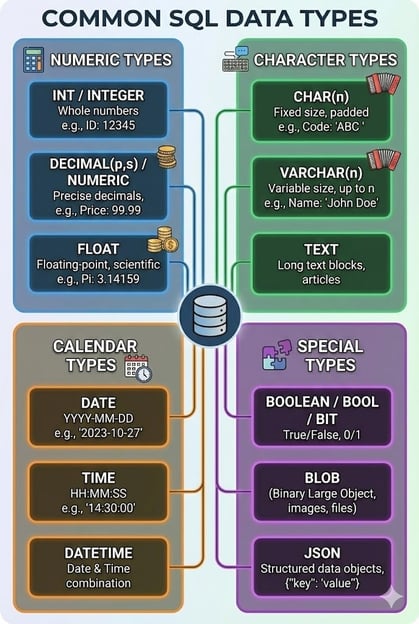
Numeric data types
Numeric types store whole numbers or decimals. The specific numeric type will determine the range, precision, and storage size of the numbers stored. The most common data types in this category are:
-
integers, like INT, SMALLINT, and BIGINT, for whole numbers,
-
decimals, like DECIMAL(p, s) and NUMERIC(p, s), for exact decimal values,
-
and floats, like FLOAT and DOUBLE, for approximate values that may introduce small rounding differences
Let’s create an example table to demonstrate different numeric data types:
CREATE TABLE products (
    product_id INT,
    price DECIMAL(8, 2),
    measurement FLOAT
);

INSERT INTO products VALUES
    (1, 19.99, 3.1415),
    (2, 250.56, 2.71828);

SELECT * FROM products;
Here’s what the output table would look like:
|
product_id
|
price
|
measurement
|
|
1
|
19.99
|
3.1415
|
|
2
|
250.56
|
2.71828
|
As you can see, the first column is constrained to be a whole number, the second to a decimal with two digits past the decimal point, and the third is a decimal point with an indefinite number of digits.
At first glance, it may seem like DECIMAL and FLOAT are the same. But there is an important difference: DECIMAL stores a precise number with a specified number of decimal places, while FLOAT keeps an approximate value that may vary slightly by system.
It’s important to use decimals when precision is necessary and only rely on floats if small rounding errors are acceptable.
|
Category
|
Data type(s)
|
Purpose / What it stores
|
Example value(s)
|
|
Numeric
|
INT, SMALLINT, BIGINT
|
Whole numbers of varying size
|
1, 42, 1000
|
|
Numeric
|
DECIMAL(p,s), NUMERIC(p,s)
|
Exact decimal values with fixed precision
|
19.99, 250.56
|
|
Numeric
|
FLOAT, DOUBLE
|
Approximate decimal values. May introduce small rounding differences
|
3.1415, 2.71828
|
Character and string data types
Character types store text. There are a few different types that differ in performance and storage efficiency.
-
CHAR(n) is for fixed-length character sets. This is useful for data that always has the same size, like state codes or airport abbreviations.
-
VARCHAR(n) is for variable-length character sets. It is useful for names, email addresses, and other user-entered text.
-
TEXT and similar types are used for large blocks of unstructured text, like blog posts or product descriptions.
Some systems, like SQL Server, even support Unicode string types, such as NCHAR and NVARCHAR, which are useful when your data includes text in multiple writing systems, such as Latin, Chinese, or Cyrillic.
|
Category
|
Data type(s)
|
Purpose / What it stores
|
Example value(s)
|
|
Character / String
|
CHAR(n)
|
Fixed-length text
|
'US', 'CA'
|
|
Character / String
|
VARCHAR(n)
|
Variable-length text
|
'Alice Johnson', 'Bob Smith'
|
|
Character / String
|
TEXT
|
Large blocks of unstructured text
|
'Preferred contact by email.', 'Requires invoice copy for each order.'
|
|
Character / String
|
NCHAR(n), NVARCHAR(n)
|
Fixed- or variable-length Unicode text
|
'Å', 'É', 'München', 'São Paulo'
|
Let’s see what this looks like with an example table demonstrating different string data types:
CREATE TABLE customers (
    id INT,
    country_code CHAR(2),
    name VARCHAR(100),
    notes TEXT
);

INSERT INTO customers VALUES
    (1, 'US', 'Alice Johnson', 'Preferred contact by email.'),
    (2, 'CA', 'Bob Smith', 'Requires invoice copy for each order.');

SELECT * FROM customers;
Here’s what this table would end up looking like. You can see the length differences encoded in each string data type.
|
id
|
country_code
|
name
|
notes
|
|
1
|
US
|
Alice Johnson
|
Preferred contact by email.
|
|
2
|
CA
|
Bob Smith
|
Requires invoice copy for each order.
|
Here, CHAR(2) enforces consistent length, while VARCHAR and TEXT allow more flexibility.
Date and time data types
Date and time data types make it possible to store and query temporal information accurately. Beginners may think they can use numeric or string data types to encode this type of information. However, doing so can cause problems downstream with data analysis. Using a specific calendar data type can make everything smoother.
The three types most commonly used are:
-
DATE, which encodes the year, month, and day,
-
TIME, which stores the hour, minute, and second,
-
and DATETIME or TIMESTAMP, which store a combined date and time.
Modern databases may even support fractional seconds or time zone–aware data types, such as TIMESTAMPTZ in PostgreSQL, which stores timestamps in UTC and automatically converts them to your session's time zone upon retrieval.
|
Category
|
Data type(s)
|
Purpose / What it stores
|
Example value(s)
|
|
Date / Time
|
DATE
|
Calendar dates (year, month, day)
|
'2025-11-26'
|
|
Date / Time
|
TIME
|
Time of day (hour, minute, second)
|
'09:30:00', '18:45:30'
|
|
Date / Time
|
DATETIME, TIMESTAMP
|
Combined date and time
|
'2025-11-20 14:15:00', '2025-11-21 09:00:00'
|
|
Date / Time
|
TIMESTAMPTZ
|
Combined date and time with time zone (PostgreSQL)
|
'2025-11-21 09:00:00+00'
|
Let’s create a simple table to demonstrate these temporal data types:
CREATE TABLE events (
    event_id INT,
    event_date DATE,
    start_time TIME,
    created_at DATETIME
);

INSERT INTO events VALUES
    (1, '2025-11-26', '09:30:00', '2025-11-20 14:15:00'),
    (2, '2025-12-01', '18:45:30', '2025-11-21 09:00:00');

SELECT * FROM events;
Here’s what the tablewould look like:
|
event_id
|
event_date
|
start_time
|
created_at
|
|
1
|
2025-11-26
|
09:30:00
|
2025-11-20 14:15:00
|
|
2
|
2025-12-01
|
18:45:30
|
2025-11-21 09:00:00
|
You can see how choosing the right date or timestamp type can affect the type of data you can store.
Boolean and other special data types
Not all types of data can fit neatly into one of the previous categories. For these, SQL includes a set of special-purpose types for specific use cases. Some of the most common ones you might see include:
-
Boolean values (BOOLEAN, BOOL, or BIT, depending on the system) for recording true or false,
-
Binary data (BLOB) for images, files, or serialized objects,
-
Large text (CLOB) for full-sized documents,
-
JSON (in MySQL and PostgreSQL) for schema-less or nested data
-
ARRAY (only in PostgreSQL) for lists
-
UUID for unique identifiers that don’t rely on numeric sequences, like a session token or a global tracking code.
Special types let you store richer or more flexible data when traditional tables alone don’t capture the structure.
|
Category
|
Data type(s)
|
Purpose / What it stores
|
Example value(s)
|
|
Special / Boolean / Other
|
BOOLEAN, BOOL, BIT
|
True or false values
|
TRUE, FALSE
|
|
Special / Boolean / Other
|
BLOB
|
Binary large objects (images, files)
|
[binary image data]
|
|
Special / Boolean / Other
|
CLOB
|
Large text documents
|
'Full contract text...'
|
|
Special / Boolean / Other
|
JSON
|
Structured or nested data
|
'{"name": "Alice"}'
|
|
Special / Boolean / Other
|
ARRAY
|
Lists of values (PostgreSQL only)
|
[1,2,3]
|
|
Special / Boolean / Other
|
UUID
|
Globally unique identifiers
|
'550e8400-e29b-41d4-a716-446655440000'
|
SQL Data Types Across Different Systems
Database management systems differ in the details of how they use these data types. While the broad categories stay the same, the exact names and behaviors vary across systems.
Different systems design their data types with their own priorities, which is why their behaviors differ. Some differences are small, like the exact keyword used. Others change how the data behaves in practice, such as limits on text length, how booleans are stored, or whether the system supports specialized formats.
MySQL emphasizes speed and simplicity, so it uses practical, lightweight choices like TINYINT (which is technically stored as numbers) for Boolean values. It favors performance and broad compatibility over strict type semantics.
PostgreSQL aims to comply with standards and be extensible. This is reflected in the fact that it uses a true BOOLEAN type and has a richer set of data type options, such as ARRAY and JSONB for storing structured or nested data directly in a column.
SQL Server is built for predictable performance in enterprise environments and deep integration with Microsoft’s ecosystem. This is why it offers strongly defined types like BIT for Booleans and VARCHAR(MAX) for large text.
The table below gives a side-by-side look at how three major SQL systems implement common concepts.
|
Concept
|
MySQL
|
PostgreSQL
|
SQL Server
|
|
Numeric (whole numbers)
|
Uses INT for general-purpose whole numbers
|
Uses INTEGER for whole numbers
|
Uses INT for whole numbers
|
|
Decimal / fixed-precision numbers
|
Uses DECIMAL(p, s) for precise numeric values
|
Uses NUMERIC(p, s) for exact precision storage
|
Uses DECIMAL(p, s) for precise numeric values
|
|
Standard-length text strings
|
Uses VARCHAR(n) for variable-length text
|
Uses VARCHAR(n) for variable-length text
|
Uses VARCHAR(n) for variable-length text
|
|
Large text storage
|
Uses TEXT for long text fields
|
Uses TEXT for long text fields
|
Uses VARCHAR(MAX) for long text fields
|
|
Boolean values
|
Stores booleans as TINYINT(1) (0 or 1)
|
Uses native BOOLEAN values (true/false)
|
Uses BIT (0 or 1) for boolean-like data
|
|
Auto-incrementing primary keys
|
Uses the AUTO_INCREMENT keyword
|
Uses SERIAL or IDENTITY for auto-generated integers
|
Uses IDENTITY for auto-generated integers
|
|
Very large character strings
|
Uses LONGTEXT for extremely large text
|
Allows very large VARCHAR with no practical upper limit
|
Uses VARCHAR(MAX) for large or unbounded text
|
|
JSON storage
|
Supports JSON for structured JSON data
|
Supports both JSON (text) and JSONB (binary-optimized)
|
Supports JSON (stored as text)
|
|
Array storage
|
Does not support array types
|
Supports ARRAY for storing lists in one column
|
Does not support array types
|
What this means in practice
Each system’s underlying design goals and the kinds of workloads they are optimized to support directly influence the way they are built to operate.
These differences mean that while many common SQL skills transfer easily between systems, details like maximum text size, auto-increment keywords, or support for complex structures can vary.
If you are only using one system, it's easy to become an expert in the particulars of your database management system. However, changing jobs or departments may require you to jump into a different database management system with different rules.
For this reason, when learning SQL, it's helpful to recognize the shared concepts behind the data types rather than simply relying on a single system’s particulars.
Choosing the Right Data Type
Selecting a data type is sometimes very straightforward. But sometimes it takes a bit of thought. A good choice makes your data easier to query, keeps storage lean, and helps avoid bugs downstream. The broad category will likely be determined by what kind of data you have.
Numeric data
For example, suppose you are storing measurement data. Obviously, you're going to want some type of numeric, not a calendar or a string. But how precise are the measurements you want to store? Are integers OK, or do you need decimals? Do you want a fixed number of significant digits?
Then you should consider storage and efficiency. Choosing the smallest integer type that can safely hold your data will help to keep your tables efficient. Smaller types use less storage and can improve performance, especially in large tables. You'll usually want to pick a type large enough for your expected range without going far beyond what you’ll realistically need.
When an integer won't work, you have the choice of a DECIMAL or a FLOAT. Floating point types approximate values rather than storing them exactly, which can cause rounding errors in financial, scientific, or other accuracy-sensitive work.
DECIMAL and NUMERIC store exact values, making them better for anything involving prices or ratios. However, DECIMALs tend to have larger storage requirements than FLOATs, depending on how many decimal points you save.
Character and string data
For string data, you'll want to think about how large you want each input to be.
Usually, you'll want to size VARCHAR fields realistically rather than defaulting to the maximum length. Overly large limits don’t usually improve flexibility, but they can mislead future developers about the data’s expected size.
Think about your expected inputs, whether that be names, emails, or product titles, and size the column accordingly.
Date and time data
For calendar data, it helps to be precise about what you’re storing.
If you only need a date or only need a time, it’s usually better to use DATE or TIME instead of DATETIME. These choices make your intentions obvious and reduce the chances of mix-ups later. They also give the database a little more room to optimize date-only or time-only queries.
Boolean data
Whenever possible, use domain-appropriate types like BOOLEAN instead of workarounds such as integers or strings. Native types include built-in validation, clearer semantics, and support from database functions that expect specific kinds of data.
Below is a summary of common data storage goals and the recommended SQL data types to address them.
|
Goal
|
Recommended data type
|
Why
|
|
Store exact numeric values (money, measurements)
|
DECIMAL or NUMERIC
|
Stores precise values without floating-point rounding issues
|
|
Store short or medium-length text
|
VARCHAR(n)
|
Efficient storage with predictable size and flexible length
|
|
Store long, unstructured text
|
TEXT or CLOB
|
Designed for blocks of text such as descriptions or documents
|
|
Store date-only or time-only information
|
DATE or TIME
|
Avoids unnecessary complexity and reflects the true meaning of the data
|
|
Store flexible, document-like values
|
JSON or JSONB
|
Useful for nested or evolving structures that don’t fit fixed columns
|
For readers who’d like a refresher on grouping and filtering data, the Intermediate SQL course walks through those core skills.
Common Pitfalls and Best Practices
Even a simple database schema can run into problems if data types aren’t chosen with care.
Truncation
For example, if you have a column for names that only allows 5 characters, you may end up with “Micha” instead of “Michael”. This is a common problem known as truncation.
It typically shows up in fields like names, addresses, or comments, where real-world variation can exceed an optimistic limit. One way to avoid this is to size text fields based on real examples or err on the side of slightly too long.
Rounding errors
Another common issue is unexpected rounding when floating-point values are used for money or other precision-sensitive data. Because FLOATs store approximate values, small discrepancies can accumulate and affect reports, summaries, or calculations.
You can prevent this by choosing DECIMAL for anything involving currency or exact decimal values. This will ensure the database keeps the numbers stable.
Type mismatches
Type mismatches can also lead to slow queries, especially in joins or comparisons.
When one column is stored as a string and another as an integer (or when each table uses a slightly different type), and you try to join them, the database may have to convert values on the fly. This can lead to errors and add unnecessary overhead.
Keeping related columns aligned in type avoids these hidden conversions and helps queries run more smoothly.
Calendar dates have their own slew of problems.
Date formatting inconsistencies are a leading source of confusion when systems mix local conventions or when developers store dates as strings rather than using proper date types. These inconsistencies can cause queries to misbehave or silently return incorrect results.
The straightforward fix is to use actual date types and stick to a consistent, unambiguous format when working with dates in text form. I highly recommend our Time Series Analysis in SQL Server course to help avoid the most common calendar problems in your databases.
Best practices
Here are a few best practices to ensure your databases run smoothly:
-
Populate tables with sample data early in the design process to reveal any weaknesses in sizing or typing choices.
-
Document the purpose and expected ranges of each of your columns so future changes don’t introduce mismatches.
-
Avoid using generic types when more specific ones would improve clarity.
Conclusion
Data types define how your database “understands” the values you store. They influence everything from storage to performance to clarity. Learning how they work makes your databases more reliable and predictable.
For further reading on this topic, check out SQL Database Overview Tutorial and SQLite Data Types: A Close Look at Storage Classes. I also recommend the PostgreSQL Summary Stats and Window Functions course, which shows how to compute running totals and ordered statistics.
A data type in SQL defines the kind of data a column can store and how that data behaves when queried or processed. It influences storage, validation, sorting, comparison, and mathematical operations.










When you first start working with SQL, it’s easy to think of data types as simple labels. A single column stores either numbers, text, dates, or special data types. But a data type is more than just a label. It’s a set of rules that defines what a value is in the eyes of the database.
In practice, data types shape the way SQL “understands” the information in your database. It’s a set of instructions that gives SQL the context it needs to read, compare, and process your data accurately.
In this tutorial, we’ll look at the major SQL data type categories and see how they behave in different database management systems. I encourage you to follow along with the examples throughout.
If you haven’t worked much with database tables before, our SQL Fundamentals course gives a clear, beginner-friendly foundation for understanding how datasets like this are structured.
What Are SQL Data Types?
A data type describes the format of your data: the kinds of values a column can hold, how those values are stored internally, and the operations that make sense to run on them.
This means your choice of data type affects more than just table design. It can influence storage needs, query performance, sorting behavior, math operations, and even how different systems interpret the same value.
Here’s a simple table that uses several types at once:
Each column in this table defines the type of data it can hold.
The
idcolumn will store whole numbers, giving each employee a unique identifier.The
namecolumn can hold up to 50 characters of text, so you can store short names.The
start_datecolumn is for calendar dates.The
activecolumn will store true or false values, making it easy to track which employees are currently active.Finally, the
salarycolumn will store monetary amounts with a 10-digit precision, keeping two digits after the decimal point for cents.Together, these columns form a structured table that enforces rules about what kinds of values are allowed in each field. This makes the data more predictable and easier to work with.
Let’s add some example data to this and see what the resulting table might look like, using PostgreSQL.
id
name
start_date
active
salary
1
Alice Johnson
2025-01-15
TRUE
55000.00
2
Bob Smith
2024-06-01
FALSE
62000.50
Different database systems follow the same principles but vary in naming and features. For example, SQL Server uses
BITinstead ofBOOLEAN, and MySQL treatsBOOLEANas a small integer.Categories of SQL Data Types
There are four main categories of data types: numeric, character, date, and special. Let’s look at each in detail.
Numeric data types
Numeric types store whole numbers or decimals. The specific numeric type will determine the range, precision, and storage size of the numbers stored. The most common data types in this category are:
integers, like
INT,SMALLINT, andBIGINT, for whole numbers,decimals, like
DECIMAL(p, s)andNUMERIC(p, s), for exact decimal values,and floats, like
FLOATandDOUBLE, for approximate values that may introduce small rounding differencesLet’s create an example table to demonstrate different numeric data types:
Here’s what the output table would look like:
product_id
price
measurement
1
19.99
3.1415
2
250.56
2.71828
As you can see, the first column is constrained to be a whole number, the second to a decimal with two digits past the decimal point, and the third is a decimal point with an indefinite number of digits.
At first glance, it may seem like
DECIMALandFLOATare the same. But there is an important difference:DECIMALstores a precise number with a specified number of decimal places, whileFLOATkeeps an approximate value that may vary slightly by system.It’s important to use decimals when precision is necessary and only rely on floats if small rounding errors are acceptable.
Category
Data type(s)
Purpose / What it stores
Example value(s)
Numeric
INT,SMALLINT,BIGINTWhole numbers of varying size
1, 42, 1000
Numeric
DECIMAL(p,s),NUMERIC(p,s)Exact decimal values with fixed precision
19.99, 250.56
Numeric
FLOAT,DOUBLEApproximate decimal values. May introduce small rounding differences
3.1415, 2.71828
Character and string data types
Character types store text. There are a few different types that differ in performance and storage efficiency.
CHAR(n)is for fixed-length character sets. This is useful for data that always has the same size, like state codes or airport abbreviations.VARCHAR(n)is for variable-length character sets. It is useful for names, email addresses, and other user-entered text.TEXTand similar types are used for large blocks of unstructured text, like blog posts or product descriptions.Some systems, like SQL Server, even support Unicode string types, such as
NCHARandNVARCHAR, which are useful when your data includes text in multiple writing systems, such as Latin, Chinese, or Cyrillic.Category
Data type(s)
Purpose / What it stores
Example value(s)
Character / String
CHAR(n)Fixed-length text
'US', 'CA'
Character / String
VARCHAR(n)Variable-length text
'Alice Johnson', 'Bob Smith'
Character / String
TEXTLarge blocks of unstructured text
'Preferred contact by email.', 'Requires invoice copy for each order.'
Character / String
NCHAR(n),NVARCHAR(n)Fixed- or variable-length Unicode text
'Å', 'É', 'München', 'São Paulo'
Let’s see what this looks like with an example table demonstrating different string data types:
Here’s what this table would end up looking like. You can see the length differences encoded in each string data type.
id
country_code
name
notes
1
US
Alice Johnson
Preferred contact by email.
2
CA
Bob Smith
Requires invoice copy for each order.
Here,
CHAR(2)enforces consistent length, whileVARCHARandTEXTallow more flexibility.Date and time data types
Date and time data types make it possible to store and query temporal information accurately. Beginners may think they can use numeric or string data types to encode this type of information. However, doing so can cause problems downstream with data analysis. Using a specific calendar data type can make everything smoother.
The three types most commonly used are:
DATE, which encodes the year, month, and day,TIME, which stores the hour, minute, and second,and
DATETIMEorTIMESTAMP, which store a combined date and time.Modern databases may even support fractional seconds or time zone–aware data types, such as
TIMESTAMPTZin PostgreSQL, which stores timestamps in UTC and automatically converts them to your session's time zone upon retrieval.Category
Data type(s)
Purpose / What it stores
Example value(s)
Date / Time
DATECalendar dates (year, month, day)
'2025-11-26'
Date / Time
TIMETime of day (hour, minute, second)
'09:30:00', '18:45:30'
Date / Time
DATETIME,TIMESTAMPCombined date and time
'2025-11-20 14:15:00', '2025-11-21 09:00:00'
Date / Time
TIMESTAMPTZCombined date and time with time zone (PostgreSQL)
'2025-11-21 09:00:00+00'
Let’s create a simple table to demonstrate these temporal data types:
Here’s what the tablewould look like:
event_id
event_date
start_time
created_at
1
2025-11-26
09:30:00
2025-11-20 14:15:00
2
2025-12-01
18:45:30
2025-11-21 09:00:00
You can see how choosing the right date or timestamp type can affect the type of data you can store.
Boolean and other special data types
Not all types of data can fit neatly into one of the previous categories. For these, SQL includes a set of special-purpose types for specific use cases. Some of the most common ones you might see include:
Boolean values (
BOOLEAN,BOOL, orBIT, depending on the system) for recording true or false,Binary data (
BLOB) for images, files, or serialized objects,Large text (
CLOB) for full-sized documents,JSON(in MySQL and PostgreSQL) for schema-less or nested dataARRAY(only in PostgreSQL) for listsUUIDfor unique identifiers that don’t rely on numeric sequences, like a session token or a global tracking code.Special types let you store richer or more flexible data when traditional tables alone don’t capture the structure.
Category
Data type(s)
Purpose / What it stores
Example value(s)
Special / Boolean / Other
BOOLEAN,BOOL,BITTrue or false values
TRUE, FALSE
Special / Boolean / Other
BLOBBinary large objects (images, files)
[binary image data]
Special / Boolean / Other
CLOBLarge text documents
'Full contract text...'
Special / Boolean / Other
JSONStructured or nested data
'{"name": "Alice"}'
Special / Boolean / Other
ARRAYLists of values (PostgreSQL only)
[1,2,3]
Special / Boolean / Other
UUIDGlobally unique identifiers
'550e8400-e29b-41d4-a716-446655440000'
SQL Data Types Across Different Systems
Database management systems differ in the details of how they use these data types. While the broad categories stay the same, the exact names and behaviors vary across systems.
Different systems design their data types with their own priorities, which is why their behaviors differ. Some differences are small, like the exact keyword used. Others change how the data behaves in practice, such as limits on text length, how booleans are stored, or whether the system supports specialized formats.
MySQL emphasizes speed and simplicity, so it uses practical, lightweight choices like
TINYINT(which is technically stored as numbers) for Boolean values. It favors performance and broad compatibility over strict type semantics.PostgreSQL aims to comply with standards and be extensible. This is reflected in the fact that it uses a true
BOOLEANtype and has a richer set of data type options, such asARRAYandJSONBfor storing structured or nested data directly in a column.SQL Server is built for predictable performance in enterprise environments and deep integration with Microsoft’s ecosystem. This is why it offers strongly defined types like
BITfor Booleans andVARCHAR(MAX)for large text.The table below gives a side-by-side look at how three major SQL systems implement common concepts.
Concept
MySQL
PostgreSQL
SQL Server
Numeric (whole numbers)
Uses
INTfor general-purpose whole numbersUses
INTEGERfor whole numbersUses
INTfor whole numbersDecimal / fixed-precision numbers
Uses
DECIMAL(p, s)for precise numeric valuesUses
NUMERIC(p, s)for exact precision storageUses
DECIMAL(p, s)for precise numeric valuesStandard-length text strings
Uses
VARCHAR(n)for variable-length textUses
VARCHAR(n)for variable-length textUses
VARCHAR(n)for variable-length textLarge text storage
Uses
TEXTfor long text fieldsUses
TEXTfor long text fieldsUses
VARCHAR(MAX)for long text fieldsBoolean values
Stores booleans as
TINYINT(1)(0 or 1)Uses native
BOOLEANvalues (true/false)Uses
BIT(0 or 1) for boolean-like dataAuto-incrementing primary keys
Uses the
AUTO_INCREMENTkeywordUses
SERIALorIDENTITYfor auto-generated integersUses
IDENTITYfor auto-generated integersVery large character strings
Uses
LONGTEXTfor extremely large textAllows very large
VARCHARwith no practical upper limitUses
VARCHAR(MAX)for large or unbounded textJSON storage
Supports
JSONfor structured JSON dataSupports both
JSON(text) andJSONB(binary-optimized)Supports
JSON(stored as text)Array storage
Does not support array types
Supports
ARRAYfor storing lists in one columnDoes not support array types
What this means in practice
Each system’s underlying design goals and the kinds of workloads they are optimized to support directly influence the way they are built to operate.
These differences mean that while many common SQL skills transfer easily between systems, details like maximum text size, auto-increment keywords, or support for complex structures can vary.
If you are only using one system, it's easy to become an expert in the particulars of your database management system. However, changing jobs or departments may require you to jump into a different database management system with different rules.
For this reason, when learning SQL, it's helpful to recognize the shared concepts behind the data types rather than simply relying on a single system’s particulars.
Choosing the Right Data Type
Selecting a data type is sometimes very straightforward. But sometimes it takes a bit of thought. A good choice makes your data easier to query, keeps storage lean, and helps avoid bugs downstream. The broad category will likely be determined by what kind of data you have.
Numeric data
For example, suppose you are storing measurement data. Obviously, you're going to want some type of numeric, not a calendar or a string. But how precise are the measurements you want to store? Are integers OK, or do you need decimals? Do you want a fixed number of significant digits?
Then you should consider storage and efficiency. Choosing the smallest integer type that can safely hold your data will help to keep your tables efficient. Smaller types use less storage and can improve performance, especially in large tables. You'll usually want to pick a type large enough for your expected range without going far beyond what you’ll realistically need.
When an integer won't work, you have the choice of a
DECIMALor aFLOAT. Floating point types approximate values rather than storing them exactly, which can cause rounding errors in financial, scientific, or other accuracy-sensitive work.DECIMALandNUMERICstore exact values, making them better for anything involving prices or ratios. However,DECIMALs tend to have larger storage requirements thanFLOATs, depending on how many decimal points you save.Character and string data
For string data, you'll want to think about how large you want each input to be.
Usually, you'll want to size
VARCHARfields realistically rather than defaulting to the maximum length. Overly large limits don’t usually improve flexibility, but they can mislead future developers about the data’s expected size.Think about your expected inputs, whether that be names, emails, or product titles, and size the column accordingly.
Date and time data
For calendar data, it helps to be precise about what you’re storing.
If you only need a date or only need a time, it’s usually better to use
DATEorTIMEinstead ofDATETIME. These choices make your intentions obvious and reduce the chances of mix-ups later. They also give the database a little more room to optimize date-only or time-only queries.Boolean data
Whenever possible, use domain-appropriate types like
BOOLEANinstead of workarounds such as integers or strings. Native types include built-in validation, clearer semantics, and support from database functions that expect specific kinds of data.Below is a summary of common data storage goals and the recommended SQL data types to address them.
Goal
Recommended data type
Why
Store exact numeric values (money, measurements)
DECIMALorNUMERICStores precise values without floating-point rounding issues
Store short or medium-length text
VARCHAR(n)Efficient storage with predictable size and flexible length
Store long, unstructured text
TEXTorCLOBDesigned for blocks of text such as descriptions or documents
Store date-only or time-only information
DATEorTIMEAvoids unnecessary complexity and reflects the true meaning of the data
Store flexible, document-like values
JSONorJSONBUseful for nested or evolving structures that don’t fit fixed columns
For readers who’d like a refresher on grouping and filtering data, the Intermediate SQL course walks through those core skills.
Common Pitfalls and Best Practices
Even a simple database schema can run into problems if data types aren’t chosen with care.
Truncation
For example, if you have a column for names that only allows 5 characters, you may end up with “Micha” instead of “Michael”. This is a common problem known as truncation.
It typically shows up in fields like names, addresses, or comments, where real-world variation can exceed an optimistic limit. One way to avoid this is to size text fields based on real examples or err on the side of slightly too long.
Rounding errors
Another common issue is unexpected rounding when floating-point values are used for money or other precision-sensitive data. Because
FLOATs store approximate values, small discrepancies can accumulate and affect reports, summaries, or calculations.You can prevent this by choosing
DECIMALfor anything involving currency or exact decimal values. This will ensure the database keeps the numbers stable.Type mismatches
Type mismatches can also lead to slow queries, especially in joins or comparisons.
When one column is stored as a string and another as an integer (or when each table uses a slightly different type), and you try to join them, the database may have to convert values on the fly. This can lead to errors and add unnecessary overhead.
Keeping related columns aligned in type avoids these hidden conversions and helps queries run more smoothly.
Date formatting
Calendar dates have their own slew of problems.
Date formatting inconsistencies are a leading source of confusion when systems mix local conventions or when developers store dates as strings rather than using proper date types. These inconsistencies can cause queries to misbehave or silently return incorrect results.
The straightforward fix is to use actual date types and stick to a consistent, unambiguous format when working with dates in text form. I highly recommend our Time Series Analysis in SQL Server course to help avoid the most common calendar problems in your databases.
Best practices
Here are a few best practices to ensure your databases run smoothly:
Populate tables with sample data early in the design process to reveal any weaknesses in sizing or typing choices.
Document the purpose and expected ranges of each of your columns so future changes don’t introduce mismatches.
Avoid using generic types when more specific ones would improve clarity.
Conclusion
Data types define how your database “understands” the values you store. They influence everything from storage to performance to clarity. Learning how they work makes your databases more reliable and predictable.
For further reading on this topic, check out SQL Database Overview Tutorial and SQLite Data Types: A Close Look at Storage Classes. I also recommend the PostgreSQL Summary Stats and Window Functions course, which shows how to compute running totals and ordered statistics.
A data type in SQL defines the kind of data a column can store and how that data behaves when queried or processed. It influences storage, validation, sorting, comparison, and mathematical operations.