
Cursus
Artificial Intelligence begrijpen
2 Hr
420.6K
De markt voor AI-codetools ging in het begin van 2026 razendsnel. OpenAI bracht in februari GPT-5.3-Codex uit, met de claim state-of-the-art resultaten op SWE-bench Pro te halen en 25% sneller te zijn dan zijn voorganger.
In hetzelfde tijdsbestek lanceerde Anthropic Claude Opus 4.6 en Claude Sonnet 4.6, met een contextvenster van 1 miljoen tokens in bèta en een nieuwe multi-agentfunctie genaamd Agent Teams. Daarbovenop wijzen verschillende lekken op een interne GPT‑5.4 met een vermoedelijk contextvenster van 2 miljoen tokens, wat de contextwedloop ver voorbij het huidige publieke aanbod van beide tools zou duwen.
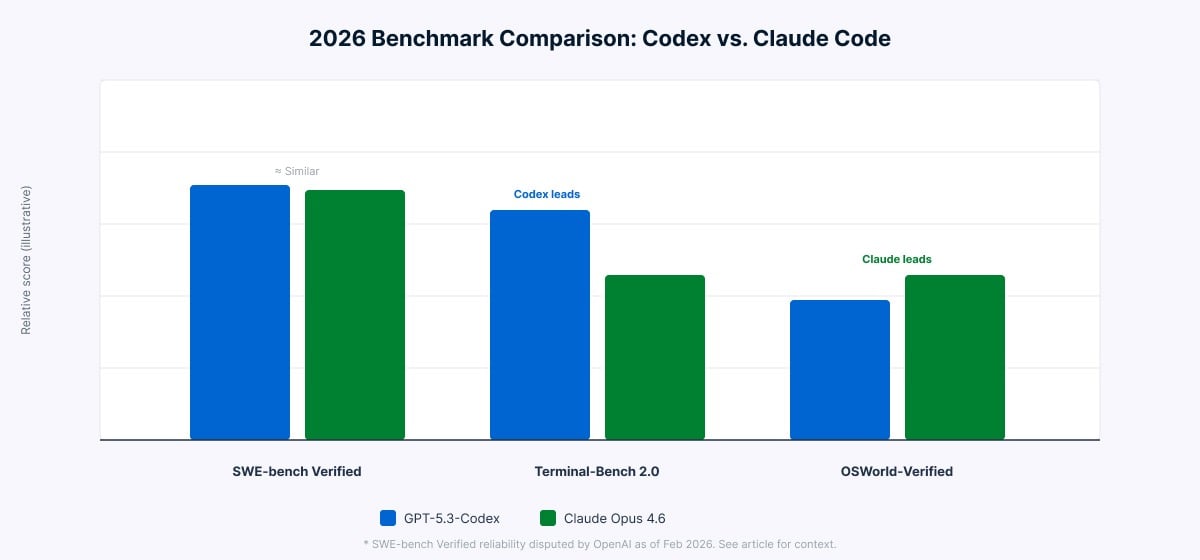
Voor het eerst draaien beide tools op modellen die binnen enkele weken van elkaar zijn uitgebracht, waardoor een directe vergelijking zinvoller is dan voorheen. Op SWE-bench Pro liggen de twee tools dicht bij elkaar. Op Terminal-Bench 2.0 laat Codex een duidelijke voorsprong zien op Claude Code bij terminalachtige taken. Het verschil zit niet waar je het zou verwachten.
Als je de naam "Codex" eerder bent tegengekomen, is het goed om meteen te verduidelijken: de huidige tool deelt alleen de naam met zijn voorganger uit 2021. De oorspronkelijke Codex was een op GPT-3 fijngestemd model dat de vroege GitHub Copilot aandreef als code-aanvulservice. Die werd in maart 2023 uitgefaseerd. Waar dat model reageerde met codecompletions op prompts, ontvangt de huidige tool doelbeschrijvingen en werkt hij daar zelfstandig naartoe.
De Codex van 2025 is een volwaardige software-engineeringtool die autonoom werkt. Hij werd gelanceerd in mei 2025, algemeen beschikbaar in oktober 2025, en draait begin 2026 op GPT-5.3-Codex. Hij vult geen regels aan. Hij plant en voert complete taken uit: features schrijven, bugs fixen, tests draaien, pull requests voorstellen en code reviewen.
Codex werkt op vier vlakken: een cloud webagent op chatgpt.com/codex, een open-source CLI gebouwd in Rust en TypeScript, IDE-extensies voor VS Code en Cursor, en een macOS-desktopapp gelanceerd in februari 2026. Hij integreert ook met GitHub, Slack en Linear.
# Install the Codex CLI
npm install -g @openai/codex

# Run in interactive mode
codex "refactor the auth module to use async/await"

# Run in full auto mode
codex --full-auto "write tests for all API endpoints"
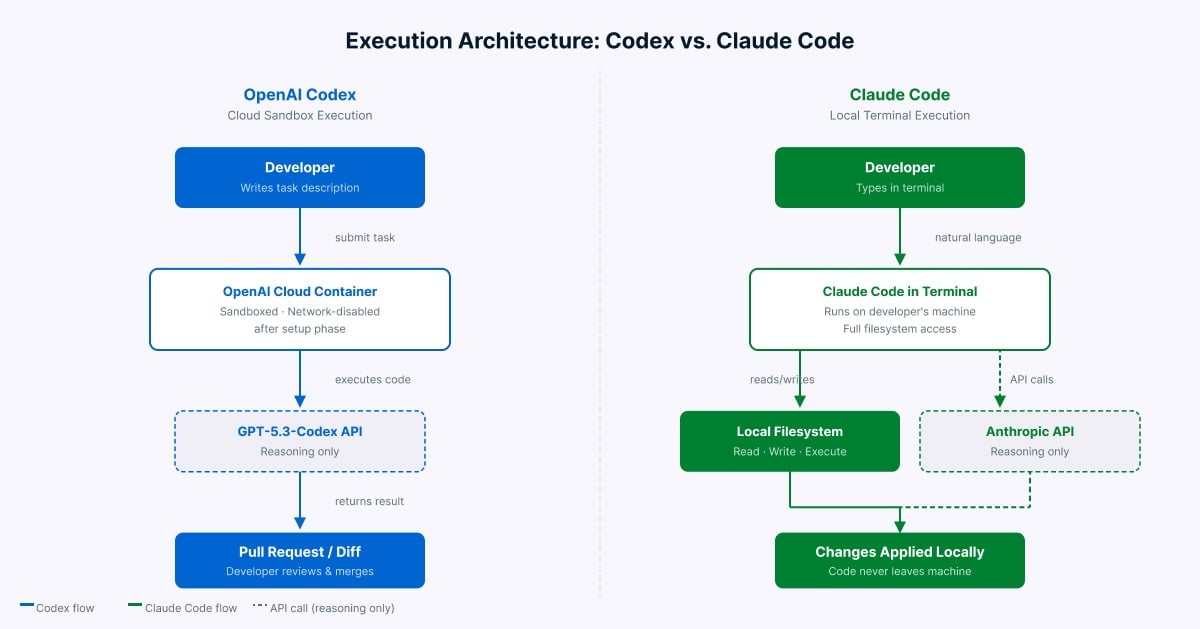
Wanneer je een taak naar de cloudagent stuurt, levert Codex een geïsoleerde container met je repository vooraf geladen. De runtime heeft twee fasen. Tijdens de setupfase heeft de container netwerktoegang om afhankelijkheden te installeren. Zodra de agentfase begint, wordt het netwerk standaard uitgeschakeld. Dit voorkomt dat code die de agent genereert externe services bereikt of onbedoelde pakketten downloadt. De agent werkt de taak af en levert een pull request of diff aan jou ter review.
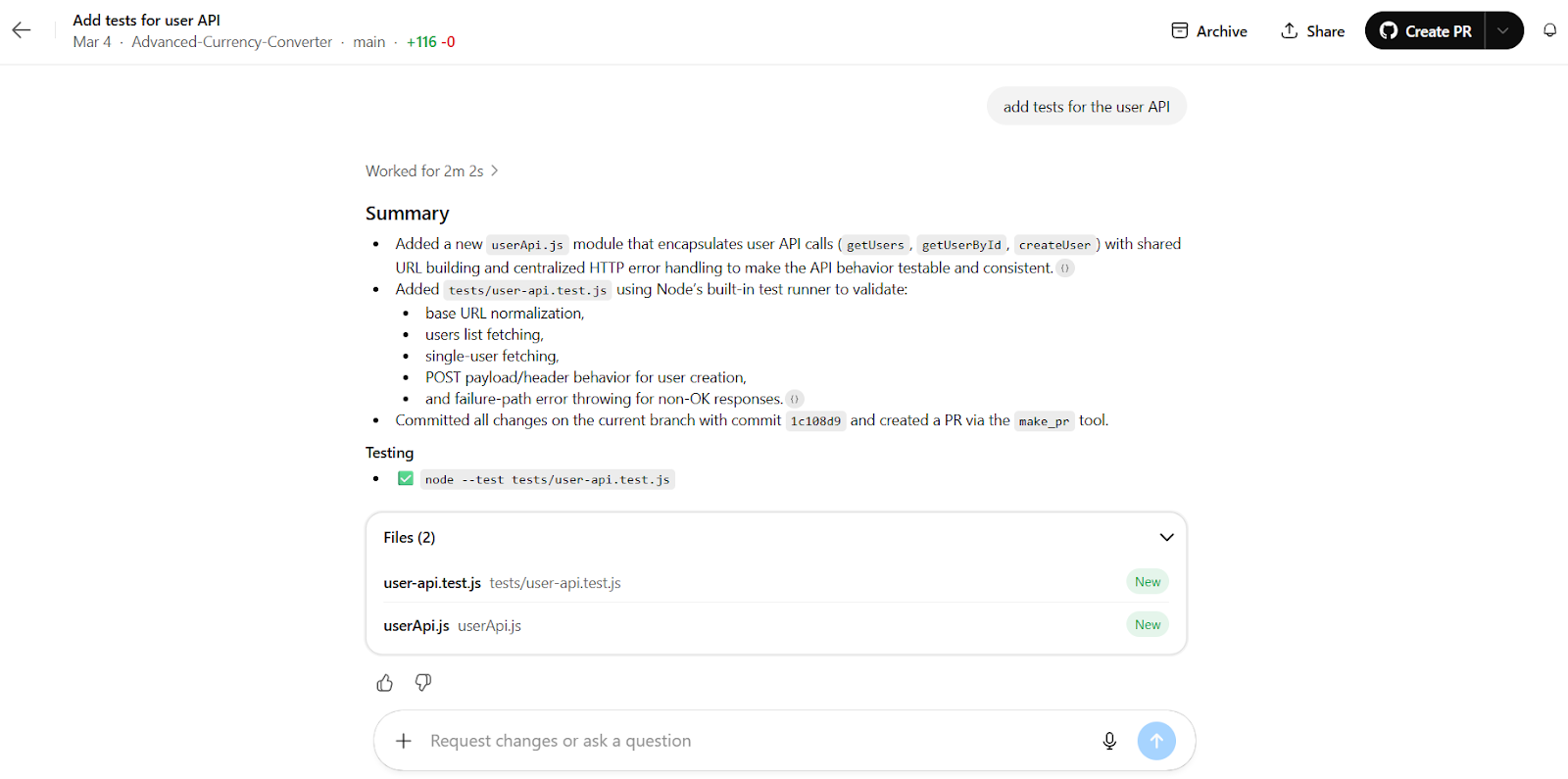
Codex-cloudwerkruimte die taken uitvoert. Afbeelding door de auteur.
De Codex CLI biedt drie niveaus van gebruikersbetrokkenheid. In de modus Suggest leest de agent je bestanden en stelt wijzigingen voor, maar voert niets door zonder jouw bevestiging. Auto Edit-modus laat de agent automatisch bestanden schrijven, maar vraagt nog steeds toestemming voordat shellcommando’s worden uitgevoerd. Full Auto-modus draait de volledige cyclus zonder onderbrekingen, beperkt tot de huidige map.
Configuratie verloopt via AGENTS.md-bestanden, een open standaard die door tienduizenden open-sourcerepos wordt ondersteund en is overgenomen door andere tools, waaronder Cursor en Aider. Als je team deze tools al gebruikt, leest Codex die bestaande configuratie direct.
Claude Code is de codeassistent van Anthropic, gebouwd voor de terminal. Hij werd in februari 2025 als beperkte research preview gelanceerd en werd algemeen beschikbaar in mei 2025. Hij draait op Claude Opus 4.6 en Claude Sonnet 4.6, beide uitgebracht begin 2026.
Het belangrijkste om te begrijpen over Claude Code is waar hij draait. Je code blijft op je machine. Claude Code leest je lokale bestandssysteem, voert commando’s uit in je eigen terminal, gebruikt je lokale git-setup en roept de Anthropic API alleen aan voor verwerking. Er wordt niets naar een cloudcontainer gestuurd.
Claude Code werkt via de terminal en ondersteunt ook VS Code, JetBrains IDE’s (momenteel in bèta) en VS Code-forks zoals Cursor en Windsurf. Er is ook een browserinterface op claude.ai/code. Installatie is eenvoudig op macOS, Linux en Windows:
# macOS and Linux
curl -fsSL https://claude.ai/install.sh | bash
Voor Windows is er een PowerShell-installer beschikbaar op de officiële downloadpagina. Homebrew en WinGet worden ook ondersteund. De npm-installatieroute is uitgefaseerd.
Na installatie praat je met Claude Code in natuurlijke taal in je terminal:
# Start a session
claude

# Continue the most recent session
claude -c

# Pipe input directly from another tool
tail -f app.log | claude -p "alert me if you see anomalies"
Een CLAUDE.md-bestand in de projectroot geeft Claude Code bewaarde context: je codeconventies, aantekeningen over de architectuur en alles wat het moet weten voordat het je code aanraakt.
Standaard vraagt Claude Code om je toestemming voordat het wijzigingen doorvoert. Voordat shellcommando’s worden uitgevoerd, naar bestanden wordt geschreven of wijzigingen worden gecommit, laat het je precies zien wat het van plan is en wacht op jouw bevestiging. Zo houd je de controle, al betekent het ook dat je tijdens een sessie actief moet blijven.
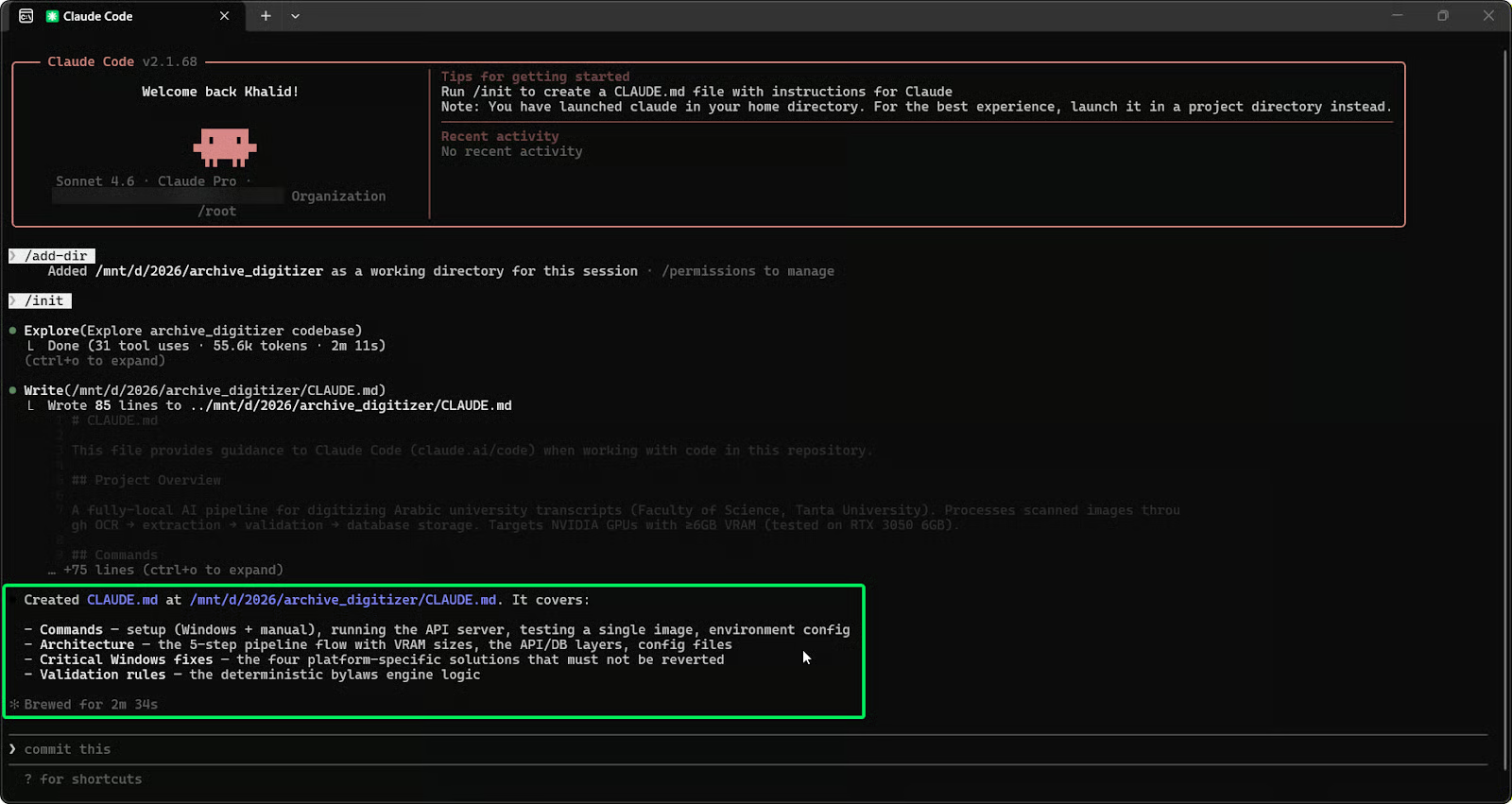
Claude Code in een lokale terminalsessie. Afbeelding door de auteur.
Een van de grootste toevoegingen naast Claude Opus 4.6 is Agent Teams, momenteel in research preview. Hiermee kunnen meerdere Claude Code-sessies parallel werken aan één gedeeld project, gecoördineerd door een leidende sessie.
In tegenstelling tot de parallelle agents van Codex die onafhankelijk draaien, delen de Agent Teams van Claude Code een takenlijst en communiceren ze met elkaar. De lead wijst subtaken toe en volgt wat elke agent wijzigt. Bij het migreren van een grote React-codebase kan de lead bijvoorbeeld één agent toewijzen om afhankelijkheden in kaart te brengen, een andere om vervangingen te schrijven en een derde om tests te draaien, allemaal met realtime updates in dezelfde takenlijst. Zo raken agents niet van het pad bij complexe wijzigingen over meerdere bestanden.
Nu je begrijpt hoe elke tool werkt, lopen we door de belangrijkste praktische verschillen.
|
Functie |
OpenAI Codex |
Claude Code |
|
Primair model |
GPT-5.3-Codex |
Claude Opus 4.6 / Sonnet 4.6 |
|
Uitvoeringsomgeving |
Cloud-sandbox + lokale CLI |
Lokale terminal (machine van de gebruiker) |
|
Interactie-stijl |
Autonoom, achtergrondtaken |
Interactief, developer-in-the-loop |
|
Contextvenster |
400K (input + output) |
200K standaard / 1M bèta |
|
Multi-agentondersteuning |
Parallelle cloud-sandboxagents |
Agent Teams (research preview) |
|
Configuratiebestand |
|
|
|
Token-efficiëntie |
Hogere efficiëntie per taak |
Meer tokens per taak |
|
Instapprijs |
ChatGPT Plus: $20/maand |
Claude Pro: $20/maand |
|
Open-source CLI |
Ja (Apache 2.0) |
Nee |
|
Desktop-app |
Alleen macOS |
Terminal, IDE-extensies, browser |
Het grootste verschil is waar de code draait.
Zoals hierboven beschreven, draait Codex taken in door OpenAI beheerde cloudcontainers, terwijl Claude Code direct in je terminal draait met je eigen bestanden en omgeving. Je lokale machine is niet betrokken bij Codex. Bij Claude Code verlaat er standaard niets je machine.
Codex is ontworpen voor delegatie. Jij beschrijft de taak, het werkt er op de achtergrond aan (meestal klaar in enkele minuten tot een half uur) en jij reviewt het resultaat. Dien de taak in, doe iets anders, kom terug als het klaar is.
Claude Code is ontworpen voor samenwerking. Zoals eerder genoemd laat het zien wat het van plan is en vraagt het bij elke stap om jouw akkoord. Deze wisselwerking vangt fouten vroeg op bij complexe taken, maar betekent dat je gefocust moet blijven gedurende de sessie. Bij simpele taken kan het traag aanvoelen, maar bij grote structurele wijzigingen met veel afhankelijkheden vangt het vaak problemen die een niet-bewaakte tool zou verergeren.
Codex gebruikt AGENTS.md voor bewaarde projectcontext en laadt je volledige repository in de cloudcontainer voor elke taak. Het contextvenster ondersteunt lange sessies met een diff-gebaseerde aanpak die het model gefocust houdt op wat nu relevant is, in plaats van de geschiedenis te comprimeren.
Claude Code gebruikt ingebouwde zoekfunctionaliteit om je codebase te doorlopen zonder dat jij specifieke bestanden hoeft aan te wijzen. Het leest CLAUDE.md voor bewaarde instructies. Het standaard contextvenster dekt grote projecten, en een veel groter contextvenster is in research preview voor Opus 4.6, wat het een voordeel geeft bij zeer grote codebases en lange sessies.
Dit verschil zorgt in de praktijk voor wrijving bij teams die beide tools gebruiken. Codex leest AGENTS.md, de open standaard die veel open-sourceprojecten gebruiken en die wordt ondersteund door tools als Cursor en Aider. Als je team deze configuratie al heeft geschreven, neemt Codex die over.
Claude Code gebruikt CLAUDE.md, dat een gedetailleerdere setup ondersteunt met gelaagde instellingen, beleidshandhaving, hooks die vóór of na acties draaien en MCP-integratie. Het werkt echter alleen binnen de tools van Anthropic en niets anders leest het. Teams die beide tools gebruiken, moeten twee aparte configuratiebestanden bijhouden.
Kijken we nu naar wat de cijfers zeggen, en waar je ze wel en niet op moet vertrouwen.
Voor we in de cijfers duiken, een kanttekening: OpenAI gaf begin 2026 aan dat SWE-bench Verified als benchmark steeds minder betrouwbaar is door contaminatie, en raadde SWE-bench Pro aan als de betrouwbaardere optie. Aan de top zijn de scoreverschillen tussen de leidende modellen klein, en de manier waarop je de tool draait is net zo bepalend als het model zelf. Zie de cijfers hieronder als algemene richtlijn, niet als definitief oordeel.
|
Benchmark |
GPT-5.3-Codex |
Claude Opus 4.6 |
|
SWE-bench Verified |
~80% |
~79% (met Thinking) |
|
SWE-bench Pro |
~57% |
~57–59% (WarpGrep v2) |
|
Terminal-Bench 2.0 |
~77% |
~65% |
|
OSWorld-Verified |
lager |
hoger |
De patronen bij SWE-bench en Terminal-Bench uit de intro houden stand als je naar de cijfers kijkt. Wat de tabel toevoegt is OSWorld-Verified: Claude Opus 4.6 pakt daar de leiding, wat zijn sterkere prestaties weerspiegelt op taken die het navigeren van interfaces en bredere computerscenario’s omvatten. Geen van beide tools domineert dus alle drie de benchmarks.
Benchmarkvergelijking 2026 voor Codex en Claude Code over SWE‑bench, Terminal‑Bench en OSWorld‑Verified. Afbeelding door de auteur.
Bij equivalente taken produceren Claude Code en Codex uitkomsten die hun ontwerp weerspiegelen. Claude Code genereert completere, goed gedocumenteerde outputs die leesbaarheid en het behouden van de oorspronkelijke structuur prioriteren. Codex levert kortere, werkende implementaties met minder uitleg.
Bij dezelfde frontend-clonetaak uit de Composio-vergelijking behield Claude Code de oorspronkelijke layout nauwkeuriger. Codex leverde een werkend resultaat dat visueel afweek maar veel minder tokens gebruikte. Bij een jobschedulertaak schreef Claude Code uitgebreide documentatie naast de code, terwijl Codex een werkende implementatie opleverde met minimale toelichting. Geen van beide is fout; ze optimaliseren voor verschillende uitkomsten.
Codex gebruikt aanzienlijk minder tokens per taak dan Claude Code voor vergelijkbaar werk. Dit verschil is vastgelegd in meerdere onafhankelijke vergelijkingen. Het komt door de werkwijze van Claude Code: het legt zijn stappen uit terwijl het gaat, wat de nauwkeurigheid bij complexe taken verbetert maar veel meer van de tokenlimiet opslokt.
In één gedocumenteerde vergelijking verbruikte Claude 6,2 miljoen tokens op een Figma-achtige taak, tegenover 1,5 miljoen voor Codex—ongeveer 4x verschil voor functioneel vergelijkbare output. Dit efficiëntiegat heeft directe prijsimplicaties, waar ik hieronder bij de prijsstelling op terugkom.
Als je begrijpt hoe elke tool is opgebouwd, zie je makkelijker waar ze in de praktijk het beste passen.
Uitvoeringsarchitectuur van Codex versus Claude Code. Afbeelding door de auteur.
Hier heeft Codex vaak de overhand. De achtergronduitvoering en efficiënte tokenconsumptie maken het geschikt om snel een werkend prototype te bouwen. Omdat prototypingtaken meestal op zichzelf staan en geen diepgaande kennis van lokale afhankelijkheden vereisen, werkt de cloudisolatie goed. Jij beschrijft de requirements, Codex bouwt op de achtergrond iets dat draait, en jij reviewt het resultaat zodra het klaar is.
Claude Code past beter wanneer het prototype aan specifieke lokale conventies moet voldoen of moet integreren met tools die al op je machine draaien, omdat het je omgeving direct kan inspecteren.
Het grotere contextvenster van Claude Code in research preview en het vermogen om je volledige codebase in het geheugen te houden maken het de sterkere keuze voor grote repositories. Wanneer een wijziging doorwerkt in veel bestanden, kunnen de Agent Teams van Claude Code de edits coördineren terwijl de volledige afhankelijkheidsgrafiek wordt bijgehouden.
Codex is concurrerend voor werk aan grote codebases wanneer de taak duidelijk is afgebakend. Codex introduceerde contextcompactie waardoor het zelfstandig langere tijd aan complexe taken kan werken. Codex blinkt hier uit wanneer de scope helder is en je zonder toezicht wilt delegeren.
Voor refactors over meerdere bestanden waarbij één wijziging doorwerkt in vele andere, behoren de Agent Teams van Claude Code tot de sterkste opties die er momenteel zijn. De gedeelde takenlijst voorkomt dat agents veranderingen in onderling afhankelijke bestanden uit het oog verliezen. Claude Opus 4.6 wordt door ontwikkelaars veel geroemd om zijn prestaties op legacycodebases met verstrengelde afhankelijkheden.
Codex is concurrerend voor refactortaken die te isoleren zijn. De kracht op Terminal-Bench maakt het ook effectief in het opsporen van logische fouten en edge-cases tijdens de reviewfase. Een veelbesproken workflow onder developers: gebruik Claude Code om de refactor te genereren en laat Codex daarna als reviewer draaien voordat je merge’t.
Codex heeft een voordeel met native integratie. Developers kunnen @Codex direct taggen in een GitHub-pull request of issue om automatische reviews of patches te starten. Code reviews vallen onder abonnementslimieten en vereisen geen extra pipelineconfiguratie. Door het clouduitvoeringsmodel draait er niets op je eigen infrastructuur.
Claude Code integreert via anthropics/claude-code-action@v1 in GitHub Actions. Taggen van @claude in een PR of issue triggert de workflow. Claude Code ondersteunt ook AWS Bedrock en Google Vertex AI als inferentiebackends voor teams die enterprisecloudinfrastructuur nodig hebben. Beide tools ondersteunen GitLab CI/CD-integratie, die voor beide platforms actief in ontwikkeling is.
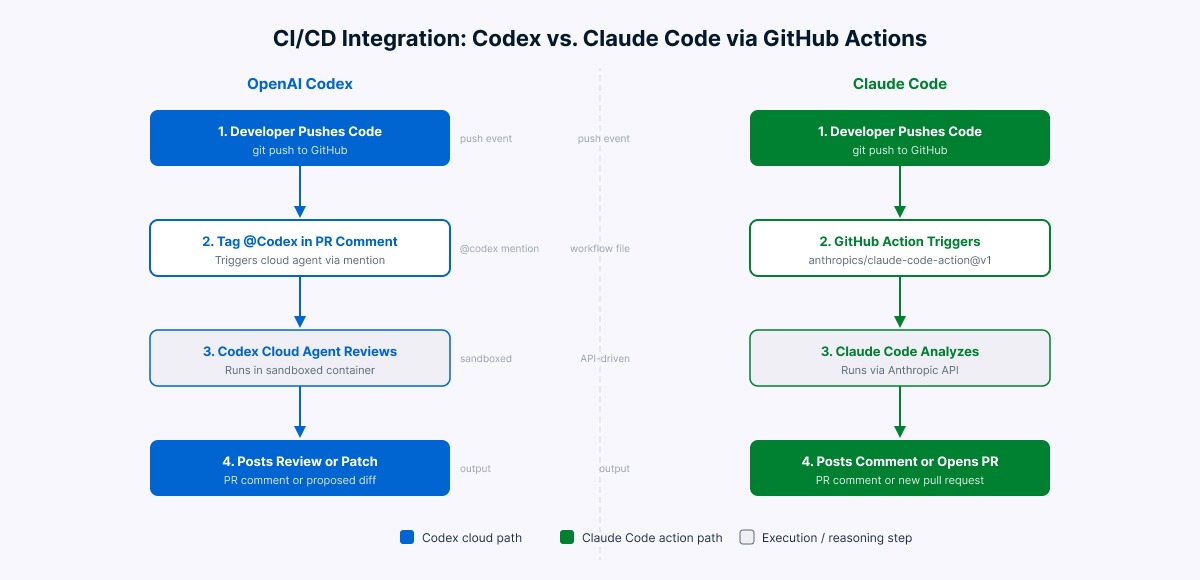
CI/CD-integratiestromen voor Codex en Claude Code. Afbeelding door de auteur.
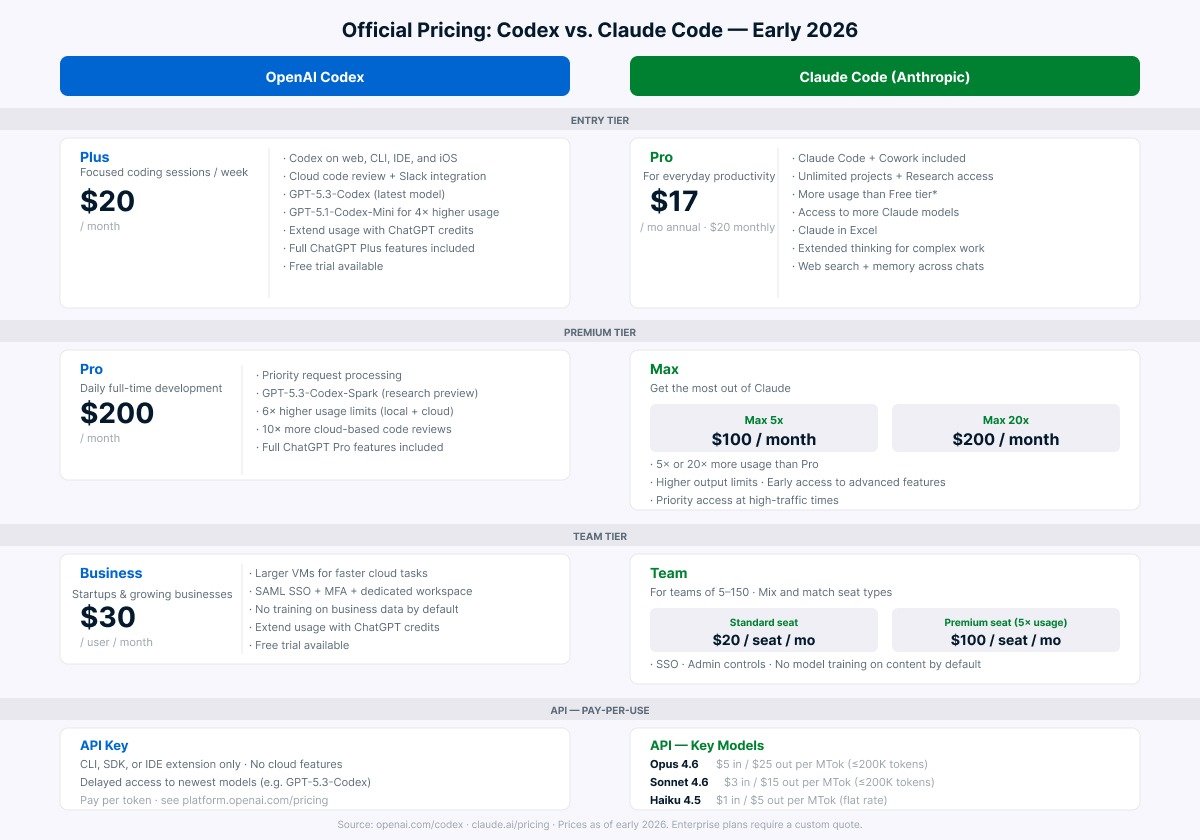
Prijzen in deze markt veranderen vaak. Controleer de actuele tarieven op de officiële prijspagina’s voordat je budgetbeslissingen neemt. De onderstaande cijfers gelden voor begin 2026.
Officiële prijstiers voor Codex en Claude Code per begin 2026. Afbeelding door de auteur.
De ervaring op het instapniveau verschilt in de praktijk, ook als de prijs vergelijkbaar is. De Plus-tier van Codex is doorgaans gul genoeg voor de meeste developers die er dagelijks mee werken. Claude Pro kost $20/maand bij maandelijkse betaling, of $17/maand bij jaarlijkse facturatie. Hoe dan ook, intensief dagelijks gebruik tikt de limieten vrij snel aan, en veel developers vinden de Max-tier beter passen voor continu werk. Dit komt rechtstreeks door hoe tokenintensief de redenering van Claude Code is.
Voor API-gebruik hangt de effectieve kost af van hoeveel tokens elke tool per taak verbruikt, niet alleen van het tarief per token. Omdat Codex doorgaans minder tokens per taak gebruikt, kan het praktische kostenverschil groter zijn dan de vermelde tarieven suggereren. Teams die Claude Code zwaar via de API inzetten, gebruiken meestal Sonnet 4.6 voor uitvoering en reserveren Opus 4.6 voor planning en architecturale redenering—dat balanceert kwaliteit en kost effectiever dan alles op Opus draaien.
Beide tools hebben duidelijke sterke punten, maar ook trade-offs afhankelijk van je werkwijze. Dit vind ik het belangrijkste om te weten voordat je je aan een van beide commit.
CLAUDE.md, hooks, MCP-integraties en slashcommando’sAGENTS.md niet: teams met meerdere tools moeten twee configbestanden bijhoudenNa tijd met beide tools kan ik zeggen: er is geen eenduidig antwoord. Het gaat erom hoe jij werkt, niet welke tool hoger scoort.
Een patroon dat vaak opduikt in developerworkflows: gebruik Claude Code voor planning en structurele beslissingen, geef de duidelijk afgebakende uitvoeringstaken aan Codex, en gebruik daarna de reviewfunctie van Codex als laatste check voor de merge.
Codex en Claude Code kiezen twee verschillende benaderingen voor AI-ondersteunde ontwikkeling. Codex is gebouwd voor developers die taken willen overdragen en resultaten willen reviewen. Claude Code is gebouwd voor developers die samen met de tool complexe problemen willen uitwerken.
Nu benchmarks naar elkaar toe groeien en beide tools snel beter worden, zijn de verschillen die er het meest toe doen praktisch: uitvoeringsomgeving, interactiestijl, contextbeheer en kosten op schaal. De beste keuze is degene die past bij hoe jij werkelijk werkt, niet degene met de hoogste benchmarkscore.
Wil je zelf aan de slag met deze tools? Bekijk dan onze OpenAI Codex CLI-tutorial voor een praktische introductie tot Codex in je terminal. Voor Claude Code loopt onze Claude Code-gids door de setup en een praktijkvoorbeeld vanaf nul. Ben je geïnteresseerd in het bredere AI-code-ecosysteem, dan is onze cursus Werken met de OpenAI API een sterke basis om op voort te bouwen.
Leren met DataCamp
Cursus
Cursus
Leerpad
blog
Adel Nehme
15 min