track
Fundamentele agenților AI
6 oră
Much of OpenAI's recent model news has been about price. GPT-6 Sol and GPT-6 Luna were lower-cost enterprise workhorses rather than top-tier flagships. Anthropic answered with a 20% price cut on Claude Opus 5.5 and kept Sonnet 5.5 at an unchanged $2/$10, intensifying the price war between OpenAI and Anthropic.
OpenAI dots, announced on September 29, 2026, at the OpenAI DevDay, takes a different approach. Dots are always-on agents that live inside ChatGPT and run on GPT-6 Astra, OpenAI's flagship model.
Each dot gets its own cloud computer and browser, connects to over 4,000 apps through OpenAI's plugin ecosystem, and keeps working between your conversations with it.
Your first dot is included at no extra cost on Pro and Business Premium plans in eligible markets.
In this article, I'll cover what dots are, the features that separate a dot from a normal ChatGPT thread, how permissions and auto-review work, specialist dots for organizations, and pricing and availability.
If you'd rather build agents yourself against the API, we walk through that route in our GPT-6 Sol API tutorial and our Claude Opus 5.5 API tutorial. I also recommend reading up on the new GPT-6.1 Sol.
A dot is an always-on agent inside ChatGPT that takes ongoing responsibility for work and keeps making progress between conversations.
It runs on GPT-6 Astra, has its own cloud computer and browser, and works through whichever of your apps you connect to it.
OpenAI's help documentation describes the difference from a regular ChatGPT thread in one line: a dot keeps working when the conversation stops.
You create one dot to start, give it a name, and pick a character or avatar. This is reminiscent of what we saw from Meta with their Muse agent, which launched on September 8, and the Muse Charm, a keychain device Meta plans to ship in December.
The default dot handle is @yourname-dot, which becomes @yourname-agentname once you name it.
OpenAI says teams of dots working together are the longer-term plan, with the ability to add more dots and scale each one's speed or monthly work allowance later.
On the safety side, OpenAI's dots safety post says GPT-6 Astra was trained to refuse harmful requests, including biological and cybersecurity misuse, and that human and automated red teaming targeted changing instructions, ambiguous requests, and attempts to push a dot past its permissions.
The system card sits on OpenAI's deployment safety change log for GPT-6 Astra. OpenAI's own caveat is blunt enough to repeat: dots can still make mistakes, so review consequential work.
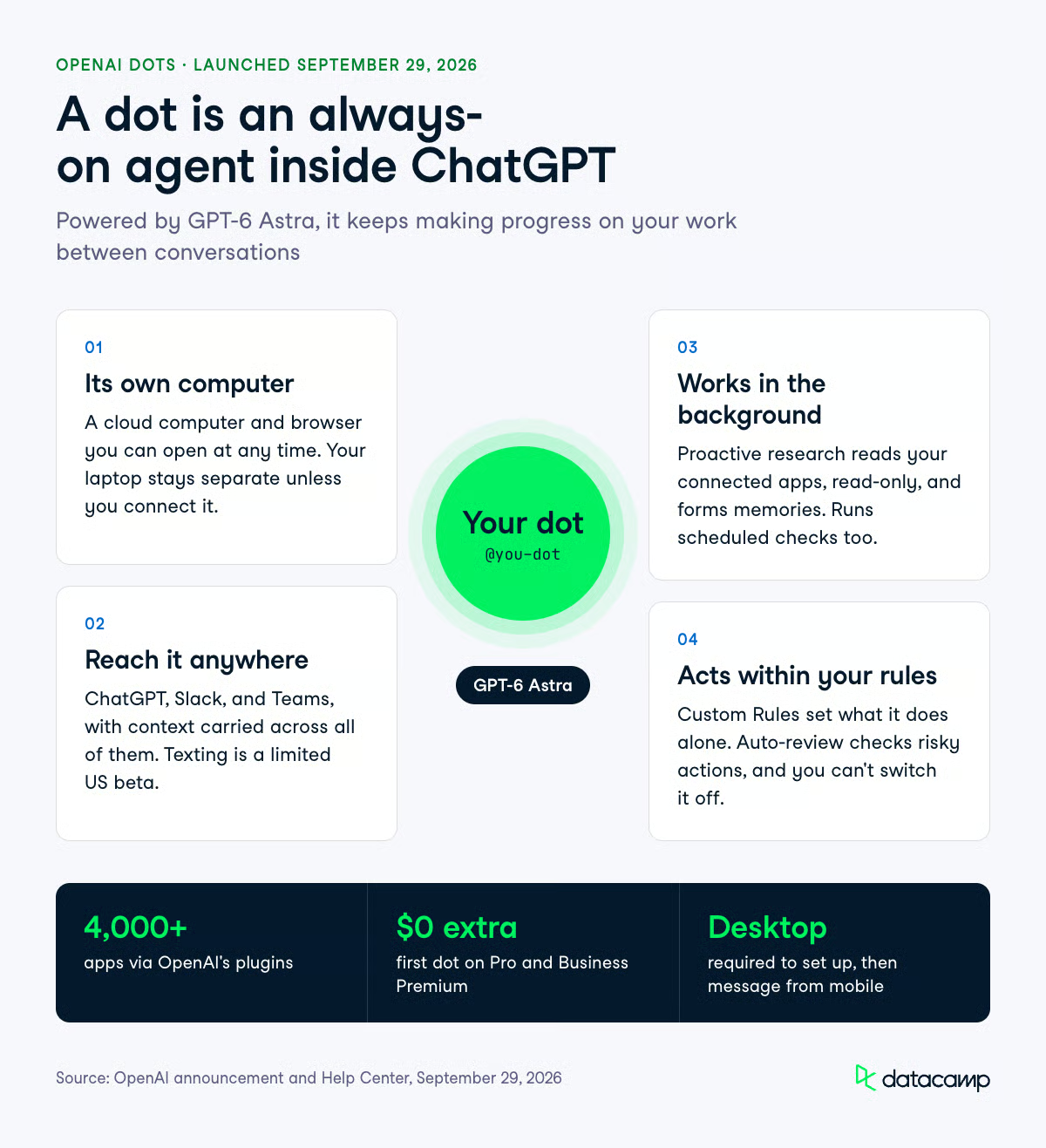
Four things separate a dot from the ChatGPT agent behavior you already have: its own machine, multi-channel reach, memory plus background research, and a permission layer that decides what it does without asking.
Every dot runs on a separate cloud computer with its own browser, and you can open that computer at any time to watch or interact with the work.
Your local machine stays out of reach unless you deliberately connect it through the ChatGPT desktop app, which is off by default.
Once you allow access and confirm it, your dot can work on files on that machine from any of its messaging channels, and you revoke access the same way.
Local access unlocks a few things the cloud sandbox cannot do: creating Work or Codex tasks on your machine, using local skills, and falling back to your local browser when the cloud browser is blocked.
Your dot can also create cloud tasks in Codex cloud environments, though you have to create the environment in Codex first.
For signing into supported websites, dots use saved passwords without those passwords being exposed to the model.
You can message or call your dot in ChatGPT on desktop, web, and mobile, and it can message you back with progress, questions, or decisions that need you.
Slack and Teams are supported channels, and texting is in limited beta. Context carries across all of them, so a project started in ChatGPT can be picked up in a Slack thread without re-explaining anything.
Two launch gaps are worth knowing before you plan around this:
Your dot inherits memories from ChatGPT and creates its own, including memories formed from connected apps when you haven't asked a specific question about them.
OpenAI calls the background behavior "proactive research": when you are not actively working with it, your dot looks for ways to help using connected apps with tools restricted to read-only. In that mode, it cannot send messages, change app content, or control your browser or computer.
You can also schedule work directly, such as a morning review of your calendar, and manage active, paused, and completed runs from the Scheduled tab in your dot's profile.
The memory model has one sharp edge: deleting your dot's own saved memories means deleting the dot. Disconnecting an app does not remove what your dot already learned from it.
Dots ship with built-in rules about when to act independently and when to ask, and Custom Rules let you override them per action.
Each rule describes an action and picks one of four behaviors. Auto-review sits underneath, checking actions that could affect your accounts or share information against your instructions, your Custom Rules, and OpenAI's safety requirements.
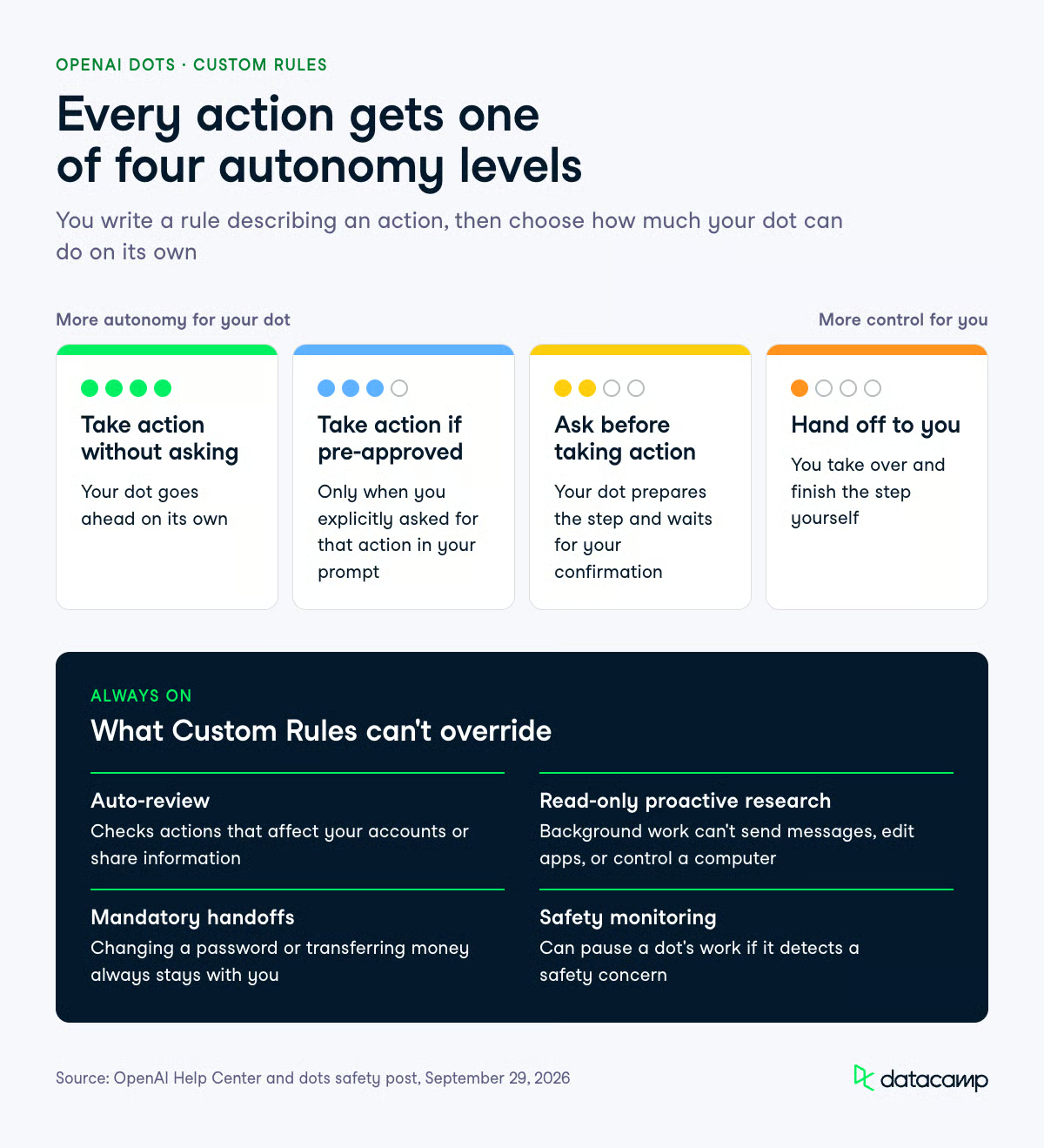
The four behaviors are:
"Pre-approved" means you explicitly requested that action in your prompt, which is a narrower definition than it first sounds.
Certain sensitive tasks, for example, changing a password, always stay with you regardless of how you configure the rules. Custom Rules also cannot switch off Auto-review or the restrictions on proactive research.
Monitoring runs alongside this and can pause or stop a dot's work if it detects a safety concern.
You can pause a dot yourself from the ••• menu in its profile. Reset deletes the dot itself, and the reset section below covers what goes with it.
OpenAI notes that dots can make mistakes when following your rules, too, which is the right expectation to set.
OpenAI's launch examples all follow the same shape: the dot learns your standards, watches for a trigger, does the work, and brings back something for review rather than shipping it unsupervised.
The five scenarios in the announcement cover developer, marketing, research, sales, and content work.
The developer example is the one I'd watch, because it is closest to work that is already automatable and already measured.
A dot monitors customer feedback for recurring requests, scopes small fixes, builds and tests them, and returns complete pull requests with attached videos showing the change.
The example I found most convincing is the one from outside OpenAI: an early tester's dot noticed he had forgotten to invoice a publication, prepared the invoice, and sent it once he approved.
That is not a hard task, but it was a task nobody was doing.
These three overlap enough to cause confusion, so here is the split as OpenAI documents it.
| Surface | What it is | Usage limits |
|---|---|---|
| Dot conversations | Chat or voice with your always-on agent | Do not count toward ChatGPT usage limits |
| Dot deeper work | Background tasks on its cloud computer | Draw on a plan allowance, though usage is not counted for the first month; terms after that are not published |
| Codex and ChatGPT Work tasks | Tasks your dot starts or manages in those products | Count toward your usage limits as normal |
Specialist dots are organization-owned agents that take on a defined responsibility rather than working on one person's behalf.
Your company sets up each one with its own identity, its own credentials, and access to the systems it needs, and OpenAI is also previewing IT-provisioned hardware and deep integrations with systems of record.
The dot adapts as it works and improves from feedback from the team.
OpenAI says the design comes from internal testing across procurement, invoice processing, email marketing, customer support, and commercial contracting.
Rollout is through focused enterprise pilots, with OpenAI engineers working directly with organizations to define each dot's responsibilities, its tools, and the review and approval path. There is no self-serve version today.
The governance piece is a Microsoft partnership: OpenAI is working to integrate specialist dots with Microsoft Agent 365 so businesses can manage them through the enterprise security and governance controls they already run.
Identity and access management is usually where agent pilots stall inside large companies, so putting non-human identities under existing tooling is the more interesting half of this announcement.
The launch constraints are specific, and several of them will decide whether dots is usable for you at all this month.
One more caveat that is about evidence rather than features: as of launch day, I found no independent third-party review or reproducible evaluation of dots. Everything above comes from OpenAI's own announcement, safety post, and help documentation.
Pause stops your dot until you resume it: open the ••• menu in its profile, select Pause, then select Paused, tap to resume when you want it working again. Reset is destructive and deletes the dot along with its conversations, saved memories, and scheduled tasks. OpenAI's privacy FAQ adds that files, Codex threads, and ChatGPT conversations a dot created are stored separately and are not deleted with it, so check those locations yourself. After a reset, you land in a new ChatGPT chat and have to create a new dot from the desktop app or desktop web.
Dots is a managed product, so the comparison that matters for practitioners is against the agents you would otherwise build yourself.
The API route gives you exact cost accounting and full control of the tool surface, which dots does not. When we built a codebase migration agent in our GPT-6 Sol tutorial, the entire run cost $0.7082, with 91% of Sol's input tokens served from cache.
The same pattern held in our Claude Opus 5.5 incident investigator, where a full investigation averaged $0.2737 and programmatic tool calling cut serialized evidence by 98.8%.
Numbers like that only exist because we wrote the loop. With dots, your conversations don't count toward ChatGPT usage limits, but deeper work draws on a plan allowance whose post-launch terms OpenAI has not published.
So the split is roughly this. Build on the API when you need per-task cost control, custom tool permissioning, and reproducible evaluation. Use a dot for the recurring work that has never been worth a build: the forgotten invoice, the weekly calendar sweep, the backlog of small bug fixes nobody scopes.
Your first dot is included in your Pro or Business Premium plan at no extra cost, with no separate subscription.
Conversations with your dot don't count toward your ChatGPT usage limits, but deeper work draws on a plan allowance, and tasks your dot starts or manages in Codex or ChatGPT Work count toward your usage limits as normal.
For the first month after launch, OpenAI's help documentation says dots usage doesn't count against eligible Pro, Business, and Enterprise allowances, while the announcement describes the same window as "extended limits." Either way, OpenAI says it will share per-plan usage terms after that window.
Access depends on your plan and your region, and rollout is gradual enough that it may take several days to reach your account. Enterprise access is off by default.
| Plan | Access at launch | Notes |
|---|---|---|
| Pro | Available, excluding the European Economic Area, Switzerland, and the UK | First dot included at no extra cost |
| Business Premium | Available across all supported ChatGPT regions | First dot included at no extra cost |
| Enterprise, Edu, Healthcare | Beta, turned on by a workspace admin | Off by default |
| Organizations wanting specialist dots | Focused enterprise pilots only | OpenAI engineering works directly with the org |
On data use, OpenAI says content from ChatGPT Business, Enterprise, and Edu workspaces is not used to improve its models by default, and personal plan users control this through existing ChatGPT data controls. Proactive research and a dot's notes to itself are not trained on directly, though information from them may be used if it informs an eligible conversation or task, depending on your settings. OpenAI also notes that human review can occur in limited circumstances, including safety cases, even when model improvement is turned off.
Create your first dot in the ChatGPT desktop app or ChatGPT on desktop web, follow the onboarding prompts, connect your apps, and let it introduce itself. Connect messaging channels like Slack from desktop as well.
After setup, you can message it from the ChatGPT mobile app, though you still cannot create a dot there.
OpenAI hasn't announced a public API for dots themselves.
The model underneath, GPT-6 Astra, is reachable on several surfaces as of September 29, 2026: directly through OpenAI's API, as gpt-6-astra on Microsoft Foundry, as openai/gpt-6-astra on OpenRouter, and as global.openai.gpt-6-astra on AWS Bedrock. It is also in the GitHub Copilot model picker for Copilot Pro+, Max, Business, and Enterprise users.
from openai import OpenAI

# GPT-6 Astra through OpenRouter; dots themselves have no public API
client = OpenAI(
    base_url="https://openrouter.ai/api/v1",
    api_key="YOUR_OPENROUTER_KEY",
)

response = client.chat.completions.create(
    model="openai/gpt-6-astra",
    messages=[{"role": "user", "content": "Draft a migration plan for this service..."}],
)
print(response.choices[0].message.content)
For hands-on agent building against OpenAI and Anthropic models, our GPT-6 Sol API tutorial covers tool permissioning and mid-turn steering, and our Gemini 3.8 Live tutorial covers the real-time voice side.
Dots is an intriguing product, similar to what we saw from Meta Muse, giving users a persistent coworker.
Would I switch to it? If you already build agents on the API, probably not just yet, keep your loop and your cost accounting.
If you are a Pro or Business Premium user with a backlog of recurring work you have never automated, the first dot costs you nothing extra today. The main investment is the time you spend writing good Custom Rules, and you should watch for OpenAI's usage terms after month one.
If you want to understand what these agents are doing under the hood, start with our AI Agent Fundamentals skill track.
Top DataCamp Courses
track
course
course
blog
Tom Farnschläder
11 min.
blog
Matt Crabtree
12 min.
blog
Richie Cotton
7 min.
tutorial
Khalid Abdelaty
12 min.
tutorial
Aashi Dutt
9 min.
code-along
Richie Cotton