
Gemini 3.8 Live Tutorial: How to Build a Full-Duplex Conversational Agent with Python

Learn how to stream mic audio, handle interruptions, and call tools asynchronously in Python, then compare Gemini 3.8 Live with its Extended Thinking variant.
Sep 25, 2026  · 14 min read

Explore with AI

ChatGPTClaudePerplexity

In this tutorial, we build a full-duplex, real-time voice assistant with Google's recently released Gemini 3.8 Live API in Python. Full-duplex here means that both the assistant and I can speak and listen at the exact same time, just like a natural phone call where you can interrupt each other, rather than taking turns like on a walkie-talkie.

We’ll build our agent incrementally in a local Jupyter notebook so you can easily follow along. Here’s a preview of the agent running:

In a Nutshell

  • Gemini 3.8 Live streams audio both ways over one WebSocket, so you can build a voice assistant that listens while it talks and handles interruptions.

  • The tutorial builds it in Python with four asyncio workers (mic recorder, audio sender, receiver, speaker) linked by two queues.

  • Barge-in works by flushing the local playback queue when Gemini sends interrupted.

  • Adding a tool (a live weather lookup) shows the difference between the two models: the standard model goes silent while tools run, while Extended Thinking keeps talking.

  • With Extended Thinking, track interaction_status == "IDLE” rather than turn_complete, and run tool calls as background tasks so the receive loop never blocks.

Associate AI Engineer

Train and fine-tune the latest AI models for production, including LLMs like Llama 4. Start your journey to becoming an AI Engineer today!
Explore Track

What’s Special About Gemini 3.8 Live?

Google's Gemini 3.8 Live is a native speech-to-speech model built specifically for real-time streaming and interactive audio applications. Gemini 3.8 Live processes multimodal inputs directly over a persistent WebSocket connection. 

This bidirectional streaming capability allows developers to create full-duplex conversational agents that can listen and speak simultaneously, supporting features like natural user interruptions and real-time audio transcription.

For application development, Gemini 3.8 Live introduces asynchronous tool calling and background reasoning, allowing agents to execute external function calls or retrieve data while maintaining active dialogue with the user.

For a comprehensive overview of its features, benchmarks, and pricing, refer to our Gemini 3.8 Live guide.

How a Live Voice Assistant Works: 4 Workers and 2 Queues

Before diving into the code, let's understand how a real-time voice assistant works under the hood.

In standard Python scripts, code runs line by line: function A finishes, then function B runs. But in a live voice conversation, waiting doesn't work:

  • While we are talking, the program must stream your voice to Gemini in real time.
  • While Gemini is replying, the program must play the audio chunks through the speakers as they arrive.
  • Most importantly, the program must keep listening even while Gemini is talking, so we can interrupt (barge in).

To achieve this without freezing, we use Python's asyncio to run 4 lightweight background tasks ("workers") that communicate using two asyncio.Queue buffers (think of them as conveyor belts):

1. The Inbound Conveyor Belt (input_queue):

  • audio_recorder(): Continuously listens to the microphone and drops audio slices onto the belt.

  • send_audio_loop(): Takes audio slices from the belt and streams them over to Gemini.

2. The Outbound Conveyor Belt (audio_queue):

  • receive_loop(): Listens to Gemini. When text arrives, it prints it. When speech arrives, it drops the audio chunks onto the belt.

  • audio_player(): Takes audio chunks from the belt and plays them through the speakers or headphones.
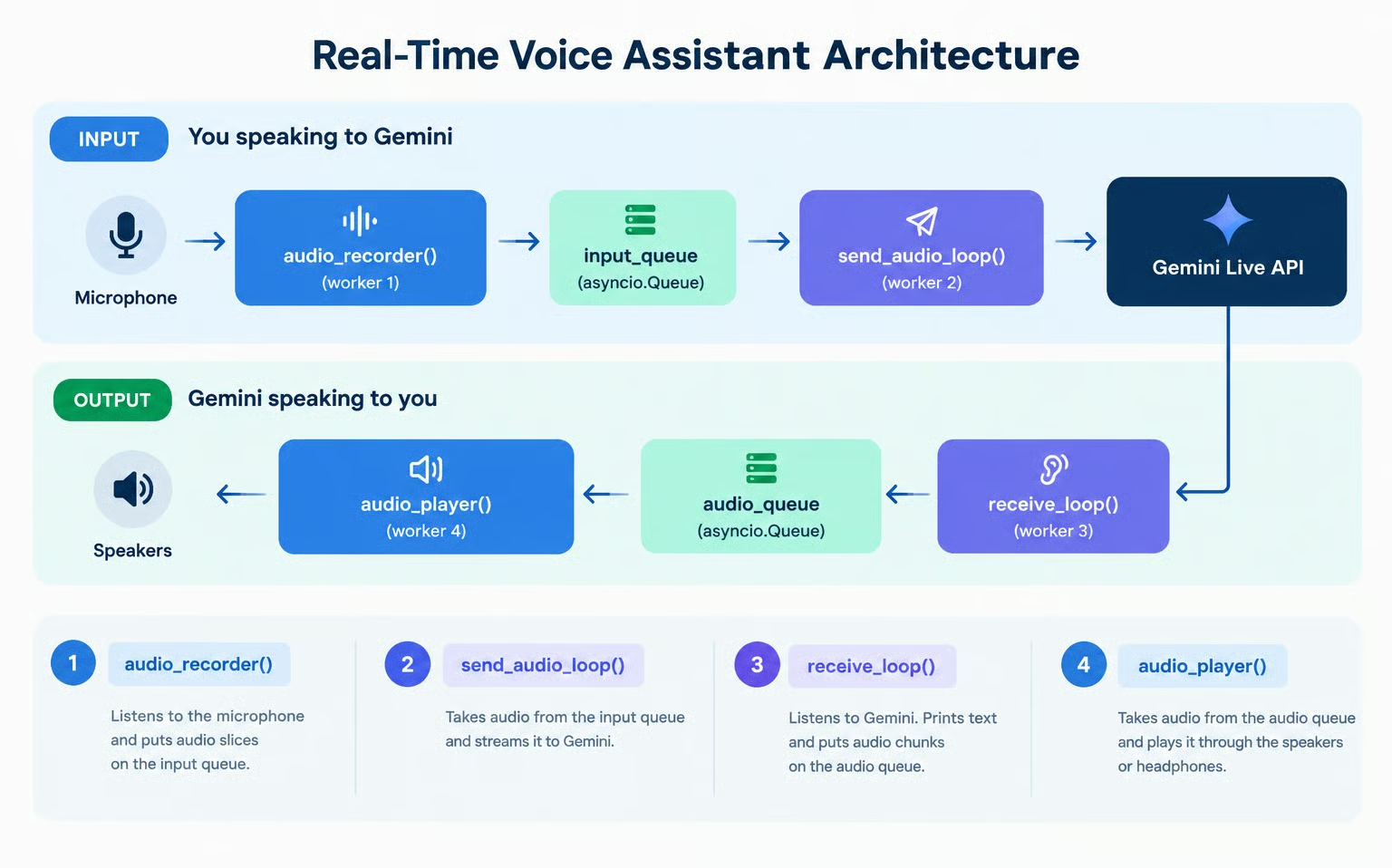
Real time Gemini 3.8 Live voice assistant architecture diagram showing how the four worker interact with the input and output audio.

Because each worker only focuses on its own small job, all four can run concurrently on Python's event loop without stepping on each other.

The full code used in this tutorial is available in this GitHub repo.

How to Generate and Set Up a Gemini API Key

To use the Gemini API, we need to create and set up an API key so that our code can communicate with the API.

The simplest way to do this is:

  • Visit Google’s AI Studio API key page and log in.

  • Click the Create API key button in the top-right corner.

  • Copy the API key into a file named .env in the same folder where the Python code will be, with the following format:

GEMINI_API_KEY=replace_with_api_key

Note that using the API usually incurs costs. The free tier covers limited access to both Gemini 3.8 Live models, but free-tier data is used to improve Google's products. For production use or higher rate limits, we need to ensure we have a payment method configured on Google’s AI Studio billing page.

How to Implement the Voice Assistant Architecture With Gemini 3.8 Live

These steps were designed to run in a local Jupyter notebook, with each code snippet corresponding to a notebook code cell. Because we require microphone and speaker access, it won't work out of the box on an online notebook like Google Colab.

Step 1: Environment setup and imports

First, we ensure the required packages are installed:

pip install google-genai sounddevice python-dotenv

Here’s a breakdown of what these packages do:

  • google-genai: The official Google package used to interact with Gemini models.

  • sounddevice: Used to handle audio hardware, recording from the microphone, and playing back through speakers.

  • python-dotenv: Utility package to load our Gemini API key from a .env file.

Now we can load environment variables, verify the API key, and initialize the genai.Client.

import asyncio
import os
import sys
from dotenv import load_dotenv
from google import genai
from google.genai import types
import sounddevice as sd

# Load environment variables from .env file
load_dotenv()

api_key = os.getenv("GEMINI_API_KEY")
if not api_key:
    raise ValueError("GEMINI_API_KEY not found. Please set it in your .env file or environment.")

# Initialize the Gemini Client
client = genai.Client(api_key=api_key)
print("Gemini Client initialized successfully!")

Step 2: Making our first request

Let's start by understanding the core Gemini Live connection lifecycle by sending a single text turn and receiving streaming speech and transcription. We’ll send a text prompt and receive the text and audio response. However, we won’t play the audio yet. For now, let's just focus on collecting the audio chunks.

The Gemini Live API uses a persistent WebSocket connection accessed via client.aio.live.connect(). To configure speech output and real-time transcription, we supply a config dictionary:

# Session configuration
config = {
    "response_modalities": ["AUDIO"],
    "output_audio_transcription": {},
}
  • response_modalities: Use the value ["AUDIO"] to tell Gemini to respond with speech audio.

  • output_audio_transcription: The value {} tells Gemini to simultaneously stream the text transcript of what it is saying.

We can now test sending a text prompt using session.send_client_content() and stream the incoming text transcription.

print("Connecting to Gemini 3.8 Live API...")
async with client.aio.live.connect(model="gemini-3.8-live", config=config) as session:
    print("Connected! Sending text prompt...")
    
    await session.send_client_content(
        turns={"role": "user", "parts": [{"text": "Hello! In one short sentence, introduce yourself."}]},
        turn_complete=True,
    )
    
    print("\n[Gemini Transcription]: ", end="", flush=True)
    audio_chunks_received = 0
    total_audio_bytes = 0
    
    async for response in session.receive():
        server_content = response.server_content
        if server_content:
            # 1. Print real-time transcription as tokens arrive
            if server_content.output_transcription:
                print(server_content.output_transcription.text, end="", flush=True)
                
            # 2. Inspect audio chunks
            if server_content.model_turn:
                for part in server_content.model_turn.parts:
                    if part.inline_data and part.inline_data.data:
                        audio_chunks_received += 1
                        total_audio_bytes += len(part.inline_data.data)

    print(f"\n\nReceived {audio_chunks_received} audio chunks ({total_audio_bytes:,} bytes total).")

When running this code, we should see something like:

Connecting to Gemini 3.8 Live API...
Connected! Sending text prompt...

[Gemini Transcription]: Hello, I am your helpful AI assistant designed to assist you with various tasks and answer your questions.

Received 22 audio chunks (304,800 bytes total).

The code captured the audio chunks, but we didn’t have an audio player set up, so we couldn’t hear it. Let’s learn how to define the audio player next.

Step 3: Real-time audio playback

In Step 2, we received thousands of bytes of audio data, but we did not hear anything. If we write directly to the audio hardware inside the receive loop, any network delay will cause audio stutters, and any audio playback delay will block network reception.

To prevent audio playback from blocking the network receiver, we implement our first worker: audio_player().

You don't need to worry about low-level audio implementation details. We advise you to treat them as black boxes. 

OUTPUT_SAMPLE_RATE = 24000
CHANNELS = 1

async def audio_player(audio_queue: asyncio.Queue):
    """Plays raw 24kHz audio chunks from audio_queue through the speakers."""
    loop = asyncio.get_running_loop()
    with sd.RawOutputStream(
        samplerate=OUTPUT_SAMPLE_RATE, channels=CHANNELS, dtype="int16"
    ) as stream:
        while True:
            chunk = await audio_queue.get()
            if chunk is None:  # Sentinel value signaling end of stream
                audio_queue.task_done()
                break
            await loop.run_in_executor(None, stream.write, chunk)
            audio_queue.task_done()

print("Audio player defined!")

To test it, we connect the audio_player() to our request. This time, we’ll hear Gemini speak out loud in real time while observing the streamed transcription:

audio_queue = asyncio.Queue()
player_task = asyncio.create_task(audio_player(audio_queue))

prompt_text = "Hello! In one short sentence, introduce yourself."
print(f"[User]: {prompt_text}")

async with client.aio.live.connect(model="gemini-3.8-live", config=config) as session:
    await session.send_client_content(
        turns={"role": "user", "parts": [{"text": prompt_text}]},
        turn_complete=True,
    )
    
    print("[Gemini]: ", end="", flush=True)
    async for response in session.receive():
        server_content = response.server_content
        if server_content:
            if server_content.output_transcription:
                print(server_content.output_transcription.text, end="", flush=True)

            if server_content.model_turn:
                for part in server_content.model_turn.parts:
                    if part.inline_data and part.inline_data.data:
                        await audio_queue.put(part.inline_data.data)

print()
# Signal the player to shut down and await completion
await audio_queue.put(None)
await player_task
print("Playback complete!")

By running this snippet, we can now hear Gemini’s response.

Step 4: Capturing the user’s audio input

To speak with Gemini in real time, we need to continuously capture our voice from the microphone.

Our second worker is audio_recorder(). It listens to your microphone in the background, slices the incoming speech into small chunks, and places them onto input_queue. We set the sample rate to 16 kHz, the standard speech format Gemini expects.

INPUT_SAMPLE_RATE = 16000  # Gemini Live expects 16kHz audio input
CHUNK_SIZE = 1024          # Number of samples per audio chunk

async def audio_recorder(input_queue: asyncio.Queue, stop_event: asyncio.Event):
    """Captures microphone input and puts raw audio chunks into the input queue."""
    loop = asyncio.get_running_loop()

    def record_loop():
        with sd.RawInputStream(
            samplerate=INPUT_SAMPLE_RATE,
            channels=CHANNELS,
            dtype="int16",
            blocksize=CHUNK_SIZE,
        ) as stream:
            while not stop_event.is_set():
                data, _ = stream.read(CHUNK_SIZE)
                loop.call_soon_threadsafe(input_queue.put_nowait, bytes(data))

    await asyncio.to_thread(record_loop)

print("Audio recorder defined!")

Step 5: Writing a function to stream audio continuously

In Step 2, we used send_client_content() to send a turn with static text. For continuous voice streaming, the Live API provides session.send_realtime_input().

Our third worker is send_audio_loop(). It watches input_queue and, as soon as an audio chunk from the microphone arrives, it forwards it to Gemini over the open WebSocket.

Notice that we don't have to manually tell Gemini when we start or stop speaking: Gemini uses its built-in Voice Activity Detection (VAD) to automatically detect when you begin and finish talking.

async def send_audio_loop(session, input_queue: asyncio.Queue, stop_event: asyncio.Event):
    """Continuously streams microphone chunks from input_queue to Gemini."""
    while not stop_event.is_set():
        try:
            chunk = await asyncio.wait_for(input_queue.get(), timeout=0.1)
            await session.send_realtime_input(
                audio=types.Blob(data=chunk, mime_type=f"audio/pcm;rate={INPUT_SAMPLE_RATE}")
            )
            input_queue.task_done()
        except asyncio.TimeoutError:
            continue

print("send_audio_loop defined!")

Just as we tested audio playback with a text prompt in Step 3, we can now test our microphone streaming end-to-end with a single spoken question.

When we run the cell below, we speak a question aloud into our microphone (for example: "What is the capital of France?"). Gemini will process our voice directly and respond with synthesized speech and real-time transcription:

audio_queue = asyncio.Queue()
input_queue = asyncio.Queue()
stop_event = asyncio.Event()

player_task = asyncio.create_task(audio_player(audio_queue))

print("Connecting to Gemini Live API...")
async with client.aio.live.connect(model="gemini-3.8-live", config=config) as session:
    print("Connected! Speak a question into your microphone (e.g. 'What is the capital of France?')...")
    recorder_task = asyncio.create_task(audio_recorder(input_queue, stop_event))
    sender_task = asyncio.create_task(send_audio_loop(session, input_queue, stop_event))

    print("\n[Gemini]: ", end="", flush=True)
    async for response in session.receive():
        server_content = response.server_content
        if server_content:
            # 1. As soon as Gemini starts replying, mute the microphone
            # so speaker audio cannot loop back into the mic and interrupt Gemini
            if not stop_event.is_set() and (server_content.output_transcription or server_content.model_turn):
                stop_event.set()

            # 2. Print transcription text as it streams
            if server_content.output_transcription:
                print(server_content.output_transcription.text, end="", flush=True)

            # 3. Queue audio parts for playback
            if server_content.model_turn:
                for part in server_content.model_turn.parts:
                    if part.inline_data and part.inline_data.data:
                        await audio_queue.put(part.inline_data.data)

            # 4. Turn complete
            if server_content.turn_complete:
                break

    # Clean up mic tasks cleanly
    stop_event.set()
    recorder_task.cancel()
    sender_task.cancel()
    await asyncio.gather(recorder_task, sender_task, return_exceptions=True)

# 5. Wait for playback queue to drain, then allow the soundcard buffer to finish playing
await audio_queue.join()
await asyncio.sleep(0.8)  # Prevents clipping the final syllables
await audio_queue.put(None)
await player_task

print("\nSingle-turn voice test complete!")

Step 6: Multi-turn and interruptions

Notice what happened in the test above: we asked a question using our microphone, and Gemini understood our voice directly and replied out loud. However, if we try to ask a follow-up question, the session has already ended. 

To overcome that, we need to address two crucial aspects of building a real-world voice assistant: multi-turn persistence and interruption.

Multi-turn session persistence:

In the google-genai SDK, session.receive() is an async generator for one turn. When Gemini finishes speaking its answer, session.receive() finishes. Without wrapping it in an outer loop, the assistant terminates after the first response.

To support continuous multi-turn conversations, we wrap session.receive() in an outer while not stop_event.is_set(): loop:

while not stop_event.is_set():
    async for response in session.receive():
        ...

Barge-in/interruption and buffer flushing:

Gemini 3.8 Live has native voice activity detection and barge-in support. If Gemini is speaking and you begin talking, Gemini immediately stops generating audio and sends a message flag: server_content.interrupted == True.

Even though Gemini stops sending new audio, our local audio_queue might still hold a few audio chunks waiting to be played by the speakers. If we do not clear this queue, the speakers will continue playing the previous answer.

Therefore, as soon as server_content.interrupted is received, we flush the queue so playback stops instantly:

if server_content.interrupted:
    print("\n[Interrupted!]")
    while not audio_queue.empty():
        audio_queue.get_nowait()
        audio_queue.task_done()

Putting it all together

Here is our fourth and final worker: receive_loop(). It combines multi-turn persistence, real-time transcription, and instant interruption:

async def receive_loop(session, audio_queue: asyncio.Queue, stop_event: asyncio.Event):
    """Receives transcription and audio output from Gemini across multiple turns."""
    first_chunk_received = False
    try:
        while not stop_event.is_set():
            async for response in session.receive():
                if stop_event.is_set():
                    break

                server_content = response.server_content
                if server_content:
                    # 1. Handle user interruption (barge-in)
                    if server_content.interrupted:
                        print("\n[Interrupted!]")
                        # Flush remaining unplayed audio so speakers go silent immediately
                        while not audio_queue.empty():
                            try:
                                audio_queue.get_nowait()
                                audio_queue.task_done()
                            except asyncio.QueueEmpty:
                                break
                        first_chunk_received = False
                        print("\n[Listening... Speak now]")

                    # 2. Print real-time transcription
                    if server_content.output_transcription:
                        if not first_chunk_received:
                            print("\n[Gemini]: ", end="", flush=True)
                            first_chunk_received = True
                        print(server_content.output_transcription.text, end="", flush=True)

                    # 3. Enqueue synthesized audio for playback
                    if server_content.model_turn:
                        for part in server_content.model_turn.parts:
                            if part.inline_data and part.inline_data.data:
                                await audio_queue.put(part.inline_data.data)

                    # 4. Interaction complete: wait for audio to finish playing before prompt
                    # In Gemini 3.8, interaction_status tracks when the overall exchange is finished
                    is_done = False
                    if server_content.interaction_status is not None:
                        is_done = str(server_content.interaction_status).endswith("IDLE") or server_content.interaction_status == "IDLE"
                    elif server_content.turn_complete:
                        is_done = True

                    if is_done:
                        print()
                        await audio_queue.join()
                        first_chunk_received = False
                        print("\n[Listening... Speak now]")
    except asyncio.CancelledError:
        pass
    except Exception as e:
        print(f"\n[Receive Error]: {e}", file=sys.stderr)
        stop_event.set()

print("receive_loop defined!")

Step 7: Assembling the full voice assistant

We now orchestrate our four concurrent workers in run_voice_assistant:

  • audio_player(): Consumes from the audio_queue and  writes to speakers.

  • audio_recorder(): Reads from the microphone and pushes audio into the input_queue.

  • send_audio_loop(): Consumes from the input_queue and streams to Gemini using session.send_realtime_input().

  • receive_loop(): Consumes Gemini’s output using session.receive(), prints transcription and pushes audio to audio_queue for playback.
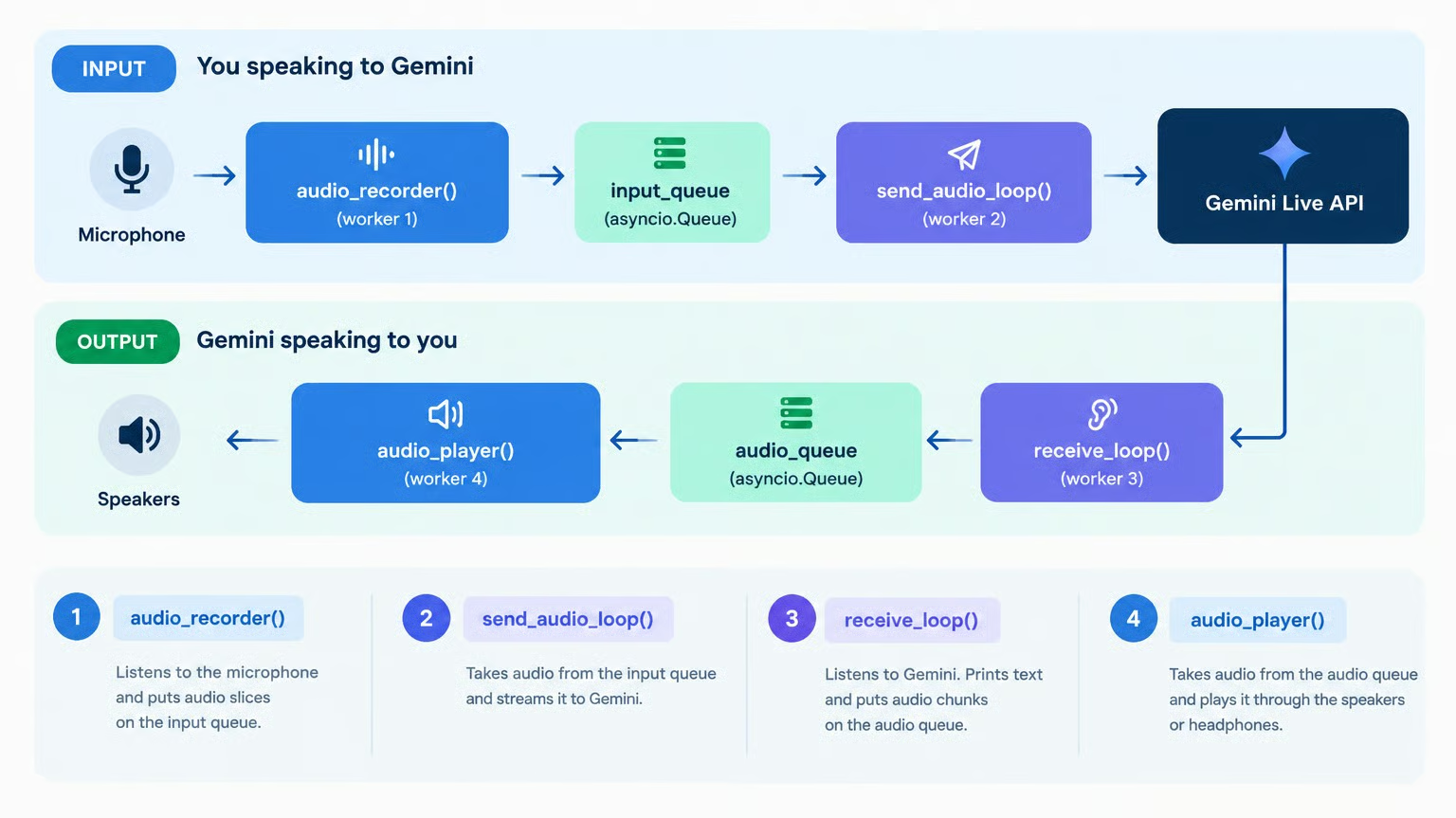
Workflow of the Gemini 3.8 Live Speech Assistant

async def run_voice_assistant():
    """Runs the full-duplex interactive voice assistant."""
    audio_queue: asyncio.Queue[bytes | None] = asyncio.Queue()
    input_queue: asyncio.Queue[bytes] = asyncio.Queue()
    stop_event = asyncio.Event()

    player_task = asyncio.create_task(audio_player(audio_queue))

    print("Connecting to Gemini Live API...")
    async with client.aio.live.connect(model="gemini-3.8-live", config=config) as session:
        print("[Listening... Speak now]")

        recorder_task = asyncio.create_task(audio_recorder(input_queue, stop_event))
        sender_task = asyncio.create_task(send_audio_loop(session, input_queue, stop_event))
        receiver_task = asyncio.create_task(receive_loop(session, audio_queue, stop_event))

        try:
            while not stop_event.is_set():
                await asyncio.sleep(0.5)
        except (asyncio.CancelledError, KeyboardInterrupt):
            print("\nStopping voice assistant...")
        finally:
            stop_event.set()
            recorder_task.cancel()
            sender_task.cancel()
            receiver_task.cancel()
            await asyncio.gather(recorder_task, sender_task, receiver_task, return_exceptions=True)

    # Terminate player
    await audio_queue.put(None)
    await player_task
    print("\nSession finished cleanly.")

print("run_voice_assistant is ready to run!")

Step 8: Running the live assistant

Here’s how to run the voice assistant in your notebook:

await run_voice_assistant()

Notes:

  • Headphones are strongly recommended. If Gemini's voice plays out loud through your laptop speakers, the microphone will pick it up, and Gemini will think you are trying to interrupt it.
  • To stop the assistant, simply click the notebook's interrupt button (■).
  • If we connect or disconnect headphones while the notebook is running, the sound device settings may change, and we may run into an audio error. In this case, we need to restart the notebook kernel and re-run the cells in order.

Advanced Usage with Gemini 3.8 Live Extended Thinking

Gemini 3.8 Live comes in two versions:

  • Standard (gemini-3.8-live): Optimized for ultra-low latency direct speech-to-speech conversations. When calling tools, it waits silently for the tool's response before answering.

  • Extended Thinking (gemini-3.8-live-extended-thinking): Features background reasoning and parallel conversational fillers. It can speak natural updates (e.g. *"Let me look that up for you..."*) while executing tools in the background.
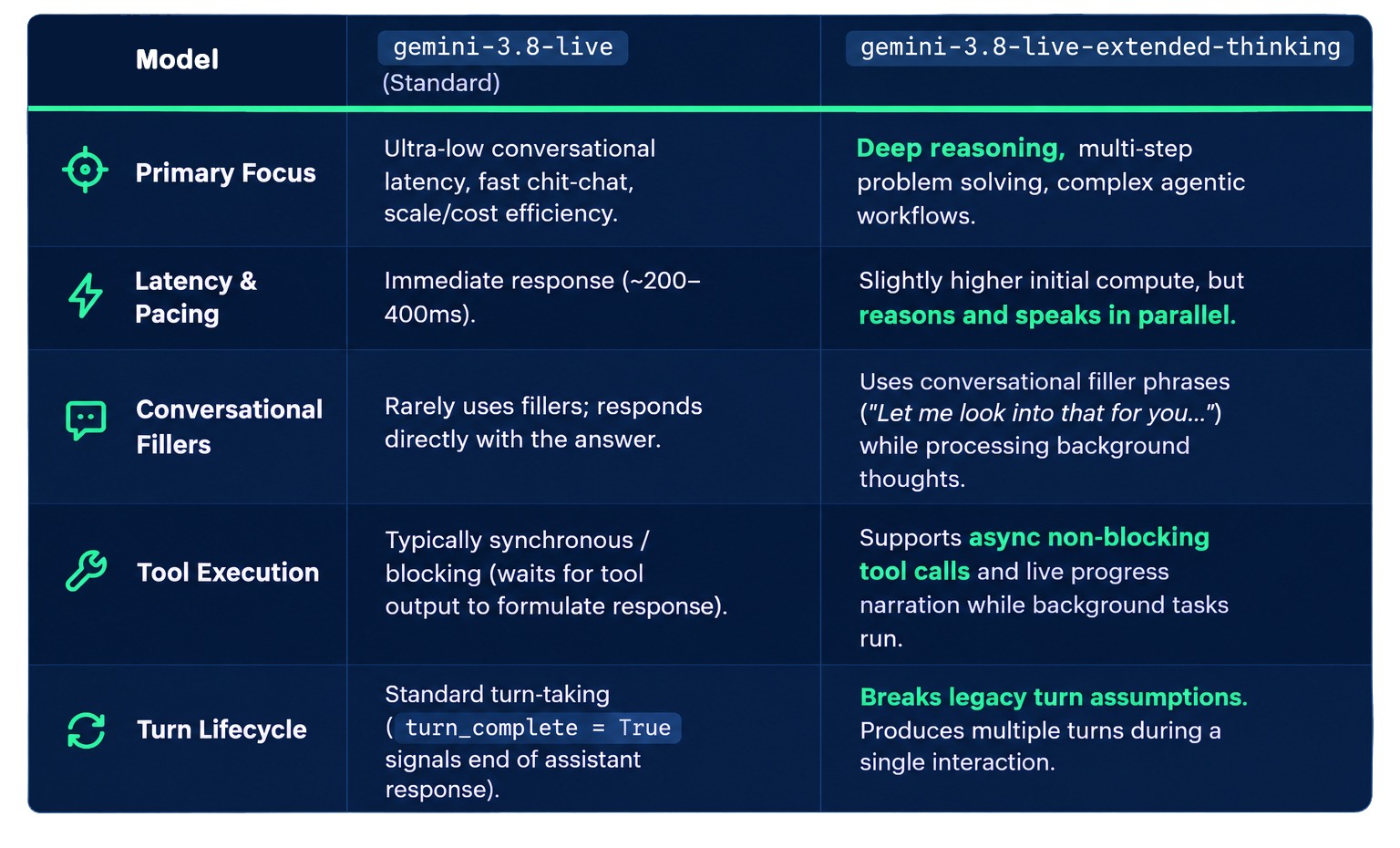
Gemini 3.8 Live vs Gemini 3.8 Live Extended Thinking

Here’s a breakdown of the differences between the two:


gemini-3.8-live

gemini-3.8-live-extended-thinking

Best for

Low-latency voice agents, direct commands, fast tools

Multi-step reasoning, planning, slow or multiple tools

Reasoning

Interleaved, fixed latency (no thinking_level)

Background reasoning (thinking_level: low, medium, high)

While tools run

Waits silently

Speaks conversational fillers

End-of-interaction signal

turn_complete

interaction_status == "IDLE"

Tool behavior

BLOCKING or NON_BLOCKING (default)

NON_BLOCKING only

When to Use Gemini 3.8 Live vs 3.8 Live Extended Thinking

If you’re unsure which of the two versions to use, this is my decision framework. When building conversational agents:

  • Use gemini-3.8-live for direct question-answering and fast voice commands where minimizing latency is the top priority.

  • Use gemini-3.8-live-extended-thinking for rich conversational assistants and agents that perform multi-step reasoning, external data retrieval, or API calls while maintaining an active, natural dialogue with the user.

How to Implement Tool Calling With Gemini 3.8 Live

One of the strengths of the extended-thinking version of the model is that it can reason and execute tools in the background while maintaining a conversation. 

Before we dive into the code, let’s see this in action. I equipped the base model with a tool to check the weather. Here’s a video of me asking the weather in New York; notice how the model stays silent while it’s computing the answer:

Here’s the same interaction but with extended thinking:

The second interaction is livelier and feels more like a normal conversation because the model can maintain the conversation while processing information in the background.

Building the tool to use in the assistant

The model doesn’t actually execute the tools for us. What the tool configuration does is let the model know the tools exist, when and how to use them. When Gemini decides external data is needed, it populates response.tool_call with the name and arguments of the function.

To integrate a custom tool into Gemini 3.8 Live, we must bridge our local code with the model's reasoning engine. This requires the following:

  • Execution Logic: Define a standard Python function that performs the actual work and returns the result.

  • Tool Mapping: Create a dictionary (tool_map) linking the function's string name to the executable Python object. 

  • Function Declaration: Build a FunctionDeclaration that acts as the tool's instruction manual. By clearly defining the name, description, and parameter Schema (including types and required fields), we teach Gemini exactly when to use the tool and how to format its request. We also set behavior="NON_BLOCKING", which Extended Thinking requires, so it can keep talking while the tool runs.

  • Session Configuration: Inject the declaration into the tools_config payload of the session. 

To illustrate this, we create a weather look-up tool:

import urllib.request
import urllib.parse
import json
import asyncio

async def get_current_weather(location: str) -> str:
    """Fetch live real-time weather for any city in the world using Open-Meteo's free API."""
    def fetch():
        # 1. Geocode city name to lat/lon coordinates
        geo_url = f"https://geocoding-api.open-meteo.com/v1/search?name={urllib.parse.quote(location)}&count=1"
        req = urllib.request.Request(geo_url, headers={"User-Agent": "VoiceAssistantTutorial/1.0"})
        with urllib.request.urlopen(req, timeout=5) as r:
            geo_data = json.loads(r.read().decode("utf-8"))
            if not geo_data.get("results"):
                return f"Could not find coordinates for '{location}'."
            loc = geo_data["results"][0]
            lat, lon = loc["latitude"], loc["longitude"]
            city_name = loc.get("name", location)
            country = loc.get("country", "")

        # 2. Fetch current temperature
        weather_url = f"https://api.open-meteo.com/v1/forecast?latitude={lat}&longitude={lon}&current=temperature_2m"
        req2 = urllib.request.Request(weather_url, headers={"User-Agent": "VoiceAssistantTutorial/1.0"})
        with urllib.request.urlopen(req2, timeout=5) as r:
            weather_data = json.loads(r.read().decode("utf-8"))
            temp = weather_data.get("current", {}).get("temperature_2m")
            return f"The current temperature in {city_name}, {country} is {temp}°C."

    try:
        return await asyncio.to_thread(fetch)
    except Exception as e:
        return f"Error retrieving weather for {location}: {e}"

tool_map = {
    "get_current_weather": get_current_weather,
}

weather_tool = types.FunctionDeclaration(
    name="get_current_weather",
    description="Get the current live weather and temperature for a given city or location.",
    behavior="NON_BLOCKING", 
    parameters=types.Schema(
        type="OBJECT",
        properties={
            "location": types.Schema(
                type="STRING",
                description="The city or location name (e.g. Tokyo, Paris, New York).",
            )
        },
        required=["location"],
    ),
)

tools_config = {
    "response_modalities": ["AUDIO"],
    "output_audio_transcription": {},
    "tools": [
        {"function_declarations": [weather_tool]},
    ],
}

print("Tool and configuration defined!")

Handling tool calls asynchronously

Talking while a tool runs takes two things. On the server side, the NON_BLOCKING declaration lets Extended Thinking keep speaking instead of waiting for the result. On the client side, our code must not block either. If we ran the tool directly inside the receive loop, a 1.5-second API call would stop us from reading Gemini's filler audio and interruption signals until the tool finished.

To enable true "talk while executing", we update receive_loop_with_tools() with two key design choices:

  1. Non-Blocking Execution: We launch handle_tool_call as a concurrent background task via asyncio.create_task(). This ensures the receive loop keeps processing and playing Gemini's speech without interruption while Python retrieves the weather in parallel.

  2. Tracking Interaction Status: In Extended Thinking, Gemini emits turn_complete: True when it finishes speaking intermediate filler phrases (e.g. *"Checking the weather for you..."*). If the code only checked turn_complete, the assistant would prematurely prompt [Listening... Speak now] while the tool is still running! By checking server_content.interaction_status == "IDLE", the client waits until all background reasoning, tool calls, and final speech are truly finished before opening the microphone.

Here's receive_loop_with_tools(). It's identical to receive_loop() except for the new handle_tool_call() helper and block 1, which dispatches tool calls:

async def receive_loop_with_tools(session, audio_queue: asyncio.Queue, stop_event: asyncio.Event):
    """Receives transcription and audio from Gemini, and automatically handles tool calls asynchronously."""
    first_chunk_received = False

    async def handle_tool_call(tool_call):
        """Executes tool calls in the background without blocking the audio receive loop."""
        try:
            function_responses = []
            for fc in tool_call.function_calls:
                print(f"\n[Tool Requested]: {fc.name}({fc.args})")
                fn = tool_map.get(fc.name)
                if fn:
                    if asyncio.iscoroutinefunction(fn):
                        result = await fn(**fc.args)
                    else:
                        result = fn(**fc.args)
                else:
                    result = f"Error: Unknown tool {fc.name}"
                print(f"[Tool Result]: {result}")
                function_responses.append(
                    types.FunctionResponse(
                        id=fc.id,
                        name=fc.name,
                        response={"result": result},
                    )
                )
            await session.send_tool_response(function_responses=function_responses)
        except Exception as e:
            print(f"\n[Tool Execution Error]: {e}", file=sys.stderr)

    try:
        while not stop_event.is_set():
            async for response in session.receive():
                if stop_event.is_set():
                    break

                # 1. Handle tool calls asynchronously (non-blocking)
                if response.tool_call:
                    asyncio.create_task(handle_tool_call(response.tool_call))

                server_content = response.server_content
                if server_content:
                    # 2. Handle user interruption (barge-in)
                    if server_content.interrupted:
                        print("\n[Interrupted!]")
                        while not audio_queue.empty():
                            try:
                                audio_queue.get_nowait()
                                audio_queue.task_done()
                            except asyncio.QueueEmpty:
                                break
                        first_chunk_received = False
                        print("\n[Listening... Speak now]")

                    # 3. Print real-time transcription
                    if server_content.output_transcription:
                        if not first_chunk_received:
                            print("\n[Gemini]: ", end="", flush=True)
                            first_chunk_received = True
                        print(server_content.output_transcription.text, end="", flush=True)

                    # 4. Enqueue synthesized audio for playback
                    if server_content.model_turn:
                        for part in server_content.model_turn.parts:
                            if part.inline_data and part.inline_data.data:
                                await audio_queue.put(part.inline_data.data)

                    # 5. Check if the interaction is complete
                    is_done = False
                    if server_content.interaction_status is not None:
                        is_done = str(server_content.interaction_status).endswith("IDLE") or server_content.interaction_status == "IDLE"
                    elif server_content.turn_complete:
                        is_done = True

                    if is_done:
                        print()
                        await audio_queue.join()
                        first_chunk_received = False
                        print("\n[Listening... Speak now]")
    except asyncio.CancelledError:
        pass
    except Exception as e:
        print(f"\n[Receive Error]: {e}", file=sys.stderr)
        stop_event.set()

print("receive_loop_with_tools defined!")

Finally, we implement run_voice_assistant_with_tools(). In addition to supplying tools_config, this function allows us to select between the standard model and the extended thinking model. Because the Extended Thinking model requires a thinking_config dictionary specifying the thinking_level ("low", "medium", or "high"), we conditionally inject it into the session configuration:

async def run_voice_assistant_with_tools(
    model: str = "gemini-3.8-live-extended-thinking",
    thinking_level: str = "low",
):
    """Runs the interactive voice assistant with tool calling enabled.
    
    Supports both:
    - 'gemini-3.8-live-extended-thinking' (requires thinking_level: 'low', 'medium', or 'high')
    - 'gemini-3.8-live' (standard, ultra-low latency, no thinking_level)
    """
    audio_queue: asyncio.Queue[bytes | None] = asyncio.Queue()
    input_queue: asyncio.Queue[bytes] = asyncio.Queue()
    stop_event = asyncio.Event()

    player_task = asyncio.create_task(audio_player(audio_queue))

    # Extended Thinking models require thinking_config with thinking_level
    session_config = dict(tools_config)
    if "extended-thinking" in model:
        session_config["thinking_config"] = {
            "thinking_level": thinking_level,
        }

    print(f"Connecting to Gemini Live API with tools (model: {model})...")
    async with client.aio.live.connect(model=model, config=session_config) as session:
        print("[Listening... Speak now.]")

        recorder_task = asyncio.create_task(audio_recorder(input_queue, stop_event))
        sender_task = asyncio.create_task(send_audio_loop(session, input_queue, stop_event))
        receiver_task = asyncio.create_task(receive_loop_with_tools(session, audio_queue, stop_event))

        try:
            while not stop_event.is_set():
                await asyncio.sleep(0.5)
        except (asyncio.CancelledError, KeyboardInterrupt):
            print("\nStopping voice assistant...")
        finally:
            stop_event.set()
            recorder_task.cancel()
            sender_task.cancel()
            receiver_task.cancel()
            await asyncio.gather(recorder_task, sender_task, receiver_task, return_exceptions=True)

    # Terminate player
    await audio_queue.put(None)
    await player_task
    print("\nSession finished cleanly.")

print("run_voice_assistant_with_tools is ready to run!")

Running the tool-enabled assistant

Now we can run our tool-enabled voice assistant and compare the live behavior of the two models.

First, test the assistant with Extended Thinking:

await run_voice_assistant_with_tools("gemini-3.8-live-extended-thinking")

Once the assistant is listening, ask a question requiring live data, for example: 

"What's the weather like in Tokyo right now?"

Because querying the Open-Meteo API over the internet takes ~1.5 seconds, we will observe the background reasoning in action:

  1. Gemini immediately speaks aloud to acknowledge our question: "Let me check the current weather in Tokyo for you..."
  2. While Gemini is speaking, our background task fetches the live weather data in parallel.
  3. Once the tool response arrives, Gemini transitions into reading the live temperature.

Next, we run the same assistant using the standard Gemini 3.8 Live model:

await run_voice_assistant_with_tools("gemini-3.8-live")

When we ask the same question to the standard model. In this case, the model stays completely silent for ~1.5 seconds while waiting for the tool's response over the network, and then directly announces the temperature without speaking any filler phrase.

To see the project in full, see the accompanying GitHub repo.

Conclusion

In this tutorial, we built a complete full-duplex voice assistant with Python and Gemini 3.8 Live. The three features that make it especially useful for real-time work:

  • Concurrent Audio Architecture: Four lightweight asyncio workers communicate over two queues, enabling simultaneous recording, real-time audio streaming, speech playback, and instant barge-in interruptions.

  • Background Tool Calling: Launching tool execution as non-blocking background tasks (asyncio.create_task) allows Gemini 3.8 Live Extended Thinking to talk while reasoning and executing external functions.

  • State Management: Tracking interaction_status == "IDLE" ensures the assistant keeps listening only after all background reasoning, tool calls, and final speech turns have finished.

If you’re keen to start your career in AI engineering, I recommend starting with our AI Engineer for Developers career track, which teaches you to work with the OpenAI API, Hugging Face, MCP, and much more!

FAQs

What are the main new features in Gemini 3.8 Live compared to previous models?

Gemini 3.8 Live introduces near real-time reasoning and intelligence, near real-time visual grounding, and automatic multilingual support across 97 languages. Additionally, Gemini 3.8 Live Extended Thinking supports simultaneous reasoning and speech, allowing the model to use natural verbal cues and live progress narration while executing background tools and multi-step tasks.

Can I run Gemini 3.8 Live on a Jupyter notebook?

When running with audio, access to the microphone is required. This is not available natively on Google Colab. However, we can run Gemini 3.8 Live on a local Jupyter notebook.

Should I use Gemini 3.8 Live or Gemini 3.8 Live Extended Thinking?

Use gemini-3.8-live for low-latency voice agents with direct questions and fast tools. Use gemini-3.8-live-extended-thinking when the agent needs multi-step reasoning or calls tools that take more than a moment to return, since it keeps talking while it works. Extended Thinking also requires tracking interaction_status instead of turn_complete.

Is the Gemini 3.8 Live API free to use?

Both models are available on the Gemini API free tier, with free input and output tokens, but free-tier data is used to improve Google's products. On the paid tier, audio input costs $3.00 per 1 million tokens (about $0.005 per minute) and audio output costs $12.00 per 1 million tokens (about $0.018 per minute).

Can I run this code as a Python script instead of a notebook?

Yes, but you need to wrap the top-level await and async with calls in an async function and start it with asyncio.run(), for example asyncio.run(run_voice_assistant()). Jupyter runs an event loop for you, while plain Python scripts don't, so running the cells as-is raises a SyntaxError.

Why does Gemini keep interrupting itself?

If the model's voice plays through your laptop speakers, the microphone picks it up, and Gemini treats it as you barging in. Use headphones to prevent this echo loop.


François Aubry's photo
Author
François Aubry
LinkedIn
Full-stack engineer & founder at CheapGPT. Teaching has always been my passion. From my early days as a student, I eagerly sought out opportunities to tutor and assist other students. This passion led me to pursue a PhD, where I also served as a teaching assistant to support my academic endeavors. During those years, I found immense fulfillment in the traditional classroom setting, fostering connections and facilitating learning. However, with the advent of online learning platforms, I recognized the transformative potential of digital education. In fact, I was actively involved in the development of one such platform at our university. I am deeply committed to integrating traditional teaching principles with innovative digital methodologies. My passion is to create courses that are not only engaging and informative but also accessible to learners in this digital age.
Topics
AI Agents
Artificial Intelligence

Learn AI With DataCamp!

Track

Associate AI Engineer for Developers

29 hr
Learn how to integrate AI into software applications using APIs and open-source libraries. Start your journey to becoming an AI Engineer today!
See DetailsRight Arrow
Start Course
See MoreRight Arrow
Related

Tutorial

Getting Started With the Gemini Live API

Learn how to build a real-time voice assistant using the Gemini Live API and Google ADK. Master WebSockets, tool calling, and native audio streaming.
Aryan Irani's photo

Aryan Irani

11 min

Tutorial

Gemini 2.0 Flash: Step-by-Step Tutorial With Demo Project

Learn how to use Google's Gemini 2.0 Flash model to develop a visual assistant capable of reading on-screen content and answering questions about it using Python.
François Aubry's photo

François Aubry

12 min

Tutorial

GPT-Live-1 API Tutorial: Build a Full-Duplex Voice Assistant

Follow this GPT-Live-1 API tutorial to build a full-duplex voice learning assistant with browser WebRTC, backend delegation, web search, and confirmed actions.
Khalid Abdelaty's photo

Khalid Abdelaty

15 min

Tutorial

Building Multimodal AI Application with Gemini 2.0 Pro

Build a chat app that can understand text, images, audio, and documents, as well as execute Python code. Truly a multimodal application closer to AGI.
Abid Ali Awan's photo

Abid Ali Awan

11 min

Tutorial

Google AI Studio Tutorial: Complete Guide to Chat, Build, and Stream Modes

Learn how to use Google AI Studio's Chat, Build, and Stream modes to prototype with Gemini models.
Bexruz (Bex) Tuychiev's photo

Bexruz (Bex) Tuychiev

12 min

Tutorial

Grok Voice Think Fast 2.0 API Tutorial: Build a Real-Time Voice Agent in Python

Learn how to use Grok Voice Think Fast 2.0 to build a real-time voice agent that handles spoken conversations, calls tools, manages interruptions, and resumes disconnected sessions.
Khalid Abdelaty's photo

Khalid Abdelaty

15 min

See MoreSee More