คอร์ส
GitHub ระดับกลาง
3 ชม.
16.4K
GitHub Copilot Enterprise อยู่ระดับบนสุดของลำดับชั้นแผนของ GitHub Copilot.
เมื่อเทียบกับ GitHub Copilot Business หรือ Pro+ รุ่น Enterprise เน้นอย่างมากที่การกำกับดูแล บริบทขององค์กร และความสามารถในการวัดผล ออกแบบมาสำหรับบริษัทที่มีสภาพแวดล้อมวิศวกรรมขนาดใหญ่ ไม่ใช่นักพัฒนารายบุคคลหรือทีมเล็ก ๆ
ความสามารถสองประการที่สำคัญที่สุดในทางปฏิบัติ:
สองคุณสมบัตินี้ยกระดับ Copilot จาก “การเติมคำอัตโนมัติอัจฉริยะ” ไปสู่สิ่งที่คล้ายแพลตฟอร์มวิศวกรรม AI ภายใน
บริษัทที่ได้รับคุณค่ามากที่สุดจาก GitHub Copilot Enterprise จะมองว่าเป็นองค์ประกอบสำคัญของโครงสร้างพื้นฐานภายใน กำหนดค่าบริบทขององค์กรอย่างพิถีพิถัน วัดการนำไปใช้อย่างต่อเนื่อง และปรับนโยบายตามข้อมูลการใช้งาน ไม่ใช่ตามสมมติฐาน
หากต้องการมุมมองที่กว้างขึ้นของระบบนิเวศ GitHub แนะนำให้อ่านคู่มือ Introduction to GitHub Products ของเรา
GitHub Copilot Enterprise ต่อยอดจากการสมัครสมาชิก Business ด้วยคุณสมบัติเพิ่มเติม เช่น:
Enterprise ต้องใช้ GitHub Enterprise Cloud ควบคู่กับการสมัคร Copilot Enterprise เอง ซึ่งเพิ่มค่าใช้จ่ายต่อผู้ใช้ ดังนั้นควรแน่ใจว่าองค์กรต้องการการกำกับดูแล เทเลเมทรี และการดูแลจัดการในระดับองค์กรจริง ๆ
|
คุณสมบัติ |
Pro+ |
Business |
Enterprise |
|
การใช้งานรายบุคคล |
มี |
ไม่มี |
ไม่มี |
|
การจัดการที่นั่งแบบศูนย์กลาง |
ไม่มี |
มี |
มี |
|
บันทึกการตรวจสอบ (Audit logs) |
ไม่มี |
มี |
มี |
|
การยกเว้นไฟล์ |
ไม่มี |
มี |
มี |
|
การรองรับ Spaces |
มี พร้อม Copilot |
มี มุมมองผู้ดูแลจำกัด |
มี การจัดการระดับองค์กรแบบเต็มรูปแบบ |
|
Usage Metrics API |
ไม่มี |
ระดับองค์กร (Org) |
ระดับองค์กรใหญ่ (Enterprise) + ระดับองค์กร (Org) |
|
การสืบนโยบายระดับ Enterprise |
ไม่มี |
ไม่มี |
มี |
หมายเหตุ: ผู้สมัครสมาชิก Business เข้าถึง Usage Metrics API ได้ในระดับองค์กร (/orgs/{org}/…) ส่วนผู้สมัครสมาชิก Enterprise เข้าถึงรายงานรวมทั้งองค์กรทั่วทั้งเอนเตอร์ไพรส์เพิ่มเติม (/enterprises/{enterprise}/…) โดยดูทุกองค์กรได้ในมุมมองเดียว
GitHub Copilot Enterprise มุ่งเป้าไปที่องค์กรที่ใช้งานสภาพแวดล้อม GitHub ที่เติบโตเต็มที่แล้ว
ลูกค้า Enterprise ทั่วไป ได้แก่:
โปรดทราบว่าสิ่งนี้ไม่ได้ทำให้ประสิทธิภาพของ Copilot ดีขึ้นโดยตรง ประเด็นนี้สำคัญเพราะหลายทีมมักซื้อเกินความจำเป็นในตอนแรก คิดว่า Enterprise เท่ากับ “Copilot ที่ดีกว่า” ทั้งที่ในความเป็นจริง Enterprise เพิ่มเครื่องมือด้านการกำกับดูแลและการวัดผลเป็นหลัก
Copilot Spaces แก้หนึ่งในจุดอ่อนที่ใหญ่ที่สุดของผู้ช่วยเขียนโค้ด AI แบบทั่วไป
โดยปกติ Copilot เข้าใจความรู้การเขียนโปรแกรมสาธารณะได้ในระดับที่ดี แต่จะไม่เข้าใจ API ภายในของคุณ การตัดสินใจด้านสถาปัตยกรรม ธรรมเนียมการเขียนโค้ด เวิร์กโฟลว์การดีพลอย หรือเอกสารแนะนำการใช้งานของคุณโดยอัตโนมัติ
Spaces มอบบริบทขององค์กรที่ผ่านการคัดสรรซึ่ง Copilot สามารถอ้างอิงได้ระหว่างการสนทนาและการช่วยเขียนโค้ด
ในทางปฏิบัติ Spaces ช่วยให้ Copilot ตอบคำถามอย่างเช่น:
Spaces รองรับเนื้อหาขององค์กรได้กว้างกว่าระบบ Knowledge Bases แบบเดิม
ประเภทเนื้อหาที่รองรับ ได้แก่:
แต่ละประเภทเนื้อหามีบทบาทต่างกันไป
ไฟล์โค้ดช่วยให้ Copilot เข้าใจรูปแบบการลงมือทำ เอกสาร Markdown ให้คำอธิบายสถาปัตยกรรมและแนวทางเริ่มต้นใช้งาน Pull request เปิดให้เห็นการสนทนาระหว่างรีวิวและการตัดสินใจทางวิศวกรรมในอดีต การผสมผสานทั้งหมดนี้ทำให้ Copilot ตระหนักถึงแนวปฏิบัติการพัฒนาขององค์กรของคุณมากขึ้น
ประเด็นเล็กแต่สำคัญคือ Spaces ไม่ได้เป็นเพียงฐานข้อมูลเวกเตอร์ที่ต่อพ่วงกับ GitHub เท่านั้น แต่ยังรวมถึงการควบคุมการแชร์และเวิร์กโฟลว์การกำกับดูแลขององค์กรที่ออกแบบมาสำหรับสภาพแวดล้อมระดับเอนเตอร์ไพรส์
GitHub เลิกใช้คุณสมบัติ Copilot Knowledge Bases แบบเดิมเมื่อวันที่ 1 พฤศจิกายน 2025
Spaces เข้ามาแทนที่ Knowledge Bases โดยมี:
คุณอาจยังพบเอกสารและบล็อกโพสต์ล้าสมัยที่อ้างอิง Knowledge Bases โปรดระวังเมื่อทำตามบทเรียนเก่า ๆ เนื่องจากปลายทางและเวิร์กโฟลว์หลายอย่างมีการเปลี่ยนแปลงระหว่างช่วงปี 2025 ถึง 2026
มุมมองการดูแลระบบ การสร้าง Copilot Spaces นั้นค่อนข้างตรงไปตรงมา ความท้าทายคือการจัดการหลายสิบหรือหลายร้อย Space ข้ามทีมต่าง ๆ
โครงสร้างที่เลือกไว้ตั้งแต่แรกมักจะติดตัวไป ฉันเคยเห็นองค์กรสร้าง “เอกสารกระจัดกระจาย” ภายใน Spaces โดยไม่ได้ตั้งกฎความเป็นเจ้าของไว้ล่วงหน้า
ใครก็สร้าง Copilot Space ได้ มาลองสร้างในรีโพส่วนตัว ขั้นตอนคล้ายกันในระดับ Enterprise โดยมีหน้าบางส่วนต่างกัน
การสร้าง Space โดยทั่วไปมีเวิร์กโฟลว์ดังนี้:

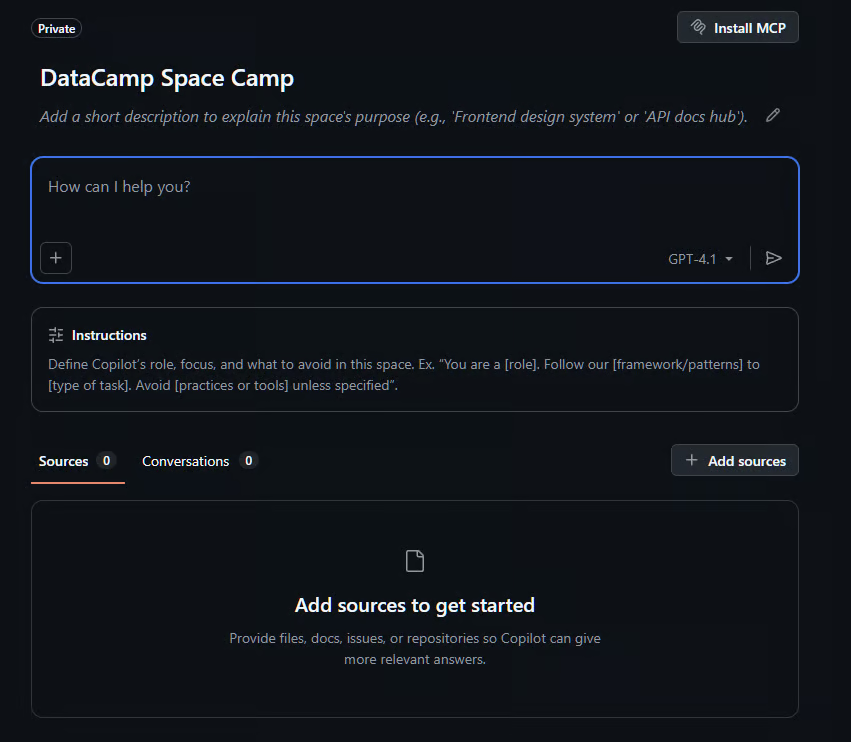
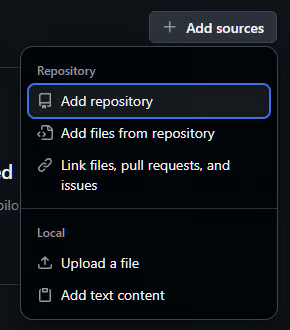

บันทึกสำหรับผู้ใช้ระดับเอนเตอร์ไพรส์: ผู้ดูแลระบบอาจปิดการแชร์ Space ส่วนบุคคลได้ ดังนั้นหากใช้บัญชีส่วนตัว อาจกระทบความสามารถในการแชร์ Copilot Space ที่ไม่ได้ใช้รีโพขององค์กร
หลังการตั้งค่า ผู้ดูแลควรทดสอบ Space ด้วยพรอมป์ตที่ใช้งานจริง
ตัวอย่างเช่น:
How does our authentication middleware handle token refresh logic?หรือ:
Show me an example of how our backend services structure database migrations.หาก Copilot ตอบไม่ได้อย่างแม่นยำ ปัญหามักเกิดจาก:
Spaces รองรับโมเดลการมองเห็นหลักสองแบบ:
สมาชิกของเอนเตอร์ไพรส์สามารถให้ Space รายบุคคลถูกจัดการโดยการตั้งค่าระดับเอนเตอร์ไพรส์ที่ใหญ่กว่า ผู้ดูแลเอนเตอร์ไพรส์ยังสามารถจัดการนโยบายการใช้งานและการเข้าถึงฟีเจอร์แบบศูนย์กลางได้
Space ส่วนตัวเหมาะกับทีมทดลองหรือโครงการภายในที่อ่อนไหว Space ทั่วทั้งองค์กรเหมาะกับมาตรฐานวิศวกรรม เอกสารเริ่มต้นใช้งาน หรือเฟรมเวิร์กที่ใช้ทั่วทั้งบริษัท
ข้อผิดพลาดที่พบบ่อยคือการรวมศูนย์เกินไป Space ขนาดยักษ์ที่ครอบคลุมทั้งบริษัทเพียงอันเดียวอาจมีสัญญาณรบกวนมากและทำให้ Copilot ใช้งานได้ไม่เต็มประสิทธิภาพ
ไม่มีโครงสร้างองค์กรที่ถูกต้องเสมอไป
รูปแบบที่พบบ่อย ได้แก่ หนึ่ง Space ต่อทีม หนึ่ง Space ต่อพื้นที่ผลิตภัณฑ์ หรือ Space มาตรฐานที่ใช้ร่วมกัน แต่ละแบบมีขอบเขตต่างกันและใช้การตั้งค่าเดิมในลักษณะแตกต่างกัน
เหมาะเมื่อกลุ่มวิศวกรรมทำงานค่อนข้างอิสระจากกัน
ตัวอย่าง:
เหมาะกับองค์กรที่โครงสร้างยึดตามผลิตภัณฑ์มากกว่าฝ่ายงาน
ตัวอย่าง:
หลายองค์กรดูแล Space แยกต่างหากเพื่อ:
ในทางปฏิบัติ วิธีแบบผสมมักได้ผลดีที่สุด โดยแต่ละทีมมี Space ของตนเอง และมี Space มาตรฐานที่ใหญ่ขึ้นใช้ร่วมกันระหว่างทีม
Spaces แก้ปัญหาด้านบริบท ส่วน Usage Metrics API แก้ปัญหาด้านการวัดผล โดยมาแทนหลายระบบเทเลเมทรีแบบเดิมที่ GitHub เลิกใช้ระหว่างการรวม API ในปี 2026
หากไม่มีการวัดผลที่ชัดเจน องค์กรจะสูญเสียการมองเห็นอย่างรวดเร็วว่าการนำ Copilot ไปใช้งานประสบความสำเร็จหรือไม่ ผู้บริหารต้องการหลักฐานว่าการลงทุนช่วยปรับปรุงเวิร์กโฟลว์ของนักพัฒนาจริง ไม่ใช่แค่เพิ่มค่าใช้จ่ายสมัครสมาชิกอีกบรรทัด
แดชบอร์ดเปิดให้ใช้งานทั่วไปในเดือนกุมภาพันธ์ 2026 และเข้าถึงได้ผ่านบัญชีเอนเตอร์ไพรส์ → AI Controls → Copilot → Metrics → Copilot usage metrics ในแท็บ Insights
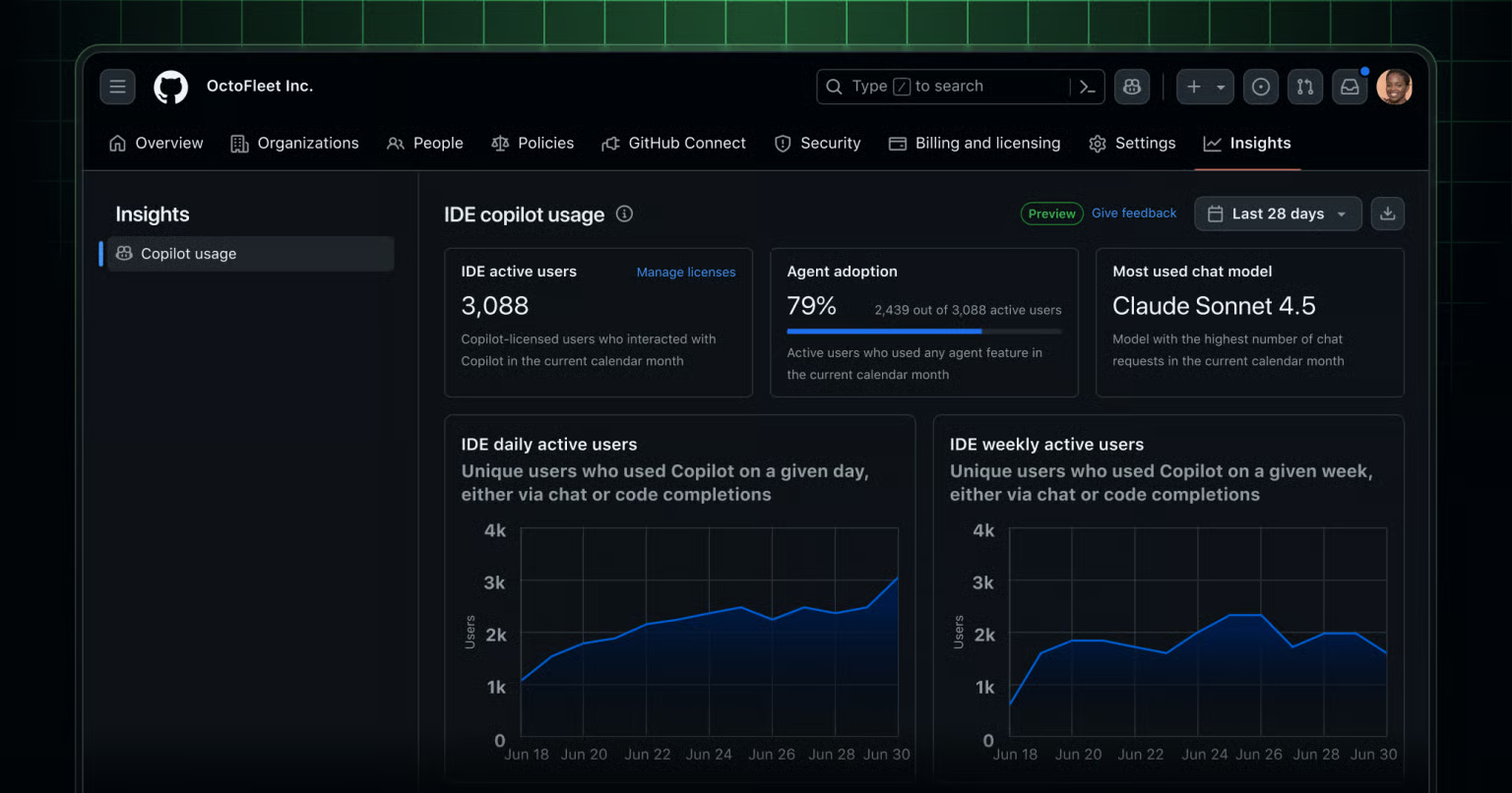
ตัวอย่างแดชบอร์ด Copilot Usage Metrics จาก github.blog
Usage Metrics API เปิดเผยหมวดหมู่เทเลเมทรีการปฏิบัติงานหลายประเภท
เมตริกทั่วไป ได้แก่:
สิ่งนี้ทำให้องค์กรเห็นภาพที่ละเอียดกว่าการนับที่นั่งแบบง่าย ๆ มาก
ทีมที่มีที่นั่ง 100 ที่ แต่มีผู้ใช้จริงเพียง 15 คน มีโปรไฟล์การนำไปใช้ที่ต่างจากทีมที่ใช้งานทุกวันอย่างสม่ำเสมอและมีอัตราการยอมรับสูงอย่างมาก
GitHub เลิกใช้ API เทเลเมทรีรุ่นก่อนหลายตัว (User-level Feature Engagement Metrics API, Direct Data Access API, Copilot Metrics API) ระหว่างช่วงปี 2025 ถึง 2026 และเลิกใช้อย่างสมบูรณ์ภายในเมษายน 2026
ได้แก่:
ปลายทาง Usage Metrics รุ่นใหม่ ซึ่งมีมาตั้งแต่กุมภาพันธ์ 2026 รวมระบบรายงานเหล่านั้นเป็นโมเดลที่เป็นเอกภาพมากขึ้น และมีการจัดทำเวอร์ชันในกรณีมีการเปลี่ยนแปลงที่กระทบการใช้งาน
ประเด็นนี้สำคัญเพราะบล็อกโพสต์และตัวอย่างบน GitHub เก่าหลายชิ้นยังอ้างถึงปลายทางที่เลิกใช้แล้ว ทุกครั้งที่ทำงานกับ Usage Metrics API ควรตรวจเอกสารเทียบกับอ้างอิง API ล่าสุดของ GitHub ก่อนสร้างระบบอัตโนมัติ
เมื่อเข้าใจวัตถุประสงค์ของ usage metrics API แล้ว มาคุยกันว่าการใช้งานจริงทำอย่างไร
ปลายทาง GitHub Copilot Usage Metrics โดยทั่วไปต้องตั้งค่าสิทธิ์บางอย่างให้กับ Personal Access Token (PAT) ซึ่งทำได้ทั้งผ่าน PAT แบบคลาสสิกหรือ PAT แบบกำหนดละเอียด
สำหรับ PAT แบบคลาสสิก ต้องให้ผู้ดูแลเอนเตอร์ไพรส์มอบสิทธิ์ต่อไปนี้: manage_billing:copilot และ read:org
สำหรับโทเค็นแบบกำหนดละเอียด ต้องใช้โทเค็นการเข้าถึงผู้ใช้ของแอป GitHub หรือโทเค็นการติดตั้งที่มีสิทธิ์ Enterprise Copilot metrics enterprise permissions (read)
โดยทั่วไปนิยมใช้โทเค็นแบบกำหนดละเอียดมากกว่า เพราะลดการเปิดเผยสิทธิ์ที่ไม่จำเป็น
รายงานระดับองค์กรที่ใช้บ่อยสองรายการคือ:
organization-1-day
organization-28-day
รายงานแบบหนึ่งวันเหมาะกับการมอนิเตอร์การปฏิบัติงานและวิเคราะห์แนวโน้มระยะสั้น มีข้อมูลย้อนหลังถึง 10 ตุลาคม 2025 และเข้าถึงได้ยาวถึงหนึ่งปีนับจากปัจจุบัน
คำสั่ง curl ด้านล่างจะเรียก API รายงานแบบหนึ่งวันและส่งคืน JSON ที่มีลิงก์ดาวน์โหลดรายงานการใช้งาน ต้องใส่ YOUR_TOKEN สำหรับ bearer auth และเลือก DAY เป็นวันที่ต้องการในรูปแบบ YYYY-MM-DD
curl -L \
 -H "Accept: application/vnd.github+json" \
 -H "Authorization: Bearer <YOUR_TOKEN>" \
-H “X-GitHub-Api-Version: 2026-03-10” \
"https://api.github.com/enterprises/ENTERPRISE/copilot/metrics/reports/enterprise-1-day?day=DAY"
URL ใน download_links จะเป็นแบบลงลายเซ็นและมีอายุจำกัด จึงหมดอายุไม่นานหลังดึงมา เวิร์กโฟลว์ต้องดึง URL ดาวน์โหลดและดาวน์โหลดไฟล์ทันทีในรอบการทำงานเดียว ไม่สามารถเก็บ URL เหล่านี้ไว้ใช้ภายหลังได้
การตอบกลับที่ได้รับอาจมีเพียง download_links และ report_day แต่นี่คือสคีมาที่เป็นไปได้ทั้งหมด:
{
  "type": "object",
  "title": "Copilot Metrics 1 Day Report",
  "description": "Links to download the Copilot usage metrics report for an enterprise/organization for a specific day.",
  "properties": {
    "download_links": {
      "type": "array",
      "items": {
        "type": "string",
        "format": "uri"
      },
      "description": "The URLs to download the Copilot usage metrics report for the enterprise/organization for the specified day."
    },
    "report_day": {
      "type": "string",
      "format": "date",
      "description": "The day of the report in YYYY-MM-DD format."
    }
  },
  "required": [
    "download_links",
    "report_day"
  ]
}
รายงาน 28 วันช่วยระบุรูปแบบการนำไปใช้ในวงกว้างและการเปลี่ยนแปลงการใช้งานระยะยาว คำสั่งคล้ายกันมาก โดยเปลี่ยนไปใช้ API แบบ 28 วัน
ตัวอย่างคำขอ:
curl -L \
 -H "Accept: application/vnd.github+json" \
 -H "Authorization: Bearer <YOUR_TOKEN>" \
-H “X-GitHub-Api-Version: 2026-03-10” \
https://api.github.com/enterprises/ENTERPRISE/copilot/metrics/reports/enterprise-28-day/latest
จะได้รับการตอบกลับคล้ายกัน ยกเว้นว่าจะมี response_start_day และ response_end_day
รายงาน JSON สำหรับทั้งแบบหนึ่งวันและ 28 วันในระดับองค์กรอาจมีหน้าตาเช่นนี้:
[
  {
    "user_id": 1001,
    "user_login": "octocat",
    "day": "2026-05-14",
    "organization_id": "999",
    "team_id": 42,
    "slug": "frontend"
  },
  {
    "user_id": 1001,
    "user_login": "octocat",
    "day": "2026-05-14",
    "organization_id": "999",
    "team_id": 43,
    "slug": "backend"
  },
  {
    "user_id": 1002,
    "user_login": "hubot",
    "day": "2026-05-14",
    "organization_id": "999",
    "team_id": 42,
    "slug": "frontend"
  }
]
จะเห็นได้ว่าสิ่งนี้ให้ภาพรวมระดับสูงของผู้ใช้ภายในองค์กร ทีมของพวกเขา และแท็กของทีม
รายงานระดับผู้ใช้ให้การมองเห็นการนำไปใช้อย่างละเอียดมากขึ้น ซึ่งหมายความว่าสามารถเข้าใจได้ว่าบุคคลใช้งาน Copilot อย่างไรในระดับสูง
ปลายทางที่ใช้บ่อย ได้แก่:
users-1-day
users-28-day
user-teams-1-day
รายงานเหล่านี้ช่วยผู้ดูแล:
คำขอเหล่านี้คล้ายกับรายงานหนึ่งวันและ 28 วันระดับองค์กร เพียงแต่ชี้ไปยัง API คนละตัว
ตัวอย่างการเรียก API users-1-day:
curl -L \
  -H "Accept: application/vnd.github+json" \
  -H "Authorization: Bearer <YOUR-TOKEN>" \
  -H "X-GitHub-Api-Version: 2026-03-10" \
"https://api.github.com/enterprises/ENTERPRISE/copilot/metrics/reports/users-1-day?day=DAY"ตัวอย่างการเรียก API users-28-day:
curl -L \
  -H "Accept: application/vnd.github+json" \
  -H "Authorization: Bearer <YOUR-TOKEN>" \
  -H "X-GitHub-Api-Version: 2026-03-10" \
https://api.github.com/enterprises/ENTERPRISE/copilot/metrics/reports/users-28-day/latestยังมีปลายทาง user-teams-1-day ซึ่งแมปผู้ใช้แต่ละคนกับการเป็นสมาชิกทีมของตน โดยไม่มีเมตริกการใช้งานในตัว จุดประสงค์คือเป็นกุญแจสำหรับ join เมื่อต้องการรวมข้อมูลรายผู้ใช้ตามทีม
ระดับรายละเอียดในรายงานเหล่านี้สูงกว่า เนื่องจากชี้ไปที่ข้อมูลการใช้งานของผู้ใช้รายบุคคล:
[{
  "code_acceptance_activity_count": 1,
  "code_generation_activity_count": 1,
  "day": "2025-10-01",
  "enterprise_id": "1",
  "loc_added_sum": 8,
  "loc_deleted_sum": 0,
  "loc_suggested_to_add_sum": 10,
  "loc_suggested_to_delete_sum": 0,
  "totals_by_cli": {
    "last_known_cli_version": {
      "cli_version": "1.0.8",
      "sampled_at": "2025-10-01T00:01:43.000Z"
    },
    "prompt_count": 2,
    "request_count": 2,
    "session_count": 2,
    "token_usage": {
      "avg_tokens_per_request": 4400.0,
      "output_tokens_sum": 5000,
      "prompt_tokens_sum": 3800
    }
  },
  "totals_by_feature": [{
    "code_acceptance_activity_count": 1,
    "code_generation_activity_count": 1,
    "feature": "code_completion",
    "loc_added_sum": 8,
    "loc_deleted_sum": 0,
    "loc_suggested_to_add_sum": 10,
    "loc_suggested_to_delete_sum": 0,
    "user_initiated_interaction_count": 0
  }],
  "totals_by_ide": [{
    "code_acceptance_activity_count": 1,
    "code_generation_activity_count": 1,
    "ide": "vscode",
    "last_known_ide_version": {
      "ide_version": "1.85.0",
      "sampled_at": "2025-10-01T00:00:02.000Z"
    },
    "last_known_plugin_version": {
      "plugin": "",
      "plugin_version": "",
      "sampled_at": "2025-10-01T00:00:02.000Z"
    },
    "loc_added_sum": 8,
    "loc_deleted_sum": 0,
    "loc_suggested_to_add_sum": 10,
    "loc_suggested_to_delete_sum": 0,
    "user_initiated_interaction_count": 0
  }],
  "totals_by_language_feature": [{
    "code_acceptance_activity_count": 1,
    "code_generation_activity_count": 1,
    "feature": "code_completion",
    "language": "unknown",
    "loc_added_sum": 8,
    "loc_deleted_sum": 0,
    "loc_suggested_to_add_sum": 10,
    "loc_suggested_to_delete_sum": 0
  }],
  "totals_by_language_model": [],
  "totals_by_model_feature": [],
  "used_agent": false,
  "used_chat": false,
  "used_cli": true,
  "user_id": 1,
  "user_login": "login1",
  "user_initiated_interaction_count": 0,
  "etl_id": "green",
  "day_partition": "2025-10-01",
  "entity_id_partition": 1
}]
เมตริกเหล่านี้มีคุณค่าสูงสุดในฐานะสัญญาณการนำไปใช้ระดับทีม อัตราการยอมรับและจำนวนการใช้งานเป็นสัญญาณเชิงปฏิบัติการ ไม่ใช่มาตรวัดคุณภาพนักพัฒนา
สำหรับเมตริกทั้งหมดที่อาจพบ โปรดดู เอกสารข้อมูลเมตริกการใช้งานของ GitHub สำหรับเมตริกที่วัดล่าสุด
รายงานระดับผู้ใช้รวมข้อมูลการโต้ตอบผ่าน CLI หากทีมใช้ Copilot ผ่านบรรทัดคำสั่ง บทเรียน GitHub Copilot CLI Tutorial ของเราครอบคลุมการตั้งค่าและเวิร์กโฟลว์ทั่วไป
การเรียก API ด้วยมือมีประโยชน์สำหรับการทดลองและทำความเข้าใจสคีมา แต่เพื่อให้ใช้งานได้จริง ควรสร้างเวิร์กโฟลว์อัตโนมัติ
ทีมที่ได้รับคุณค่าสูงสุดจาก Copilot Enterprise มักสร้างไปป์ไลน์รายงานแบบน้ำหนักเบาที่ผสานเทเลเมทรีการใช้งานเข้ากับเมตริกวิศวกรรมภายใน
ไม่ใช่ทุกเมตริกของ Copilot จะสำคัญเท่าเทียมกัน เมตริกที่มีประโยชน์ที่สุดมักรวมถึง:
GitHub เผยแพ้มาตรวัดเปรียบเทียบ เช่น:
ตัวเลขเหล่านี้ชี้ถึงการปรับปรุงผลผลิตอย่างมีนัยสำคัญ ผลลัพธ์ของคุณจะแตกต่างกันตามทีมและเวิร์กโฟลว์ ซึ่งเป็นเหตุผลว่าทำไม Usage Metrics API จึงมีอยู่ ทีมโครงสร้างพื้นฐานแบ็กเอนด์อาจมีปฏิสัมพันธ์กับ Copilot ต่างจากทีมต้นแบบฝั่งหน้า
เวิร์กโฟลว์รายงานแบบน้ำหนักเบามักมีหน้าตาเช่นนี้:
เทคโนโลยีที่ใช้สำคัญน้อยกว่าความสม่ำเสมอ
แม้เวิร์กโฟลว์ง่าย ๆ ที่ใช้สคริปต์ Python ตามกำหนดเวลาและส่งออกเป็น CSV ก็ให้การมองเห็นการปฏิบัติงานที่มีประโยชน์ได้
สถาปัตยกรรมตัวอย่าง:
GitHub API
↓
สคริปต์ Python ตามกำหนดเวลา
↓
PostgreSQL / CSV / สเปรดชีต
↓
Power BI / Tableau / Looker
สาระสำคัญของ GitHub Copilot Enterprise คือการสร้างโครงสร้างพื้นฐานให้พร้อมสำหรับโค้ดที่ขับเคลื่อนด้วย AI Spaces มอบบริบทขององค์กรที่ทำให้ Copilot มีประโยชน์มากขึ้นในสภาพแวดล้อมวิศวกรรมจริง ส่วน Usage Metrics API ให้เทเลเมทรีที่จำเป็นเพื่อเข้าใจว่าการนำไปใช้ประสบความสำเร็จหรือไม่
องค์กรที่ได้ผลลัพธ์ที่แข็งแกร่งที่สุดจาก Copilot Enterprise มักมีรูปแบบร่วมกันดังนี้:
วิธีคิดนั้นสำคัญกว่าการแจกที่นั่งมาก
หากต้องการต่อยอดทักษะ Copilot และ AI แนะนำคอร์ส Software Development with GitHub Copilot หรือเส้นทางทักษะเต็มรูปแบบ AI for Software Engineering
คอร์ส GitHub แนะนำ
คอร์ส
คอร์ส
แทร็ก