

Claude Agent SDK 概括了一个结构化的智能体循环,包含四个关键步骤:收集上下文、采取行动、核验结果与迭代重复。
实践中,先用智能体式搜索获取上下文,需要提速时再叠加语义搜索。动作应聚焦于高信号工具、bash 脚本,以及通过 Model Context Protocol 集成外部服务。
核验可结合规则检查、可视化反馈与可选的 LLM 辅助。建议持续迭代,以在功能演进中不断优化性能、扩展工具并增强搜索能力。
关键特性:
- SDK: 提供 TypeScript 与 Python,覆盖 Web/Node.js 后端与数据科学场景,概念统一,便于团队跨技术栈复用模式。
- 模式: 流式模式用于交互式、低时延体验;一次性模式适合批处理或确定性运行——按任务选择以平衡速度与可控性。
- 上下文管理: 自动压缩与长时会话上下文控制,防止溢出,确保智能体在长时间会话中保持轨道。
- 工具链: 内置文件操作、代码执行与网页搜索,并可通过 MCP 扩展接入外部工具与数据。
- 权限: 细粒度能力控制(如按工具允许/拒绝与策略模式),限制智能体在生产环境中的行为边界。
- 生产就绪: 内置错误处理、会话管理与监控,从第一天起即可部署具备可观测性的可靠智能体。
- Claude 集成: 自动提示缓存与性能优化,在提升吞吐的同时降低时延与成本。
- 认证: 可使用 Claude API 密钥,或通过 Amazon Bedrock、Google Vertex AI 等提供商路由,以适配您的部署环境。
- 系统提示: 定义角色、专长与护栏,在不同任务与会话中一致地塑造智能体行为。
- 集成(MCP): 通过开放的 Model Context Protocol 连接自定义工具、数据库与 API——该标准由 Anthropic 支持,拥有官方 TypeScript SDK 与不断增长的生态。
在 Python 中开始使用 Claude Agent SDK
在开始构建任何项目之前,您需要完成一些前置条件,安装 Claude Code CLI 和 Claude Agent SDK。
前置条件
- 请确保已安装 Python 3.10 或更高版本。
- 要高效使用 Claude Code CLI,您还需要安装 Node.js 18 或更高版本及 NPM 包。
安装 Claude Code CLI
Windows:
打开 PowerShell,运行以下命令下载并安装 Claude Code:
irm https://claude.ai/install.ps1 | iex安装完成后,将 C:\Users\<user>\.local\bin 添加到系统 PATH。重启 PowerShell,您应能看到 Claude 正在运行。
其他平台:
如果已安装 Node.js 和 NPM,请在终端运行以下命令安装 Claude Code:
npm i -g @anthropic-ai/claude-code按照指引设置环境变量,这样您便可在终端直接输入“claude”来使用 Claude Code。
设置 Claude Code
安装完成后,在终端输入“claude”并登录。如果您有 Claude Pro 或 Max 订阅,请选择“使用订阅账户登录”,从而使用订阅配额。
如果您更偏好按量付费,也可使用 API 密钥进行认证;计费将通过 Anthropic 控制台进行。
最后,设置主题与界面/CLI 偏好,使其从第一天起就贴合您的工作流。
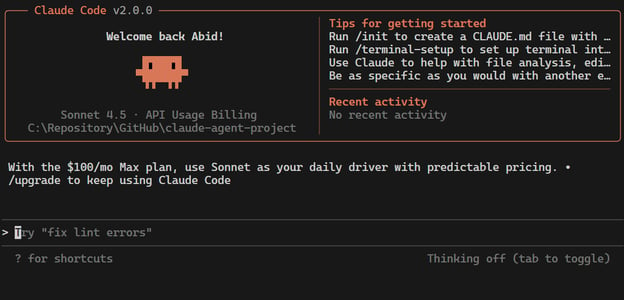
我已使用 API 密钥完成 Claude Code 的设置。如下所示:
安装 Claude Agent SDK
确认已安装 Python,然后打开终端。安装 Claude Agent SDK 的命令如下:
pip install claude-agent-sdk注意:如果遇到 CLINotFoundError,请确认您已安装上述 CLI,且已将 Claude 加入 PATH。
使用 Claude Agent SDK 与 Claude Sonnet 4.5 构建项目
我们将使用 Claude Agent SDK 作为框架、Claude Code 作为工具与计算机使用能力、Claude Sonnet 4.5 作为 AI 模型,构建三个简单项目。
- 一次性博客大纲: 一个不使用工具的简单一次性查询,演示 Claude Agent SDK 的基础用法。
- InspireBot CLI: 结合网页搜索能力与用于励志语录的自定义回退工具。
- NoteSmith 多工具应用: 一个功能完整的笔记应用,包含多种工具、安全钩子与用量追踪。
全部源码已发布于 GitHub 仓库:kingabzpro/claude-agent-projects
1. 一次性博客大纲
在该项目中,我们使用 SDK 的 query() 函数与 Claude Sonnet 4.5 生成博客大纲。这是一次简单的一次性查询,不使用任何工具,展示 Claude Agent SDK 的基础用法。
代码包括:
- 异步流式输出:结合
asyncio与 SDK 的query()异步迭代器,实现非阻塞、逐 token 输出。 - 提示与选项:定义博客大纲
PROMPT,并通过ClaudeAgentOptions配置模型/人设。 - 类型化消息流:遍历消息,仅提取
AssistantMessage → TextBlock的内容。 - 实时输出:到达即打印文本(
end=""),获得干净的流式控制台视图。 - 结果处理:忽略
ResultMessage,让流自然结束。 - 入口:脚本执行时通过
asyncio.run(main())运行。 - 可定制、最小化:便于替换模型/提示;脚本轻量,适合演示或流水线。
oneshot_outline.py:
import asyncio
from claude_agent_sdk import (
query,
ClaudeAgentOptions,
AssistantMessage,
TextBlock,
ResultMessage,
)
PROMPT = """Create a crisp markdown outline (H2/H3 bullets) for a 500-word blog post:
Title: Why Sovereign AI Compute Matters in 2026
Audience: CTOs and Heads of AI
Tone: pragmatic, non-hype
Include: 3 buyer pains, 3 evaluation criteria, 1 closing CTA
"""
async def main():
options = ClaudeAgentOptions(
model="sonnet",
system_prompt="You are a precise technical copy strategist."
)
async for msg in query(prompt=PROMPT, options=options):
if isinstance(msg, AssistantMessage):
for block in msg.content:
if isinstance(block, TextBlock):
print(block.text, end="") # only the outline
elif isinstance(msg, ResultMessage):
pass # let the iterator end naturally
if __name__ == "__main__":
asyncio.run(main())我们将运行脚本,并把输出保存为 markdown 文件。
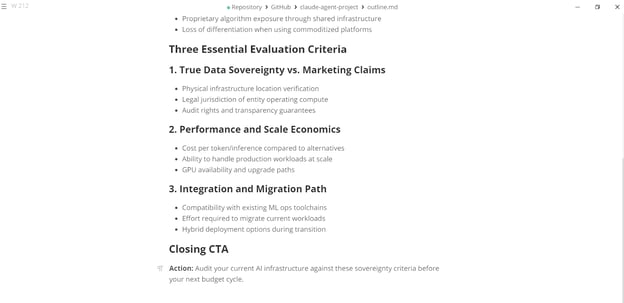
python oneshot_outline.py > outline.md 打开该 markdown 文件,您会看到已生成规范的技术文案。
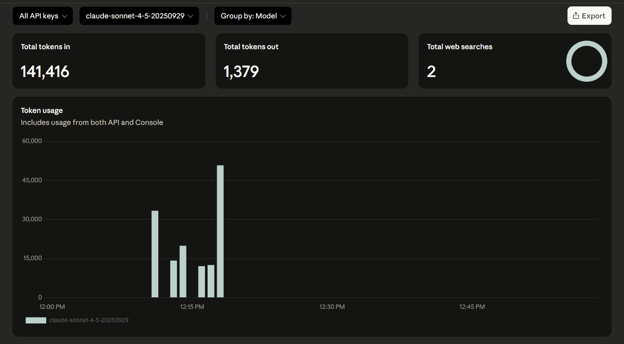
您可以前往仪表板 https://console.anthropic.com/usage 查看用量。如图所示,所用模型为 Claude Sonnet 4.5。
2. InspireBot CLI
该项目构建了一个适配终端的励志生成器,使用 Claude Sonnet 4.5 以流式方式输出语录。它先尝试 WebSearch,如无结果则回退到自定义的 inspire_me 工具来返回随机语录。
代码包括:
- 自定义回退工具:定义
inspire_me,内置励志语录,并通过create_sdk_mcp_server注册。 - CLI 辅助:通过
is_tty、typewrite、bold、faint,为终端输出增加打字机动画与样式。 - 提示与选项:通过
ClaudeAgentOptions配置工具(WebSearch+inspire_me)与系统人设“InspireBot”。 - 流式工具调用:迭代消息,展示工具使用(
ToolUseBlock)、结果(ToolResultBlock)与最终输出(TextBlock)。 - 回退逻辑:若未获得可用输出,则默认使用本地随机语录。
- 交互体验:显示流式的工具输入/结果,并以打字机效果呈现最终励志语句。
inspire_web.py:
import sys
import json
import asyncio
import random
import time
from typing import Any
from claude_agent_sdk import (
query,
ClaudeAgentOptions,
tool,
create_sdk_mcp_server,
AssistantMessage,
TextBlock,
ToolUseBlock,
ToolResultBlock,
ResultMessage,
)
# -------------------------
# Custom fallback tool
# -------------------------
QUOTES = [
"Dream big, start small -- but start.",
"Stay curious, stay humble, keep building.",
"Every expert was once a beginner.",
"Small wins stack into big victories.",
"Consistency beats intensity when intensity is inconsistent.",
]
@tool("inspire_me", "Return a random motivational quote", {})
async def inspire_me(_: dict) -> dict:
return {"content": [{"type": "text", "text": random.choice(QUOTES)}]}
UTILS = create_sdk_mcp_server("inspire_util", "1.0.0", [inspire_me])
# -------------------------
# Tiny terminal helpers
# -------------------------
def is_tty() -> bool:
try:
return sys.stdout.isatty()
except Exception:
return False
def typewrite(text: str, delay: float = 0.02) -> None:
"""Print with a typewriter effect if TTY; otherwise plain print."""
if not is_tty():
print(text)
return
for ch in text:
print(ch, end="", flush=True)
time.sleep(delay)
print()
def faint(s: str) -> str:
"""Dim text if terminal supports ANSI."""
return s if not is_tty() else f"\033[2m{s}\033[0m"
def bold(s: str) -> str:
return s if not is_tty() else f"\033[1m{s}\033[0m"
# -------------------------
# Main
# -------------------------
async def main():
topic = "engineering focus" if len(sys.argv) < 2 else " ".join(sys.argv[1:])
options = ClaudeAgentOptions(
model="sonnet", # switch to "sonnet-4.5" if your CLI lists it
system_prompt=(
"You are InspireBot.\n"
"- First, try WebSearch to find a short, uplifting quote relevant to the user's topic.\n"
"- If WebSearch is unhelpful or no clear quote is found, call the custom 'inspire_me' tool.\n"
"- Output ONE short line only. No preface, no commentary, <= 120 characters."
),
allowed_tools=[
"WebSearch",
"mcp__inspire_util__inspire_me",
],
mcp_servers={"inspire_util": UTILS},
)
prompt = (
"Find a short, uplifting quote for today's inspiration. "
f"Topic: {topic}. Prefer something crisp and modern.\n"
"If search yields multiple options, pick the best single line."
)
final_line_parts: list[str] = []
if is_tty():
print(bold("🌐 InspireBot (WebSearch + fallback tool)"))
print(faint("Tip: pass a custom topic: python inspire_web_animated.py \"women in leadership\""))
print()
async for message in query(prompt=prompt, options=options):
# Stream assistant messages for tool usage + final text
if isinstance(message, AssistantMessage):
for block in message.content:
if isinstance(block, ToolUseBlock):
tool_name = block.name
tool_input = block.input or {}
print(f"{bold('🛠️ Tool used:')} {tool_name}")
print(f"{faint(' input:')} {json.dumps(tool_input, ensure_ascii=False)}")
elif isinstance(block, ToolResultBlock):
# Show summarized tool result text if present
shown = False
if isinstance(block.content, list):
for part in block.content:
if isinstance(part, dict) and part.get("type") == "text":
text = (part.get("text") or "").strip()
if text:
preview = text if len(text) <= 200 else (text[:197] + "...")
print(f"{faint(' result:')} {preview}")
shown = True
break
if not shown:
print(f"{faint(' result:')} (no textual content)")
elif isinstance(block, TextBlock):
# This should be the final "inspiration" line content
final_line_parts.append(block.text)
elif isinstance(message, ResultMessage):
# allow the iterator to finish naturally (no break)
pass
final_line = " ".join(part.strip() for part in final_line_parts).strip()
if not final_line:
final_line = random.choice(QUOTES) # ultimate fallback, just in case
# Animate the final line (typewriter), or plain if not a TTY
typewrite(final_line, delay=0.02)
if __name__ == "__main__":
asyncio.run(main())我们将使用默认主题运行脚本,命令如下:
python inspire_web.py如您所见,它会显示所用工具及其输入,随后输出一条励志语录。

我们再为该 Python 脚本提供一个自定义主题:
python inspire_web.py "Sadness and Love"返回的励志语录将包含“love”和“sadness”等关键词。

3. NoteSmith 多工具应用
该项目构建了一个多工具研究助手,可在本地保存与搜索笔记、总结网页,并使用 Claude Sonnet 4.5 以流式输出结果。它结合了自定义 MCP 工具、内置工具与安全钩子,带来更丰富的 CLI 体验。
代码包括:
- 本地存储:将笔记连同时间戳保存到磁盘;用简单的 grep 逻辑支持不区分大小写的搜索。
- 自定义 MCP 工具:
save_note(存储文本)与find_note(搜索笔记),并通过create_sdk_mcp_server注册。 - 安全钩子:
block_dangerous_bash在工具执行前拒绝有害的 shell 命令(如rm -rf /)。 - 系统提示与命令:定义
/summarize、/note、/find、/help、/exit;提示引导工具使用(WebFetch、save_note、find_note)。 - 流式交互:通过
ClaudeSDKClient处理AssistantMessage、ToolUseBlock、ToolResultBlock,实时打印文本与工具结果。 - 用量追踪:在 stderr 打印包含模型名称、tokens 与成本的页脚,同时保持主输出整洁。
- 聊天界面:如轻量 REPL,您输入命令(
/note、/find、/summarize),即可获得即时响应,仿佛与助手对话。
note_smith.py:
import sys
import json
import asyncio
from datetime import datetime
from pathlib import Path
from typing import Any
from claude_agent_sdk import (
ClaudeSDKClient,
ClaudeAgentOptions,
AssistantMessage,
TextBlock,
ToolUseBlock,
ToolResultBlock,
ResultMessage,
tool,
create_sdk_mcp_server,
HookMatcher,
HookContext,
)
# ----------------------------
# Storage (simple local notes)
# ----------------------------
NOTES_DIR = Path(__file__).parent / "notes"
NOTES_DIR.mkdir(exist_ok=True)
def _ts() -> str:
return datetime.now().strftime("%Y-%m-%d_%H-%M-%S")
def save_note_to_disk(text: str) -> str:
path = NOTES_DIR / f"note_{_ts()}.txt"
path.write_text(text.strip() + "\n", encoding="utf-8")
return str(path)
def grep_notes(pattern: str) -> list[str]:
pat = pattern.lower()
out: list[str] = []
for p in NOTES_DIR.glob("*.txt"):
for i, line in enumerate(p.read_text(encoding="utf-8").splitlines(), start=1):
if pat in line.lower():
out.append(f"{p.name}:{i}: {line}")
return out
# ----------------------------
# Custom MCP tools
# ----------------------------
@tool("save_note", "Save a short note to local disk", {"text": str})
async def save_note(args: dict[str, Any]) -> dict[str, Any]:
path = save_note_to_disk(args["text"])
return {"content": [{"type": "text", "text": f"Saved note → {path}"}]}
@tool("find_note", "Find notes containing a pattern (case-insensitive)", {"pattern": str})
async def find_note(args: dict[str, Any]) -> dict[str, Any]:
hits = grep_notes(args["pattern"])
body = "\n".join(hits) if hits else "No matches."
return {"content": [{"type": "text", "text": body}]}
UTILS_SERVER = create_sdk_mcp_server(
name="notes_util",
version="1.0.0",
tools=[save_note, find_note],
)
# ----------------------------
# Optional safety hook (Bash)
# ----------------------------
async def block_dangerous_bash(
input_data: dict[str, Any],
tool_use_id: str | None,
context: HookContext
):
if input_data.get("tool_name") == "Bash":
cmd = str(input_data.get("tool_input", {}).get("command", "")).strip().lower()
if "rm -rf /" in cmd or "format c:" in cmd:
return {
"hookSpecificOutput": {
"hookEventName": "PreToolUse",
"permissionDecision": "deny",
"permissionDecisionReason": "Dangerous command blocked"
}
}
return {}
# ----------------------------
# Prompts & UI
# ----------------------------
SYSTEM_PROMPT = """You are NoteSmith, a concise research assistant.
- Prefer bullet answers with crisp takeaways.
- When the user asks to /summarize <url>, use WebFetch to retrieve and then summarize 5 key points + a 1-line TL;DR.
- When the user types /note <text>, call the custom save_note tool.
- When the user types /find <pattern>, call the custom find_note tool.
- Keep answers short unless asked to expand.
"""
HELP = """Commands:
/summarize <url> Summarize a webpage (WebFetch)
/note <text> Save a note locally
/find <pattern> Search saved notes
/help Show this help
/exit Quit
"""
# Use the broadest model label for compatibility; switch to "sonnet-4.5" if your CLI lists it.
MODEL = "sonnet"
# ----------------------------
# Main app
# ----------------------------
async def main():
options = ClaudeAgentOptions(
model=MODEL,
system_prompt=SYSTEM_PROMPT,
permission_mode="acceptEdits",
allowed_tools=[
# Built-ins (Claude may use these if relevant)
"WebFetch", "Read", "Write", "Grep", "Glob",
# Our MCP tools (SDK prefixes mcp__<alias>__<toolname>)
"mcp__utils__save_note",
"mcp__utils__find_note",
],
mcp_servers={"utils": UTILS_SERVER},
hooks={"PreToolUse": [HookMatcher(hooks=[block_dangerous_bash])]},
setting_sources=None, # no filesystem settings; everything is programmatic
)
print("💡 NoteSmith (Claude Sonnet)\n")
print(HELP)
async with ClaudeSDKClient(options=options) as client:
while True:
user = input("\nYou: ").strip()
if not user:
continue
if user.lower() in {"/exit", "exit", "quit"}:
print("Bye!")
break
if user.lower() in {"/help", "help"}:
print(HELP)
continue
# Lightweight command parsing (the system prompt also guides tool usage)
if user.startswith("/summarize "):
url = user.split(" ", 1)[1].strip()
prompt = f"Summarize this URL using WebFetch and return 5 bullets + TL;DR:\n{url}"
elif user.startswith("/note "):
text = user.split(" ", 1)[1]
prompt = f'Please call tool save_note with text="{text}"'
elif user.startswith("/find "):
patt = user.split(" ", 1)[1]
prompt = f'Please call tool find_note with pattern="{patt}"'
else:
prompt = user
await client.query(prompt)
# -------- Response streaming with footer to STDERR --------
model_used = None
usage = None
cost = None
async for message in client.receive_response():
if isinstance(message, AssistantMessage):
if model_used is None:
model_used = message.model # e.g., "sonnet" or "sonnet-4.5"
for block in message.content:
if isinstance(block, TextBlock):
print(block.text, end="", flush=True) # stdout
elif isinstance(block, ToolUseBlock):
print(f"\n🛠️ Using tool: {block.name} with input: {json.dumps(block.input)}")
elif isinstance(block, ToolResultBlock):
if isinstance(block.content, list):
for part in block.content:
if isinstance(part, dict) and part.get("type") == "text":
print(f"\n🔎 Tool says: {part.get('text')}")
elif isinstance(message, ResultMessage):
usage = message.usage or {}
cost = message.total_cost_usd
# Do not break early; let stream end naturally
# Footer (model + tokens + cost) → STDERR so normal output stays clean
def _token_summary(u: dict) -> str:
total = u.get("total_tokens")
if total is None:
it, ot = u.get("input_tokens"), u.get("output_tokens")
if it is not None or ot is not None:
total = (it or 0) + (ot or 0)
if total is None:
return "tokens=?"
if "input_tokens" in u or "output_tokens" in u:
return f"tokens={total} (in={u.get('input_tokens','?')}, out={u.get('output_tokens','?')})"
return f"tokens={total}"
footer = (
f"\n\n-- Turn done. model={(model_used or options.model)} "
f"{_token_summary(usage or {})} cost={cost if cost is not None else '?'} --"
)
print(footer, file=sys.stderr)
# Entry
if __name__ == "__main__":
asyncio.run(main())在终端输入以下命令以运行该应用:
python note_smith.py这将启动带有帮助命令的 CLI 聊天界面。
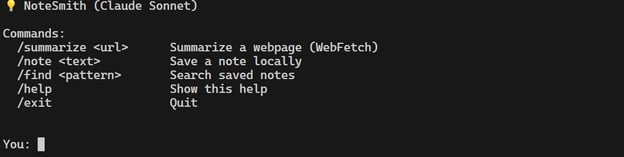
我们先来总结一个网页。我提供了我的个人作品集网站 URL:
/summarize abid.work
首先,智能体会判断使用哪些工具,抓取网页内容,提炼五个要点,并在聊天界面展示。最后显示用量报告,包括模型名称、token 用量与成本。
I'll fetch and summarize the content from that URL for you.
🛠️ Using tool: WebFetch with input: {"url": "https://abid.work", "prompt": "Extract the main content and key information from this page, including what the person does, their background, projects, and any notable achievements or areas of focus."}
**5 Key Points:**
• **Prolific Tech Educator** - Authored 500+ articles making data science & ML accessible through tutorials, cheat sheets, and practical guides
• **Certified Data Scientist** - Professional focus on building innovative machine learning solutions across NLP, computer vision, and MLOps
• **Multi-Domain Expertise** - Covers Python, SQL, AI, and end-to-end ML workflows with hands-on project demonstrations
• **Content-First Philosophy** - Maintains extensive portfolio including blogs, tutorials, book reviews, and career resources
• **Open Contributor** - Active on GitHub (kingabzpro) sharing code and projects with the community
**TL;DR:** Abid Ali Awan is a certified data scientist who's authored 500+ educational articles and tutorials, specializing in ML, NLP, and making complex tech concepts accessible to learners.
-- Turn done. model=claude-sonnet-4-5-20250929 tokens=326 (in=6, out=320) cost=0.062402849999999996 --接下来,保存一条笔记:
/note what is love
我们指示其以“what is love”文本保存笔记。
🛠️ Using tool: mcp__utils__save_note with input: {"text": "what is love"}
✓ Note saved: "what is love"
-- Turn done. model=claude-sonnet-4-5-20250929 tokens=81 (in=6, out=75) cost=0.07421549999999999 --最后,通过提供该笔记中的关键词来查找笔记:
/find love
如您所见,它找到了文件并展示了其中的文本。
🛠️ Using tool: mcp__utils__find_note with input: {"pattern": "love"}
**Found 1 note matching "love":**
• `note_2025-09-30_17-18-02.txt` - "what is love"
-- Turn done. model=claude-sonnet-4-5-20250929 tokens=105 (in=6, out=99) cost=0.08423339999999999 --总结
Claude Agent SDK 的安装配置非常简便,尤其是在您已在本地安装 Claude Code 的情况下。您只需安装 SDK 包即可。
Python SDK 提供两种与 Claude 交互的主要方式:
query()—— 简单的文本生成 API,适用于轻量用例,但不支持工具。ClaudeSDKClient—— 功能全面的智能体 API,支持恢复会话、使用工具、保持手动控制等能力。
在本教程中,我们探索了 Anthropic 最新模型 Claude Sonnet 4.5,并介绍了全新的 Claude Agent SDK。我们完成了安装流程,并构建了三个示例项目来展示其能力。
如果您对探索智能体式工作流感兴趣,我强烈建议您尝试这个 SDK。

Anthropic 发布了 Claude Sonnet 4.5,这是一款最先进的代码模型,已在行业排行榜和基准测试中名列前茅。本次发布的亮点在于其与各类工具和框架的无缝集成:从 VS Code 扩展与上下文编辑,到记忆工具、代码执行、文件创建(表格、幻灯片、文档)等;还扩展到了全新的使用体验,如 Claude for Chrome 与 Imagine with Claude。
但此次发布的重头戏是全新的 Claude Agent SDK,它构建于 Claude Code 之上。该 SDK 引入了强大的智能体框架,使开发者能够以全新的方式构建、定制并扩展 Claude 的能力。
在本教程中,我们将探讨 Claude 4.5 的新特性,动手体验 Claude Agent SDK,本地完成安装配置,并构建三个简单项目,直观感受其潜力。
Claude 4.5 有哪些新变化?
Claude Sonnet 4.5 带来了重大能力升级。它是全球最强的代码模型,也是构建复杂智能体的最佳选择,并在计算机使用类任务上表现卓越,在推理与数学方面有显著提升。该模型在 SWE-bench Verified 基准上达到了业界领先水平,并已观察到能在复杂的多步骤任务上保持专注超过 30 小时。
在 OSWorld 排行榜上,它的成绩提升至 61.4%,较四个月前的 42.2% 大幅跃升。来自金融、法律、医学与 STEM 领域的专家也反馈其领域知识与推理能力有明显改善。
来源:Introducing Claude Sonnet 4.5 \ Anthropic
此外,这是迄今为止 Anthropic 对齐度最高的前沿模型,在逢迎、欺骗、逐利行为以及鼓励妄想方面均有所降低,并进一步加强了对提示注入的防御。该模型在 ASL-3 保障下发布,升级后的分类器旨在过滤高风险内容,同时相较早期版本显著减少误报。我们也看到了一个更小的模式,详情可参阅我们的Claude Haiku 4.5 指南。
了解 Claude Agent SDK
Claude Agent SDK(此前称为 Claude Code SDK)提供了一套工具,帮助您使用与 Claude Code 相同的框架来构建强大的通用智能体。
其核心理念很简单:让 Claude 能使用一台计算机。通过对终端与文件系统的访问,智能体可以像开发者一样搜索、编写、执行并迭代代码。这些能力也远不止于编码,还包括深度研究、视频创作、笔记记录、数据分析等。