コース
Pythonで学ぶMongoDB入門
3時間
24.4K
Most chatbots and agents forget everything when a session ends, which forces users to repeat themselves. Developers usually need to set up a database before the bot can remember anything. What if the agent could recognize when memory matters, provision a database on demand, and retrieve only the context relevant to the current conversation?
In this tutorial, I'll show you how to add thread-scoped persistent memory to a chatbot or agent using MongoDB Atlas Ephemeral Clusters (on-demand clusters can be claimed and kept), MongoDB Vector Search, and MongoDB Automated Embedding with Voyage AI. You'll store conversations and durable facts, retrieve the right context by meaning, and decide at the end whether to claim the temporary cluster or let it expire.
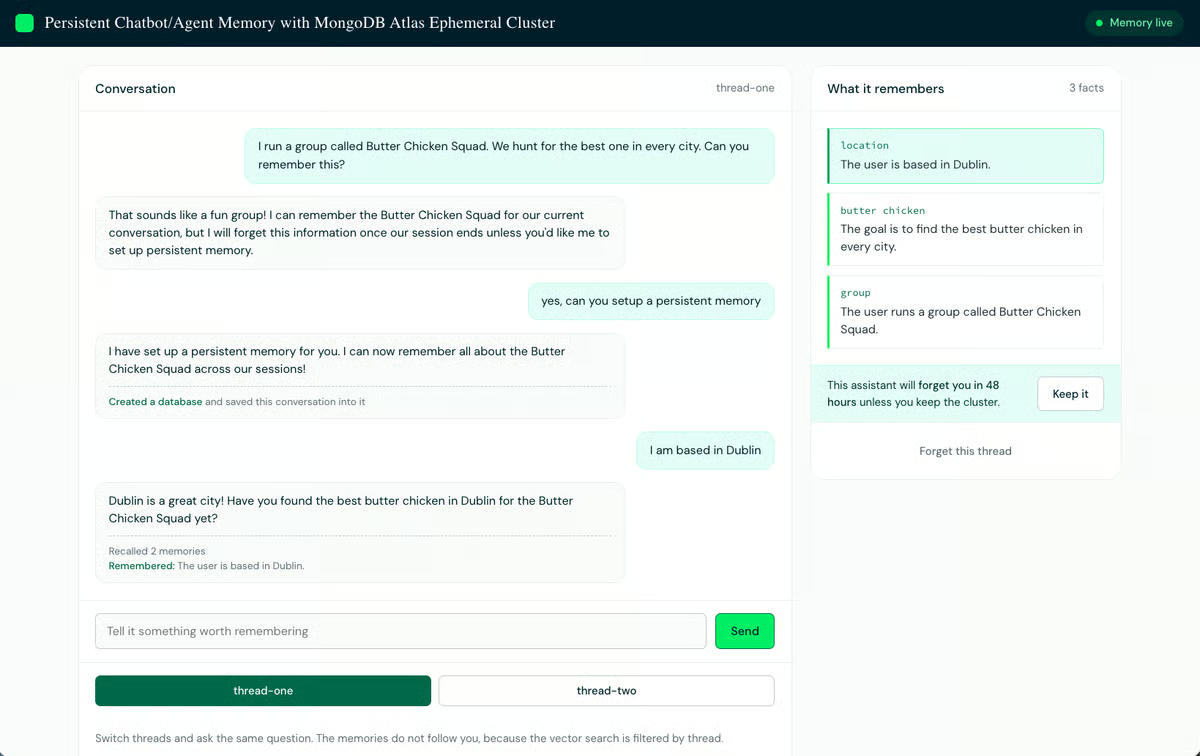
The bot created its own database partway through this conversation. The three facts were extracted from the conversation, and in 48 hours, they are deleted unless someone presses Keep it.
I recently rejoined MongoDB and wanted to write an intro post for our team channel. Some colleagues had never met me, while others had worked with me for years. A detailed reintroduction would have wasted the time of the second group, so I found myself wanting to write the post as a branch:
if (weHaventMet) {
  // Here is who I am and what I have been doing
} else {
  // Good to be back
}
That branch depends on something we take for granted: memory. I know who I've met before, so I can choose the right introduction without making everyone read the same one.
A chatbot or agent cannot make that choice. The large language model (LLM) behind it does not retain information between requests, so without an application-provided memory layer, every conversation starts as if weHaventMet were true. The model may reason through a complex task while the session is active, but it only ever sees the context the application sends in the current request. Anything the application did not write somewhere durable is gone the next time you talk.
Adding persistent memory means solving two separate problems.
|
Problem |
Why it happens |
Fix |
|
The bot forgets between sessions |
In-session "memory" is just resending the transcript every turn. That works until the transcript outgrows the context window, or the process dies, and there is nothing left to resend. |
Somewhere durable to put facts: a database |
|
Recall gets slow and vague |
Bots that keep a transcript reprocess it on every turn, so recall gets slower and more expensive as the conversation grows. |
A way to fetch only the handful of facts that matter now: vector search |
We'll solve both with two MongoDB Atlas features. Atlas Ephemeral Clusters [Public Preview] lets the application provision a temporary database through a single API call. MongoDB Vector Search retrieves relevant facts even when the wording of a question differs from the wording of the stored fact.
You'll start with a chatbot that forgets everything on restart, and finish with one that provisions its own database mid-conversation. Here is the path:
Steps 1 through 4 are reading and design. You will not run the application again until Step 5. All the code is in the companion repo. It's TypeScript, but nothing here is TypeScript-specific.
git clone https://github.com/mongodb-developer/ephemeral-agent-memory
cd ephemeral-agent-memory
npm install
cp .env.example .envLLM_PROVIDER=anthropic
LLM_API_KEY=your_api_key
LLM_CHAT_MODEL=your_chat_model
LLM_EXTRACT_MODEL=your_extraction_modelUse LLM_PROVIDER=anthropic for Anthropic, or LLM_PROVIDER=openai for OpenAI and for OpenAI-compatible providers such as Groq, Together, LM Studio, vLLM, and Ollama. Compatible providers also need LLM_BASE_URL set to their endpoint. If you need a key, see Anthropic API key setup or OpenAI API key setup.
Use the exact model name your provider expects. The same model can handle both chat and extraction.
I ran this project locally with Ollama's OpenAI-compatible API. Local Ollama and LM Studio endpoints usually do not require an API key, so LLM_API_KEY stays empty:
LLM_PROVIDER=openai
LLM_BASE_URL=http://localhost:11434/v1
LLM_API_KEY=
LLM_CHAT_MODEL=gemma4:12b
LLM_EXTRACT_MODEL=gemma4:12bMONGODB_URI empty. The chatbot sets it later, when it provisions a database.Before adding memory, run the chatbot as it ships. Seeing the failure first makes the fix easier to follow.
From the project directory:
npm run chatYou should see a you> prompt. Tell the bot something worth remembering, then ask about it:
you > I run a group called Butter Chicken Squad. We hunt for the best one in every city.
bot > That sounds like a delicious mission. I'd love to hear about the best spots so far.
you > What do I care about?
bot > You care about finding the best butter chicken in every city. I don't know anything else about your interests yet.
Now press Ctrl+C, start the process again, and ask the same question:
you > What do I care about?
bot > I'm sorry, I don't know what you care about yet. We've just started talking.
That is the amnesia test used throughout this tutorial: say something, stop the process, restart it, and ask again. Nothing is broken. The bot has no persistent memory because none was configured.
Here is why. The bot keeps recent turns in a RAM array and resends them with every request. This is a simplified version of the flow in src/chat.ts and src/converse.ts:
const sessionMessages: LlmMessage[] = [];

const reply = await askModel({
  system: BASE_PROMPT,
  messages: [...sessionMessages.slice(-10), { role: "user", content: userInput }],
});
That slice(-10) is the entire memory system: the last 10 messages, with no notion of which ones matter. In the vocabulary we'll get to next, this bot has working memory and nothing else. Nothing is written down, so there is no episodic memory, and nothing is distilled into a fact, so there is no semantic memory. When the process exits, the array goes with it.
You just watched one kind of memory fail. In AI systems, "memory" covers several different jobs, and this tutorial uses four terms borrowed from cognitive psychology.
Working memory is what the agent holds right now: the context window, plus any scratchpad for the task in progress. It is the RAM array you saw in Step 0, and it dies with the process.
Episodic memory records events: what happened. For a chatbot, that is the transcript, verbatim and chronological.
Semantic memory stores facts separated from the event that produced them: what is true. "Based in Dublin" is a semantic memory. You no longer need to recall which Tuesday the person mentioned it.
Procedural memory is how to do things: skills, rules, and habits. For an agent, that means the system prompt, tool definitions, and installed skills. You author it rather than learn it from the user.
Table 1. How each kind of memory maps to this tutorial.
|
Kind of memory |
What it holds |
Where it lives in this tutorial |
How long it lasts |
|
Working |
The task in progress |
The context window, plus an in-RAM buffer |
Gone when the process exits |
|
Episodic |
The verbatim transcript |
messages collection, one document per message |
Append-only, prune on a schedule |
|
Semantic |
Distilled durable facts |
memories collection, one document per subject |
Until contradicted or deleted |
|
Procedural |
How to behave and which tools exist |
The system prompt and tool definitions in code |
Until you change the code |
Only episodic and semantic memory reach the database here. Procedural memory stays in code because behavior comes from the system prompt and tool definitions rather than from user data. Working memory stays in RAM because a chatbot that restarts mid-conversation has already lost the user's place.
Episodic and semantic memory go into separate collections because the transcript grows on every turn, while facts are added only when someone says something durable. That separation lets you prune the transcript without deleting the facts.
These four map directly to the application we are building, but they are not a complete list. Memory systems can also include semantic caches, shared memory between agents, associative memory, and workflow state. MongoDB's guide to agent memory covers those broader patterns.
The memory layer is deliberately separate from the interfaces that use it. The terminal chatbot, browser UI, MCP adapter, and LangGraph adapter all call the same code, which is what lets you change how the bot is accessed without touching how memory is stored.
src/
├── chat.ts                 # Terminal chatbot
├── converse.ts             # Shared one-turn conversation flow
├── llm.ts                  # Model-provider abstraction
├── provision.ts            # Creates an Ephemeral Cluster
├── inspect.ts              # Prints stored memories
└── memory/
    ├── config.ts           # Database and memory settings
    ├── types.ts            # Document and scope types
    ├── store.ts            # MongoDB connection and index setup
    ├── extract.ts          # Extracts durable facts
    └── index.ts            # remember(), recall(), history(), and forget()

web/
├── server.ts               # HTTP wrapper around the memory module
└── public/                 # Browser interface

examples/
├── mcp/                    # MCP adapter
└── langgraph/              # LangGraph adapter
One turn flows through chat.ts into converse.ts, which recalls relevant facts, calls the model, and stores the result through memory/index.ts. Everything below that is implementation: store.ts holds the connection and indexes, extract.ts decides whether a message contains a durable fact, and llm.ts hides the differences between providers.
This step replaces the in-memory array with a small, persistent API. The repository already has the completed module, so open src/memory/ and read along. You will not run anything until Step 5.
remember(scope, role, content); // store a message and extract durable facts
recall(scope, query, limit);    // find relevant facts
history(scope, limit);          // retrieve recent messages
forget(scope, subject?);        // delete a fact
A surface this small lets the same module run inside a terminal chatbot, a browser UI, or an MCP server. None of those callers needs to know how memory is stored, only what to ask for.
Every function takes a scope containing {threadId,userId}, which keeps one conversation's memories separate from another's. Step 3 shows how those values become query filters.
MongoDB stores data as documents, which look much like JSON objects, grouped into collections. Unlike a relational table, a collection does not require every document to have the same fields.
That flexibility matters here because the two kinds of memory have different shapes. The transcript is a long list of short, uniform entries and the facts are a shorter list of richer ones. Separate collections let each have its own shape, index, and retention policy.
Table 2. The two memory collections.
|
Collection |
Holds |
Write pattern |
Index |
|
messages |
Episodic memory, the transcript |
Append only, one document per message |
Compound on threadId and createdAt |
|
memories |
Semantic memory, distilled facts |
Upsert, one document per subject |
Unique on threadId and subject |
The messages index supports efficient queries for recent messages within a thread. The unique memories index prevents duplicate documents with the same {threadId,subject}, and the upsert in Step 2 relies on that constraint to replace an older fact with a newer one. Step 3 covers both index definitions in detail.
Semantic search does not need a third collection. It is a query against memories, which we write in Step 4. A separate vector database would mean two systems to keep in sync. Here, the facts and their search index live in the same cluster.
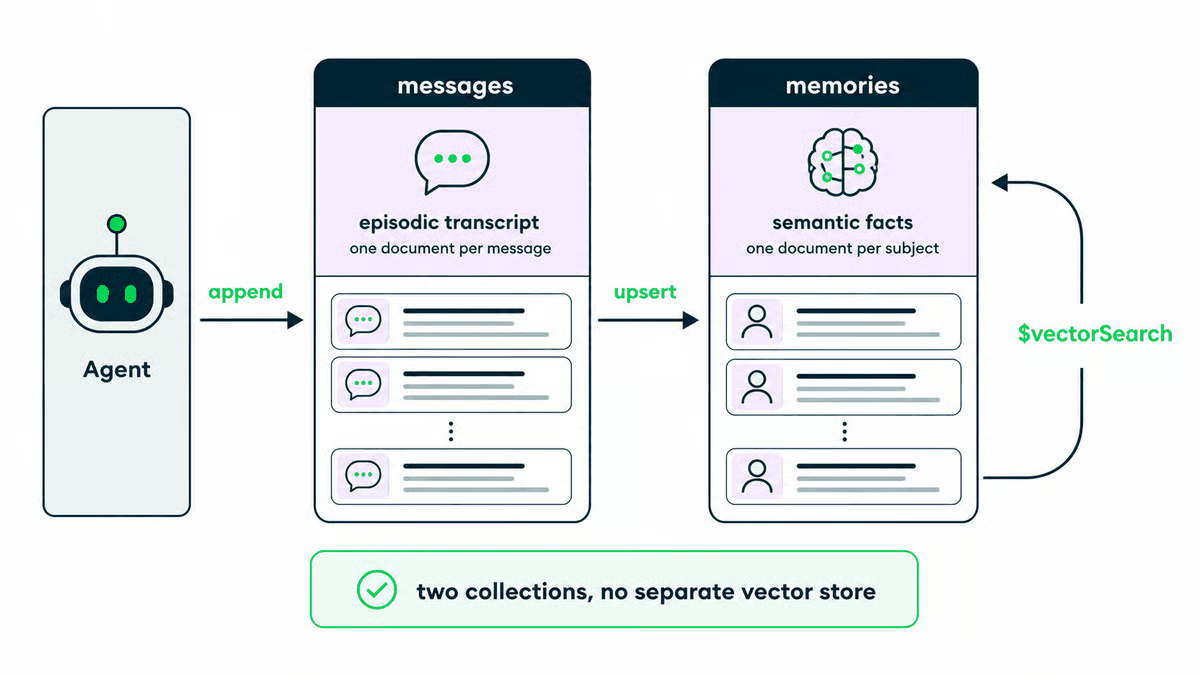
A transcript document stores who said what, when:
{
  _id: ObjectId("68a1f4c2e8b91a4f2c7d3e01"),
  threadId: "thread-one",
  userId: "harshit",
  role: "user",
  content: "I run a group called Butter Chicken Squad. We hunt for the best one in every city.",
  createdAt: ISODate("2026-07-29T10:58:12.441Z")
}
Every document gets an _id primary key automatically. The threadId and userId fields carry the scope, and the compound index on threadId and createdAt supports recent-history queries. Because a transcript entry is a single insert, the application can afford to store every message.
A fact document stores one durable fact within the current thread:
{
  _id: ObjectId("68a1f4c5e8b91a4f2c7d3e04"),
  threadId: "thread-one",
  userId: "harshit",
  subject: "food",
  fact: "Runs a group called Butter Chicken Squad.",
  sourceText: "I run a group called Butter Chicken Squad. We hunt for the best one in every city.",
  createdAt: ISODate("2026-07-29T10:58:14.702Z"),
  updatedAt: ISODate("2026-07-29T10:58:14.702Z")
}
Table 3. The fields that do the work in a fact document.
|
Field |
Job |
|
subject |
The topic, and the key we upsert on (Step 2) |
|
fact |
The sentence, and the field we search by meaning (Step 4) |
|
sourceText |
The message it came from, so you can show a user where a fact originated |
There is no vector field. Facts need embeddings to be searchable by meaning, but MongoDB Automated Embedding generates them from the fact field, which we will configure in Step 3.
This step decides which messages get promoted into durable facts. It is what separates a memory system from a log file.
The obvious approach, storing and indexing every message, has three costs: you pay for a vector on every turn regardless of content, the collection fills with "ok thanks" and "can you repeat that", and recall gets worse because one useful fact competes with hundreds of low-value entries for a top result slot.
So remember() splits the work. It always writes the raw message to messages, because an insert is cheap and a full transcript is worth having. Separately, it asks a model one question: Is there anything here that will still be true next week?
const SYSTEM_PROMPT = Decide which durable facts, if any, this message reveals about the user. These facts may be useful in later sessions within the same memory scope.

Return JSON only. No explanation, no markdown fences.

Format:
{"facts": [{"subject": "short lowercase noun", "fact": "one short sentence"}]}

Rules:
- Return an empty list if the message contains nothing durable.
- Keep only things that will still be true next week: preferences, constraints, relationships, names, recurring habits, goals.
- Ignore small talk, questions, and anything about the current task only.
- "subject" is the topic the fact belongs to, such as "diet", "dog", "job", "meeting times". Reuse the same subject for the same topic, so newer facts can replace older ones.
- Write facts in the third person. "Prefers vegetarian food." not "I prefer vegetarian food."
- At most three facts per message.;
"What time is it in Sydney?" returns nothing. "I run a group called Butter Chicken Squad" returns one fact. Most messages are not durable facts, which is the point: this is the difference between a memories collection holding three useful sentences and one holding three hundred lines of small talk.
Two details in that prompt earn their place. Asking for JSON only, with the shape spelled out, gives you something parseable without a schema library. Asking for third person means the facts read correctly when injected into a system prompt describing the user: "Prefers vegetarian food" works there, "I prefer vegetarian food" does not.
Each fact carries a subject such as food,city, or job. That subject is the stable key, which lets us upsert the document rather than insert a new one every time. An upsert updates a document when the filter matches and inserts one when it does not:
await memories().updateOne(
  // Match on the topic, not on a generated id.
  { threadId: scope.threadId, subject },
  {
    $set: {
      userId: scope.userId,
      fact,                  // plain text, Atlas embeds this for us
      sourceText: content,   // keep the message this came from
      updatedAt: now,
    },
    // Only set on first write, so we keep the original creation time.
    $setOnInsert: { threadId: scope.threadId, subject, createdAt: now },
  },
  { upsert: true }
);
$set writes the fields that change on every update. $setOnInsert writes fields only at creation, which is how createdAt survives later updates while updatedAt moves.
The reason to build it this way is that facts change. Suppose the Squad's home base was London when you first mentioned it, and months later, you move to Dublin. Inserting both leaves two competing city facts:
{ subject: "city", fact: "Based in London.", updatedAt: ISODate("2026-02-14...") }
{ subject: "city", fact: "Based in Dublin.", updatedAt: ISODate("2026-07-29...") }
Both match a question about where you are based, and the bot answers with whichever scored higher, which is not the same as whichever is true. Upserting on the subject means today's fact replaces yesterday's:
{ subject: "city", fact: "Based in Dublin.",
  createdAt: ISODate("2026-02-14..."), updatedAt: ISODate("2026-07-29...") }
createdAt still points to February. You keep when you first learned about this subject, while the fact itself moves, and the unique index from Step 1 enforces it at the database level, so an application bug cannot produce a duplicate.
One fact per subject is a simplification. Some subjects should accumulate, such as dietary restrictions or a list of projects, but "newest wins" is a reasonable default and takes a single operation.
Scope is the other design choice here. This tutorial keeps all threads in one cluster and separates them with threadId and userId filters. Step 3 adds those fields to the MongoDB Vector Search index, and Step 4 uses them in the query. A cluster per thread would make the cluster boundary the memory boundary, at the cost of tracking which cluster belongs to which thread.
Those filters only work as a privacy boundary if the application creates and validates the values. Do not let users choose another user's identifiers. In production, derive identity from authenticated application state and test cross-thread access explicitly.
We can store facts and replace an older value when it changes. Now we need to find the right fact when a question uses different words.
MongoDB Vector Search compares numerical representations of meaning, called embeddings, rather than matching keywords. An embedding model converts text into a list of numbers arranged so that similar meanings produce nearby vectors. Atlas embeds the stored fact, embeds the question, and returns the closest matches. That is why a question about enjoying Indian food can retrieve a fact about running a Butter Chicken group.
There are two ways to get embeddings into MongoDB. You can create them manually, calling an embedding API yourself, storing a vector beside each fact, and computing another vector for every question. Or you can declare which field holds the text and let Atlas embed both the stored facts and the queries, which is the MongoDB Automated Embedding approach used here. The index is where we configure it.
The ordinary indexes on threadId and createdAt are available as soon as MongoDB creates them. A vector search index is different: it builds in the background, so createSearchIndex() can return before the index can answer queries. In testing, this took about a minute, though it depends on the cluster and the amount of data.
await memories().createSearchIndex({
  name: VECTOR_INDEX,
  type: "vectorSearch",
  definition: {
    fields: [
      {
        type: "autoEmbed",      // Atlas generates the vector, not us
        path: "fact",           // the text field, not a vector field
        modality: "text",
        model: "voyage-4",
      },
      { type: "filter", path: "threadId" },
      { type: "filter", path: "userId" },
    ],
  },
});
That autoEmbed field type is doing a lot of work. Atlas now generates a vector twice on our behalf: once when we write a fact, and once for the query text on every recall. Both use the voyage-4 model named in the index.
Table 4. Four details in the index definition.
|
Detail |
Why it looks like that |
|
path is fact, a text field |
Atlas embeds the sentence and stores the vector out of sight. A manual index would point to an array of floats |
|
No numDimensions or similarity |
Naming the model once means Atlas configures both sides consistently. A manual index needs both to match, or writes fail |
|
No API key |
Atlas meters embedding tokens against the cluster's organization |
|
Two filter fields |
Declaring a field as a filter lets a query narrow before comparing vectors |
One restriction: you cannot mix autoEmbed and vector field types in the same index. Atlas rejects the definition outright. If you are converting an existing project, you are rebuilding the index, not amending it.
The application waits until the index becomes queryable before using it:
while (Date.now() - startedAt < timeoutMs) {
  const [index] = await memories().listSearchIndexes(VECTOR_INDEX).toArray();
  if (index?.queryable) return;
  await new Promise((resolve) => setTimeout(resolve, 3000));
}Without a filter, a search compares the question against every vector in the collection and returns whatever is closest. With one conversation in the database, that is correct. With many, a question asked in one thread can return a fact belonging to a different thread, purely because the two sentences are semantically similar. No error is raised. The bot answers helpfully, with someone else's information.
A memory system holds exactly the kind of data you do not want crossing between users, so these two lines are the ones to get right. Step 4 uses them in the query.
If you need stronger separation than per-conversation, for example, real tenants with compliance requirements, the MongoDB docs on multi-tenant architecture cover those patterns.
The index is ready. Now we can ask it a question.
MongoDB queries data with an aggregation pipeline, an array of stages that process documents one at a time. $vectorSearch is one of those stages, so recall() searches for relevant facts and then shapes the results for the prompt.
export async function recall(
  scope: MemoryScope,
  query: string,
  limit = 5,
) {
  return memories()
    .aggregate([
      {
        $vectorSearch: {
          index: VECTOR_INDEX,
          path: "fact",
          query: { text: query },
          numCandidates: limit * 15,
          limit,
          filter: {
            threadId: { $eq: scope.threadId },
            userId: { $eq: scope.userId },
          },
        },
      },
      {
        $project: {
          _id: 0,
          subject: 1,
          fact: 1,
          updatedAt: 1,
          score: { $meta: "vectorSearchScore" },
        },
      },
    ])
    .toArray();
}
There is no embedding API call before this pipeline. The application passes the question as text, and Atlas embeds it using the model declared in the index.
Table 5. Four parts of the $vectorSearch stage.
|
Parameter |
What to know |
|
query |
Text, in the form { text: "..." } |
|
filter |
Restricts the search to the current threadId and userId, so a semantically similar fact from another thread is not returned |
|
numCandidates |
How many candidates are considered before the best limit results are returned. Too close to limit reduces quality; fifteen to twenty times limit is a reasonable start. See the vector search accuracy guide |
|
Model |
The query names no embedding model. Atlas uses the one declared in the index, so stored facts and queries stay consistent |
The recalled facts go into the prompt like any other retrieved document:
const recalled = await recall(scope, userInput, 5);

const system = ${BASE_PROMPT}

Here is what you remember about this person from earlier conversations:
	${recalled.map((m) => - ${m.fact}).join("\n")}

	Use these facts naturally.
	Do not list them back unless asked.;
That is, retrieval-augmented generation pointed at the user instead of at a document set. The machinery is the same. Only the data being retrieved is different.
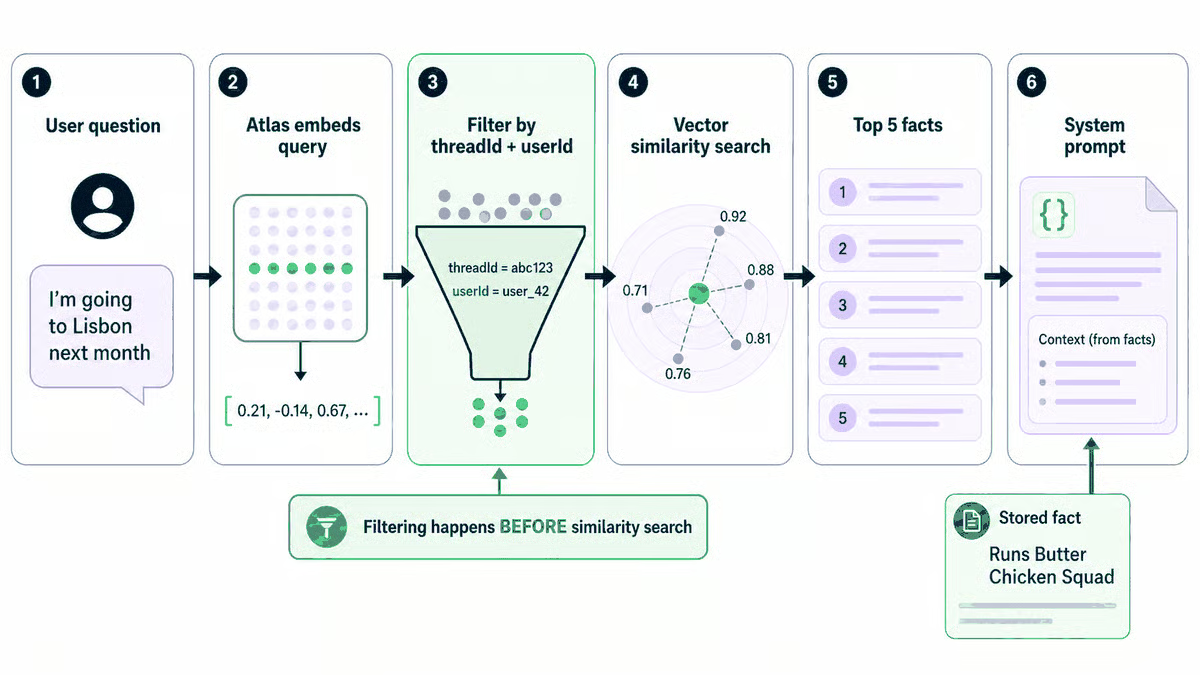
Filtering narrows the candidate set before any vectors are compared, not after. That ordering is what keeps one thread's facts out of another thread's answers.
MongoDB Automated Embedding moves work rather than removing it. You do not manage vectors or a separate embedding key, but embedding happens asynchronously and is rate-limited.
A vector search index can be queryable while a newly written fact is still waiting for its embedding. The write succeeds, but the fact may not be searchable straight away, so a query can return nothing at first and work a minute later. If you are writing tests, do not assume a successful write means the fact is available to recall().
For a demo, you may never notice the rate limits. For real traffic, treat a rate-limit response as an expected condition and retry with backoff rather than as an unrecoverable error.
The module writes facts, keeps them consistent, and searches them. Connecting it to a real database by hand now gives us a known-good baseline before Step 6 lets the chatbot do it itself.
Create a cluster with the standalone script, which calls the same provisionCluster() that the chatbot will use later:
npm run provisionThis makes a single unauthenticated request to the MongoDB Atlas Ephemeral Clusters API. Atlas returns a live temporary M0 cluster with a connection string, a claimUrl, and an expiration time. Save the connection string in .env as MONGODB_URI and keep the claim URL somewhere safe. You will use it in Step 7 if you decide to keep the cluster. If you do not claim it, the cluster expires.
Do note that Ephemeral Clusters are in Public Preview. Check the official MongoDB documentation for current expiry and claim-window behavior.
Treat the claimUrl like a credential. Do not commit it to source control, put it in public logs, or share it with anyone who should not be able to claim the cluster.
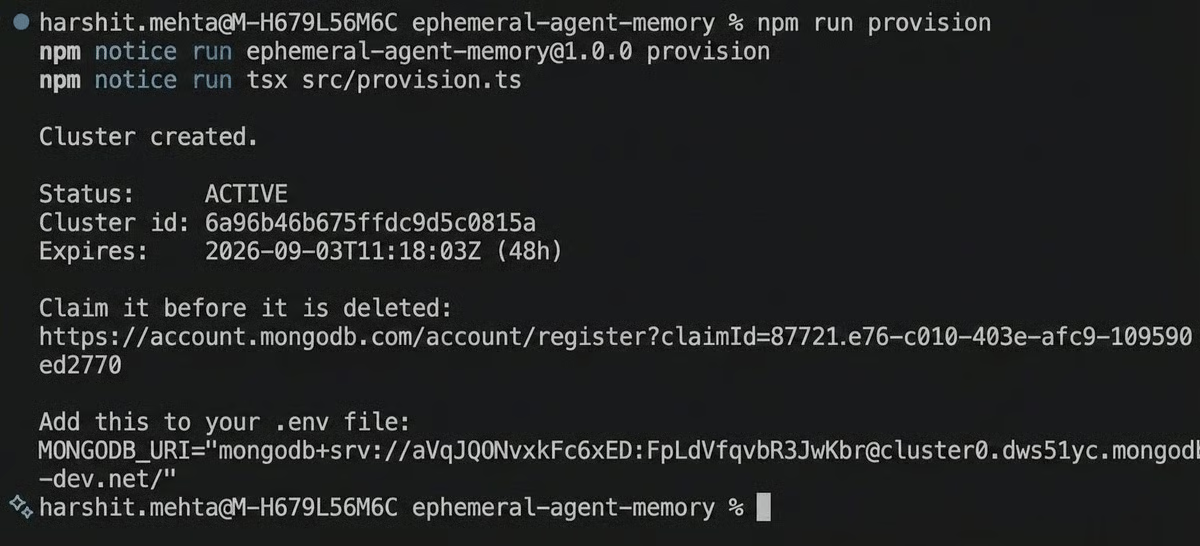
One command, no account. Atlas returns a live cluster with a claim link and a 48-hour expiry.
Now start the chatbot:
npm run chatyou > I run a group called Butter Chicken Squad. We hunt for the best one in every city.
bot > Noted. I will keep an eye out.
[remembered] Runs a group called Butter Chicken Squad.
[remembered] Looks for good butter chicken when travelling.
you > I am based in Dublin.
bot > Good to know.
[remembered] Based in Dublin.
you > /exitThe exact replies and extracted facts vary because a model decides what is worth remembering.
Stop the process, start it again, and say something that does not mention food:
you > I am going to Lisbon next month.
bot > Nice. You will want to find out whether Lisbon has a butter chicken worth reporting back to the Squad.
The question was about travel, and the stored fact was about food. The wording barely overlaps, so a keyword search would be unlikely to connect them. Vector search retrieves the fact because the two pieces of text mean related things.
If it does not connect on the first attempt, wait a minute and ask again. The fact may be stored while Atlas is still generating its embedding, and npm run inspect confirms whether it exists.
Open a second terminal, set a different thread, and start the app:
# macOS and Linux
THREAD_ID="thread-two" npm run chat

# Windows (CMD)
set THREAD_ID=thread-two
npm run chat

# Windows (PowerShell)
$env:THREAD_ID="thread-two"
npm run chat
Ask the same question:
you > I am going to Lisbon next month.
bot > Sounds good. Anything you want help planning?
Both threads use the same cluster, collection, and index. Only the scope differs, and the filter keeps the first thread's facts out of the second.
Finally, inspect what the application stored:
npm run inspectYou should see the messages and memories collections with facts grouped by thread. Counts depend on what you said, but the result to look for is that the transcript holds the messages while memories holds only the extracted facts.
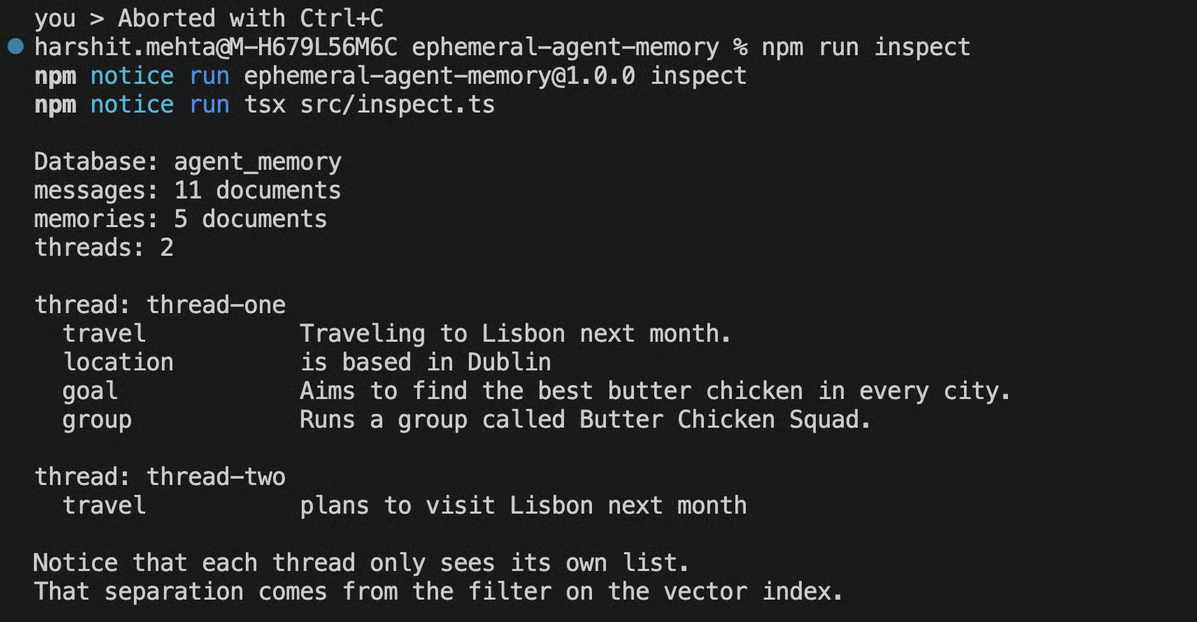
The same cluster and index serve both threads. thread-two sees only its own fact, because the filter is applied before the vector comparison.
Because those facts are readable sentences rather than opaque vectors, you can show them to the person they describe and let them delete individual memories. A memory system that people can inspect is easier to audit than one that only produces an answer.
So far, getting a database has been your job: run npm run provision, copy a connection string, and edit .env. That works for a tutorial, but nobody wants to open a terminal before they can talk to a bot.
Language models can call functions you give them, usually called tools or function calling. You describe a tool in the request, and if the model decides it needs that tool, it returns a request to call it instead of a text reply. Your code runs the function, returns the result, and the model continues from there. We can use that to let the chatbot ask for a database when it needs one.
Start from a clean slate: a fresh terminal with MONGODB_URI unset. This is the same memoryless bot from Step 0, except now you know what the machinery underneath is doing.
npm run chatThis time, don't type a command. Just ask:
you > Can you remember this next time we talk?
  [tool] provision_memory: The person wants to be remembered across sessions.
  [tool] claim link (save this): https://account.mongodb.com/account/register?claimId=...
Connecting...
Connected to database "agent_memory".
Standard indexes ready.
Creating Vector Search index (auto-embedding with voyage-4)...
Waiting for the vector index to finish building. This is normal
Vector index ready
Memory is live.

bot > I can now. I just set myself up a database and saved what you have already told me. It is temporary until you claim it.
Log messages and index-build time vary. The sequence is the part that matters: the model calls provision_memory, the application creates and attaches a cluster, and memory becomes available.
const reply = await askModel({
  system,
  messages,
  // No memory yet, so offer the model a way to go and get some.
  ...(isReady() ? {} : { tool: PROVISION_TOOL, onToolCall: runProvisionTool }),
});
While isReady() is false, no database is attached, so the model receives the provisioning tool. Once a cluster is attached, isReady() returns true and the tool is left out of the request. The model cannot call a tool that it was not given.
Application state decides which capabilities the model has. That pattern goes beyond memory: an agent can receive different tools depending on what resources exist or how far along a task is.
When the model calls provision_memory, the handler uses the same provisionCluster() you ran manually in Step 5. The request has not changed, only who decided to start it.
export async function provisionCluster(): Promise<EphemeralCluster> {
  const response = await fetch(EPHEMERAL_ENDPOINT, {
    method: "POST",
    headers: { Accept: EPHEMERAL_ACCEPT_HEADER },
  });

  if (!response.ok) {
    throw new Error(Cluster creation failed (${response.status}): ${await response.text()});
  }

  return (await response.json()) as EphemeralCluster;
}
One problem remains. The conversation began before the database existed, so the first few messages live only in the in-memory buffer and would be left behind. The application replays them instead:
async function attachAndBackfill(
  uri: string,
  scope: MemoryScope,
  sessionBuffer: LlmMessage[],
  log: Logger,
): Promise<void> {
  await attach(uri, log);

  for (const message of sessionBuffer) {
    await remember(scope, message.role, message.content);
  }

  sessionBuffer.length = 0;
}
Because the backfill goes through the same remember() used for later messages, the earlier conversation gets both a transcript entry and any durable facts extracted from it.
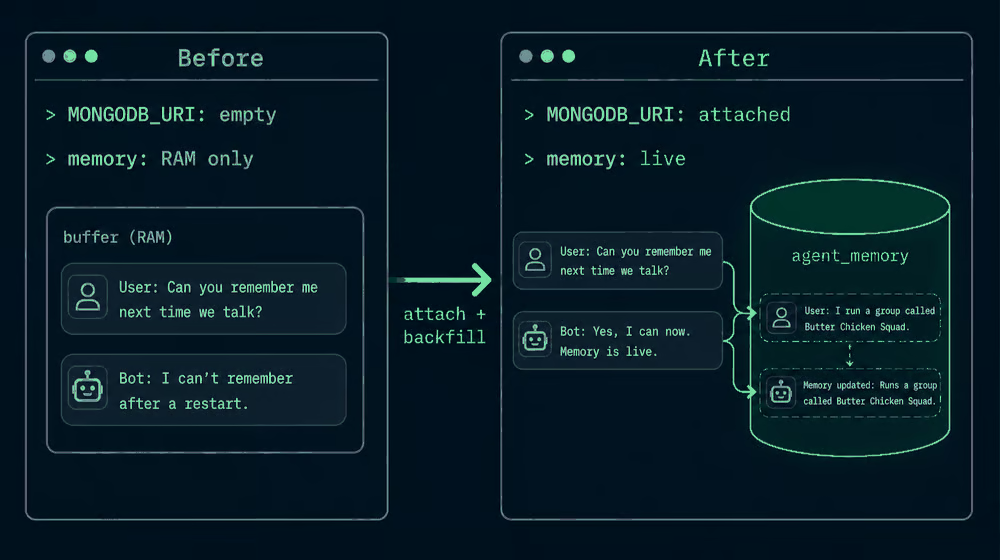
The buffered conversation is replayed into the new cluster, so nothing said before provisioning is lost.
The program no longer needs to know at startup whether it will have a database. It can run without one, decide mid-conversation that it needs storage, acquire it, and carry forward everything said up to that point. For a chatbot that saves a setup step. For an agent running unattended, it is the difference between finishing a task and stopping to ask a human to click through a console.
The browser version behaves the same way:
npm run web 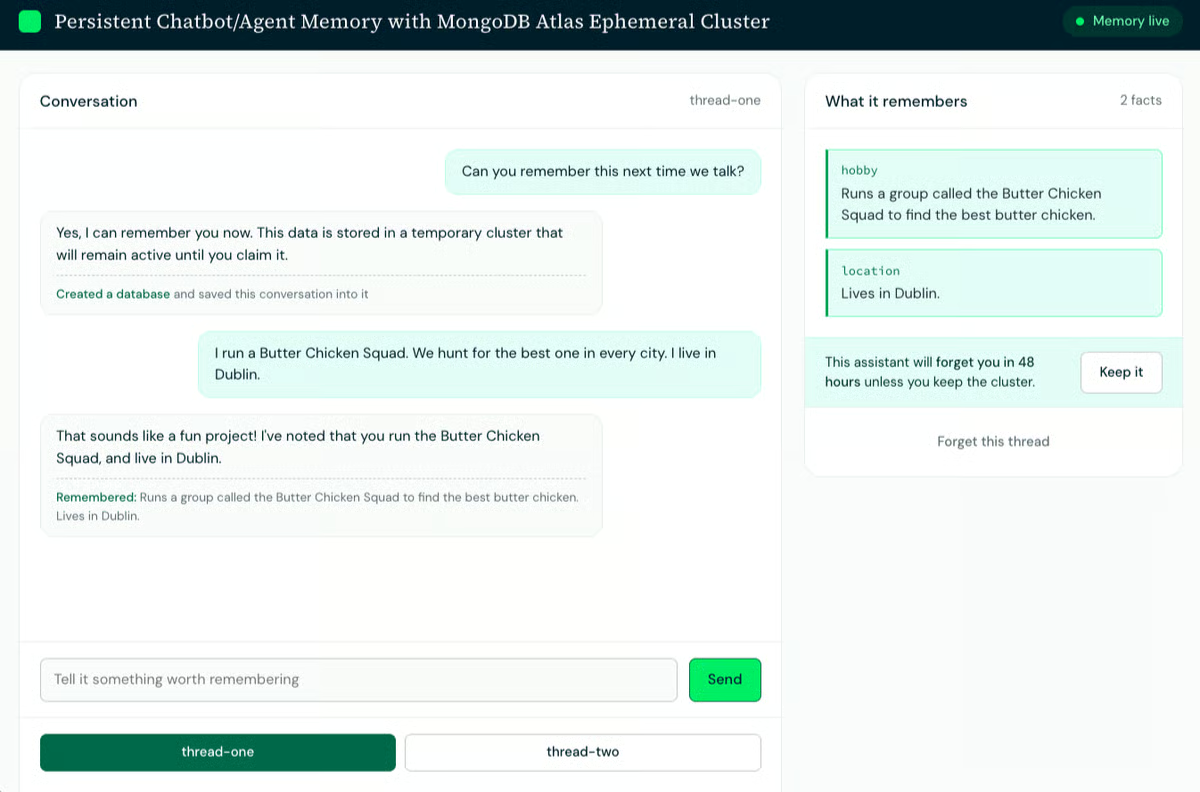
The browser version provisions a cluster on its own. The facts panel fills in, and the banner starts the 48-hour countdown.
Ask it to remember you, and the model provisions a cluster mid-conversation exactly as the terminal does. The status pill turns to "Memory live", the facts panel fills in, and an expiry banner appears with a button to keep the cluster.
One detail matters if you build a UI like this. Provisioning includes waiting for the vector index, so that turn takes about a minute, and a spinner reading "Thinking" will look broken. The web client says "Thinking (may set up a database)" while no memory is attached.
If you would rather not let the model decide, both entry points support manual provisioning: /provision in the terminal, or the Create a cluster button in the browser. Both call the same code.
The cluster holding the memory is temporary by default. That is not a limitation. It is the point of this flow. Most conversations do not deserve permanent storage. You ask a bot something, it helps, and neither of you needs a record of it a month later.
Think about the use cases that benefit from this default:
The few conversations that turn into something worth keeping are the ones where a person decides to keep them. Until someone makes that decision, the default is to forget.
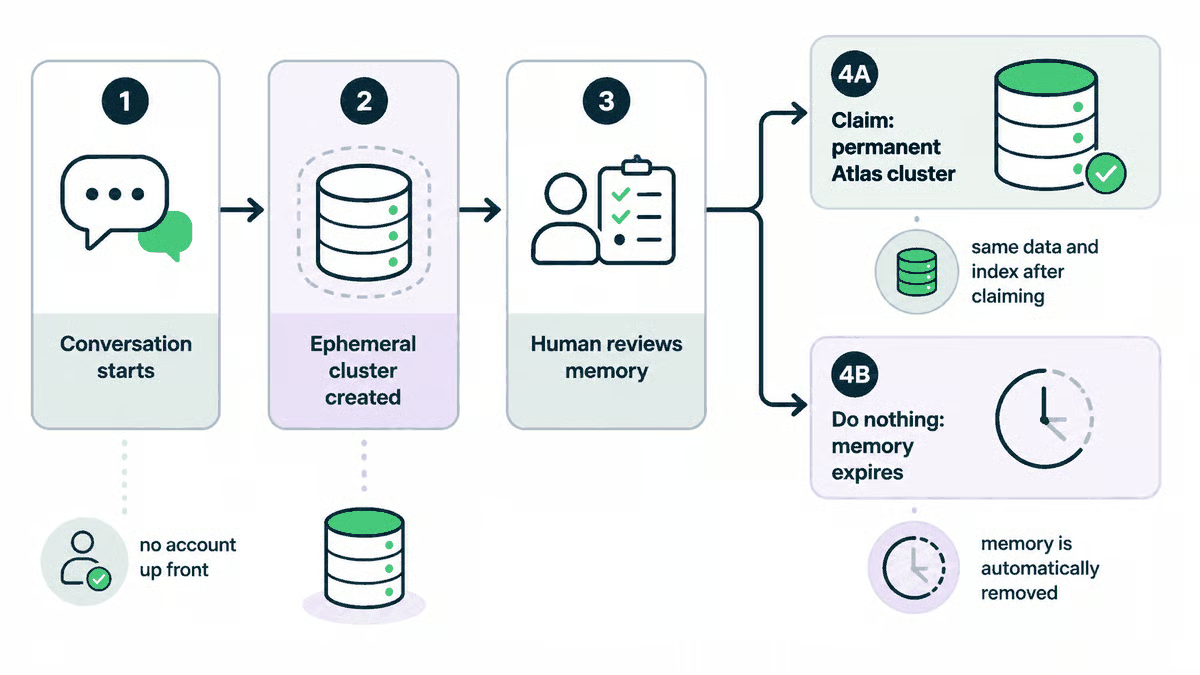
The branch at step 4 is the whole design. Claiming carries the data and the vector search index across unchanged, and doing nothing deletes them.
If the thread becomes something you want to keep, open the claimUrl printed in Step 5 or Step 6, or press Keep it in the web UI. The claim flow moves the cluster into your Atlas organization with its collections, vector search index, and data still in place. There is no export or migration, because it was a real Atlas cluster from the beginning. What changes is who owns it.
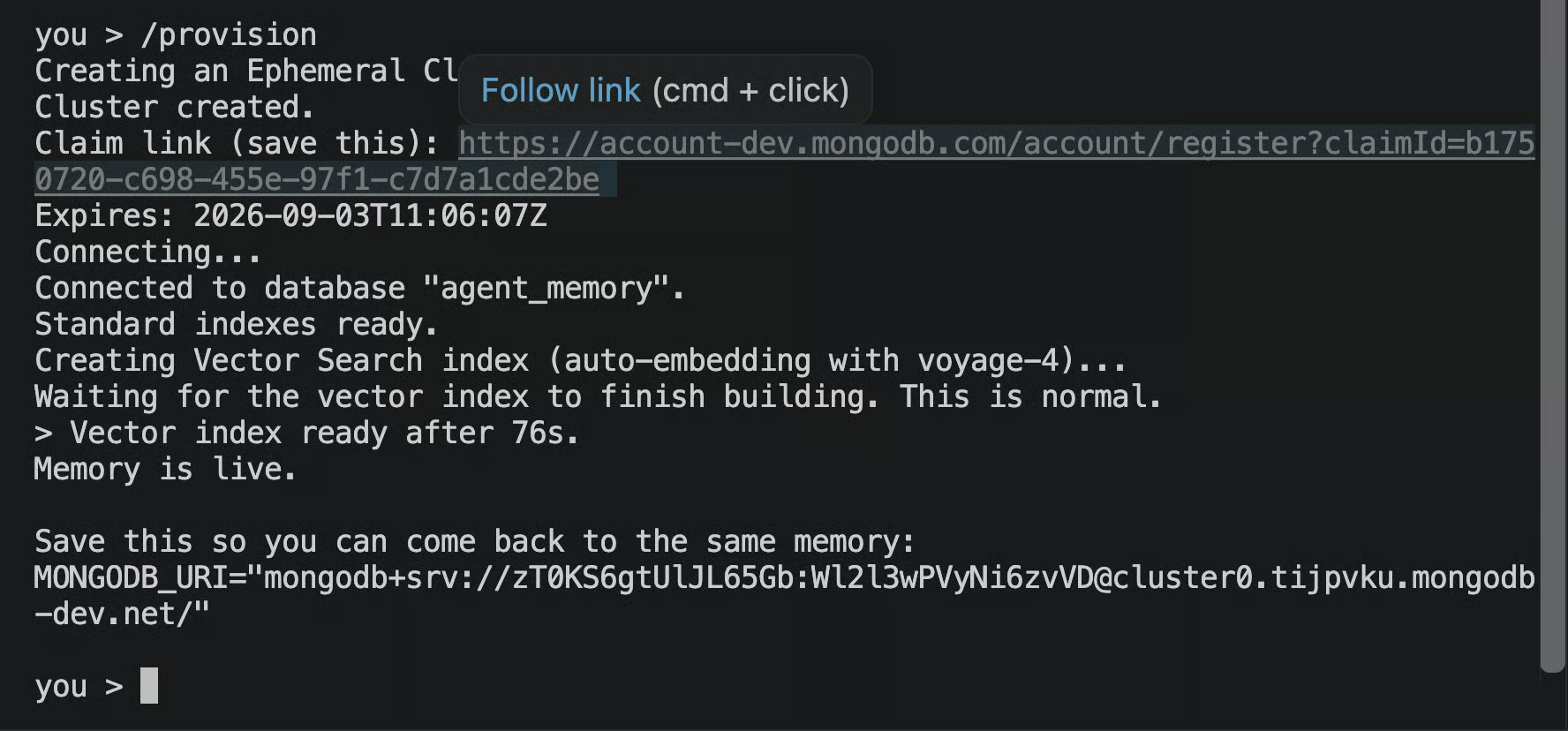
The claim link is printed once, at provisioning time. Save it then, because this is the only way back to this cluster.
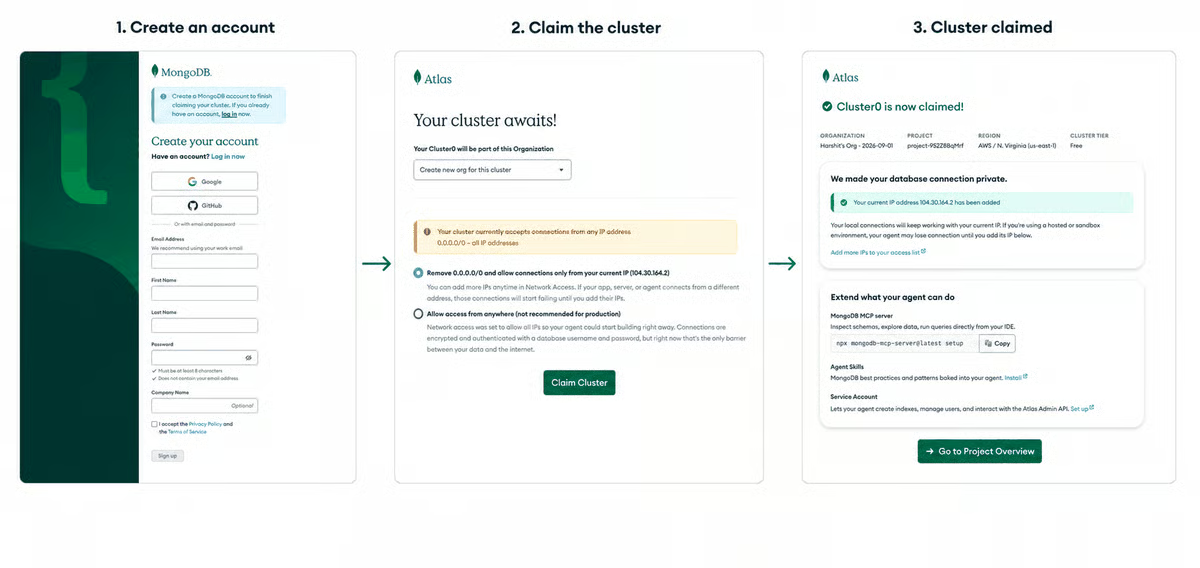
Claiming moves an existing cluster into your organization rather than you needing to create a new cluster or a new organization. Note the network access warning in step 2, which is the open access to close before real data goes in.
If you do not claim it, the cluster passes its expiresAt time and pauses. Your application can no longer connect, but the data remains available during the claim window. Once that window closes, the cluster and its data are deleted.
Everything so far has run inside this repository's chatbot. The memory module was written without knowing what calls it, so you can attach it to a bot you already have:
cp -r ephemeral-agent-memory/src/memory your-project/src/There are two integration patterns, and the difference is who decides when memory is touched.
recall() before each model call, remember() after each turn, and provisioning at startup if MONGODB_URI is missing. The model never sees memory as a tool, so it cannot skip a write or save something that should not be kept. This suits anything that needs auditable behavior, such as a support tool that logs every conversation.Either way, the memory layer stays framework-independent. A custom chat loop, CrewAI application, LangGraph workflow, or MCP client decides when to call the four functions. None of them owns the data model or the storage.
In this repository, the direct integration is one optional callback:
const result = await converse({
  scope,
  message,
  sessionBuffer,
  onProvision,
});
Omit onProvision and the model never sees the provisioning tool. Pass it, and the model can request memory.
MCP (Model Context Protocol) lets an AI application discover and call tools running in a separate process, so the memory server can run alongside your chatbot instead of inside its chat loop. Nothing in src/memory changes.
npm i @modelcontextprotocol/sdk zod
npx tsx examples/mcp/server.ts
{
"mcpServers": {
"agent-memory": {
"command": "npx",
"args": [
"tsx",
"path/to/ephemeral-agent-memory/examples/mcp/server.ts"
]
}
}
}The adapter exposes remember, recall, list_memories, and setup_memory as MCP tools. If MONGODB_URI is missing, setup_memory provisions a cluster exactly as it did in Step 6.
The repository also includes a LangGraph adapter in examples/langgraph, with one node that loads memory before the model runs and another that stores the turn afterward.
Note that LangGraph checkpoints solve a different problem. They preserve workflow state so a graph can resume, while this module stores durable facts that can be reused across sessions. A production application might use both.
A bot that remembers your dinner preferences is a demo. The same four functions can sit behind a research workspace, a support copilot, a per-branch coding assistant, or a workshop with thirty attendees and no accounts. The pattern underneath them is the same: a temporary workspace earns the right to become permanent when someone decides to keep it.
This design keeps the transcript, the extracted facts, the scope fields, and the vector search index in one system. You write the conversation, update a fact, filter retrieval by thread, and search by meaning without synchronizing a second database. That is what makes the memory layer easy to inspect and easy to attach to another bot.
These start with what you see rather than the underlying cause, because that is how debugging usually begins.
Table 6. Common symptoms and their fixes.
|
What you see |
What it is |
Fix |
|
Zero results, no error, right after setup |
The vector search index is still building |
Poll listSearchIndexes until queryable is true. Allow about a minute |
|
A stored fact is not recalled |
Automated embedding is asynchronous |
Wait and retry. npm run inspect confirms whether the fact is stored |
|
Nothing returned from a built index |
The query text is in the wrong shape |
Use query: { text: "..." } |
|
One user sees another user's facts |
A scope filter is missing from $vectorSearch |
Restore threadId in both the index definition and the query |
|
406 INVALID_VERSION_DATE during provisioning |
The endpoint rejected a dated Accept header |
Use application/vnd.atlas.preview+json |
|
DNS fails for a cluster that worked yesterday |
The cluster passed expiresAt and paused |
Open the claimUrl. Data is still available during the claim window |
Table 7. Work performed per turn.
|
Per turn |
Writes |
Embeddings |
Model calls |
|
Something forgettable |
1 message document |
1 query embedding |
1 chat, 1 extraction |
|
Something worth keeping |
1 message, 1 memory document |
1 query, 1 document embedding |
1 chat, 1 extraction |
The transcript grows far faster than the semantic memory, which is the practical reason for separate collections: prune messages on a schedule and leave memories alone.
Ephemeral clusters are for temporary environments. Their open network access suits prototypes, demos, tests, and workshops, not unsecured production data. Claim the cluster and secure it as you would any other before putting real people's data in it.
Extraction costs a model call. The extraction model can be small and cheap, but it still sits between the user's message and the reply. In production, run extraction in the background after the reply has been sent.
Top DataCamp Courses
コース
コース
コース
チュートリアル
Bexruz (Bex) Tuychiev
15 分
チュートリアル
Nilesh Soni
8 分
チュートリアル
Bexruz (Bex) Tuychiev
11 分
チュートリアル
Victor Martin
10 分
code-along
Apoorva Joshi
code-along
Casius Sibanda Lee