Tracks
開発者向けアソシエイトAIエンジニア
26時間
Supermemoryは、エージェント向けのAIメモリAPIと表現するのが最もわかりやすいでしょう。ユーザーに関する文字列を渡すと、後からそのユーザーがどんな人物で最近何をしていたかを凝縮したビューを返します。埋め込み、インデックス作成、検索はすべてSupermemory内部で実行されるため、エージェントのコードは小さく保てます。
LongMemEvalベンチマークは、長い会話履歴にわたってメモリシステムがどれだけ質問に答えられるかをテストします。Supermemoryは正しい事実の81.6%を想起します。次点のZepは71.2%で、10ポイントの差はユーザーの10個の質問につき正答が約1つ多いことに相当します。オープンソースリポジトリはGitHubスター22k超で、実利用の一つの証左です。
エージェントのメモリツールに手を伸ばす読者の多くは、これまでにRAGを使ったことがあるはずです。Supermemoryをその隣に置いて考えると理解しやすくなります。RAGとメモリは別の問題を解き、しばしば同じエージェント内で併存します。
RAGシステムは、開発者が一度用意したドキュメントコーパス(製品マニュアル、サポート記事、社内ドキュメントなど)を参照します。コーパスはデプロイ時に読み込まれ、実行時に検索され、めったに変更されません。エージェントは、プロダクト自身が答えを持っている質問に対して、これを用いて回答します。
メモリシステムはユーザーを指します。Supermemoryは、エージェントがそのユーザーと会話するたびにユーザー固有の事実を書き込み、会話ごとにストアが成長します。エージェントは、嗜好、履歴、最近のアクティビティなど、ユーザーにしか答えられない質問に対して、これを用いて回答します。
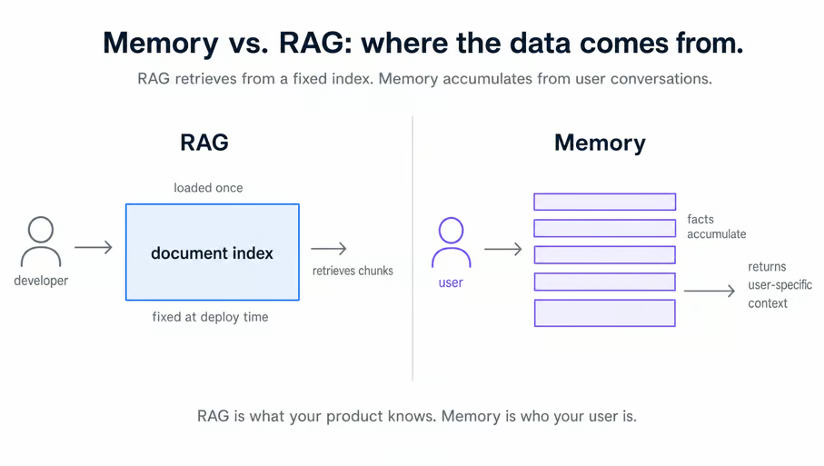
実際のプロダクトでは、この2つが並走します。企業ナレッジベース上のRAGは「返金ポリシーは?」に答えます。Supermemoryはユーザーに関する「先週のベンチプレスは?」に答えます。同じエージェントで2つのデータストア、2つの役割です。
Supermemoryの主な考え方はユーザープロファイルです。すべてのログは2つのバケツに振り分けられます。めったに変わらない静的な事実と、現在の活動に関する動的な事実です。繰り返し現れるパターンは静的に昇格し、最近の活動は動的に留まります。
エージェントがプロファイルを読むと、1回の呼び出しで両方のバケツと一致するメモリチャンクが返ってきます。
この分割が重要なのは、同じユーザーについて異なる種類の質問に答えるからです:
|
静的事実 |
動的事実 |
|
自宅でダンベルと懸垂バーを使ってトレーニング |
現在の重点:上半身の筋力 |
|
左膝を負傷、ディープスクワットは不可 |
直近のベンチ:185ポンドで5回×4セット |
|
年末までにベンチプレス+20ポンドを目標 |
今週は「グリース・ザ・グルーブ」方式で懸垂に取り組み中 |
|
トレーニングは夜のみ、朝はしない |
昨日は5kmを28分で走破 |
1行目を見てください。静的側はユーザーのトレーニング方法(自宅で所有する器具を使用)を示します。これは週ごとに変わりません。動的側は今取り組んでいること(このサイクルでは上半身)を示します。
ワークアウトの提案には両方が必要です。静的側はジム専用のエクササイズを除外し、動的側が今日のセッションを選びます。
このプロファイルの裏では、Supermemoryが本来なら自作する4つの仕事を担います。生のメモリの保存、各チャンクの埋め込み、読み出し時の類似検索、ログからのプロファイル事実の抽出です。いずれもコードには現れません。
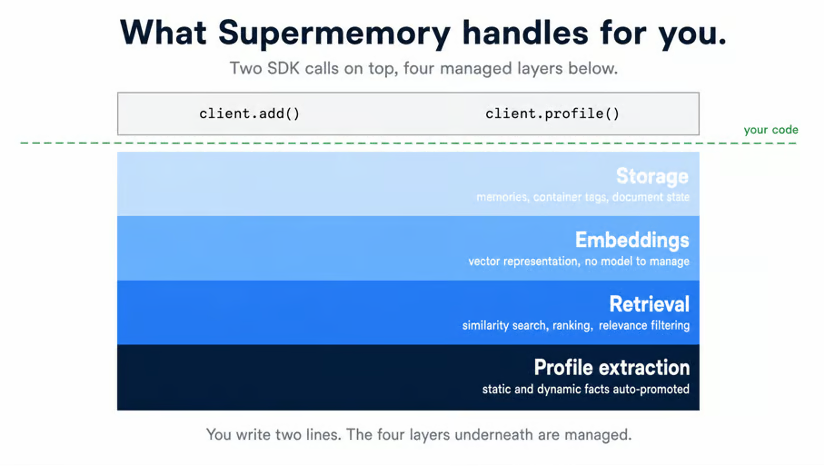
すべてのメモリには、開発者が選ぶ文字列タグが付与されます。読み出し時は同じ文字列を渡して出力を制限します。トレーナーは、プロファイルの挙動を示すには1ユーザーで十分なため、タグを1つにハードコードしています。実アプリでは、認証済みユーザー(JWTなど)からタグを計算します。
トレーナーには2つのAPIキー(SupermemoryとOpenAI)と、3つの依存関係を持つPythonプロジェクトが必要です。簡単な往復スクリプトで、エージェントコードに触れる前に両方のキーが有効かを確認します。
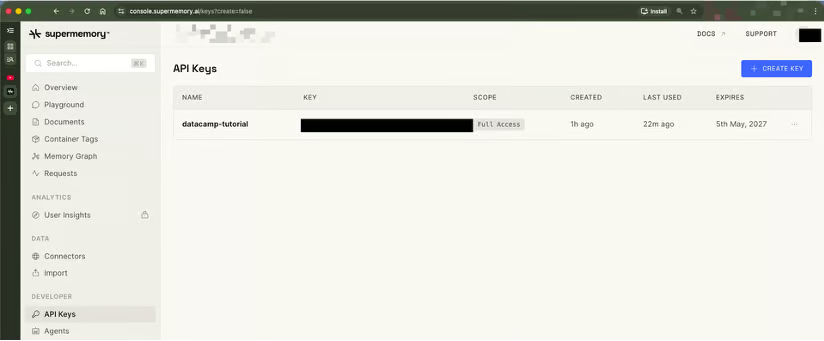
SupermemoryのAPIキーはconsole.supermemory.aiにあります(app.supermemory.aiではありません)。appサブドメインはコンシューマー向けのメモリ製品(ノート保存、スペースの閲覧)で、APIキーのページはありません。スキップしてコンソールに直接進んでください。
console.supermemory.aiでは:
サインインします。
サイドバーのAPI Keysをクリックします。
Create API Keyをクリックします。
名前を付けます(本チュートリアルのデモではdatacamp-tutorial)。
表示されたキーをコピーします。sm_で始まります。
エージェントのLLM呼び出し用にOpenAIのキーも必要です。未取得の場合はplatform.openai.com/api-keysから取得してください。
プロジェクトのルートに.envファイルを作成し、両方のキーを記載します。コミットはしないでください。
SUPERMEMORY_API_KEY=sm_your_key_here
OPENAI_API_KEY=sk-your_key_hereSupermemoryの無料プランで、このチュートリアルは支払い情報なしでカバーされます。正確な制限は料金ページをご覧ください。
このチュートリアルでは、プロジェクトのセットアップと実行にuvを使用します。uvがない場合は、astral.sh/uvのワンライナーで一度インストールしてください。
プロジェクトを初期化します:
uv init supermemory-trainer
cd supermemory-trainer
uv initが追加した自動生成のREADME.mdを削除します。自動生成のhello.pyは次のステップで上書きするため、今は残しておきます。
依存関係を3つ追加します:
supermemory==3.37.0はメモリクライアントで、本チュートリアルで検証済みのバージョンに固定しています。
openai-agentsはOpenAI Agents SDKです。パッケージ名はハイフン区切りですが、インポートパスはagentsです。
python-dotenvは、先ほど作成した.envファイルを読み込みます。
uv add supermemory==3.37.0 openai-agents python-dotenv生成されたpyproject.toml:
[project]
name = "supermemory-trainer"
version = "0.1.0"
description = "Personal exercise trainer agent built with Supermemory and the OpenAI Agents SDK."
requires-python = ">=3.10"
dependencies = [
	"openai-agents>=0.10.2",
	"python-dotenv>=1.2.1",
	"supermemory==3.37.0",
]エージェントコードを書く前に、1文だけでSupermemoryの挙動を一度確認してみましょう。以下のスクリプトは、1つの事実をSupermemoryに送信し、パイプラインを待ってからプロファイルを読み戻します。これが問題なく動作すれば、キーは有効で、SDKにアクセスできています。出力は、Supermemoryが生テキストをどう扱うかの最初の見え方にもなります。
プロジェクトルートのhello.pyを開き、自動生成の本体をインポートと書き込み呼び出しで置き換えます:
import time

from dotenv import load_dotenv
from supermemory import Supermemory

load_dotenv()

client = Supermemory()
USER_ID = "demo_warmup"

response = client.add(
	content="The user is learning Supermemory by building a personal trainer agent.",
	container_tag=USER_ID,
)
print(f"client.add() -> id={response.id} status={response.status}")load_dotenv()は、Supermemory()の構築前に.envから環境変数へAPIキーを読み込みます。クライアントは自動的にSUPERMEMORY_API_KEYを拾います。container_tag="demo_warmup"の値は、この単一の事実を使い捨てユーザーにスコープします。
次に、同じファイルの末尾に待機と読み出しを追加します:
print("Waiting 20 seconds for processing...")
time.sleep(20)

prof = client.profile(container_tag=USER_ID, q="learning")
print(f"profile.static  ({len(prof.profile.static)}): {prof.profile.static}")
print(f"profile.dynamic ({len(prof.profile.dynamic)}): {prof.profile.dynamic}")
print(f"search_results.results ({len(prof.search_results.results)}):")
for r in prof.search_results.results[:3]:
	print(f"  - {r['memory']} (similarity={r['similarity']:.3f})")
20秒のスリープは、Supermemoryの埋め込みと抽出のパイプラインが新しいメモリを処理する時間を確保します。待機がないと、読み出しは何も返さず、スクリプトに不具合があるように見えてしまいます。
ファイルを実行します:
uv run python hello.py期待される出力:
client.add() -> id=zNLsJBrY1PZupAeZ3Qn6EL status=queued
Waiting 20 seconds for processing...
profile.static  (0): []
profile.dynamic (1): ['Building a personal trainer agent to learn Supermemory.']
search_results.results (1):
- Building a personal trainer agent to learn Supermemory. (similarity=0.650)この出力で重要なのは3点です。client.add()はstatus="queued"で即時に返ります。Supermemoryは非同期でドキュメントを処理するためです。20秒の待機で埋め込みと抽出のパイプラインをカバーします。読み出しの時点で、生の1文は検索可能なメモリチャンクになっています。
注目すべきはprofile.dynamicです。入力は「The user is learning Supermemory by building a personal trainer agent.」という三人称の文でした。出力は'Building a personal trainer agent to learn Supermemory.'というユーザーに関する一人称の動的事実です。プロファイル抽出器がその役割を果たしています。
profile.staticは空のリストです。静的事実は、関連するログがいくつか蓄積してからゆっくりまとまるため、ウォームアップの1回だけでは生成されません。トレーナーの提案ツールはこれを織り込み、staticは保証ではなく「あると良いもの」として扱います。
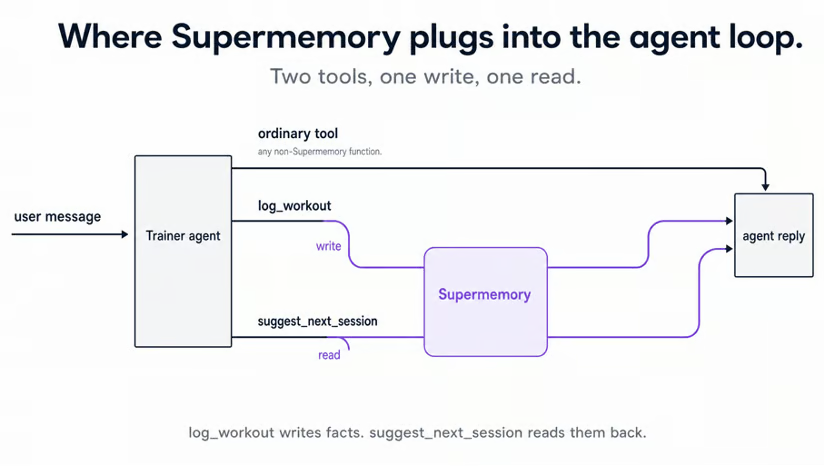
トレーナーはclient.add()とclient.profile()を2つのエージェントツールにラップし、ユーザーとの対話に合わせて自動で読み書きが行われるようにします。ワークアウト履歴はメモリとの相性が良い領域です。器具、怪我、直近の挙上重量はLLMの学習データには存在せず、セッションごとに蓄積されていく情報だからです。
トレーナーは小規模で、プロジェクト全体は2つのPythonファイルと、すでにあるpyproject.tomlに収まります:
supermemory-trainer/
├── .env            	# your real keys (gitignored)
├── .env.example    	# placeholders, committed
├── .gitignore
├── .python-version
├── main.py         	# agent definition, system prompt, REPL loop
├── pyproject.toml
└── tools.py # log_workout and suggest_next_sessiontools.pyには、次に作成するメモリ連携の2つのツールが入ります。log_workoutはclient.add()経由でワークアウトを書き込み、suggest_next_sessionはclient.profile()経由でユーザープロファイルを読み取ります。main.pyは両者をインポートしてエージェントを接続します。
main.pyの大半はOpenAI Agents SDKのボイラープレートです。システムプロンプト中の1文がSupermemoryの要です:ユーザーに関する事実はすべてツール呼び出し経由で戻すこと。エージェント自身には記憶がないと指示します。この1つのルールにより、トレーナーはメモリ連携型になります。
main.pyを開き、インポートとシステムプロンプトから始めます:
import asyncio

from agents import Agent, Runner, SQLiteSession

from tools import log_workout, suggest_next_session

SYSTEM_PROMPT = """You are a personal exercise trainer who logs the user's
workouts and recommends what to do next.

You have no memory of the user's history on your own. Every fact about the
user lives in Supermemory and reaches you only through tool calls.

Two rules, no exceptions:

1. Whenever the user reports completing a workout, call log_workout immediately, before responding. Extract the exercise, sets, reps, weight, and any notes from what they said. If a value is missing, ask one short follow-up question instead of guessing. After logging, confirm in one short sentence and stop. Do NOT recommend the next session unless the user asks for one.

2. When the user explicitly asks what to do next (or asks for a recommendation, suggestion, or plan), call suggest_next_session first. Never recommend from your own training data. The tool returns the user's
 recent activity, stable preferences, and matching past sessions. Reference those facts directly in your reply.

Keep replies concise (2-4 sentences). Be specific: name the exercise, sets, reps, and weight. Honor any injuries or equipment constraints the tool surfaces.
"""
システムプロンプトの2つのルールは、モデルをSupermemory経由に誘導します。
ルール1は、ユーザーがワークアウト完了を報告するたびにlog_workoutの書き込みを強制し、すべてのワークアウトがメモリストアに届くようにします。ルール2は、どんな提案の前にもsuggest_next_sessionの読み出しを強制し、すべての提案がSupermemoryの知識に基づくようにします。
これらのルールがないと、エージェントは学習データから回答してしまい、メモリレイヤーの意味がなくなります。
同じファイル内で、エージェントとチャットループを定義します:
def build_agent() -> Agent:
	return Agent(
    	name="Trainer",
    	instructions=SYSTEM_PROMPT,
    	tools=[log_workout, suggest_next_session],
    	model="gpt-5",
	)


async def chat() -> None:
	agent = build_agent()
	session = SQLiteSession(session_id="trainer-cli")

	print("Trainer ready. Type a message, or 'exit' to quit.\n")
	while True:
    	try:
        	message = input("You: ").strip()
    	except (EOFError, KeyboardInterrupt):
        	print()
        	break
    	if not message:
        	continue
    	if message.lower() in {"exit", "quit"}:
        	break

    	result = await Runner.run(agent, message, session=session)
    	print(f"\nTrainer: {result.final_output}\n")


if __name__ == "__main__":
asyncio.run(chat())このブロックで注目すべき行は2つです。tools=[log_workout, suggest_next_session]はメモリ連携の2ツールを登録します。各ツール(tools.py内)についた@function_toolデコレータは、SDKに対してそれらが呼び出し可能であることを知らせます。デコレータがないと、生成自体は成功しても、実行時にエージェントはツールを持ちません。
SQLiteSession(session_id="trainer-cli")は、短期のターン履歴を実行中のPythonプロセス内に保持します。Supermemoryはプロセスをまたいだ長期のユーザー事実を保持します。Pythonプロセスを終了するとSQLiteのセッションは消えますが、Supermemoryのデータは残ります。
重要:main.pyはスクリプトとして実行してください。Jupyterのイベントループはasyncio.run()と競合します。同期的なSupermemory()クライアントは、Agents SDKがツールをスレッドプールで実行するため、非同期ツール関数内でも動作します。SDK自体の詳細は、OpenAI Agents SDKのチュートリアルを参照してください。
log_workoutはエージェントのメモリ書き込み側です。関数はエージェントから構造化引数(種目名、セット数、レップ数、重量、任意のメモ)を受け取り、それらを短い英語の1文に変換してclient.add()経由でSupermemoryに渡します。埋め込みと抽出のパイプラインはその後Supermemory内で動作し、トレーナーからの追加作業は不要です。
tools.pyを開き、インポートと共有クライアントを1つ用意します:
from agents import function_tool
from dotenv import load_dotenv
from supermemory import Supermemory

load_dotenv()

USER_ID = "demo_user"

client = Supermemory()load_dotenv()はインポート時に実行され、Supermemory()の構築前にSUPERMEMORY_API_KEYが環境に読み込まれます。環境読み込み前にクライアントを構築すると、認証されていないクライアントになり、最初の呼び出しが紛らわしい401を返します。このファイル内の2つのツール関数は、その1つのクライアントと1つのUSER_ID定数を共有します。
クライアントの下にロギングツールを追加します:
@function_tool
def log_workout(
	exercise: str,
	sets: int,
	reps: int,
	weight: float,
	notes: str = "",
) -> str:
	"""Log a completed workout to the user's memory.

	Args:
    	exercise: Name of the exercise.
    	sets: Number of sets performed.
    	reps: Number of reps per set.
    	weight: Weight in pounds. Pass 0 for bodyweight or cardio.
    	notes: Optional notes about the session.
	"""
	print(f"[log_workout] {exercise=} {sets=} {reps=} {weight=} {notes=}")

	content = f"Performed {exercise}: {sets} sets of {reps} reps at {weight} lbs."
	if notes:
    	content += f" Notes: {notes}"

	response = client.add(content=content, container_tag=USER_ID)
	print(f"[log_workout] -> id={response.id} status={response.status}")
return f"Logged {exercise} ({sets}x{reps} @ {weight} lb)."@function_toolのドックストリングは、LLMがツールを呼ぶかどうかを判断する際に参照されます。Args:ブロックはパラメータごとの説明に対応します。どちらも関数との契約の一部です。
このツールはclient.add()にJSONではなく自然文を送ります。Supermemoryのプロファイル抽出器は自然言語を読み取り、そこから事実を推定します。JSONでも技術的には動作しますが、モデルが要約する物語性がないため抽出品質が下がります。「Performed bench press: 4 sets of 5 reps at 185.0 lbs」のように、抽出器が扱いやすい明快な文を与えましょう。
2つのprint()呼び出しは、各ツール実行をターミナルに出力します。最初に解析済み引数、次にレスポンスです。
[log_workout] exercise='bench press' sets=4 reps=5 weight=185.0 notes=''
[log_workout] -> id=xY7AK3qLzBPx5Vd2HnRf1M status=queuedstatus="queued"は、先ほどのウォームアップスクリプトと同じです。生のログは保存されますが、パイプラインが完了するまではclient.profile()の検索結果に現れません。後で待機して確認するステップを追加します。
suggest_next_sessionは読み取り側で、静的・動的の分割が効いてきます。client.profile(container_tag=USER_ID, q=focus)の1回の呼び出しで、1往復でユーザーの3つのビューが返ります。
安定した嗜好はprofile.static、現在の活動はprofile.dynamic、最も近い過去の一致はsearch_results.resultsとして返ってきます。ツールの役割は、これら3つのビューをエージェントが引用できる1つのコンテキストブロックに平坦化することです。
いくつかワークアウトを記録すると、このツールは次のような出力を生成します:
Recent activity:
- Trains at home instead of a gym
- Performed deadlift: 3 sets of 5 reps at 225.0 lbs
- Performed 5k run in 26 minutes
- Reports no knee pain during bench press
- Performed bench press: 4 sets of 5 reps at 185.0 lbs
Closest matching past entries:
- Trains at home instead of a gym
- Performed deadlift: 3 sets of 5 reps at 225.0 lbs
- Performed bench press: 4 sets of 5 reps at 185.0 lbs
- Performed 5k run in 26 minutes
- Reports no knee pain during bench pressエージェントはこのブロックを読み、ユーザーの実際の履歴に基づいた推奨を作成します。Supermemoryのプロファイルがなければ、同じコンテキストを自前で組み立てる必要があります。つまり、別のセマンティックサーチ、自作のプロファイルストア、結果のマージが必要です。単一のclient.profile()呼び出しが3つすべての代わりになります。
tools.pyのlog_workoutの下に、次を追加します:
@function_tool
def suggest_next_session(focus: str) -> str:
	"""Fetch the user's training history and preferences for a given focus.

	Returns a context string the agent can use to recommend the next session.
	The agent is responsible for the actual recommendation. This tool only
	surfaces what Supermemory knows about the user.

	Args:
    	focus: What the user wants to train next (e.g. "upper body", "legs",
        	"cardio", "today"). Drives semantic search against past logs.
	"""
	print(f"[suggest_next_session] focus={focus!r}")
	profile = client.profile(container_tag=USER_ID, q=focus)

	static_facts = profile.profile.static
	dynamic_facts = profile.profile.dynamic
	matches = profile.search_results.results

	print(
    	f"[suggest_next_session] static={len(static_facts)} "
    	f"dynamic={len(dynamic_facts)} matches={len(matches)}"
	)

	sections = []
	if static_facts:
    	sections.append("Stable preferences and constraints:")
    	sections.extend(f"- {fact}" for fact in static_facts)
	if dynamic_facts:
    	sections.append("Recent activity:")
    	sections.extend(f"- {fact}" for fact in dynamic_facts)
	if matches:
    	sections.append("Closest matching past entries:")
    	for r in matches[:5]:
        	sections.append(f"- {r['memory']}")

	if not sections:
    	return (
        	"No prior training history found for this user. "
        	"Ask the user about their goals, equipment, and recent training."
    	)
	return "\n".join(sections)
client.profile(container_tag=USER_ID, q=focus)はProfileResponseオブジェクトを返します。短いログを5件ほど入れた後、このツールが読む3つのフィールドは次のようになります:
profile.profile.static        	# [] (list[str])
profile.profile.dynamic       	# ["Performed bench press: 4 sets of 5 reps at 185.0 lbs", ...]
profile.search_results.results # [{"memory": "...", "similarity": 0.631, ...}, ...] (list[dict])各検索結果はPydanticオブジェクトではなくPythonのdictです。テキストはr["memory"]、スコアはr["similarity"]を使います。完全なdictには次のキーがあります:
id
memory
rootMemoryId
metadata
updatedAt
version
similarity
filepath
documents
SupermemoryのOpenAI Agents SDK統合ページにあるr.memory or r.chunkのスニペットは、supermemory==3.37.0ではAttributeErrorになります。ブラケット記法を使ってください。
staticはここでは空です。そのためif static_facts:で分岐しています。最初の十数件では、実質的な仕事はdynamicとsearch_resultsの分岐で行います。
Supermemoryはデフォルトの類似度しきい値も適用します。1度だけ触れた事実は、すべてのクエリで返らない場合があります。上の5件はq="today"で全て返りましたが、より具体的なクエリ文字列では少なくなるかもしれません。if matches:のガードで、失敗せずに対応できます。
セッション1を開始し、いくつかワークアウトを記録して、後で読み戻すためのデータをSupermemoryに入れましょう。スクリプトを実行します:
uv run python main.pyベンチプレス、5kmラン、デッドリフトを記録し、加えて「自宅でしかトレーニングしない。ジムは使わない。」という嗜好も1つ伝えます。エージェントはワークアウトごとにlog_workoutを1回発火し、ツールのprint()行で各呼び出しがターミナルに表示されます。
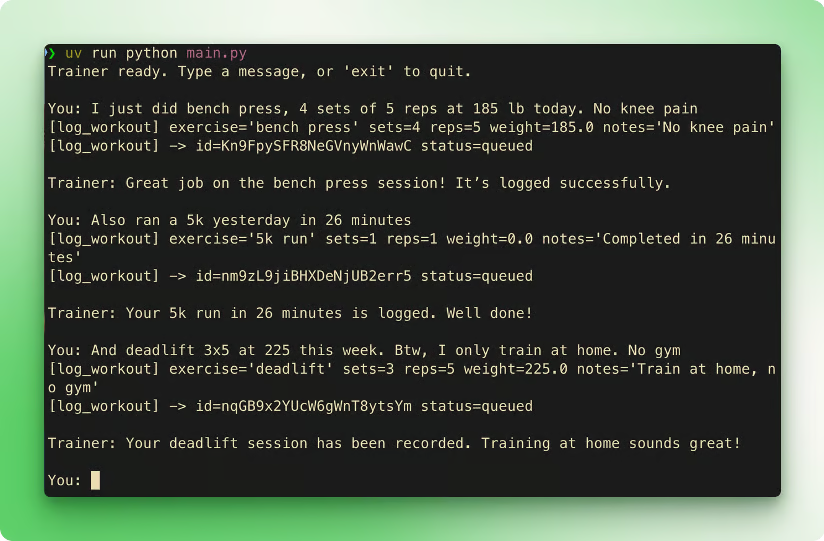
出力例です。モデルは非決定的なため、正確な言い回しは異なります。
3つのstatus=queuedの行は、Supermemoryが処理を引き継いだ瞬間です。各行は、Supermemory側で文書が埋め込み・抽出パイプラインを通過していることに対応します。このような短いテキストログでは、約12秒でclient.profile()から検索可能になります。
トレーナーのコードはそれを待ちません。エージェントは先へ進み、Supermemoryが裏で作業を完了します。
各ログは正確に1回のlog_workout呼び出しを発火させ、エージェントは停止します。先回りの提案、余計なツール呼び出し、追随の提案はありません。最初のシステムプロンプトのルールがその役割を果たします。ルールがないと、各記録のたびに次のセッションを提案し、ツール呼び出しが倍増します。
exitと入力してセッション1を終了します。Pythonプロセスが終了し、SQLiteSessionも消えます。ワークアウトのログと嗜好の文は、スクリプトとは独立して、container_tag="demo_user"の下でSupermemoryに保存されました。
セッション2の前に、セッション1の事実がクエリ可能か確認します。新しいPython REPLを開くか、次を短いスクリプトとして保存してください:
from dotenv import load_dotenv
from supermemory import Supermemory

load_dotenv()
client = Supermemory()

prof = client.profile(container_tag="demo_user", q="training")
print(f"static  ({len(prof.profile.static)}): {prof.profile.static}")
print(f"dynamic ({len(prof.profile.dynamic)}):")
for fact in prof.profile.dynamic:
	print(f"  - {fact}")
print(f"matches ({len(prof.search_results.results)}):")
for r in prof.search_results.results[:5]:
	print(f"  - {r['memory']} (similarity={r['similarity']:.3f})")
2つのセッションの合間に取得した実際の出力:
static  (0): []
dynamic (5):
  - Trains at home instead of a gym
  - Performed deadlift: 3 sets of 5 reps at 225.0 lbs
  - Performed 5k run in 26 minutes
  - Reports no knee pain during bench press
  - Performed bench press: 4 sets of 5 reps at 185.0 lbs
matches (5):
  - Trains at home instead of a gym (similarity=0.682)
  - Performed deadlift: 3 sets of 5 reps at 225.0 lbs (similarity=0.643)
  - Performed bench press: 4 sets of 5 reps at 185.0 lbs (similarity=0.631)
  - Performed 5k run in 26 minutes (similarity=0.585)
- Reports no knee pain during bench press (similarity=0.585)Supermemoryの抽出器が生成したものに注目してください。ユーザーは一度だけ「自宅でしかトレーニングしない。ジムは使わない。」と言いました。抽出器はそれを動的事実"Trains at home instead of a gym"に変換しました。
ベンチプレスのログには「膝の痛みなし」というメモ欄が含まれていました。抽出器はその1つのログを、ワークアウト用と痛みの不在用の2つの動的事実に分割しました。
4つのログが、正規化された5つの動的事実と、類似度0.585〜0.682の一致メモリチャンク5つになりました。分割、正規化、マッチングはいずれもトレーナーのコードでは行っていません。もしdynamicが空の場合は、さらに10秒待ってからスニペットを再実行してください。処理キューがたまにスパイクします。
では、新しいプロセスでセッション2を開始します:
uv run python main.pyこれは新しいPythonインタプリタです。セッション1との共有メモリはありません。ウォームキャッシュもありません。エージェントが想起するものはすべてSupermemory由来です。
メッセージを1つ送ります:「今日のワークアウトは何をすればいい?」
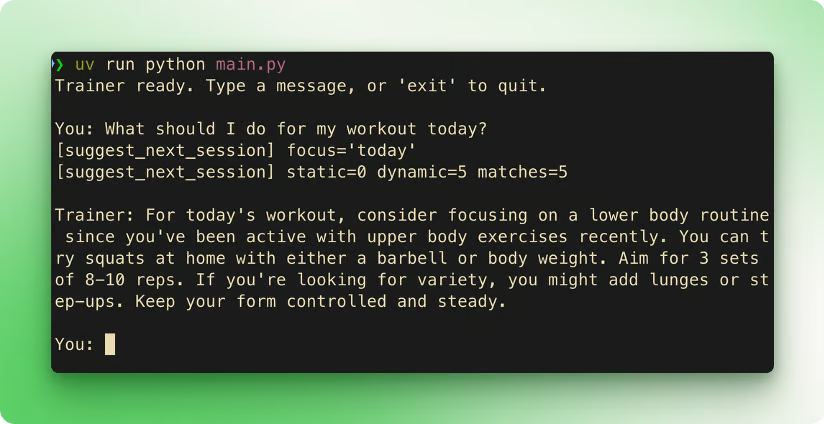
出力例。同じメモリストア、ただし新しいPythonプロセスです。
エージェントはsuggest_next_session("today")を呼びます。ツールはstatic=0 dynamic=5 matches=5と出力します。キャプチャした実行では、自宅でできる下半身セッション(スクワット、ランジ、ステップアップ)を返しました。
推奨が以前のログと整合したのは、Supermemoryのプロファイルがそれらをエージェントに伝えたからです。ベンチ、デッドリフト、5km走は上半身または有酸素で、ユーザーは自宅でのみトレーニングしていました。どちらの事実も同じclient.profile()呼び出しから戻ってきます。モデルは非決定的なので表現は異なりますが、想起の経路は同じです。
このデモは、1ユーザー、2ツール、CLIという構成です。実際のトレーナー版では、エージェントループに手を入れる前に、Supermemoryの形に沿って3つの方向に拡張します。
実ユーザーごとにメモリをスコープする。定数USER_ID = "demo_user"は1人用には機能します。本番アプリでは、認証済みユーザーのIDからタグを計算します(container_tag="user_sarah"やcontainer_tag=customer_idなど)。読み出し時に毎回タグを渡すため、ユーザー間のメモリは分離されます。変更はtools.pyの1箇所のみで、他のコードは不要です。
メモリ連携ツールを増やす。デロード週、PRトラッキング、毎週のモビリティの促しなど。いずれも@function_tool関数で、書き込みはclient.add()、読み出しは同じcontainer_tagに対するclient.profile()を呼びます。ツールの形は同じで、記録・取得する内容だけが変わります。
Supermemoryの失敗を扱う。client.add()とclient.profile()をtry/except supermemory.APIErrorで包み、Supermemoryの一時的な失敗でエージェントが落ちないようにします。制約のある環境でエージェントを実行する場合は、リクエスト単位のタイムアウトも設定してください。
エージェントループ側の作業はSupermemoryと独立しており、後から変更できます。CLIの前段にTelegram、Discord、Slackを置いて、ユーザーがワークアウトを送るとボットがRunner.run()を呼ぶようにしても構いません。あるいはフレームワークを入れ替えても良いでしょう。スタックがすでにLangChainエージェントなら、SupermemoryにはLangChain統合があり、メモリのコードは変わりません。
静的・動的の分割は他のドメインにも適合します。
ユーザーが真実のソースである限り、この分割は有効です。
プロセスをまたいで永続メモリを持つ、2つのツールを備えたPythonトレーナーを作成しました。client.add()はワークアウトを書き込み、client.profile()はユーザーを静的事実・動的事実・セマンティック一致として1回の呼び出しで読み出します。すべてはcontainer_tagでスコープされます。Supermemoryが、デモで書く必要のなかったチャンク化、埋め込み、検索、プロファイル抽出を担います。
RAGと組み合わせれば、同じエージェントがユーザーとプロダクトの両方に関する質問に答えます。より広いエージェントパターンはLLM Agents Explainedで扱っており、Associate AI Engineer for Developersトラックでは、メモリ連携エージェントをさらに深掘りします。
DataCampでAIエンジニアリングを学ぼう!
Tracks
Courses
Tracks