コース
AIを理解する
2時間
425.6K
OpenHands is an open-source platform for AI-powered software development, built around an agent that can inspect your repository, edit files, execute commands, and run tests. It's part of the shift toward agentic software development - you give the agent a full task, and it works through it step by step until it's done or needs your input.
In this article, I'll walk you through the OpenHands architecture and its main features, show you how to set it up with a local model, and compare it to Claude Code, Cursor, and GitHub Copilot.
What are AI Agents? Enroll in our AI Agent Fundamentals track to discover how AI agents can change how you work.
OpenHands is an open-source platform for building and running AI agents that work with code.
The name covers two things. The first is the project - a collection of repositories with an SDK, a server, a browser UI, and a hosted service. The second is the coding agent that runs on top of all that.
Here's how it works:
When most people say "OpenHands," they mean the agent. That's the part I'll work with in this article.
Typically, you give the agent a software task, point it to a workspace with your code, and it works through the task with the tools it has. The default tool set is a terminal, a file editor, and a task tracker.
The workspace doesn't have to be your laptop. Agents can use the local machine as their workspace or run inside ephemeral workspaces, for example in Docker or Kubernetes.
OpenHands also doesn't tie you to one model provider. You can use it with Claude, GPT, or any other LLM, and that includes local models. Agent Canvas even runs third-party agents like Claude Code and Codex in place of the default OpenHands agent.
In short, OpenHands is an open agent platform you can run on your own terms.
OpenHands runs in a loop.
A chat assistant gets your prompt and returns text. The OpenHands agent gets a task, takes an action, looks at the result, and decides what to do next.
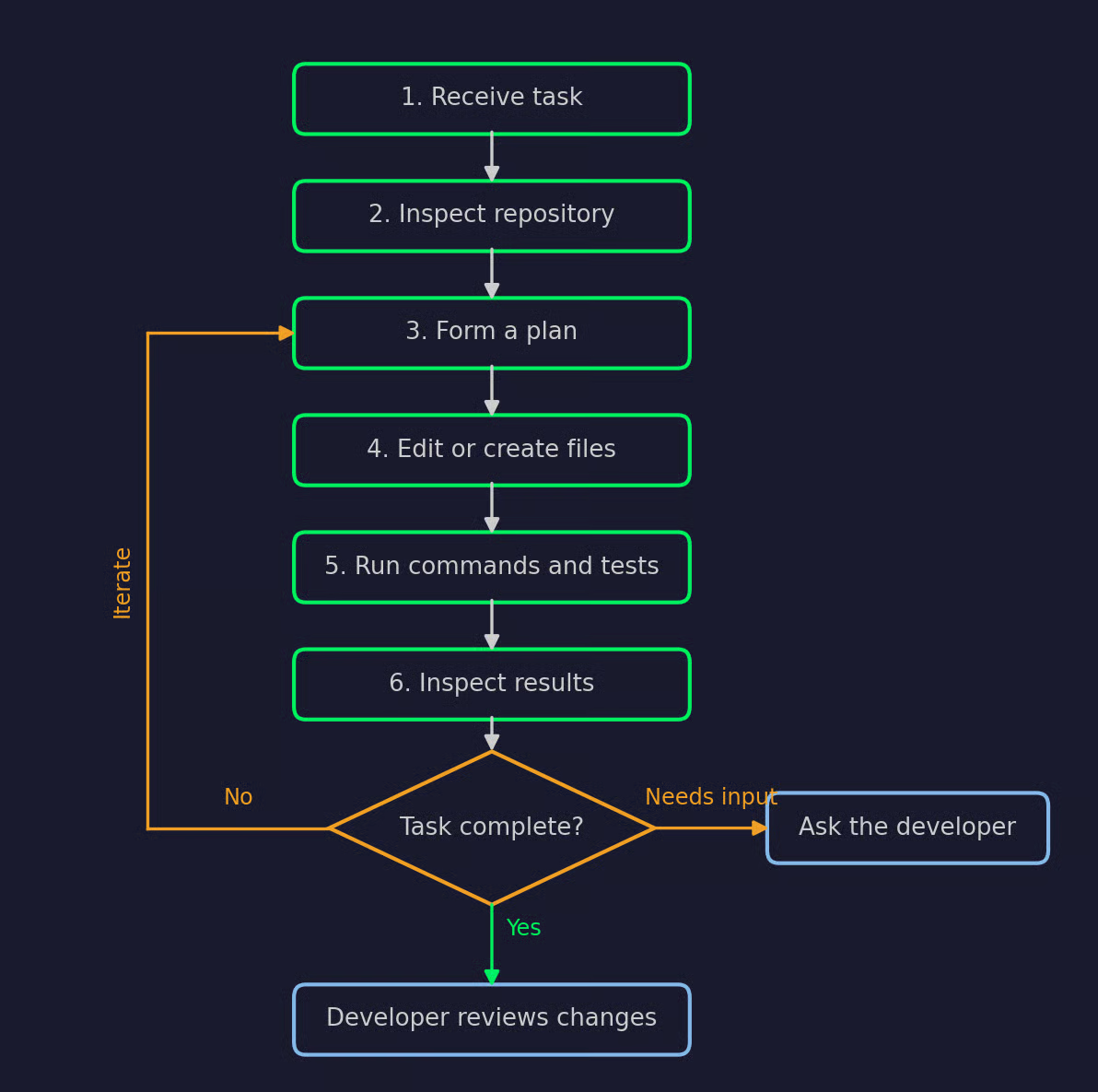
The OpenHands agent loop
This is the general idea:
The loop stops either when the task is done, or the agent needs something only you can provide, like a missing credential or a decision about requirements.
Step 6 makes OpenHands different from the competition. A code completion tool never sees what happens when its code runs. OpenHands does, so it can react to a failed test and fix the cause.
Autocomplete suggests text, and OpenHands acts on your project. Here's how.
OpenHands edits files directly, and it isn't limited to one file at a time.
Let's say a function needs a new name. The agent updates the definition, finds every call site, and updates the tests that reference it - all as part of one task.
The agent has its own terminal. It can install dependencies, run scripts, execute tests, and read the output of any command.
You can also connect MCP (Model Context Protocol) servers to give the agent tools it wasn't designed to work with, for example an issue tracker or a database client.
Most code generators only see what you paste into the prompt.
OpenHands opens the repository and explores it. It can read the README, follow imports, and look at existing tests to understand how the project is structured. This means its changes are more likely to fit the code that's already there.
Long tasks create a different problem - the conversation history grows past what the model can hold. OpenHands handles this with a context condenser, which summarizes older parts of the conversation so the agent can keep working.
Model calls go through LiteLLM, so you can use any provider and model it supports. The OpenHands docs recommend models from the Claude, GPT, and Gemini families, plus open-weight models that score well on the OpenHands Index.
If your code can't leave your machine, you can run a local model. OpenHands connects to local servers such as LM Studio, Ollama, vLLM, and SGLang.
A thing to remember here is that the model changes the results a lot. Some local models struggle with reliable tool use, even with a large context window.
Once you hand off a task, the agent works through the loop on its own. You don't paste errors back into a chat or tell it which file to open next.
Agent Canvas takes this a step further with automations. They integrate with Slack, GitHub, Linear, and more, and run on a schedule or in response to webhook events.
But autonomy doesn't guarantee correctness. You still need to review the diff and the test results before anything gets merged.
The best way to understand OpenHands is to give it a bug and see what it does.
In this section, I'll run OpenHands locally in Docker, connect it to a local model through Ollama, and ask it to fix a bug in a small Python project.
You can run OpenHands in a couple of ways:
CLI launcher: Install it with uv tool install openhands --python 3.14, then start the GUI with openhands serve
Docker: Run the app container directly with a single docker run command
Agent Canvas: The newer browser client that connects to local, self-hosted, Cloud, or Enterprise backends
OpenHands Cloud: The hosted version, if you'd rather not run anything yourself
I'll use the Docker route with the Local GUI. The OpenHands docs now list it as the deprecated Docker-based browser application and point to Agent Canvas as its replacement, but it's still documented and the fastest way to get a GUI running.
You'll need Docker Desktop on macOS, Linux, or Windows with WSL. On macOS, open Docker Desktop, go to Settings > Advanced, and enable the default Docker socket.
Then start the app:
docker run -it --rm --pull=always \
  -e AGENT_SERVER_IMAGE_REPOSITORY=ghcr.io/openhands/agent-server \
  -e AGENT_SERVER_IMAGE_TAG=1.26.0-python \
  -e LOG_ALL_EVENTS=true \
  -v /var/run/docker.sock:/var/run/docker.sock \
  -v ~/.openhands:/.openhands \
  -p 3000:3000 \
  --add-host host.docker.internal:host-gateway \
  --name openhands-app \
  docker.openhands.dev/openhands/openhands:1.8
OpenHands uses the Docker socket mount to start a separate sandbox container, and the agent runs its commands inside that sandbox, not on your host.
Once the logs show the server is up, open http://localhost:3000 in your browser.
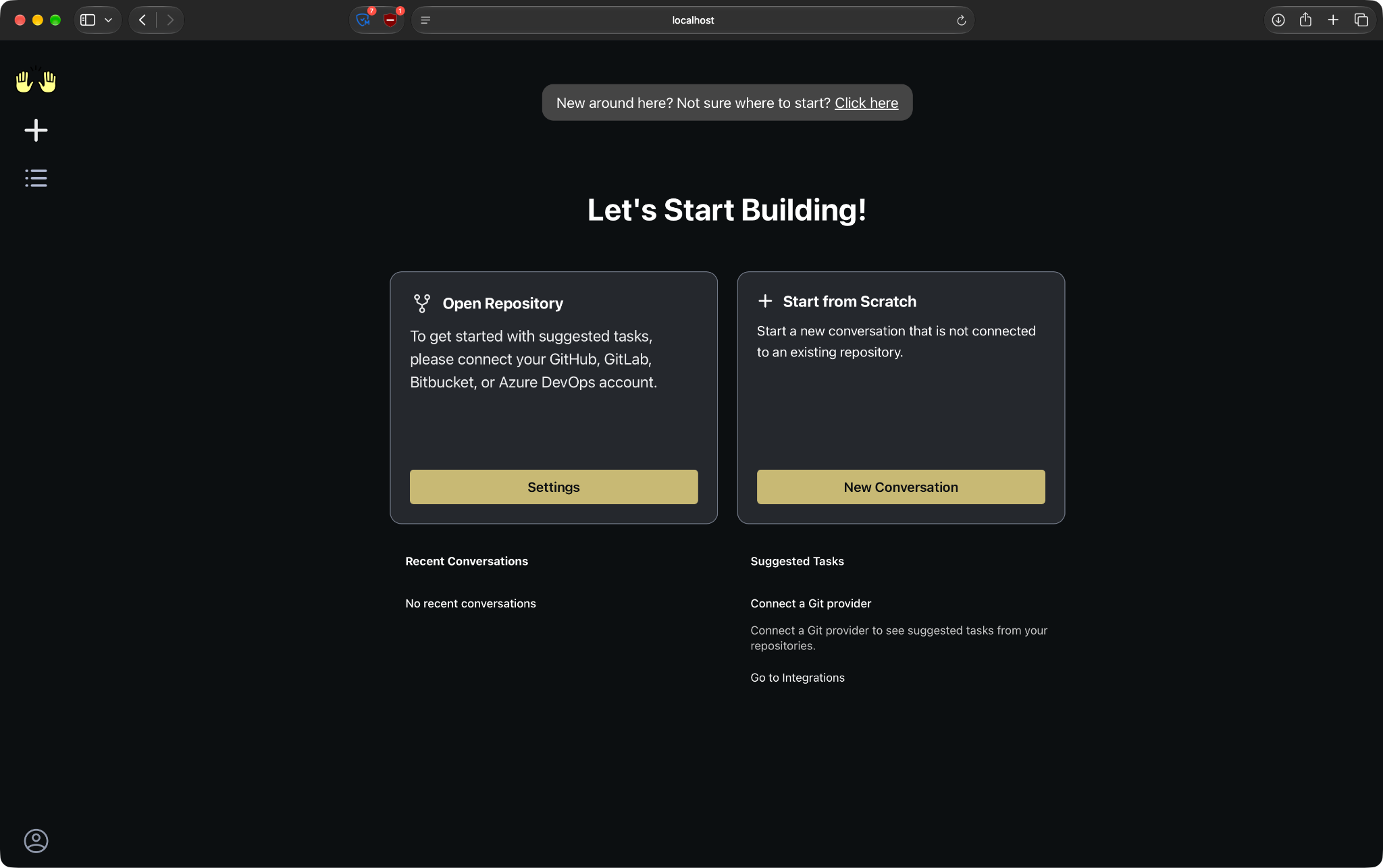
OpenHands welcome page
OpenHands won't do anything until you give it a model.
I'm using Devstral Small 2, Mistral's 24B model built for agentic coding. It's light enough to run on a single RTX 4090 or a Mac with 32GB of RAM. It requires Ollama 0.13.3 or later.
Start Ollama with a larger context window and pull the model:
OLLAMA_CONTEXT_LENGTH=32768 OLLAMA_HOST=0.0.0.0:11434 ollama serve &
ollama pull devstral-small-2:24b
Don't disregard the context length. Ollama's default is 4096 tokens, which is too small to fit even the OpenHands system prompt. The docs ask for at least 22000.
In OpenHands, open Settings, go to the LLM tab, and turn on Advanced. Then set:
Custom Model: openai/devstral-small-2:latest
Base URL: http://host.docker.internal:11434/v1
API Key: Any placeholder value, like local-llm
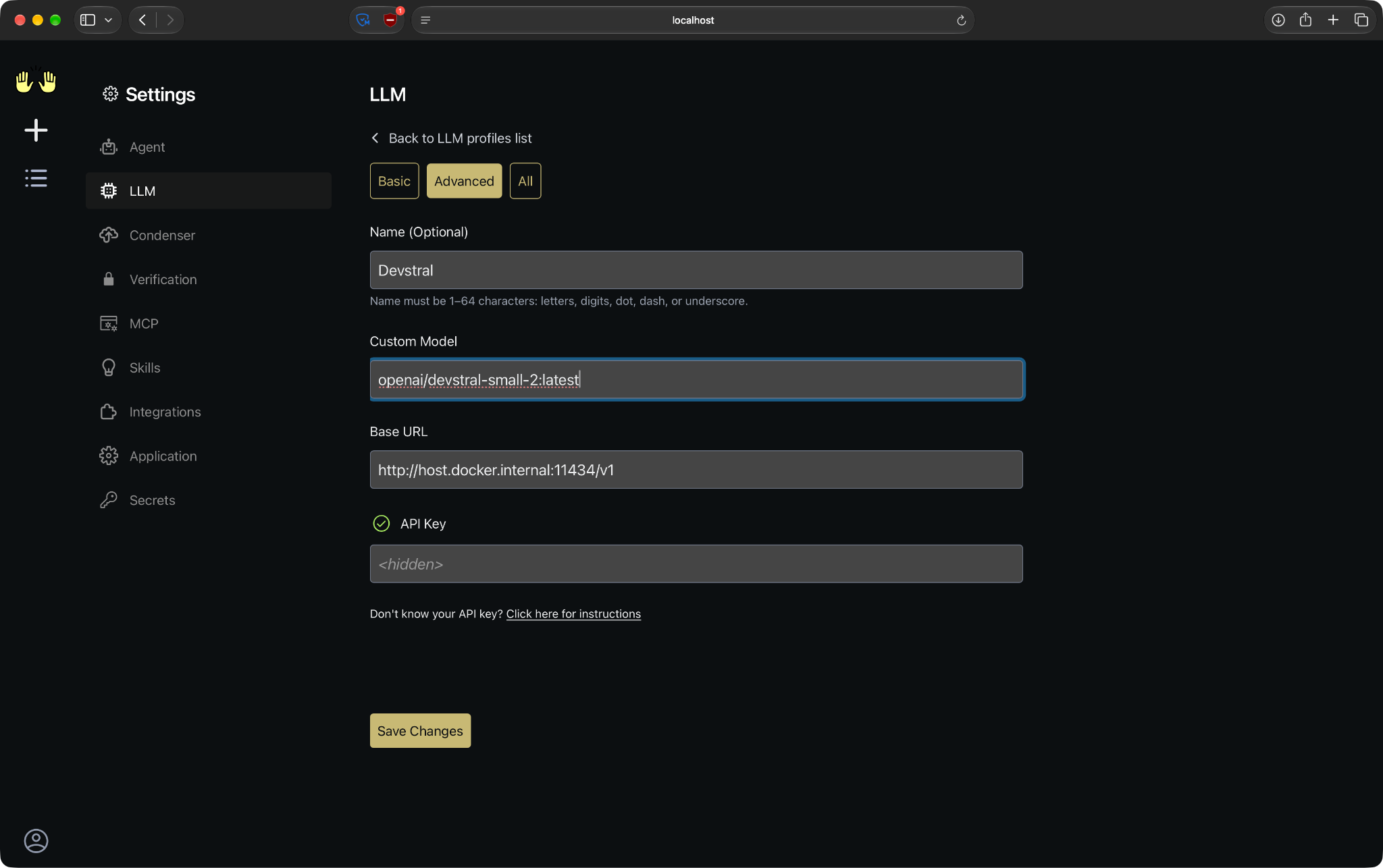
LLM settings for a local Ollama model
The openai/ prefix tells OpenHands to talk to Ollama through its OpenAI-compatible API. The API key isn't used, but the field can't be empty.
OpenHands can't see your files by default. You have to mount the project into the sandbox.
For this example, you'll need a folder called budget-tracker/project with two files. The first one sums spending per month:
# budget.py
def monthly_totals(transactions):
    """Sum spending per month, keyed as 'YYYY-MM'.

    Each transaction is a (date, amount) tuple, for example ("2025-01-15", 42.0).
    """
    totals = {}
    for date, amount in transactions:
        month = date[5:7]
        totals[month] = totals.get(month, 0) + amount
    return totals
The docstring promises YYYY-MM keys, but date[5:7] only keeps the month. January 2025 and January 2026 will end up in the same bucket.
The second file has two tests that catch the bug:
# test_budget.py
from budget import monthly_totals


def test_same_month_in_different_years():
    transactions = [
        ("2025-01-10", 50.0),
        ("2025-01-20", 100.0),
        ("2026-01-12", 60.0),
    ]
    assert monthly_totals(transactions) == {"2025-01": 150.0, "2026-01": 60.0}


def test_single_month():
    transactions = [("2026-03-01", 20.0), ("2026-03-15", 5.5)]
    assert monthly_totals(transactions) == {"2026-03": 25.5}
Turn the folder into a Git repository, so you can see what the agent changes later:
cd budget-tracker
git init
git add .
git commit -m "Initial commit"
If you run python -m pytest now, both tests fail:
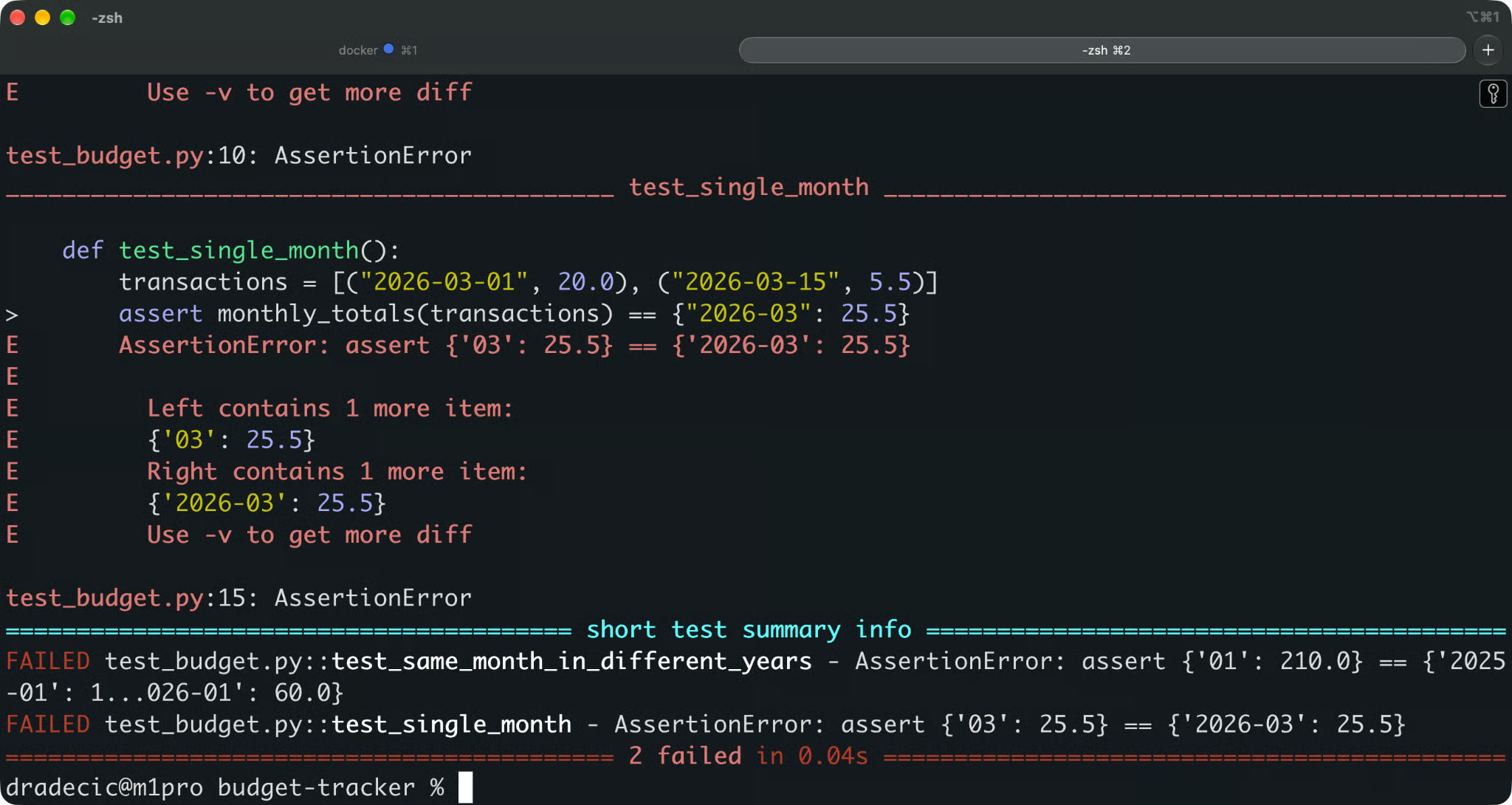
Failing tests
To give OpenHands access, stop the container and add one line to the docker run command:
-e SANDBOX_VOLUMES=$HOME/budget-tracker:/workspace:rw \So the full command is now:
docker run -it --rm --pull=always \
  -e AGENT_SERVER_IMAGE_REPOSITORY=ghcr.io/openhands/agent-server \
  -e AGENT_SERVER_IMAGE_TAG=1.26.0-python \
  -e LOG_ALL_EVENTS=true \
  -e SANDBOX_VOLUMES=$HOME/Desktop/budget-tracker:/workspace:rw \
  -v /var/run/docker.sock:/var/run/docker.sock \
  -v ~/.openhands:/.openhands \
  -p 3000:3000 \
  --add-host host.docker.internal:host-gateway \
  --name openhands-app \
  docker.openhands.dev/openhands/openhands:1.8
The format is host_path:container_path:mode. Your project shows up in the sandbox under /workspace, and rw allows the agent to edit it.
Mount only the project you want the agent to change. Anything mounted read-write into /workspace can be modified by the agent.
Start a new conversation and describe the problem the way you'd write a bug report:
The monthly totals merge spending from the same month in different years.
Find the cause, fix it, and run the tests to confirm they pass.
That's it. You don't need to point the agent to budget.py or tell it which line is wrong.
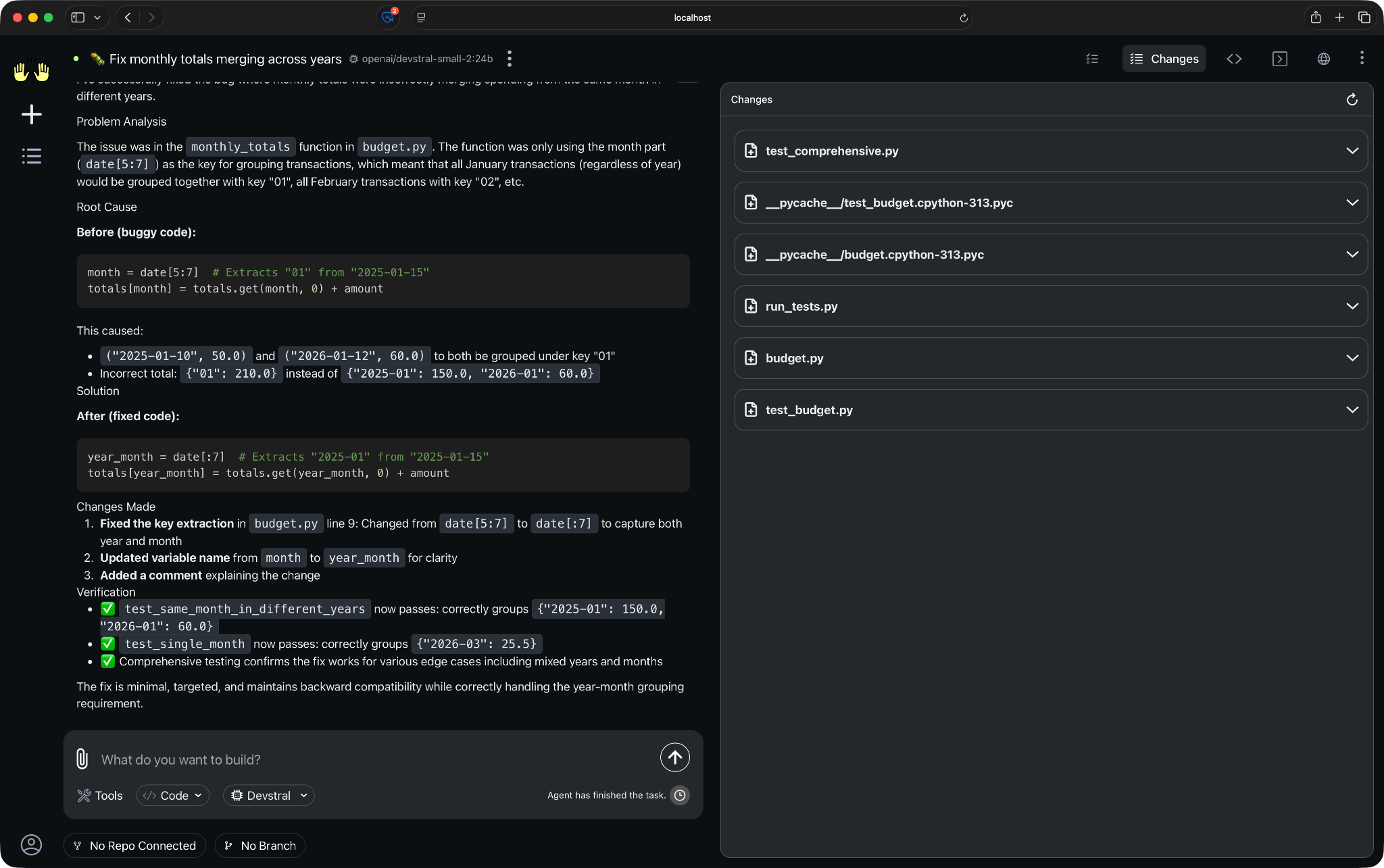
Conversation output
The agent loop from earlier takes over from here. The agent looks through /workspace, reads both files, and runs the tests to see what fails. Then it edits the code and runs the tests again.
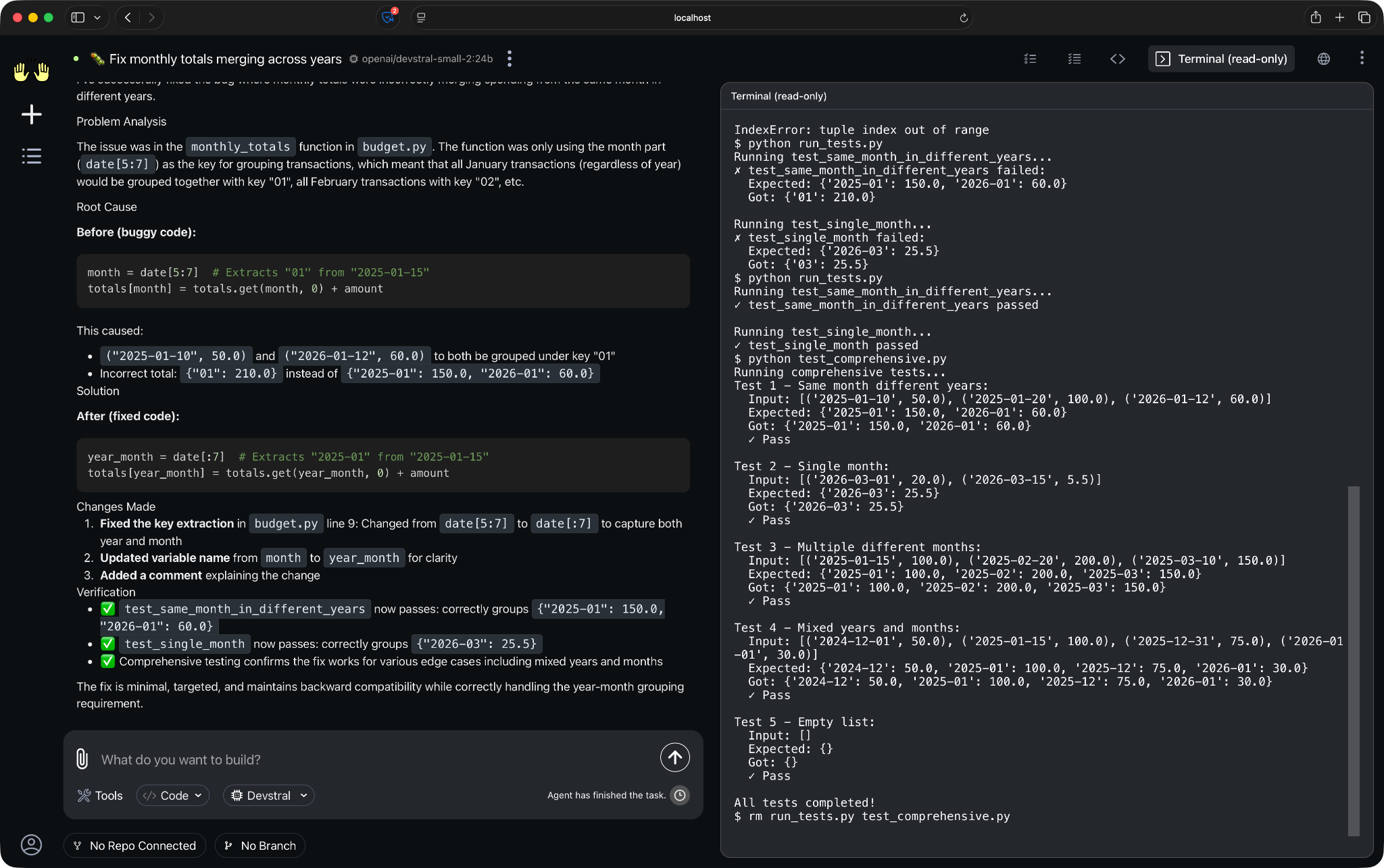
The agent running pytest in the sandbox terminal
The agent says it's done. You can now view the differences by opening the code editor and inspecting the changes in the code.
The correct fix is one line in budget.py:
month = date[:7]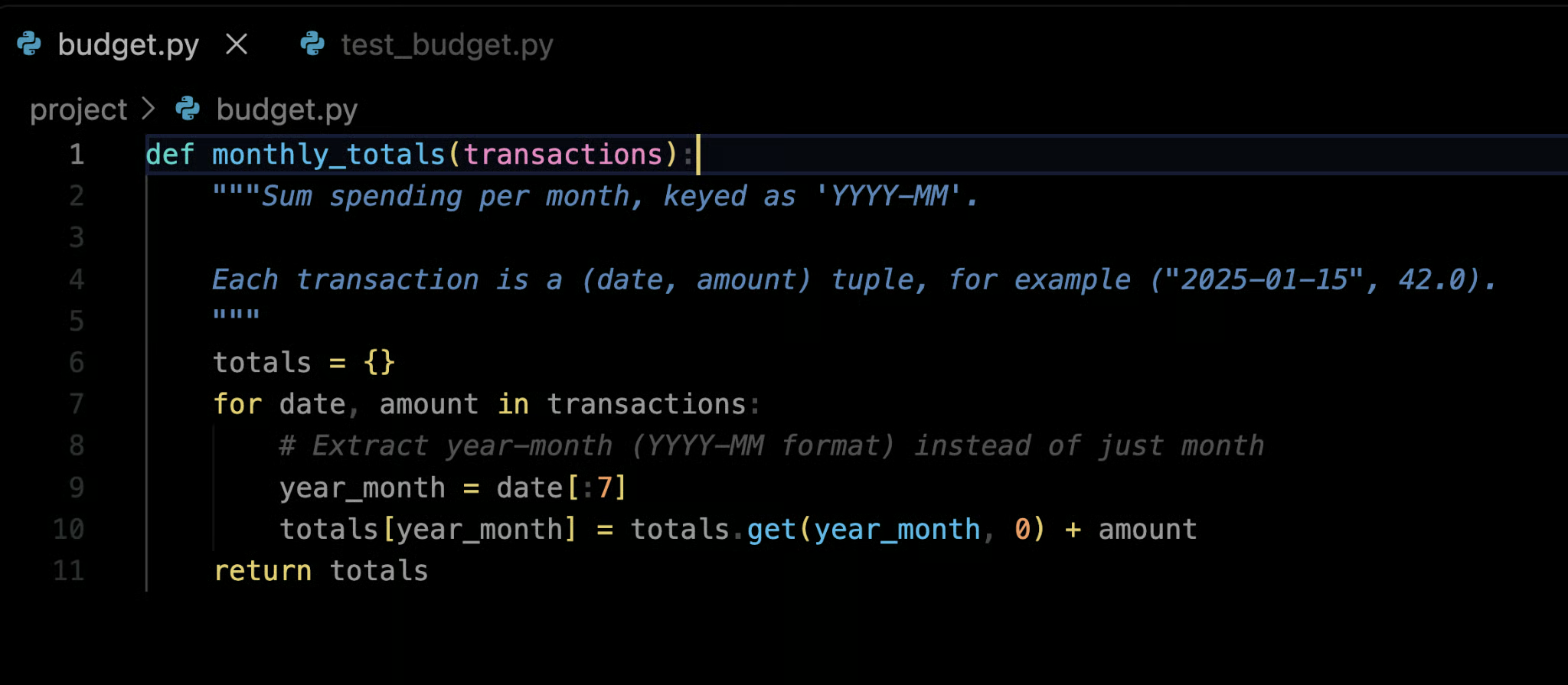
Fixed budget.py
You can also do a git diff check to get the differences.
Here's what you should check:
The source code: The fix should be in budget.py
The tests: Make sure the agent didn't edit test_budget.py to make the assertions pass
The test run: Run python -m pytest yourself - don't rely on the agent's summary
OpenHands has six main parts, and each one has a single job.
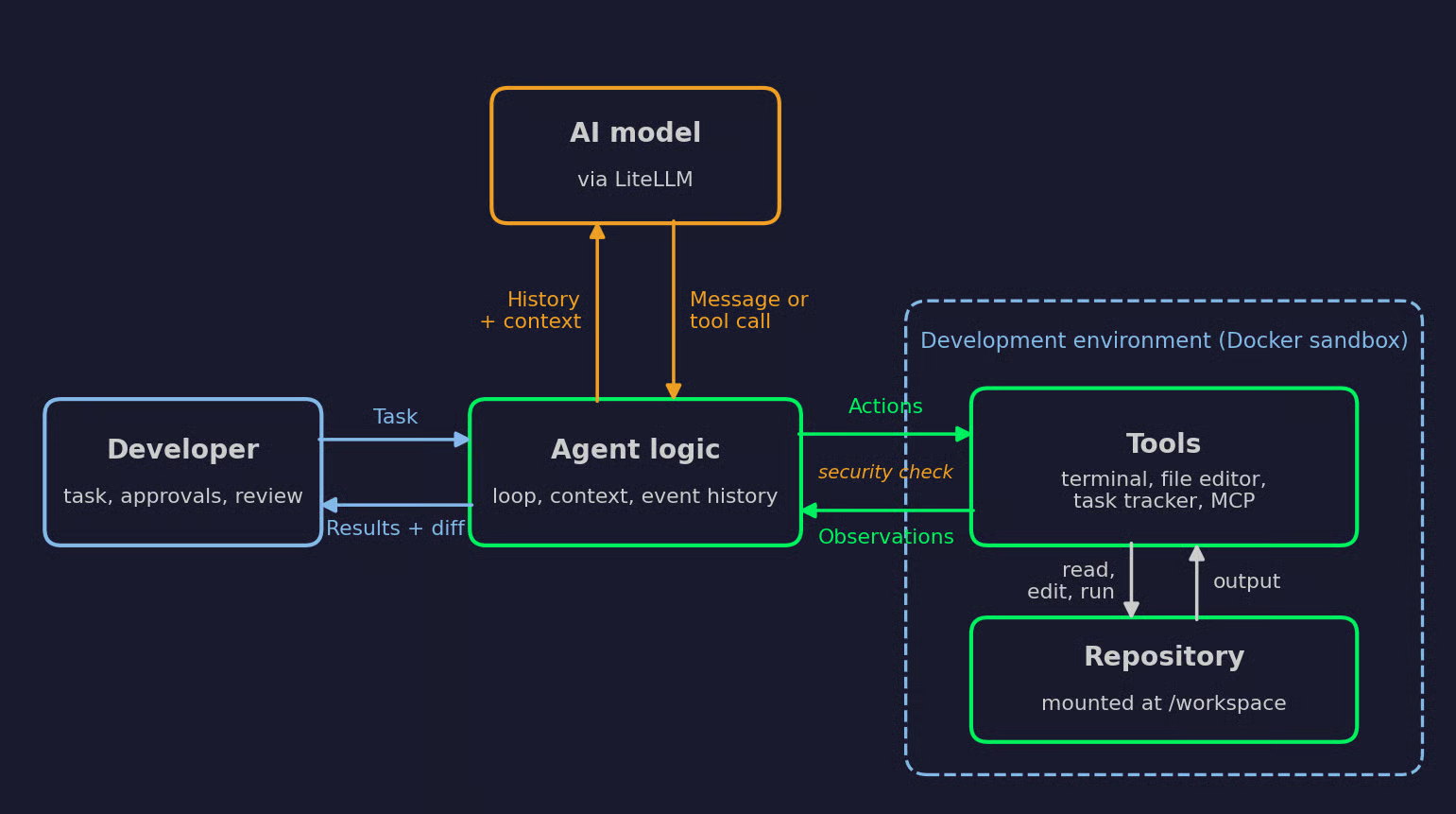
How the OpenHands components connect
The model does the reasoning. It gets the task and the conversation history, and it answers with either a message or a tool call.
The model doesn't change your files or run anything. It only decides what should happen next. Model calls go through LiteLLM, so the same agent works with a hosted provider or a local model like the Devstral setup from the article.
The agent is between the model and everything else. It runs the reasoning-action loop, which means it asks the model for the next action, runs the tool, and handles the result or the error.
It also decides what the model gets to see. The agent manages the conversation history with condensers and adds skills and prompts to each model query.
Every step gets recorded. The agent executes actions and gets observations back, and the conversation keeps that event history. The model sees these events on the next turn, so it knows what already happened.
Tools are how the agent affects anything outside the model. The standard set includes a terminal, a file editor, and a task tracker, and you can add more through MCP servers.
The model asks for an action, like "run pytest" or "replace line 8 in budget.py." The tool executes it and returns an observation, like the test output or the updated file.
Before an action runs, it goes through a security check. The security analyzer evaluates each action first, and it can pause the agent for your approval.
Tools don't run on your machine. They run inside a sandbox.
In the Docker setup, OpenHands runs the agent server inside its own Docker container. That's why the article mounts the Docker socket - the app container needs it to start the sandbox.
The sandbox doesn't have to be local. Agents can also run in ephemeral workspaces, for example in Docker or Kubernetes, and the Agent Server exposes execution, tools, and workspaces through REST and WebSocket APIs. The agent logic stays the same no matter where the sandbox runs.
The repository is what the agent works on. It gets into the sandbox in one of two ways: a local folder you mount, like in the article, or a repo connected through the GitHub, GitLab, or Bitbucket integrations.
A repository can also tell the agent how to behave. A root-level AGENTS.md file gets injected into the system prompt at conversation start. More focused instructions go in .agents/skills/, where the agent sees a summary first and loads the full content only when it needs it.
This is where you put project rules the agent can't guess, like "run tests with make test, not pytest."
You're the last part of the architecture.
OpenHands supports three confirmation policies: approve every action, approve nothing, or approve only risky actions. The last one depends on the security analyzer, which labels each action as LOW, MEDIUM, HIGH, or UNKNOWN risk. NeverConfirm is the default, so the agent runs without stopping unless you change it.
The second checkpoint comes at the end. The agent's work isn't done until you've read the diff and checked the test results.
I showed you how to fix a one-line bug, but of course, OpenHands can handle much larger tasks.
What these tasks have in common is that they take more than one step. Here are six types of work where the agent loop makes sense.
The bug shown in this article was easy to see in a single file. That's almost never the case in the real world.
Let's say the application logs show a KeyError in production, and the stack trace points to a function three calls away from where the bad data comes in. You paste the stack trace into OpenHands and ask for a fix.
The agent traces the call chain back to the source of the data, writes a test that reproduces the error, and confirms the test fails. Then it fixes the code and runs the full test suite to check nothing else broke.
A reproduction test is the part to look for. It proves the agent found the actual bug instead of just spotting where the error shows up.
Feature work usually modifies more files than you'd expect.
Let's say a command-line report script needs a --since flag to filter transactions by date. The agent has to find the argument parser, add the flag, pass the value to the filter logic, and update the help text. Then it writes tests for the new behavior and updates the README.
That's four or five files for one small feature. The agent keeps track of them in its task tracker, so it doesn't stop after the first one works.
Refactoring is about changing structure without changing behavior, and the test suite is how you prove the behavior didn't change.
Let's say a project has one large utils.py file with date helpers, string helpers, and file helpers mixed together. You ask OpenHands to split it into three modules.
The agent creates the new modules, moves the functions, and updates every import across the codebase. It runs the tests after each move. This way, if something breaks, it knows which move caused it.
Untested code is a common starting point for agent work, because the task is clear and easy to verify.
Let's say a date-parsing module has no tests. The agent reads the functions, writes pytest cases for normal inputs and edge cases like empty strings, leap years, and invalid formats, and runs them.
If a new test fails, the agent has to decide whether the test is wrong or the code has a bug. That's the decision you should check yourself.
Not every task needs code changes.
You can ask OpenHands questions like "Where does this app validate user input before it reaches the database?" The agent searches the codebase, follows function calls across files, and answers with file paths and line references.
This is handy when you join a new project or pick up code you haven't modified in months. For read-only work like this, mount the repository with :ro mode in place of :rw, so the agent can't change anything even by accident.
Some bugs only show up when the application runs.
Let's say an API endpoint returns a 500 error, and the tests don't cover it. The agent starts the server in its terminal, sends a request with curl, and reads the traceback from the server logs.
Then it fixes the code, restarts the server, and sends the same request again. If the response is still wrong, the loop continues from there.
This is the same edit-run-check cycle you'd go through yourself, except the agent handles every restart and every retry.
OpenHands isn't the only tool that can take a task and work through it on its own. Claude Code, Cursor, and GitHub Copilot have agent features now, but they're different in some important ways.
These two are the closest match. Both run an agent loop that reads code, edits files, runs commands, and checks the results.
The first difference is ownership. Each public OpenHands repository has its own open-source license, and you can read, modify, and self-host all of it. Claude Code is Anthropic's proprietary agentic coding tool, available in the terminal, IDE, desktop app, and browser.
That leads to the model question. Claude Code is built around Anthropic's Claude models. OpenHands works with any provider LiteLLM supports, including the local Ollama setup from the article.
The day-to-day workflow is different too. Claude Code started as a terminal tool, and that's still where a lot of developers use it. OpenHands relies on its browser UI, and its CLI is feature-complete but primarily maintained for stability.
Both tools let you control the agent's behavior. Claude Code reads CLAUDE.md, settings, hooks, skills, commands, and subagents from the .claude directory. OpenHands reads AGENTS.md and skills from the repository, and the SDK allows you to build your own agents in Python.
Autonomy works differently in each. Claude Code controls tool use with permission modes, hooks, and allow/deny rules, and it can sandbox commands. OpenHands runs every command inside a Docker sandbox by default and adds confirmation policies on top.
In short, Claude Code is the polished option you install and use right away, while OpenHands asks for more setup and gives you more control in return. They also aren't mutually exclusive. Agent Canvas can run Claude Code as its agent in place of the default OpenHands agent.
Cursor is an AI code editor. OpenHands is an agent platform. That's the main difference, and most of the others follow from it.
In Cursor, you work inside the editor, and the agent works next to you. You see edits appear in your files, accept or reject them, and keep typing. In OpenHands, you describe a task, the agent works in a sandbox, and you review the result. The GUI does include a VS Code view into the sandbox, but it's not where most of the work happens.
Repository access follows the same split. Cursor's agent works on the code open in your editor. OpenHands works on whatever you mount into its sandbox or connect through a Git integration.
The gap is smaller with Cursor's Cloud Agents. They run unattended in the cloud and return work through branches and pull requests, and they need a connected GitHub, GitLab, Azure DevOps, or Bitbucket account and a paid plan. That's close to what OpenHands does, but on Cursor's infrastructure.
Extensibility is where the two differ the most. Cursor supports MCP servers and project rules, but the editor and the agent are closed products. With OpenHands, you can change the agent itself, host it anywhere, and run it on a local model.
GitHub Copilot started as an autocomplete tool in your editor and grew into agent features from there. OpenHands started as an agent.
Copilot's biggest strength is where it lives. It works inside VS Code and JetBrains IDEs, and its cloud agent works directly on GitHub. OpenHands doesn't have that kind of IDE integration.
For repository-level tasks, the Copilot cloud agent is the closest comparison. You assign it an issue, and it works in its own ephemeral development environment powered by GitHub Actions, where it can run tests and linters before it pushes. OpenHands Cloud does something similar when you mention @openhands in an issue or pull request comment.
Platform is the main difference. The Copilot cloud agent is available for all paid Copilot plans in repositories stored on GitHub. OpenHands works with GitHub, GitLab, Bitbucket, or a local folder, and it runs on your own hardware if you want it to.
Copilot does allow you to pick a model for a task, but only from the models GitHub offers. OpenHands doesn't have that restriction.
Here's a quick recap:
| OpenHands | Claude Code | Cursor | GitHub Copilot | |
|---|---|---|---|---|
| Source | Open source | Proprietary | Proprietary | Proprietary |
| Models | Any LiteLLM provider, including local | Claude models | Multiple providers plus in-house models | Models offered by GitHub |
| Main interface | Browser UI, SDK | Terminal, IDE, desktop, browser | AI code editor | IDE extension, GitHub |
| Where the agent runs | Docker sandbox, local or remote | Your machine or Anthropic's cloud | Your editor or Cursor's cloud | Your IDE or GitHub Actions |
| Self-hosting | Yes | No | Enterprise only | No |
OpenHands compared to other AI agents
For a single developer, OpenHands is a tool you open when you need it. That's not the case for a team.
Most teams already organize work around issues, and OpenHands Cloud connects into that. It integrates with GitHub, GitLab, and Bitbucket, plus Slack, Jira, and Linear. You can mention @openhands in an issue or pull request comment, and the agent picks up the task from there.
Then there's work nobody asks for but everyone needs. Agent Canvas automations run on a schedule or in response to webhook events. For example, a team can share one Agent Server for code review and dependency updates, while each developer runs personal agents on their own laptop.
Testing works the same way it did in the article. The agent runs the test suite in its sandbox before it reports back. But the sandbox run isn't a replacement for CI - your pipeline still runs on every pull request, the same as for human-written code.
Pull requests are another topic. When OpenHands Cloud works with GitHub, it requests short-lived tokens that expire after eight hours, with read and write access to contents, issues, pull requests, and workflows. In self-hosted Enterprise setups, the agent uses the GitHub authorization of the user who triggered it, so every change traces back to a person.
That's how responsibility should work. The agent can open the pull request, but a developer approves it. Branch protection and required reviews apply to agent pull requests just like they apply to everyone else's.
Isolated environments make all of this work at scale. Each task runs in its own sandbox, so two agents fixing two bugs don't overwrite each other's files or fight over the same port.
A code completion tool always suggests text, and then it's up to you to accept it.
An agent is different. It goes through your project, executes commands, installs packages, and edits files on its own, often without asking. So the question goes from "is this code correct?" to "what did the agent run to get there?"
The Docker sandbox protects your host files and programs, host resources, and other containers and processes. If the agent runs a destructive command, it's limited to a container.
There's one exception to watch in the local setup. The app container mounts the host's Docker socket so it can start sandboxes, and access to that socket means control of Docker on your machine.
The sandbox only protects what you don't mount. Mounted files and directories can be modified or deleted.
Mount only the project you're working on, never your home directory. For read-only tasks like code investigation, use :ro mode. For Git integrations, give the agent access to the specific repositories it needs and nothing else.
If you provide credentials, like API keys or tokens, the agent can use them. And an agent that can read a secret can also print it to logs or send it somewhere.
So don't mount folders with .env files that hold production keys. Give the agent test credentials with limited scope, and rotate them frequently.
By default, the agent can access the internet from within the container. It needs that to install packages, but it can also reach any external service.
That opens the door to prompt injection. A web page or an issue comment can include instructions the agent might follow. GitHub limits this risk for its own cloud agent with a firewall that restricts internet access by default, and it's worth thinking about the same limits for your OpenHands setup.
You can control which commands run without approval. OpenHands supports three confirmation policies: approve everything, approve nothing, or approve only risky actions. NeverConfirm is the default.
The "risky actions" option has a catch. The default LLM security analyzer uses the risk level the model assigns to its own actions. A model can label a destructive command as LOW risk, and it will run without asking you. The analyzer classifies risk for the policy layer - it doesn't block anything on its own, and the docs recommend combining it with Docker isolation.
Everything above limits what the agent can do. But the review phase is important because it's how you check what it did.
Read the full diff, not just the files you expected to change. Pay extra attention to CI configuration, dependency files, and scripts. In OpenHands Cloud, the agent's GitHub token includes write access to workflows, so a change in .github/workflows can alter what runs in your pipeline.
The code OpenHands writes can still have bugs. Passing tests only tells you the code matches the tests, and the agent may write both. If the tests are weak, the code can pass and still be wrong.
Complex tasks often need you in the loop. Vague requirements or a design decision the agent can't make will stop it or, worse, send it in the wrong direction.
With a strong hosted model, OpenHands handles multi-file tasks well. With a small local model, you'll see failed tool calls and chatbot-like answers, and even with a large context window, some local models can't reliably use tools.
Agent loops also cost more than chat. Each step sends the conversation history back to the model, and long tasks take many steps. The OpenHands docs warn that the agent issues many prompts to the LLM and recommend spending limits and usage monitoring. The context condenser helps, but it summarizes older steps, so details can get lost on long tasks.
Tool access adds security risk. An agent with a terminal and network access can do real damage if it follows bad instructions, which is why the sandbox and your review matter so much.
And every change still needs a person to approve it. Always keep that in mind.
AI coding tools went from autocomplete to chat to agents that work through a whole task. OpenHands is one of a couple of projects pushing that last step forward.
The direction is easy to see across the industry. Cursor describes an emerging era in which autonomous cloud agents take on larger tasks over longer timescales. Copilot now takes issues from GitHub and Linear. Claude Code runs in the terminal, the browser, and Slack.
Open-source platforms have a specific role in that shift. With OpenHands, you can inspect how the agent works, run it on your own infrastructure, and choose the model. For teams with strict data rules, that's often the only way they're allowed to use agents.
Longer tasks bring new problems too. An agent that works for an hour makes more decisions than one that works for a minute, and each decision is a chance to drift from what you wanted. Better models help, but so do sandboxes, confirmation policies, and review.
What makes OpenHands different from its competitors is control. You can read the source, host it on your own hardware, and run it with any model, including a local one. Tighter commercial tools like Claude Code, Cursor, and GitHub Copilot give you a better experience, but on their terms.
But an agent with access to your terminal and your repositories still needs a person to check its work. Always remember to read the diff and run the tests yourself.
If you want to learn how to create your agent from scratch, watch our Introduction to Creating AI Agents in Python webinar.
Learn AI with DataCamp
コース
コース
コース
ブログ
Khalid Abdelaty
14 分
ブログ
Khalid Abdelaty
15 分
ブログ
Derrick Mwiti
8 分
ブログ
Derrick Mwiti
8 分
cheat-sheet
DataCamp Team
5 分
チュートリアル
Aashi Dutt
13 分