APIs (Application Programming Interface) are the backbone of modern architecture because they allow for applications to be modular and decoupled. This means that you can build applications built quickly and easily, allowing you to easily maintain and update them.
APIs are also very important in machine learning because they allow different applications to share data and work together, saving time and effort. There are many different frameworks for building APIs in Python. Some of the most popular frameworks for creating APIs in Python are Django, Flask, and FastAPI. This tutorial is a deep dive into one of the frameworks called FastAPI.
API stands for Application Programming Interface. An API is a software intermediary that allows two applications to talk to each other. When you use an application on your phone, the application connects to the Internet and sends data to a server. The server then processes the data and sends it back to your phone. The application on your phone then interprets the data and presents it to you in a readable way.
An API is like a waiter in a restaurant. The waiter takes your order and sends it to the kitchen. The kitchen then prepares the food and sends it back to the waiter. The waiter then brings the food to you.
In the same way, an API takes a request from an application and sends it to a server. The server then processes the request and sends the data back to the application. The application then interprets the data and presents it to the user.
FastAPI is a high-performing web framework for building APIs with Python 3.7+ based on standard Python type hints. It helps developers build applications quickly and efficiently. FastAPI is built on top of the Starlette web server and includes features that make building web applications easier, such as automatic data validation, error handling, and interactive API docs.
We will look at all these features individually in this section. First, let’s look at key features as pointed out in the original documentation of FastAPI.
Performance: On par with NodeJS and the Go language.
Speed: Increase the development speed 2-3X.
Easy: Great editor support. Completion everywhere. Easy to learn and use.
Robust: Production-ready code with automatic interactive documentation.
OpenAPI based: Fully compatible with OpenAPI and JSON Schema.
Installing FastAPI
FastAPI requires Python 3.7+. It can be installed using pip. You will need to install FastAPI and the ASGI server `uvicorn`.
`main` is the name of the Python file, and `app` is the variable that stores the FastAPI class. You can name them whatever you like. Once you run the above command, you will see something like this on your terminal:
Head over to the link in your browser, and if you see a page that shows `Hello World,` the API is up and running.
Image by Author
Congratulations on building your first API.
Interactive API Docs
FastAPI generates a "schema" with all your APIs using the OpenAPI standard for defining APIs. A "schema" is a definition or description of something. Not the code that implements it, but just an abstract description. The OpenAPI schema is what powers the two interactive documentation systems included in FastAPI.
To see the documentation, just add `/docs` to the url (`http://127.0.0.1:8000/docs`). This link will show automatic interactive API documentation.
Image by Author
Click on `Try it out` button in the top right corner to test the API.
Image by Author
You can see the response body is a dictionary. This is the return call of the `read_item` function defined in the `main.py`. You can also see the request url `http://127.0.0.1:8000/items/1?q=orange`. `1` and `orange` were our inputs to the API.
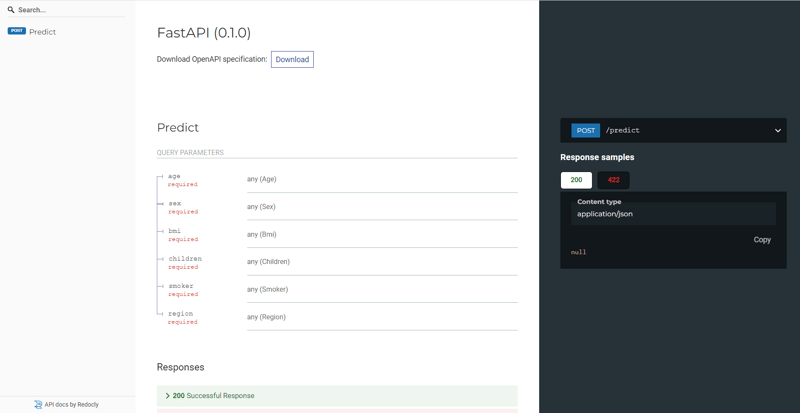
There is an alternative interactive automatic documentation available in FastAPI. To check that out, go to http://127.0.0.1:8000/redoc`. This is what it looks like:
Image by Author
More advanced examples
While building an API, the "path" defines the route or endpoint of the request. However, there is one more choice we have to make here, i.e., “Operation.” The word `operation` here refers to one of the HTTP "methods." By using one (or more) of these so-called "methods," you can communicate with each of the several paths supported by the HTTP protocol. Typically, you would use:
POST: to create data.
GET: to read data.
PUT: to update data.
DELETE: to delete data.
And a few other advanced ones
FastAPI supports all of the http methods.
The fact that FastAPI is built on Python type hints is yet another key aspect of this framework. Type hints are supported in versions of Python 3.6 and later. The type hints are a specialized kind of syntax that makes it possible to declare the type of a variable.
Declaring types for your variables enables editors and other tools to provide you with improved assistance. Let’s see an advanced example.
We will modify our `main.py` file to include a new `PUT` request which will take multiple inputs of different data types.
```
from typing import Union
from fastapi import FastAPI
from pydantic import BaseModel
app = FastAPI()classItem(BaseModel):
name:str
price:float
is_offer: Union[bool,None]=None@app.get("")defread_root():return{"Hello":"World"}@app.get("/items/{item_id}")defread_item(item_id:int, q: Union[str,None]=None):return{"item_id": item_id,"q": q}@app.put("/items/{item_id}")defupdate_item(item_id:int, item: Item):return{"item_name": item.name,"item_id": item_id}
```
A `put` request is added that takes two inputs. `item_id` is an integer and `item` type is pointing to custom class`Item` created and inheriting the `BaseModel` from `pydantic`. The class `Item` contains three attributes: `name`, `price`, `is_offer`, and all of them have different data types.
FastAPI will check:
`name` is a `str`.
`price` is a `float`.
`is_offer` is a bool, if present.
The benefit of using type hints is that you declare once the types of parameters, body, etc. as function parameters with standard Python (3.6+). You will get:
Editor support, including auto-completion, type checks
Data Validation
Conversion of input data
Conversion of output data
Errors that are easy to understand.
Comparison of FastAPI with Django and Flask
All three of these frameworks are Python web frameworks that you can use to develop web applications. They each have their own strengths and weaknesses.
Django is a full-featured framework that includes everything you need to get started, including a built-in ORM and an admin panel. It can be a bit overwhelming for beginners, but its comprehensive documentation makes it easy to learn.
Flask is a microframework that is lightweight and easy to get started with. It doesn't include as many features as Django, but it's perfect for simple projects.
FastAPI is a new framework that is designed to be fast and easy to use. It includes features like automatic data validation and documentation.
Django
Flask
FastAPI
Community
Big.
66K GitHub stars
Big.
61K GitHub stars
Big.
50K GitHub stars
Performance
Django is massive. It isn't the best in terms of performance.
Flask is a micro web framework. It performs better than Django.
FastAPI is one of the fastest web frameworks with native async support that adds to the efficiency of the framework.
Async support
Yes, with limited latency.
No.
Needs Asyncio
FastAPI provides native async support.
Ease of use
Django is massive and hence a bit complicated to learn.
Flask is easy to learn and pretty straightforward in use.
FastAPI is the simplest of all three.
Interactive Documentation
Not interactive
No
Yes (OpenAI, Redoc)
Data Verification
No
No
Yes
FastAPI Performance Benchmarks
According to the results of tests run by techempower, FastAPI is superior to all other frameworks in terms of its overall performance.
Source: https://www.techempower.com/benchmarks/
Example: Building an end-to-end machine learning Pipeline with PyCaret and deploying with FastAPI
In this section, we will quickly build a machine learning pipeline and then create an API to serve the model. We will use a low-code Python library PyCaret to build a pipeline and create an API. PyCaret has integration with FastAPI, which makes it extremely easy to create and serve machine learning models as an API.
PyCaret
PyCaret is an open-source, low-code machine learning library in Python that automates machine learning workflows. It is an end-to-end machine learning and model management tool that speeds up the experiment cycle exponentially and makes you more productive.
We will use the `insurance` dataset in this example. It is a regression use-case for predicting medical charges based on age, sex, BMI, and region.
```

from pycaret.datasets import get_data

data = get_data(‘insurance’)

```ขับเคลื่อนโดย
Image by Author
Next we will initialize the `setup` function from pycaret. This function initializes the experiment in PyCaret and creates the transformation pipeline based on all the parameters passed in the function.
The `setup` must first executed before any other function. It requires two parameters to work `data` and `target`. All the remaining arguments in `setup` are optional. The `setup` function is responsible for controlling the entirety of the data preprocessing procedures. Check out the PyCaret documentation for a comprehensive rundown of all of the preprocessing procedures that are supported in PyCaret.
```
from pycaret.regression import*
s = setup(data, target ='charges')
```
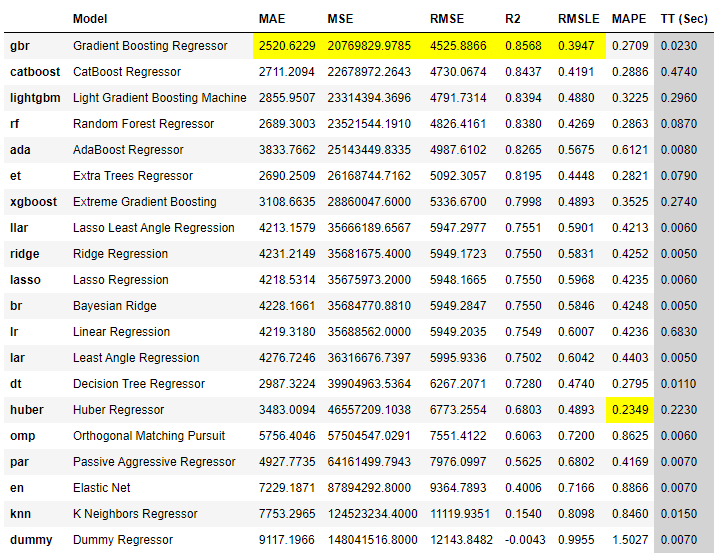
Once the setup is finished, we can start model training and selection with just one line of code: `compare_models`. Through the use of cross-validation, this function trains and evaluates the model performance of all estimators within the model library. The result of this function is a scoring grid that contains the average scores obtained from cross-validation.
Based on this the best performing model is `Gradient Boosting Regressor`. If we want, we can analyze the model through visualization and further try to improve performance through hyperparameter tuning or model ensembling, but we will not do that in this tutorial.
We will get straight into building the API of the best model to serve predictions in production using FastAPI. Remember, PyCaret has integration with FastAPI, so it can automatically create a REST API from the model using the `create_api` function.
Now to run this API, open the command prompt terminal and navigate to the folder where your Notebook is and run the following command `python insurance_prediction_model.py`.
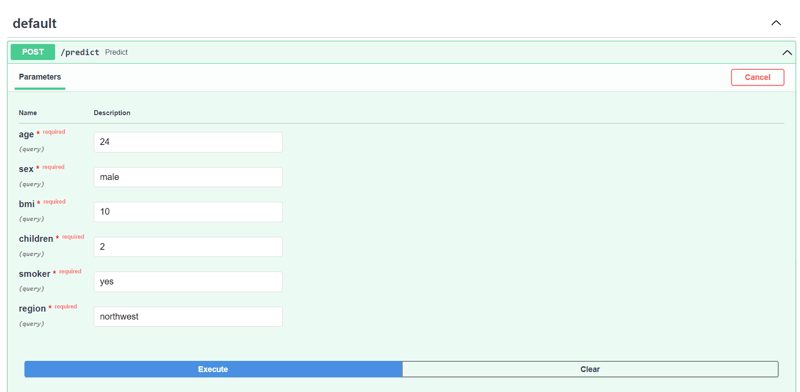
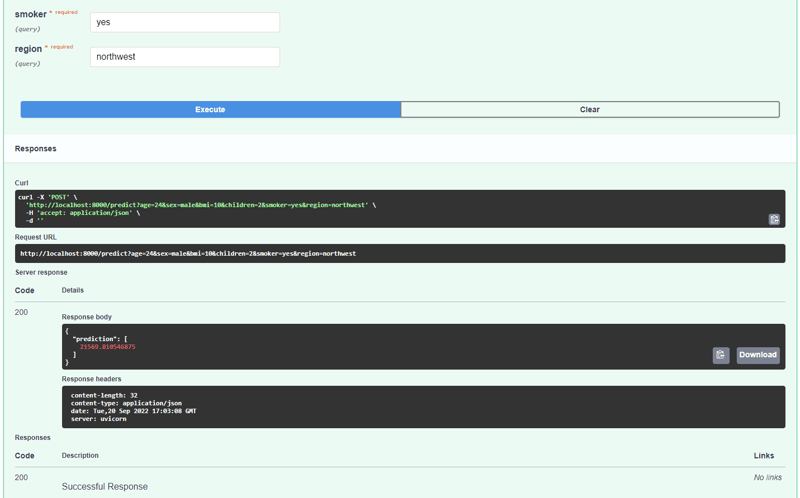
Head over to `http://127.0.0.1:8000/docs` and you will see the same UI as you have seen earlier in this tutorial
Remember, both the default and redoc interactive documentation are powered using OpenAPI standards.
If you want to see the file that PyCaret created when you used `create_api` function you can check out the file in the same folder as your Notebook. It looks like this:
```
import pandas as pd
from pycaret.regression import load_model, predict_model
from fastapi import FastAPI
import uvicorn
# Create the app
app = FastAPI()# Load trained Pipeline
model = load_model('my_lr_api')# Define predict function@app.post('/predict')defpredict(age, sex, bmi, children, smoker, region):
data = pd.DataFrame([[age, sex, bmi, children, smoker, region]])
data.columns =['age','sex','bmi','children','smoker','region']
predictions = predict_model(model, data=data)return{'prediction':list(predictions['Label'])}if __name__ =='__main__':
uvicorn.run(app, host='127.0.0.1', port=8000)
```
The article discussed the idea of API and why they are used. API is important in modern architecture because it allows different software programs to share data and functionality. This makes it possible to create complex systems that are more reliable and easier to maintain.
We then deep dive into a relatively new framework in Python called FastAPI. FastAPI is a newer API that is designed to be easy to use and efficient. It is a great option for developers who want to create an API quickly and easily.
GitHub star history - created using star-history.com
A practical run-through of FastAPI interview questions from beginner to advanced, covering API design, async programming, dependency injection, security, deployment, and the scenario-based problems senior interviews actually ask about.
This complete guide teaches you the fundamentals of Python backend development. Learn basic concepts, frameworks, and best practices to start building web applications.
This Python Streamlit tutorial is designed for data scientists and machine learning engineers who want to quickly build web apps without extensive web development knowledge.






APIs (Application Programming Interface) are the backbone of modern architecture because they allow for applications to be modular and decoupled. This means that you can build applications built quickly and easily, allowing you to easily maintain and update them.
APIs are also very important in machine learning because they allow different applications to share data and work together, saving time and effort. There are many different frameworks for building APIs in Python. Some of the most popular frameworks for creating APIs in Python are Django, Flask, and FastAPI. This tutorial is a deep dive into one of the frameworks called FastAPI.
If you want to dive deeper into this subject, I recommend this course: Deploying AI Into Production With FastAPI.
What is an API?
API stands for Application Programming Interface. An API is a software intermediary that allows two applications to talk to each other. When you use an application on your phone, the application connects to the Internet and sends data to a server. The server then processes the data and sends it back to your phone. The application on your phone then interprets the data and presents it to you in a readable way.
An API is like a waiter in a restaurant. The waiter takes your order and sends it to the kitchen. The kitchen then prepares the food and sends it back to the waiter. The waiter then brings the food to you.
In the same way, an API takes a request from an application and sends it to a server. The server then processes the request and sends the data back to the application. The application then interprets the data and presents it to the user.
Image Source: https://www.techfunnel.com/wp-content/uploads/2021/07/api.png
If you want to learn more about machine learning pipelines, APIs, and MLOps, you can check out our Machine Learning, Pipelines, Deployment and MLOps Tutorial.
What is FastAPI
FastAPI is a high-performing web framework for building APIs with Python 3.7+ based on standard Python type hints. It helps developers build applications quickly and efficiently. FastAPI is built on top of the Starlette web server and includes features that make building web applications easier, such as automatic data validation, error handling, and interactive API docs.
We will look at all these features individually in this section. First, let’s look at key features as pointed out in the original documentation of FastAPI.
Installing FastAPI
FastAPI requires Python 3.7+. It can be installed using pip. You will need to install FastAPI and the ASGI server `uvicorn`.
Create a simple API
Let’s directly get into creating a very simple toy API. I am using VS Code to implement this, but you can use any editor you like.
(Example reproduced from the original documentation). Thanks to @tiangolo.
Now using a command line terminal, run this API with the following command:
`main` is the name of the Python file, and `app` is the variable that stores the FastAPI class. You can name them whatever you like. Once you run the above command, you will see something like this on your terminal:
Head over to the link in your browser, and if you see a page that shows `Hello World,` the API is up and running.
Image by Author
Congratulations on building your first API.
Interactive API Docs
FastAPI generates a "schema" with all your APIs using the OpenAPI standard for defining APIs. A "schema" is a definition or description of something. Not the code that implements it, but just an abstract description. The OpenAPI schema is what powers the two interactive documentation systems included in FastAPI.
To see the documentation, just add `/docs` to the url (`http://127.0.0.1:8000/docs`). This link will show automatic interactive API documentation.
Image by Author
Click on `Try it out` button in the top right corner to test the API.
Image by Author
You can see the response body is a dictionary. This is the return call of the `read_item` function defined in the `main.py`. You can also see the request url `http://127.0.0.1:8000/items/1?q=orange`. `1` and `orange` were our inputs to the API.
There is an alternative interactive automatic documentation available in FastAPI. To check that out, go to http://127.0.0.1:8000/redoc`. This is what it looks like:
Image by Author
More advanced examples
While building an API, the "path" defines the route or endpoint of the request. However, there is one more choice we have to make here, i.e., “Operation.” The word `operation` here refers to one of the HTTP "methods." By using one (or more) of these so-called "methods," you can communicate with each of the several paths supported by the HTTP protocol. Typically, you would use:
FastAPI supports all of the http methods.
The fact that FastAPI is built on Python type hints is yet another key aspect of this framework. Type hints are supported in versions of Python 3.6 and later. The type hints are a specialized kind of syntax that makes it possible to declare the type of a variable.
Declaring types for your variables enables editors and other tools to provide you with improved assistance. Let’s see an advanced example.
We will modify our `main.py` file to include a new `PUT` request which will take multiple inputs of different data types.
(Example reproduced from the original documentation). Thanks to @tiangolo.
The change:
A `put` request is added that takes two inputs. `item_id` is an integer and `item` type is pointing to custom class`Item` created and inheriting the `BaseModel` from `pydantic`. The class `Item` contains three attributes: `name`, `price`, `is_offer`, and all of them have different data types.
FastAPI will check:
The benefit of using type hints is that you declare once the types of parameters, body, etc. as function parameters with standard Python (3.6+). You will get:
Comparison of FastAPI with Django and Flask
All three of these frameworks are Python web frameworks that you can use to develop web applications. They each have their own strengths and weaknesses.
Django is a full-featured framework that includes everything you need to get started, including a built-in ORM and an admin panel. It can be a bit overwhelming for beginners, but its comprehensive documentation makes it easy to learn.
Flask is a microframework that is lightweight and easy to get started with. It doesn't include as many features as Django, but it's perfect for simple projects.
FastAPI is a new framework that is designed to be fast and easy to use. It includes features like automatic data validation and documentation.
Django
Flask
FastAPI
Community
Big.
66K GitHub stars
Big.
61K GitHub stars
Big.
50K GitHub stars
Performance
Django is massive. It isn't the best in terms of performance.
Flask is a micro web framework. It performs better than Django.
FastAPI is one of the fastest web frameworks with native async support that adds to the efficiency of the framework.
Async support
Yes, with limited latency.
No.
Needs Asyncio
FastAPI provides native async support.
Ease of use
Django is massive and hence a bit complicated to learn.
Flask is easy to learn and pretty straightforward in use.
FastAPI is the simplest of all three.
Interactive Documentation
Not interactive
No
Yes (OpenAI, Redoc)
Data Verification
No
No
Yes
FastAPI Performance Benchmarks
According to the results of tests run by techempower, FastAPI is superior to all other frameworks in terms of its overall performance.
Source: https://www.techempower.com/benchmarks/
Example: Building an end-to-end machine learning Pipeline with PyCaret and deploying with FastAPI
In this section, we will quickly build a machine learning pipeline and then create an API to serve the model. We will use a low-code Python library PyCaret to build a pipeline and create an API. PyCaret has integration with FastAPI, which makes it extremely easy to create and serve machine learning models as an API.
PyCaret
PyCaret is an open-source, low-code machine learning library in Python that automates machine learning workflows. It is an end-to-end machine learning and model management tool that speeds up the experiment cycle exponentially and makes you more productive.
We will use the `insurance` dataset in this example. It is a regression use-case for predicting medical charges based on age, sex, BMI, and region.
Image by Author
Next we will initialize the `setup` function from pycaret. This function initializes the experiment in PyCaret and creates the transformation pipeline based on all the parameters passed in the function.
The `setup` must first executed before any other function. It requires two parameters to work `data` and `target`. All the remaining arguments in `setup` are optional. The `setup` function is responsible for controlling the entirety of the data preprocessing procedures. Check out the PyCaret documentation for a comprehensive rundown of all of the preprocessing procedures that are supported in PyCaret.
Image by Author Output truncated.
Once the setup is finished, we can start model training and selection with just one line of code: `compare_models`. Through the use of cross-validation, this function trains and evaluates the model performance of all estimators within the model library. The result of this function is a scoring grid that contains the average scores obtained from cross-validation.