Courses
Support Vector Machines in R
4 ชม.
11.1K
เคยพยายามจะมองภาพการกระจายของข้อมูล แต่ได้ฮิสโตแกรมที่เปลี่ยนรูปร่างทุกครั้งที่ปรับขนาดถังหรือไม่?
โดยปกติแล้วจะเป็นแบบนี้ เลือกถัง 10 ช่องจะเห็นโค้งที่ค่อนข้างเรียบ จากนั้นเปลี่ยนเป็น 30 ช่องกลับมีหลายยอด ข้อมูลยังเหมือนเดิม แต่จำนวนถังที่ต่างกันให้การตีความที่ต่างกัน นั่นคือปัญหาใหญ่ของฮิสโตแกรม: มันไม่ได้แสดงการกระจายจริง แต่แสดงเพียงเวอร์ชันหนึ่ง ซึ่งเวอร์ชันนั้นถูกกำหนดโดยพารามิเตอร์ที่ตั้งขึ้นแบบสุ่มของคุณเอง
KDE ใช้วิธีที่ต่างออกไป แทนที่จะหั่นข้อมูลเป็นถัง มันจะวางโค้งเรียบขนาดเล็กลงบนแต่ละจุดข้อมูลแล้วบวกรวมกันทั้งหมด วิธีนี้ให้ค่าประมาณแบบต่อเนื่องเพียงเส้นเดียวของการกระจายที่อยู่เบื้องหลัง
ในบทความนี้ จะได้เข้าใจสัญชาตญาณเบื้องหลัง KDE เดินผ่านสูตร อธิบายว่าความกว้างแถบ (bandwidth) ควบคุมความเรียบของเส้นโค้งอย่างไร และตัวอย่างการใช้งานจริงใน Python และ R
เพิ่งเริ่มใช้ฮิสโตแกรมหรือ? นี่คือคู่มือครบถ้วนเกี่ยวกับ Frequency Histograms ที่จะช่วยให้เริ่มต้นได้
การประมาณความหนาแน่นแบบเคอร์เนลเป็นวิธีแบบไม่พารามิเตอร์สำหรับประมาณฟังก์ชันความหนาแน่นความน่าจะเป็นของชุดข้อมูล
คำว่าไม่พารามิเตอร์นี่เองที่ทำให้มันแตกต่าง
ด้วยวิธีแบบพารามิเตอร์ จะสมมติว่าข้อมูลของคุณตามการกระจายแบบใดแบบหนึ่ง เช่น นอร์มัล เอกซ์โปเนนเชียล แล้วปรับพารามิเตอร์ให้เข้ากัน หากสมมตินั้นผิด แบบจำลองก็ผิด KDE ไม่ทำสมมติแบบนั้น มันปล่อยให้ข้อมูลพูดด้วยตัวเอง และสร้างค่าประมาณของการกระจายที่อยู่ใต้ข้อมูลขึ้นมาโดยตรงจากการสังเกต
ผลลัพธ์คือเส้นโค้งเรียบที่บอกว่าค่ามีแนวโน้มจะอยู่ที่ไหน และมีความเป็นไปได้แค่ไหน จุดสูงหมายถึงบริเวณหนาแน่น จุดต่ำหมายถึงบริเวณที่บางเบา
ฮิสโตแกรมเป็นเครื่องมือมาตรฐานในการแสดงภาพการกระจาย แต่มีปัญหา: รูปร่างที่เห็นขึ้นอยู่กับจำนวนถังที่เลือก และจำนวนถังนั้นเป็นสิ่งที่คุณต้องกำหนดเอง คนสองคนสามารถดูชุดข้อมูลเดียวกันและสรุปต่างกันโดยสิ้นเชิงเพียงเพราะเลือกจำนวนถังต่างกัน
ด้วย KDE แทนที่จะบังคับข้อมูลให้ลงถัง มันให้เส้นโค้งเรียบต่อเนื่องที่ไม่เปลี่ยนไปตามพารามิเตอร์ตามอำเภอใจที่ตั้งไว้แต่แรก
นั่นทำให้มีประโยชน์ในหลายเรื่อง เช่น:
นำเอาแต่ละจุดข้อมูลมาวางโค้งเรียบเล็ก ๆ ไว้ด้านบน โค้งนั้นเรียกว่า เคอร์เนล จากนั้นก็บวกรวมโค้งย่อยทั้งหมดเป็นเส้นเดียว
ผลลัพธ์คือเส้นโค้งเรียบเส้นเดียวที่แสดงความหนาแน่นของข้อมูล ตรงที่จุดหนาแน่นรวมตัวกัน เคอร์เนลหลายอันจะซ้อนทับกัน เส้นโค้งจึงสูงขึ้น ตรงที่ข้อมูลเบาบาง เคอร์เนลแทบไม่ทับกัน เส้นโค้งจึงต่ำลง ทุกจุดมีส่วนร่วมอย่างเท่าเทียมกันต่อค่าประมาณสุดท้าย
ลองนึกภาพว่าบันทึกคะแนนสอบปลายภาคของชั้นเรียน แทนที่จะจัดถังเป็นฮิสโตแกรม KDE จะวางโค้งเรียบเล็ก ๆ ลงบนแต่ละคะแนน ตรงที่คะแนนกระจุกตัวกัน เช่น แถว ๆ 70–75 โค้งจะซ้อนกันและค่าประมาณจะสูงขึ้น นักเรียนคนเดียวที่ได้ 95 จะเพิ่มปุ่มนูนเล็ก ๆ ที่ปลายหาง
ภาพด้านล่างแสดงสิ่งนี้อย่างชัดเจน นักเรียนส่วนใหญ่ได้คะแนนใกล้ค่าเฉลี่ย และมีนักเรียนคนหนึ่งได้สูงกว่ามาก:
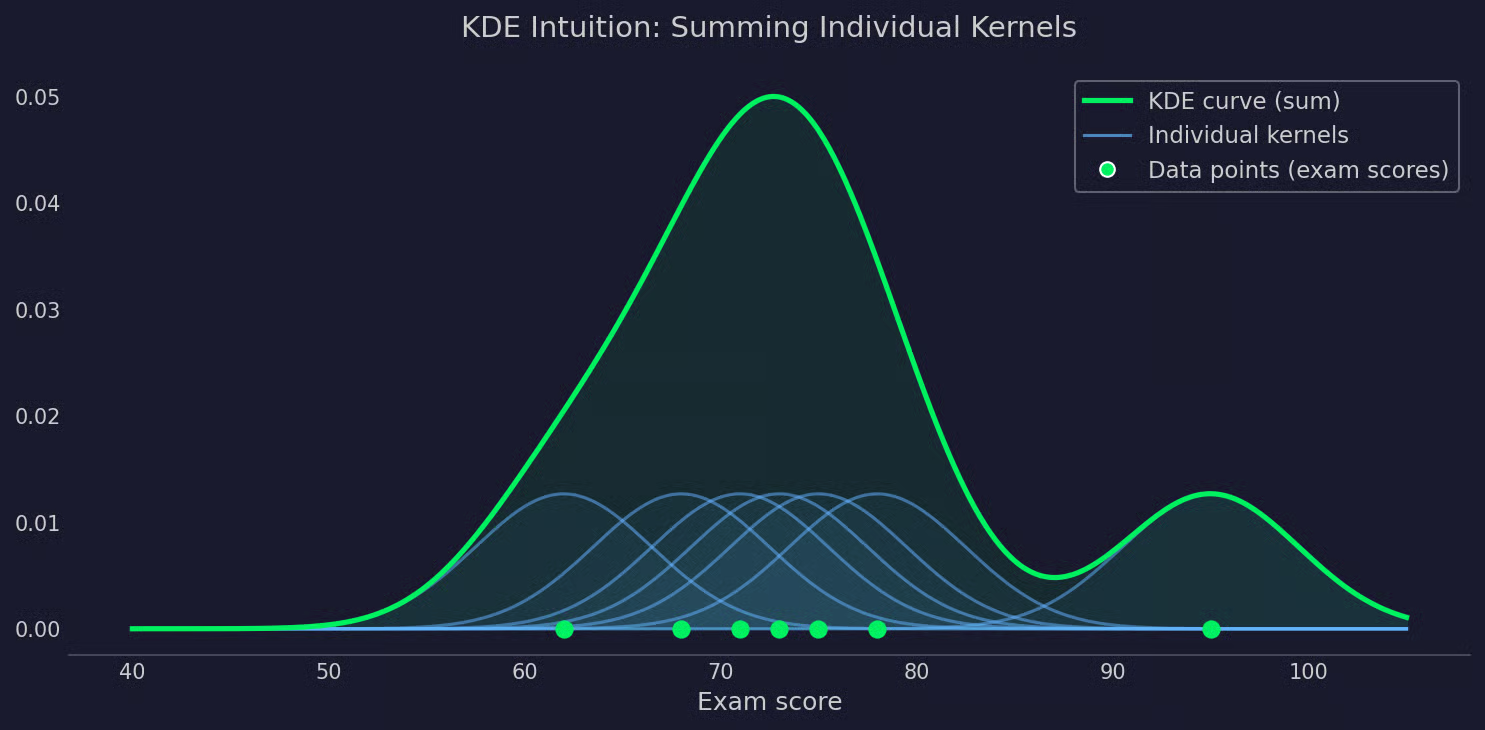
ภาพ KDE
สูตร KDE ดูน่ากลัวกว่าที่เป็นจริง
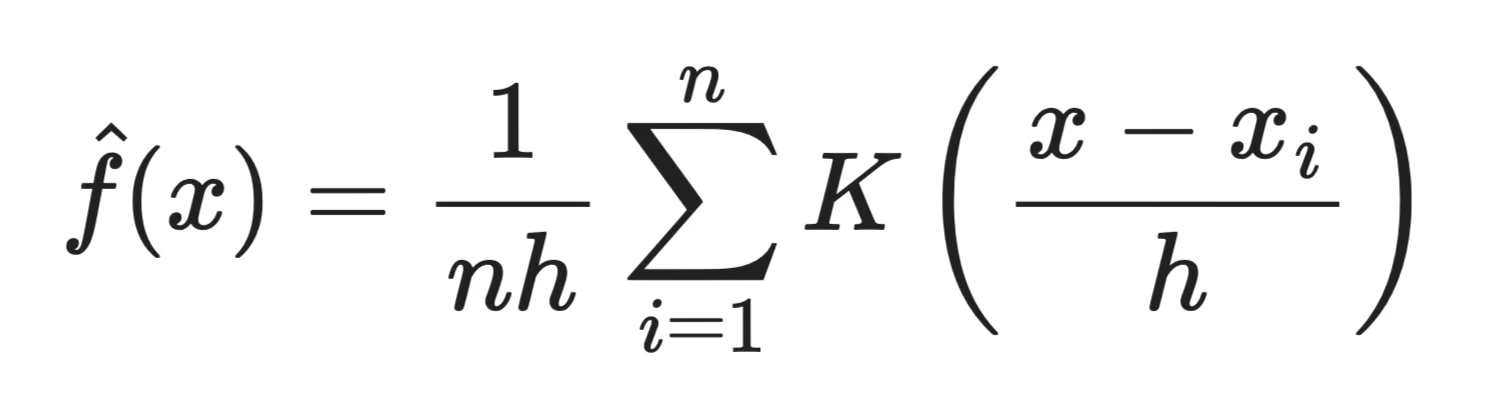
สูตร KDE
ความหมายของแต่ละส่วนมีดังนี้:
n คือจำนวนจุดข้อมูล
x_i คือจุดข้อมูลแต่ละจุดในชุดข้อมูลของคุณ
K คือฟังก์ชันเคอร์เนล — โค้งเรียบที่วางบนแต่ละจุด
h คือแบนด์วิดท์ — ควบคุมว่าแต่ละเคอร์เนลกว้างแค่ไหน
x คือจุดที่กำลังประเมินความหนาแน่น
พูดให้เข้าใจง่าย ๆ สูตรบอกว่า: สำหรับจุดใด ๆ x ให้ดูว่าทุกจุดข้อมูล x_i ใกล้กับมันแค่ไหน ชั่งน้ำหนักความใกล้นั้นด้วยฟังก์ชันเคอร์เนล K แล้วนำค่าเฉลี่ยผลลัพธ์ตลอดทุกจุด n ทำเช่นนี้สำหรับทุก ๆ x ตลอดช่วง ก็จะได้เส้นโค้งความหนาแน่นเต็มรูป
แบนด์วิดท์ h อยู่ในส่วนตัวหารของเศษส่วนภายใน K ยิ่ง h เล็ก เคอร์เนลยิ่งแคบ ดังนั้นมีเพียงจุดที่ใกล้มากเท่านั้นที่มีอิทธิพลต่อค่าประมาณ ยิ่ง h ใหญ่ อิทธิพลก็ยิ่งแผ่กว้าง เดี๋ยวจะอธิบายเพิ่มเติมต่อไปในบทความ
เคอร์เนลคือโค้งเรียบที่วางบนแต่ละจุดข้อมูล มันกำหนดว่าอิทธิพลของจุดนั้นจะแผ่ไปยังเพื่อนบ้านอย่างไร
ทุกเคอร์เนลถูกจัดให้อยู่กึ่งกลางที่จุดข้อมูลและกำหนดน้ำหนักตามระยะห่าง จุดที่ใกล้ศูนย์กลางได้ค่าน้ำหนักสูง จุดที่ไกลออกไปได้น้ำหนักต่ำหรือไม่มีเลย รูปร่างการให้น้ำหนักที่แน่นอนขึ้นอยู่กับเคอร์เนลที่เลือก
มีตัวเลือกที่พบบ่อยสามแบบ:
ส่วนใหญ่แล้ว การเลือกเคอร์เนลไม่ค่อยมีผลมาก ใช้เคอร์เนลสองแบบกับข้อมูลเดียวกันและแบนด์วิดท์เท่ากันจะได้เส้นโค้งแทบไม่ต่างกัน สิ่งที่สำคัญกว่ามากคือแบนด์วิดท์ — ซึ่งจะพูดถึงต่อไป
แบนด์วิดท์เป็นพารามิเตอร์เดียวที่มีผลมากที่สุดต่อผลลัพธ์ของ KDE มากกว่าการเลือกเคอร์เนลเสียอีก
มันควบคุมความกว้างของแต่ละเคอร์เนล เคอร์เนลแคบจะดึงอิทธิพลจากจุดใกล้เคียงเท่านั้น เคอร์เนลกว้างจะกระจายอิทธิพลไปไกลกว่า ผลลัพธ์คือเส้นโค้งที่ตามข้อมูลอย่างใกล้ชิดหรือเส้นที่ปรับเรียบทับรายละเอียด
แบนด์วิดท์เล็กทำให้แต่ละเคอร์เนลแคบและแน่น ค่าประมาณตอบสนองต่อทุกจุดข้อมูลอย่างรุนแรง ซึ่งหมายความว่าจะจับทั้งโครงสร้างจริงของข้อมูลและสัญญาณรบกวนไปพร้อมกัน
ในทางปฏิบัติจึงเห็นเป็นเส้นโค้งมีหนามแหลมหลายยอด บางยอดสะท้อนกลุ่มจริงในข้อมูล บางยอดเป็นเพียงสิ่งหลงเหลือจากการปรับเรียบน้อยเกินไป แยกไม่ออกว่าอันไหนเป็นอันไหน นั่นแหละคือปัญหา
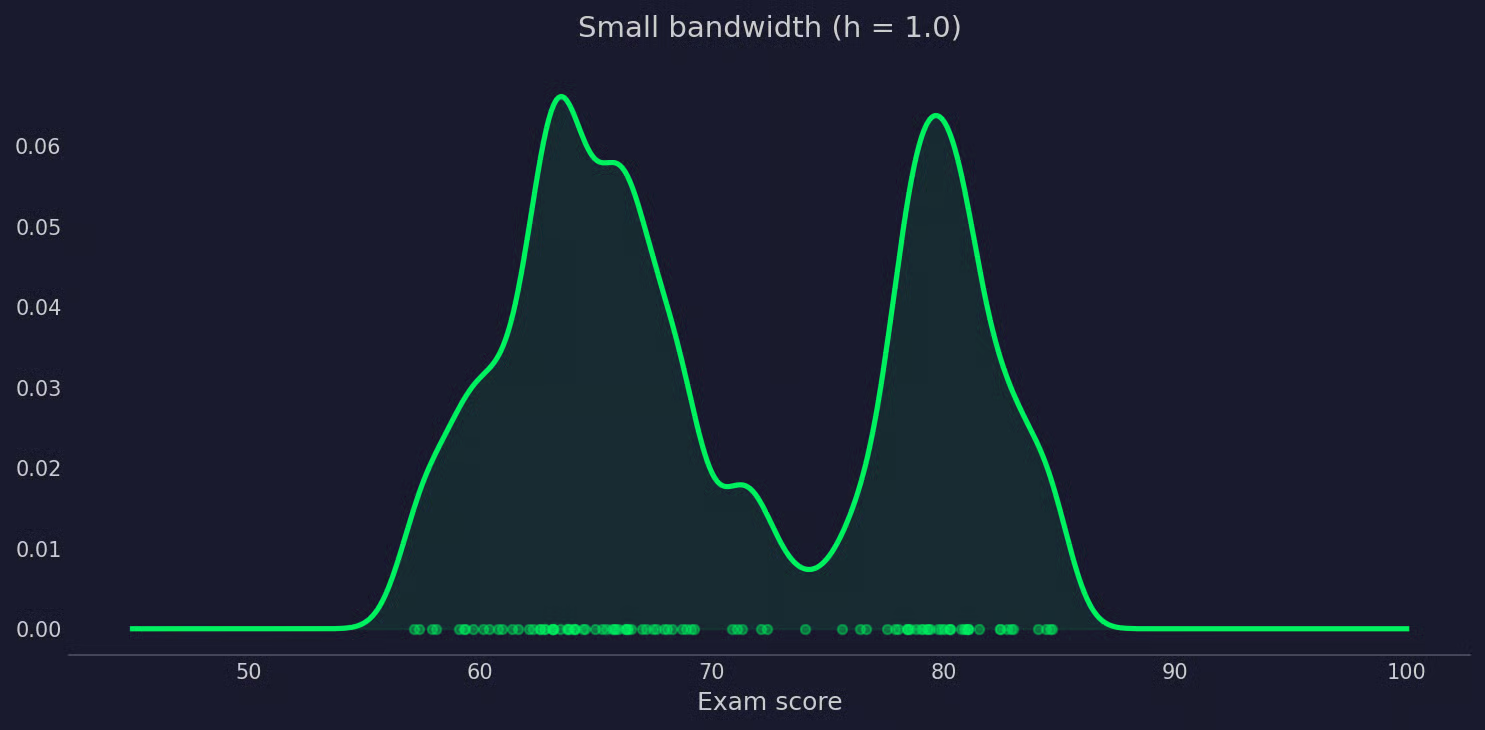
KDE ที่มีแบนด์วิดท์เล็ก
แบนด์วิดท์ใหญ่ทำให้แต่ละเคอร์เนลกว้าง เคอร์เนลที่อยู่ใกล้กันซ้อนทับกัน และเส้นโค้งสุดท้ายออกมาเรียบ
ถ้าเรียบเกินไป โครงสร้างจริงจะเริ่มหายไป กลุ่มที่แตกต่างกันสองกลุ่มอาจเบลอเป็นเส้นเดียว การกระจายที่มีหางหนักอาจดูสมมาตร การแสดงภาพอาจกำลังซ่อนสิ่งต่าง ๆ จากคุณ
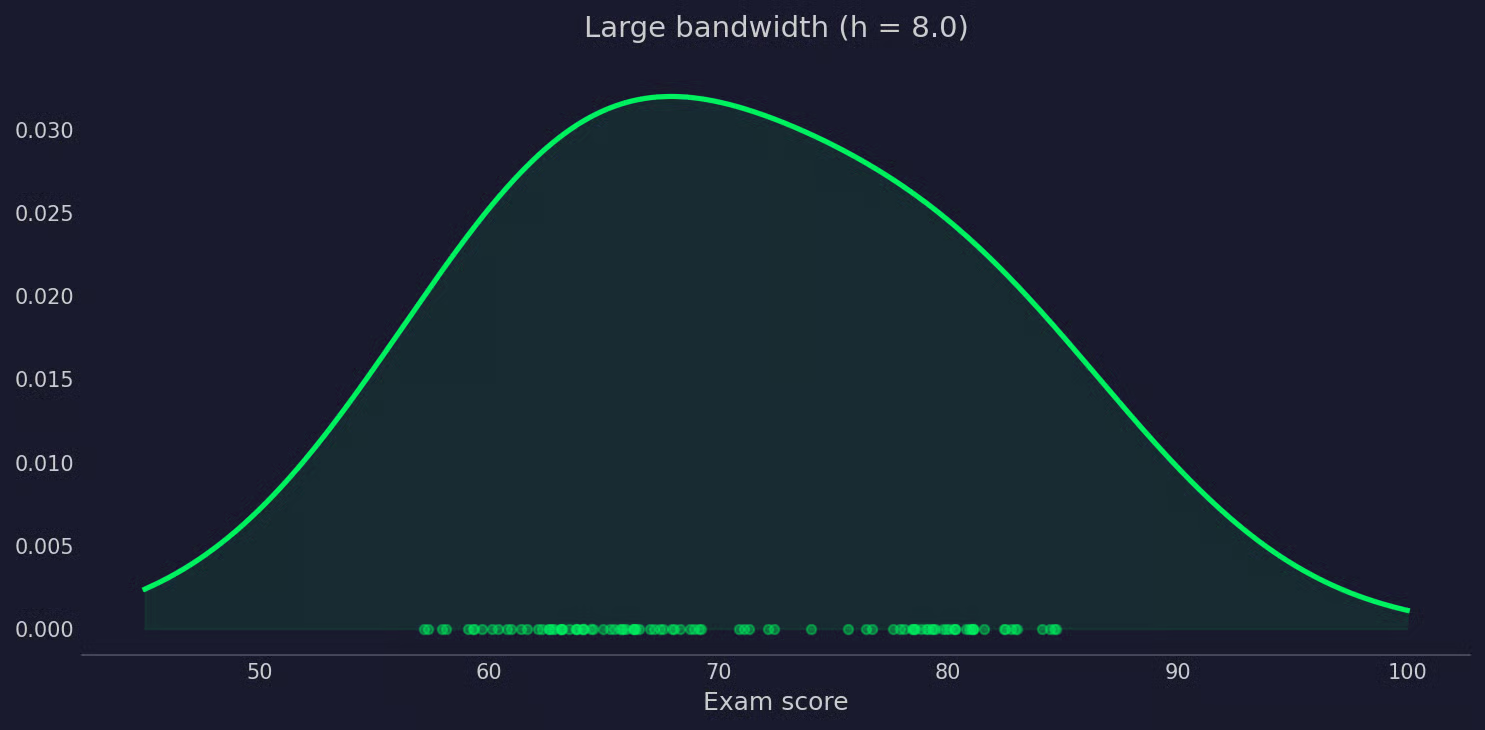
KDE ที่มีแบนด์วิดท์ใหญ่
ไม่มีแบนด์วิดท์ที่ถูกต้องแบบสากล เป้าหมายคือหาค่าที่เรียบพอจะกรองสัญญาณรบกวน แต่ไม่เรียบจนลบรูปแบบจริงทิ้ง
ไลบรารีส่วนใหญ่ทำเช่นนี้ด้วยวิธีเลือกแบนด์วิดท์อัตโนมัติ กฎโดยประมาณของ Silverman เป็นวิธีที่พบบ่อยที่สุด โดยเลือกแบนด์วิดท์จากขนาดตัวอย่างและส่วนเบี่ยงเบนมาตรฐานของข้อมูล ใช้งานได้ดีกับการกระจายที่ใกล้เคียงนอร์มัล แต่กับการกระจายหลายยอดอาจปรับเรียบเกินไป
หากไม่แน่ใจ ลองค่าหลาย ๆ ค่าแล้วเปรียบเทียบเส้นโค้ง ความแตกต่างจะบอกอะไรได้มากเกี่ยวกับข้อมูลของคุณ
ทั้งฮิสโตแกรมและ KDE แสดงการกระจายของข้อมูล — แต่ทำด้วยวิธีที่ต่างกันมาก
ฮิสโตแกรมแบ่งข้อมูลเป็นถังแบบไม่ต่อเนื่องและนับจำนวนจุดที่ตกในแต่ละถัง เร็ว เข้าใจง่าย และอธิบายให้ผู้ชมที่ไม่เทคนิคเข้าใจได้ง่าย
ปัญหาคือความไวต่อจำนวนถัง หากเปลี่ยนจำนวนถัง รูปร่างก็เปลี่ยน ไม่มีจำนวนถังที่ถูกต้องอย่างเป็นวัตถุวิสัย หมายความว่าคนสองคนสามารถดูข้อมูลเดียวกันและสรุปต่างกันได้จากการเลือกนี้เพียงข้อเดียว
ฮิสโตแกรมยังให้รูปร่างแบบขั้น ๆ ไม่ต่อเนื่อง ซึ่งพอสำหรับการดูคร่าว ๆ แต่ก็อาจบดบังการกระจายที่แท้จริงอยู่เบื้องหลัง
KDE ให้เส้นโค้งเรียบต่อเนื่องโดยไม่มีถังเกี่ยวข้อง เหมาะกว่าสำหรับเผยให้เห็นรูปร่างจริงของการกระจาย — อย่างเช่น การเอียง หลายยอด หรือหางหนัก ที่ฮิสโตแกรมอาจพลาดหรือบิดเบือนขึ้นกับการเลือกถัง
ข้อแลกเปลี่ยนคือ KDE มีพารามิเตอร์ของตนเอง — แบนด์วิดท์ — และต้องคำนวณมากกว่า อีกทั้งอธิบายให้เข้าใจยากกว่า เพราะแกน y แสดงความหนาแน่นความน่าจะเป็น ไม่ใช่จำนวน ซึ่งอาจทำให้ผู้อ่านที่ไม่คุ้นเคยสับสนได้
ใช้ฮิสโตแกรมเมื่อจำเป็นต้องสรุปข้อมูลอย่างรวดเร็วและตีความง่าย หรือเมื่อผู้ชมไม่คุ้นกับค่าประมาณความหนาแน่น ใช้ KDE เมื่อรูปร่างของการกระจายมีความสำคัญ — เช่น เมื่อเปรียบเทียบระหว่างกลุ่มหรือพยายามตรวจจับโหมดหลายค่าในข้อมูล
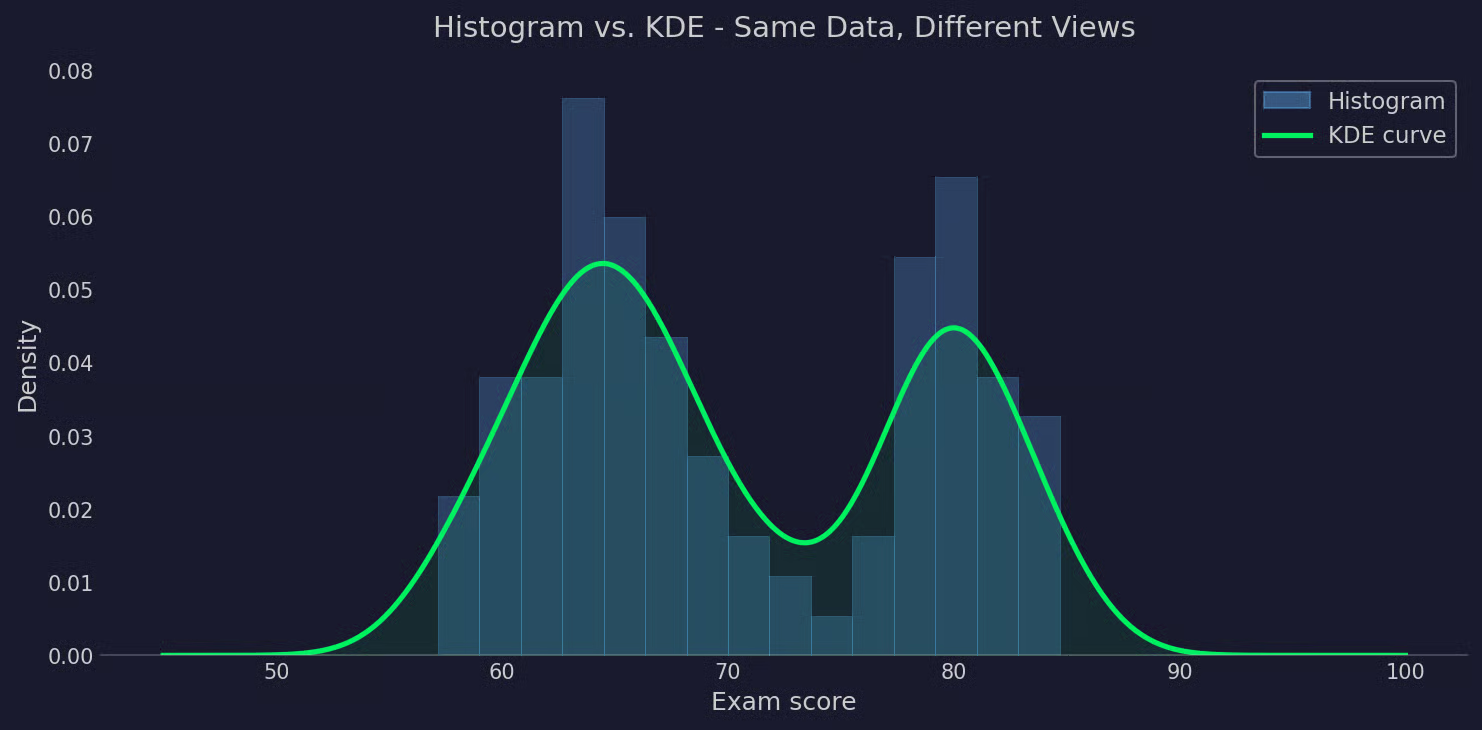
ฮิสโตแกรมเทียบกับ KDE
ในทางปฏิบัติมักใช้ร่วมกัน: ใช้ฮิสโตแกรมสำหรับจำนวน และซ้อนเส้น KDE ด้านบนเพื่อดูรูปร่าง
ใน Python มีหลายวิธีในการคำนวณและพล็อต KDE ขึ้นอยู่กับว่าต้องการกราฟอย่างรวดเร็วหรือการควบคุมค่าประมาณอย่างละเอียด
วิธีที่เร็วที่สุดในการได้กราฟ KDE คือ seaborn.kdeplot() ทำแค่นี้ก็พอ:
import seaborn as sns
import numpy as np

np.random.seed(42)
scores = np.concatenate([
    np.random.normal(65, 4, 60),
    np.random.normal(80, 3, 40)
])

sns.kdeplot(scores, bw_adjust=1)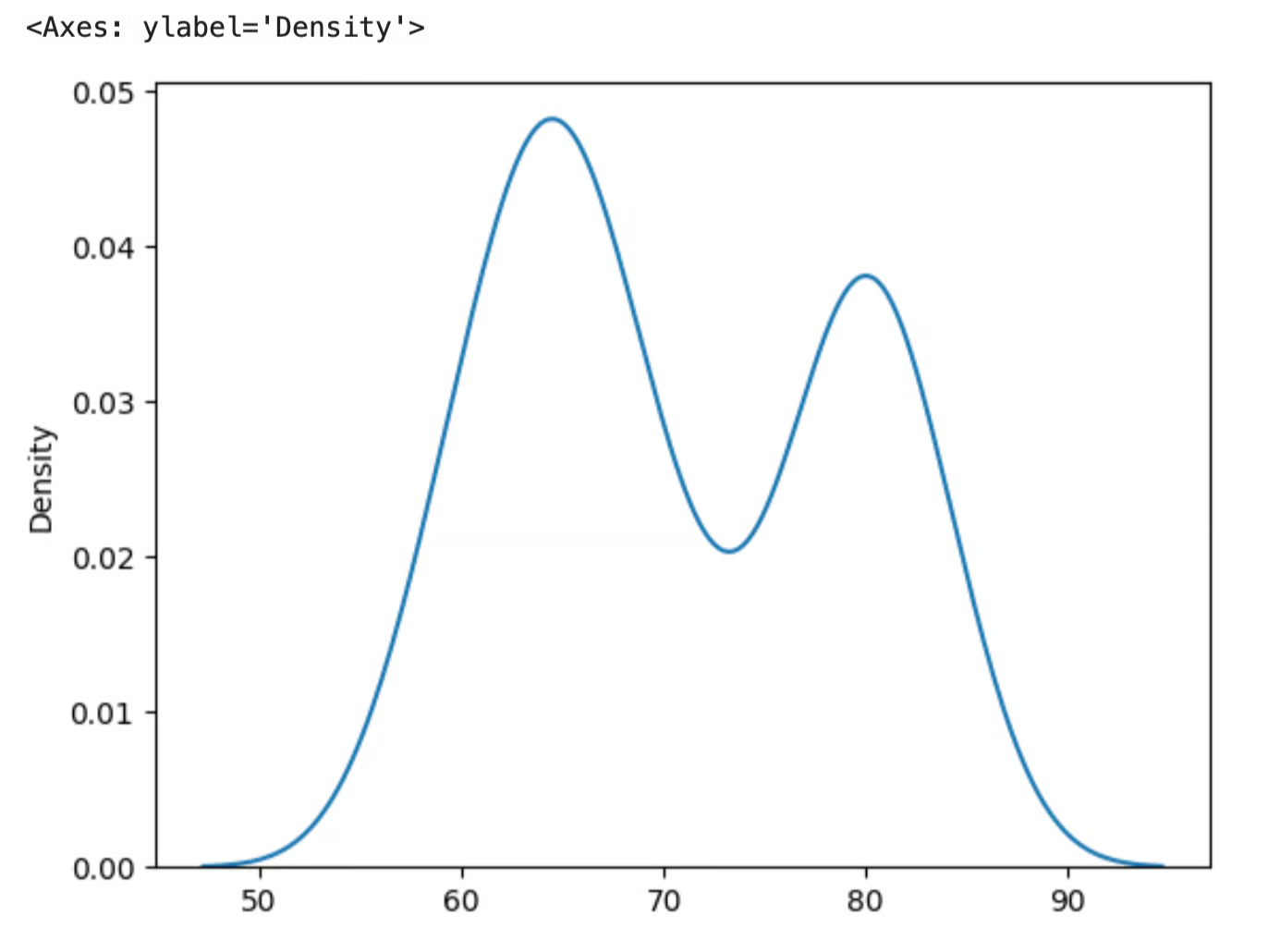
KDE ด้วย seaborn
พารามิเตอร์ bw_adjust จะสเกลแบนด์วิดท์ที่เลือกอัตโนมัติ ค่าต่ำกว่า 1 ทำให้เส้นแน่นขึ้น ค่าสูงกว่า 1 ทำให้เรียบขึ้น มันเป็นตัวคูณบนค่าแบนด์วิดท์ที่ seaborn เลือกภายใน ดังนั้นไม่จำเป็นต้องตั้งค่าแบนด์วิดท์ดิบเอง
แกน y แสดงความหนาแน่นความน่าจะเป็น ไม่ใช่จำนวน เส้นโค้งบอกว่าค่าหนึ่ง ๆ มีแนวโน้มมากน้อยเพียงใดเมื่อเทียบกับการกระจายที่เหลือ ค่ายิ่งสูงหมายถึงข้อมูลกระจุกตัวมากตรงนั้น
หากต้องการค่าความหนาแน่นจริง ๆ ไม่ใช่แค่กราฟ ให้ใช้ scipy.stats.gaussian_kde ซึ่งให้วัตถุที่เรียกได้และประเมินค่าได้ที่จุดใดก็ได้
from scipy.stats import gaussian_kde
import numpy as np
import matplotlib.pyplot as plt

kde = gaussian_kde(scores, bw_method="scott")
x = np.linspace(45, 100, 500)
density = kde(x)

plt.plot(x, density)
bw_method="scott" ใช้กฎของ Scott เพื่อเลือกแบนด์วิดท์อัตโนมัติ เป็นค่าเริ่มต้นที่ดีสำหรับกรณีส่วนใหญ่ นอกจากนี้ยังสามารถส่งสเกลาร์เพื่อกำหนดแบนด์วิดท์เองได้
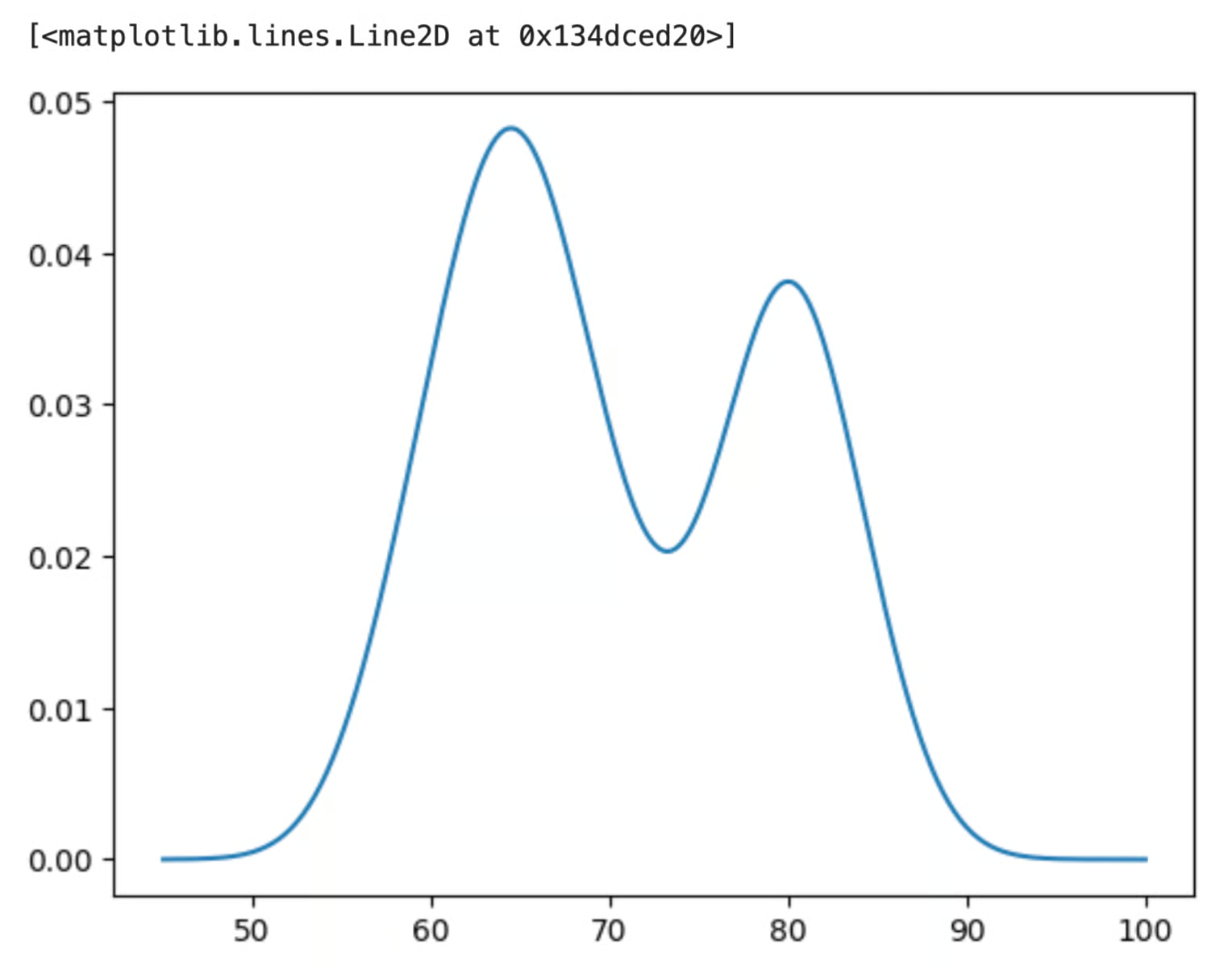
KDE ด้วย scipy และ matplotlib
ใน R มี KDE อยู่แล้วในภาษา ไม่ต้องใช้แพ็กเกจเพิ่ม
ฟังก์ชัน density() รับเวกเตอร์ตัวเลขและส่งกลับวัตถุ KDE
set.seed(42)
scores <- c(rnorm(60, mean = 65, sd = 4),
            rnorm(40, mean = 80, sd = 3))

kde <- density(scores, bw = "SJ")
อาร์กิวเมนต์ bw ควบคุมการเลือกแบนด์วิดท์ "SJ" ใช้วิธี Sheather-Jones ซึ่งจัดการการกระจายหลายยอดได้ดีกว่าค่าเริ่มต้น นอกจากนี้ยังสามารถส่งค่าตัวเลขเพื่อกำหนดแบนด์วิดท์เองได้
ผลลัพธ์เป็นวัตถุแบบลิสต์ที่มีองค์ประกอบสำคัญสองส่วน:
kde$x: ลำดับของจุดที่ประเมินความหนาแน่นkde$y: ค่าความหนาแน่นที่สอดคล้องกันเพียงส่งผลลัพธ์เข้า plot() โดยตรง
plot(kde,
     main = "Exam Score Distribution",
     xlab = "Score",
     ylab = "Density")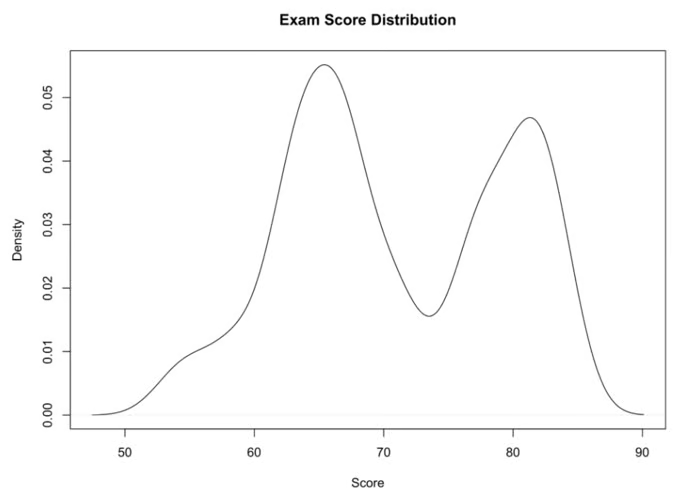
พล็อต KDE ใน R
หากต้องการซ้อน KDE บนฮิสโตแกรม ให้ใช้ hist() โดยตั้ง freq = FALSE ก่อน แล้วค่อยเพิ่มเส้นโค้งด้วย lines()
hist(scores, freq = FALSE, main = "Histogram + KDE", xlab = "Score")
lines(kde, col = "blue", lwd = 2)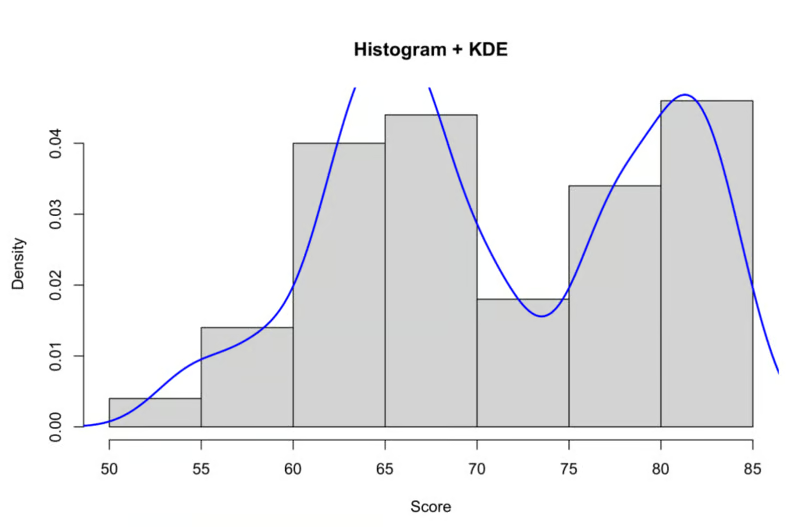
ฮิสโตแกรมพร้อม KDE ใน R
freq = FALSE ทำให้ฮิสโตแกรมสเกลเป็นความหนาแน่น เพื่อให้ทั้งแท่งและเส้นโค้งใช้แกน y ร่วมกัน
KDE เป็นภาพที่มีประโยชน์จริง แต่เช่นเดียวกับสิ่งอื่น มีข้อแลกเปลี่ยนที่ควรรู้ก่อนจะใช้แทนฮิสโตแกรม
จุดขายใหญ่คือ KDE ไม่ทำสมมติเกี่ยวกับการกระจายของข้อมูล ไม่จำเป็นต้องตัดสินใจล่วงหน้าว่าข้อมูลเป็นนอร์มัล เอกซ์โปเนนเชียล หรืออย่างอื่น รูปร่างมาจากข้อมูลเอง ทำให้ KDE ยืดหยุ่นพอจะจัดการการกระจายหลายยอดและสิ่งที่ไม่เข้ากับแบบจำลองพารามิเตอร์มาตรฐาน
ผลลัพธ์ยังเป็นเส้นโค้งเรียบต่อเนื่อง ไม่ใช่การประมาณแบบขั้น ๆ จึงช่วยให้เห็นรูปแบบต่าง ๆ ได้ง่ายขึ้น — อย่างเช่น หลายยอดหรือหางยาว — ที่ฮิสโตแกรมอาจซ่อนไว้ขึ้นกับการเลือกถัง
และเพราะ KDE ทำงานบนข้อมูลดิบโดยไม่ต้องฟิตแบบจำลองก่อน จึงเป็นก้าวแรกที่ดีในการวิเคราะห์เชิงสำรวจ
การเลือกแบนด์วิดท์คือจุดอ่อนหลัก หากเลือกผิด ค่าประมาณอาจตามสัญญาณรบกวน หรือปรับเรียบทับรูปแบบจริง วิธีอัตโนมัติเช่นกฎของ Silverman ใช้ได้ดีกับข้อมูลที่ใกล้นอร์มัล แต่กับการกระจายซับซ้อนอาจทำให้เข้าใจผิด มักต้องตรวจสอบค่าหลาย ๆ ค่าเองก่อนเชื่อผลลัพธ์
ประสิทธิภาพอาจเป็นปัญหาเมื่อขนาดข้อมูลใหญ่ KDE ต้องประเมินฟังก์ชันเคอร์เนลสำหรับทุกจุดข้อมูลที่ทุกตำแหน่งประเมิน ทำให้การคำนวณเติบโตเร็วเมื่อชุดข้อมูลใหญ่ขึ้น สำหรับงานสำรวจส่วนใหญ่ไม่ใช่ปัญหา แต่กับข้อมูลหลักแสนจุดอาจช้าลงได้
เอฟเฟ็กต์ขอบเขตเป็นปัญหาที่ละเอียดกว่า KDE มาตรฐานสมมติว่าข้อมูลยืดได้ไม่สิ้นสุดทั้งสองทิศ เมื่อข้อมูลมีขอบเขตแน่นอน — เช่น ค่าที่ไม่สามารถต่ำกว่าศูนย์ — ค่าประมาณจะรั่วมวลความน่าจะเป็นข้ามขอบเขต ทำให้เส้นโค้งต่ำผิดปกติใกล้ขอบ มีเวอร์ชัน KDE ที่แก้ขอบเขต แต่ไม่ค่อยมีให้ใช้ในไลบรารีมาตรฐาน
KDE ให้วิธีที่สะอาดตากว่าในการดูการกระจายของข้อมูลมากกว่าฮิสโตแกรม ไม่มีการเลือกถังและไม่มีสมมติแบบจำลองพารามิเตอร์ — มีเพียงเส้นโค้งเรียบที่แสดงสิ่งที่อยู่ในชุดข้อมูลของคุณจริง ๆ
แบนด์วิดท์คือพารามิเตอร์เดียวที่สำคัญจริง ๆ ลองค่าหลายค่า เปรียบเทียบเส้นโค้ง ใช้ตัวเลือกอัตโนมัติ และตรวจให้แน่ใจว่าค่าประมาณสอดคล้องกับสิ่งที่รู้เกี่ยวกับข้อมูล ก่อนจะสรุปจากมัน
วิธีสร้างสัญชาตญาณให้กับ KDE ที่ดีที่สุดคือทดลองกับข้อมูลจริง เลือกชุดข้อมูลที่คุ้นเคย ใช้ KDE และเปรียบเทียบกับฮิสโตแกรมเพื่อดูว่าสิ่งใดที่เคยมองข้ามไป
สนใจการสร้างภาพข้อมูลหรือไม่ ลองดูคอร์ส Data Visualization with Seaborn หากใช้ Python หรือ Data Visualization with ggplot2 หากใช้ R
เรียนกับ DataCamp
Courses
Courses
Courses