

Kurs
Yapay Zekayı Anlamak
2 sa
430.7K
Alıştırma and program your progress.
Google Ile Devam EdinÇoğu yapay zeka aracı karşılaştırması bunu bir teknik özellik yarışı gibi ele alır: kimin daha fazla bağlamı var, kim kıyaslamalarda daha yüksek puan alıyor, kimin aylık ücreti daha düşük. Bu çerçeve, aslında ne tür bir iş yaptığınız ve aracın buna uyup uymadığı gibi daha yararlı soruyu ıskalar.
GitHub Copilot ve Claude Code bu soruya farklı yanıtlar temsil eder. Copilot bir IDE asistanı olarak başladı ve çok yüzeyli bir platforma dönüştü. Claude Code ise baştan itibaren özerk bir ajan olarak tasarlandı ve başka bir şeymiş gibi davranmadı. Bu köken farkı, her iki aracın da sıradan bir iş gününde nasıl hissettirdiğini hâlâ belirliyor ve herhangi bir kıyaslama puanından daha iyi bir karşılaştırma çerçevesi sunuyor.
Belirtmeye değer bir nokta: Cursor meşru bir üçüncü seçenek; mevcut bir IDE’ye yapay zekâ eklemek yerine yapay zekâ etrafında tam bir IDE inşa ediyor. Bu makale onu kapsamıyor, ancak alanı değerlendiriyorsanız, tartışmanın bir parçası olmalı.
Doğrudan karşılaştırmadan önce, her araca ayrı ayrı bakmak faydalıdır.
Claude Code, Anthropic'in ajansal kodlama aracıdır. Komut satırı arayüzü (CLI) olarak çalışır: kurarsınız, projenize gidersiniz, claude komutunu çalıştırır ve görevleri düz İngilizceyle verirsiniz. Kod tabanınızı okur, birden fazla konumda dosyaları düzenler, kabuk komutları çalıştırır, test çıktısını kontrol eder ve yol boyunca öğrendiklerine göre ayarlama yapar.
Anthropic'in ajansal döngü dediği süreçle çalışır: bağlam topla, eyleme geç, sonuçları doğrula ve tekrarla. Örneğin “auth modülündeki başarısız testleri düzelt” diyebilirsiniz; Claude Code testleri çalıştırır, hata çıktısını okur, ilgili dosyaları bulur, düzenlemeleri yapar, testleri tekrar çalıştırır ve bitirene ya da bir engelle karşılaşana kadar devam eder. İstediğiniz anda araya girip yönlendirebilirsiniz.
Nisan 2026 itibarıyla Claude Code terminalin ötesinde de mevcut. Bir VS Code uzantısı, bir JetBrains eklentisi (halen Beta), yeniden tasarlanan bir masaüstü uygulaması, claude.ai/code adresinde bir web sürümü ve bir iOS uygulaması var. Artık “yalnızca terminal” ifadesi doğru değil, ancak en kapsamlı olduğu yer hâlâ terminal.
Siz görevi tarif edersiniz, o çalışır, siz sonucu gözden geçirirsiniz.
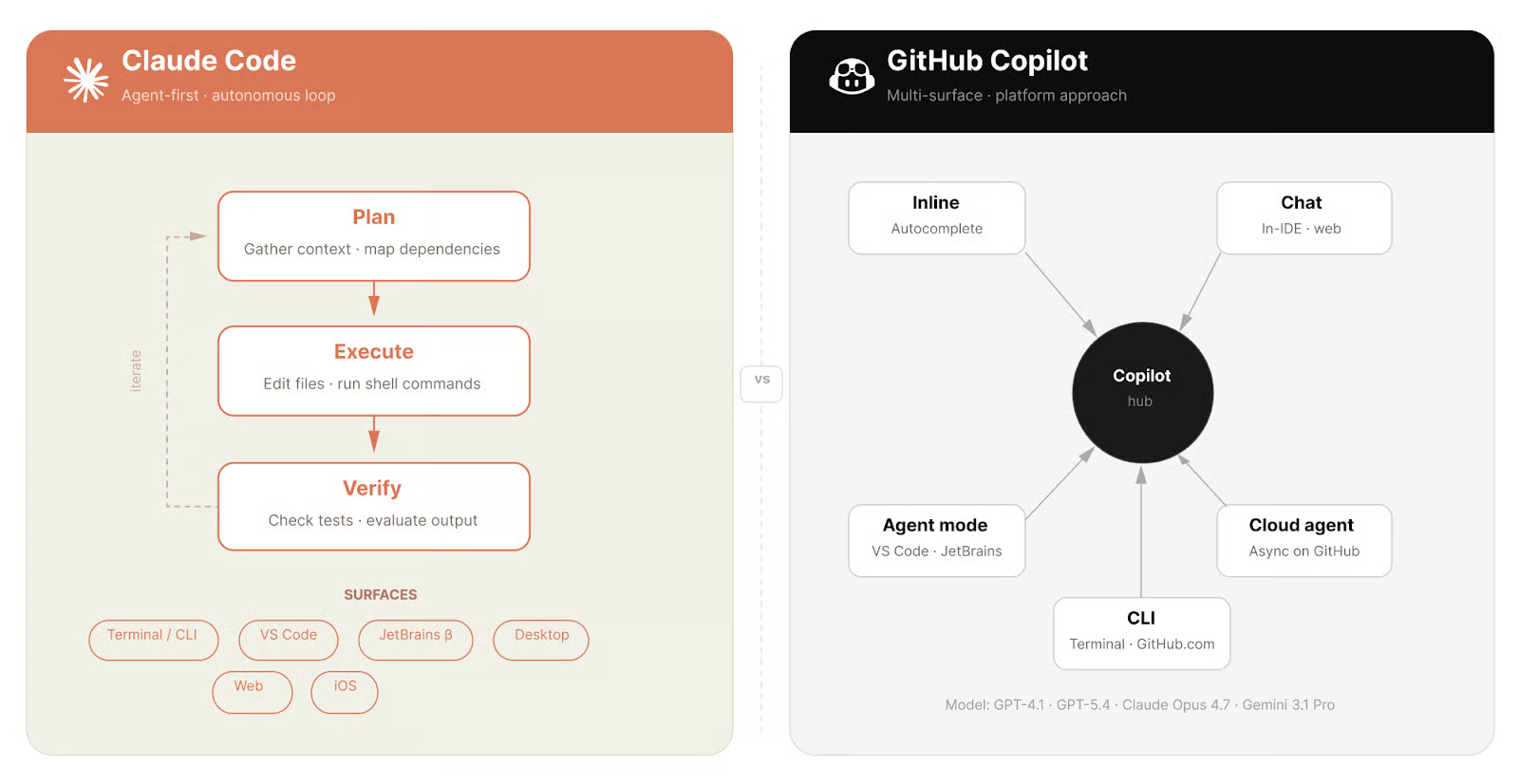
İki araç, iki farklı başlangıç noktası. Görsel: Yazar.
GitHub Copilot'ı tanımlamak daha zordur çünkü artık aynı anda birçok şeydir. Satır içi kod tamamlama olarak başladı ve o zamandan beri IDE uzantılarına, bir terminal CLI'sına, bir bulut ajanına, bir kod inceleme aracına ve kalıcı proje bağlamı için Copilot Spaces'e genişledi.
En çok kullanılan parça hâlâ satır içi deneyimdir. Siz yazarken Copilot bir sonraki satır veya kod bloğunu önerir; siz de kabul eder ya da görmezden gelirsiniz. Nisan 2025’ten beri VS Code’da, Mart 2026’dan beri JetBrains’de bulunan ajan modu, aynı anda birden çok dosyada düzenleme yapmasına olanak tanır. Bulut ajanı daha da ileri gider: Doğrudan GitHub üzerinde eşzamansız çalışır ve siz oturumu kapattıktan sonra pull request açar.
Model esnekliğine dikkat etmek gerekir. Tek bir oturumda, planınıza bağlı olarak GPT-4.1, GPT-5.4, Claude Sonnet 4.6, Claude Opus 4.7 veya Gemini 3.1 Pro arasında geçiş yapabilirsiniz.
En büyük fark yürütme modelidir. Claude Code ajan-önceliklidir: her etkileşim bir planla-uygula-doğrula döngüsünden geçer. Copilot ise platform-önceliklidir ve satır içi otomatik tamamlama, sohbet, ajan modu ve bulut ajanlarını ayrı yüzeyler olarak sunar.
Bağlam da farklı çalışır. Claude Code, Opus ve Sonnet 4.6 planlarında tek bir pencerede 1 milyon tokene kadar kod tabanınızı, proje kurallarınızı ve oturum geçmişinizi tutar. Copilot ise bağlamı geri getirimle (retrieval) bir araya getirir: çalışma alanı indeksleme, Copilot Spaces ve depo talimatları. Fark, özellikle dosyalar arası bağımlılıkların baştan belirgin olmadığı büyük yeniden düzenlemelerde ortaya çıkar.
Ve sonra en göze çarpan şey var: Claude Code'un satır içi otomatik tamamlaması yok. Copilot'ta var. Kodun siz yazarken belirmesi çalışma biçiminizin merkezindeyse, önemli olan karşılaştırma budur.
|
Boyut |
Claude Code |
GitHub Copilot |
|
Yürütme modeli |
Ajan-öncelikli döngü (planla, uygula, doğrula) |
Çok yüzeyli platform (satır içi, sohbet, ajan, bulut) |
|
Satır içi otomatik tamamlama |
Hayır |
Evet |
|
Bağlam modeli |
Oturumda 1M tokene kadar |
Geri getirim tabanlı (indeksleme, Spaces, depo talimatları) |
|
Çoklu ajan |
Agent Teams (deneysel) |
/fleet komutu (Nisan 2026) |
|
IDE desteği |
VS Code, JetBrains (Beta), masaüstü, web |
Doğal olarak 8+ editör, ayrıca GitHub.com |
|
GitHub.com entegrasyonu |
MCP sunucusu aracılığıyla |
Doğal (bulut ajan PR ve issue'lar üzerinde doğrudan çalışır) |
|
Model seçimi |
Yalnızca Claude modelleri |
GPT-4.1, GPT-5.4, Claude Opus 4.7, Gemini 3.1 Pro, diğerleri |
|
Ücretsiz katman |
Hayır |
Evet |
|
Başlangıç fiyatı |
$20/ay |
$10/ay veya Ücretsiz planda $0 |
Doğru araç çoğu zaman geliştirme döngüsünün hangi aşamasında olduğunuza bağlıdır.
Copilot daha hızlıdır. Satır içi öneriler bağlama duyarlıdır ve siz yapmadan bir sonraki düzenlemenizi öngörebilir. Yerleşik bir depoda çokça yeni kod yazıyorsanız, Copilot sizi akışta tutar.
Claude Code yazmadan önce plan yaptığı için başlaması daha uzun sürer. Basit bir fonksiyon için bu ek yük değmez. Ancak karmaşık bağımlılıklar veya mimari kısıtlar içeren kodlarda çıktı genelde daha tutarlı olur.
Uygulamada bağlam penceresi farkının önem kazandığı yer burasıdır. Claude Code tüm ilgili kod tabanını bellekte tutabilir ve daha önce neyi değiştirdiğini kaybetmeden genelinde değişiklik yapabilir.
Copilot'un ajan modu, hedefli yeniden düzenlemelerde çoklu dosya düzenlemelerini iyi yönetir. Geri getirimle toplanan bağlam, çok büyük depolarda dosyalar arası bağımlılıkları kaçırabilir; fark burada ortaya çıkar. Onlarca dosya boyunca uzanan uzun bir özerk refaktör için Claude Code daha güvenilir bir seçimdir. Öte yandan, Copilot'un ajan modu o kadar gelişti ki, günlük birçok refaktörde fark etmeyebilirsiniz.
Claude Code hataları dosya sınırlarının ötesinde takip edebilir, sorunu terminalde yeniden üretebilir ve siz bağlam değiştirmeden hata çözülene kadar yineleyebilir. Copilot dosya içi hata ayıklamada daha iyidir: satır içi düzeltmeler ve açık dosyalar arasında Sohbet akıl yürütmesi. Hata izoleyse Copilot daha hızlıdır. Birkaç modüle yayılıyorsa, genellikle doğru araç Claude Code'dur.
Claude Code, gerçek GitHub sorunları üzerinde kodlama ajanları için standart kıyaslama olan SWE-bench Verified alanında önde. 16 Nisan 2026'dan beri genel kullanıma açık olan Claude Opus 4.7, %87,6 puan alıyor. Daha önceki Claude modelleri yaklaşık %80,8–%80,9 arasında puanlamıştı.
GitHub Copilot tek bir ürün olarak birleşik bir kıyaslama puanı yayınlamaz, çünkü performans seçilen modele bağlıdır. Copilot içinde Claude Opus 4.7'yi seçtiğinizde, Claude Code'un en üst katmanını çalıştıran aynı modeli kullanırsınız. Farklı olan iskele (scaffolding) kısmıdır: bağlamın nasıl bir araya getirildiği ve hataların nasıl ele alındığı. Aynı model, üzerine neyin sarıldığına bağlı olarak farklı performans gösterir. Opus 4.7'yi Copilot içinde çalıştırmanın fiyatlandırma açısından da bir yansıması var; buna birazdan değineceğim.
Her iki araç da karmaşık problemler üzerinde akıl yürütebilir. Copilot Chat'te, özellikle Opus 4.7 seçiliyken, bunu siz istediğinizde sohbet arayüzü üzerinden yapar. Claude Code'da ise bu, her görevden önce otomatik olarak çalışan bir düşünce zinciri akıl yürütmesidir: terminalde bir satır yazmadan önce yaklaşımı nasıl oluşturduğunu izleyebilirsiniz.
Claude Code proje dizininizi, oturum geçmişinizi ve proje düzeyi talimatları tek bir bağlam penceresine yükler. 1 milyon tokene kadar, çoğu gerçek kod tabanı sığar; ancak çok büyük monorepolar başka bir hikâyedir.
Copilot bunu geri getirim yoluyla yönetir. Copilot Spaces, depoları ve belgeleri yeniden kullanılabilir bir bağlam kaynağı olarak bir araya getirmenize olanak tanır. Şu anda önizlemede olan Copilot Memory, oturumlar arasında öğrenimleri saklar. Bu yaklaşım, tek bir bağlam penceresi için fazla büyük kod tabanlarına ölçeklenir.
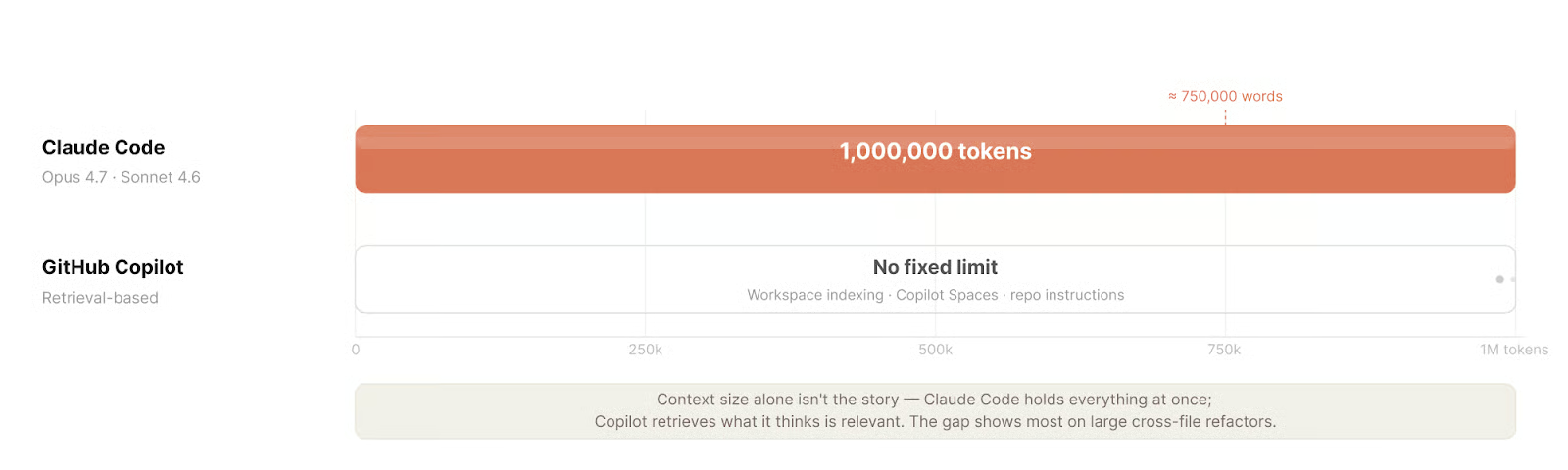
Bağlam boyutu hikâyenin tamamı değil. Görsel: Yazar.
Günlük kullanım hissi, en çok ayrıştıkları noktadır.
Copilot, çalışma biçiminizi değiştirmemek üzerine kuruludur. Uzantı tek tıkla kurulur, siz yazarken öneriler belirir ve sohbet arayüzünün bir öğrenme eğrisi yoktur. Sekiz editörde yerel olarak ve GitHub.com üzerinde çalışır. Şubat 2026'dan beri genel kullanıma açık olan Copilot CLI, terminal etkileşimi ekler. Ayrıca bir depo talimatları dosyasında proje özel kurallar tanımlayabilir ve bu dosya otomatik olarak yüklenir.
DataCamp ile Yapay Zekâyı Öğrenin
Kurs
Kurs
Alıştırma and program your progress.
Google Ile Devam Edinblog
Abid Ali Awan
14 dk.
blog
Dario Radečić
15 dk.
Eğitim
Kurtis Pykes
8 dk.
Eğitim
Adel Nehme