AI-Assisted Reporting with Word and Copilot
Rachel Irabor shows how to use Microsoft Copilot to draft, refine, and improve reports in Word, and how to check AI output before you trust it.

Rachel Irabor
相关

博客
Copilot in Excel: A Full Review With Real Examples
Learn how to use Copilot in Excel to analyze data, automate formulas, and generate insights using natural language—all within your spreadsheet.
 Josef Waples · 10 min

博客
Microsoft Copilot Cowork: What It Is and How to Use It
Learn what Microsoft Copilot Cowork is, how it works, what business tasks it can handle, where it helps, and what risks to consider before using it.
 Khalid Abdelaty · 15 min
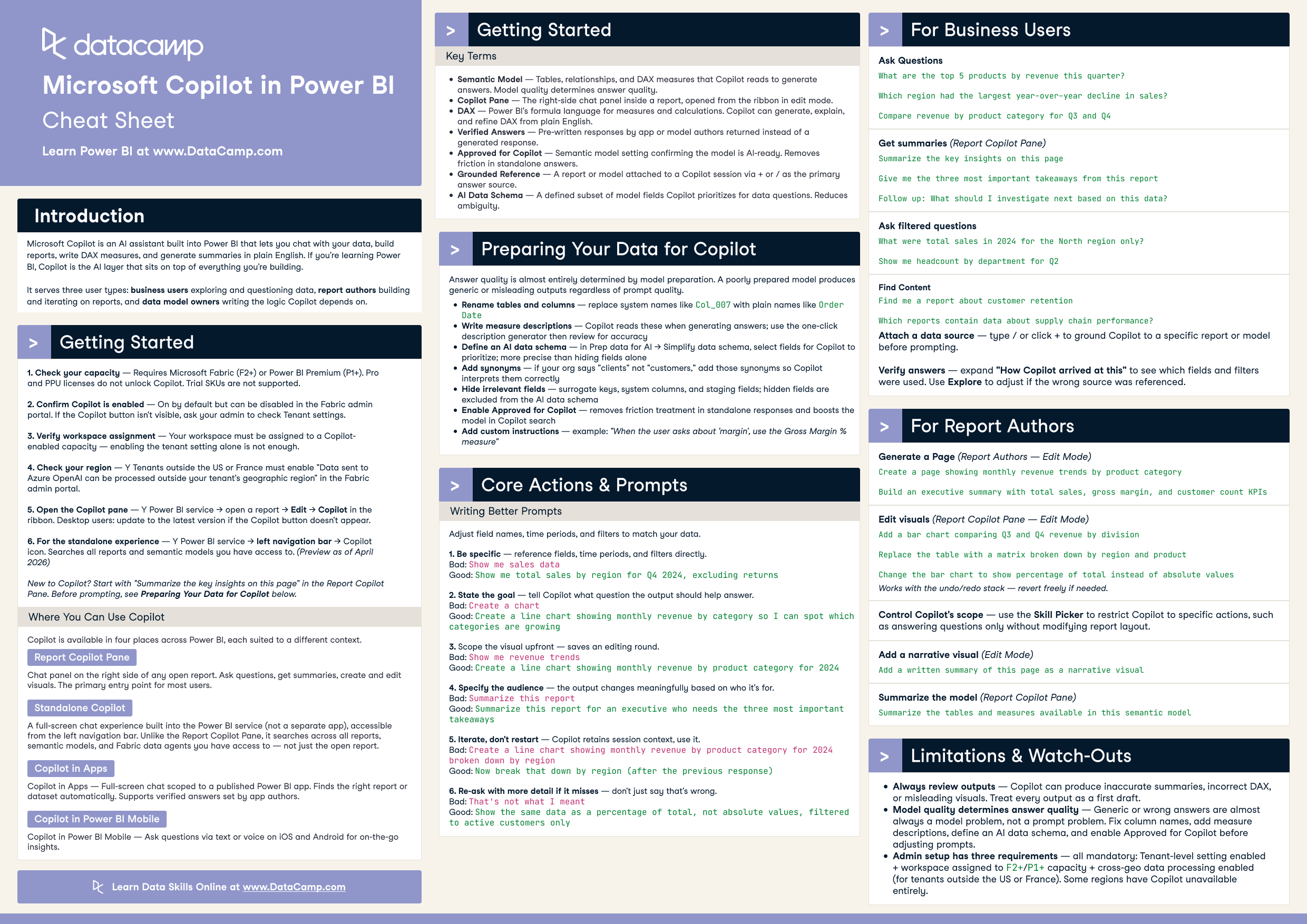
速查表
Microsoft Copilot in Power BI Cheat Sheet
Use Microsoft Copilot in Power BI to chat with your data, build reports, write DAX, and generate summaries. This cheat sheet covers setup, the four places Copilot appears, model preparation, prompting principles, and core actions for business users, report authors, and data model owners.
 DataCamp Team · 5 min






Session Resources
Writing reports is one of the most time-consuming tasks for knowledge workers and data analysts. When the stakes are high, the quality of the content matters. AI tools like Microsoft Copilot can help you write faster and more clearly in Microsoft Word. But knowing how to use them well, and how to check their output, is a skill worth learning.
In this code-along webinar, Rachel Irabor, Techno-functional Consultant and Microsoft MVP, will show you how to use Microsoft Copilot to draft, refine, and improve reports in Microsoft Word. You will explore AI-assisted reporting workflows and learn prompting techniques that get better results. Rachel will also show you how to check the quality of AI output, so you can trust what you produce.
Key Takeaways