

Claude 开发者平台(API)
Claude Skills 也可通过 Claude API 访问。本节我们将探讨如何通过 Claude API 模拟 Claude 应用界面。
步骤 1:先决条件
首先安装运行时依赖:
-
Anthropic:用于 Claude Messages API -
pandas与openpyxl:从 Excel 读取工时表 -
reportlab:在本地生成备用 PDF 发票
!pip -q install anthropic pandas openpyxl reportlab至此依赖已安装完毕。接下来配置 API 密钥。
步骤 2:配置您的 API 密钥
在调用 Messages API 之前,需要先进行身份验证。本步骤使用 API 密钥创建一个可复用的 anthropic.Client。
import os, json, sys, re
import anthropic
from datetime import datetime, timedelta
API_KEY = "YOUR_ANTHROPIC_API_KEY"
client = anthropic.Client(api_key=API_KEY)登录 Anthropic Console,在设置下找到 API keys 选项卡。点击Create Key 并复制您的 Anthropic API 密钥。
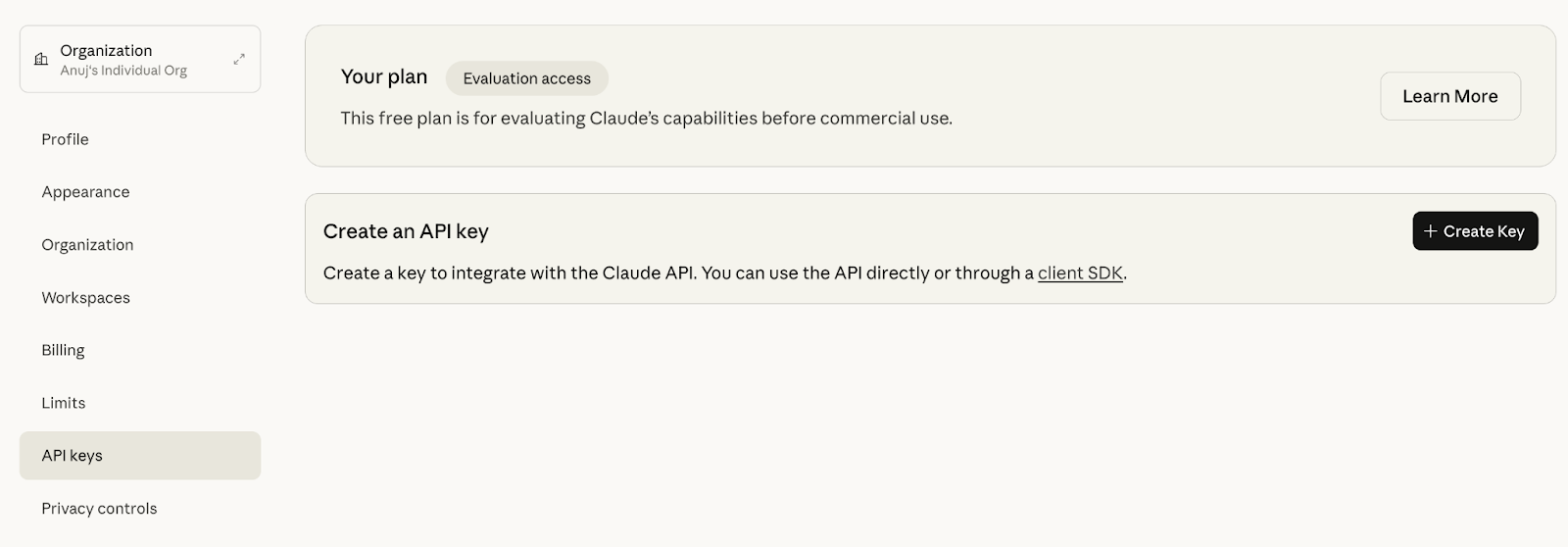
来源: Anthropic API
注意: 若您在个人私有笔记本中使用,可直接添加 API Key。否则请使用安全的环境变量,避免在笔记本或日志中暴露密钥。
以上代码初始化了 Anthropic SDK 客户端并完成环境配置。此客户端对象将在后续所有 Messages API 调用中复用。
步骤 3:数据预处理
本步骤将把 timesheet.xlsx 工时表转换为结构清晰、可预测的 JSON 对象,供 Skill 消费。这能保持下游逻辑简单,并避免脆弱的提示语解析。
def load_invoice_from_timesheet(excel_path):
import pandas as pd
df = pd.read_excel(excel_path)
df.columns = df.columns.str.strip()
invoice_period = "2025-10"
if 'Date' in df.columns:
first_date = str(df['Date'].iloc[0])
date_match = re.search(r'(\d{2})\s+(\w+)\s+(\d{4})', first_date)
if date_match:
month_name = date_match.group(2)
year = date_match.group(3)
month_num = datetime.strptime(month_name[:3], '%b').month
invoice_period = f"{year}-{month_num:02d}"
article_col = next((col for col in df.columns if 'article' in col.lower() and 'name' in col.lower()), None)
amount_col = next((col for col in df.columns if 'amount' in col.lower()), None)
topic_col = next((col for col in df.columns if 'topic' in col.lower()), None)
line_items = []
timesheet_articles = []
for idx, row in df.iterrows():
if pd.isna(row.get(article_col)) or row.get(article_col) == '':
continue
article_name = str(row[article_col]).strip()
amount = row.get(amount_col, 0)
if isinstance(amount, str):
amount = float(amount.replace('$', '').replace(',', '').strip())
line_items.append({
"title": article_name,
"rate_type": "flat",
"qty": 1,
"rate": float(amount)
})
timesheet_articles.append({
"title": article_name,
"topic": str(row.get(topic_col, 'N/A')) if topic_col else 'N/A'
})
return {
"client_name": "Client",
"billing_contact": "[email protected]",
"invoice_period": invoice_period,
"currency": "USD",
"payment_terms": "Net-30",
"line_items": line_items,
"discount_pct": 0.0,
"tax_pct": 0.0,
"timesheet": timesheet_articles
}load_invoice_from_timesheet 函数将上传的 Excel 文件转换为规范化的发票 JSON 负载。
-
使用 pandas 读取 Excel,并规范化列名。
-
随后通过正则与月份解析,从首行
Date(若存在)推断invoice_period。 -
最后以不区分大小写的方式检测文章标题、金额与主题列名。
-
输出两种结构:
-
line_items:用于计费计算(此处为每篇文章的固定费率)。 -
timesheet:用于可选附录的{title, topic}扁平列表。 -
正则
(\d{2})\s+(\w+)\s+(\d{4})期望日期格式如01 Oct 2025;若您的表格使用其他格式,请相应调整。 -
对缺失列/值的处理为跳过空行;如需,也可扩展为快速失败策略。
输入现已就绪。接下来,我们将通过 API 调用 Claude Skill,把处理后的工时表生成可编辑发票。
步骤 4:辅助函数
本节定义两个辅助函数,用于模拟 Skill 运行期间 Claude 请求的工具执行。
def execute_bash_tool(command):
try:
dangerous = ['rm -rf /', 'sudo', 'chmod', 'mkfs', '> /dev/']
if any(d in command for d in dangerous):
return f"Error: Command blocked for safety: {command}"
result = subprocess.run(
command,
shell=True,
capture_output=True,
text=True,
timeout=30,
cwd=tempfile.gettempdir()
)
output = result.stdout if result.stdout else result.stderr
return output if output else "Command executed successfully"
except subprocess.TimeoutExpired:
return "Error: Command timed out"
except Exception as e:
return f"Error executing command: {str(e)}"
def execute_text_editor_tool(params):
try:
command = params.get('command')
path = params.get('path')
if command == 'create':
file_text = params.get('file_text', '')
os.makedirs(os.path.dirname(path) if os.path.dirname(path) else '.', exist_ok=True)
with open(path, 'w') as f:
f.write(file_text)
return f"File created: {path}"
elif command == 'view':
if os.path.exists(path):
with open(path, 'r') as f:
content = f.read()
return content[:1000]
return f"Error: File not found: {path}"
elif command == 'str_replace':
if os.path.exists(path):
with open(path, 'r') as f:
content = f.read()
old_str = params.get('old_str', '')
new_str = params.get('new_str', '')
content = content.replace(old_str, new_str)
with open(path, 'w') as f:
f.write(content)
return f"File updated: {path}"
return f"Error: File not found: {path}"
return f"Unknown command: {command}"
except Exception as e:
return f"Error: {str(e)}"execute_bash_tool 函数模拟了一个用于 Skill 驱动操作的安全 bash 工具。它首先拦截 rm -rf /、sudo、chmod、mkfs 等危险模式作为安全门槛,并在操作系统的临时目录中以 30 秒超时限制通过 subprocess.run() 执行命令。
execute_text_editor_tool 函数提供 Skills 使用的最小化文本编辑接口。它支持三种命令:create(使用 file_text 写入新文件)、view(返回文件最多 1,000 个字符)、str_replace(就地替换为 new_str)。同时会为 create 自动创建父目录,并在 view 与 str_replace 前检查文件是否存在,最后将更新写回磁盘。
这些辅助函数让您可以在本地以护栏完成工具调用循环。现在,Skill 可在生成发票期间请求文件编辑或 Shell 操作,而不危及您的系统。
步骤 5:通过 API 调用 Skill
本步骤通过 Claude Messages API 驱动端到端的发票生成。它发送结构化请求、启用工具使用、对 Claude 请求的任意工具调用进行迭代,最后从工作与临时目录收集生成的 PDF 文件。
def generate_invoice_with_claude(invoice):
user_text = f"""Generate a professional PDF invoice with the following data:
Client: {invoice['client_name']}
Period: {invoice['invoice_period']}
Currency: {invoice['currency']}
Payment Terms: {invoice['payment_terms']}
Line Items:
{json.dumps(invoice['line_items'], indent=2)}
Timesheet Articles:
{json.dumps(invoice['timesheet'], indent=2)}
Please create a professional PDF invoice with:
1. Invoice header with invoice number (INV-{invoice['invoice_period'].replace('-', '')}-001)
2. Client billing information
3. Line items table with amounts
4. Subtotal and total calculations
5. Timesheet section showing all articles and topics
Save the PDF as: invoice_{invoice['client_name'].lower()}_{invoice['invoice_period']}.pdf
"""
tools = [
{"type": "bash_20250124", "name": "bash"},
{"type": "text_editor_20250728", "name": "str_replace_based_edit_tool"}
]
messages = [{"role": "user", "content": user_text}]
iteration = 0
max_iterations = 15
while iteration < max_iterations:
iteration += 1
response = client.messages.create(
model="claude-sonnet-4-20250514",
max_tokens=8192,
tools=tools,
messages=messages
)
messages.append({"role": "assistant", "content": response.content})
if response.stop_reason == "end_turn":
break
if response.stop_reason == "tool_use":
tool_results = []
for block in response.content:
if block.type == "tool_use":
tool_name = block.name
tool_input = block.input
if tool_name == "bash":
result = execute_bash_tool(tool_input.get('command', ''))
elif tool_name == "str_replace_based_edit_tool":
result = execute_text_editor_tool(tool_input)
else:
result = f"Unknown tool: {tool_name}"
tool_results.append({
"type": "tool_result",
"tool_use_id": block.id,
"content": result
})
messages.append({"role": "user", "content": tool_results})
else:
break
pdf_files = []
for file in os.listdir('.'):
if file.endswith('.pdf') and 'invoice' in file.lower():
pdf_files.append(file)
for file in os.listdir(tempfile.gettempdir()):
if file.endswith('.pdf') and 'invoice' in file.lower():
temp_path = os.path.join(tempfile.gettempdir(), file)
import shutil
dest_path = os.path.join('.', file)
shutil.copy2(temp_path, dest_path)
pdf_files.append(file)
return pdf_files
def main():
if len(sys.argv) < 2:
print("Usage: python app.py <timesheet.xlsx>")
sys.exit(1)
excel_file = sys.argv[1]
if not os.path.exists(excel_file):
print(f"Error: File not found: {excel_file}")
sys.exit(1)
try:
invoice = load_invoice_from_timesheet(excel_file)
pdf_files = generate_invoice_with_claude(invoice)
if pdf_files:
for pdf in pdf_files:
print(f"Invoice generated: {os.path.abspath(pdf)}")
else:
print("Error: No PDF file was generated.")
except Exception as e:
print(f"Error: {e}")
import traceback
traceback.print_exc()
sys.exit(1)
if __name__ == "__main__":
main()generate_invoice_with_claude 函数将规范化发票发送至 Claude API 并驱动 Skill 的端到端执行。其逻辑包括:
-
构建清晰的
user_text,内嵌客户、周期、货币、条款、明细与工时列表,并明确输出要求(抬头、表格、合计与文件名)。 -
通过声明
bash_number与text_editor_number启用工具执行,使用感知工具的消息循环提交请求、检查stop_reason,当请求tool_use时,分派到本地辅助函数并返回tool_result块以继续交互。 -
在
end_turn或达到循环上限时停止,随后扫描工作目录与操作系统临时目录中匹配invoice*.pdf的文件,将临时制品复制回项目文件夹并返回发现的 PDF 列表。 -
main函数提供简单的 CLI 命令:python app.py <timesheet.xlsx>,校验输入路径后,依次运行管道:先用load_invoice_from_timesheet(...)构建负载,再用generate_invoice_with_claude(...)调用 Skill 并收集 PDF。
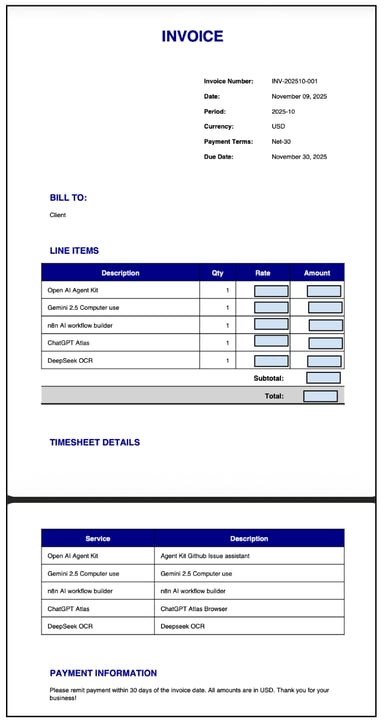
完成上述配置后,API 调用应能生成一份可发给客户的 PDF。若未生成文件,请检查 tool_result 日志与 Skill 配置,并使用小型测试表重试。
结论
您现在已经拥有一个由 Claude Skills 驱动的自动发票生成器,并可通过 API 将原始表格转换为可交付给客户的发票。该演示展示了 Skills 的优势:便携式设置、自动激活、可确定的代码执行,以及在应用与 API 间无需为每个线程重写提示语即可保持一致的结果。Claude Skills 能在不同情境下返回一致的输出,既是可复用的领域知识,也有代码背书。尽管 Skills 能执行代码,您仍需通过仅启用可信的 Skills、使用组织级控制并在发布前审查更新来强化安全。
若要更进一步,请查阅 Anthropic 的 Skills 文档与控制台以进行版本管理与升级,然后开始组合多个 Skills 构建端到端工作流。

我是一名 Google Developers 机器学习(生成式 AI)领域的专家、Kaggle 三项专家,以及 Women Techmakers 大使,拥有 3 年以上的技术从业经验。2020 年我共同创办了一家健康科技初创公司,目前在佐治亚理工学院攻读计算机科学硕士,专攻机器学习。
Anthropic 近期发布了 Claude Skills——一种面向任务、可复用的模块,让 Claude 仅加载完成工作所需的专业能力。与其使用冗长、重复的提示语,Skills 会打包说明、脚本与素材,使 Claude 能在 Claude 应用、Claude Code 与 API 中产出一致、符合品牌的结果。
在本教程中,我们将构建一个“自动发票生成器”,把 Excel 工时表转换为可直接发给客户的发票(DOCX/PDF)。在此过程中,您将学会:
SKILL.md并连同所需素材一并上传 Skill。pandas等预处理工时表数据,生成可预测的 JSON 负载。完成后,您将得到一个可在 Claude 生态系统任意位置复用的便携式 Skill。
什么是 Claude Skills?
Claude Skills 是自包含的任务模块,包含
SKILL.md(说明)文件、可选脚本与支持性素材。当任务与某个 Skill 的用途相匹配时,Claude 会仅加载该 Skill 的必要部分以高效完成任务。您可以把 Skill 理解为可进行版本管理、共享并在组织内受控治理的“打包专业能力”。Claude Skills 的关键特性
Claude Skill 的核心特性说明了其为何能在整个 Claude 生态中保持快速、可复用、可靠。部分关键特性包括:
当您让 Claude “创建带月度汇总的 Excel 预算”时,它会评估请求、扫描可用的 Skills,并仅激活相关部分。激活过程可在 Claude 应用的推理视图中看到。由于 Skills 是可版本化的组件,团队可在无需到处修改提示语的情况下统一升级。
在 Claude 生态中使用 Claude Skills
无论您是在 Claude 应用中聊天、在 Claude Code 中编码,还是通过 开发者 API 自动化工作流,同一个 Skill 只需版本化一次、集中管理,并在任务匹配其用途时自动调用。由此带来一致的质量与更快的交付。换言之,一个 Skill,可处处复用。
在本教程中,我们将在 Claude 应用与 API 中应用“自动发票生成器” Skill,解析 Excel 文件并输出可直接发送的发票。
Claude 应用
Claude Skills 存放于您的 Claude 应用中,当请求与其用途匹配时会自动激活。您在设置中启用一次,随后只需描述期望的结果。Claude 会加载合适的 Skill,并在推理视图中展示。
来源: Claude 博客
开始使用:
来源: Claude 博客
注意: 此功能仅向 Pro、Max、Team 与 Enterprise 用户开放。
您还可以找到可添加到与 Claude 对话中的 Skills 列表,如 algorithmic-art、artifacts-builder、brand-guidelines、canvas-design、internal-comms、mcp-builder、slack-gif-creator 等。
点击“上传技能”,上传包含 SKILL.md 文件的 zip 压缩包。文件要求如下。
ZIP 压缩包在根目录下应且仅应包含一个 SKILL.md 文件
SKILL.md使用 YAML 格式包含技能名称与描述SKILL.md文件在本教程中的示例如下:上传 Skill 后,Claude 会自动识别并打开一个已就绪的新聊天。
这会如何影响聊天中的使用?
接着,我上传了自己的工时表,并让 Claude 生成一份可编辑的发票。
Claude 自动发现该 Skill,读取 Excel 文件,并返回了可编辑的 Word 发票,同时也可导出为 PDF 或 Word。发票版式清晰,小计与总计也准确无误。它遵照了提示,且可编辑的 DOCX 与格式化 PDF 文件的样式都符合该 Skill 的品牌设置。
现在我们用 API 跑一遍相同示例。