您可以通过 Gemini 应用在 gemini.google.com 免费试用 Nano Banana Pro。只需使用您的 Google 账号登录并开始生成图片。免费访问有使用上限(谷歌未公布具体数值),如果您计划批量生成或构建应用,则需要通过 Google AI Studio 或 Vertex AI 获取 API 访问。这需要开通计费,但可带来可预期的成本与更高配额。
获取 API 访问
前往 Google AI Studio 并登录。您需要创建或关联一个 Google Cloud 项目,然后启用计费(需信用卡)。完成后,在 API keys 区域生成一个 API 密钥。
适用于 Nano Banana Pro 的高质量提示词,需结合具体细节与摄影或设计术语。与其含糊描述,不如加入明确的视觉元素与风格参照。
优秀提示词通常包括:
主体细节:具体的物体、颜色、构图
光线:如“柔和自然光”“黄金时刻”“戏剧性侧光”
相机参数:如“浅景深”“低机位”“广角镜头”
风格描述:如“专业摄影”“电影感”“极简设计”
生成您的第一张图像
以下是生成图像的完整代码:
import os
from google import genai
from google.genai import types
from dotenv import load_dotenv
# Load API key
load_dotenv()
client = genai.Client(api_key=os.getenv("GOOGLE_API_KEY"))# Generate image
response = client.models.generate_content(
model="gemini-3-pro-image-preview",
contents="Vast cosmic nebula in deep space. Swirling purple and blue gas clouds with bright star clusters. Ethereal glow. Epic space photography. 16:9 cinematic composition. No planets visible.",
config=types.GenerateContentConfig(
response_modalities=["TEXT","IMAGE"],
image_config=types.ImageConfig(
aspect_ratio="16:9",
image_size="1K"),))# Save the imagefor part in response.parts:if image := part.as_image():
image.save("cosmic_base.png")print("Image saved!")技术支持
# Load the base imagefrom PIL import Image
base_image = Image.open("cosmic_base.png")# Create a chat session for editing
chat = client.chats.create(
model="gemini-3-pro-image-preview",
config=types.GenerateContentConfig(
response_modalities=["TEXT","IMAGE"],
image_config=types.ImageConfig(
aspect_ratio="16:9",
image_size="1K"),))# Edit: Transform colors
response = chat.send_message([
base_image,"Transform this nebula to warm orange and red tones, like a different type of stellar nursery. Keep the same swirling structure and composition."])# Save edited imagefor part in response.parts:if image := part.as_image():
image.save("cosmic_orange.png")技术支持
同样的星云结构,完全不同的氛围:
融合多张图像
Nano Banana Pro 最多可融合 14 张参考图像,并保持一致性。我们将把橙色星云与两个额外元素结合:一颗戏剧性的彗星和一座上古外星独石碑。
首先生成两张参考图像:
# Generate comet reference
comet_response = client.models.generate_content(
model="gemini-3-pro-image-preview",
contents="Massive comet with bright glowing nucleus and long ion tail streaming behind. Detailed surface texture on comet head. Ethereal blue-white tail against black space. Dramatic cosmic photography.",
config=types.GenerateContentConfig(
response_modalities=["TEXT","IMAGE"],
image_config=types.ImageConfig(aspect_ratio="16:9", image_size="1K"),))# Save cometfor part in comet_response.parts:if image := part.as_image():
image.save("comet.png")技术支持
这是彗星元素:
# Generate ancient alien monolith
monolith_response = client.models.generate_content(
model="gemini-3-pro-image-preview",
contents="Massive ancient alien monolith floating in space. Towering black rectangular obelisk with subtle geometric patterns. Mysterious glowing symbols etched on surface. 2001 Space Odyssey style. Epic scale.",
config=types.GenerateContentConfig(
response_modalities=["TEXT","IMAGE"],
image_config=types.ImageConfig(aspect_ratio="16:9", image_size="1K"),))# Save monolithfor part in monolith_response.parts:if image := part.as_image():
image.save("monolith.png")技术支持
# Load all three images
nebula = Image.open("cosmic_orange.png")
comet = Image.open("comet.png")
monolith = Image.open("monolith.png")# Blend them into one composition
blend_response = client.models.generate_content(
model="gemini-3-pro-image-preview",
contents=["Combine these images into one epic space scene. Place the ancient alien monolith in the right side, towering and mysterious. Show the bright comet with its glowing tail streaking diagonally across the left side. Keep the orange nebula as the dramatic backdrop. Cinematic space composition.",
nebula,
comet,
monolith
],
config=types.GenerateContentConfig(
response_modalities=["TEXT","IMAGE"],
image_config=types.ImageConfig(aspect_ratio="16:9", image_size="1K"),))# Save final compositionfor part in blend_response.parts:if image := part.as_image():
image.save("cosmic_final.png")技术支持
最终构图将三大元素无缝融合:
至此,您已了解如何用新模型生成图像并利用其特性。接下来讲解它与其他模型相比的四大差异点。
Nano Banana Pro 的独到之处
您已经见识了基础的图像生成与对话式编辑。现在逐一剖析各项能力,并看看它们在实践中的表现。
我们将使用一个辅助函数来保持代码示例简洁:
defgenerate_image(prompt, filename, aspect_ratio="16:9", size="1K", use_google_search=False):
config = types.GenerateContentConfig(
response_modalities=["TEXT","IMAGE"],
image_config=types.ImageConfig(
aspect_ratio=aspect_ratio,
image_size=size
),)# Add Google Search grounding if requestedif use_google_search:
config.tools =[{"google_search":{}}]
response = client.models.generate_content(
model="gemini-3-pro-image-preview",
contents=prompt,
config=config
)for part in response.parts:if image := part.as_image():
image.save(f"{filename}.png")return image技术支持
这能减少下文的重复代码,也为您的项目提供可复用的模式。
文本渲染的突破
历史上,AI 图像生成器在文字方面表现糟糕,几乎无法用于排版、品牌或界面设计。Nano Banana Pro 解决了这一痛点。
下面是一张包含多处文字元素的电影海报:
# Generate movie poster with cast and credits
image = generate_image(
prompt="""Sci-fi movie poster. Large title "STELLAR HORIZON" at top. Actor names "SARAH CHEN" "MARCUS RODRIGUEZ" "AISHA WILLIAMS". Production credits "Directed by James Park" "Produced by Luna Studios" at bottom. Deep space background with nebula. Professional film poster typography. Crisp readable text.""",
filename="movie_poster")技术支持
相同能力也适用于包含多处文本元素的网页界面:
# SaaS website hero section
image = generate_image(
prompt="""Modern SaaS website hero section. Large headline "Automate Your Workflow in Minutes" with subheadline "Connect your tools and boost productivity by 10x". Two buttons "Start Free Trial" and "Watch Demo". Trust badges showing "500K+ Users" "99.9% Uptime" "SOC 2 Certified". Clean typography. Gradient purple to blue background. Professional web design layout.""",
filename="saas_hero")技术支持
它甚至能在同一图像上处理多语言文本:
# Conference poster with English and Japanese
image = generate_image(
prompt="""Tech conference poster. Top section English text: "GLOBAL AI SUMMIT 2025" "March 15-17, Tokyo". Bottom section Japanese text: "グローバルAIサミット2025" "3月15日-17日、東京". Modern geometric design. Vibrant gradient background blue to purple. Professional bilingual typography.""",
filename="multilingual_poster")技术支持
# Generate base product image
base_image = generate_image(
prompt="""Premium wireless earbuds with charging case. Front-facing straight-on view. Sleek matte black finish. Modern minimalist design. Clean white studio background. Professional product photography. Sharp focus throughout. Contemporary tech aesthetic.""",
filename="earbuds_front")技术支持
现在在不重新生成的情况下,将机位改为俯视角:
# Create chat for editing
chat = client.chats.create(
model="gemini-3-pro-image-preview",
config=types.GenerateContentConfig(
response_modalities=["TEXT","IMAGE"],
image_config=types.ImageConfig(aspect_ratio="16:9", image_size="1K"),))# Edit camera angle conversationally
edit_response = chat.send_message([
base_image,"""Show these exact same wireless earbuds from bird's eye view, looking straight down from above. Keep the same earbuds and charging case. Overhead flat lay composition. Professional product photography."""])# Save edited imagefor part in edit_response.parts:if image := part.as_image():
image.save("earbuds_overhead.png")技术支持
品牌吉祥物需要在所有触点保持一致。营销活动也常要求同一角色在不同场景中出现。早期模型在这方面表现欠佳(不过基础版 Nano Banana 已经相当不错)。Nano Banana Pro 进一步提升了跨场景的视觉一致性。
先生成一个品牌标识元素:
# Create brand logo
brand_logo = generate_image(
prompt="""Abstract geometric ribbon logo. Flowing infinity loop shape with metallic gradient silver to deep purple. Smooth curved surfaces. Elegant minimalist design. Clean white background. Premium brand identity element. Modern corporate aesthetic. No face. No eyes.""",
filename="ribbon_logo")技术支持
在移动应用界面中使用同一丝带标:
# Create chat for editing
chat = client.chats.create(
model="gemini-3-pro-image-preview",
config=types.generateContentConfig(
response_modalities=["TEXT","IMAGE"],
image_config=types.ImageConfig(aspect_ratio="16:9", image_size="1K"),))# Show logo in app interface
app_response = chat.send_message([
brand_logo,"""Show this exact ribbon logo in a complete mobile app home screen. Top status bar with time and battery. Logo in header next to app name. Content cards below showing features. Bottom tab navigation with icons and labels. Modern mobile app UI. Gradient purple background. Professional startup app design. Full mobile interface layout."""])# Savefor part in app_response.parts:if image := part.as_image():
image.save("ribbon_app.png")技术支持
再将同一丝带标应用到实体周边上:
# Show logo on merchandise
merch_response = chat.send_message([
brand_logo,"""Show this exact ribbon logo on brand merchandise collection. Flat lay showing: white tote bag with logo, coffee mug with logo, t-shirt with logo printed on chest, product packaging box with logo. All items arranged together. Premium brand identity mockup. Minimalist aesthetic. Professional product photography. Same ribbon on each item."""])# Savefor part in merch_response.parts:if image := part.as_image():
image.save("ribbon_merchandise.png")技术支持
# Generate solar energy infographic with Search grounding
image = generate_image(
prompt="""Educational infographic explaining solar panel energy conversion. Show photovoltaic cells converting to DC power, then inverter converting to AC power for the grid. Clear labels and arrows.""",
filename="solar_infographic",
use_google_search=True# Enable Search for factual accuracy)技术支持
同样适用于技术示意图:
# Generate neural network diagram with Search grounding
image = generate_image(
prompt="""Neural network architecture diagram. Left: 4 input nodes labeled "Input 1" "Input 2" "Input 3" "Input 4". Middle: two hidden layers each with 5 nodes labeled "Hidden Layer 1" and "Hidden Layer 2". Right: 3 output nodes labeled "Output 1" "Output 2" "Output 3". Connection lines between all layers. Clean technical illustration. Educational ML diagram. Professional data science aesthetic.""",
filename="ml_architecture",
use_google_search=True# Enable Search for accuracy)技术支持
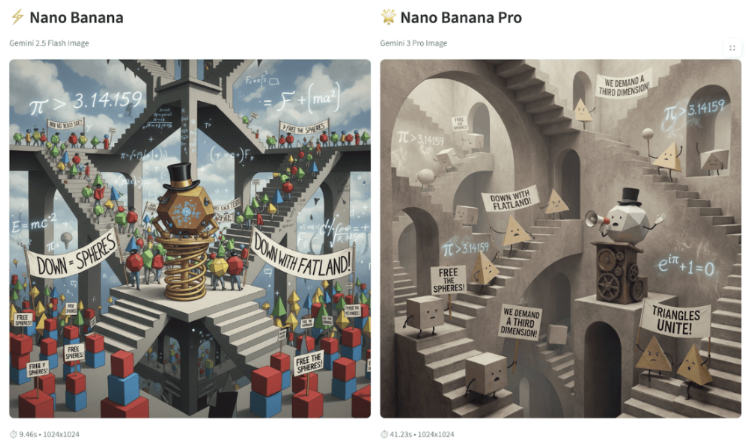
Geometric shapes staging a protest. Cubes holding signs reading "FREE THE SPHERES!" Triangles with banners "DOWN WITH FLATLAND!" A giant dodecahedron wearing a top hat giving a speech. Protest happening inside an M.C. Escher staircase. Floating equations as graffiti: "π > 3.14159". Pure mathematical chaos.技术支持
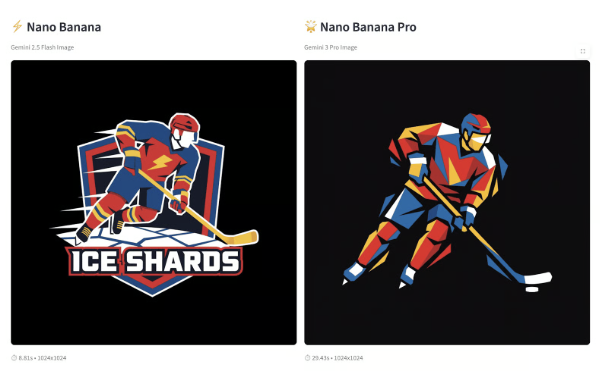
Bold emblem/logo direction: a graphical, simplified, highly geometric icon of an ice hockey player in a powerful action pose with the hockey stick touching the ice, constructed entirely from sharp, angular, polygonal shards. Strict four-color palette (red, blue, yellow, white) on black, flat colors only (no gradients) for perfect reproduction as a logo or patch.技术支持
Nano Banana Pro 显然更胜一筹。它生成的标志锐利、专业(无不必要文字),且如要求般由几何图形构成。基础版缺乏干净的几何构成,还会添加多余元素。
提示 3:
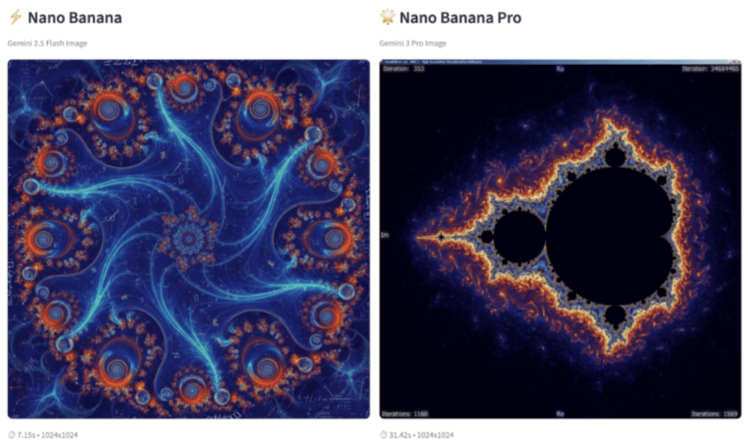
Mandelbrot's set drawn with extreme mathematical accuracy for a 1:1 wallpaper, fractal art技术支持
专业版以令人印象深刻的精度渲染了分形。仍然不是完美无缺——为追求艺术效果,边缘处在数学精确性上有所取舍——但它的表现远胜基础版(基础版画出了完全不同的东西)。不过,专业版也添加了未请求的元素:迭代计数、虚轴与实轴,以及某种“Windows XP 风格”的窗口框架。



当谷歌开发团队在内部给他们的图像生成模型起了“Nano Banana”的代号之后,这个名字就沿用下来了。专业版于 2025 年 11 月 20 日发布,修复了早期 AI 图像生成器常见、让用户头疼的问题。
本教程将介绍 Nano Banana Pro 的工作方式,带您通过 API 实操,并帮助您判断何时应使用它而非非专业版。
什么是 Nano Banana Pro?
Nano Banana Pro(
gemini-3-pro-image-preview)基于 Gemini 2.5 Flash Image(最初的 Nano Banana,参见我之前的教程)并带来显著改进。该模型在四个方面表现卓越,而早期版本在这些方面较为吃力:
该模型支持 1K、2K 和 4K 分辨率,纵横比包括 1:1、16:9、9:16 和 21:9。每张图像都包含不可见的 SynthID 水印。您可以通过 Gemini 应用免费试用,但使用 API 需要开通计费。
在开始之前,您需要获取该模型的访问权限。来看一下可选方案。
如何访问 Nano Banana Pro
您可以通过 Gemini 应用在 gemini.google.com 免费试用 Nano Banana Pro。只需使用您的 Google 账号登录并开始生成图片。免费访问有使用上限(谷歌未公布具体数值),如果您计划批量生成或构建应用,则需要通过 Google AI Studio 或 Vertex AI 获取 API 访问。这需要开通计费,但可带来可预期的成本与更高配额。
获取 API 访问
前往 Google AI Studio 并登录。您需要创建或关联一个 Google Cloud 项目,然后启用计费(需信用卡)。完成后,在 API keys 区域生成一个 API 密钥。
请妥善保管您的 API 密钥。在项目目录创建
.env文件并添加:切勿将该文件提交到版本控制。请把
.env加入.gitignore。价格明细
模型按生成的每张图像计费:
作为参考,$10 大约可获得 75 张标准质量的 1K 图像或 42 张 4K 图像。生成与编辑成本相同。
速率限制因您的账号层级与地区而异(请查看官方价格文档以了解当前限额)。企业用户可通过 Vertex AI 访问该模型,并获得额外的安全与合规功能。
完成访问配置后,我们来生成您的第一张图像,并体验对话式编辑。
快速上手:您的第一张图像
现在开始生成图像,看看 Nano Banana Pro 的独到之处。我们将生成一幅震撼的宇宙场景,通过对话进行变换,然后与多张参考图融合,完成最终构图。
环境准备
首先安装所需依赖:
您将使用
google-genai操作 Gemini 模型,使用python-dotenv从.env文件加载 API 密钥,并使用pillow处理图像。编写高效提示词
适用于 Nano Banana Pro 的高质量提示词,需结合具体细节与摄影或设计术语。与其含糊描述,不如加入明确的视觉元素与风格参照。
优秀提示词通常包括:
生成您的第一张图像
以下是生成图像的完整代码:
该代码遵循 Nano Banana Pro 的核心流程。
generate_content()方法负责图像生成。response_modalities参数指示模型同时返回文本与图像。在image_config中,您可以控制输出:aspect_ratio设置图像长宽比(16:9 为宽屏),而image_size确定分辨率(1K、2K 或 4K)。响应以部件形式返回,您需要遍历以提取并保存生成的图像。这会生成一幅震撼的宇宙星云:
接下来看看对话式编辑如何改造这一场景。
对话式编辑实战
无需从头再生,您可以通过对话编辑图像。我们来改变星云的色彩方案,同时保留其结构:
同样的星云结构,完全不同的氛围:
融合多张图像
Nano Banana Pro 最多可融合 14 张参考图像,并保持一致性。我们将把橙色星云与两个额外元素结合:一颗戏剧性的彗星和一座上古外星独石碑。
首先生成两张参考图像:
这是彗星元素:
这是上古外星独石碑:
现在将三者融合为一个构图。
contents参数接收一个列表:先是文本提示词,然后是要融合的所有图像。最终构图将三大元素无缝融合:
至此,您已了解如何用新模型生成图像并利用其特性。接下来讲解它与其他模型相比的四大差异点。
Nano Banana Pro 的独到之处
您已经见识了基础的图像生成与对话式编辑。现在逐一剖析各项能力,并看看它们在实践中的表现。
我们将使用一个辅助函数来保持代码示例简洁:
这能减少下文的重复代码,也为您的项目提供可复用的模式。
文本渲染的突破
历史上,AI 图像生成器在文字方面表现糟糕,几乎无法用于排版、品牌或界面设计。Nano Banana Pro 解决了这一痛点。
下面是一张包含多处文字元素的电影海报:
相同能力也适用于包含多处文本元素的网页界面:
它甚至能在同一图像上处理多语言文本:
营销团队可以生成信息清晰的活动视觉,设计师可探索排版而无需手工布局,品牌可在各类物料上生成一致的字标,UI/UX 设计师也能产出可读的界面模型。
文字清晰只是其一。接下来看看如何控制光线与机位。
影棚级控制
Nano Banana Pro 允许您以对话方式调整光线、机位、景深与色彩分级,同时保留构图。
先生成一张正面产品照:
现在在不重新生成的情况下,将机位改为俯视角:
产品摄影师可在不重拍的情况下测试机位,建筑师可展示建筑的不同视角,室内设计师可从多种视角可视化空间,营销团队也能为 A/B 测试快速生成构图变体。
角色一致性
品牌吉祥物需要在所有触点保持一致。营销活动也常要求同一角色在不同场景中出现。早期模型在这方面表现欠佳(不过基础版 Nano Banana 已经相当不错)。Nano Banana Pro 进一步提升了跨场景的视觉一致性。
先生成一个品牌标识元素:
在移动应用界面中使用同一丝带标:
再将同一丝带标应用到实体周边上:
接下来是 Nano Banana Pro 的颠覆性功能——通过 Google 搜索实现事实溯源。
真实世界知识的应用
启用搜索溯源后,模型可获取最新信息,以保证教育资料、技术文档及数据驱动内容的事实准确性,这在正确性至关重要的场景尤为关键。
为教育内容启用 Google 搜索溯源:
同样适用于技术示意图:
教育内容创作者可产出更准确的学习资料,技术写作者能正确可视化复杂系统,数据团队可展示真实统计,科普工作者无需大量核查即可创建准确的图解。
这四个特性结合,使 Nano Banana Pro 能胜任专业工作流程。接着,我们将其与初代 Nano Banana 直接对比,看看提升之处。