

快速解答:如何在 SQL 中进行透视
在汇总数据时,SQL Server 的 PIVOT 运算符非常有用,因为它允许将行转换为列。请看下面的 city_sales 表,其中展示了某产品在美国五大城市的总体销售额。
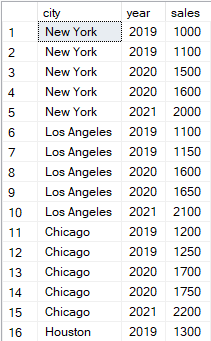
使用 SQL PIVOT 进行转换的示例表。图片作者提供。
我们将使用下面这个包含 PIVOT 运算符的查询,对上述表进行多列透视。
-- Select the columns for the output: city and sales data for 2019, 2020, and 2021
SELECT
city,
[2019] AS Sales_2019,
[2020] AS Sales_2020,
[2021] AS Sales_2021
FROM
(
-- Subquery to select city, year, and sales from city_sales table
SELECT city, year, sales
FROM city_sales
) AS src
PIVOT
(
-- Pivot the sales data to have years as columns and sum the sales for each year
SUM(sales)
FOR year IN ([2019], [2020], [2021])
) AS pvt;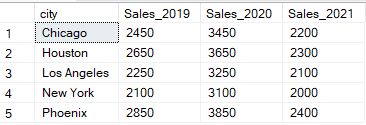
使用 SQL PIVOT 进行输出转换的示例。图片作者提供。
什么是 SQL 中的 PIVOT
透视(Pivoting)是 SQL 中的一种技术,用于将表格数据中的行转换为列。在 SQL Server 和 Oracle 中,透视由 PIVOT 运算符完成。下面展示的 SQL PIVOT 运算符语法包含三个主要部分:
-
SELECT:
SELECT语句指定要在 SQL 数据透视表中返回的列。 -
子查询:子查询包含要纳入 SQL 数据透视表的数据源或表。
-
PIVOT:
PIVOT运算符包含在透视表中要应用的聚合与筛选。
-- Select the non-pivoted column and the pivoted columns with aliases
SELECT
[non-pivoted column],
[first pivoted column] AS [column name],
[second pivoted column] AS [column name],
...
FROM
(
-- Subquery to select the necessary columns from the source table
SELECT [columns]
FROM [source_table]
) AS source_table
PIVOT
(
-- Pivot operation to aggregate data and transform rows into columns
[aggregate_function]([pivot_column])
FOR [pivot_column] IN ([first pivoted column], [second pivoted column], ...)
) AS pivot_table; -- Alias for the result of the pivot operationSQL PIVOT 的数据库特定实现
SQL Server 和 Oracle 数据库直接支持 PIVOT 运算符。然而,MySQL 和 PostgreSQL 需要采用其他方法在 SQL 中创建数据透视表。
SQL Server 中的 PIVOT
SQL Server 原生支持 PIVOT 运算符。在这里,我们将使用 PIVOT 运算符将行转换为列,并使用 SUM() 等聚合函数汇总数据。我们还将配合使用 WHERE、GROUP BY 和 ORDER BY 等 SQL 子句,以便更精细地处理数据。
下面的示例展示了如何使用 PIVOT 运算符筛选 2020 年及之后的数据(WHERE)、按城市与年份分组(GROUP BY),并按城市排序(ORDER BY):
-- Select the city and sales data for the years 2019, 2020, and 2021
SELECT
city,
[2019] AS Sales_2019,
[2020] AS Sales_2020,
[2021] AS Sales_2021
FROM
(
-- Subquery to select city, year, and sales from the city_sales table
SELECT city, year, sales
FROM city_sales
WHERE year >= 2020 -- filtering
GROUP BY city, year, sales -- grouping
) AS src
PIVOT
(
-- Pivot the sales data to have years as columns, averaging the sales over each year
SUM(sales) -- aggregating
FOR year IN ([2019], [2020], [2021])
) AS pvt; 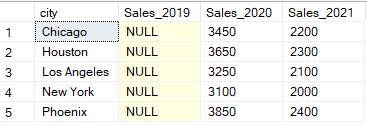
结合常用子句使用 SQL PIVOT 转换表的输出示例。图片作者提供。
Oracle 中的 PIVOT
与 SQL Server 类似,Oracle 也使用 PIVOT 运算符将行转换为列。不过,Oracle 数据库中 PIVOT 运算符的语法与 SQL Server 略有不同。下面的查询展示了 Oracle 中 PIVOT 运算符的写法。请注意,与 SQL Server 在外层 SELECT 语句中设置别名不同,Oracle 在 PIVOT 运算符内部对列进行别名设置。
-- Outer SELECT to choose all columns resulting from the PIVOT operation
SELECT *
FROM (
-- Inner SELECT to retrieve the raw data of city, year, and sales
SELECT city, year, sales
FROM sales
)
-- PIVOT operation to convert rows to columns
PIVOT (
SUM(sales)
-- Specify the year values to pivot and alias them as Sales_<year>
FOR year IN (2019 AS Sales_2019, 2020 AS Sales_2020, 2021 AS Sales_2021)
)
ORDER BY city;MySQL 中的透视
MySQL 数据库不支持 SQL 的 PIVOT 运算符。要在 MySQL 中创建 SQL 数据透视表,您需要结合使用 CASE 语句与条件聚合。例如,下面的查询将创建一个数据透视表,按不同年份的销售额之和进行汇总,并按 city 分组和排序。
-- Select the city and sum the sales data for the years 2019, 2020, and 2021
SELECT
city,
SUM(CASE WHEN year = 2019 THEN sales ELSE 0 END) AS Sales_2019,
SUM(CASE WHEN year = 2020 THEN sales ELSE 0 END) AS Sales_2020,
SUM(CASE WHEN year = 2021 THEN sales ELSE 0 END) AS Sales_2021
FROM
city_sales
GROUP BY
city
ORDER BY
city; PostgreSQL 中的透视
PostgreSQL 数据库同样不支持 SQL 的 PIVOT 运算符。因此,在创建数据透视表时,需要使用 CASE 语句配合条件聚合。下面的查询演示了在 PostgreSQL 中使用条件 CASE 语句创建数据透视表的示例。
-- Select the city and sum the sales data for the years 2019, 2020, and 2021
SELECT
city,
SUM(CASE WHEN year = 2019 THEN sales ELSE 0 END) AS Sales_2019,
SUM(CASE WHEN year = 2020 THEN sales ELSE 0 END) AS Sales_2020,
SUM(CASE WHEN year = 2021 THEN sales ELSE 0 END) AS Sales_2021
FROM
city_sales
GROUP BY
city
ORDER BY
city; SQL PIVOT 的高级技巧
编写复杂查询时,有一些高级的 SQL 透视技巧。在本节中,我们将介绍动态透视,它用于在待透视的列未知时创建数据透视表的查询。该方法使用 SQL 在运行时生成透视表。
SQL Server 中的动态 PIVOT
下面的查询使用 PIVOT 在 SQL Server 中对 year 列进行动态透视。该查询将从 city_sales 表中检索不同的年份,然后构造并执行使用这些年份的动态 PIVOT 查询。
-- Declare variables to hold the column names and the dynamic query
DECLARE @cols AS NVARCHAR(MAX),
@query AS NVARCHAR(MAX);
-- Get distinct values of the year column and concatenate them into a string
SELECT @cols = STRING_AGG(QUOTENAME(year), ',')
FROM (SELECT DISTINCT year FROM city_sales) AS years;
-- Construct the dynamic PIVOT query
SET @query = '
SELECT city, ' + @cols + '
FROM
(
-- Subquery to select city, year, and sales from the city_sales table
SELECT city, year, sales
FROM city_sales
) AS src
PIVOT
(
-- Pivot the sales data to have years as columns, summing the sales for each year
SUM(sales)
FOR year IN (' + @cols + ')
) AS pvt
ORDER BY city'; -- Order the results by city
-- Execute the dynamic PIVOT query
EXEC sp_executesql @query;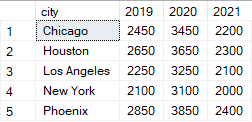
使用 SQL 动态 PIVOT 的表输出示例。图片作者提供。
Oracle 中的动态 PIVOT
在 Oracle 数据库中,动态透视可通过使用 EXECUTE IMMEDIATE 语句执行动态查询来实现。还会使用 LISTAGG 函数动态聚合列名,以及在别名中使用的单引号 ' '。
DECLARE
cols VARCHAR2(4000);
sql_query VARCHAR2(4000);
BEGIN
-- Get the list of years dynamically
SELECT LISTAGG('''' || year || ''' AS ' || 'sales_' || year, ',')
INTO cols
FROM (SELECT DISTINCT year FROM city_sales);
-- Construct the dynamic SQL query
sql_query := 'SELECT * FROM (
SELECT city, year, sales
FROM city_sales
)
PIVOT (
SUM(sales)
FOR year IN (' || cols || ')
)
ORDER BY city';
-- Execute the dynamic SQL query
EXECUTE IMMEDIATE sql_query;
END;MySQL 中的动态透视
MySQL 不支持直接的动态 SQL。因此,您需要创建存储过程来实现 MySQL 中的动态 PIVOT。下面的查询展示了如何使用存储过程来创建动态 PIVOT 查询。
-- Declare variables to hold the dynamic columns (cols) and the final SQL query
DELIMITER $
CREATE PROCEDURE dynamic_pivot()
BEGIN
DECLARE cols VARCHAR(1000);
DECLARE sql_query VARCHAR(2000);
-- Get the list of distinct years
SELECT GROUP_CONCAT(DISTINCT
CONCAT('SUM(CASE WHEN year = ', year, ' THEN sales ELSE 0 END) AS ', year, '')
) INTO cols
FROM city_sales;
-- Construct the dynamic SQL query
SET sql_query = CONCAT('SELECT city, ', cols, ' FROM city_sales GROUP BY city ORDER BY city');
-- Prepare and execute the SQL query
PREPARE stmt FROM sql_query;
EXECUTE stmt;
DEALLOCATE PREPARE stmt;
END $
DELIMITER ;创建存储过程后,您需要调用该存储过程以执行动态 PIVOT 查询:
CALL dynamic_pivot();PostgreSQL 中的动态透视
同样,您也可以使用以下查询在 PostgreSQL 中创建动态 PIVOT:
-- Block declaration to execute PL/pgSQL code in an anonymous code block
DO
$
DECLARE
cols text; -- Variable to store the list of columns for the dynamic query
query text; -- Variable to store the dynamic SQL query
BEGIN
-- Get distinct years and construct the list of SUM(CASE...) statements
SELECT STRING_AGG(DISTINCT 'SUM(CASE WHEN year = ' || year || ' THEN sales ELSE 0 END) AS "Sales_' || year || '"', ', ')
INTO cols
FROM city_sales;
-- Construct the dynamic PIVOT query
query := 'SELECT city, ' || cols || ' FROM city_sales GROUP BY city ORDER BY city';
-- Execute the dynamic PIVOT query
EXECUTE query;
END
$;结语与进阶学习
如果您希望高效地转换并分析数据,理解如何在 SQL 中使用 PIVOT 十分重要。在创建 SQL 数据透视表时,了解不同数据库中 PIVOT 运算符的实现差异至关重要。作为数据分析师,我鼓励您持续练习 SQL 技能,学习如何以及何时应用 PIVOT 来分析不同的数据集。
无论您是想进入行业的准数据分析师,还是更有经验的分析师,我都建议学习 DataCamp 的 Introduction to SQL 和 Intermediate SQL 课程来提升数据分析技能。我还建议学习我们的 Data Manipulation in SQL 课程,其中讲解了子查询以及本教程涵盖的其他概念;以及专门介绍 SQL Server 的 Introduction to SQL Server 课程。

数据科学技术写作者,具备数据分析、商业智能和数据科学的一线实践经验。我撰写以行业为导向的实用内容,涵盖 SQL、Python、Power BI、Databricks 和数据工程,并以真实的分析工作为基础。我的写作兼顾技术深度与业务影响,帮助专业人士将数据转化为自信的决策。
常见问题
什么是 SQL PIVOT?
SQL 的 PIVOT 运算符会将查询结果中的行转换为列。
哪些数据库支持 SQL PIVOT?
SQL Server 和 Oracle 原生支持 PIVOT 运算符。MySQL 和 PostgreSQL 则通过聚合与 CASE 语句来创建数据透视表。
PIVOT 与 UNPIVOT 有何不同?
PIVOT 运算符通过聚合将数据行转换为列,以便更易阅读;而 UNPIVOT 子句用于将列转换回行。
使用带聚合的 PIVOT 然后再 UNPIVOT,能否恢复到原始数据?
不会。使用带聚合的 PIVOT 后再应用 UNPIVOT,通常并不能完全还原到数据的原始形态。
我可以在 SQL 中进行动态透视吗?
SQL Server 和 PostgreSQL 支持动态透视。MySQL 可通过存储过程实现动态透视。
PIVOT 可以与 SQL 子句结合使用吗?
您可以将 PIVOT 运算符与 SQL 子句组合使用来筛选数据,包括 WHERE、GROUP BY 和 ORDER BY 子句。
交叉表与 SQL 中的数据透视表是同一个概念吗?
是的,交叉表(cross-tabs)与 SQL 中的数据透视表本质上是同一个概念。两者都用于汇总和重组数据,使其更易于理解。
SQL Server 和 Oracle 中的 PIVOT 运算符是一种非常实用的技术,可将表格的行转换为列。
PIVOT运算符不仅提升查询结果的可读性和易解性,还能通过聚合创建数据透视表或交叉表,从而更易洞察数据趋势。这些数据透视表对需要良好可视化效果的报告尤其有帮助。在开始之前,如果您觉得自己的 SQL 技能有些生疏,建议查看 DataCamp 的 SQL Fundamentals 技能路径。我们的 SQL Fundamentals 技能路径将帮助您理解如何连接与处理数据,以及如何使用子查询和窗口函数。