
Corso
SQL Server intermedio
4 h
66K
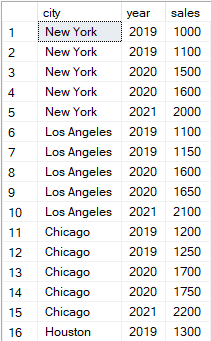
L'operatore PIVOT di SQL Server è utile per riassumere i dati, poiché consente di trasformare le righe in colonne. Considera la tabella city_sales qui sotto, che mostra le vendite generali di un prodotto in cinque grandi città degli Stati Uniti.
Esempio di trasformazione di una tabella con SQL PIVOT. Immagine dell'autore.
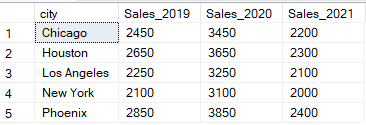
Useremo la seguente query, che utilizza l'PIVOT operator, per pivotare più colonne nella tabella qui sopra.
-- Select the columns for the output: city and sales data for 2019, 2020, and 2021
SELECT
    city,
    [2019] AS Sales_2019,
    [2020] AS Sales_2020,
    [2021] AS Sales_2021
FROM
    (
        -- Subquery to select city, year, and sales from city_sales table
        SELECT city, year, sales
        FROM city_sales
    ) AS src
PIVOT
(
    -- Pivot the sales data to have years as columns and sum the sales for each year
    SUM(sales)
    FOR year IN ([2019], [2020], [2021])
) AS pvt;
Esempio di output della trasformazione usando SQL PIVOT. Immagine dell'autore.
Il pivoting è una tecnica in SQL usata per trasformare le righe in colonne nei dati tabellari. In SQL Server e Oracle, il pivoting si fa con l'operatore PIVOT. La sintassi dell'operatore SQL PIVOT, mostrata sotto, ha tre parti principali:
SELECT: L'istruzione SELECT fa riferimento alle colonne da restituire nella tabella pivot SQL.
Sottoquery: La sottoquery contiene l'origine dati o la tabella da includere nella tabella pivot SQL.
PIVOT: L'operatore PIVOT contiene le aggregazioni e il filtro da applicare nella tabella pivot.
-- Select the non-pivoted column and the pivoted columns with aliases
SELECT
    [non-pivoted column],
    [first pivoted column] AS [column name],
    [second pivoted column] AS [column name],
    ...
FROM
    (
        -- Subquery to select the necessary columns from the source table
        SELECT [columns]
        FROM [source_table]
    ) AS source_table
PIVOT
(
    -- Pivot operation to aggregate data and transform rows into columns
    [aggregate_function]([pivot_column])
    FOR [pivot_column] IN ([first pivoted column], [second pivoted column], ...)
) AS pivot_table; -- Alias for the result of the pivot operationI database SQL Server e Oracle supportano direttamente l'operatore PIVOT. Tuttavia, MySQL e PostgreSQL hanno metodi alternativi per creare tabelle pivot in SQL.
SQL Server fornisce il supporto nativo per l'operatore PIVOT. Qui useremo l'operatore PIVOT per trasformare le righe in colonne e riassumere i dati usando funzioni di aggregazione come SUM(). Useremo anche clausole SQL, come WHERE, GROUP BY e ORDER BY, per una manipolazione dei dati più mirata.
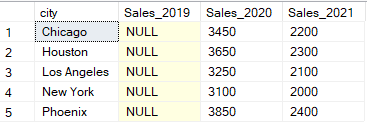
L'esempio seguente mostra come usare l'operatore PIVOT per filtrare i dati per l'anno 2020 o successivo (WHERE), raggruppare i dati per città e anno (GROUP BY) e ordinare i dati per città (ORDER BY):
-- Select the city and sales data for the years 2019, 2020, and 2021
SELECT
    city,
    [2019] AS Sales_2019,
    [2020] AS Sales_2020,
    [2021] AS Sales_2021
FROM
    (
        -- Subquery to select city, year, and sales from the city_sales table
        SELECT city, year, sales
        FROM city_sales
        WHERE year >= 2020 -- filtering
        GROUP BY city, year, sales -- grouping
    ) AS src
PIVOT
(
    -- Pivot the sales data to have years as columns, averaging the sales over each year
    SUM(sales) -- aggregating
    FOR year IN ([2019], [2020], [2021])
) AS pvt;
Esempio di output di una tabella trasformata usando SQL PIVOT con clausole comuni. Immagine dell'autore.
Analogamente a SQL Server, anche Oracle usa l'operatore PIVOT per trasformare le righe in colonne. Tuttavia, la sintassi dell'operatore PIVOT nel database Oracle differisce leggermente da quella di SQL Server. La query seguente mostra come appare l'operatore PIVOT in Oracle. Nota che le colonne sono aliasate all'interno dell'operatore PIVOT, a differenza dell'istruzione SELECT esterna in SQL Server.
-- Outer SELECT to choose all columns resulting from the PIVOT operation
SELECT *
FROM (
    -- Inner SELECT to retrieve the raw data of city, year, and sales
    SELECT city, year, sales
    FROM sales
)
-- PIVOT operation to convert rows to columns
PIVOT (
    SUM(sales)
    -- Specify the year values to pivot and alias them as Sales_<year>
    FOR year IN (2019 AS Sales_2019, 2020 AS Sales_2020, 2021 AS Sales_2021)
)
ORDER BY city;Il database MySQL non supporta l'operatore SQL PIVOT. Per creare tabelle pivot in MySQL, devi usare l'istruzione CASE con aggregazione condizionale. Ad esempio, la query seguente creerà una tabella pivot per aggregare i dati per somma delle vendite nei diversi anni, raggruppati e ordinati per city.
-- Select the city and sum the sales data for the years 2019, 2020, and 2021
SELECT
    city,
    SUM(CASE WHEN year = 2019 THEN sales ELSE 0 END) AS Sales_2019,
    SUM(CASE WHEN year = 2020 THEN sales ELSE 0 END) AS Sales_2020,
    SUM(CASE WHEN year = 2021 THEN sales ELSE 0 END) AS Sales_2021
FROM
    city_sales
GROUP BY
    city
ORDER BY
city; Anche il database PostgreSQL non supporta l'operatore SQL PIVOT. Pertanto, quando crei tabelle pivot, è importante usare l'istruzione CASE con aggregazione condizionale. La query seguente è un esempio delle istruzioni condizionali CASE usate per creare tabelle pivot in PostgreSQL.
-- Select the city and sum the sales data for the years 2019, 2020, and 2021
SELECT
    city,
    SUM(CASE WHEN year = 2019 THEN sales ELSE 0 END) AS Sales_2019,
    SUM(CASE WHEN year = 2020 THEN sales ELSE 0 END) AS Sales_2020,
    SUM(CASE WHEN year = 2021 THEN sales ELSE 0 END) AS Sales_2021
FROM
    city_sales
GROUP BY
    city
ORDER BY
city; Esistono alcune tecniche avanzate di pivoting SQL per scrivere query complesse. In questa sezione vedremo il pivoting dinamico, che usiamo per creare query per tabelle pivot in cui le colonne da pivotare sono sconosciute. Questo metodo usa SQL per generare la tabella pivot a runtime.
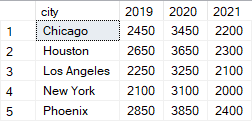
La query seguente usa PIVOT per pivotare dinamicamente la colonna year in SQL Server. La query recupererà gli anni distinti dalla tabella city_sales. Poi costruirà ed eseguirà una query PIVOT dinamica usando gli anni recuperati.
-- Declare variables to hold the column names and the dynamic query
DECLARE @cols AS NVARCHAR(MAX),
        @query AS NVARCHAR(MAX);
-- Get distinct values of the year column and concatenate them into a string
SELECT @cols = STRING_AGG(QUOTENAME(year), ',')
               FROM (SELECT DISTINCT year FROM city_sales) AS years;
-- Construct the dynamic PIVOT query
SET @query = '
SELECT city, ' + @cols + '
FROM
(
    -- Subquery to select city, year, and sales from the city_sales table
    SELECT city, year, sales
    FROM city_sales
) AS src
PIVOT
(
    -- Pivot the sales data to have years as columns, summing the sales for each year
    SUM(sales)
    FOR year IN (' + @cols + ')
) AS pvt
ORDER BY city';  -- Order the results by city
-- Execute the dynamic PIVOT query
EXEC sp_executesql @query;
Esempio di output di una tabella usando un PIVOT dinamico in SQL. Immagine dell'autore.
Nel database Oracle, il pivoting dinamico è supportato eseguendo la query dinamica con l'istruzione EXECUTE IMMEDIATE. La funzione LISTAGG viene inoltre usata per aggregare dinamicamente i nomi delle colonne e le virgolette singole ' ' usate negli alias all'interno del pivot.
DECLARE
    cols VARCHAR2(4000);
    sql_query VARCHAR2(4000);
BEGIN
    -- Get the list of years dynamically
    SELECT LISTAGG('''' || year || ''' AS ' || 'sales_' || year, ',')
    INTO cols
    FROM (SELECT DISTINCT year FROM city_sales);
    -- Construct the dynamic SQL query
    sql_query := 'SELECT * FROM (
                      SELECT city, year, sales
                      FROM city_sales
                  )
                  PIVOT (
                      SUM(sales)
                      FOR year IN (' || cols || ')
                  )
                  ORDER BY city';
    -- Execute the dynamic SQL query
    EXECUTE IMMEDIATE sql_query;
END;MySQL non supporta SQL dinamico diretto. Perciò, devi creare una stored procedure per il PIVOT dinamico in MySQL. La query seguente mostra come usare la stored procedure per creare una query PIVOT dinamica.
-- Declare variables to hold the dynamic columns (cols) and the final SQL query
DELIMITER $
CREATE PROCEDURE dynamic_pivot()
BEGIN
    DECLARE cols VARCHAR(1000);
    DECLARE sql_query VARCHAR(2000);
    -- Get the list of distinct years
    SELECT GROUP_CONCAT(DISTINCT
        CONCAT('SUM(CASE WHEN year = ', year, ' THEN sales ELSE 0 END) AS ', year, '')
    ) INTO cols
    FROM city_sales;
    -- Construct the dynamic SQL query
    SET sql_query = CONCAT('SELECT city, ', cols, ' FROM city_sales GROUP BY city ORDER BY city');
    -- Prepare and execute the SQL query
    PREPARE stmt FROM sql_query;
    EXECUTE stmt;
    DEALLOCATE PREPARE stmt;
END $
DELIMITER ;
Dopo aver creato la stored procedure, devi chiamarla per eseguire la query PIVOT dinamica:
CALL dynamic_pivot();Allo stesso modo, puoi creare un PIVOT dinamico in PostgreSQL usando la seguente query:
-- Block declaration to execute PL/pgSQL code in an anonymous code block
DO
$
DECLARE
    cols text;  -- Variable to store the list of columns for the dynamic query
    query text; -- Variable to store the dynamic SQL query
BEGIN
    -- Get distinct years and construct the list of SUM(CASE...) statements
    SELECT STRING_AGG(DISTINCT 'SUM(CASE WHEN year = ' || year || ' THEN sales ELSE 0 END) AS "Sales_' || year || '"', ', ')
    INTO cols
    FROM city_sales;
    -- Construct the dynamic PIVOT query
    query := 'SELECT city, ' || cols || ' FROM city_sales GROUP BY city ORDER BY city';
    -- Execute the dynamic PIVOT query
    EXECUTE query;
END
$;Capire come usare PIVOT in SQL è importante se vuoi trasformare e analizzare i dati in modo efficiente. Quando crei tabelle pivot in SQL, è fondamentale imparare le diverse implementazioni dell'operatore PIVOT nei vari database. Come data analyst, ti incoraggio a continuare a esercitarti con SQL per imparare come e quando applicare PIVOT per analizzare dataset diversi.
Che tu sia un aspirante data analyst in cerca di entrare nel settore o un analista più esperto, ti consiglio di seguire i corsi di DataCamp Introduction to SQL e Intermediate SQL per migliorare le tue competenze di analisi dei dati. Ti consiglio anche il nostro corso Data Manipulation in SQL, che insegna le sottoquery e altri concetti trattati in questo tutorial, insieme al corso Introduction to SQL Server, dedicato in particolare a SQL Server.
Impara SQL con DataCamp
Corso
Corso
Corso
blog
Tim Lu
12 min
blog
Abid Ali Awan
15 min
blog
Abid Ali Awan
10 min