One week. 700+ courses for $0. No credit card needed.
Start Now

AI agents such as Auto-GPT, AgentGPT, and BabyAGI are the next evolution in the fast-developing world of AI. While ChatGPT brought generative AI into the mainstream at the end of 2022, it requires a human to input prompts. The idea behind AI agents is to have the AI work independently towards a goal with minimal or zero human input.
Many developers have recognized the potential of this new technology. Auto-GPT is the fastest-growing open-source project in history if you measure this by the number of GitHub stars it’s received (equivalent to "favoriting" a software project). In the six weeks since its development began, it has 107,000 stars. For comparison, pandas, the most popular Python package for data science, has 38 thousand stars.
This tutorial explains what AI agents are, how they are related to large language models like GPT, and how they can be used. Before reading this tutorial, it is helpful to know what a large language model is. A Beginner's Guide to GPT-3 is a good primer. I also recommend our new Introduction to AI Agents course to learn all about AI Agents and their real use.
Explaining AI agents requires some knowledge of jargon. Check out the definitions below:
Just as ChatGPT is a web application that is powered by the GPT LLM, the three AI agents covered in this tutorial are also applications powered by GPT.
The main problem that these AI agents are trying to solve is to reduce the amount of human interaction that is needed for the AI to complete a task.
AgentGPT and BabyAGI are essentially "GPT on a loop," where GPT is repeatedly called to break the user's request into solvable problems, and the output from each step is refined until each subtask is completed successfully.
Auto-GPT goes a step further by providing the AI agent with internet access and the ability to run code, letting it solve a wider variety of problems.
The following innovations are worth discussing.
LLMs generate words based on the previous words in the conversation (both the user prompts and the AI responses). However, LLMs have fairly short memories: many models remember only a few hundred words, and the state-of-the-art GPT-4 remembers about 6000 words by default. When the length of the conversation exceeds the memory of the LLM, the responses can become inconsistent with each other.
For most use cases, this isn't a problem. However, in some cases, it is essential that the entire conversation—and perhaps even previous conversations—is remembered. Chatbots, and their more advanced cousin, AI agents, are an example of this.
Giving the AI agent a memory is achieved by using an embedding workflow to store the text of the conversation as numbers. Each user prompt or AI response is stored as an array that represents the meaning of the text.
These numeric arrays are stored in a vector database. Currently, Auto-GPT and BabyAGI use Pinecone (the leading player in this space), and the AgentGPT team is developing support for this feature.
If you ask ChatGPT a question about recent events, it will tell you that it cannot answer because it was only trained on data until September 2021. Again, this limitation isn't a problem for many applications, but it does cause issues if your task involves current events or information.
One solution to this problem is to give the AI web browsing capabilities to access the internet and find answers for itself.
Auto-GPT can perform research for itself via the Google Search API.
This feature is slightly controversial: the developers of AgentGPT and BabyAGI have currently not added this feature, preferring to restrict the AI's knowledge to whatever GPT knows.
While LLMs like GPT can generate code from scratch, and debug or improve existing code, they can't actually run it.
Auto-GPT can execute shell and Python code. That means it can both write code and run it.
One particularly powerful ability this gives it is that it can write the code to interact with other software, then run it. This means it can complete tasks by making use of other software.
It is still very early days to figure out how we can use AI agents. Many examples are variations of an automated personal assistant, like a next-generation IBM Watson Assistant.
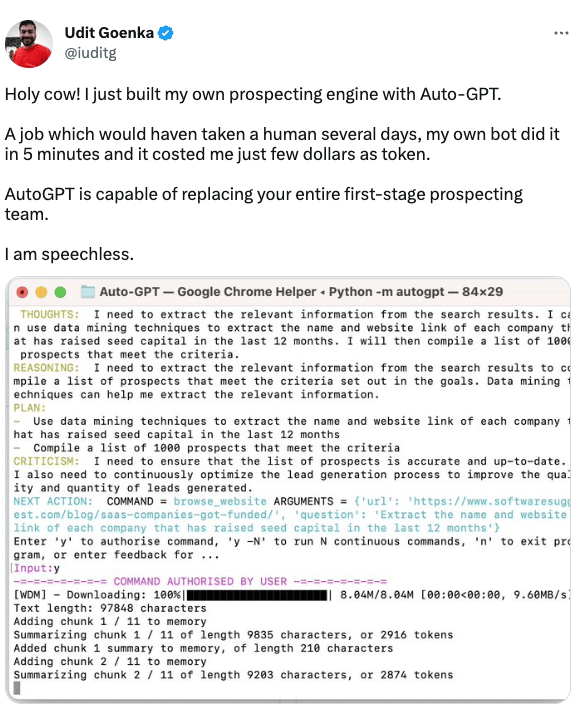
Udit Goenka, the CEO of FirstSales.io, posted on Twitter that he'd used Auto-GPT to build a prospecting engine. The screenshot in the tweet shows the AI agent creating a plan to search for companies that have raised seed capital in the last year (that is, prospects who ought to have cash available) and describing the details to create the list (extracting company names and URLs).
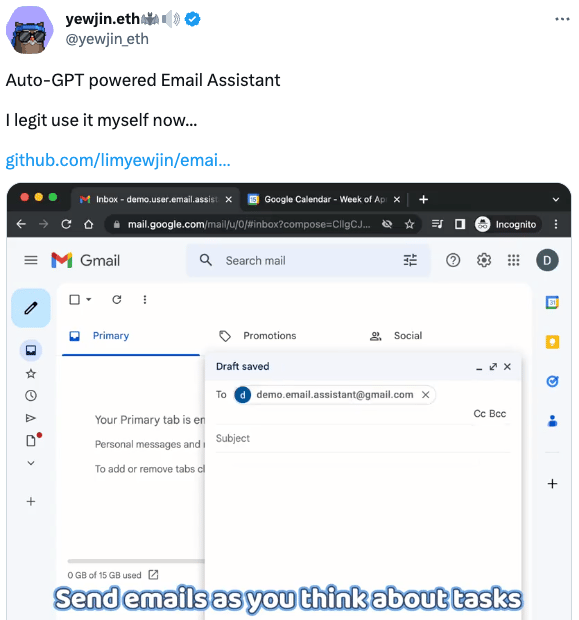
Yew Jin Lim, a software engineer at Google, posted that he'd used Auto-GPT to create an email assistant (Github repo). The video in the tweet shows Yew Jin emailing the AI agent with details of a task to complete and the agent performing tasks like adding an event to his calendar.
The consensus advice around working with AI is that most tasks are better performed with a human in the loop to sanity-check what the AI is doing. Remember that the AI is supposed to be an assistant, not an expert (and is an assistant that sometimes hallucinates). There are some pieces of caution that should be heeded.
While a single call to GPT via the OpenAI API is fairly cheap (typically less than 1 US cent for GPT-3.5, depending on the amount of output; GPT-4 is more expensive), using any of the three AI Agents discussed here to perform a complex task could involve hundreds or thousands of API calls.
It is a good idea to include breakpoints where human intervention is needed to provide permission for the AI to continue running.
While Auto-GPT can be provided with access to any API, if you give it access to buy stock on your behalf automatically, you should be prepared to lose all the money in your account. Likewise, it's a bad idea to give it write-access to your corporate database.
Going beyond personal or corporate losses, some AI researchers have argued that advanced AI provides larger or even existential threats. While initial attempts to use Auto-GPT to destroy humanity have been unsuccessful, it's worth bearing in mind the warning from Eliezer Yudkowsky, a Senior Research Fellow at the Machine Intelligence Research Institute.
To visualize a hostile superhuman AI, don’t imagine a lifeless book-smart thinker dwelling inside the internet and sending ill-intentioned emails. Visualize an entire alien civilization, thinking at millions of times human speeds, initially confined to computers—in a world of creatures that are, from its perspective, very stupid and very slow. A sufficiently intelligent AI won’t stay confined to computers for long. In today’s world you can email DNA strings to laboratories that will produce proteins on demand, allowing an AI initially confined to the internet to build artificial life forms or bootstrap straight to postbiological molecular manufacturing.
If somebody builds a too-powerful AI, under present conditions, I expect that every single member of the human species and all biological life on Earth dies shortly thereafter.
While this is clearly a worst-case scenario, it's worth considering the dangers an unshackled AI could pose.
To try these AI agents yourself, there are several websites that let you try out the tech. If you want to use them more seriously, you'll need to install them on your development platform of choice.
Whichever agent you use, and however you decide to use it, you'll need to get an OpenAI API key. Instructions for this are given in the Using GPT-3.5 and GPT-4 via the OpenAI API in Python tutorial.
If you want to install any of these AI agents, note that they are command-line applications, and in their current state, they all require a bit of effort to set up.
AI platform Hugging Face provides a hosted version of Auto-GPT. You just need to provide your OpenAI API key, then give the AI a role and some goals.
God Mode (named after a video game cheat mode) similarly allows you to input your OpenAI API key and simply give Auto-GPT a task to complete.
For Replit users, you can also fork this repl and give it your OpenAI API key.
The AgentGPT team provides a demo version of their AI agent, though as a free version, it will only run for about two minutes before terminating.
Currently, there is no hosted version of BabyAGI that I could find.
Auto-GPT is a command-line application, and in its current state, it requires a bit of effort to set up. You can find detailed documentation on setup to help you get started.
This guide assumes that you can access a shell (like bash or zsh), and have git and Python installed.
In the terminal, clone the Auto-GPT repository.
Navigate to the Auto-GPT directory that has just been created, and checkout the stable branch
Auto-GPT requires that you have an OpenAI API key (to contact GPT). The free account only allows you to make 3 API calls per minute, which is insufficient for use with Auto-GPT, so you'll need to get a paid account. Instructions for this are given in our Using GPT-3.5 and GPT-4 via the OpenAI API in Python tutorial.
You can optionally make use of the Pinecone API (for storage), the ElevenLabs API (for a speech interface), the Google API (for search), and the Twitter API (for promoting what you just built).
Auto-GPT stores all the API keys in a configuration file named .env.
Note that storing API keys like this in a plain text file is poor security practice, so you should only run Auto-GPT in a secure environment, such as on your local machine, or you should invalidate your API keys after using them.
Take a copy of the .env.template file and name it .env.
In a text editor, find the line starting OPENAI_API_KEY= and add your OpenAI API key to it without spaces or quotes.
Add any additional API keys in the same key=value format.
Auto-GPT is run via the run.sh shell script (run.bat on Windows).
To get help on how to use this script, use the --help argument.
Note that the script does a lot of checking for versions of Python packages before displaying the usage details.
To start an Auto-GPT assistant, simply run that same command without the help argument.
After going through the packages checks, Auto-GPT will ask you three things
AgentGPT provides a brief description of how to get started in the README of its GitHub repo.
In the terminal, clone the AgentGPT repository.
Navigate to the AgentGPT directory that has just been created.
There is a bash script to run to set up the AI agent.
The first thing you will be asked is to input your OpenAI API key and press ENTER.
You may be asked to give access to your Desktop files and to accept incoming network connections. Accept these.
After a few seconds, you should receive a message saying something like:
Copy the URL and paste it into the address bar in your web browser. AgentGPT will be open with a welcome message.
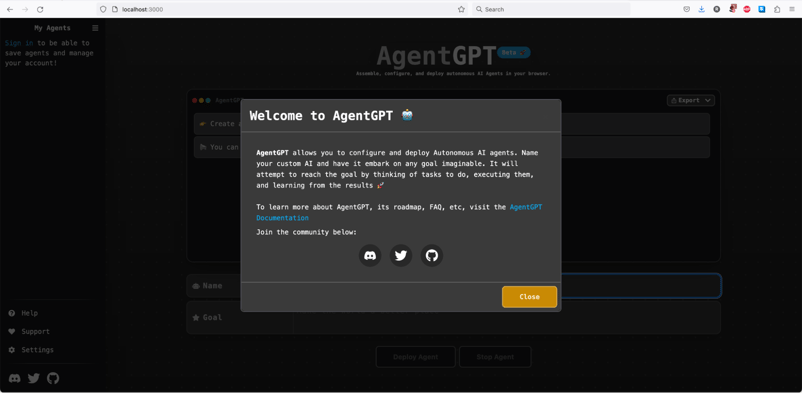
Give your agent a name and a goal, then click "Deploy Agent".

BabyAGI has some (very minimal) documentation in the README of its GitHub repo.
In the terminal, clone the BabyAGI repository.
Navigate to the BabyAGI directory that has just been created.
Use pip to install the packages needed to run BabyAGI.
Create a configuration file named .env.
Edit the configuration file. You can use any terminal text editor; here, we'll use vim.
Press i to insert text.
OPENAI_API_KEY= append your OpenAI API key.INSTANCE_NAME= optionally give your AI agent a name.OBJECTIVE= give your AI agent a goal to achieve.Run the BabyAGI script.
As a test, I named my AI assistant "Jeff," described it as "A data science expert who writes tutorials about AI," and gave it the goal to "Write a tutorial about Auto-GPT."
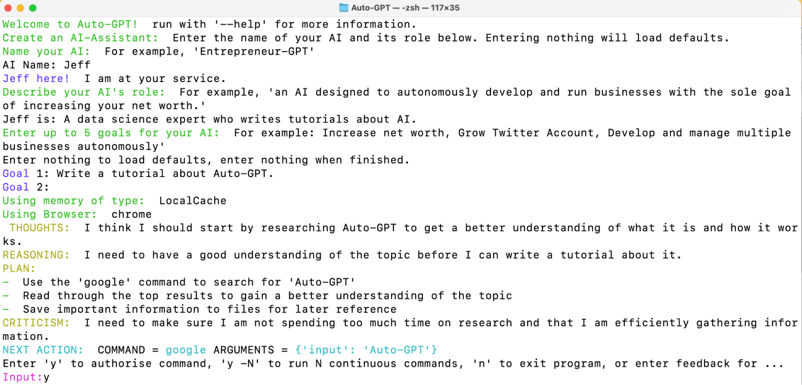
Auto-GPT will regularly prompt you for permission to perform the next task, whether it is searching the internet for more information or writing a file. Click 'y' to let it proceed, or provide text feedback.
After a few minutes of Auto-GPT attempting to write a tutorial, it produced this tutorial file.
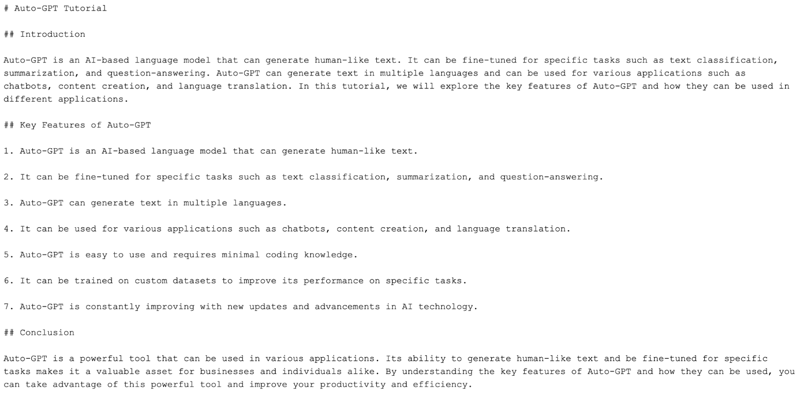
It isn't a good, or even factually correct, tutorial, so as ever, when using AI, you need to be very precise with your requirements in your prompts and pay close attention to what the AI is doing.
AI agents like Auto-GPT, AgentGPT, and BabyAGI represent a significant leap in the realm of AI, bringing us closer to the vision of truly autonomous AI systems. As these agents work towards goals with minimal human intervention, they open up a world of potential applications, from personal assistants to problem solvers.
To stay ahead in this rapidly changing landscape, we encourage you to expand your knowledge and skills in data science, machine learning, and AI. Check out the following resources to learn more:

Richie helps individuals and organizations get better at using data and AI. He's been a data scientist since before it was called data science, and has written two books and created many DataCamp courses on the subject. He is a host of the DataFramed podcast, and runs DataCamp's webinar program.
Chat with AI Richie about every episode of DataFramed - all data champs welcome!
ChatGPT is designed for human-in-the-loop interactions, where a person inputs prompts and receives responses. AI agents like Auto-GPT, on the other hand, are designed to work autonomously toward a defined goal, often using loops, memory, and external tools like web browsers or code execution to complete tasks with little or no further human input.
A basic understanding of command-line tools, Python, and API keys is usually required to install and run AI agents like Auto-GPT or BabyAGI. Some platforms (like Hugging Face or God Mode) offer more user-friendly interfaces, but using the full power of these tools often involves hands-on configuration and setup.
Yes, some AI agents like Auto-GPT can access the internet through APIs like Google Search, enabling them to retrieve real-time data. However, this feature is sometimes omitted (e.g., in AgentGPT and BabyAGI) due to concerns around safety, cost, or reliability.

블로그
 Sandra Kublik• 15분

블로그
 Vinod Chugani• 9분

튜토리얼
 Khalid Abdelaty• 12분
Learn AI with DataCamp
강의
LangGraph 프레임워크에서 새로운 에이전트 설계 패턴을 적용해 강력한 멀티 에이전트 시스템을 구축하세요.
강의
생성형 AI를 책임감 있게 활용하는 방법을 알아보세요. 생성형 AI 모델이 어떻게 개발되는지, 그리고 앞으로 사회에 어떤 영향을 미칠지 살펴보세요.