
Last chance! 50% off DataCamp Premium
Sale ends in
Buy Now
Few-shot prompting is a technique that involves providing a language model with a small number of examples to guide its response to a specific task. This method sits between zero-shot learning (where no examples are given) and fully supervised fine-tuning (which requires large amounts of labeled data). The blog post on few-shot learning explains this machine learning technique in detail.
In other words, few-shot prompting is the process of giving a language model a handful of demonstrations or examples within the prompt itself. These examples act as a guide, showing the model how to approach and respond to a particular type of task or question. When you provide these examples, you are essentially saying to the model, "Here's how you should respond in similar situations."
Let’s look at an example.
Imagine we want the model to classify the sentiment of movie reviews. A few-shot prompt might look like this:
Prompt:
Classify the sentiment of the third movie review. Use the information from the first two examples:Review: "This movie was a waste of time."Sentiment: NegativeReview: "I couldn't stop laughing throughout the film!"Sentiment: PositiveReview: "The special effects were amazing, but the plot was confusing."Sentiment:```markdownIf we input this prompt to the LLM, and if it understands the task correctly, it will output:```markdownSentiment: MixedIn this example, The LLM uses the examples in the prompt to understand how to classify the sentiment of the third review and generates the output accordingly.
Few-shot prompting is important because it makes LLMs more useful and accessible. First, it saves time and effort since you don't need to completely retrain the model or gather huge amounts of data.
Second, it's very flexible—you can quickly adapt the model to different tasks just by changing the examples you give it. Third, it often helps the LLM to perform better on specific or complex tasks compared to asking it to do something without any guidance. This method also makes powerful AI tools available to more people, not just tech experts with lots of resources.
The core of few-shot prompting lies in providing the LLM with a small set of relevant examples or demonstrations within the prompt itself. These examples guide the model, illustrating how to approach and respond to a particular type of task or question. Demonstrations are typically structured as follows:
For instance, if we wanted the model to generate rhyming couplets, a few-shot prompt might look like this:
Generate a rhyming couplet about a tree:Input: "cat"Output: The curious cat, so sleek and fat, Curled up cozy on the welcome mat.Input: "sky"Output: Look up high into the endless sky, Where birds and clouds go drifting by.Input: "tree"Output:When presented with these demonstrations, the language model engages in a process often called "in-context learning" or "learning by example." It works like this:

This process allows the model to adapt its knowledge and capabilities to a specific task without requiring any changes to its underlying parameters.
It's important to note that the effectiveness of few-shot prompting can vary depending on factors such as the complexity of the task, the quality and relevance of the examples provided, and the capabilities of the underlying language model. However, when used effectively, few-shot prompting can make language models perform lots of different tasks with impressive accuracy and flexibility.
Few-shot prompting has a few benefits. Let's look at why this method is so helpful.
One of the most notable advantages of few-shot prompting is the substantial improvement in performance compared to zero-shot approaches.
For instance, consider a scenario where we want the model to generate product descriptions with a specific tone and format.
Generate product descriptions:Product: Wireless EarbudsDescription: Immerse yourself in crystal-clear audio with our sleek wireless earbuds. Featuring noise-cancellation technology and a comfortable fit, these earbuds are perfect for music lovers on the go.Product: Smart WatchDescription: Stay connected and track your fitness with our advanced smart watch. With heart rate monitoring, GPS, and a vibrant touch screen, it's your perfect companion for an active lifestyle.Product: Ergonomic Office ChairDescription:With these examples, the model is more likely to generate a relevant and appropriately styled description for the office chair, compared to a zero-shot approach where it might produce a more generic or less focused description.
A potential output could be:```markdown
Description: Transform your workspace with our state-of-the-art ergonomic office chair. Designed for ultimate comfort and support, this chair features adjustable lumbar support, breathable mesh backrest, and customizable armrests. Whether you're working from home or in a corporate setting, this chair is the perfect blend of style and functionality for the modern professional.
Faster adaptationFew-shot prompting helps the LLM to quickly learn new tasks or topics, making it fast and easy to switch between different jobs.Quick task learning: Models can quickly grasp new tasks with just a handful of examples, allowing for rapid prototyping and testing of new applications.Domain adaptation: It's easy to shift the model's focus to different domains or styles by simply changing the examples in the prompt.Iterative refinement: Users can quickly iterate and refine their prompts based on initial results, leading to a more agile development process.For example, if we wanted to adapt the model to generate different types of poetry, we could quickly switch between haikus, limericks, or sonnets just by changing the examples in our prompt:```markdownGenerate poetry based on the given theme and format.Theme: SpringHaiku: Cherry blossoms bloom Soft petals dance in the breeze Nature awakensTheme: SummerHaiku:Theme: A funny catLimerick: There once was a cat named Lou Who always knew just what to do He'd climb up a tree Then meow with glee And slide down as if on a chuteTheme: A clumsy dogLimerick:A potential output would be:
Haiku:Scorching sun aboveCicadas sing endlesslyBeach waves cool bare feetLimerick:There once was a dog quite unsteadyHis paws were not quite readyHe'd trip on his tailKnock over the mailBut his smile kept his owner steadyFew-shot prompting significantly reduces the need for large amounts of labeled data, which is a major advantage over traditional fine-tuning approaches.
Few-shot prompting can be applied to many domains. Its flexibility and efficiency make it particularly useful for tasks that require specialized knowledge or creative output. Let's explore some key applications:
Few-shot prompting can significantly improve an LLM's ability to handle tasks that involve multi-step reasoning, logical deduction, or domain-specific knowledge.
Let’s see how we could use few-shot prompting for a medical diagnosis task:
Provide a possible diagnosis and explain your reasoning:Symptoms: Fever, cough, fatigueDiagnosis: Common coldExplanation: The combination of fever, cough, and fatigue is typical of a common cold. No severe symptoms are present, suggesting a mild viral infection.Symptoms: Chest pain, shortness of breath, dizzinessDiagnosis: Possible heart attackExplanation: The combination of chest pain, shortness of breath, and dizziness are warning signs of a possible heart attack. Immediate medical attention is required.Symptoms: Headache, sensitivity to light, nauseaDiagnosis:Explanation: This prompt guides the model to not only provide a diagnosis but also explain the reasoning behind it, demonstrating complex medical reasoning.
The LLM would output:```markdown
Diagnosis: Migraine
Explanation: These symptoms together are typical of a migraine. The headache combined with light sensitivity (photophobia) is a strong indicator of migraine, and nausea often accompanies this condition. While other causes are possible, this combination strongly suggests a migraine headache.
Creative writingFew-shot prompting is particularly effective in guiding LLMs to generate text in specific styles, formats, or genres.Let’s see how to generate movie synopsis in different genres using few-shot prompting:```markdownGenerate movie synopsis:Genre: Sci-FiSynopsis: In a world where dreams can be shared, a skilled "dream thief" is tasked with the impossible: planting an idea in someone's mind. As he delves deeper into the target's subconscious, the lines between reality and dreams blur, threatening to trap him forever.Genre: RomanceSynopsis: A chance encounter on a rainy day in Paris leads two strangers on a whirlwind 24-hour adventure. As they explore the city and each other's hearts, they must decide if their connection is strong enough to overcome the ocean that will separate them come morning.Genre: HorrorSynopsis: This prompt guides the model in generating a synopsis that captures the key elements and tone of the specified genre.
Output:
Synopsis: A remote mountain town is plagued by a series of mysterious disappearances. As a skeptical detective investigates, she uncovers an ancient cult that awakens every hundred years to feed on the town's inhabitants. With time running out and the cult's power growing, she must confront her own dark past to save the remaining townspeople and herself from a terrifying fate.Few-shot prompting can be incredibly useful in helping LLMs generate code that adheres to specific conventions, follows best practices, or meets particular requirements. Examples can demonstrate the correct syntax and structure for a particular programming language.
Let’s see how to use few-shot prompting for generating Python functions with docstrings and type hints:
def calculate_area(length: float, width: float) -> float: """ Calculate the area of a rectangle. Args: length (float): The length of the rectangle. width (float): The width of the rectangle. Returns: float: The area of the rectangle. """ return length * widthdef celsius_to_fahrenheit(celsius: float) -> float: """ Convert temperature from Celsius to Fahrenheit. Args: celsius (float): Temperature in Celsius. Returns: float: Temperature in Fahrenheit. """ return (celsius * 9/5) + 32def calculate_bmi(weight: float, height: float) -> float: """ [Generate a docstring for this function] """ # [Generate the function body]This prompt guides the model to generate a function with proper type hints and a detailed docstring, following the established pattern.
The output would be:
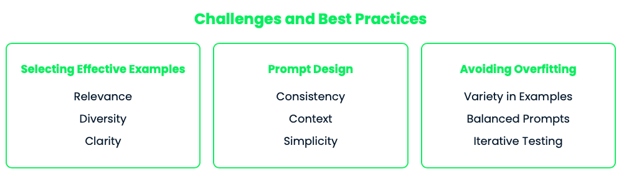
def calculate_bmi(weight: float, height: float) -> float: """ Calculate the Body Mass Index (BMI) of a person. Args: weight (float): The weight of the person in kilograms. height (float): The height of the person in meters. Returns: float: The calculated BMI value. Note: BMI is calculated as weight (kg) divided by height squared (m^2). This function assumes weight is in kilograms and height is in meters. """ return weight / (height ** 2)While few-shot prompting works well in many cases, it comes with its own challenges. Understanding these challenges and following best practices can help us maximize the effectiveness of our prompts and achieve better results.
The quality and relevance of the examples you choose are crucial for successful few-shot prompting. Here are some tips:
Creating effective prompts is an art that requires careful consideration of how the examples are presented and how the task is framed. Here are some strategies you can follow:
One of the risks of few-shot prompting is that the model might overfit to the provided examples, leading to outputs that are too similar to the examples or that fail to generalize well to new inputs. To avoid this:
Following these best practices will help you create more effective few-shot prompts that guide the model in performing the desired task accurately and efficiently.
Few-shot prompting is a technique that helps LLMs to apply their knowledge to specific tasks.
It allows quick adaptation to new tasks without extensive retraining. It enhances accuracy for complex tasks by providing relevant examples. It's useful across various domains, from reasoning to creative writing and coding and it makes advanced language models more accessible and adaptable.
However, its effectiveness depends on careful example selection and prompt design. The quality and relevance of examples are crucial for optimal performance.
Looking ahead, I’m excited about where this could go. Imagine systems that can pick the perfect examples automatically or adapt on the fly based on how they're doing.
So, there you have it! Few-shot prompting in a nutshell. Keep experimenting, keep learning, and see you in the next one!
Yes, improvements can be measured using standard machine learning metrics, depending on the task. For classification tasks, accuracy, precision, recall, and F1 score can be used. Metrics like BLEU, ROUGE, or human evaluation can be used for generation tasks.
Few-shot prompting has been successful in various sectors, including customer service (for generating responses), content creation (for writing assistance), and software development (for code generation). It's also proving to be valuable in healthcare for tasks like medical record summarization and in finance for market analysis and report generation.
Few-shot prompting could potentially democratize AI application development, allowing non-experts to easily create specialized AI solutions. This might shift the focus of data scientists and ML engineers towards more complex tasks, prompt engineering, and developing more advanced AI systems. It could also create new roles focused on crafting effective prompts and examples for various applications.
In highly specialized domains, few-shot prompting may struggle if the model lacks foundational knowledge in that area. It might also be challenging to capture complex domain-specific rules or procedures with just a few examples. In such cases, more extensive fine-tuning or domain-specific training might be necessary.
Yes, there are ethical concerns. Few-shot prompting could potentially be used to guide AI models in generating biased or harmful content if the examples are not carefully chosen. There's also a risk of unintentional data leakage if sensitive information is included in the prompts.
Ana Rojo Echeburúa is an AI and data specialist with a PhD in Applied Mathematics. She loves turning data into actionable insights and has extensive experience leading technical teams. Ana enjoys working closely with clients to solve their business problems and create innovative AI solutions. Known for her problem-solving skills and clear communication, she is passionate about AI, especially generative AI. Ana is dedicated to continuous learning and ethical AI development, as well as simplifying complex problems and explaining technology in accessible ways.

blog
 Victor Jotham Ashioya• 7 min

blog
 Dr Ana Rojo-Echeburúa• 10 min

blog
Dr Ana Rojo-Echeburúa• 8 minLearn AI with these courses!
Kurs
Poznaj rolę, jaką Generative Artificial Intelligence odgrywa dziś i będzie odgrywać w przyszłości w środowisku biznesowym.
Kurs
Naucz się pisać skuteczne prompty z ChatGPT i stosować je w swoim workflow już dziś.
Ścieżka
Przyspiesz swoją podróż z AI, opanuj ChatGPT i opracuj kompleksową strategię sztucznej inteligencji.



Large language models can understand and write text that sounds very human-like. But when it comes to getting these models to do this in the exact way that we want, it's not that easy. One needs to choose appropriate techniques to get a satisfactory answer.
One of these techniques is few-shot prompting. It's a clever method that helps connect what the model already knows with what we need it to do for a specific job—you give the model a few quick examples to show it what you want, making it easier for it to understand and do the task correctly.
In this tutorial, you will learn:
This tutorial is part of my “Prompt Engineering: From Zero to Hero” series of blog posts: