Courses
使用 CrewAI 构建 AI Agents
1小时
1.3K
代理群集是一组协同完成任务的 AI 代理。与其让一个模型独自完成调研、写作、审阅、定稿,不如将工作拆分给多个专门化的代理。每个代理都有明确分工,系统将其协调起来,以产出更强的最终结果。
优势在于“专精”。专注调研的代理可以聚焦于查找与核实信息源;专注写作的代理可以专注结构与清晰度;审稿人则能对照原始调研检查草稿,而不会被刚刚写出的内容分心。
一个协调代理将步骤串联并决定下一步做什么。在我们搭建的群集中,这些角色正对应 Researcher、Writer、Reviewer 和 Manager。
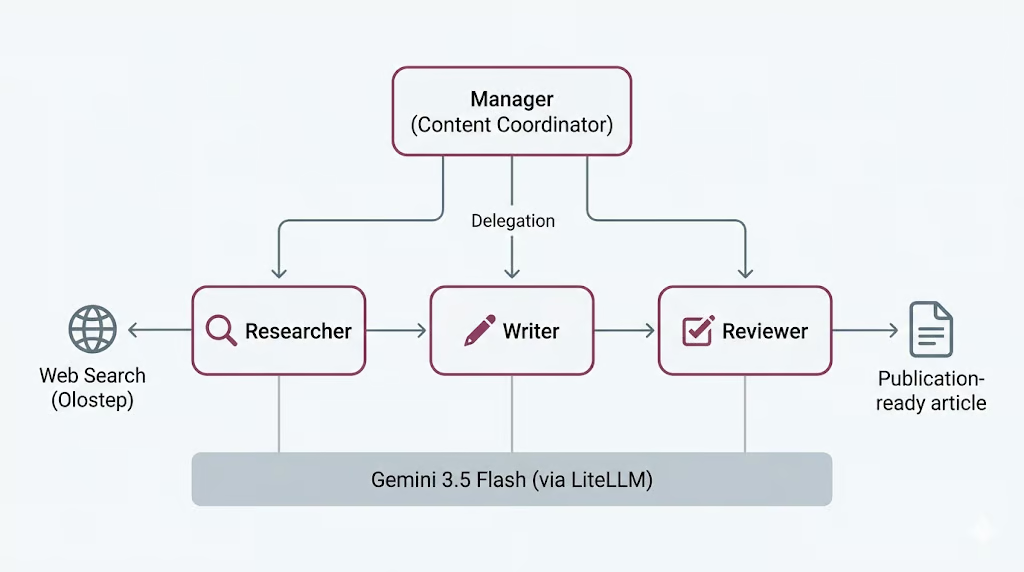
当然,这并非没有代价。更多的代理意味着更多的模型调用、更长的时间,以及更多潜在出错点;这种权衡我们会在最后回到这里,等您看到实际运行成本之后再讨论。
CrewAI 是一个用于构建多代理系统的开源框架。它提供了清晰的方式来定义代理、分配任务并选择协调方式,让您可以把精力放在角色与工作流本身,而不是它们之间的“管道”连接。
三个核心概念承担了主要功能。
该流程可以是顺序式(任务按固定顺序运行),也可以是分层式(由管理者代理进行工作委派并验证输出)。我们将在此使用分层流程,由 Manager 负责委派。
CrewAI 还通过 LiteLLM 处理模型访问,这是一个为多家服务商提供统一接口的开源库。这使我们可以定义一个 Gemini 3.5 Flash 模型,并在四个代理中复用它;具体设置见下文步骤。
让我们从环境搭建开始。
开始之前,请确保您具备:
启动 Jupyter Notebook 或 JupyterLab,并打开一个使用您环境中最新 Python 内核的笔记本。然后运行下方单元以安装所需软件包。
%pip install --quiet -U \
    crewai \
    crewai-tools \
    google-genai \
    litellm \
    olostep \
    nest-asyncio
安装完成后,运行下一个单元检查已安装的软件包版本。这有助于确认一切正确安装。
import importlib.metadata as md

for pkg in [
    "crewai",
    "crewai-tools",
    "google-genai",
    "litellm",
    "olostep",
    "nest-asyncio",
]:
    print(f"{pkg:>16}  {md.version(pkg)}")
您应会看到类似如下的输出:
         crewai  1.14.6
    crewai-tools  1.14.6
      google-genai  2.8.0
          litellm  1.87.1
          olostep  1.1.0
nest-asyncio 1.6.0本项目需要两个 API 密钥。
首先,在 Google AI Studio 创建一个 Gemini API 密钥。打开 Google AI Studio,进入 API key 区域,为您的项目创建新密钥。Gemini 提供免费层,但有使用量与速率限制。为了更稳定地测试与运行 Gemini,请关联您的 Google 计费账户或为您的 Google 账户充值,以便超出免费层限制后能够计费。
接着,创建一个 Olostep API 密钥。注册 Olostep,打开 Olostep 控制台,并在 API keys 页面生成密钥。我们将用此密钥为 Researcher 代理提供实时网页搜索与页面抓取能力。
两把密钥都准备好后,将其保存为环境变量。Gemini 为 CrewAI 代理提供模型能力,而 Olostep 则让 Researcher 能从网络收集最新信息。
创建好两把密钥后,请在运行笔记本之前将它们保存为环境变量。
PowerShell:
$env:GEMINI_API_KEY="your-gemini-key"
$env:OLOSTEP_API_KEY="your-olostep-key"
macOS/Linux:
export GEMINI_API_KEY="your-gemini-key"
export OLOSTEP_API_KEY="your-olostep-key"
现在运行下方单元,检查 Gemini API 密钥是否已正确加载。
import os

api_key = os.getenv("GEMINI_API_KEY") or os.getenv("GOOGLE_API_KEY")

if not api_key:
    raise RuntimeError(
        "Set GEMINI_API_KEY or GOOGLE_API_KEY in your environment, "
        "then restart the notebook kernel."
    )
print(f"Gemini API key loaded")
您应会看到:
Gemini API key loaded在本项目中,我们将使用 Gemini 3.5 Flash 作为所有 CrewAI 代理共享的 LLM。Gemini 3.5 Flash 面向快速、具备“代理能力”、以及偏向编码的工作负载。它适用于本项目,因为我们的代理需要跨多步推理、遵循指令、调用工具并产出结构化输出。
Gemini 3.5 Flash 还支持超大上下文窗口、长输出、思维链与工具使用,非常适合代理工作流。由于代理群集会在 Researcher、Writer、Reviewer 与 Manager 之间多次调用模型,使用 Flash 模型有助于在保持响应性的同时,仍提供强劲的推理与写作质量。
如果您想对比其他最先进的 LLM,建议阅读我们的指南:Gemini 3.5 Flash vs GPT-5.5 与 Gemini 3.5 Flash vs Claude Opus 4.8。
我们将通过 LiteLLM 访问 Gemini。LiteLLM 是一个开源库,为包括 Gemini、OpenAI、Anthropic、Bedrock、Vertex AI 等在内的诸多提供商提供统一调用接口。在该设置中,CrewAI 在后台使用 LiteLLM,因此我们可以用简单的 provider/model 格式传入 Gemini 模型名称。
现在我们将创建一个共享的 CrewAI LLM,并在全部代理中复用它。这样设置更简单,因为 Researcher、Writer、Reviewer 与 Manager 都会使用同一个 Gemini 模型。
from crewai import LLM

GEMINI_MODEL = "gemini/gemini-3.5-flash"

gemini_llm = LLM(
    model=GEMINI_MODEL,
    api_key=os.getenv("GEMINI_API_KEY") or os.getenv("GOOGLE_API_KEY"),
    temperature=1.0,
)

print(f"LLM ready: {gemini_llm.model}")
print("Provider API: Google Gemini (via LiteLLM)")
您应会看到类似如下的输出:
LLM ready: gemini-3.5-flash
Provider API: Google Gemini (via LiteLLM)
这表明 CrewAI 现已可通过 LiteLLM 访问 Gemini。接下来我们会将这个共享的 gemini_llm 对象传递给每个代理。
Researcher 代理需要访问最新信息。为此,我们将创建一个自定义的 Olostep 搜索工具,并在稍后交给 Researcher 使用。
该工具可在两种模式下工作:仅返回搜索摘要(更快),或抓取结果页面并以 markdown 返回页面内容。我们还会添加一个小的搜索预算,避免代理反复调用网页工具过多次。
from pydantic import Field, PrivateAttr
from crewai.tools import BaseTool

try:
    from olostep import Olostep, Olostep_BaseError
except ImportError:
    raise ImportError(
        "The 'olostep' package is not installed. Run %pip install -U olostep."
    )
首先,从环境中加载 Olostep API 密钥。
olostep_api_key = os.getenv("OLOSTEP_API_KEY")

if not olostep_api_key or olostep_api_key == "your-olostep-api-key-here":
    print(
        "The Olostep tool will fail at call time unless OLOSTEP_API_KEY "
        "is set in the environment."
    )
else:
    print("Olostep API key loaded.")

_olostep_client = Olostep(api_key=olostep_api_key) if olostep_api_key else None
现在创建自定义的 CrewAI 工具。
class OlostepSearchTool(BaseTool):
    """Search the web with a strict research-call budget."""

    name: str = "olostep_web_search"
    description: str = (
        "Search the live web. Set scrape=false for fast discovery and "
        "scrape=true for full-page evidence. You have at most 3 discovery "
        "searches without scraping and 6 external search calls total. After "
        "3 discovery searches, use scrape=true on the strongest query or "
        "domain. Each call returns at most 3 results. Inputs: query, scrape, "
        "limit, and optional include_domains."
    )

    default_limit: int = Field(default=3, ge=1, le=3)
    max_chars_per_page: int = Field(default=4000, ge=500, le=12000)

    _total_calls: int = PrivateAttr(default=0)
    _discovery_calls: int = PrivateAttr(default=0)
    _call_history: list[dict] = PrivateAttr(default_factory=list)

    def _run(
        self,
        query: str,
        scrape: bool = False,
        limit: int | None = None,
        include_domains: list[str] | None = None,
    ) -> str:
        if _olostep_client is None:
            return (
                "OLOSTEP_API_KEY is not set. Set it in the environment "
                "and restart the kernel."
            )

        if self._total_calls >= 6:
            return (
                "Research search budget exhausted: 6 external calls have "
                "already been used. Stop searching and complete the task "
                "with the collected sources."
            )

        if not scrape and self._discovery_calls >= 3:
            return (
                "Discovery-search limit reached. Do not run another "
                "scrape=False search. Use scrape=True on the strongest query "
                "or selected domains, or finish with the sources already found."
            )

        clean_query = query.strip()
        if not clean_query:
            return "Search query cannot be empty."

        result_limit = max(1, min(limit or self.default_limit, 3))
        kwargs = {"query": clean_query, "limit": result_limit}

        if scrape:
            kwargs["scrape_options"] = {
                "formats": ["markdown"],
                "timeout": 25,
            }

        if include_domains:
            kwargs["include_domains"] = include_domains

        self._total_calls += 1
        if not scrape:
            self._discovery_calls += 1

        call_record = {
            "number": self._total_calls,
            "query": clean_query,
            "scrape": scrape,
            "limit": result_limit,
            "domains": include_domains or [],
            "status": "started",
            "results": 0,
        }
        self._call_history.append(call_record)

        try:
            search = _olostep_client.searches.create(**kwargs)
        except Olostep_BaseError as error:
            call_record["status"] = "error"
            call_record["error"] = f"{type(error).__name__}: {error}"
            return (
                f"Olostep search error: {type(error).__name__}: {error}\n"
                f"Budget used: {self._total_calls}/6 total calls; "
                f"{self._discovery_calls}/3 discovery calls."
            )

        if not search.links:
            call_record["status"] = "no_results"
            return (
                f"No results found for query: {clean_query!r}\n"
                f"Budget used: {self._total_calls}/6 total calls; "
                f"{self._discovery_calls}/3 discovery calls."
            )

        call_record["status"] = "success"
        call_record["results"] = len(search.links)

        chunks = [
            f"## Web results for: {clean_query!r}",
            f"Page scraping: {'enabled' if scrape else 'disabled'}",
            (
                f"Budget used: {self._total_calls}/6 total calls; "
                f"{self._discovery_calls}/3 discovery calls."
            ),
        ]

        for index, link in enumerate(search.links, 1):
            url = link.get("url", "")
            title = link.get("title") or url or "Untitled result"
            description = link.get("description") or "No description provided."

            chunks.append(
                f"### {index}. {title}\n"
                f"URL: {url}\n"
                f"Summary: {description}"
            )

            markdown = link.get("markdown_content")
            if scrape and markdown:
                body = markdown.strip()
                if len(body) > self.max_chars_per_page:
                    body = body[: self.max_chars_per_page] + "\n...[truncated]"
                chunks.append(f"Page content:\n{body}")

        return "\n\n".join(chunks)
最后,创建该工具的实例。
olostep_search_tool = OlostepSearchTool()
print(f"Tool ready: {olostep_search_tool.name}")
您应会看到类似如下的输出:
Olostep API key loaded.
Tool ready: olostep_web_search
这表明 Olostep 网页搜索工具已就绪。稍后我们会将此工具挂载给 Researcher,让其可从网络收集最新信息。
现在我们来创建群集所需的代理。我们将定义 3 个工作代理与 1 个管理代理。工作代理执行主要任务,管理代理负责协调工作流。
其中,Researcher 将使用 Olostep 工具查找最新信息。Writer 将把调研转化为草稿。Reviewer 将改进草稿。Manager 则在分层团队中决定如何委派工作。
先从三个工作代理开始。
from crewai import Agent

researcher = Agent(
    role="Senior Research Analyst",
    goal=(
        "Find accurate, current, and well-sourced information about {topic}. "
        "Produce concrete, verifiable points for the writer."
    ),
    backstory=(
        "You are a meticulous research analyst. You decide whether each web "
        "search needs page scraping. Use scrape=False when titles, URLs, and "
        "summaries are enough. Use scrape=True when you need full-page evidence "
        "to verify a claim or understand a source in detail. Cite source URLs."
    ),
    llm=gemini_llm,
    tools=[olostep_search_tool],
    verbose=True,
    allow_delegation=False,
)
接着,创建 Writer 代理。
writer = Agent(
    role="Blog Post Writer",
    goal=(
        "Turn the research into a complete, publication-ready educational "
        "article on {topic}. Include a strong title, an unlabeled italic "
        "summary, TL;DR, detailed body sections, conclusion, and FAQs. Add a "
        "table only when it makes a comparison or decision easier to understand."
    ),
    backstory=(
        "You are a seasoned technology educator and writer. You create "
        "practical, approachable articles similar in structure to high-quality "
        "DataCamp content, without copying its wording or branding. You use "
        "clear headings, short paragraphs, concrete examples, and sourced facts."
    ),
    llm=gemini_llm,
    verbose=True,
    allow_delegation=False,
)
现在创建 Reviewer 代理。
reviewer = Agent(
    role="Senior Editor",
    goal=(
        "Review the draft for factual accuracy, clarity, structure, and "
        "completeness. Ensure it follows the required article order and return "
        "a polished, publication-ready version."
    ),
    backstory=(
        "You are a detail-oriented senior editor for an educational technology "
        "publication. You verify claims, improve flow, remove repetition, and "
        "ensure the title is followed by an unlabeled italic summary and TL;DR. "
        "You keep a table only when it adds real value, remove any Key Takeaways "
        "section, and ensure Conclusion appears immediately before FAQs."
    ),
    llm=gemini_llm,
    verbose=True,
    allow_delegation=False,
)最后,创建 Manager 代理。
manager = Agent(
    role="Content Coordinator",
    goal=(
        "Coordinate research, writing, and review for {topic}. Delegate each "
        "task to the correct specialist and ensure the reviewed article is the "
        "final result."
    ),
    backstory=(
        "You are an experienced editorial lead. You keep the workflow simple: "
        "research first, writing second, and editorial review last."
    ),
    llm=gemini_llm,
    verbose=True,
    allow_delegation=True,
)
在搭建分层团队时,管理者会单独配置。这就是为何尚未将其加入工作代理列表。
现在我们来为代理群集定义任务。这些任务不会直接分配给工作代理,而是由 Manager 决定该由哪位工作代理来处理。
在此工作流中,第一步是调研,第二步是写作,第三步是审阅。每个任务还包含预期输出,便于代理清楚需要产出什么。
from crewai import Task

research_task = Task(
    description=(
        "Delegate to the Senior Research Analyst. Research '{topic}' using at "
        "most 6 web-tool calls. Use no more than 3 calls with scrape=False, "
        "then use scrape=True only when detailed evidence is needed. Collect "
        "5-7 useful findings, source URLs, and common reader questions."
    ),
    expected_output=(
        "Clear markdown research notes with 5-7 sourced findings and 3-5 "
        "potential FAQ questions."
    ),
)
接下来,创建写作任务。该任务使用调研任务作为上下文,便于 Writer 基于已收集的调研内容撰写文章。
write_task = Task(
    description=(
        "Delegate to the Blog Post Writer. Write one complete educational "
        "markdown article on '{topic}', approximately 1,000-1,500 words. Start "
        "with one H1 title and an unlabeled italic summary. Then include TL;DR, "
        "an introduction, useful body sections, an optional table only when it "
        "improves understanding, a Conclusion, and FAQs. Use source links."
    ),
    expected_output=(
        "One continuous publication-ready markdown article with title, italic "
        "summary, TL;DR, body, Conclusion, and 3-5 FAQs."
    ),
    context=[research_task],
)
现在,创建审阅任务。该任务同时使用调研与写作任务作为上下文,便于 Reviewer 将文章与原始调研进行对照检查。
review_task = Task(
    description=(
        "Delegate to the Senior Editor. Review the article for accuracy, "
        "clarity, structure, and source support. Return only the corrected full "
        "article. Keep the same continuous article format and ensure FAQs are "
        "the final section."
    ),
    expected_output=(
        "Only the final reviewed markdown article, beginning with its H1 title "
        "and ending with the final FAQ answer."
    ),
    context=[research_task, write_task],
)
最后,将三项任务加入列表。
tasks = [research_task, write_task, review_task]

print(f"Defined {len(tasks)} manager-delegated tasks.")
您应会看到:
Defined 3 manager-delegated tasks.现在我们将代理与任务连接成一个完整的 CrewAI 工作流。我们将使用分层流程,由 Manager 协调各工作代理。
在该设置中,Researcher、Writer 与 Reviewer 被添加为工作代理。Manager 则通过 manager_agent 单独传入,因为它负责委派与协调。
from crewai import Crew, Process

crew = Crew(
    agents=[researcher, writer, reviewer],
    tasks=tasks,
    manager_agent=manager,
    process=Process.hierarchical,
    verbose=True,
    memory=False,
)
现在打印团队详情,确认工作流已正确组装。
print("Hierarchical crew assembled.")
print(f"  Workers : {[a.role for a in crew.agents]}")
print(f"  Manager : {crew.manager_agent.role}")
print(f"  Tasks   : {len(crew.tasks)}")
print(f"  Process : {crew.process}")
您应会看到类似如下的输出:
Hierarchical crew assembled.
  Workers : ['Senior Research Analyst', 'Blog Post Writer', 'Senior Editor']
  Manager : Content Coordinator
  Tasks   : 3
  Process : Process.hierarchical
这表明分层代理群集已就绪。下一步,我们将在某个主题上运行该团队并生成最终结果。
现在可以运行代理群集了。我们将提供一个主题,并通过 kickoff_async() 启动工作流。
Jupyter 已在后台运行事件循环。为此,我们先应用 nest_asyncio,以便异步的 CrewAI 工作流能在笔记本中运行。
try:
    import nest_asyncio

    nest_asyncio.apply()

    print("nest_asyncio applied: CrewAI can now run inside this kernel.")

except ModuleNotFoundError:
    print("nest_asyncio not installed. Run: pip install nest-asyncio")
您应会看到:
nest_asyncio applied: CrewAI can now run inside this kernel.接着,定义一个主题,并创建运行团队的辅助函数。
from datetime import datetime

topic = "Learning Adaptive Thresholds for LLM Tool Use: When to Rely on Memory and When to Call a Tool"

async def run_crew(topic: str):
    """Run the CrewAI crew asynchronously."""
    print(f"Starting crew at {datetime.now().isoformat(timespec='seconds')}")
    print(f"Topic: {topic!r}\n")

    result = await crew.kickoff_async(inputs={"topic": topic})

    print(f"\nFinished at {datetime.now().isoformat(timespec='seconds')}")
    print(f"Result type: {type(result).__name__}")
    return result

result = await run_crew(topic)
工作流启动后,CrewAI 会先将任务交给 Manager。Manager 随后将调研工作委派给 Senior Research Analyst。Researcher 使用 olostep_web_search 工具,搜索有关自适应阈值、LLM 工具使用、记忆与工具调用决策的信息。
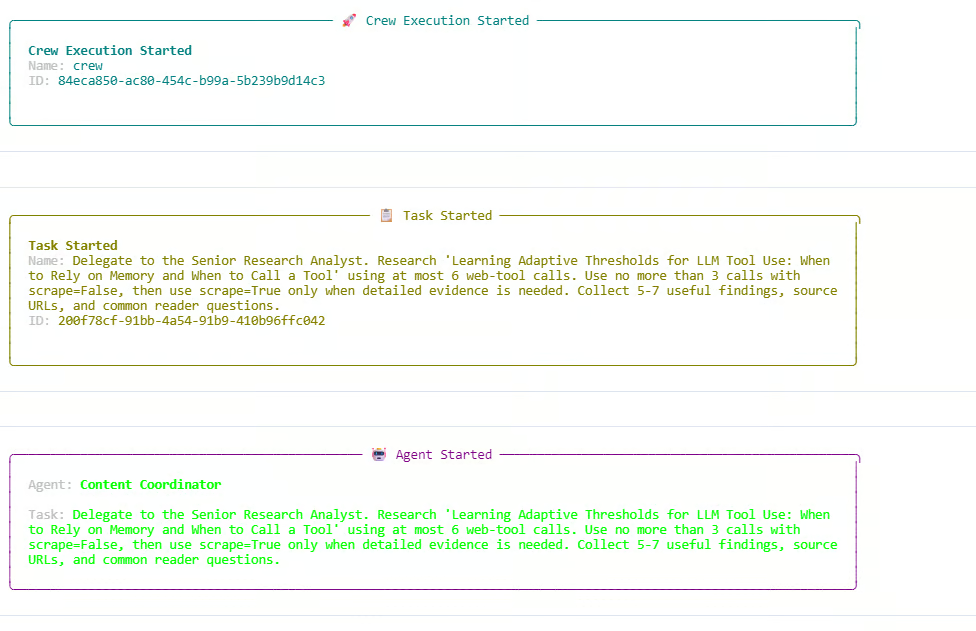
从日志可见,Researcher 同时使用了仅搜索与抓取两类调用。搜索预算被完全用尽:共 6/6 次外部网页调用与 3/3 次探索(不抓取)调用。由于探索调用已达上限,一次额外的仅搜索请求被阻止。这说明我们自定义的 Olostep 工具内部的预算规则运作正常。
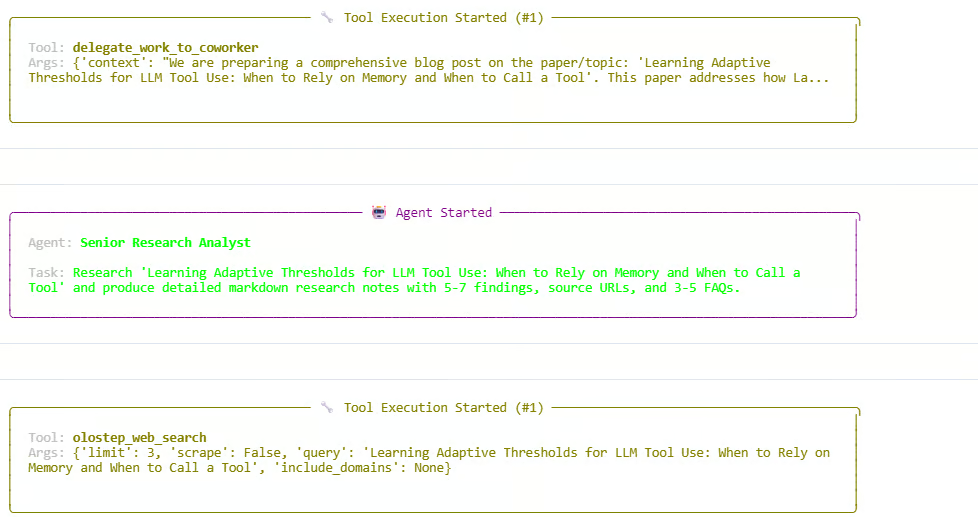
调研阶段结束后,Manager 继续将写作与审阅步骤进行委派。各代理先产出调研笔记,再撰写文章,最后润色成品。此次运行成功结束并返回一个 CrewOutput 对象。
您应会看到类似如下的输出:
Starting crew at 2026-06-05T13:54:07
Topic: 'Learning Adaptive Thresholds for LLM Tool Use: When to Rely on Memory and When to Call a Tool'

Crew Execution Started
Task Started
Agent: Content Coordinator
Agent: Senior Research Analyst
Tool: olostep_web_search
Budget used: 6/6 total calls; 3/3 discovery calls

Finished at 2026-06-05T13:59:29
Result type: CrewOutput
这意味着整个群集运行成功。Manager 负责协调,Researcher 收集最新信息,Writer 创建草稿,Reviewer 改进最终输出。
群集运行结束后,我们可以展示团队生成的最终文章。result.raw 包含了工作流的最终响应。
from IPython.display import Markdown, display

raw = result.raw

if "Blog Post" in raw:
    raw = raw.split("Blog Post", 1)[1].strip()

display(Markdown(raw))
这会在笔记本中以格式化的 markdown 渲染最终输出。
多数情况下,生成的博文结构良好,包含多级标题、清晰的分节、在合适处加入图示或可视化解释,并以有力的结论收尾。
调研、写作与编辑审阅的组合有助于产出可直接发表的内容。就我个人而言,在审阅输出后会给出“可发布”的绿灯。

接下来,我们可以打印执行追踪。这有助于理解群集如何工作、有哪些代理参与、使用了多少网页调用、以及每个任务是如何处理的。
from collections import Counter

def role_name(value):
    """Return a readable role/name for CrewAI agent values."""
    if value is None:
        return "Not reported"
    if isinstance(value, str):
        return value
    return getattr(value, "role", None) or getattr(value, "name", None) or str(value)

print("=" * 70)
print("SWARM EXECUTION TRACE")
print("=" * 70)

# Hierarchical crew structure
print("\nCOORDINATION")
print(f"Process : {crew.process}")
print(f"Manager : {role_name(crew.manager_agent)}")
print(f"Workers : {', '.join(role_name(agent) for agent in crew.agents)}")
print(
    "Flow    : Manager receives each task, delegates specialist work, "
    "validates the response, and passes approved context to the next task."
)

Now print the web-tool usage recorded by the custom Olostep tool.
history = list(getattr(olostep_search_tool, "_call_history", []))
discovery_calls = sum(not item["scrape"] for item in history)
scrape_calls = sum(item["scrape"] for item in history)
successful_calls = sum(item["status"] == "success" for item in history)

print("\nWEB TOOL USAGE")
print(f"Total external calls : {len(history)}/6")
print(f"Without scraping     : {discovery_calls}/3")
print(f"With scraping        : {scrape_calls}")
print(f"Successful calls     : {successful_calls}")

if history:
    for item in history:
        mode = "scrape" if item["scrape"] else "search only"
        domains = ", ".join(item["domains"]) if item["domains"] else "all domains"
        print(
            f"  {item['number']}. {mode}; status={item['status']}; "
            f"results={item['results']}; scope={domains}"
        )
        print(f"     Query: {item['query']}")
else:
    print("  No Olostep calls were recorded.")

Finally, print the task-by-task trace.
print("\nTASK-BY-TASK TRACE")
agent_activity = Counter()

for index, task_out in enumerate(result.tasks_output, start=1):
    task = crew.tasks[index - 1] if index <= len(crew.tasks) else None
    reported_agent = role_name(getattr(task_out, "agent", None))
    processed_by = sorted(getattr(task, "processed_by_agents", set()) or [])
    participants = processed_by or [reported_agent]

    for participant in participants:
        agent_activity[role_name(participant)] += 1

    delegations = getattr(task, "delegations", 0) if task else 0
    used_tools = getattr(task, "used_tools", 0) if task else 0
    tool_errors = getattr(task, "tools_errors", 0) if task else 0
    start_time = getattr(task, "start_time", None) if task else None
    end_time = getattr(task, "end_time", None) if task else None
    duration = end_time - start_time if start_time and end_time else None

    print(f"\n--- Task {index} ---")
    print(f"Reported owner : {reported_agent}")
    print(f"Processed by   : {', '.join(map(role_name, participants))}")
    print(f"Delegations    : {delegations}")
    print(f"Tool uses      : {used_tools}")
    print(f"Tool errors    : {tool_errors}")
    if duration is not None:
        print(f"Duration       : {duration}")

    preview = getattr(task_out, "raw", "").strip().replace("\n", " ")
    print(f"Output preview : {preview[:300]}{'...' if len(preview) > 300 else ''}")

print("\nAGENT ACTIVITY")
for agent, count in agent_activity.most_common():
    print(f"{agent}: participated in {count} task(s)")

if not agent_activity:
    print("CrewAI did not expose per-agent processing metadata for this run.")
您应会看到类似如下的输出:
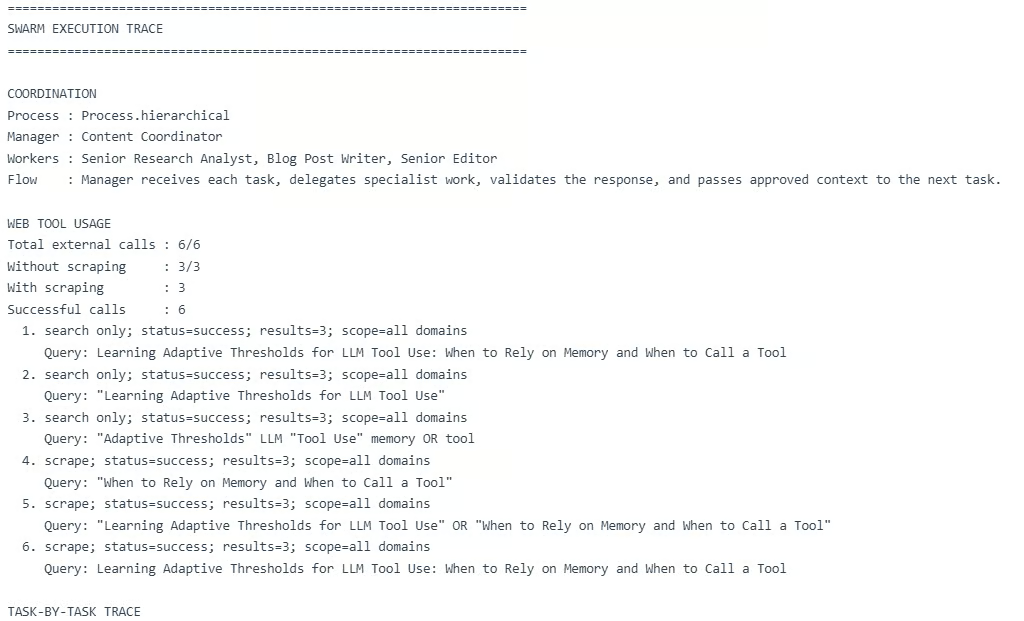
该追踪显示分层群集如预期工作:Manager 协调三项任务,Researcher 进行调研,Writer 撰写草稿,Reviewer 改进最终输出。
不过,这也揭示了一个重要限制:多代理工作流可能变得昂贵。
在这次运行中,工作流使用了 6 次外部网页调用,并在 Manager、Researcher、Writer 与 Reviewer 之间进行了多次 LLM 调用。单次运行成本最高约为 $0.28,在测试期间编写本指南的总成本约为 $2.78。对于一个简单的教程项目而言,这个成本偏高。
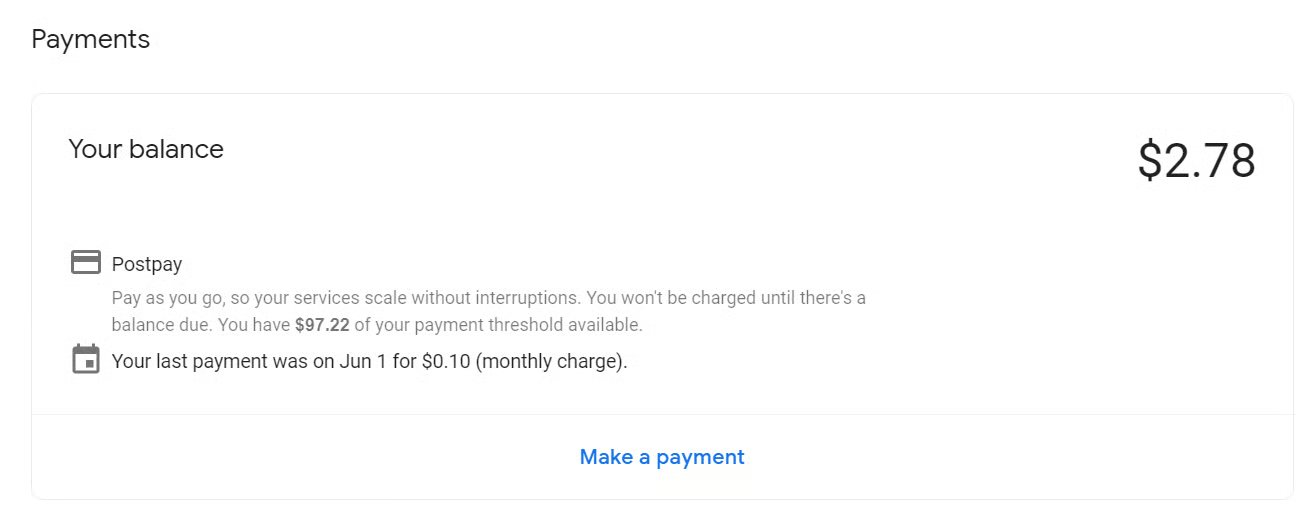
代理群集与多代理工作流在纸面上看起来非常美好。让 Researcher、Writer、Reviewer 与 Manager 协同工作这一理念的确很有力量,而在本指南中,最终输出确实只需少量修改就足以发布。
但在实践中,这种设置可能更费钱、花时更久、出错点更多。以我为例,单次运行约 $0.28,撰写本指南在测试期间约 $2.78。对于一个简单教程项目而言,这已经不少了。
对于真实应用,我不会总是用完整的多代理群集。更偏好程序化的设置:用代码或规则处理简单任务,仅将复杂任务交给代理。同时,我们可以通过限制工具调用、减少代理数量、缩短提示词、以及将分层工作流改为线性流程来降低成本。
当然,一旦优化过度,它可能不再是“真正的代理群集”,而更像是基于规则的 AI 工作流。因此目标在于“平衡”:在确实能带来价值时使用代理群集,而在不需要时保持简单。
在 DataCamp 学习 Agentic AI!
Courses
Tracks
Courses