
Course
Building AI Agents with CrewAI
1 hr
1.3K
An agent swarm is a group of AI agents that work together to complete a task. Instead of asking one model to research, write, review, and finalize everything on its own, an agent swarm splits the work across multiple specialized agents. Each agent has a clear role, and the system coordinates them to produce a stronger final result.
The advantage is specialization. A research-focused agent can concentrate on finding and verifying sources, a writing-focused agent can focus on structure and clarity, and a reviewer can check the draft against the original research without being distracted by the writing it just produced.
A coordinating agent ties the steps together and decides what happens next. In the swarm we're building, those roles map directly onto the Researcher, Writer, Reviewer, and Manager.
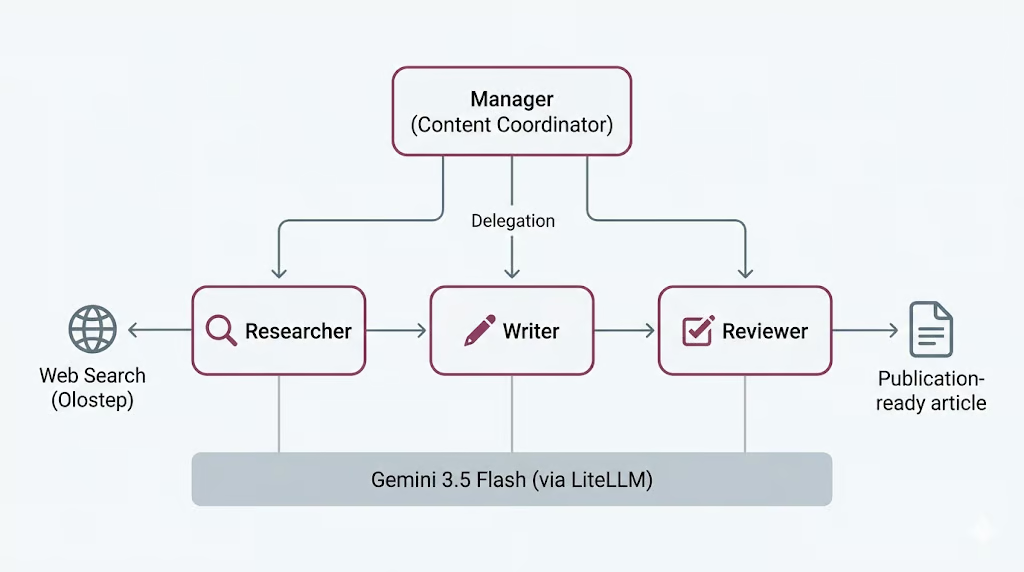
This isn't free, though. More agents means more model calls, more time, and more places for the workflow to go wrong; a tradeoff we'll come back to at the end, once you've seen what it actually costs to run.
CrewAI is an open-source framework for building multi-agent systems. It gives you a clean way to define agents, assign them tasks, and choose how they coordinate, so you can focus on the roles and the workflow rather than the plumbing that connects them.
Three concepts do most of the work.
This process can be either sequential, where tasks run in a fixed order, or hierarchical, where a manager agent delegates work to others and validates their output. We'll use the hierarchical process here, with the Manager handling delegation.
CrewAI also handles model access through LiteLLM, an open-source library that provides one unified interface for many providers. That's what lets us define a single Gemini 3.5 Flash model and reuse it across all four agents, which we'll set up in the steps below.
Let’s get started with the setup.
Before starting, make sure you have:
Launch Jupyter Notebook or JupyterLab and open a notebook with the latest Python kernel available in your environment. Then run the following cell to install the required packages.
%pip install --quiet -U \
    crewai \
    crewai-tools \
    google-genai \
    litellm \
    olostep \
    nest-asyncio
After the installation is complete, run the next cell to check the installed package versions. This helps confirm that everything was installed correctly.
import importlib.metadata as md

for pkg in [
    "crewai",
    "crewai-tools",
    "google-genai",
    "litellm",
    "olostep",
    "nest-asyncio",
]:
    print(f"{pkg:>16}  {md.version(pkg)}")
You should see output similar to this:
         crewai  1.14.6
    crewai-tools  1.14.6
      google-genai  2.8.0
          litellm  1.87.1
          olostep  1.1.0
nest-asyncio 1.6.0You will need two API keys for this project.
First, create a Gemini API key from Google AI Studio. Open Google AI Studio, go to the API key section, and create a new key for your project. Gemini offers a free tier, but it has limited usage and rate limits. For checking and running Gemini more reliably, connect your Google billing account or add credits to your Google account so usage can be billed when you go beyond the free tier limits.
Next, create an Olostep API key. Sign up for Olostep, open the Olostep dashboard, and generate an API key from the API keys page. We will use this key to give the Researcher agent live web access for search and page scraping.
Once both keys are ready, save them as environment variables. Gemini will power the CrewAI agents, while Olostep will allow the Researcher agent to collect current information from the web.
After creating both keys, save them as environment variables before running the notebook.
PowerShell:
$env:GEMINI_API_KEY="your-gemini-key"
$env:OLOSTEP_API_KEY="your-olostep-key"
macOS/Linux:
export GEMINI_API_KEY="your-gemini-key"
export OLOSTEP_API_KEY="your-olostep-key"
Now run the following cell to check that the Gemini API key is loaded correctly.
import os

api_key = os.getenv("GEMINI_API_KEY") or os.getenv("GOOGLE_API_KEY")

if not api_key:
    raise RuntimeError(
        "Set GEMINI_API_KEY or GOOGLE_API_KEY in your environment, "
        "then restart the notebook kernel."
    )
print(f"Gemini API key loaded")
You should see:
Gemini API key loadedIn this project, we will use Gemini 3.5 Flash as the shared LLM for all CrewAI agents. Gemini 3.5 Flash is designed for fast, agentic, and coding-focused workloads. It is useful for this project because our agents need to reason across multiple steps, follow instructions, work with tools, and produce structured outputs.
Gemini 3.5 Flash also supports a large context window, long outputs, thinking, and tool use, making it a strong choice for agent workflows. Since an agent swarm may call the model several times across the Researcher, Writer, Reviewer, and Manager agents, using a Flash model helps keep the workflow responsive while still giving strong reasoning and writing quality.
If you want to compare the model to other state-of-the-art LLMs, I recommend reading our guides on Gemini 3.5 Flash vs GPT-5.5 and Gemini 3.5 Flash vs Claude Opus 4.8.
We will access Gemini through LiteLLM. LiteLLM is an open-source library that provides one unified interface for calling many LLM providers, including Gemini, OpenAI, Anthropic, Bedrock, Vertex AI, and others. In this setup, CrewAI uses LiteLLM behind the scenes so we can pass the Gemini model name in a simple provider/model format.
Now we will create a shared CrewAI LLM and reuse it for all agents. This keeps the setup simple because the Researcher, Writer, Reviewer, and Manager will all use the same Gemini model.
from crewai import LLM

GEMINI_MODEL = "gemini/gemini-3.5-flash"

gemini_llm = LLM(
    model=GEMINI_MODEL,
    api_key=os.getenv("GEMINI_API_KEY") or os.getenv("GOOGLE_API_KEY"),
    temperature=1.0,
)

print(f"LLM ready: {gemini_llm.model}")
print("Provider API: Google Gemini (via LiteLLM)")
You should see output similar to this:
LLM ready: gemini-3.5-flash
Provider API: Google Gemini (via LiteLLM)
This confirms that CrewAI can now access Gemini through LiteLLM. In the next steps, we will pass this shared gemini_llm object to each agent.
The Researcher agent needs access to current information. To do this, we will create a custom Olostep search tool and give it to the Researcher agent later.
This tool can work in two modes. It can return search summaries only, which is faster, or it can scrape the result pages and return page content in markdown. We also add a small search budget so the agent does not keep calling the web tool too many times.
from pydantic import Field, PrivateAttr
from crewai.tools import BaseTool

try:
    from olostep import Olostep, Olostep_BaseError
except ImportError:
    raise ImportError(
        "The 'olostep' package is not installed. Run %pip install -U olostep."
    )
First, load the Olostep API key from the environment.
olostep_api_key = os.getenv("OLOSTEP_API_KEY")

if not olostep_api_key or olostep_api_key == "your-olostep-api-key-here":
    print(
        "The Olostep tool will fail at call time unless OLOSTEP_API_KEY "
        "is set in the environment."
    )
else:
    print("Olostep API key loaded.")

_olostep_client = Olostep(api_key=olostep_api_key) if olostep_api_key else None
Now create the custom CrewAI tool.
class OlostepSearchTool(BaseTool):
    """Search the web with a strict research-call budget."""

    name: str = "olostep_web_search"
    description: str = (
        "Search the live web. Set scrape=false for fast discovery and "
        "scrape=true for full-page evidence. You have at most 3 discovery "
        "searches without scraping and 6 external search calls total. After "
        "3 discovery searches, use scrape=true on the strongest query or "
        "domain. Each call returns at most 3 results. Inputs: query, scrape, "
        "limit, and optional include_domains."
    )

    default_limit: int = Field(default=3, ge=1, le=3)
    max_chars_per_page: int = Field(default=4000, ge=500, le=12000)

    _total_calls: int = PrivateAttr(default=0)
    _discovery_calls: int = PrivateAttr(default=0)
    _call_history: list[dict] = PrivateAttr(default_factory=list)

    def _run(
        self,
        query: str,
        scrape: bool = False,
        limit: int | None = None,
        include_domains: list[str] | None = None,
    ) -> str:
        if _olostep_client is None:
            return (
                "OLOSTEP_API_KEY is not set. Set it in the environment "
                "and restart the kernel."
            )

        if self._total_calls >= 6:
            return (
                "Research search budget exhausted: 6 external calls have "
                "already been used. Stop searching and complete the task "
                "with the collected sources."
            )

        if not scrape and self._discovery_calls >= 3:
            return (
                "Discovery-search limit reached. Do not run another "
                "scrape=False search. Use scrape=True on the strongest query "
                "or selected domains, or finish with the sources already found."
            )

        clean_query = query.strip()
        if not clean_query:
            return "Search query cannot be empty."

        result_limit = max(1, min(limit or self.default_limit, 3))
        kwargs = {"query": clean_query, "limit": result_limit}

        if scrape:
            kwargs["scrape_options"] = {
                "formats": ["markdown"],
                "timeout": 25,
            }

        if include_domains:
            kwargs["include_domains"] = include_domains

        self._total_calls += 1
        if not scrape:
            self._discovery_calls += 1

        call_record = {
            "number": self._total_calls,
            "query": clean_query,
            "scrape": scrape,
            "limit": result_limit,
            "domains": include_domains or [],
            "status": "started",
            "results": 0,
        }
        self._call_history.append(call_record)

        try:
            search = _olostep_client.searches.create(**kwargs)
        except Olostep_BaseError as error:
            call_record["status"] = "error"
            call_record["error"] = f"{type(error).__name__}: {error}"
            return (
                f"Olostep search error: {type(error).__name__}: {error}\n"
                f"Budget used: {self._total_calls}/6 total calls; "
                f"{self._discovery_calls}/3 discovery calls."
            )

        if not search.links:
            call_record["status"] = "no_results"
            return (
                f"No results found for query: {clean_query!r}\n"
                f"Budget used: {self._total_calls}/6 total calls; "
                f"{self._discovery_calls}/3 discovery calls."
            )

        call_record["status"] = "success"
        call_record["results"] = len(search.links)

        chunks = [
            f"## Web results for: {clean_query!r}",
            f"Page scraping: {'enabled' if scrape else 'disabled'}",
            (
                f"Budget used: {self._total_calls}/6 total calls; "
                f"{self._discovery_calls}/3 discovery calls."
            ),
        ]

        for index, link in enumerate(search.links, 1):
            url = link.get("url", "")
            title = link.get("title") or url or "Untitled result"
            description = link.get("description") or "No description provided."

            chunks.append(
                f"### {index}. {title}\n"
                f"URL: {url}\n"
                f"Summary: {description}"
            )

            markdown = link.get("markdown_content")
            if scrape and markdown:
                body = markdown.strip()
                if len(body) > self.max_chars_per_page:
                    body = body[: self.max_chars_per_page] + "\n...[truncated]"
                chunks.append(f"Page content:\n{body}")

        return "\n\n".join(chunks)
Finally, create an instance of the tool.
olostep_search_tool = OlostepSearchTool()
print(f"Tool ready: {olostep_search_tool.name}")
You should see output similar to this:
Olostep API key loaded.
Tool ready: olostep_web_search
This confirms that the Olostep web search tool is ready. Later, we will attach this tool to the Researcher agent so it can collect current information from the web.
Now we will create the agents for our swarm. We will define three worker agents and one manager agent. The worker agents do the main tasks, while the manager coordinates the workflow.
The Researcher agent will use the Olostep tool to find current information. The Writer agent will turn the research into a draft. The Reviewer agent will improve the draft. The Manager agent will decide how to delegate the work in the hierarchical crew.
Let’s start with the three worker agents.
from crewai import Agent

researcher = Agent(
    role="Senior Research Analyst",
    goal=(
        "Find accurate, current, and well-sourced information about {topic}. "
        "Produce concrete, verifiable points for the writer."
    ),
    backstory=(
        "You are a meticulous research analyst. You decide whether each web "
        "search needs page scraping. Use scrape=False when titles, URLs, and "
        "summaries are enough. Use scrape=True when you need full-page evidence "
        "to verify a claim or understand a source in detail. Cite source URLs."
    ),
    llm=gemini_llm,
    tools=[olostep_search_tool],
    verbose=True,
    allow_delegation=False,
)
Next, create the Writer agent.
writer = Agent(
    role="Blog Post Writer",
    goal=(
        "Turn the research into a complete, publication-ready educational "
        "article on {topic}. Include a strong title, an unlabeled italic "
        "summary, TL;DR, detailed body sections, conclusion, and FAQs. Add a "
        "table only when it makes a comparison or decision easier to understand."
    ),
    backstory=(
        "You are a seasoned technology educator and writer. You create "
        "practical, approachable articles similar in structure to high-quality "
        "DataCamp content, without copying its wording or branding. You use "
        "clear headings, short paragraphs, concrete examples, and sourced facts."
    ),
    llm=gemini_llm,
    verbose=True,
    allow_delegation=False,
)
Now create the Reviewer agent.
reviewer = Agent(
    role="Senior Editor",
    goal=(
        "Review the draft for factual accuracy, clarity, structure, and "
        "completeness. Ensure it follows the required article order and return "
        "a polished, publication-ready version."
    ),
    backstory=(
        "You are a detail-oriented senior editor for an educational technology "
        "publication. You verify claims, improve flow, remove repetition, and "
        "ensure the title is followed by an unlabeled italic summary and TL;DR. "
        "You keep a table only when it adds real value, remove any Key Takeaways "
        "section, and ensure Conclusion appears immediately before FAQs."
    ),
    llm=gemini_llm,
    verbose=True,
    allow_delegation=False,
)Finally, create the Manager agent.
manager = Agent(
    role="Content Coordinator",
    goal=(
        "Coordinate research, writing, and review for {topic}. Delegate each "
        "task to the correct specialist and ensure the reviewed article is the "
        "final result."
    ),
    backstory=(
        "You are an experienced editorial lead. You keep the workflow simple: "
        "research first, writing second, and editorial review last."
    ),
    llm=gemini_llm,
    verbose=True,
    allow_delegation=True,
)
The manager is configured separately when we build the hierarchical crew. That is why it has not been added to the worker agent list yet.
Now we will define the tasks for the agent swarm. These tasks are not directly assigned to the worker agents. Instead, the Manager agent will decide which worker should handle each task.
In this workflow, the first task is research, the second task is writing, and the third task is review. Each task also includes an expected output, so the agents know exactly what they need to produce.
from crewai import Task

research_task = Task(
    description=(
        "Delegate to the Senior Research Analyst. Research '{topic}' using at "
        "most 6 web-tool calls. Use no more than 3 calls with scrape=False, "
        "then use scrape=True only when detailed evidence is needed. Collect "
        "5-7 useful findings, source URLs, and common reader questions."
    ),
    expected_output=(
        "Clear markdown research notes with 5-7 sourced findings and 3-5 "
        "potential FAQ questions."
    ),
)
Next, create the writing task. This task uses the research task as context, so the Writer can build the article from the collected research.
write_task = Task(
    description=(
        "Delegate to the Blog Post Writer. Write one complete educational "
        "markdown article on '{topic}', approximately 1,000-1,500 words. Start "
        "with one H1 title and an unlabeled italic summary. Then include TL;DR, "
        "an introduction, useful body sections, an optional table only when it "
        "improves understanding, a Conclusion, and FAQs. Use source links."
    ),
    expected_output=(
        "One continuous publication-ready markdown article with title, italic "
        "summary, TL;DR, body, Conclusion, and 3-5 FAQs."
    ),
    context=[research_task],
)
Now, create the review task. This task uses both the research and writing tasks as context, so the Reviewer can check the article against the original research.
review_task = Task(
    description=(
        "Delegate to the Senior Editor. Review the article for accuracy, "
        "clarity, structure, and source support. Return only the corrected full "
        "article. Keep the same continuous article format and ensure FAQs are "
        "the final section."
    ),
    expected_output=(
        "Only the final reviewed markdown article, beginning with its H1 title "
        "and ending with the final FAQ answer."
    ),
    context=[research_task, write_task],
)
Finally, add all three tasks to a list.
tasks = [research_task, write_task, review_task]

print(f"Defined {len(tasks)} manager-delegated tasks.")
You should see:
Defined 3 manager-delegated tasks.Now we will connect the agents and tasks into one CrewAI workflow. We will use a hierarchical process in which the Manager agent coordinates the worker agents.
In this setup, the Researcher, Writer, and Reviewer are added as worker agents. The Manager is passed separately through manager_agent, because it is responsible for delegation and coordination.
from crewai import Crew, Process

crew = Crew(
    agents=[researcher, writer, reviewer],
    tasks=tasks,
    manager_agent=manager,
    process=Process.hierarchical,
    verbose=True,
    memory=False,
)
Now print the crew details to confirm that the workflow was assembled correctly.
print("Hierarchical crew assembled.")
print(f"  Workers : {[a.role for a in crew.agents]}")
print(f"  Manager : {crew.manager_agent.role}")
print(f"  Tasks   : {len(crew.tasks)}")
print(f"  Process : {crew.process}")
You should see output similar to this:
Hierarchical crew assembled.
  Workers : ['Senior Research Analyst', 'Blog Post Writer', 'Senior Editor']
  Manager : Content Coordinator
  Tasks   : 3
  Process : Process.hierarchical
This confirms that the hierarchical agent swarm is ready. In the next step, we will run the crew on a topic and generate the final response.
Now we can run the agent swarm. We will provide a topic and start the workflow with kickoff_async().
Jupyter already runs an event loop in the background. Because of that, we first apply nest_asyncio, so the asynchronous CrewAI workflow can run inside the notebook.
try:
    import nest_asyncio

    nest_asyncio.apply()

    print("nest_asyncio applied: CrewAI can now run inside this kernel.")

except ModuleNotFoundError:
    print("nest_asyncio not installed. Run: pip install nest-asyncio")
You should see:
nest_asyncio applied: CrewAI can now run inside this kernel.Next, define a topic and create a helper function to run the crew.
from datetime import datetime

topic = "Learning Adaptive Thresholds for LLM Tool Use: When to Rely on Memory and When to Call a Tool"

async def run_crew(topic: str):
    """Run the CrewAI crew asynchronously."""
    print(f"Starting crew at {datetime.now().isoformat(timespec='seconds')}")
    print(f"Topic: {topic!r}\n")

    result = await crew.kickoff_async(inputs={"topic": topic})

    print(f"\nFinished at {datetime.now().isoformat(timespec='seconds')}")
    print(f"Result type: {type(result).__name__}")
    return result

result = await run_crew(topic)
When the workflow starts, CrewAI first gives the task to the Manager agent. The Manager then delegates the research work to the Senior Research Analyst. The Researcher uses the olostep_web_search tool to search the web for information about adaptive thresholds, LLM tool use, memory, and tool-calling decisions.
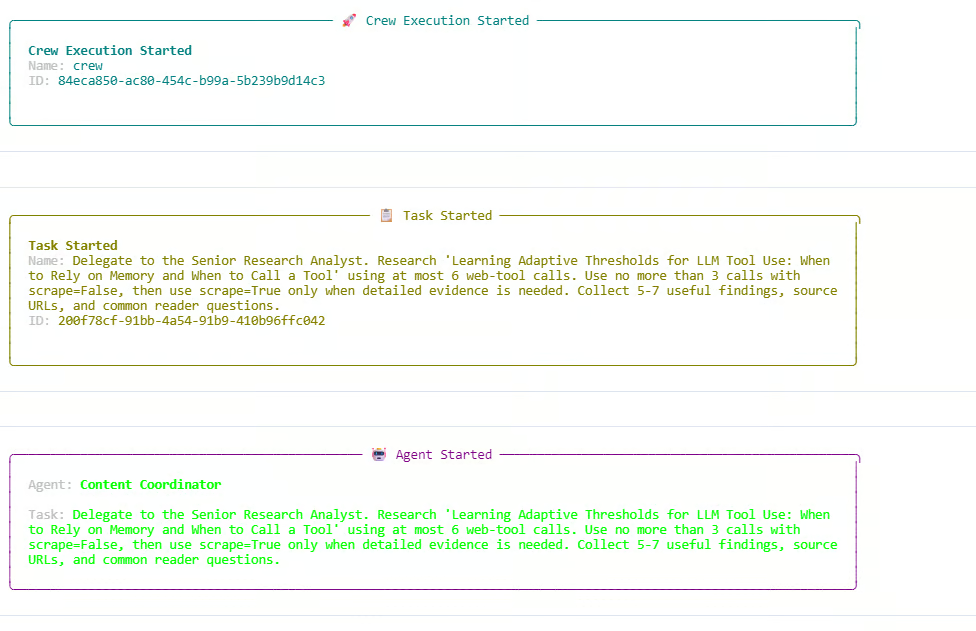
In the log, the Researcher uses both search-only calls and scraping calls. The search budget is used fully, reaching 6 out of 6 total web calls and 3 out of 3 discovery calls. One extra search-only request is blocked because the discovery-search limit has already been reached. This shows that the budget rules inside our custom Olostep tool are working correctly.
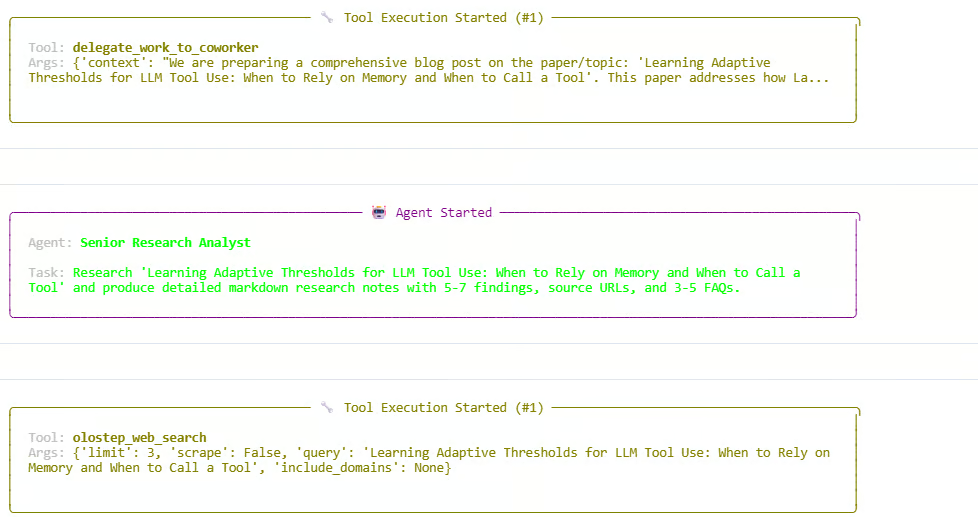
After the research phase, the Manager continues the workflow by delegating the writing and review steps. The agents produce research notes, draft the article, and then polish the final response. The run finishes successfully and returns a CrewOutput object.
You should see output similar to this:
Starting crew at 2026-06-05T13:54:07
Topic: 'Learning Adaptive Thresholds for LLM Tool Use: When to Rely on Memory and When to Call a Tool'

Crew Execution Started
Task Started
Agent: Content Coordinator
Agent: Senior Research Analyst
Tool: olostep_web_search
Budget used: 6/6 total calls; 3/3 discovery calls

Finished at 2026-06-05T13:59:29
Result type: CrewOutput
This means the full swarm ran successfully. The Manager coordinated the workflow, the Researcher collected current information, the Writer created the draft, and the Reviewer improved the final output.
After the swarm finishes running, we can display the final article generated by the crew. The result.raw value contains the final response from the workflow.
from IPython.display import Markdown, display

raw = result.raw

if "Blog Post" in raw:
    raw = raw.split("Blog Post", 1)[1].strip()

display(Markdown(raw))
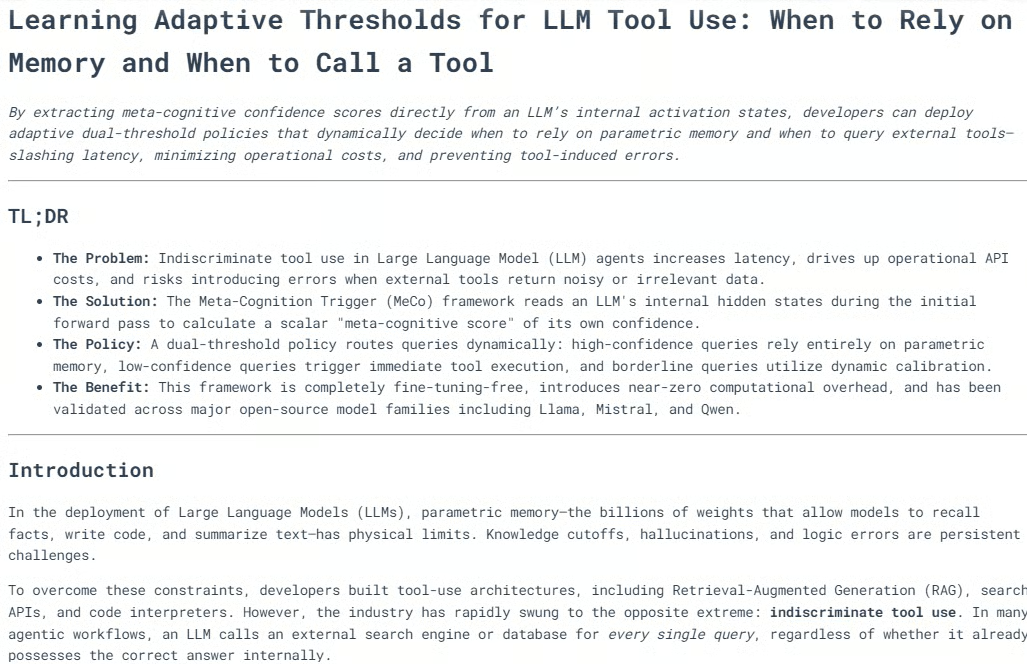
This will render the final output as formatted markdown inside the notebook.
In most cases, the generated blog will already be well structured, with multiple headings, clear sections, diagrams or visual explanations where appropriate, and a strong conclusion.
The combination of research, writing, and editorial review helps produce content that is publication-ready. After reviewing the output, I would personally give it the green light for publication.
Next, we can print an execution trace. This helps us understand how the swarm worked, which agents participated, how many web calls were used, and how each task was processed.
from collections import Counter

def role_name(value):
    """Return a readable role/name for CrewAI agent values."""
    if value is None:
        return "Not reported"
    if isinstance(value, str):
        return value
    return getattr(value, "role", None) or getattr(value, "name", None) or str(value)

print("=" * 70)
print("SWARM EXECUTION TRACE")
print("=" * 70)

# Hierarchical crew structure
print("\nCOORDINATION")
print(f"Process : {crew.process}")
print(f"Manager : {role_name(crew.manager_agent)}")
print(f"Workers : {', '.join(role_name(agent) for agent in crew.agents)}")
print(
    "Flow    : Manager receives each task, delegates specialist work, "
    "validates the response, and passes approved context to the next task."
)

Now print the web-tool usage recorded by the custom Olostep tool.
history = list(getattr(olostep_search_tool, "_call_history", []))
discovery_calls = sum(not item["scrape"] for item in history)
scrape_calls = sum(item["scrape"] for item in history)
successful_calls = sum(item["status"] == "success" for item in history)

print("\nWEB TOOL USAGE")
print(f"Total external calls : {len(history)}/6")
print(f"Without scraping     : {discovery_calls}/3")
print(f"With scraping        : {scrape_calls}")
print(f"Successful calls     : {successful_calls}")

if history:
    for item in history:
        mode = "scrape" if item["scrape"] else "search only"
        domains = ", ".join(item["domains"]) if item["domains"] else "all domains"
        print(
            f"  {item['number']}. {mode}; status={item['status']}; "
            f"results={item['results']}; scope={domains}"
        )
        print(f"     Query: {item['query']}")
else:
    print("  No Olostep calls were recorded.")

Finally, print the task-by-task trace.
print("\nTASK-BY-TASK TRACE")
agent_activity = Counter()

for index, task_out in enumerate(result.tasks_output, start=1):
    task = crew.tasks[index - 1] if index <= len(crew.tasks) else None
    reported_agent = role_name(getattr(task_out, "agent", None))
    processed_by = sorted(getattr(task, "processed_by_agents", set()) or [])
    participants = processed_by or [reported_agent]

    for participant in participants:
        agent_activity[role_name(participant)] += 1

    delegations = getattr(task, "delegations", 0) if task else 0
    used_tools = getattr(task, "used_tools", 0) if task else 0
    tool_errors = getattr(task, "tools_errors", 0) if task else 0
    start_time = getattr(task, "start_time", None) if task else None
    end_time = getattr(task, "end_time", None) if task else None
    duration = end_time - start_time if start_time and end_time else None

    print(f"\n--- Task {index} ---")
    print(f"Reported owner : {reported_agent}")
    print(f"Processed by   : {', '.join(map(role_name, participants))}")
    print(f"Delegations    : {delegations}")
    print(f"Tool uses      : {used_tools}")
    print(f"Tool errors    : {tool_errors}")
    if duration is not None:
        print(f"Duration       : {duration}")

    preview = getattr(task_out, "raw", "").strip().replace("\n", " ")
    print(f"Output preview : {preview[:300]}{'...' if len(preview) > 300 else ''}")

print("\nAGENT ACTIVITY")
for agent, count in agent_activity.most_common():
    print(f"{agent}: participated in {count} task(s)")

if not agent_activity:
    print("CrewAI did not expose per-agent processing metadata for this run.")
You should see output similar to this:
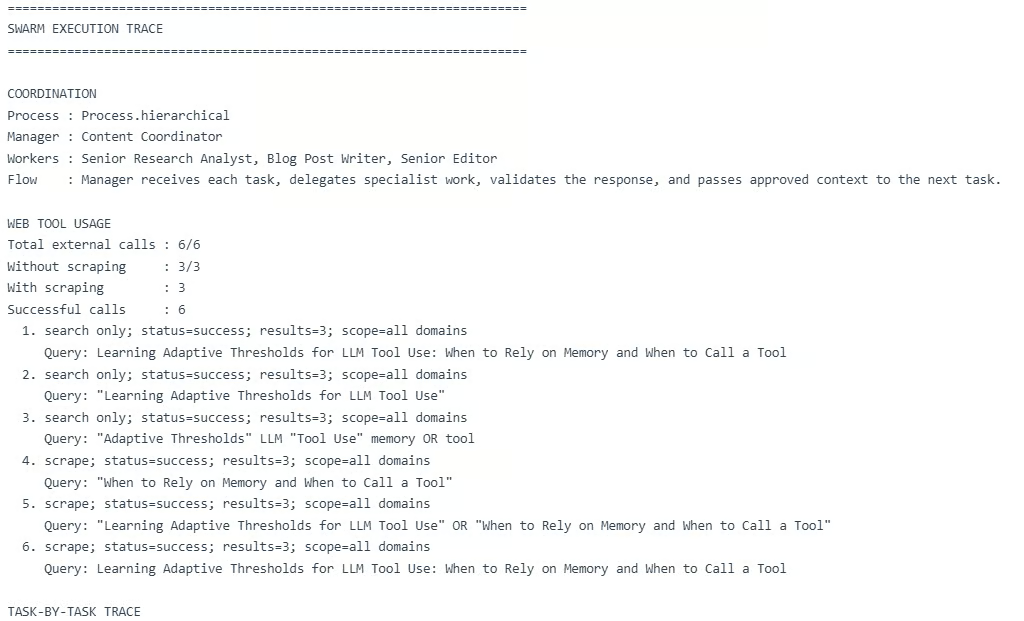
This trace shows that the hierarchical swarm worked as expected. The Manager coordinated all three tasks, the Researcher handled the research step, the Writer created the article draft, and the Reviewer improved the final response.
However, this also shows an important limitation: multi-agent workflows can become expensive.
In this run, the workflow used 6 external web calls and multiple LLM calls across the Manager, Researcher, Writer, and Reviewer. A single run can cost up to around $0.28, and creating this guide cost around $2.78 during testing. That is high for a simple tutorial project.
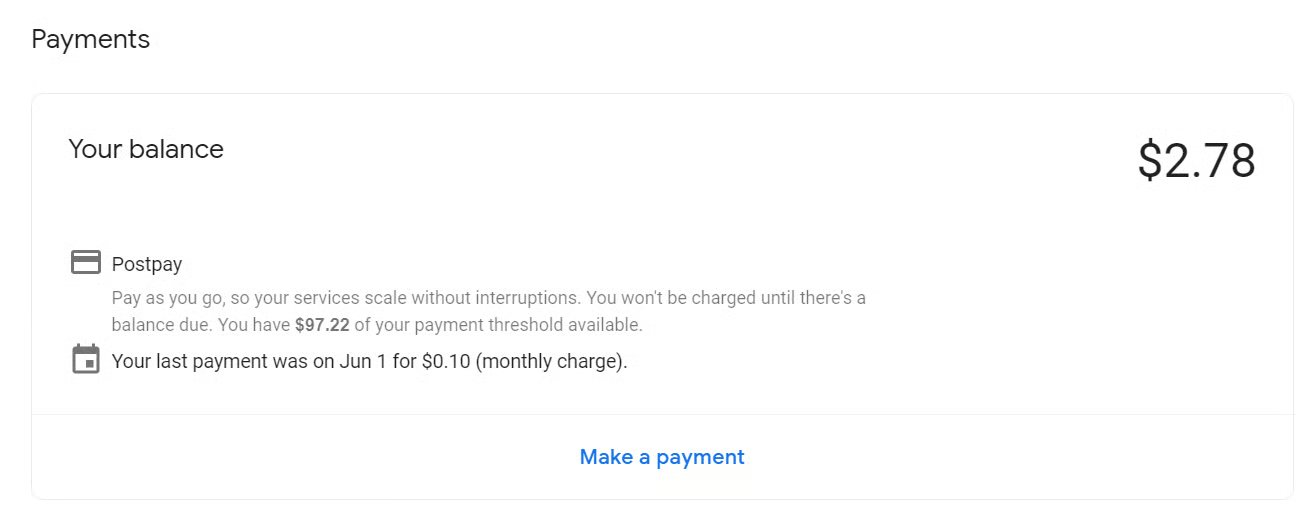
Agent swarms and multi-agent workflows look great on paper. The idea of having a Researcher, Writer, Reviewer, and Manager working together feels powerful, and in this guide, the final output was actually good enough to publish with minor edits.
But in practice, this setup can cost more, take more time, and create more points of failure. In my case, one run costs around $0.28, and creating this guide costs around $2.78. That is a lot for a simple tutorial project.
For real applications, I would not always use a full multi-agent swarm. I would prefer a more programmatic setup where simple tasks are handled by code or rules, and only complex tasks are handed off to agents. We can also reduce costs by limiting tool calls, using fewer agents, shortening prompts, and using a linear workflow instead of a hierarchical one.
Of course, once we optimize too much, it may no longer be a true agent swarm. It becomes more like a rule-based AI workflow. That is why the goal is balance: use agent swarms when they add real value, but keep things simple when they do not.
Learn Agentic AI with DataCamp!
Course
Track
Course
Tutorial
Bhavishya Pandit
9 min
Tutorial
Abid Ali Awan
13 min
Tutorial
Aashi Dutt
10 min
Tutorial
Benito Martin
15 min
Tutorial
Aashi Dutt
8 min
code-along
Tony Kipkemboi