Courses
Building AI Agents with CrewAI
1時間
1.3K
エージェント・スウォームは、AIエージェントのチームが協力してタスクを完了する仕組みです。1つのモデルに調査・執筆・レビュー・最終化まで任せる代わりに、複数の専門エージェントに仕事を分担します。各エージェントには明確な役割があり、システムはそれらを調整してより強い最終成果を生み出します。
強みは専門化にあります。調査に特化したエージェントは情報源の発見と検証に集中でき、執筆に特化したエージェントは構成と明瞭性に集中できます。レビューアは、自ら書いたばかりの文章に引きずられず、元の調査内容と見比べてチェックできます。
調整役のエージェントが各ステップをつなぎ、次に何をするかを判断します。本スウォームでは、Researcher、Writer、Reviewer、Managerがこの役割分担に対応します。
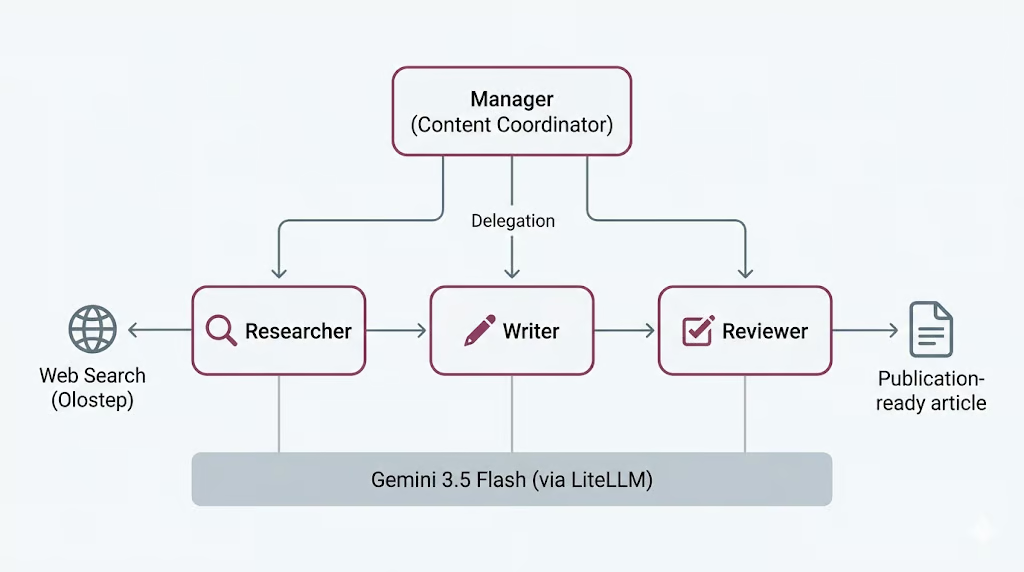
ただし、これは無料ではありません。エージェントが増えればモデル呼び出しも時間も増え、ワークフローが失敗する箇所も増えます。このトレードオフについては、最後に実際の実行コストを見たうえで改めて考えます。
CrewAIは、マルチエージェントシステムを構築するためのオープンソースフレームワークです。エージェントの定義、タスクの割り当て、連携方法の選択をすっきり記述できるため、配線の実装ではなく役割やワークフローの設計に集中できます。
中心となる概念は3つです。
プロセスは、タスクを決まった順序で実行する逐次型か、マネージャーが他のエージェントに委任して出力を検証する階層型かを選べます。ここではManagerが委任を担う階層型を使います。
CrewAIは LiteLLM を通じてモデルへのアクセスも扱います。LiteLLMは多様なプロバイダを単一のインターフェースで呼び出せるオープンソースライブラリです。これにより、単一のGemini 3.5 Flashモデルを定義して4つのエージェントすべてで再利用できます。以下の手順で設定します。
それではセットアップを始めましょう。
開始前に、以下を用意してください。
Jupyter NotebookまたはJupyterLabを起動し、環境で利用可能な最新のPythonカーネルでノートブックを開きます。続いて、次のセルを実行して必要なパッケージをインストールします。
%pip install --quiet -U \
    crewai \
    crewai-tools \
    google-genai \
    litellm \
    olostep \
    nest-asyncio
インストール完了後、次のセルでインストールされたパッケージのバージョンを確認します。正しく導入できたかの確認に役立ちます。
import importlib.metadata as md

for pkg in [
    "crewai",
    "crewai-tools",
    "google-genai",
    "litellm",
    "olostep",
    "nest-asyncio",
]:
    print(f"{pkg:>16}  {md.version(pkg)}")
次のような出力が表示されるはずです。
         crewai  1.14.6
    crewai-tools  1.14.6
      google-genai  2.8.0
          litellm  1.87.1
          olostep  1.1.0
nest-asyncio 1.6.0このプロジェクトには2つのAPIキーが必要です。
まず、Google AI StudioでGeminiのAPIキーを作成します。Google AI Studioを開き、API keyセクションからプロジェクト用の新しいキーを作成してください。Geminiには無料枠がありますが、利用量とレート制限があります。より確実にGeminiを試し・実行するには、Googleの請求アカウントを連携するか、無料枠超過時に課金できるようクレジットを追加してください。
次に、OlostepのAPIキーを作成します。Olostepにサインアップし、ダッシュボードのAPI keysページでAPIキーを生成します。これを使い、Researcherエージェントに検索とページスクレイピングのためのライブWebアクセスを付与します。
両方のキーが用意できたら、環境変数として保存してください。GeminiはCrewAIのエージェントを駆動し、OlostepはResearcherがWebから最新情報を収集するために使用します。
両キーの作成後、ノートブックを実行する前に環境変数として保存してください。
PowerShell:
$env:GEMINI_API_KEY="your-gemini-key"
$env:OLOSTEP_API_KEY="your-olostep-key"
macOS/Linux:
export GEMINI_API_KEY="your-gemini-key"
export OLOSTEP_API_KEY="your-olostep-key"
次のセルを実行して、GeminiのAPIキーが正しく読み込まれたか確認します。
import os

api_key = os.getenv("GEMINI_API_KEY") or os.getenv("GOOGLE_API_KEY")

if not api_key:
    raise RuntimeError(
        "Set GEMINI_API_KEY or GOOGLE_API_KEY in your environment, "
        "then restart the notebook kernel."
    )
print(f"Gemini API key loaded")
次の出力が表示されます。
Gemini API key loaded本プロジェクトでは、すべてのCrewAIエージェントで共有するLLMとしてGemini 3.5 Flashを使います。Gemini 3.5 Flashは、高速でエージェント向け・コーディング向けのワークロードに設計されています。本ケースでは、複数ステップでの推論、指示の順守、ツールの活用、構造化出力が必要となるため適しています。
Gemini 3.5 Flashは大きなコンテキスト、長い出力、thinking、ツール使用をサポートしており、エージェントのワークフローに好適です。スウォームではResearcher、Writer、Reviewer、Managerが何度もモデルを呼び出す可能性があるため、Flashモデルを使うことで応答性を保ちながら、推論と執筆の品質も確保できます。
他の最先端LLMとの比較をしたい場合は、Gemini 3.5 Flash vs GPT-5.5やGemini 3.5 Flash vs Claude Opus 4.8のガイドを参照してください。
GeminiにはLiteLLM経由でアクセスします。LiteLLMは、Gemini、OpenAI、Anthropic、Bedrock、Vertex AIなど多くのプロバイダを単一のインターフェースで呼び出せるオープンソースライブラリです。本セットアップでは、CrewAIは内部的にLiteLLMを使うため、provider/model形式で簡単にGeminiのモデル名を指定できます。
ここで共有のCrewAI LLMを作成し、すべてのエージェントで再利用します。Researcher、Writer、Reviewer、Managerが同じGeminiモデルを使うことで、設定をシンプルに保てます。
from crewai import LLM

GEMINI_MODEL = "gemini/gemini-3.5-flash"

gemini_llm = LLM(
    model=GEMINI_MODEL,
    api_key=os.getenv("GEMINI_API_KEY") or os.getenv("GOOGLE_API_KEY"),
    temperature=1.0,
)

print(f"LLM ready: {gemini_llm.model}")
print("Provider API: Google Gemini (via LiteLLM)")
次のような出力が表示されるはずです。
LLM ready: gemini-3.5-flash
Provider API: Google Gemini (via LiteLLM)これでCrewAIがLiteLLM経由でGeminiにアクセスできることが確認できました。次のステップでは、この共有のgemini_llmオブジェクトを各エージェントに渡します。
Researcherエージェントには最新情報へのアクセスが必要です。そのため、カスタムのOlostep検索ツールを作成し、後でResearcherに渡します。
このツールは2つのモードで動作します。検索結果のサマリーのみを返す高速モードと、結果ページをスクレイピングしてMarkdownのページ内容を返すモードです。さらに、Webツールの呼び出し回数が増えすぎないよう小さな検索予算も設けます。
from pydantic import Field, PrivateAttr
from crewai.tools import BaseTool

try:
    from olostep import Olostep, Olostep_BaseError
except ImportError:
    raise ImportError(
        "The 'olostep' package is not installed. Run %pip install -U olostep."
    )
まず、環境からOlostepのAPIキーを読み込みます。
olostep_api_key = os.getenv("OLOSTEP_API_KEY")

if not olostep_api_key or olostep_api_key == "your-olostep-api-key-here":
    print(
        "The Olostep tool will fail at call time unless OLOSTEP_API_KEY "
        "is set in the environment."
    )
else:
    print("Olostep API key loaded.")

_olostep_client = Olostep(api_key=olostep_api_key) if olostep_api_key else None
次に、カスタムのCrewAIツールを作成します。
class OlostepSearchTool(BaseTool):
    """Search the web with a strict research-call budget."""

    name: str = "olostep_web_search"
    description: str = (
        "Search the live web. Set scrape=false for fast discovery and "
        "scrape=true for full-page evidence. You have at most 3 discovery "
        "searches without scraping and 6 external search calls total. After "
        "3 discovery searches, use scrape=true on the strongest query or "
        "domain. Each call returns at most 3 results. Inputs: query, scrape, "
        "limit, and optional include_domains."
    )

    default_limit: int = Field(default=3, ge=1, le=3)
    max_chars_per_page: int = Field(default=4000, ge=500, le=12000)

    _total_calls: int = PrivateAttr(default=0)
    _discovery_calls: int = PrivateAttr(default=0)
    _call_history: list[dict] = PrivateAttr(default_factory=list)

    def _run(
        self,
        query: str,
        scrape: bool = False,
        limit: int | None = None,
        include_domains: list[str] | None = None,
    ) -> str:
        if _olostep_client is None:
            return (
                "OLOSTEP_API_KEY is not set. Set it in the environment "
                "and restart the kernel."
            )

        if self._total_calls >= 6:
            return (
                "Research search budget exhausted: 6 external calls have "
                "already been used. Stop searching and complete the task "
                "with the collected sources."
            )

        if not scrape and self._discovery_calls >= 3:
            return (
                "Discovery-search limit reached. Do not run another "
                "scrape=False search. Use scrape=True on the strongest query "
                "or selected domains, or finish with the sources already found."
            )

        clean_query = query.strip()
        if not clean_query:
            return "Search query cannot be empty."

        result_limit = max(1, min(limit or self.default_limit, 3))
        kwargs = {"query": clean_query, "limit": result_limit}

        if scrape:
            kwargs["scrape_options"] = {
                "formats": ["markdown"],
                "timeout": 25,
            }

        if include_domains:
            kwargs["include_domains"] = include_domains

        self._total_calls += 1
        if not scrape:
            self._discovery_calls += 1

        call_record = {
            "number": self._total_calls,
            "query": clean_query,
            "scrape": scrape,
            "limit": result_limit,
            "domains": include_domains or [],
            "status": "started",
            "results": 0,
        }
        self._call_history.append(call_record)

        try:
            search = _olostep_client.searches.create(**kwargs)
        except Olostep_BaseError as error:
            call_record["status"] = "error"
            call_record["error"] = f"{type(error).__name__}: {error}"
            return (
                f"Olostep search error: {type(error).__name__}: {error}\n"
                f"Budget used: {self._total_calls}/6 total calls; "
                f"{self._discovery_calls}/3 discovery calls."
            )

        if not search.links:
            call_record["status"] = "no_results"
            return (
                f"No results found for query: {clean_query!r}\n"
                f"Budget used: {self._total_calls}/6 total calls; "
                f"{self._discovery_calls}/3 discovery calls."
            )

        call_record["status"] = "success"
        call_record["results"] = len(search.links)

        chunks = [
            f"## Web results for: {clean_query!r}",
            f"Page scraping: {'enabled' if scrape else 'disabled'}",
            (
                f"Budget used: {self._total_calls}/6 total calls; "
                f"{self._discovery_calls}/3 discovery calls."
            ),
        ]

        for index, link in enumerate(search.links, 1):
            url = link.get("url", "")
            title = link.get("title") or url or "Untitled result"
            description = link.get("description") or "No description provided."

            chunks.append(
                f"### {index}. {title}\n"
                f"URL: {url}\n"
                f"Summary: {description}"
            )

            markdown = link.get("markdown_content")
            if scrape and markdown:
                body = markdown.strip()
                if len(body) > self.max_chars_per_page:
                    body = body[: self.max_chars_per_page] + "\n...[truncated]"
                chunks.append(f"Page content:\n{body}")

        return "\n\n".join(chunks)
最後に、ツールのインスタンスを作成します。
olostep_search_tool = OlostepSearchTool()
print(f"Tool ready: {olostep_search_tool.name}")
次のような出力が表示されるはずです。
Olostep API key loaded.
Tool ready: olostep_web_search
これでOlostepのWeb検索ツールの準備が整いました。後でこのツールをResearcherに付与し、Webから最新情報を収集できるようにします。
スウォーム用のエージェントを作成します。ワーカー3体とマネージャー1体を定義します。ワーカーは主要タスクを担当し、マネージャーはワークフローを調整します。
まずResearcherはOlostepツールで最新情報を探します。Writerは調査を下敷きに草稿を作成します。Reviewerは草稿を改善します。Managerは階層型クルーでの委任方法を決めます。
まず3体のワーカーから始めます。
from crewai import Agent

researcher = Agent(
    role="Senior Research Analyst",
    goal=(
        "Find accurate, current, and well-sourced information about {topic}. "
        "Produce concrete, verifiable points for the writer."
    ),
    backstory=(
        "You are a meticulous research analyst. You decide whether each web "
        "search needs page scraping. Use scrape=False when titles, URLs, and "
        "summaries are enough. Use scrape=True when you need full-page evidence "
        "to verify a claim or understand a source in detail. Cite source URLs."
    ),
    llm=gemini_llm,
    tools=[olostep_search_tool],
    verbose=True,
    allow_delegation=False,
)
次にWriterエージェントを作成します。
writer = Agent(
    role="Blog Post Writer",
    goal=(
        "Turn the research into a complete, publication-ready educational "
        "article on {topic}. Include a strong title, an unlabeled italic "
        "summary, TL;DR, detailed body sections, conclusion, and FAQs. Add a "
        "table only when it makes a comparison or decision easier to understand."
    ),
    backstory=(
        "You are a seasoned technology educator and writer. You create "
        "practical, approachable articles similar in structure to high-quality "
        "DataCamp content, without copying its wording or branding. You use "
        "clear headings, short paragraphs, concrete examples, and sourced facts."
    ),
    llm=gemini_llm,
    verbose=True,
    allow_delegation=False,
)
続いてReviewerエージェントを作成します。
reviewer = Agent(
    role="Senior Editor",
    goal=(
        "Review the draft for factual accuracy, clarity, structure, and "
        "completeness. Ensure it follows the required article order and return "
        "a polished, publication-ready version."
    ),
    backstory=(
        "You are a detail-oriented senior editor for an educational technology "
        "publication. You verify claims, improve flow, remove repetition, and "
        "ensure the title is followed by an unlabeled italic summary and TL;DR. "
        "You keep a table only when it adds real value, remove any Key Takeaways "
        "section, and ensure Conclusion appears immediately before FAQs."
    ),
    llm=gemini_llm,
    verbose=True,
    allow_delegation=False,
)最後にManagerエージェントを作成します。
manager = Agent(
    role="Content Coordinator",
    goal=(
        "Coordinate research, writing, and review for {topic}. Delegate each "
        "task to the correct specialist and ensure the reviewed article is the "
        "final result."
    ),
    backstory=(
        "You are an experienced editorial lead. You keep the workflow simple: "
        "research first, writing second, and editorial review last."
    ),
    llm=gemini_llm,
    verbose=True,
    allow_delegation=True,
)
マネージャーは階層型クルーを構築する際に別途設定します。したがって、まだワーカーのリストには追加していません。
スウォーム向けのタスクを定義します。これらのタスクはワーカーに直接割り当てるのではなく、Managerがどのワーカーに任せるかを判断します。
このワークフローでは、最初が調査、次が執筆、最後がレビューです。各タスクには期待される出力も含め、エージェントが何を作るべきかを明確にします。
from crewai import Task

research_task = Task(
    description=(
        "Delegate to the Senior Research Analyst. Research '{topic}' using at "
        "most 6 web-tool calls. Use no more than 3 calls with scrape=False, "
        "then use scrape=True only when detailed evidence is needed. Collect "
        "5-7 useful findings, source URLs, and common reader questions."
    ),
    expected_output=(
        "Clear markdown research notes with 5-7 sourced findings and 3-5 "
        "potential FAQ questions."
    ),
)
次に執筆タスクを作成します。このタスクは調査タスクをコンテキストとして利用し、Writerが収集済みの調査から記事を構築できるようにします。
write_task = Task(
    description=(
        "Delegate to the Blog Post Writer. Write one complete educational "
        "markdown article on '{topic}', approximately 1,000-1,500 words. Start "
        "with one H1 title and an unlabeled italic summary. Then include TL;DR, "
        "an introduction, useful body sections, an optional table only when it "
        "improves understanding, a Conclusion, and FAQs. Use source links."
    ),
    expected_output=(
        "One continuous publication-ready markdown article with title, italic "
        "summary, TL;DR, body, Conclusion, and 3-5 FAQs."
    ),
    context=[research_task],
)
続いてレビュータスクを作成します。このタスクは調査と執筆の両タスクをコンテキストとして利用し、Reviewerが元の調査に照らして記事を確認できるようにします。
review_task = Task(
    description=(
        "Delegate to the Senior Editor. Review the article for accuracy, "
        "clarity, structure, and source support. Return only the corrected full "
        "article. Keep the same continuous article format and ensure FAQs are "
        "the final section."
    ),
    expected_output=(
        "Only the final reviewed markdown article, beginning with its H1 title "
        "and ending with the final FAQ answer."
    ),
    context=[research_task, write_task],
)
最後に、3つのタスクをリストにまとめます。
tasks = [research_task, write_task, review_task]

print(f"Defined {len(tasks)} manager-delegated tasks.")
次の出力が表示されます。
Defined 3 manager-delegated tasks.エージェントとタスクを1つのCrewAIワークフローに接続します。Managerがワーカーを調整する階層型プロセスを使います。
このセットアップでは、Researcher、Writer、Reviewerをワーカーとして追加します。Managerは委任と調整を担うため、manager_agentで別途渡します。
from crewai import Crew, Process

crew = Crew(
    agents=[researcher, writer, reviewer],
    tasks=tasks,
    manager_agent=manager,
    process=Process.hierarchical,
    verbose=True,
    memory=False,
)
ワークフローが正しく組み上がったか、クルーの詳細を表示して確認します。
print("Hierarchical crew assembled.")
print(f"  Workers : {[a.role for a in crew.agents]}")
print(f"  Manager : {crew.manager_agent.role}")
print(f"  Tasks   : {len(crew.tasks)}")
print(f"  Process : {crew.process}")
次のような出力が表示されるはずです。
Hierarchical crew assembled.
  Workers : ['Senior Research Analyst', 'Blog Post Writer', 'Senior Editor']
  Manager : Content Coordinator
  Tasks   : 3
  Process : Process.hierarchical
これで階層型のエージェント・スウォームの準備が整いました。次のステップでは、トピックを与えてクルーを実行し、最終出力を生成します。
いよいよスウォームを実行します。トピックを指定し、kickoff_async()でワークフローを開始します。
Jupyterはすでにバックグラウンドでイベントループを動かしています。そのため、非同期のCrewAIワークフローをノートブック内で動かすには、まずnest_asyncioを適用します。
try:
    import nest_asyncio

    nest_asyncio.apply()

    print("nest_asyncio applied: CrewAI can now run inside this kernel.")

except ModuleNotFoundError:
    print("nest_asyncio not installed. Run: pip install nest-asyncio")
次の出力が表示されます。
nest_asyncio applied: CrewAI can now run inside this kernel.次に、トピックを定義し、クルーを実行するヘルパー関数を作成します。
from datetime import datetime

topic = "Learning Adaptive Thresholds for LLM Tool Use: When to Rely on Memory and When to Call a Tool"

async def run_crew(topic: str):
    """Run the CrewAI crew asynchronously."""
    print(f"Starting crew at {datetime.now().isoformat(timespec='seconds')}")
    print(f"Topic: {topic!r}\n")

    result = await crew.kickoff_async(inputs={"topic": topic})

    print(f"\nFinished at {datetime.now().isoformat(timespec='seconds')}")
    print(f"Result type: {type(result).__name__}")
    return result

result = await run_crew(topic)
ワークフロー開始時、CrewAIはまずManagerにタスクを渡します。Managerは調査作業をSenior Research Analystに委任します。Researcherはolostep_web_searchツールを使い、アダプティブしきい値、LLMのツール使用、メモリ、ツール呼び出しの意思決定に関する情報をWebで探します。
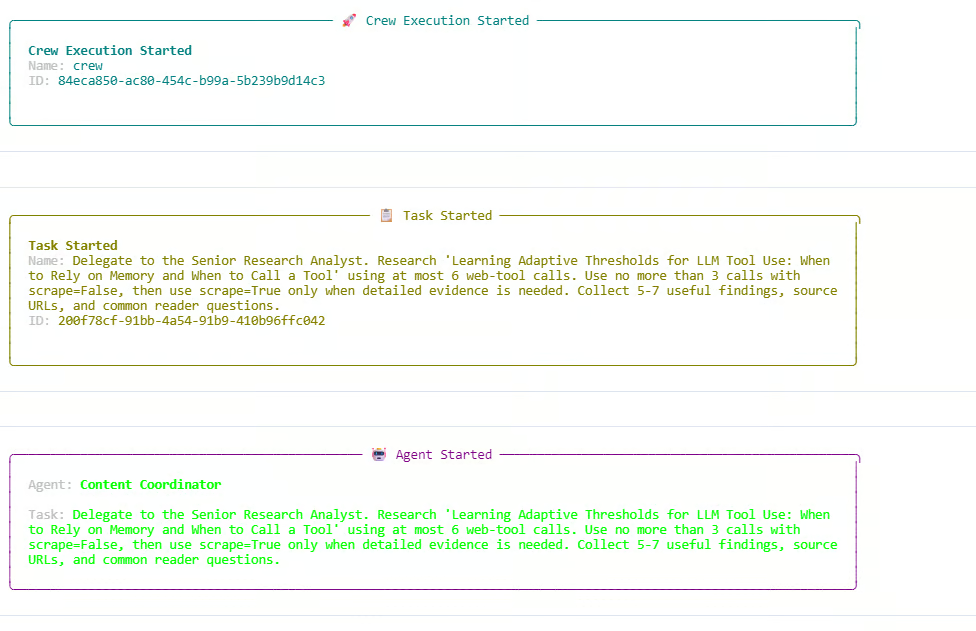
ログでは、Researcherが検索のみの呼び出しとスクレイピング呼び出しの両方を使用しています。検索予算は使い切られ、合計6/6のWeb呼び出しと3/3のディスカバリー呼び出しに達しています。ディスカバリーの上限に達したため、追加の検索のみリクエストはブロックされました。カスタムOlostepツール内の予算ルールが正しく機能していることが分かります。
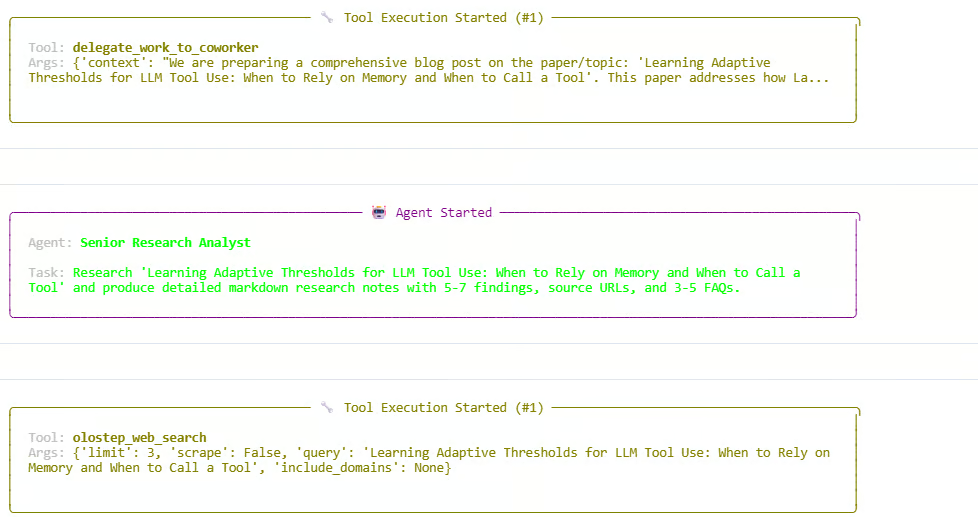
調査フェーズの後、Managerは執筆とレビューのステップへと委任を進めます。エージェントは調査ノートを作成し、記事を下書きし、最終出力を磨き上げます。実行は成功し、CrewOutputオブジェクトが返されます。
次のような出力が表示されるはずです。
Starting crew at 2026-06-05T13:54:07
Topic: 'Learning Adaptive Thresholds for LLM Tool Use: When to Rely on Memory and When to Call a Tool'

Crew Execution Started
Task Started
Agent: Content Coordinator
Agent: Senior Research Analyst
Tool: olostep_web_search
Budget used: 6/6 total calls; 3/3 discovery calls

Finished at 2026-06-05T13:59:29
Result type: CrewOutput
これはスウォーム全体が正常に動作したことを意味します。Managerがワークフローを調整し、Researcherが最新情報を収集、Writerが草稿を作成し、Reviewerが最終出力を改善しました。
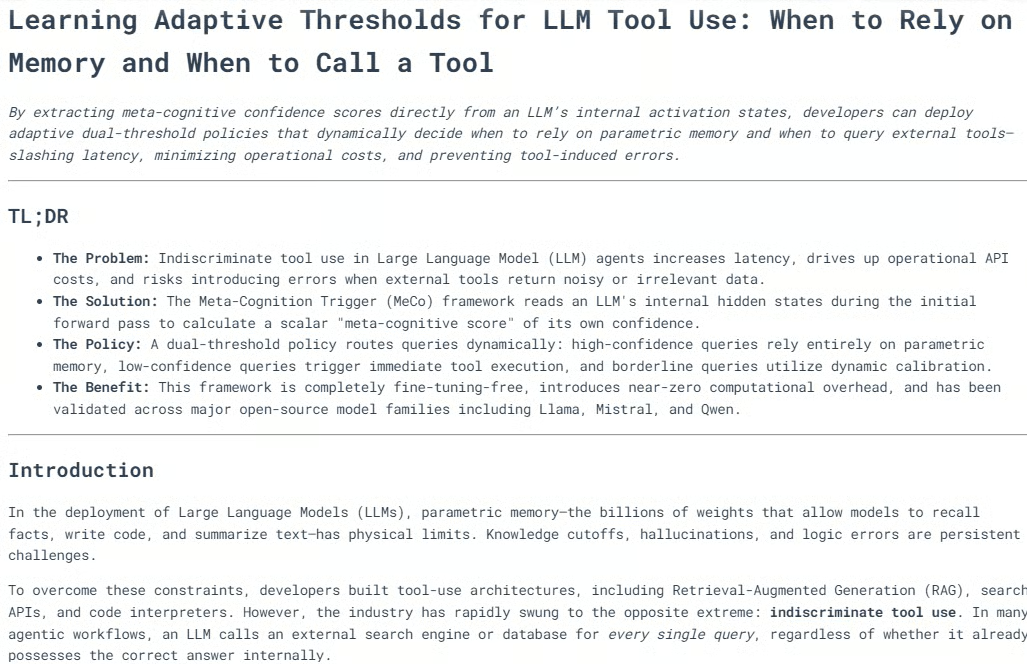
スウォームの実行が終わったら、クルーが生成した最終記事を表示できます。result.rawにはワークフローからの最終レスポンスが入っています。
from IPython.display import Markdown, display

raw = result.raw

if "Blog Post" in raw:
    raw = raw.split("Blog Post", 1)[1].strip()

display(Markdown(raw))
これでノートブック内に整形済みのMarkdownとして最終出力がレンダリングされます。
多くの場合、生成されたブログはすでに良好な構成で、複数の見出しや明確なセクション、適宜図や視覚的な説明が入り、力強い結論で締めくくられます。
調査・執筆・編集レビューの組み合わせにより、公開可能な品質のコンテンツが得られます。出力を確認したうえで、私なら小さな修正で公開に送り出すでしょう。
続いて、実行トレースを出力します。スウォームがどのように動き、どのエージェントが関与し、Web呼び出しが何回使われ、各タスクがどのように処理されたかを把握できます。
from collections import Counter

def role_name(value):
    """Return a readable role/name for CrewAI agent values."""
    if value is None:
        return "Not reported"
    if isinstance(value, str):
        return value
    return getattr(value, "role", None) or getattr(value, "name", None) or str(value)

print("=" * 70)
print("SWARM EXECUTION TRACE")
print("=" * 70)

# Hierarchical crew structure
print("\nCOORDINATION")
print(f"Process : {crew.process}")
print(f"Manager : {role_name(crew.manager_agent)}")
print(f"Workers : {', '.join(role_name(agent) for agent in crew.agents)}")
print(
    "Flow    : Manager receives each task, delegates specialist work, "
    "validates the response, and passes approved context to the next task."
)

Now print the web-tool usage recorded by the custom Olostep tool.
history = list(getattr(olostep_search_tool, "_call_history", []))
discovery_calls = sum(not item["scrape"] for item in history)
scrape_calls = sum(item["scrape"] for item in history)
successful_calls = sum(item["status"] == "success" for item in history)

print("\nWEB TOOL USAGE")
print(f"Total external calls : {len(history)}/6")
print(f"Without scraping     : {discovery_calls}/3")
print(f"With scraping        : {scrape_calls}")
print(f"Successful calls     : {successful_calls}")

if history:
    for item in history:
        mode = "scrape" if item["scrape"] else "search only"
        domains = ", ".join(item["domains"]) if item["domains"] else "all domains"
        print(
            f"  {item['number']}. {mode}; status={item['status']}; "
            f"results={item['results']}; scope={domains}"
        )
        print(f"     Query: {item['query']}")
else:
    print("  No Olostep calls were recorded.")

Finally, print the task-by-task trace.
print("\nTASK-BY-TASK TRACE")
agent_activity = Counter()

for index, task_out in enumerate(result.tasks_output, start=1):
    task = crew.tasks[index - 1] if index <= len(crew.tasks) else None
    reported_agent = role_name(getattr(task_out, "agent", None))
    processed_by = sorted(getattr(task, "processed_by_agents", set()) or [])
    participants = processed_by or [reported_agent]

    for participant in participants:
        agent_activity[role_name(participant)] += 1

    delegations = getattr(task, "delegations", 0) if task else 0
    used_tools = getattr(task, "used_tools", 0) if task else 0
    tool_errors = getattr(task, "tools_errors", 0) if task else 0
    start_time = getattr(task, "start_time", None) if task else None
    end_time = getattr(task, "end_time", None) if task else None
    duration = end_time - start_time if start_time and end_time else None

    print(f"\n--- Task {index} ---")
    print(f"Reported owner : {reported_agent}")
    print(f"Processed by   : {', '.join(map(role_name, participants))}")
    print(f"Delegations    : {delegations}")
    print(f"Tool uses      : {used_tools}")
    print(f"Tool errors    : {tool_errors}")
    if duration is not None:
        print(f"Duration       : {duration}")

    preview = getattr(task_out, "raw", "").strip().replace("\n", " ")
    print(f"Output preview : {preview[:300]}{'...' if len(preview) > 300 else ''}")

print("\nAGENT ACTIVITY")
for agent, count in agent_activity.most_common():
    print(f"{agent}: participated in {count} task(s)")

if not agent_activity:
    print("CrewAI did not expose per-agent processing metadata for this run.")
次のような出力が表示されるはずです。
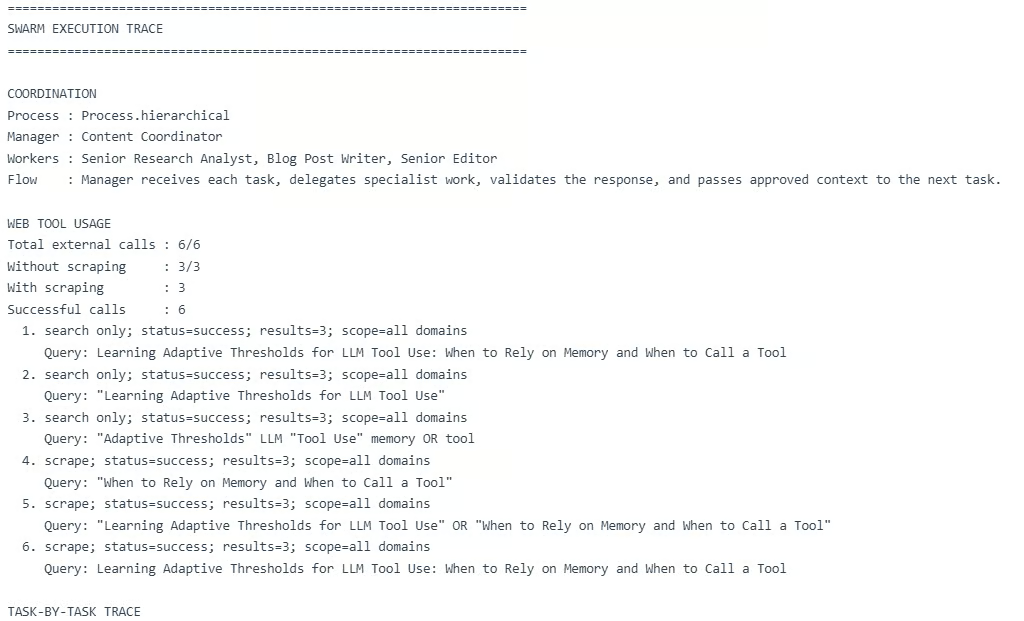
このトレースから、階層型スウォームが想定どおり機能したことが分かります。Managerが3つのタスクを調整し、Researcherが調査、Writerが草稿作成、Reviewerが最終出力の改善を担当しました。
ただし、重要な制約も見えてきます。マルチエージェントのワークフローはコストがかさみがちです。
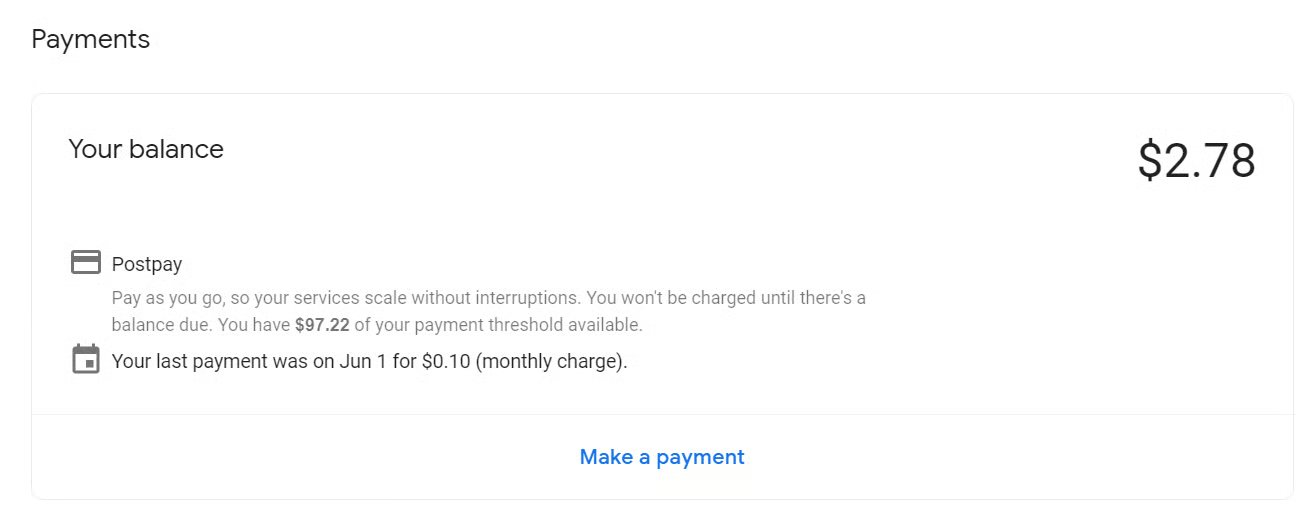
この実行では、外部Web呼び出しが6回、さらにManager、Researcher、Writer、Reviewer全体で複数のLLM呼び出しが発生しました。1回の実行で最大約$0.28、テストを含む本ガイドの作成では約$2.78かかりました。シンプルなチュートリアルとしては高コストです。
エージェント・スウォームやマルチエージェントのワークフローは、概念としては非常に魅力的です。Researcher、Writer、Reviewer、Managerが協働する発想は強力であり、本ガイドでも最終出力は小さな修正で公開可能なレベルに達しました。
しかし実務では、コスト増・時間増・失敗ポイントの増加を招くことがあります。私のケースでは1回の実行が約$0.28、このガイドの作成全体で約$2.78でした。シンプルなチュートリアルにしては高めです。
実アプリケーションでは、常にフルのマルチエージェント・スウォームを使うとは限りません。単純な作業はコードやルールで処理し、複雑な作業だけをエージェントに任せるような、よりプログラマティックな構成を好みます。ツール呼び出しを制限する、エージェント数を減らす、プロンプトを短くする、階層型ではなく直列型のワークフローにする、といった工夫でコストを抑えることもできます。
もちろん最適化しすぎると、もはや真のエージェント・スウォームとは言えなくなるかもしれません。よりルールベースのAIワークフローに近づくでしょう。だからこそ重要なのはバランスです。実際に価値を生む場面ではエージェント・スウォームを使い、そうでない場面ではできるだけシンプルに保ちましょう。
DataCampでエージェント型AIを学ぼう!
Courses
Tracks
Courses