Courses
การสร้าง AI Agent ด้วย CrewAI
1 ชม.
1.3K
Agent swarm คือกลุ่มของ AI agent ที่ทำงานร่วมกันเพื่อทำภารกิจหนึ่งให้เสร็จ แทนที่จะให้โมเดลเดียวค้นคว้า เขียน ตรวจทาน และปิดงานทั้งหมดเอง Agent swarm จะแบ่งงานให้เอเยนต์เฉพาะทางหลายตัว แต่ละเอเยนต์มีบทบาทชัดเจน และระบบจะประสานพวกเขาเพื่อให้ได้ผลงานสุดท้ายที่แข็งแรงกว่า
ข้อดีคือความเชี่ยวชาญเฉพาะทาง เอเยนต์ที่โฟกัสงานวิจัยสามารถเน้นการค้นหาและตรวจสอบแหล่งข้อมูล เอเยนต์ที่โฟกัสการเขียนเน้นโครงสร้างและความชัดเจน และผู้ตรวจทานสามารถตรวจเช็กฉบับร่างเทียบกับงานวิจัยเดิมโดยไม่ถูกรบกวนจากงานเขียนที่ตนเพิ่งผลิตขึ้น
เอเยนต์ผู้ประสานงานจะเชื่อมแต่ละขั้นเข้าด้วยกันและตัดสินใจว่าขั้นตอนต่อไปคืออะไร ในฝูงที่เราสร้างนี้ บทบาทต่าง ๆ จับคู่ตรงกับ Researcher, Writer, Reviewer และ Manager
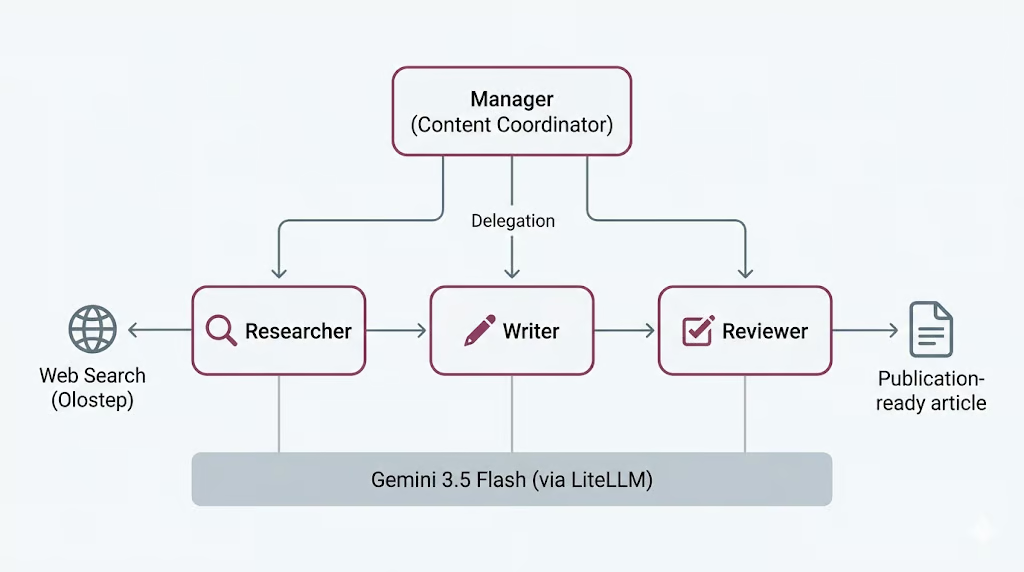
แต่นี่ไม่ใช่ของฟรี ยิ่งมีเอเยนต์มากก็ยิ่งมีการเรียกโมเดลมาก ใช้เวลามากขึ้น และมีจุดที่เวิร์กโฟลว์อาจผิดพลาดมากขึ้น เป็นการแลกที่เราจะกลับมาคุยท้ายบท หลังจากเห็นต้นทุนจริงของการรัน
CrewAI เป็นเฟรมเวิร์กโอเพ่นซอร์สสำหรับสร้างระบบเอเยนต์หลายตัว ช่วยให้กำหนดเอเยนต์ มอบหมายงาน และเลือกวิธีประสานงานได้อย่างเป็นระเบียบ ทำให้โฟกัสกับบทบาทและเวิร์กโฟลว์ แทนงานเชื่อมต่อเบื้องหลัง
มี 3 แนวคิดหลักที่ทำงานส่วนใหญ่
กระบวนการนี้อาจเป็นแบบลำดับขั้นที่งานรันตามลำดับตายตัว หรือแบบลำดับชั้นที่เอเยนต์ผู้จัดการมอบหมายงานให้ผู้อื่นและตรวจสอบผลลัพธ์ เราจะใช้กระบวนการแบบลำดับชั้นที่ให้ Manager จัดการการมอบหมาย
CrewAI ยังจัดการการเข้าถึงโมเดลผ่าน LiteLLM ซึ่งเป็นไลบรารีโอเพ่นซอร์สที่ให้ส่วนติดต่อเดียวสำหรับผู้ให้บริการหลายราย นั่นทำให้เรากำหนดโมเดล Gemini 3.5 Flash เพียงครั้งเดียวและนำกลับมาใช้กับเอเยนต์ทั้งสี่ ซึ่งเราจะตั้งค่าในขั้นตอนด้านล่าง
มาเริ่มตั้งค่ากัน
ก่อนเริ่ม ให้ตรวจสอบว่ามีสิ่งต่อไปนี้:
เปิด Jupyter Notebook หรือ JupyterLab แล้วเปิดโน้ตบุ๊กด้วยเคอร์เนล Python รุ่นล่าสุดในสภาพแวดล้อมของคุณ จากนั้นรันเซลล์ต่อไปนี้เพื่อติดตั้งแพ็กเกจที่ต้องใช้
%pip install --quiet -U \
    crewai \
    crewai-tools \
    google-genai \
    litellm \
    olostep \
    nest-asyncio
หลังติดตั้งเสร็จ ให้รันเซลล์ถัดไปเพื่อตรวจสอบเวอร์ชันแพ็กเกจที่ติดตั้ง เพื่อยืนยันว่าทุกอย่างติดตั้งถูกต้อง
import importlib.metadata as md

for pkg in [
    "crewai",
    "crewai-tools",
    "google-genai",
    "litellm",
    "olostep",
    "nest-asyncio",
]:
    print(f"{pkg:>16}  {md.version(pkg)}")
ควรเห็นเอาต์พุตคล้าย ๆ ดังนี้:
         crewai  1.14.6
    crewai-tools  1.14.6
      google-genai  2.8.0
          litellm  1.87.1
          olostep  1.1.0
nest-asyncio 1.6.0โปรเจ็กต์นี้ต้องใช้ API key สองตัว
ก่อนอื่น สร้าง Gemini API key จาก Google AI Studio เปิด Google AI Studio ไปที่ส่วน API key และสร้างคีย์ใหม่สำหรับโปรเจ็กต์ของคุณ Gemini มีชั้นใช้งานฟรี แต่จำกัดปริมาณและอัตราการเรียก หากต้องการใช้งาน Gemini ให้เสถียรมากขึ้น ให้เชื่อมบัญชีเรียกเก็บเงินของ Google หรือเติมเครดิตเพื่อให้สามารถคิดค่าบริการได้เมื่อเกินขีดจำกัดของชั้นฟรี
ถัดไป สร้าง Olostep API key สมัครใช้งาน Olostep เปิดแดชบอร์ด Olostep และสร้าง API key จาก หน้า API keys เราจะใช้คีย์นี้เพื่อให้เอเยนต์ Researcher เข้าถึงเว็บแบบสดสำหรับค้นหาและดึงข้อมูลหน้า
เมื่อได้คีย์ทั้งสองแล้ว ให้บันทึกเป็นตัวแปรสภาพแวดล้อม Gemini จะขับเคลื่อนเอเยนต์ของ CrewAI ส่วน Olostep จะเปิดทางให้เอเยนต์ Researcher รวบรวมข้อมูลล่าสุดจากเว็บ
หลังจากสร้างคีย์ทั้งสองแล้ว ให้บันทึกเป็นตัวแปรสภาพแวดล้อมก่อนรันโน้ตบุ๊ก
PowerShell:
$env:GEMINI_API_KEY="your-gemini-key"
$env:OLOSTEP_API_KEY="your-olostep-key"
macOS/Linux:
export GEMINI_API_KEY="your-gemini-key"
export OLOSTEP_API_KEY="your-olostep-key"
จากนั้นรันเซลล์ต่อไปนี้เพื่อตรวจสอบว่าโหลด Gemini API key ถูกต้อง
import os

api_key = os.getenv("GEMINI_API_KEY") or os.getenv("GOOGLE_API_KEY")

if not api_key:
    raise RuntimeError(
        "Set GEMINI_API_KEY or GOOGLE_API_KEY in your environment, "
        "then restart the notebook kernel."
    )
print(f"Gemini API key loaded")
ควรเห็น:
Gemini API key loadedโปรเจ็กต์นี้เราจะใช้ Gemini 3.5 Flash เป็น LLM ร่วมสำหรับเอเยนต์ CrewAI ทุกตัว Gemini 3.5 Flash ถูกออกแบบมาสำหรับงานที่ต้องการความเร็ว แนว agentic และการโค้ด เหมาะกับโปรเจ็กต์นี้เพราะเอเยนต์ของเราต้องให้เหตุผลหลายขั้น ทำตามคำสั่ง ใช้งานเครื่องมือ และผลิตเอาต์พุตแบบมีโครงสร้าง
Gemini 3.5 Flash ยังรองรับหน้าต่างบริบทขนาดใหญ่ เอาต์พุตยาว การคิด และการใช้เครื่องมือ จึงเหมาะมากสำหรับเวิร์กโฟลว์ของเอเยนต์ เนื่องจากฝูงเอเยนต์อาจเรียกโมเดลหลายครั้งผ่านเอเยนต์ Researcher, Writer, Reviewer และ Manager การใช้รุ่น Flash ช่วยให้เวิร์กโฟลว์ตอบสนองไวขึ้นขณะยังคงคุณภาพการให้เหตุผลและการเขียนที่ดี
หากต้องการเปรียบเทียบกับ LLM ชั้นนำอื่น แนะนำให้อ่านคู่มือของเราเรื่อง Gemini 3.5 Flash vs GPT-5.5 และ Gemini 3.5 Flash vs Claude Opus 4.8
เราจะเข้าถึง Gemini ผ่าน LiteLLM ซึ่งเป็นไลบรารีโอเพ่นซอร์สที่ให้ส่วนติดต่อเดียวสำหรับเรียก LLM จากผู้ให้บริการหลายราย รวมถึง Gemini, OpenAI, Anthropic, Bedrock, Vertex AI และอื่น ๆ ในการตั้งค่านี้ CrewAI ใช้ LiteLLM อยู่เบื้องหลัง ดังนั้นเราจึงส่งชื่อโมเดล Gemini ในรูปแบบ provider/model ได้ง่าย
ต่อไปเราจะสร้าง LLM ร่วมสำหรับ CrewAI และใช้ซ้ำกับเอเยนต์ทุกตัว ช่วยให้การตั้งค้าง่ายขึ้น เพราะ Researcher, Writer, Reviewer และ Manager จะใช้โมเดล Gemini เดียวกัน
from crewai import LLM

GEMINI_MODEL = "gemini/gemini-3.5-flash"

gemini_llm = LLM(
    model=GEMINI_MODEL,
    api_key=os.getenv("GEMINI_API_KEY") or os.getenv("GOOGLE_API_KEY"),
    temperature=1.0,
)

print(f"LLM ready: {gemini_llm.model}")
print("Provider API: Google Gemini (via LiteLLM)")
ควรเห็นเอาต์พุตคล้าย ๆ ดังนี้:
LLM ready: gemini-3.5-flash
Provider API: Google Gemini (via LiteLLM)
นี่ยืนยันว่า CrewAI เข้าถึง Gemini ผ่าน LiteLLM ได้แล้ว ในขั้นตอนถัดไป เราจะส่งอ็อบเจ็กต์ gemini_llm ที่ใช้ร่วมกันนี้ไปยังแต่ละเอเยนต์
เอเยนต์ Researcher ต้องเข้าถึงข้อมูลล่าสุด เพื่อทำเช่นนี้ เราจะสร้างเครื่องมือค้นหา Olostep แบบกำหนดเองและมอบให้เอเยนต์ Researcher ในภายหลัง
เครื่องมือนี้ทำงานได้สองโหมด คือส่งคืนผลสรุปการค้นหาอย่างเดียว ซึ่งเร็วกว่า หรือขูดข้อมูลหน้าและส่งคืนเนื้อหาเป็นมาร์กดาวน์ เรายังเพิ่มงบค้นหาเล็กน้อยเพื่อไม่ให้เอเยนต์เรียกเครื่องมือเว็บมากเกินไป
from pydantic import Field, PrivateAttr
from crewai.tools import BaseTool

try:
    from olostep import Olostep, Olostep_BaseError
except ImportError:
    raise ImportError(
        "The 'olostep' package is not installed. Run %pip install -U olostep."
    )
ก่อนอื่น โหลด Olostep API key จากสภาพแวดล้อม
olostep_api_key = os.getenv("OLOSTEP_API_KEY")

if not olostep_api_key or olostep_api_key == "your-olostep-api-key-here":
    print(
        "The Olostep tool will fail at call time unless OLOSTEP_API_KEY "
        "is set in the environment."
    )
else:
    print("Olostep API key loaded.")

_olostep_client = Olostep(api_key=olostep_api_key) if olostep_api_key else None
ตอนนี้สร้างเครื่องมือ CrewAI แบบกำหนดเอง
class OlostepSearchTool(BaseTool):
    """Search the web with a strict research-call budget."""

    name: str = "olostep_web_search"
    description: str = (
        "Search the live web. Set scrape=false for fast discovery and "
        "scrape=true for full-page evidence. You have at most 3 discovery "
        "searches without scraping and 6 external search calls total. After "
        "3 discovery searches, use scrape=true on the strongest query or "
        "domain. Each call returns at most 3 results. Inputs: query, scrape, "
        "limit, and optional include_domains."
    )

    default_limit: int = Field(default=3, ge=1, le=3)
    max_chars_per_page: int = Field(default=4000, ge=500, le=12000)

    _total_calls: int = PrivateAttr(default=0)
    _discovery_calls: int = PrivateAttr(default=0)
    _call_history: list[dict] = PrivateAttr(default_factory=list)

    def _run(
        self,
        query: str,
        scrape: bool = False,
        limit: int | None = None,
        include_domains: list[str] | None = None,
    ) -> str:
        if _olostep_client is None:
            return (
                "OLOSTEP_API_KEY is not set. Set it in the environment "
                "and restart the kernel."
            )

        if self._total_calls >= 6:
            return (
                "Research search budget exhausted: 6 external calls have "
                "already been used. Stop searching and complete the task "
                "with the collected sources."
            )

        if not scrape and self._discovery_calls >= 3:
            return (
                "Discovery-search limit reached. Do not run another "
                "scrape=False search. Use scrape=True on the strongest query "
                "or selected domains, or finish with the sources already found."
            )

        clean_query = query.strip()
        if not clean_query:
            return "Search query cannot be empty."

        result_limit = max(1, min(limit or self.default_limit, 3))
        kwargs = {"query": clean_query, "limit": result_limit}

        if scrape:
            kwargs["scrape_options"] = {
                "formats": ["markdown"],
                "timeout": 25,
            }

        if include_domains:
            kwargs["include_domains"] = include_domains

        self._total_calls += 1
        if not scrape:
            self._discovery_calls += 1

        call_record = {
            "number": self._total_calls,
            "query": clean_query,
            "scrape": scrape,
            "limit": result_limit,
            "domains": include_domains or [],
            "status": "started",
            "results": 0,
        }
        self._call_history.append(call_record)

        try:
            search = _olostep_client.searches.create(**kwargs)
        except Olostep_BaseError as error:
            call_record["status"] = "error"
            call_record["error"] = f"{type(error).__name__}: {error}"
            return (
                f"Olostep search error: {type(error).__name__}: {error}\n"
                f"Budget used: {self._total_calls}/6 total calls; "
                f"{self._discovery_calls}/3 discovery calls."
            )

        if not search.links:
            call_record["status"] = "no_results"
            return (
                f"No results found for query: {clean_query!r}\n"
                f"Budget used: {self._total_calls}/6 total calls; "
                f"{self._discovery_calls}/3 discovery calls."
            )

        call_record["status"] = "success"
        call_record["results"] = len(search.links)

        chunks = [
            f"## Web results for: {clean_query!r}",
            f"Page scraping: {'enabled' if scrape else 'disabled'}",
            (
                f"Budget used: {self._total_calls}/6 total calls; "
                f"{self._discovery_calls}/3 discovery calls."
            ),
        ]

        for index, link in enumerate(search.links, 1):
            url = link.get("url", "")
            title = link.get("title") or url or "Untitled result"
            description = link.get("description") or "No description provided."

            chunks.append(
                f"### {index}. {title}\n"
                f"URL: {url}\n"
                f"Summary: {description}"
            )

            markdown = link.get("markdown_content")
            if scrape and markdown:
                body = markdown.strip()
                if len(body) > self.max_chars_per_page:
                    body = body[: self.max_chars_per_page] + "\n...[truncated]"
                chunks.append(f"Page content:\n{body}")

        return "\n\n".join(chunks)
สุดท้าย สร้างอินสแตนซ์ของเครื่องมือ
olostep_search_tool = OlostepSearchTool()
print(f"Tool ready: {olostep_search_tool.name}")
ควรเห็นเอาต์พุตคล้าย ๆ ดังนี้:
Olostep API key loaded.
Tool ready: olostep_web_search
นี่ยืนยันว่าเครื่องมือค้นเว็บ Olostep พร้อมใช้งาน ต่อไปเราจะผูกเครื่องมือนี้กับเอเยนต์ Researcher เพื่อให้รวบรวมข้อมูลล่าสุดจากเว็บได้
ตอนนี้เราจะสร้างเอเยนต์สำหรับฝูงของเรา เราจะกำหนดเอเยนต์ทำงานสามตัวและเอเยนต์ผู้จัดการหนึ่งตัว เอเยนต์ทำงานจะทำภารกิจหลัก ส่วนผู้จัดการจะประสานเวิร์กโฟลว์
เอเยนต์ Researcher จะใช้เครื่องมือ Olostep เพื่อค้นหาข้อมูลล่าสุด เอเยนต์ Writer จะเปลี่ยนงานวิจัยเป็นฉบับร่าง เอเยนต์ Reviewer จะปรับปรุงฉบับร่าง และเอเยนต์ Manager จะตัดสินใจมอบหมายงานอย่างไรใน crew แบบลำดับชั้น
เริ่มจากเอเยนต์ทำงานทั้งสาม
from crewai import Agent

researcher = Agent(
    role="Senior Research Analyst",
    goal=(
        "Find accurate, current, and well-sourced information about {topic}. "
        "Produce concrete, verifiable points for the writer."
    ),
    backstory=(
        "You are a meticulous research analyst. You decide whether each web "
        "search needs page scraping. Use scrape=False when titles, URLs, and "
        "summaries are enough. Use scrape=True when you need full-page evidence "
        "to verify a claim or understand a source in detail. Cite source URLs."
    ),
    llm=gemini_llm,
    tools=[olostep_search_tool],
    verbose=True,
    allow_delegation=False,
)
ต่อไป สร้างเอเยนต์ Writer
writer = Agent(
    role="Blog Post Writer",
    goal=(
        "Turn the research into a complete, publication-ready educational "
        "article on {topic}. Include a strong title, an unlabeled italic "
        "summary, TL;DR, detailed body sections, conclusion, and FAQs. Add a "
        "table only when it makes a comparison or decision easier to understand."
    ),
    backstory=(
        "You are a seasoned technology educator and writer. You create "
        "practical, approachable articles similar in structure to high-quality "
        "DataCamp content, without copying its wording or branding. You use "
        "clear headings, short paragraphs, concrete examples, and sourced facts."
    ),
    llm=gemini_llm,
    verbose=True,
    allow_delegation=False,
)
จากนั้นสร้างเอเยนต์ Reviewer
reviewer = Agent(
    role="Senior Editor",
    goal=(
        "Review the draft for factual accuracy, clarity, structure, and "
        "completeness. Ensure it follows the required article order and return "
        "a polished, publication-ready version."
    ),
    backstory=(
        "You are a detail-oriented senior editor for an educational technology "
        "publication. You verify claims, improve flow, remove repetition, and "
        "ensure the title is followed by an unlabeled italic summary and TL;DR. "
        "You keep a table only when it adds real value, remove any Key Takeaways "
        "section, and ensure Conclusion appears immediately before FAQs."
    ),
    llm=gemini_llm,
    verbose=True,
    allow_delegation=False,
)สุดท้าย สร้างเอเยนต์ Manager
manager = Agent(
    role="Content Coordinator",
    goal=(
        "Coordinate research, writing, and review for {topic}. Delegate each "
        "task to the correct specialist and ensure the reviewed article is the "
        "final result."
    ),
    backstory=(
        "You are an experienced editorial lead. You keep the workflow simple: "
        "research first, writing second, and editorial review last."
    ),
    llm=gemini_llm,
    verbose=True,
    allow_delegation=True,
)
ผู้จัดการจะถูกกำหนดค่าแยกต่างหากเมื่อเราสร้าง crew แบบลำดับชั้น นั่นจึงยังไม่ถูกเพิ่มเข้าในรายชื่อเอเยนต์ทำงาน
ตอนนี้เราจะกำหนดงานสำหรับฝูงเอเยนต์ งานเหล่านี้จะไม่ถูกมอบให้เอเยนต์ทำงานโดยตรง แต่ให้เอเยนต์ Manager ตัดสินใจว่าจะให้ใครทำงานใด
ในเวิร์กโฟลว์นี้ งานแรกคือการวิจัย งานที่สองคือการเขียน และงานที่สามคือการตรวจทาน แต่ละงานยังระบุเอาต์พุตที่คาดหวังไว้ เพื่อให้เอเยนต์ทราบชัดว่าแต่ละงานต้องผลิตอะไร
from crewai import Task

research_task = Task(
    description=(
        "Delegate to the Senior Research Analyst. Research '{topic}' using at "
        "most 6 web-tool calls. Use no more than 3 calls with scrape=False, "
        "then use scrape=True only when detailed evidence is needed. Collect "
        "5-7 useful findings, source URLs, and common reader questions."
    ),
    expected_output=(
        "Clear markdown research notes with 5-7 sourced findings and 3-5 "
        "potential FAQ questions."
    ),
)
ถัดไป สร้างงานเขียน งานนี้จะใช้งานวิจัยเป็นบริบท เพื่อให้ Writer เขียนบทความจากข้อมูลที่รวบรวมได้
write_task = Task(
    description=(
        "Delegate to the Blog Post Writer. Write one complete educational "
        "markdown article on '{topic}', approximately 1,000-1,500 words. Start "
        "with one H1 title and an unlabeled italic summary. Then include TL;DR, "
        "an introduction, useful body sections, an optional table only when it "
        "improves understanding, a Conclusion, and FAQs. Use source links."
    ),
    expected_output=(
        "One continuous publication-ready markdown article with title, italic "
        "summary, TL;DR, body, Conclusion, and 3-5 FAQs."
    ),
    context=[research_task],
)
ตอนนี้ สร้างงานตรวจทาน งานนี้ใช้งานวิจัยและงานเขียนเป็นบริบท เพื่อให้ Reviewer ตรวจเช็กบทความเทียบกับงานวิจัยเดิม
review_task = Task(
    description=(
        "Delegate to the Senior Editor. Review the article for accuracy, "
        "clarity, structure, and source support. Return only the corrected full "
        "article. Keep the same continuous article format and ensure FAQs are "
        "the final section."
    ),
    expected_output=(
        "Only the final reviewed markdown article, beginning with its H1 title "
        "and ending with the final FAQ answer."
    ),
    context=[research_task, write_task],
)
สุดท้าย รวมนงานทั้งสามไว้ในลิสต์
tasks = [research_task, write_task, review_task]

print(f"Defined {len(tasks)} manager-delegated tasks.")
ควรเห็น:
Defined 3 manager-delegated tasks.ตอนนี้เราจะเชื่อมเอเยนต์และงานให้เป็นเวิร์กโฟลว์ CrewAI เดียว เราจะใช้กระบวนการแบบลำดับชั้นที่ให้เอเยนต์ Manager ประสานเอเยนต์ทำงาน
ในการตั้งค่านี้ Researcher, Writer และ Reviewer ถูกเพิ่มเป็นเอเยนต์ทำงาน ส่วน Manager ถูกส่งแยกผ่าน manager_agent เพราะรับผิดชอบการมอบหมายและประสานงาน
from crewai import Crew, Process

crew = Crew(
    agents=[researcher, writer, reviewer],
    tasks=tasks,
    manager_agent=manager,
    process=Process.hierarchical,
    verbose=True,
    memory=False,
)
จากนั้นพิมพ์รายละเอียด crew เพื่อยืนยันว่าเวิร์กโฟลว์ประกอบเรียบร้อย
print("Hierarchical crew assembled.")
print(f"  Workers : {[a.role for a in crew.agents]}")
print(f"  Manager : {crew.manager_agent.role}")
print(f"  Tasks   : {len(crew.tasks)}")
print(f"  Process : {crew.process}")
ควรเห็นเอาต์พุตคล้าย ๆ ดังนี้:
Hierarchical crew assembled.
  Workers : ['Senior Research Analyst', 'Blog Post Writer', 'Senior Editor']
  Manager : Content Coordinator
  Tasks   : 3
  Process : Process.hierarchical
นี่ยืนยันว่าฝูงเอเยนต์แบบลำดับชั้นพร้อมใช้งานแล้ว ขั้นตอนถัดไป เราจะรัน crew ด้วยหัวข้อหนึ่งและสร้างผลลัพธ์สุดท้าย
ตอนนี้เราสามารถรัน agent swarm ได้ เราจะระบุหัวข้อและเริ่มเวิร์กโฟลว์ด้วย kickoff_async().
Jupyter มี event loop รันอยู่แล้ว ด้วยเหตุนี้เราจึงใช้ nest_asyncio ก่อน เพื่อให้เวิร์กโฟลว์แบบอะซิงก์ของ CrewAI รันในโน้ตบุ๊กได้
try:
    import nest_asyncio

    nest_asyncio.apply()

    print("nest_asyncio applied: CrewAI can now run inside this kernel.")

except ModuleNotFoundError:
    print("nest_asyncio not installed. Run: pip install nest-asyncio")
ควรเห็น:
nest_asyncio applied: CrewAI can now run inside this kernel.ถัดไป กำหนดหัวข้อและสร้างฟังก์ชันช่วยสำหรับรัน crew
from datetime import datetime

topic = "Learning Adaptive Thresholds for LLM Tool Use: When to Rely on Memory and When to Call a Tool"

async def run_crew(topic: str):
    """Run the CrewAI crew asynchronously."""
    print(f"Starting crew at {datetime.now().isoformat(timespec='seconds')}")
    print(f"Topic: {topic!r}\n")

    result = await crew.kickoff_async(inputs={"topic": topic})

    print(f"\nFinished at {datetime.now().isoformat(timespec='seconds')}")
    print(f"Result type: {type(result).__name__}")
    return result

result = await run_crew(topic)
เมื่อเวิร์กโฟลว์เริ่ม CrewAI จะส่งงานให้เอเยนต์ Manager ก่อน จากนั้น Manager จะมอบหมายงานวิจัยให้ Senior Research Analyst นักวิจัยจะใช้เครื่องมือ olostep_web_search เพื่อค้นหาข้อมูลเกี่ยวกับ adaptive thresholds การใช้เครื่องมือของ LLM หน่วยความจำ และการตัดสินใจเรียกเครื่องมือ
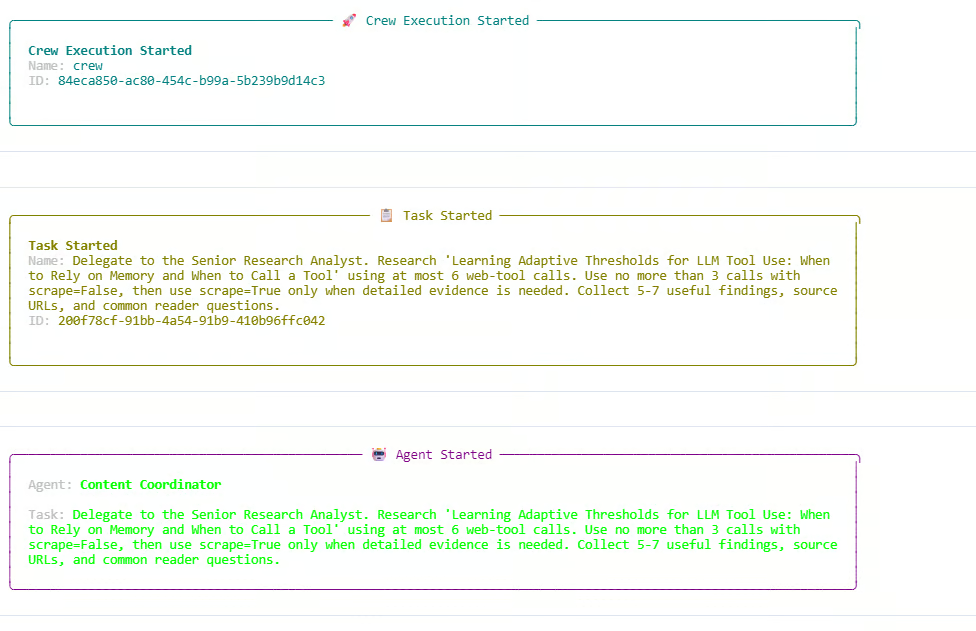
จากล็อก นักวิจัยใช้ทั้งการค้นหาอย่างเดียวและการขูดข้อมูล งบค้นหาถูกใช้เต็มจำนวนที่ 6 จาก 6 ครั้ง และการค้นหาแบบสำรวจ 3 จาก 3 ครั้ง คำขอค้นหาแบบสำรวจเพิ่มเติมหนึ่งครั้งถูกบล็อกเพราะถึงขีดจำกัดแล้ว ซึ่งแสดงว่ากฎงบประมาณภายในเครื่องมือ Olostep แบบกำหนดเองของเราทำงานถูกต้อง
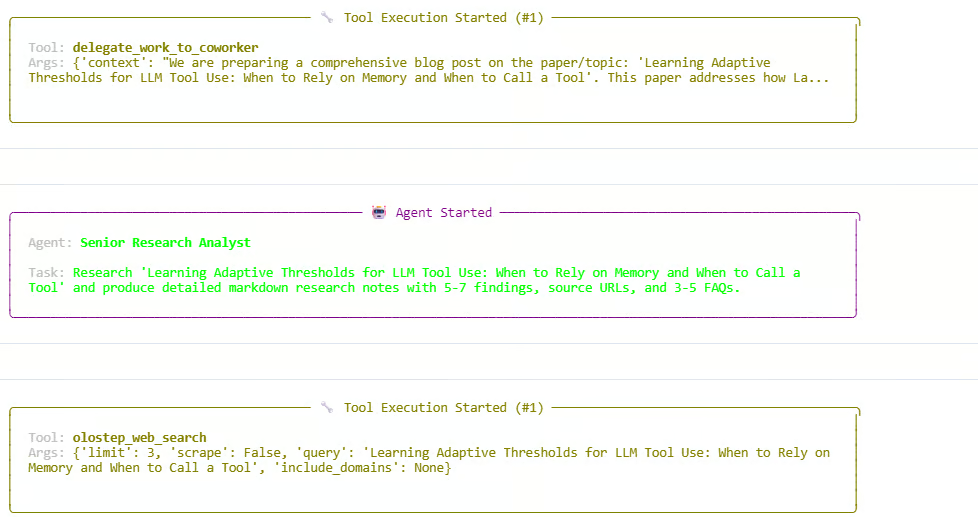
หลังจบช่วงวิจัย Manager จะเดินเวิร์กโฟลว์ต่อโดยมอบหมายขั้นการเขียนและตรวจทาน เอเยนต์จะผลิตบันทึกวิจัย ร่างบทความ และขัดเกลาผลลัพธ์สุดท้าย การรันสำเร็จและส่งคืนอ็อบเจ็กต์ CrewOutput
ควรเห็นเอาต์พุตคล้าย ๆ ดังนี้:
Starting crew at 2026-06-05T13:54:07
Topic: 'Learning Adaptive Thresholds for LLM Tool Use: When to Rely on Memory and When to Call a Tool'

Crew Execution Started
Task Started
Agent: Content Coordinator
Agent: Senior Research Analyst
Tool: olostep_web_search
Budget used: 6/6 total calls; 3/3 discovery calls

Finished at 2026-06-05T13:59:29
Result type: CrewOutput
นั่นหมายความว่าฝูงทั้งหมดรันสำเร็จ Manager ประสานเวิร์กโฟลว์ Researcher รวบรวมข้อมูลล่าสุด Writer สร้างฉบับร่าง และ Reviewer ปรับปรุงผลลัพธ์สุดท้าย
หลังฝูงรันเสร็จ เราสามารถแสดงบทความฉบับสุดท้ายที่ crew สร้างขึ้น ค่า result.raw มีการตอบกลับสุดท้ายจากเวิร์กโฟลว์
from IPython.display import Markdown, display

raw = result.raw

if "Blog Post" in raw:
    raw = raw.split("Blog Post", 1)[1].strip()

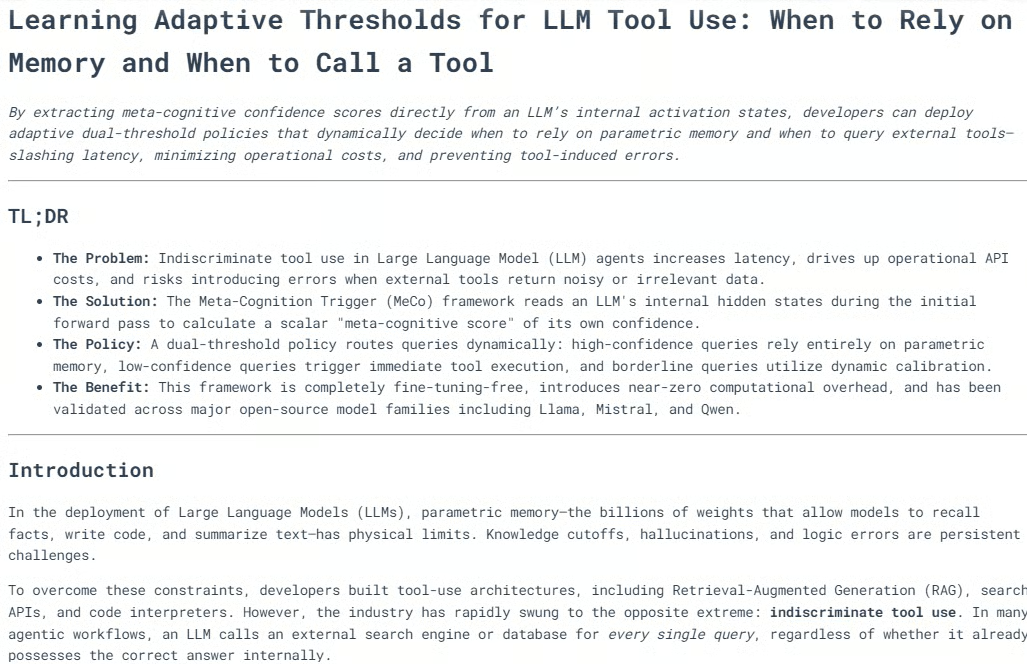
display(Markdown(raw))
ระบบจะเรนเดอร์ผลลัพธ์สุดท้ายเป็นมาร์กดาวน์แบบจัดรูปภายในโน้ตบุ๊ก
ในหลายกรณี บล็อกที่สร้างจะมีโครงสร้างดีแล้ว มีหลายหัวข้อ ส่วนต่าง ๆ ชัดเจน ไดอะแกรมหรือคำอธิบายภาพเมื่อเหมาะสม และบทสรุปที่แข็งแรง
การผสานงานวิจัย การเขียน และการตรวจทานเชิงบรรณาธิการช่วยให้ได้เนื้อหาพร้อมเผยแพร่ หลังตรวจดูเอาต์พุต โดยส่วนตัวฉันให้ไฟเขียวสำหรับการเผยแพร่
ต่อไป เราสามารถพิมพ์ร่องรอยการทำงาน ซึ่งช่วยให้เข้าใจว่าฝูงทำงานอย่างไร มีเอเยนต์ใดบ้าง จำนวนการเรียกเว็บ และการประมวลผลงานแต่ละงานเป็นอย่างไร
from collections import Counter

def role_name(value):
    """Return a readable role/name for CrewAI agent values."""
    if value is None:
        return "Not reported"
    if isinstance(value, str):
        return value
    return getattr(value, "role", None) or getattr(value, "name", None) or str(value)

print("=" * 70)
print("SWARM EXECUTION TRACE")
print("=" * 70)

# Hierarchical crew structure
print("\nCOORDINATION")
print(f"Process : {crew.process}")
print(f"Manager : {role_name(crew.manager_agent)}")
print(f"Workers : {', '.join(role_name(agent) for agent in crew.agents)}")
print(
    "Flow    : Manager receives each task, delegates specialist work, "
    "validates the response, and passes approved context to the next task."
)

Now print the web-tool usage recorded by the custom Olostep tool.
history = list(getattr(olostep_search_tool, "_call_history", []))
discovery_calls = sum(not item["scrape"] for item in history)
scrape_calls = sum(item["scrape"] for item in history)
successful_calls = sum(item["status"] == "success" for item in history)

print("\nWEB TOOL USAGE")
print(f"Total external calls : {len(history)}/6")
print(f"Without scraping     : {discovery_calls}/3")
print(f"With scraping        : {scrape_calls}")
print(f"Successful calls     : {successful_calls}")

if history:
    for item in history:
        mode = "scrape" if item["scrape"] else "search only"
        domains = ", ".join(item["domains"]) if item["domains"] else "all domains"
        print(
            f"  {item['number']}. {mode}; status={item['status']}; "
            f"results={item['results']}; scope={domains}"
        )
        print(f"     Query: {item['query']}")
else:
    print("  No Olostep calls were recorded.")

Finally, print the task-by-task trace.
print("\nTASK-BY-TASK TRACE")
agent_activity = Counter()

for index, task_out in enumerate(result.tasks_output, start=1):
    task = crew.tasks[index - 1] if index <= len(crew.tasks) else None
    reported_agent = role_name(getattr(task_out, "agent", None))
    processed_by = sorted(getattr(task, "processed_by_agents", set()) or [])
    participants = processed_by or [reported_agent]

    for participant in participants:
        agent_activity[role_name(participant)] += 1

    delegations = getattr(task, "delegations", 0) if task else 0
    used_tools = getattr(task, "used_tools", 0) if task else 0
    tool_errors = getattr(task, "tools_errors", 0) if task else 0
    start_time = getattr(task, "start_time", None) if task else None
    end_time = getattr(task, "end_time", None) if task else None
    duration = end_time - start_time if start_time and end_time else None

    print(f"\n--- Task {index} ---")
    print(f"Reported owner : {reported_agent}")
    print(f"Processed by   : {', '.join(map(role_name, participants))}")
    print(f"Delegations    : {delegations}")
    print(f"Tool uses      : {used_tools}")
    print(f"Tool errors    : {tool_errors}")
    if duration is not None:
        print(f"Duration       : {duration}")

    preview = getattr(task_out, "raw", "").strip().replace("\n", " ")
    print(f"Output preview : {preview[:300]}{'...' if len(preview) > 300 else ''}")

print("\nAGENT ACTIVITY")
for agent, count in agent_activity.most_common():
    print(f"{agent}: participated in {count} task(s)")

if not agent_activity:
    print("CrewAI did not expose per-agent processing metadata for this run.")
ควรเห็นเอาต์พุตคล้าย ๆ ดังนี้:
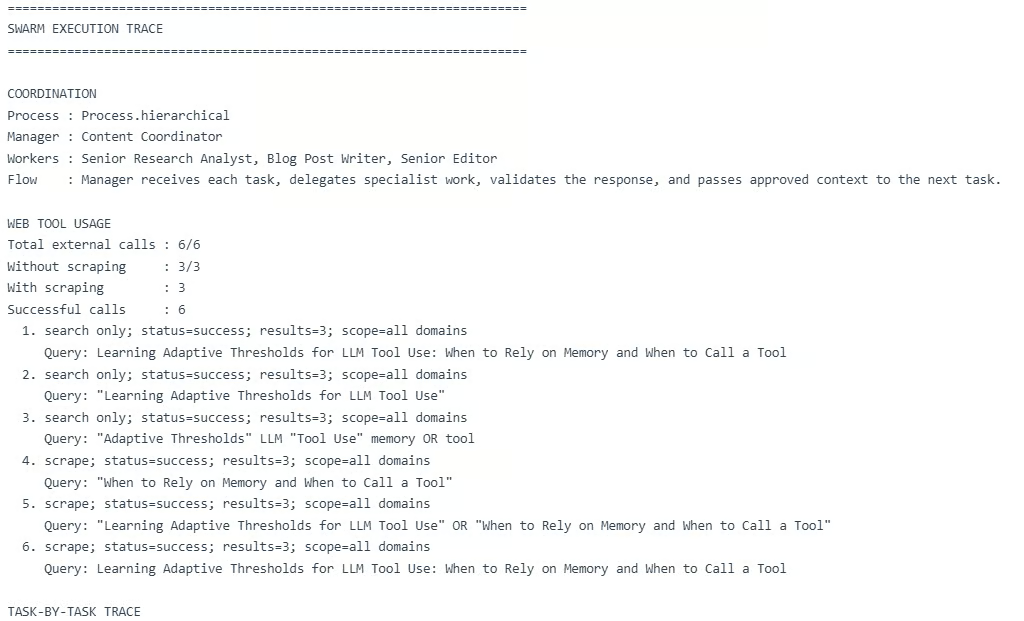
ร่องรอยนี้แสดงว่าฝูงแบบลำดับชั้นทำงานตามคาด Manager ประสานงานทั้งสามงาน Researcher จัดการขั้นวิจัย Writer สร้างฉบับร่าง และ Reviewer ปรับปรุงผลลัพธ์สุดท้าย
อย่างไรก็ตาม นี่ยังชี้ข้อจำกัดสำคัญ: เวิร์กโฟลว์หลายเอเยนต์อาจมีต้นทุนสูง
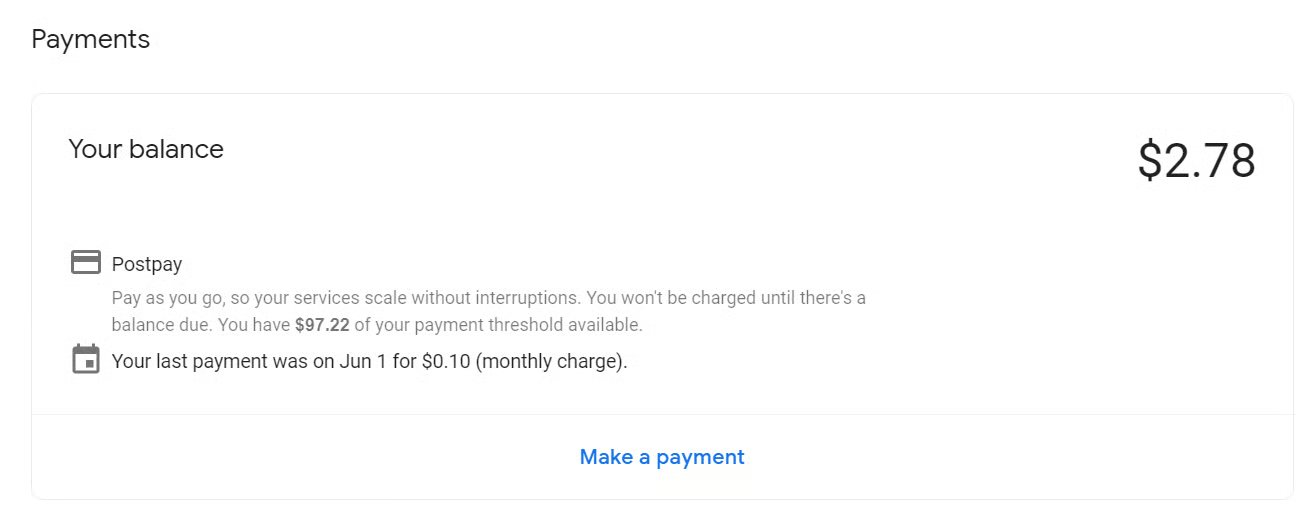
ในการรันนี้ เวิร์กโฟลว์ใช้การเรียกเว็บภายนอก 6 ครั้ง และเรียก LLM หลายครั้งผ่าน Manager, Researcher, Writer และ Reviewer การรันครั้งเดียวอาจมีค่าใช้จ่ายราว $0.28 และการสร้างคู่มือนี้มีค่าใช้จ่ายราว $2.78 ระหว่างทดสอบ ซึ่งถือว่าสูงสำหรับโปรเจ็กต์สอนพื้นฐาน
Agent swarm และเวิร์กโฟลว์หลายเอเยนต์ดูดีบนกระดาษ ไอเดียที่มี Researcher, Writer, Reviewer และ Manager ทำงานร่วมกันนั้นทรงพลัง และในคู่มือนี้ ผลลัพธ์สุดท้ายก็ดีพอจะเผยแพร่ด้วยการแก้เล็กน้อย
แต่ในทางปฏิบัติ การตั้งค่านี้อาจมีต้นทุนสูงกว่า ใช้เวลามากขึ้น และสร้างจุดล้มเหลวมากขึ้น สำหรับฉัน การรันหนึ่งครั้งมีค่าใช้จ่ายราว $0.28 และการสร้างคู่มือนี้มีค่าใช้จ่ายราว $2.78 ซึ่งมากสำหรับโปรเจ็กต์สอนง่าย ๆ
สำหรับงานจริง ฉันจะไม่ใช้ฝูงหลายเอเยนต์เต็มรูปแบบเสมอไป ฉันจะชอบการตั้งค่าเชิงโปรแกรมมากกว่า โดยให้โค้ดหรือกฎจัดการงานง่าย ๆ และส่งมอบเฉพาะงานซับซ้อนให้เอเยนต์ เรายังลดต้นทุนได้ด้วยการจำกัดการเรียกเครื่องมือ ใช้เอเยนต์น้อยลง ย่อพรอมป์ต์ และใช้เวิร์กโฟลว์เชิงเส้นแทนแบบลำดับชั้น
แน่นอนว่าเมื่อปรับให้ประหยัดมากเกินไป มันอาจไม่ใช่ agent swarm อย่างแท้จริง แต่จะกลายเป็นเวิร์กโฟลว์ AI แบบอิงกฎ ดังนั้นเป้าหมายคือความสมดุล: ใช้ agent swarm เมื่อช่วยเพิ่มคุณค่าอย่างแท้จริง และทำให้เรียบง่ายเมื่อไม่จำเป็น
เรียนรู้ Agentic AI กับ DataCamp!
Courses
Tracks
Courses