

Working With CDK Constructs
AWS CDK apps rely on constructs as their essential structural elements. Your infrastructure code will become more modular, maintainable, and readable when you master constructs, whether you use built-in service constructs or create your reusable patterns.
This section teaches you about using L2 (high-level) constructs and how to develop custom constructs that reduce repetitive patterns.
Using L2 constructs
L2 constructs are CDK-native abstractions that are easier to use than raw CloudFormation (L1). They have sensible defaults and type safety, often requiring fewer lines of code to set up an AWS resource.
Why use L2 constructs?
- Less boilerplate — fewer required fields compared to L1
- More readable and idiomatic Python code
- Includes utility methods like
.add_to_role_policy()or.add_event_notification() - Automatically manages dependencies between resources
Example: Creating an S3 bucket using L2
from aws_cdk import aws_s3 as s3
# Create a versioned and encrypted S3 bucket
bucket = s3.Bucket(
self,
"MyBucket",
versioned=True,
encryption=s3.BucketEncryption.S3_MANAGED
)The equivalent L1 construct, s3.CfnBucket, would need all properties manually set up and configuration defined as raw dicts—much less intuitive.
Other common L2 constructs include:
lambda_.Function()for AWS Lambdadynamodb.Table()for DynamoDBsqs.Queue()for SQSsns.Topic()for SNS
Creating custom constructs
Your infrastructure will expand with recurring patterns, such as creating Lambda functions with particular permissions and S3 buckets. Custom constructs serve as the ideal solution for this specific scenario.
Custom constructs enable you to combine related resources into a single logical unit, which can be reused across stacks or projects.
When to create a custom construct:
- When you have 3+ resources that are always provisioned together
- When you want to encapsulate reusable logic
- When you want to reduce code duplication across stacks
Example: A reusable S3 + Lambda pattern
from constructs import Construct
from aws_cdk import aws_s3 as s3, aws_lambda as lambda_
class StorageWithLambda(Construct):
def __init__(self, scope: Construct, id: str) -> None:
super().__init__(scope, id)
# S3 bucket
self.bucket = s3.Bucket(self, "MyBucket")
# Lambda function
self.function = lambda_.Function(
self,
"MyFunction",
runtime=lambda_.Runtime.PYTHON_3_9,
handler="index.handler",
code=lambda_.Code.from_asset("lambda")
)
# Grant Lambda access to the S3 bucket
self.bucket.grant_read_write(self.function)You can now use this construct inside any stack like this:
from my_project.storage_with_lambda import StorageWithLambda
storage = StorageWithLambda(self, "ReusableComponent")Before running the above, create a folder named lambda in the project root and create a file index.py with the following content:
def handler(event, context):
return {
"statusCode": 200,
"body": "Hello from Lambda!"
}Reusability tips
- Prefix files with
construct_or place inside aconstructs/folder - Expose outputs like
self.bucketorself.functionfor flexibility - Keep each construct focused on one responsibility
Testing and Synthesizing CDK Apps
After writing your infrastructure code, it is essential to check what the CDK will deploy and ideally test that your stacks behave as expected. The AWS CDK provides tools to synthesize CloudFormation templates and write automated tests to catch misconfigurations before deployment.
Synthesizing templates
The cdk synth command generates the CloudFormation template from your CDK code.
cdk synthWhen you run this, the CDK:
- Loads your app (via
app.py) - Resolves all constructs and stacks
- Outputs raw YAML/JSON CloudFormation templates
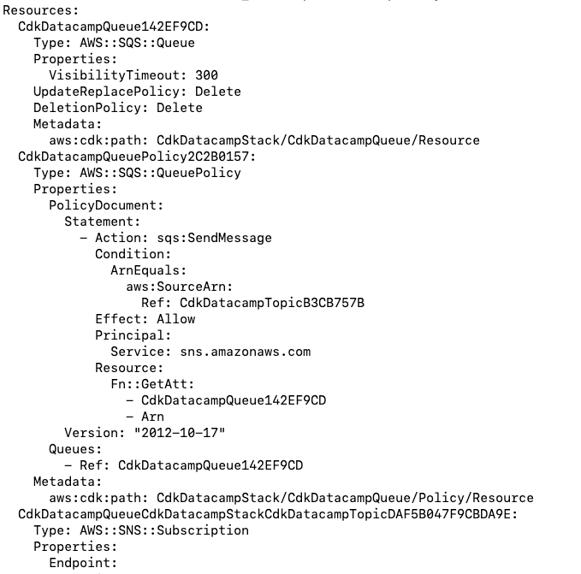
Synthesized CloudFormation template
By default, the output goes to your terminal, but you can also output to a file if needed:
cdk synth > template.yamlThis is useful when:
- You want to inspect the actual template before deploying
- You're debugging a stack’s structure
- You're sharing the template with teams who aren’t using CDK
Testing infrastructure
Although testing infrastructure as code might sound unusual, it is beneficial, especially when your stacks get large or include conditional logic, loops, or reusable constructs.
The AWS CDK offers the assertions module to test synthesized stacks.
Writing a simple test with pytest
Here's an example test that checks if a specific resource (like an S3 bucket) is included in the stack:
# test/test_cdk_datacamp_stack.py
import aws_cdk as cdk
from aws_cdk.assertions import Template
from cdk_datacamp.cdk_datacamp_stack import CdkDatacampStack
def test_s3_bucket_created():
app = cdk.App()
stack = CdkDatacampStack(app, "TestStack")
template = Template.from_stack(stack)
# Assert that an S3 bucket exists
template.resource_count_is("AWS::S3::Bucket", 1)To run the tests, make sure pytest is installed:
pip install -U pytestThen run:
pytestIf everything passes, you’ll see a green checkmark. If not, the test output will tell you what's missing.

Pytest output showing successful execution of all test cases for the AWS CDK stack
You can also include validation in your CDK stack. Validation tests are runtime checks inside your construct or stack code that validate inputs before deployment happens. They help catch misconfigurations or enforce constraints early in the development lifecycle.
Let’s say we want to pass the bucket_name as a context variable, but we want to validate that:
- The bucket name is not empty
- It meets S3 naming rules (e.g., lowercase only)
Create a file named test/test_storage_with_lambda.py and add the following:
import pytest
from aws_cdk import App, Stack
from cdk_datacamp.storage_with_lambda import StorageWithLambda
def test_missing_bucket_name():
app = App()
stack = Stack(app, "TestStack")
with pytest.raises(ValueError, match="bucket_name is required"):
StorageWithLambda(stack, "FailingConstruct", bucket_name=None)
def test_bucket_name_uppercase():
app = App()
stack = Stack(app, "TestStack")
with pytest.raises(ValueError, match="must be lowercase"):
StorageWithLambda(stack, "FailingConstruct", bucket_name="InvalidName")To test the validation, run the below command:
test/test_storage_with_lambda.py
Pytest output showing successful execution of all test cases for the AWS CDK stack
When to use testing:
- You're creating reusable constructs or patterns.
- The implementation of testing serves to establish standard technical requirements among team members.
- You want to catch regressions or unintended changes during CI/CD.
Want to reinforce your CDK knowledge in an interview setting? These top AWS DevOps interview questions can help you prepare.
Best Practices and Tips for Working with the AWS CDK
After mastering CDK stack creation and deployment, you should follow best practices to keep your infrastructure code clean, secure, and scalable. This section will discuss how to structure large projects, handle security correctly, and integrate CDK into CI/CD pipelines.
Organizing large projects
As your CDK app grows, organizing code into manageable units becomes essential.
Use multiple stacks
Split your infrastructure by concern. For example:
- NetworkingStack: VPCs, subnets, security groups
- ComputeStack: EC2, Lambda
- StorageStack: S3, DynamoDB
This allows you to deploy, test, or destroy parts of your infrastructure independently. Here’s how it can be included in app.py:
network_stack = NetworkingStack(app, "NetworkingStack")
compute_stack = ComputeStack(app, "ComputeStack")You can also pass resources between stacks using outputs or references.
Create reusable nested constructs
Encapsulate related resources (like a Lambda and its permissions) into a custom construct, as you did with StorageWithLambda. This improves readability and reusability across stacks or apps.
Use environment-specific configuration
Support multiple environments (dev, staging, prod) using:
cdk.jsonwith context values- CLI overrides:
cdk deploy -c env=prod - Conditional logic in your stacks
env = app.node.try_get_context("env")
if env == "prod":
bucket_name = "mycompany-prod-logs"Security and permissions
Any infrastructure project must prioritize security during AWS CDK automated deployment processes. The following section demonstrates secure IAM resource management through least privilege principles.
Define IAM roles instead of using defaults
CDK constructs, which include Lambda or ECS tasks, will automatically create IAM roles. Although convenient, it can limit your control over permissions and naming.
Instead, define roles explicitly:
from aws_cdk import aws_iam as iam
execution_role = iam.Role(
self,
"LambdaExecutionRole",
assumed_by=iam.ServicePrincipal("lambda.amazonaws.com"),
description="Custom role for Lambda with least privilege",
managed_policies=[
iam.ManagedPolicy.from_aws_managed_policy_name("service-role/AWSLambdaBasicExecutionRole")
]
)This role only allows logging and nothing else by default.
Apply the principle of least privilege
Avoid using "*" in actions or resources unless absolutely necessary.
Example:
lambda_fn.add_to_role_policy(
iam.PolicyStatement(
actions=["*"],
resources=["*"]
)
)You can also use resource-specific grants when available:
bucket.grant_read(lambda_fn)This automatically generates the necessary policy with scoped access to the S3 bucket.
Use managed policies when possible
AWS-managed policies simplify maintenance and reduce the chance of errors.
iam.ManagedPolicy.from_aws_managed_policy_name("AmazonSQSReadOnlyAccess")You can attach these to custom roles for services like ECS, Batch, or Step Functions.
CI/CD integration
The AWS CDK delivers exceptional power through its ability to integrate with contemporary CI/CD pipelines. CDK supports automated infrastructure delivery through version-controlled code deployment, which works with GitHub, GitLab, and AWS-native services, including CodePipeline. The system decreases human mistakes while shortening feedback cycles and enables deployment across multiple environments.
GitHub Actions: Automating CDK deployments
You can use GitHub Actions to synthesize, diff, test, and deploy CDK stacks on every push or pull request.
Take a look at this .github/workflows/deploy.yml:
name: Deploy CDK App
on:
push:
branches:
- main
jobs:
deploy:
runs-on: ubuntu-latest
steps:
- uses: actions/checkout@v3
- uses: actions/setup-python@v4
with:
python-version: 3.11
- name: Install dependencies
run: |
pip install -r requirements.txt
npm install -g aws-cdk
- name: Run unit tests
run: pytest
- name: CDK Synth
run: cdk synth -c environment=prod
- name: Deploy to AWS
run: cdk deploy --require-approval never
env:
AWS_ACCESS_KEY_ID: ${{ secrets.AWS_ACCESS_KEY_ID }}
AWS_SECRET_ACCESS_KEY: ${{ secrets.AWS_SECRET_ACCESS_KEY }}Use cdk diff in PRs to preview infra changes before merging.
CDK pipelines: Native CDK CI/CD with CodePipeline
For fully-managed deployments within AWS, CDK provides a module called aws_cdk.pipelines, which lets you define your entire CI/CD pipeline as code, just like infrastructure.
Here’s a simplified example:
from aws_cdk import pipelines, SecretValue, Stack
from constructs import Construct
from my_app_stage import MyAppStage # replace with your actual stage import
class PipelineStack(Stack):
def __init__(
self,
scope: Construct,
construct_id: str,
**kwargs
) -> None:
super().__init__(scope, construct_id, **kwargs)
# Define the source of the pipeline from a GitHub repository
source = pipelines.CodePipelineSource.git_hub(
repo_string="your-org/your-repo", # GitHub org/repo
branch="main",
authentication=SecretValue.secrets_manager("GITHUB_TOKEN")
)
# Define the CodePipeline and its synthesis step
pipeline = pipelines.CodePipeline(
self,
"MyAppPipeline",
synth=pipelines.ShellStep(
"Synth",
input=source,
commands=[
"pip install -r requirements.txt",
"npm install -g aws-cdk",
"cdk synth"
]
)
)
# Add an application stage (e.g., production deployment)
pipeline.add_stage(
MyAppStage(self, "ProdStage")
)In the above code:
SecretValue.secrets_manager("GITHUB_TOKEN")securely pulls your GitHub token from Secrets Manager.MyAppStageshould be a class that extendsStageand wraps your actual CDK stacks.
If you're deploying machine learning systems, integrating CDK with continuous deployment practices is covered in our CI/CD for Machine Learning course.
Conclusion
This tutorial showed you how to construct and deploy cloud infrastructure in Python through AWS Cloud Development Kit (CDK) operations. You learned how to:
- Create your first CDK stack.
- Define and validate S3 buckets and Lambda functions as resources.
- Organize a project through custom constructs and multi-stack patterns.
- Apply security best practices through the principle of least privilege.
- Automate deployments by combining GitHub Actions with CDK Pipelines.
- Write tests to validate your infrastructure logic.
Now that you’ve deployed your first CDK app, here are a few ways to level up:
- Use parameterized environments for dev/staging/prod
- Add CloudWatch alarms, API Gateway, or Step Functions
- Explore CDK constructs like
aws_s3_deployment,aws_ecs_patterns, andcdk.pipelines - Convert your constructs into an internal Python library for reusability
To keep learning and building, check out the Introduction to AWS Boto in Python course!
FAQs
What is AWS CDK, and how is it different from CloudFormation or Terraform?
AWS CDK allows you to define cloud infrastructure using programming languages like Python, while CloudFormation and Terraform rely on JSON/YAML or HCL. CDK offers higher abstraction and reusability through constructs.
Do I need to know CloudFormation to use AWS CDK?
No, CDK abstracts most of CloudFormation’s complexity. However, understanding CloudFormation helps when using lower-level constructs or troubleshooting deployments.
Can I deploy multiple environments (e.g., dev, prod) with AWS CDK?
Yes! CDK supports environment-specific configuration using context values and CLI flags like cdk deploy -c env=prod.
How do I test my CDK infrastructure code?
You can use pytest along with CDK's assertions and the template module to write unit tests that verify your stack’s resources and configurations before deployment.
What happens behind the scenes when I run cdk deploy?
cdk deploy synthesizes your Python code into a CloudFormation template, uploads it to AWS, and provisions the defined resources in your account.

Rahul Sharma 是一位 AWS 大使、DevOps 架构师与技术博主,专注于云计算、DevOps 实践与开源技术。凭借在 AWS、Kubernetes 与 Terraform 方面的专长,他通过生动易懂的文章与教程,为学习者与专业人士化繁为简。Rahul 热衷于解决 DevOps 难题,并分享洞见以赋能技术社区。
使用原始的 JSON 或 YAML 模板来管理云基础设施既繁琐又容易出错。AWS Cloud Development Kit(CDK)通过允许您使用现代编程语言(如 Python、TypeScript、Java 和 C#)来定义云资源,从而改变了这一点。
借助 CDK,基础设施以代码的形式存在,可复用、可测试,并能进行版本控制。即便在配置复杂的云系统时,它也能让您以开发者的方式进行思考。
在本教程中,您将学习如何使用 Python 搭建一个 AWS CDK 项目。我们将逐步演示如何编写您的第一个堆栈、添加一个基础的 AWS 资源,并将其部署到您的 AWS 账户。结束时,您将清楚了解 CDK 的工作原理,以及如何以对开发者友好的方式通过代码来管理基础设施。
若想更好地理解 AWS CDK 等工具背后的实践,请探索我们的 DevOps 概念课程。
先决条件
在开始使用 AWS CDK 编写代码之前,请确保您的环境已正确配置。您需要准备:
用于实验的 AWS 账户
您需要访问一个 AWS 账户,才能部署我们将构建的应用。如果您的系统已经为具有管理员权限的用户配置了凭证,可以直接跳到后面。
如果您还没有 AWS 账户,请在此创建。
若需要系统化学习 AWS 基础知识,AWS Cloud Practitioner 学习路径是不錯的起点。
管理员用户
为便于跟进操作,您需要一个具有编程访问权限且拥有完整权限的用户。
在最后一个页面,记录您的访问密钥 ID(Access key ID)和秘密访问密钥(Secret access key)。下一步会用到它们。
配置您的 AWS 凭证
打开终端并运行:
系统将提示您输入来自 IAM 控制台的凭证:
选择用于开发的 IDE
AWS CDK 允许开发者在完整的编程环境中工作,而不是使用 YAML 或 JSON 模板。这个功能全面的环境使您可以使用偏好的 IDE,同时受益于代码补全、实时 Lint、重构工具等,以高效管理基础设施代码。
为了获得使用 Python CDK 的最佳开发体验,建议使用支持以下功能的 IDE:
安装 Python 和 pip
要将 AWS CDK 与 Python 一起使用,您的系统需要安装 3.8 或更高版本的 Python。如果尚未安装,可以从Python 官方网站下载最新版本。
如果您使用 Windows,请确保已将 Python 添加到系统的
PATH环境变量。要检查,请打开终端或命令提示符并运行:如果看到“command not found”或类似错误,说明 Python 可能未加入
PATH。最简单的修正方法是在安装时勾选“Add Python 3.x to PATH”。稍后您还需要 pip(Python 包管理器)来安装 AWS CDK 依赖。大多数现代 Python 发行版都预装了 pip。
如果尚未安装,请参考pip 官方安装指南。
开始使用 AWS CDK
在编写任何代码之前,了解 AWS CDK 是什么、为何存在,以及它在更广泛的“基础设施即代码(IaC)”领域中所处的位置至关重要。本节将向您介绍 CDK 背后的核心概念,并展示它与其他流行 IaC 工具的比较。
什么是 AWS CDK,为什么要使用它?
AWS Cloud Development Kit(CDK)是一个开源框架,使用户可以使用熟悉的编程语言(包括 Python、TypeScript、Java 和 C#)来创建云基础设施。
CDK 允许用户通过实际代码以编程方式生成 CloudFormation 模板,而无需手写 JSON 或 YAML 模板。
这意味着您可以:
在其核心,CDK 围绕三个主要概念构建:
AWS CDK 应用的可视化层级
CDK vs Terraform vs CloudFormation
下表描述了在 AWS 上管理基础设施的不同工具之间的差异。
特性
AWS CDK
Terraform
AWS CloudFormation
语言支持
Python、TypeScript、Java、C#
HCL(声明式)
YAML / JSON
抽象层级
高(OOP + 库)
中
低
模块化
强(构造、类)
强(模块)
弱(嵌套堆栈)
状态管理
由 CloudFormation 处理
由 Terraform 处理(tfstate)
由 CloudFormation 处理
多云
仅限 AWS
是
仅限 AWS
支持的语言与前置条件
AWS CDK 支持多种编程语言,开发者可选择自己最熟悉的:
本教程将聚焦 Python,但核心概念适用于所有受支持语言。
安装与设置
既然环境已经就绪,是时候使用 Python 脚手架搭建您的第一个 AWS CDK 应用了。CDK 的
init命令会设置完整的项目结构,包括文件、目录和虚拟环境,帮助您快速上手。创建项目目录
打开终端,运行以下命令创建新目录并进入:
初始化 CDK 应用
这将创建一个起始项目,预配置了一个基础示例,包括:
cdk_datacamp_stack)cdk.json文件.venv)命令完成后,您将看到类似如下的输出:
CDK Python 项目脚手架
虚拟环境设置
如果
cdk init过程未自动创建虚拟环境,您可以手动创建:激活后,安装所需依赖:
理解 CDK 概念
在更深入编写代码之前,我们来看看 AWS CDK 的核心组件——App、Stack 和 Construct——在实践中如何协同工作。既然您已经熟悉各自的含义,接下来了解它们如何交互,以构建可扩展、模块化的基础设施。
我们还将拆解构造的不同层级(L1、L2、L3),并了解实现这些能力的 CDK 库。
App、Stack 与 Construct
既然您已从前文了解了 App、Stack 和 Construct 的概念,我们来理解它们在 CDK 应用中的协作方式。
可将其类比为建造房屋:
在代码中,关系如下:
在此示例中,App 实例化了一个 Stack,其中包含诸如 S3 存储桶等 Construct。
理解构造层级:L1、L2 和 L3
在 AWS CDK 中,构造具有三种抽象层级,可根据您对控制力或简洁性的需求进行选择。
第 1 层(L1)——CloudFormation 构造
这些是直接从 AWS CloudFormation 规范生成的原始构建块。CloudFormation 中的每个 AWS 资源在 CDK 中都有对应的 L1 构造;其名称总以 “Cfn” 开头。
L1 构造暴露所有可能的配置选项,但不提供抽象或默认值。当您需要完全掌控,或使用尚未被更高层构造封装的新 AWS 功能时,L1 很理想。
s3.CfnBucket第 2 层(L2)——原生 AWS CDK 构造
L2 构造在 L1 之上提供更高层级、对开发者友好的抽象。它们是带有合理默认值的“固化”组件,内置方法可简化日常任务。它们为日常使用而设计,能减少样板代码,同时仍提供良好的自定义能力。
s3.Bucket—— 仅一行代码即可创建启用版本控制的存储桶。第 3 层(L3)——模式构造
L3 构造将多个 AWS 资源打包为常见的架构模式。这些可以由 AWS 提供,也可以由社区或您自己构建为可复用组件。使用 L3 构造可封装复杂性,并在项目或团队间复用基础设施模式。
aws_s3_deployment.BucketDeployment—— 将 S3 存储桶与部署策略结合,实现资产上传自动化。Most developers start with L2 constructs and introduce L1 only when needed. L3 becomes handy as your project grows and you want to abstract repeated patterns into reusable components.
CDK 库与模块
You don't interact directly with raw CloudFormation when building with AWS CDK. Instead, you use CDK's modular libraries, which provide constructs for AWS services like S3, Lambda, IAM, and more. All AWS service modules are bundled under the core package called
aws-cdk-lib, and these are further organized by service.Commonly used libraries in Python
Below are some of the most frequently used libraries (or modules) from
aws-cdk-libin Python projects:aws_cdk.aws_s3– For creating S3 bucketsaws_cdk.aws_lambda– For defining Lambda functionsaws_cdk.aws_iam– For managing roles and permissionsaws_cdk.aws_dynamodb– For working with DynamoDB tablesaws_cdk.aws_ec2– For networking components like VPCs and security groupsaws_cdk.aws_sns/aws_cdk.aws_sns_subscriptions– For SNS topics and their subscribersThese modules are imported only as needed, keeping your project lightweight and modular.
How to import and use a CDK module
To use a specific AWS service, you import its module and call its construct classes. For example, to create an S3 bucket:
This example uses the L2 construct
s3.Bucket, which includes built-in defaults like encryption and versioning options.If you need to use another service, just import its module in the same way:
Note: In your
requirements.txt, you typically only need:These two packages give you access to all AWS CDK constructs and the core framework functionality.
Creating Your First CDK Stack
After learning about AWS CDK internal operations, you can implement this knowledge. The following section guides you through building an operational CDK stack using Python. Before deploying them to your AWS account, you will create a project structure through code and implement actual AWS resources, such as S3 buckets and Lambda functions.
Scaffolding a new project
When you run the
cdk initcommand with the--language pythonflag, it sets up a full project structure that looks something like this:Folder structure of an AWS CDK Python project
The
app.pyfile is where the App is defined, and thecdk_datacamp_stack.pyfile is where you write the code for your Stack and Constructs.Tip: You can rename the stack file or class to match the purpose of your app, such as
storage_stack.pyormonitoring_stack.py.Adding AWS resources
Now let’s add some AWS resources to your CDK stack. You'll write this inside the
__init__()method of yourStackclass in thecdk_datacamp_stack.py file.S3 bucket
Lambda function
Deploying the stack
Once you’ve added your resources, it’s time to deploy them to AWS.
In your terminal, activate your virtual environment and run:
This will:
You’ll be prompted to approve the changes if it’s your first time deploying the stack.
After deployment, you can: