
课程
Python 入门
4 小时
7.1M
实践并学习路径你的进步。
使用 Google 继续在线运行和编辑此教程中的代码
运行代码如果您刚开始学习 Python,想要了解更多内容,欢迎参加 DataCamp 的《Python 数据科学入门》课程。
通过这个动手练习来练习 Python 中的文档字符串(Docstring)。
Python 文档字符串(常称为 docstring)是一种字符串字面量,用于类、模块、函数或方法的定义中。对于任意 Python 对象,都可以通过 doc 属性 (__doc__) 访问其文档字符串,也可以使用内置的 help() 函数访问。对象的文档字符串是在对象定义中以字符串常量作为第一条语句来指定的。
与解释单行代码的常规注释不同,docstring 提供函数、类或模块的高层描述。优质的 docstring 能提升代码的可读性、可维护性与协作效率,因此是作为 Python 开发者为代码撰写文档的最佳实践。
Docstring 有助于您了解模块或函数的功能。例如,假设您安装了 scikit-learn 库,想要了解 sklearn 包的描述、包含的模块等信息,您可以直接使用 help 函数来获取。
我们先快速导入该包。
import sklearn
help(sklearn)
您将会看到类似下图的输出:
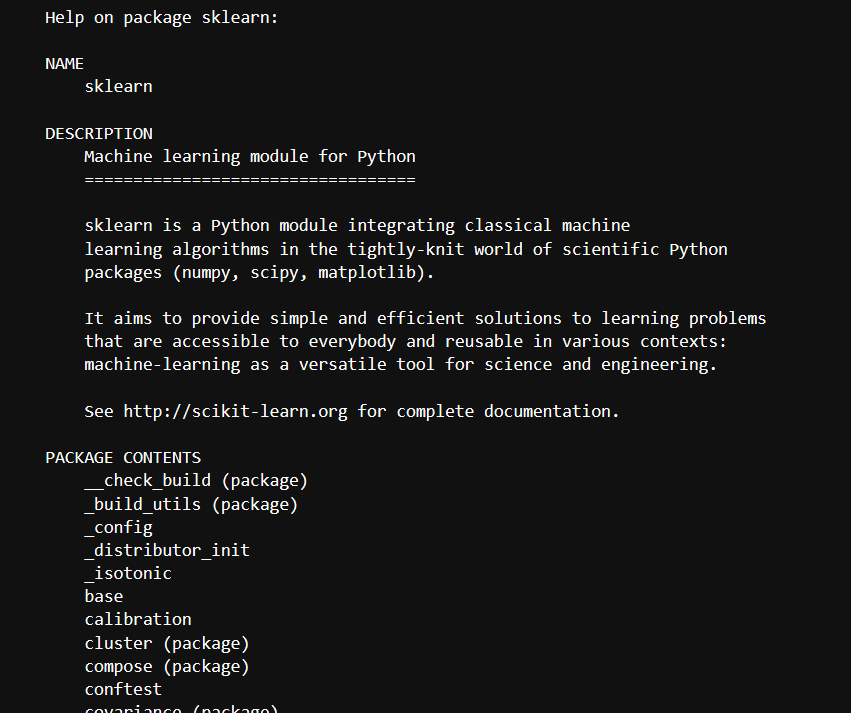
Docstring 与注释在精神上相似,但它是注释的增强版,更加规范且更有用。Docstring 用作类、模块和包的文档。
另一方面,注释主要用于解释代码中不明显的部分,也常用于标注修复 Bug 和待办任务。
Docstring 使用成对的引号来表示,而注释以开头的 # 符号开始。
请注意,注释无法通过内置的 doc 属性和 help 函数访问。让我们看看如果您尝试这样做会发生什么:
def string_reverse(str1):
    #Returns the reversed String.

    #Parameters:
    #    str1 (str):The string which is to be reversed.

    #Returns:
    #    reverse(str1):The string which gets reversed.

    reverse_str1 = ''
    i = len(str1)
    while i > 0:
        reverse_str1 += str1[i - 1]
        i = i- 1
    return reverse_str1
print(string_reverse.__doc__)
None
help(string_reverse)
Help on function string_reverse in module __main__:

string_reverse(str1)
编写或使用 Docstring 有两种方式:单行 docstring 和 多行 docstring。我们逐一学习。
单行 docstring 是能放在一行内的简短描述。它们用三引号 (''' 或 """)括起,且结束引号必须与内容在同一行。
虽然三单引号和三双引号都可以,但 Python 的标准约定是使用三双引号 (""")。
示例如下:
def square(a):
    """Returns the square of the given number."""
    return a ** 2  # Corrected exponentiation

# Accessing the docstring
print(square.__doc__)
输出:
Returns the square of the given number.您也可以使用 Python 的 help() 函数来获取该文档:
help(square)输出:
Help on function square in module __main__:

square(a)
    Returns the square of the given number.
多行 docstring 与单行 docstring 一样以字符串字面量开头,但随后会留出一个空行,并附上更详细的描述性文本。
多行 docstring 的通用写法如下:
def some_function(argument1):
    """Summary or Description of the Function

    Parameters:
    argument1 (int): Description of arg1

    Returns:
    int:Returning value

   """

    return argument1

print(some_function.__doc__)
Summary or Description of the Function

    Parameters:
    argument1 (int): Description of arg1

    Returns:
    int:Returning value
help(some_function)
Help on function some_function in module __main__:

some_function(argument1)
    Summary or Description of the Function

    Parameters:
    argument1 (int): Description of arg1

    Returns:
    int:Returning value
我们再看一个示例,展示如何更详细地使用多行字符串:
def string_reverse(str1):
    '''
    Returns the reversed String.

    Parameters:
        str1 (str):The string which is to be reversed.

    Returns:
        reverse(str1):The string which gets reversed.
    '''

    reverse_str1 = ''
    i = len(str1)
    while i > 0:
        reverse_str1 += str1[i - 1]
        i = i- 1
    return reverse_str1
print(string_reverse('DeepLearningDataCamp'))
pmaCataDgninraeLpeeD
help(string_reverse)
Help on function string_reverse in module __main__:

string_reverse(str1)
    Returns the reversed String.

    Parameters:
        str1 (str):The string which is to be reversed.

    Returns:
        reverse(str1):The string which gets reversed.
您可以看到,上面的摘要行单独占一行,并与其他内容以一个空行分隔。需要遵循这一约定,这对自动索引工具很有帮助。
我们来查看 Python 的内置文档字符串。
所有内置函数、类和方法都附有可读的人类描述。您可以通过两种方式访问:
您会注意到,help 函数的输出比 __doc__ 属性更详细。
例如:
import math
print(math.__doc__)
This module provides access to the mathematical functions
defined by the C standard.
同样,您也可以使用 help 函数:
help(math)
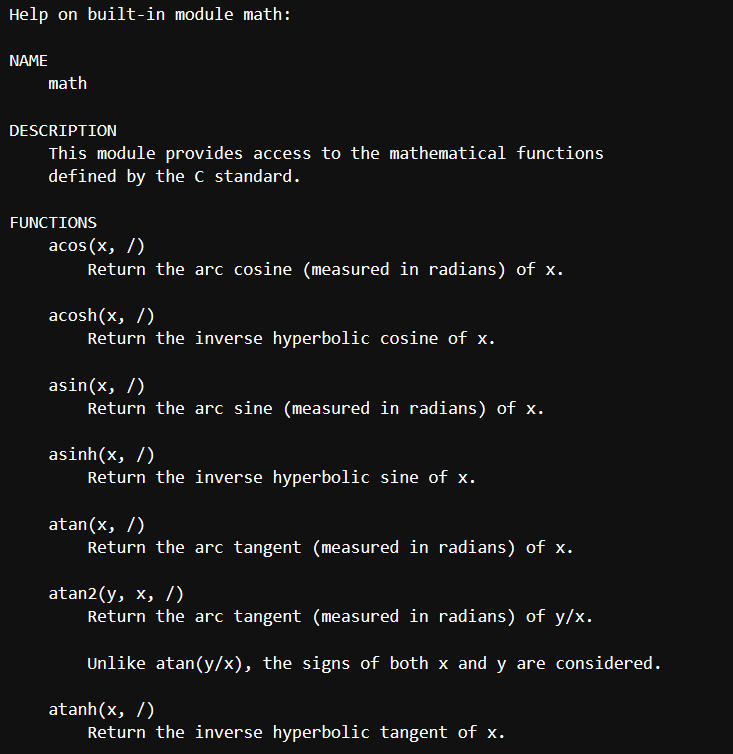
在类定义中,docstring 可用于为整个类提供文档。通常将其紧跟在类定义之后,并使用三引号(""") 括起。例如:
class MyClass:
    """This is the documentation for MyClass."""

    def __init__(self):
        """This is the documentation for the __init__ method."""
        pass
可以通过类或方法的 __doc__ 属性访问 docstring。例如,您可以通过 MyClass.__doc__ 访问 MyClass 的 docstring。
下面我们来了解一些常见的 Docstring 格式。
可用的 Docstring 格式很多,但最好使用那些易于 Docstring 解析器识别、也便于其他数据科学家/程序员阅读的格式。选择 Docstring 格式没有硬性规定,但在整个项目中保持一致非常重要。此外,建议使用 Sphinx 广泛支持的格式类型。
最常用的格式如下所示。
| 格式类型 | 描述 |
|---|---|
| NumPy/SciPy 文档字符串 | reStructured 与 Google Docstrings 的结合,受 Sphinx 支持 |
| PyDoc | Python 的标准文档模块,受 Sphinx 支持 |
| EpyDoc | 将 Epytext 渲染为一系列 HTML 文档,并基于 Docstring 为 Python 模块生成 API 文档的工具 |
| Google 文档字符串 | Google 风格 |
可能会存在不同的文档字符串格式。您无需“重新发明轮子”去逐一学习,因为这些格式的模式几乎相似,只是在细节上略有差别。下面我们将结合用例,查看一种常见的文档字符串格式示例。
首先,我们将详细了解 Sphinx 风格,之后您也可以轻松上手其他格式。
Sphinx 风格简单、传统且冗长,最初专为 Python 文档创建。Sphinx 使用 reStructuredText,其用法与 Markdown 类似。
class Vehicle(object):
    '''
    The Vehicle object contains lots of vehicles
    :param arg: The arg is used for ...
    :type arg: str
    :param `*args`: The variable arguments are used for ...
    :param `**kwargs`: The keyword arguments are used for ...
    :ivar arg: This is where we store arg
    :vartype arg: str
    '''


    def __init__(self, arg, *args, **kwargs):
        self.arg = arg

    def cars(self, distance, destination):
        '''We can't travel a certain distance in vehicles without fuels, so here's the fuels

        :param distance: The amount of distance traveled
        :type amount: int
        :param bool destinationReached: Should the fuels be refilled to cover required distance?
        :raises: :class:`RuntimeError`: Out of fuel

        :returns: A Car mileage
        :rtype: Cars
        '''
        pass
Sphinx 使用 关键字(保留字),大多数编程语言也有类似概念。但在 Sphinx 中,这些被明确称为 role。在上述代码中,Sphinx 将 param 作为一个 role,type 也是一个 role,表示 param 的 Sphinx 数据类型。type 角色是可选的,但 param 是必需的。返回值相关的角色用于记录返回的对象,与参数角色不同。返回值的角色不依赖于 rtype,反之亦然。rtype 表示函数返回对象的类型。
Google 风格更简单直观,适合简短的文档。要开始使用,需要在配置文件中进行设置,即在 conf.py 的 extensions 列表中添加 sphinx.ext.napoleon 或 sphinxcontrib.napoleon。
class Vehicles(object):
    '''
    The Vehicle object contains a lot of vehicles

    Args:
        arg (str): The arg is used for...
        *args: The variable arguments are used for...
        **kwargs: The keyword arguments are used for...

    Attributes:
        arg (str): This is where we store arg,
    '''
    def __init__(self, arg, *args, **kwargs):
        self.arg = arg

    def cars(self, distance,destination):
        '''We can't travel distance in vehicles without fuels, so here is the fuels

        Args:
            distance (int): The amount of distance traveled
            destination (bool): Should the fuels refilled to cover the distance?

        Raises:
            RuntimeError: Out of fuel

        Returns:
            cars: A car mileage
        '''
        pass
Google 风格比 Sphinx 风格更易用。但它也有不便之处:如上例所示,对 distance 的多行描述会显得杂乱。因此,若需更长篇幅的文档,建议采用 Numpy 风格。
Numpy 风格在文档中提供大量细节。它比其他文档格式更冗长,但如果您需要进行详细的文档编写(如对所有函数和参数进行全面说明),这是个很好的选择。
class Vehicles(object):
    '''
    The Vehicles object contains lots of vehicles

    Parameters
    ----------
    arg : str
        The arg is used for ...
    *args
        The variable arguments are used for ...
    **kwargs
        The keyword arguments are used for ...

    Attributes
    ----------
    arg : str
        This is where we store arg,
    '''
    def __init__(self, arg, *args, **kwargs):
        self.arg = arg

    def cars(self, distance, destination):
        '''We can't travel distance in vehicles without fuels, so here is the fuels

        Parameters
        ----------
        distance : int
            The amount of distance traveled
        destination : bool
            Should the fuels refilled to cover the distance?

        Raises
        ------
        RuntimeError
            Out of fuel

        Returns
        -------
        cars
            A car mileage
        '''
        pass
上述示例比其他文档更为冗长,适用于编写长篇且详尽的文档。
如前所述,docstring 可通过 Python 内置的 __doc__ 属性和 help() 函数访问。您还可以使用内置模块 Pydoc,与 doc 属性和 help 函数相比,它在功能上有很大不同。
当您想与同事共享代码或将其开源(面向更广泛的受众)时,Pydoc 会很有用。它可以从 Python 文档生成网页,还能启动一个 Web 服务器。
我们来看它如何工作。
运行 Pydoc 模块最简单、最方便的方式是将其作为脚本运行。在 jupyter lab 的单元格中运行时,需要使用感叹号(!)。
!python -m pydoc
pydoc - the Python documentation tool

pydoc <name> ...
    Show text documentation on something.  <name> may be the name of a
    Python keyword, topic, function, module, or package, or a dotted
    reference to a class or function within a module or module in a
    package.  If <name> contains a '\', it is used as the path to a
    Python source file to document. If name is 'keywords', 'topics',
    or 'modules', a listing of these things is displayed.

pydoc -k <keyword>
    Search for a keyword in the synopsis lines of all available modules.

pydoc -n <hostname>
    Start an HTTP server with the given hostname (default: localhost).

pydoc -p <port>
    Start an HTTP server on the given port on the local machine.  Port
    number 0 can be used to get an arbitrary unused port.

pydoc -b
    Start an HTTP server on an arbitrary unused port and open a Web browser
    to interactively browse documentation.  This option can be used in
    combination with -n and/or -p.

pydoc -w <name> ...
    Write out the HTML documentation for a module to a file in the current
    directory.  If <name> contains a '\', it is treated as a filename; if
    it names a directory, documentation is written for all the contents.
从上述输出可见,Pydoc 的首要用途是展示函数、模块、类等的文本文档。让我们看看如何比 help 函数更好地利用它。
!python -m pydoc glob
Help on module glob:

NAME
    glob - Filename globbing utility.

MODULE REFERENCE
    https://docs.python.org/3.7/library/glob

    The following documentation is automatically generated from the Python
    source files.  It may be incomplete, incorrect or include features that
    are considered implementation detail and may vary between Python
    implementations.  When in doubt, consult the module reference at the
    location listed above.

FUNCTIONS
    escape(pathname)
        Escape all special characters.

    glob(pathname, *, recursive=False)
        Return a list of paths matching a pathname pattern.

        The pattern may contain simple shell-style wildcards a la
        fnmatch. However, unlike fnmatch, filenames starting with a
        dot are special cases that are not matched by '*' and '?'
        patterns.

        If recursive is true, the pattern '**' will match any files and
        zero or more directories and subdirectories.

    iglob(pathname, *, recursive=False)
        Return an iterator which yields the paths matching a pathname pattern.

        The pattern may contain simple shell-style wildcards a la
        fnmatch. However, unlike fnmatch, filenames starting with a
        dot are special cases that are not matched by '*' and '?'
        patterns.

        If recursive is true, the pattern '**' will match any files and
        zero or more directories and subdirectories.

DATA
    __all__ = ['glob', 'iglob', 'escape']

FILE
    c:\users\hda3kor\.conda\envs\test\lib\glob.py
现在我们用 help 函数来获取 glob 的文档。
help(glob)
---------------------------------------------------------------------------

NameError                                 Traceback (most recent call last)

<ipython-input-6-6f504109e3a2> in <module>
----> 1 help(glob)


NameError: name 'glob' is not defined
如您所见,因为未定义 glob 而抛出名称错误。因此,要使用 help 函数提取文档,您必须先导入该模块;而使用 Pydoc 则不需要。
我们来探索 Pydoc 的一个最有趣的特性:作为 Web 服务运行。
为此,您只需以脚本方式运行 Pydoc,并添加 -b 参数。这会在一个空闲端口上启动 HTTP 服务器,并打开浏览器以交互方式浏览文档。当系统中运行了多个服务且您不记得哪些端口空闲时,这尤其有用。
!python -m pydoc -b
^C
运行上述单元后,将会在任意端口打开一个新窗口,浏览器界面类似下图。
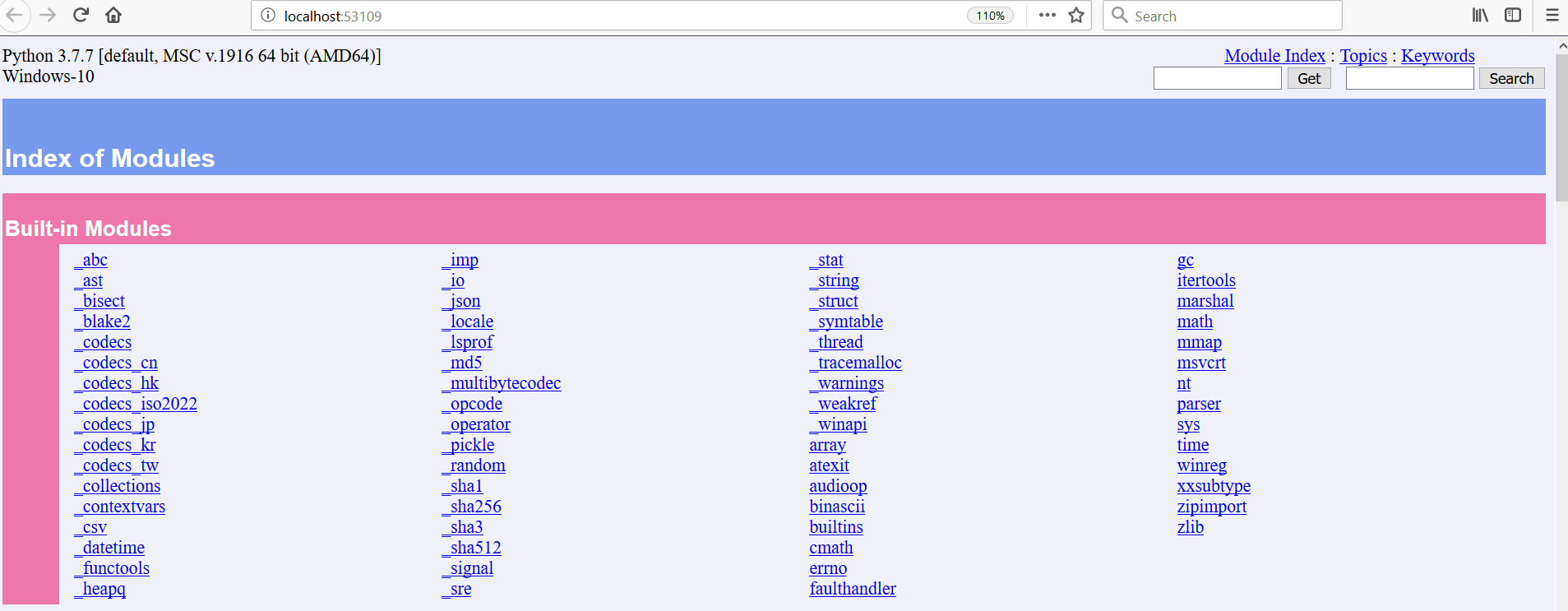
我们查看一下 h5py 模块的文档,它是一种用于存储神经网络权重的文件格式。
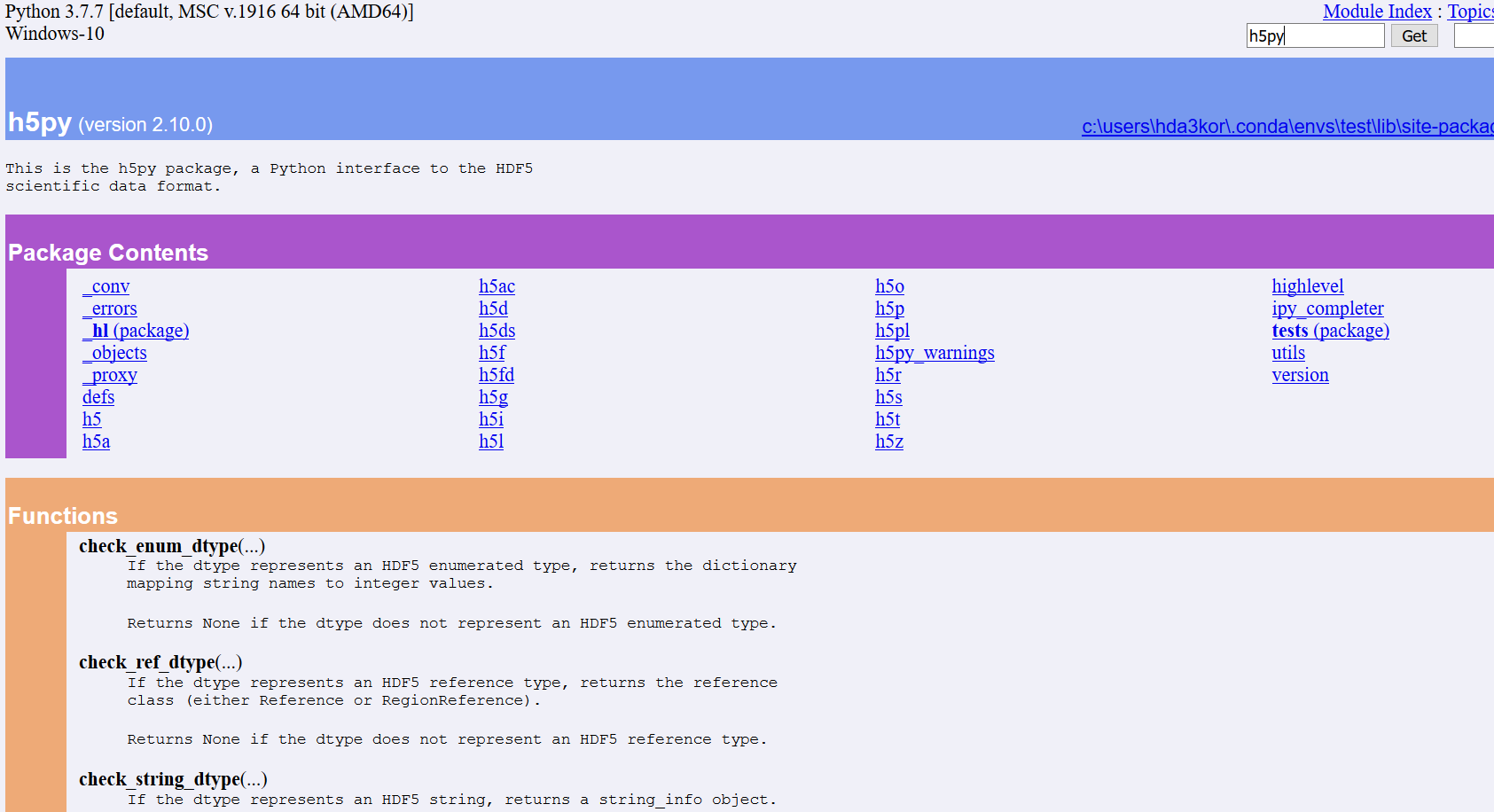
下表对比了上文提到的不同类型的 docstring 格式:
| 格式 | 描述 | 优点 | 缺点 | 最佳使用场景 |
|---|---|---|---|---|
| Sphinx | 使用 reStructuredText 进行文档编写,支持结构化角色如 param、type、returns、raises。适合大型项目,并能很好地与 Sphinx 文档集成。 |
结构高度化;与 Sphinx 配合良好;大型项目的行业标准。 | 较为冗长;需要了解 reStructuredText 语法。 | 需要结构化文档的大型 Python 项目。 |
更简单直观的格式,包含 Args、Attributes、Returns 和 Raises。更易读,但对多行描述可能显得杂乱。 |
易读易写;适合较短的文档。 | 多行描述可能杂乱;需要额外配置。 | 通用的 Python 文档,注重易读性。 | |
| NumPy | 高度详细且结构化,使用 Parameters、Attributes、Returns、Raises。非常适合科学计算与数据科学项目。 |
内容详尽,适用于复杂的科学与数据科学项目。 | 比其他格式更冗长;对简单项目可能过度。 | 需要详细文档的科学计算与数据科学项目。 |
| PyDoc | Python 的内置文档工具。可从 docstring 生成网页,也可启动 Web 服务器进行交互式浏览。 | 与 Python 集成;可生成基于 Web 的文档。 | 与其他文档工具相比灵活性有限。 | 需要内置文档与基于 Web 浏览的项目。 |
恭喜您完成了这篇 Python 文档字符串(docstring)教程。
本教程主要帮助您入门 docstring,涵盖了关键主题。但 Docstring 领域很广,还有一些概念未展开。如果您想继续学习,请查看我们的Python 字符串教程以及《用 Python 编写函数》课程。
如果您刚开始学习 Python,想要了解更多内容,欢迎参加 DataCamp 的《Python 数据科学入门》课程。您也可以选择我们的 Python 职业学习路径,开启成为Python 开发者或Python 数据科学家的旅程。
Python 课程
课程
课程
实践并学习路径你的进步。
使用 Google 继续