
कोर्स
Python परिचय
4 घंटा
7.1M
अभ्यास और ट्रैक अपनी प्रगति को।
Google के साथ जारी रखेंइस ट्यूटोरियल का कोड ऑनलाइन चलाएं और संपादित करें
कोड चलाएंयदि आप Python में अभी शुरुआत कर रहे हैं और और अधिक सीखना चाहते हैं, तो DataCamp का Introduction to Data Science in Python कोर्स लें।
Python में Docstrings का अभ्यास करें इस हैंड्स-ऑन एक्सरसाइज़ के साथ।
Python documentation string, जिसे आमतौर पर docstring कहा जाता है, एक string literal होती है और इसे class, module, function या method की परिभाषा में उपयोग किया जाता है। Docstrings किसी भी Python ऑब्जेक्ट के doc एट्रिब्यूट (__doc__) से और बिल्ट-इन help() फ़ंक्शन से उपलब्ध होती हैं। किसी ऑब्जेक्ट की docstring, उस ऑब्जेक्ट की परिभाषा में पहले कथन के रूप में एक string constant शामिल करके परिभाषित की जाती है।
सामान्य टिप्पणियों (comments) के विपरीत, जो कोड की अलग-अलग लाइनों को समझाती हैं, docstrings यह उच्च-स्तरीय वर्णन देती हैं कि कोई function, class या module क्या करता है। अच्छी तरह लिखी गई docstrings कोड की पठनीयता, अनुरक्षणीयता, और सहयोग को बेहतर बनाती हैं, जिससे वे एक Python डेवलपर के रूप में अपने Python कोड का दस्तावेज़ीकरण करने की बेहतर प्रथा बन जाती हैं।
Docstrings किसी module या function की क्षमताओं को समझने में मदद करती हैं। उदाहरण के लिए, मान लीजिए आपने scikit-learn लाइब्रेरी इंस्टॉल की है और आप sklearn पैकेज के बारे में सब कुछ जानना चाहते हैं, जैसे विवरण, पैकेज मॉड्यूल्स, आदि। आप बस help फ़ंक्शन का उपयोग करके सारी जानकारी प्राप्त कर सकते हैं।
आइए पैकेज को जल्दी से इम्पोर्ट करें।
import sklearn
help(sklearn)
आपको नीचे दिखाए गए जैसे आउटपुट दिखाई देगा:
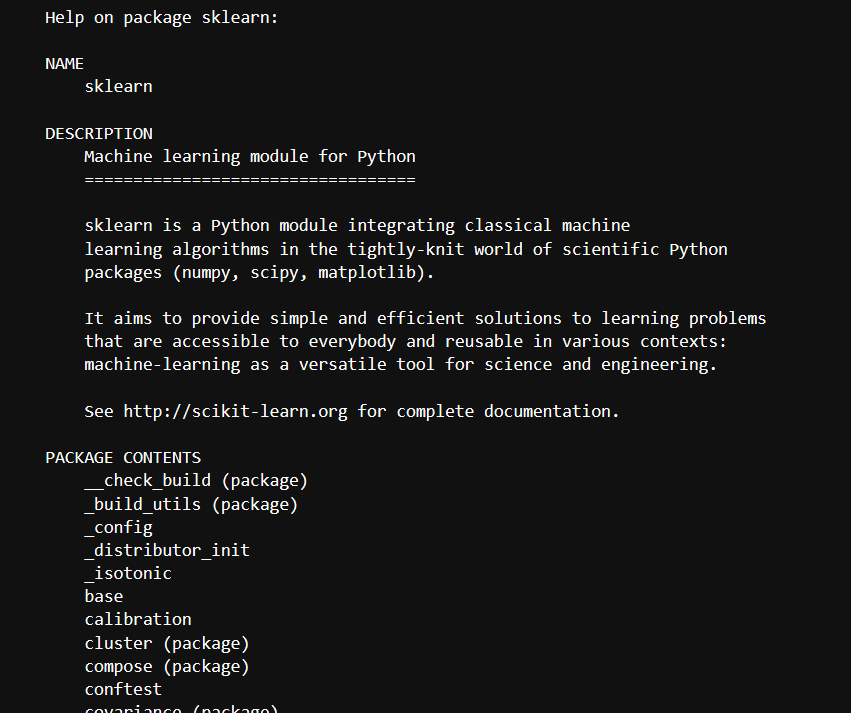
Docstrings मूल भावना में commenting के समान हैं, लेकिन ये उससे उन्नत, अधिक तार्किक और उपयोगी संस्करण हैं। Docstrings class, module और packages के लिए दस्तावेज़ीकरण का काम करती हैं।
दूसरी ओर, Comments मुख्य रूप से कोड के गैर-स्पष्ट हिस्सों को समझाने के लिए उपयोग किए जाते हैं और बग फिक्स करने और किए जाने वाले कार्यों पर टिप्पणियों के लिए उपयोगी हो सकते हैं।
Docstrings आरंभिक और समापन उद्धरणों (quotes) के साथ दर्शाई जाती हैं, जबकि comments # से शुरू होते हैं।
ध्यान दें कि comments को बिल्ट-इन doc एट्रिब्यूट और help फ़ंक्शन से एक्सेस नहीं किया जा सकता। आइए देखें, अगर आप ऐसा करने की कोशिश करते हैं तो क्या होता है:
def string_reverse(str1):
    #Returns the reversed String.

    #Parameters:
    #    str1 (str):The string which is to be reversed.

    #Returns:
    #    reverse(str1):The string which gets reversed.

    reverse_str1 = ''
    i = len(str1)
    while i > 0:
        reverse_str1 += str1[i - 1]
        i = i- 1
    return reverse_str1
print(string_reverse.__doc__)
None
help(string_reverse)
Help on function string_reverse in module __main__:

string_reverse(str1)
Docstring लिखने या उपयोग करने के दो तरीके होते हैं, यानी one-line docstring और multi-line docstring। आइए इन्हें एक-एक करके सीखते हैं।
वन-लाइन docstrings छोटे विवरण होते हैं जो एक ही पंक्ति में समा जाते हैं। इन्हें ट्रिपल कोट्स (''' या """) में रखा जाता है, और समापन उद्धरण उसी पंक्ति में होने चाहिए।
हालांकि ट्रिपल- सिंगल और ट्रिपल-डबल दोनों उद्धरण काम करते हैं, Python में प्रचलित मानक ट्रिपल-डबल उद्धरण (""") का उपयोग करना है।
यहाँ एक उदाहरण है:
def square(a):
    """Returns the square of the given number."""
    return a ** 2  # Corrected exponentiation

# Accessing the docstring
print(square.__doc__)
आउटपुट:
Returns the square of the given number.आप Python के help() फ़ंक्शन का उपयोग करके भी यह दस्तावेज़ीकरण प्राप्त कर सकते हैं:
help(square)आउटपुट:
Help on function square in module __main__:

square(a)
    Returns the square of the given number.
मल्टी-लाइन Docstrings में भी उसी तरह के string literals होते हैं जैसे वन-लाइन Docstrings में, लेकिन इसके बाद एक खाली पंक्ति होती है और फिर वर्णनात्मक पाठ आता है।
मल्टी-लाइन Docstring लिखने का सामान्य प्रारूप इस प्रकार है:
def some_function(argument1):
    """Summary or Description of the Function

    Parameters:
    argument1 (int): Description of arg1

    Returns:
    int:Returning value

   """

    return argument1

print(some_function.__doc__)
Summary or Description of the Function

    Parameters:
    argument1 (int): Description of arg1

    Returns:
    int:Returning value
help(some_function)
Help on function some_function in module __main__:

some_function(argument1)
    Summary or Description of the Function

    Parameters:
    argument1 (int): Description of arg1

    Returns:
    int:Returning value
आइए एक उदाहरण देखें जो दिखाता है कि मल्टी-लाइन स्ट्रिंग्स का विस्तार से कैसे उपयोग किया जा सकता है:
def string_reverse(str1):
    '''
    Returns the reversed String.

    Parameters:
        str1 (str):The string which is to be reversed.

    Returns:
        reverse(str1):The string which gets reversed.
    '''

    reverse_str1 = ''
    i = len(str1)
    while i > 0:
        reverse_str1 += str1[i - 1]
        i = i- 1
    return reverse_str1
print(string_reverse('DeepLearningDataCamp'))
pmaCataDgninraeLpeeD
help(string_reverse)
Help on function string_reverse in module __main__:

string_reverse(str1)
    Returns the reversed String.

    Parameters:
        str1 (str):The string which is to be reversed.

    Returns:
        reverse(str1):The string which gets reversed.
आप ऊपर देख सकते हैं कि सारांश पंक्ति एक पंक्ति में है और अन्य सामग्री से एक खाली पंक्ति द्वारा अलग की गई है। इस परंपरा का पालन करना चाहिए, जो स्वचालित इंडेक्सिंग टूल्स के लिए उपयोगी है।
आइए बिल्ट-इन Python Docstrings देखें।
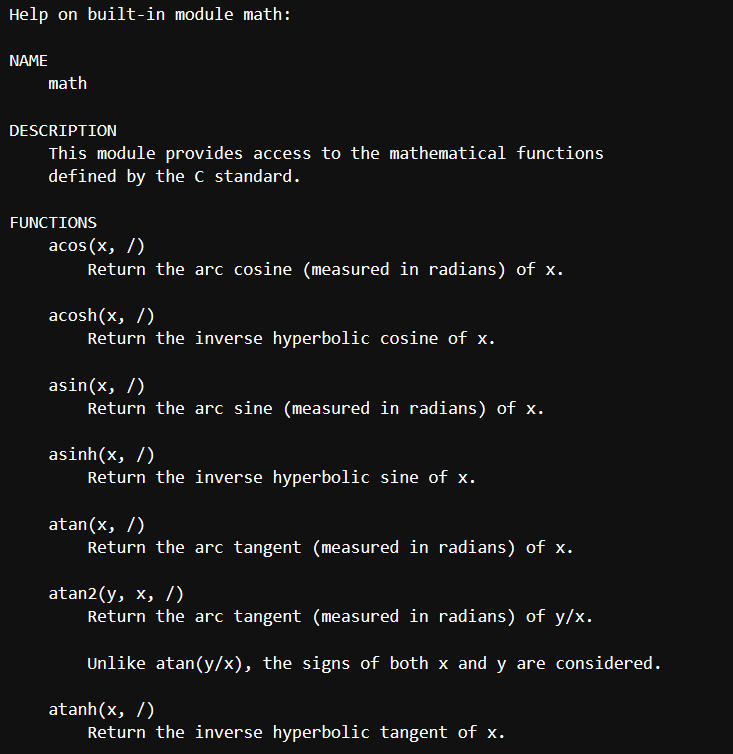
सभी बिल्ट-इन functions, classes, methods के साथ वास्तविक मानव-पठनीय विवरण जुड़े होते हैं। आप इसे दो तरीकों में से किसी एक से एक्सेस कर सकते हैं।
आप देखेंगे कि help फ़ंक्शन का आउटपुट __doc__ एट्रिब्यूट की तुलना में अधिक विस्तृत होता है।
उदाहरण के लिए:
import math
print(math.__doc__)
This module provides access to the mathematical functions
defined by the C standard.
इसी तरह, आप help फ़ंक्शन का उपयोग कर सकते हैं:
help(math)
किसी class की परिभाषा में, docstring का उपयोग पूरी class के लिए दस्तावेज़ीकरण देने में किया जा सकता है। आप आम तौर पर इसे class परिभाषा के तुरंत बाद रखते हैं, और इसे ट्रिपल कोट्स (""") में घेरा जाता है। उदाहरण के लिए:
class MyClass:
    """This is the documentation for MyClass."""

    def __init__(self):
        """This is the documentation for the __init__ method."""
        pass
Docstrings को class या method के __doc__ एट्रिब्यूट का उपयोग करके एक्सेस किया जा सकता है। उदाहरण के लिए, आप MyClass की docstring को MyClass.__doc__ के माध्यम से एक्सेस कर सकते हैं।
अब आइए कुछ लोकप्रिय Docstring फ़ॉर्मेट्स देखें और उन्हें विस्तार से समझें।
कई Docstrings फ़ॉर्मेट उपलब्ध हैं, लेकिन बेहतर है कि आप वही फ़ॉर्मेट्स उपयोग करें जो Docstring पार्सर और सहकर्मी डेटा वैज्ञानिकों/प्रोग्रामर्स द्वारा आसानी से पहचाने जा सकें। किसी Docstring फ़ॉर्मेट को चुनने के लिए कोई सख्त नियम नहीं हैं, लेकिन प्रोजेक्ट भर में एक ही फ़ॉर्मेट चुनने में स्थिरता आवश्यक है। साथ ही, यह वांछनीय है कि आप वही फ़ॉर्मेटिंग प्रकार उपयोग करें जिसे Sphinx अधिकतर सपोर्ट करता है।
सबसे आमतौर पर उपयोग किए जाने वाले फ़ॉर्मेट्स नीचे सूचीबद्ध हैं।
| फ़ॉर्मेटिंग प्रकार | विवरण |
|---|---|
| NumPy/SciPy docstrings | reStructured और GoogleDocstrings का संयोजन, और Sphinx द्वारा समर्थित |
| PyDoc | Python के लिए मानक डॉक्यूमेंटेशन मॉड्यूल और Sphinx द्वारा समर्थित |
| EpyDoc | Epytext को HTML दस्तावेज़ों की एक श्रंखला के रूप में रेंडर करता है और Python मॉड्यूल्स की Docstrings के आधार पर API डॉक्यूमेंटेशन बनाने का टूल है |
| Google Docstrings | Google की शैली |
विभिन्न प्रकार की डॉक्यूमेंटेशन स्ट्रिंग्स उपलब्ध हो सकती हैं। आपको यह चिंता करने की ज़रूरत नहीं कि सब कुछ सीखने के लिए पहिया फिर से ईजाद करना पड़े। सभी डॉक्यूमेंटेशन स्ट्रिंग्स के फ़ॉर्मेट लगभग समान हैं। पैटर्न समान हैं, बस प्रत्येक फ़ॉर्मेट में कुछ सूक्ष्म अंतर होते हैं। आप उपलब्ध लोकप्रिय डॉक्यूमेंटेशन स्ट्रिंग फ़ॉर्मेट के उदाहरणों को उनके उपयोग सहित देखेंगे।
सबसे पहले, आप Sphinx शैली को विस्तार से देखेंगे, और फिर आप अन्य फ़ॉर्मेट्स को भी आसानी से फॉलो कर सकेंगे।
Sphinx सरल और पारंपरिक शैली है, विस्तारपूर्वक होती है, और मूल रूप से Python डॉक्यूमेंटेशन के लिए बनाई गई थी। Sphinx reStructured Text का उपयोग करता है, जिसका उपयोग Markdown से मिलता-जुलता है।
class Vehicle(object):
    '''
    The Vehicle object contains lots of vehicles
    :param arg: The arg is used for ...
    :type arg: str
    :param `*args`: The variable arguments are used for ...
    :param `**kwargs`: The keyword arguments are used for ...
    :ivar arg: This is where we store arg
    :vartype arg: str
    '''


    def __init__(self, arg, *args, **kwargs):
        self.arg = arg

    def cars(self, distance, destination):
        '''We can't travel a certain distance in vehicles without fuels, so here's the fuels

        :param distance: The amount of distance traveled
        :type amount: int
        :param bool destinationReached: Should the fuels be refilled to cover required distance?
        :raises: :class:`RuntimeError`: Out of fuel

        :returns: A Car mileage
        :rtype: Cars
        '''
        pass
Sphinx keyword(reserved word) का उपयोग करता है; जैसा कि अधिकांश प्रोग्रामिंग भाषाएँ करती हैं। लेकिन Sphinx में इसे स्पष्ट रूप से role कहा जाता है। ऊपर के कोड में, Sphinx में param एक role है, और type एक role है, जो param के लिए Sphinx डेटा प्रकार है। type role वैकल्पिक है, लेकिन param अनिवार्य है। return roles लौटाए गए ऑब्जेक्ट का दस्तावेज़ीकरण करते हैं। यह param role से अलग है। return role rtype पर निर्भर नहीं है और न ही इसके विपरीत। rtype दिए गए फ़ंक्शन से लौटाए गए ऑब्जेक्ट का प्रकार है।
Google शैली उपयोग में आसान और अधिक सहज है। इसे छोटे रूप के डॉक्यूमेंटेशन के लिए उपयोग किया जा सकता है। शुरू करने के लिए एक Python कॉन्फ़िगरेशन फ़ाइल सेट करनी होती है, इसलिए आपको conf.py में extensions सूची में sphinx.ext.napoleon या sphinxcontrib.napoleon में से किसी एक को जोड़ना होगा।
class Vehicles(object):
    '''
    The Vehicle object contains a lot of vehicles

    Args:
        arg (str): The arg is used for...
        *args: The variable arguments are used for...
        **kwargs: The keyword arguments are used for...

    Attributes:
        arg (str): This is where we store arg,
    '''
    def __init__(self, arg, *args, **kwargs):
        self.arg = arg

    def cars(self, distance,destination):
        '''We can't travel distance in vehicles without fuels, so here is the fuels

        Args:
            distance (int): The amount of distance traveled
            destination (bool): Should the fuels refilled to cover the distance?

        Raises:
            RuntimeError: Out of fuel

        Returns:
            cars: A car mileage
        '''
        pass
Google शैली Sphinx शैली से बेहतर है। इसमें एक असुविधाजनक बात भी है, यानी ऊपर दिए गए कोड में, distance का मल्टी-लाइन विवरण बिखरा हुआ लग सकता है। यही कारण है कि अधिक विस्तृत डॉक्यूमेंटेशन के लिए Numpy का उपयोग किया जा सकता है।
Numpy शैली में डॉक्यूमेंटेशन में बहुत सारे विवरण होते हैं। यह अन्य डॉक्यूमेंटेशन की तुलना में अधिक विस्तारपूर्वक होती है, लेकिन यदि आप विस्तृत डॉक्यूमेंटेशन करना चाहते हैं, यानी सभी फ़ंक्शन्स और पैरामीटर्स का व्यापक दस्तावेज़ीकरण, तो यह एक उत्कृष्ट विकल्प है।
class Vehicles(object):
    '''
    The Vehicles object contains lots of vehicles

    Parameters
    ----------
    arg : str
        The arg is used for ...
    *args
        The variable arguments are used for ...
    **kwargs
        The keyword arguments are used for ...

    Attributes
    ----------
    arg : str
        This is where we store arg,
    '''
    def __init__(self, arg, *args, **kwargs):
        self.arg = arg

    def cars(self, distance, destination):
        '''We can't travel distance in vehicles without fuels, so here is the fuels

        Parameters
        ----------
        distance : int
            The amount of distance traveled
        destination : bool
            Should the fuels refilled to cover the distance?

        Raises
        ------
        RuntimeError
            Out of fuel

        Returns
        -------
        cars
            A car mileage
        '''
        pass
ऊपर दिया गया उदाहरण अन्य किसी भी डॉक्यूमेंटेशन से अधिक विस्तारपूर्वक है। यह अधिक लंबा है और केवल लंबे और विस्तृत डॉक्यूमेंटेशन के लिए इस्तेमाल किया जाना चाहिए।
जैसा कि आपने सीखा कि docstrings बिल्ट-इन Python __doc__ एट्रिब्यूट और help() फ़ंक्शन के माध्यम से सुलभ हैं। आप Pydoc नामक बिल्ट-इन मॉड्यूल का भी उपयोग कर सकते हैं, जो सुविधाओं और कार्यात्मकताओं के संदर्भ में doc एट्रिब्यूट और help फ़ंक्शन की तुलना में बहुत अलग है।
Pydoc एक ऐसा टूल है जो तब काम आता है जब आप अपना कोड अपने सहकर्मियों के साथ साझा करना चाहते हैं या उसे ओपन-सोर्स बनाना चाहते हैं, जहाँ आप बहुत व्यापक ऑडियंस को लक्षित करेंगे। यह आपके Python डॉक्यूमेंटेशन से वेब पेज बना सकता है और एक वेब सर्वर भी चालू कर सकता है।
आइए देखें यह कैसे काम करता है।
Pydoc मॉड्यूल चलाने का सबसे आसान और सुविधाजनक तरीका इसे एक स्क्रिप्ट के रूप में चलाना है। इसे jupyter lab सेल के अंदर चलाने के लिए, आप विस्मयादिबोधक चिह्न (!) कैरेक्टर का उपयोग करेंगे।
!python -m pydoc
pydoc - the Python documentation tool

pydoc <name> ...
    Show text documentation on something.  <name> may be the name of a
    Python keyword, topic, function, module, or package, or a dotted
    reference to a class or function within a module or module in a
    package.  If <name> contains a '\', it is used as the path to a
    Python source file to document. If name is 'keywords', 'topics',
    or 'modules', a listing of these things is displayed.

pydoc -k <keyword>
    Search for a keyword in the synopsis lines of all available modules.

pydoc -n <hostname>
    Start an HTTP server with the given hostname (default: localhost).

pydoc -p <port>
    Start an HTTP server on the given port on the local machine.  Port
    number 0 can be used to get an arbitrary unused port.

pydoc -b
    Start an HTTP server on an arbitrary unused port and open a Web browser
    to interactively browse documentation.  This option can be used in
    combination with -n and/or -p.

pydoc -w <name> ...
    Write out the HTML documentation for a module to a file in the current
    directory.  If <name> contains a '\', it is treated as a filename; if
    it names a directory, documentation is written for all the contents.
यदि आप ऊपर के आउटपुट को देखें, तो Pydoc का पहला उपयोग किसी फ़ंक्शन, मॉड्यूल, क्लास, आदि पर टेक्स्ट डॉक्यूमेंटेशन दिखाना है, तो आइए देखें कि आप इसे help फ़ंक्शन से बेहतर कैसे उपयोग कर सकते हैं।
!python -m pydoc glob
Help on module glob:

NAME
    glob - Filename globbing utility.

MODULE REFERENCE
    https://docs.python.org/3.7/library/glob

    The following documentation is automatically generated from the Python
    source files.  It may be incomplete, incorrect or include features that
    are considered implementation detail and may vary between Python
    implementations.  When in doubt, consult the module reference at the
    location listed above.

FUNCTIONS
    escape(pathname)
        Escape all special characters.

    glob(pathname, *, recursive=False)
        Return a list of paths matching a pathname pattern.

        The pattern may contain simple shell-style wildcards a la
        fnmatch. However, unlike fnmatch, filenames starting with a
        dot are special cases that are not matched by '*' and '?'
        patterns.

        If recursive is true, the pattern '**' will match any files and
        zero or more directories and subdirectories.

    iglob(pathname, *, recursive=False)
        Return an iterator which yields the paths matching a pathname pattern.

        The pattern may contain simple shell-style wildcards a la
        fnmatch. However, unlike fnmatch, filenames starting with a
        dot are special cases that are not matched by '*' and '?'
        patterns.

        If recursive is true, the pattern '**' will match any files and
        zero or more directories and subdirectories.

DATA
    __all__ = ['glob', 'iglob', 'escape']

FILE
    c:\users\hda3kor\.conda\envs\test\lib\glob.py
अब, आइए glob डॉक्यूमेंटेशन को help फ़ंक्शन का उपयोग करके निकालें।
help(glob)
---------------------------------------------------------------------------

NameError                                 Traceback (most recent call last)

<ipython-input-6-6f504109e3a2> in <module>
----> 1 help(glob)


NameError: name 'glob' is not defined
जैसा कि आप देख सकते हैं, यह name error देता है क्योंकि glob परिभाषित नहीं है। इसलिए डॉक्यूमेंटेशन निकालने के लिए help फ़ंक्शन का उपयोग करने हेतु आपको पहले उस मॉड्यूल को इम्पोर्ट करना होगा, जो Pydoc के मामले में आवश्यक नहीं है।
आइए Pydoc मॉड्यूल की सबसे रोचक विशेषता का पता लगाएं, यानी Pydoc को वेब सेवा के रूप में चलाना।
इसके लिए, आप बस Pydoc को एक स्क्रिप्ट के रूप में चलाएँगे लेकिन -b आर्ग्युमेंट के साथ, जो एक HTTP सर्वर को किसी भी अप्रयुक्त पोर्ट पर शुरू कर देगा और वेब ब्राउज़र खोल देगा ताकि आप इंटरैक्टिव तरीके से डॉक्यूमेंटेशन ब्राउज़ कर सकें। यह खासकर तब मददगार है जब आपके सिस्टम पर कई अन्य सेवाएँ चल रही हों और आपको याद न हो कि कौन-सा पोर्ट खाली होगा।
!python -m pydoc -b
^C
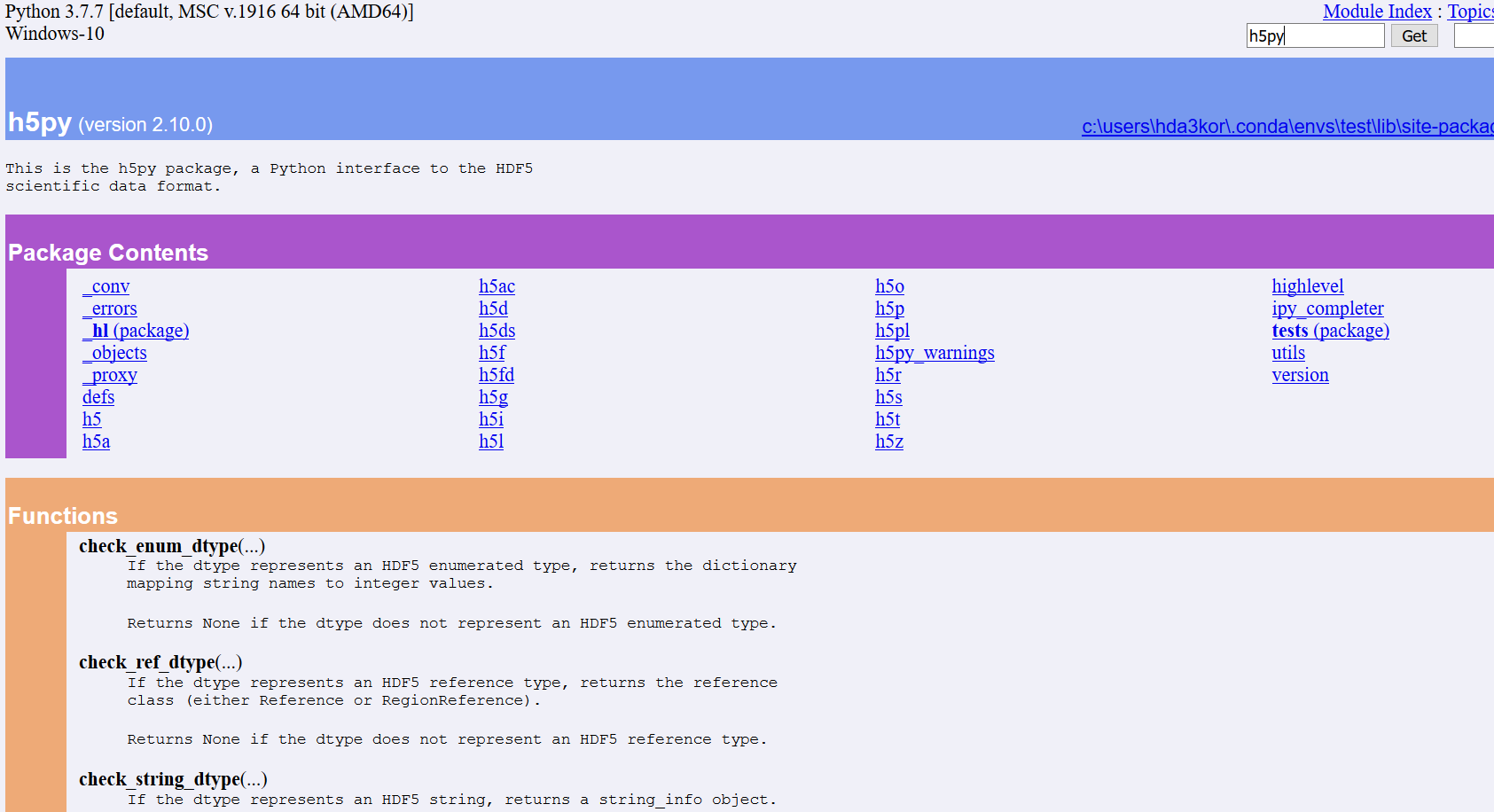
जैसे ही आप ऊपर का सेल चलाते हैं, एक नया विंडो किसी भी पोर्ट नंबर पर खुलेगा, और वेब ब्राउज़र नीचे दिखाए गए जैसा दिखाई देगा।
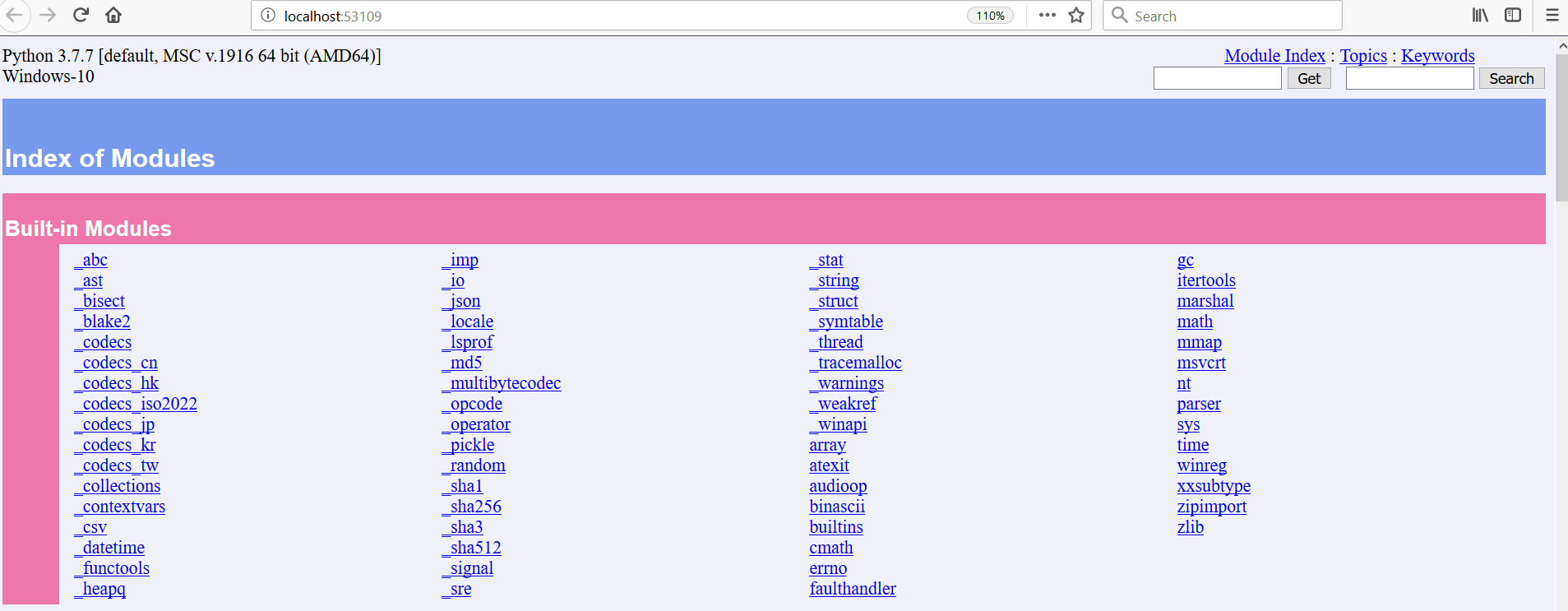
आइए h5py मॉड्यूल का डॉक्यूमेंटेशन देखें, जो एक फ़ाइल फ़ॉर्मेट है जिसका उपयोग न्यूरल नेटवर्क आर्किटेक्चर के वेट्स को स्टोर करने के लिए किया जाता है।
नीचे दी गई तालिका में, आप ऊपर बताए गए विभिन्न docstring फ़ॉर्मेट्स की तुलना देख सकते हैं:
| फ़ॉर्मेट | विवरण | फायदे | कमियाँ | सबसे अच्छा उपयोग |
|---|---|---|---|---|
| Sphinx | डॉक्यूमेंटेशन के लिए reStructuredText का उपयोग करता है, और param, type, returns, raises जैसे स्ट्रक्चर्ड रोल्स को सपोर्ट करता है। बड़े प्रोजेक्ट्स के लिए पसंदीदा और Sphinx डॉक्यूमेंटेशन के साथ अच्छी तरह एकीकृत होता है। |
बेहद स्ट्रक्चर्ड; Sphinx के साथ अच्छा काम करता है; बड़े प्रोजेक्ट्स के लिए इंडस्ट्री स्टैंडर्ड। | विस्तारपूर्वक; reStructuredText सिंटैक्स की समझ आवश्यक। | स्ट्रक्चर्ड डॉक्यूमेंटेशन की आवश्यकता वाले बड़े Python प्रोजेक्ट्स। |
Args, Attributes, Returns, और Raises के साथ सरल और अधिक सहज फ़ॉर्मेट। पढ़ने में आसान, लेकिन मल्टी-लाइन विवरण के लिए बिखरा हुआ लग सकता है। |
पढ़ने और लिखने में आसान; छोटे डॉक्यूमेंटेशन के लिए आदर्श। | मल्टी-लाइन विवरण अव्यवस्थित हो सकते हैं; अतिरिक्त कॉन्फ़िगरेशन की आवश्यकता। | आसान-से-पढ़ने वाली शैली के साथ सामान्य-उद्देश्य Python डॉक्यूमेंटेशन। | |
| NumPy | Parameters, Attributes, Returns, Raises का उपयोग करते हुए अत्यधिक विस्तृत और संरचित। वैज्ञानिक कंप्यूटिंग और डेटा साइंस प्रोजेक्ट्स के लिए आदर्श। |
बहुत विस्तृत और जटिल वैज्ञानिक व डेटा साइंस प्रोजेक्ट्स के लिए उपयुक्त। | अन्य फ़ॉर्मेट्स की तुलना में अधिक विस्तारपूर्वक; सरल प्रोजेक्ट्स के लिए भारी लग सकता है। | विस्तृत डॉक्यूमेंटेशन की आवश्यकता वाले वैज्ञानिक कंप्यूटिंग और डेटा साइंस प्रोजेक्ट्स। |
| PyDoc | Python का बिल्ट-इन डॉक्यूमेंटेशन टूल। Docstrings से वेब पेज जनरेट कर सकता है, और इंटरैक्टिव ब्राउज़िंग के लिए वेब सर्वर भी चालू कर सकता है। | Python के साथ इंटीग्रेटेड; वेब-आधारित डॉक्यूमेंटेशन बना सकता है। | अन्य डॉक्यूमेंटेशन टूल्स की तुलना में सीमित लचीलापन। | बिल्ट-इन Python डॉक्यूमेंटेशन और वेब-आधारित ब्राउज़िंग की ज़रूरत वाले प्रोजेक्ट्स। |
Python में docstring पर यह ट्यूटोरियल पूरा करने के लिए बधाई।
यह ट्यूटोरियल मुख्य रूप से आपको आवश्यक विषयों को कवर करके docstrings के साथ आरंभ कराने पर केंद्रित था। हालांकि, Docstrings एक व्यापक विषय है, और कुछ अवधारणाएँ अनकवर्ड रह गई होंगी। यदि आप और सीखना चाहते हैं, तो हमारा Python string ट्यूटोरियल और writing functions in Python पर कोर्स देखें।
यदि आप Python में अभी शुरुआत कर रहे हैं और और अधिक सीखना चाहते हैं, तो DataCamp का Introduction to Data Science in Python कोर्स लें। आप हमारे किसी Python करियर ट्रैक को भी ले सकते हैं और Python डेवलपर या Data Scientist with Python बनने की अपनी यात्रा शुरू कर सकते हैं।
Python Courses
कोर्स
कोर्स
अभ्यास और ट्रैक अपनी प्रगति को।
Google के साथ जारी रखें