

什么是 Grok 3?
Grok 3 是 xAI 最新的大型语言模型,专为循序渐进的推理、逻辑一致性和结构化输出而打造。不同于优先对话流畅度的常见聊天模型,Grok 3 在回答前会先“思考”,非常适合需要深度逻辑的任务,例如复杂决策、数学推理和定量分析。
Grok 3 提供两个版本:常规模型和 mini 模型。mini 模型完全聚焦于推理,并支持访问其推理轨迹;而常规模型则号称在金融、医疗、法律和科学等领域具备广泛的领域知识。
这两个版本均支持原生函数调用和结构化响应生成等高级能力,帮助开发者更轻松地构建可靠且可预测的 AI 工作流。
如果您想了解更多关于 Grok 3 的架构和性能,请查看这份Grok 3 概览。
准备工作:获取 Grok 3 API 访问权限
本节将介绍如何创建 API 密钥、设置 Python 环境以连接 Grok API,并完成您的第一次用户请求。
创建 API 密钥
要让 Python 客户端通过 API 进行身份验证,我们需要创建一个 API 密钥。流程如下:
- 前往 xAI 文档页面。
- 使用您的 X、xAI 或 Google 账号登录,或创建一个 xAI 账号。
- 点击“Create an API key”,为其命名并点击“save”。
- 当密钥显示时,将其复制。之后将无法再次查看,但若遗失可随时新建。
- 在项目目录中创建名为
.env的文件,并按以下格式粘贴密钥:
XAI_API_KEY=<your_api_key>Grok 3 API 定价
虽然使用 API 往往比购买高级订阅成本更低,但它并非免费。与每月固定账号费用(例如 SuperGrok 订阅起价 $30)不同,API 成本完全取决于使用量。要了解潜在费用,请访问 xAI 的 定价页面。
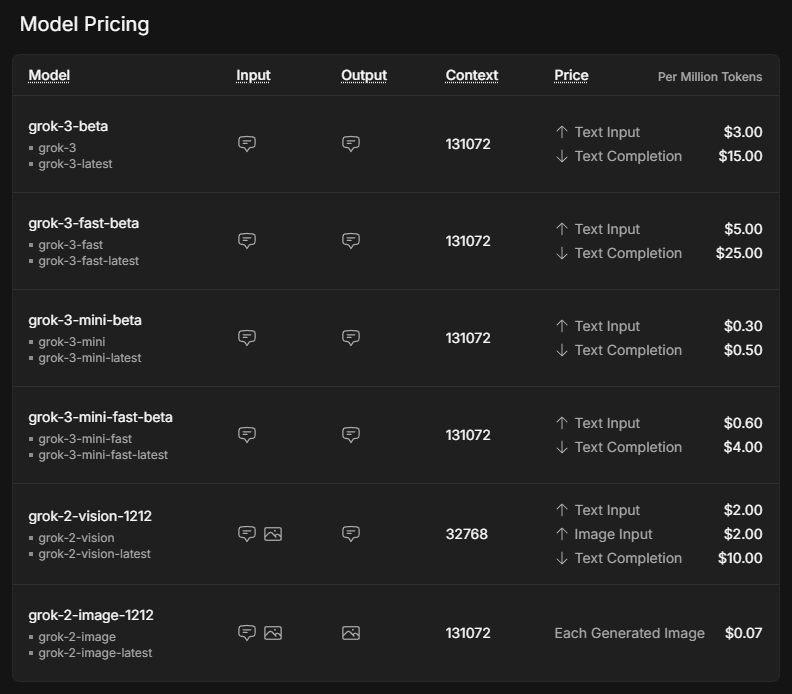
标价以每百万 token 计费。根据 经验法则,这大约相当于英文 75 万词的输入或输出。
mini 模型显著便宜于常规模型。Grok 3 与 Grok 3 mini 的 fast 版本使用完全相同的底层模型,但运行在更快的基础设施上,从而提升响应时间。
使用 API 需要购买额度。建议初期使用预付额度而非自动开票计费,以防意外费用。您可以在 xAI 控制台的 Invoices > Credits 下购买 token 并查看用量概况。
设置 Python 环境
既然我们已经获取了 API 密钥并购买了额度,接下来是设置 Python 客户端。我们需要安装两个依赖,以便成功发起 API 请求:
python-dotenv:从.env文件加载 API 密钥为环境变量;以及openai客户端:作为向 Grok 3 发送请求的接口。
为避免不同 Python 包之间的潜在冲突,我建议使用Anaconda 来为项目搭建环境。安装 Anaconda 后,我们使用 Python 3.10 创建名为 grok3 的环境,并在终端执行以下命令激活:
conda create -n grok3 python=3.10
conda activate grok3最后,安装依赖:
pip install python-dotenv openai发送第一个用户请求
现在开始编写第一个脚本!首先,我们需要从先前安装的包中导入将要使用的函数,并导入 os 以读取 API 密钥。
import os
from dotenv import load_dotenv
from openai import OpenAI通过执行从 dotenv 包导入的 load_dotenv() 函数,我们可以将指向 API 密钥的环境变量加载到程序中。
# Load environment variables
load_dotenv()下一步是初始化客户端。我们使用 .env 文件中的 API 密钥和 Grok 服务器的 URL 调用 OpenAI 函数,并将其赋值给变量 client。
client = OpenAI(
api_key=os.getenv("XAI_API_KEY"),
base_url="https://api.x.ai/v1",
)我们来向 Grok 询问:如果旧金山下雨,有什么推荐的活动?我们需要指定 model 和我们的 messages,并将它们作为参数传递给 client.chat.completions.create 函数。可选地,我们还可以调整 max_tokens 来控制响应长度,或通过 temperature 影响随机性。
# Send a basic reasoning query
response = client.chat.completions.create(
model="grok-3",
messages=[
{"role": "user", "content": "What kind of activity would you suggest, if it rains in San Francisco? Answer in one sentence."}
],
max_tokens=1000,
temperature=0.2, # lower temperature for more deterministic answers
)要打印 Grok 的回答,我们需要从结果对象中提取。由于我们将结果变量命名为 response,答案位于 response.choices[0].message.content。
print(response.choices[0].message.content) # Print the responseIf it rains in San Francisco, I suggest visiting indoor attractions like the San Francisco Museum of Modern Art or the California Academy of Sciences for an enriching and dry experience.使用 Grok 3 Mini 进行推理
为了观察 Grok 的推理风格,我们来问一个需要一定逻辑推理的基础问题。我们将使用 Grok 3 Mini 完成这次请求,因为它能保证每个 API 响应都包含完整的推理轨迹,便于不依赖特殊提示工程也能一步步跟踪模型的思考过程。
决定模型“思考”深度的参数叫做 reasoning_effort。该参数仅适用于 Grok 3 Mini,默认设置为更快的 ”low”。将 reasoning_effort="high" 可帮助模型在给出最终答案前,细致地逐步走通问题,适合规划、决策或数学推理等任务。
设想我们想用 Grok 来根据天气决定休息日的安排。我们可以向 Grok 提供前提,分别定义晴天和雨天的活动,并加入基于当天实际天气的前提。
response = client.chat.completions.create(
model="grok-3-mini-beta",
reasoning_effort="high",
messages=[
{"role": "user", "content": (
"Premises:\n"
"- If it is raining, the weather is suitable for indoor activities.\n"
"- Visiting a museum is an indoor activity.\n"
"- Today, it is raining.\n"
"Question: What should we do today?"
)}
],
max_tokens=1000,
temperature=0.2,
)要处理推理轨迹,我们首先需要解析 API 响应,并从 message 对象中提取 reasoning_content 属性。下面的代码展示了如何打印详细推理步骤和最终答案,使其呈现形式类似于 Web 界面。
# Print the reasoning trace if available
reasoning = getattr(response.choices[0].message, "reasoning_content", None)
if reasoning:
print("Reasoning steps:\n")
print(reasoning)
else:
print("No detailed reasoning trace found.")
# Print the final answer
print("\nFinal Answer:\n")
print(response.choices[0].message.content)结果如下所示:
Reasoning steps:
First, the premises are:
1. If it is raining, the weather is suitable for indoor activities.
2. Visiting a museum is an indoor activity.
3. Today, it is raining.
The question is: What should we do today?
I need to reason step by step based on the given premises.
From premise 3, today it is raining.
From premise 1, if it is raining, then the weather is suitable for indoor activities. Since it's raining today, the weather is suitable for indoor activities today.
From premise 2, visiting a museum is an indoor activity. So, if the weather is suitable for indoor activities, and visiting a museum is an indoor activity, it makes sense that visiting a museum would be a good choice today.
The conclusion should be that we should visit a museum or engage in some indoor activity. But the question is "What should we do today?" and the premises point towards indoor activities, with a specific example given.
Let me chain the logic:
- It is raining (premise 3).
- Therefore, weather is suitable for indoor activities (from premise 1).
- Visiting a museum is an indoor activity (premise 2).
- So, since the weather is suitable for indoor activities, and museum visiting is an indoor activity, it should be suitable to visit a museum.
The premises don't explicitly say that we should do the most suitable activity or anything like that. They just provide conditions and facts.
However, the question implies a recommendation based on the premises. Given that it's raining and indoor activities are suitable, and a museum is mentioned, it's logical to suggest visiting a museum.
I should stick to what's given. The premises don't suggest any other activities or constraints, so based on the information, visiting a museum is a reasonable suggestion.
Final answer should be something like: "We should visit a museum today."
To make it clear, I can phrase it as: "Since it is raining and the weather is suitable for indoor activities, and visiting a museum is an indoor activity, we should visit a museum today."
But since the instruction is to put the final answer in a box, probably a concise statement.
Looking back at the user's message, it's a reasoning exercise, so the answer should be direct.
Final Answer:
Based on the given premises:
- It is raining today (premise 3).
- If it is raining, the weather is suitable for indoor activities (premise 1).
- Therefore, the weather is suitable for indoor activities today.
- Visiting a museum is an indoor activity (premise 2).
A suitable activity for today would be an indoor one, such as visiting a museum.
**Recommendation:** We should visit a museum today.尽管这是一个相当简单的例子,但我们可以看到 grok-3-mini 如何仔细走过每个前提,逐步串联逻辑后再给出建议。其推理方法有条不紊且透明,便于追踪模型如何从事实走向最终建议。
在 Grok 3 中进行函数调用
Grok 3 的一大亮点是函数调用,它使模型能够连接到外部工具和系统。这不仅让模型能生成文本,还能触发诸如获取天气预报、查询活动日程、分析数据库条目,甚至控制智能设备等操作。
当我们发送用户请求时,Grok 3 能识别出它需要额外信息,并请求以特定参数调用某个函数。随后,Python 客户端会在本地执行该函数,将结果发回 Grok 3,并接收最终的、完整推理后的响应。
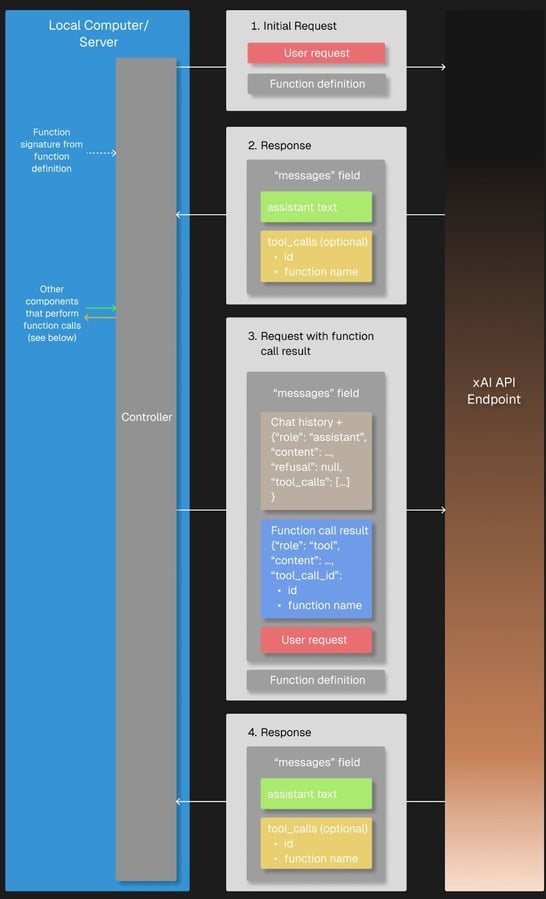
来源:xAI
准备
我们需要 json 包来访问 Grok 调用函数时的参数结构,因此需要导入它。
import json为了试验函数调用,我们需要定义一个回调函数,当 Grok 在响应中请求它时会被调用。这里的 get_weather_forecast 是一个简单的 Python 函数,返回硬编码的天气预报。我将其硬编码仅用于演示,以保持讲解简明并避免依赖外部服务。
# Define the dummy function
def get_weather_forecast(location: str, date: str) -> dict:
"""Simulated function to always return rainy weather."""
return {
"location": location,
"date": “this weekend”, # hardcoded for demo purposes
"forecast": "rainy" # hardcoded for demo purposes
}我们还必须通过 JSON 模式定义可用工具,包括其名称、用途和所需参数,稍后会随请求一同发送给 Grok。这样设置后,Grok 3 就知道在需要天气信息来进行推理时可以调用此工具。
tools = [
{
"type": "function",
"function": {
"name": "get_weather_forecast",
"description": "Get a simulated weather forecast for a given location and date.",
"parameters": {
"type": "object",
"properties": {
"location": {
"type": "string",
"description": "The city where the activity will take place."
},
"date": {
"type": "string",
"description": "The date for which the weather is needed, in YYYY-MM-DD format."
}
},
"required": ["location", "date"]
}
}
}
]最后,tools_map dictionary 将 Grok 3 使用的函数名映射到本地实际的 Python 函数,使客户端能够正确执行所请求的工具调用。
# Link the function names to the functions
tools_map = {
"get_weather_forecast": get_weather_forecast
}对于简单项目,手动定义工具模式完全可行;但随着项目规模和复杂度增长,使用如 Pydantic 这样的数据校验模块会越来越有价值。它支持对函数输入进行自动验证、更好的错误处理,以及更清晰、可维护的代码。
执行
来看 Grok 是否会在被问及本周末在旧金山的建议活动时使用我们的天气预报函数。我们遵循函数调用工作流的结构:
- 首先,向 Grok 发送包含问题的初始用户请求,并附上可用的
tools。 - 检查 Grok 的回答中是否有工具调用请求;如有,使用
tools_map调用匹配的本地函数。如果 Grok 未请求工具调用,我们可直接返回模型的初始回答。 - 接着,将结果添加到消息历史中;然后
- 再发回给 Grok,以完成推理并生成最终答案。
# Step 1: Send the initial user request
messages = [
{"role": "user", "content": "What should I do this weekend in San Francisco?"}
]
response = client.chat.completions.create(
model="grok-3",
messages=messages,
tools=tools,
tool_choice="auto",
)
# Step 2: Check if a tool call was requested
tool_calls = getattr(response.choices[0].message, "tool_calls", [])
if tool_calls:
for tool_call in tool_calls:
function_name = tool_call.function.name
function_args = json.loads(tool_call.function.arguments)
# Find and call the matching local function
if function_name in tools_map:
function_result = tools_map[function_name](**function_args)
# Step 3: Add the function result back to the message history
messages.append(response.choices[0].message) # Grok's tool call message
messages.append({
"role": "tool",
"tool_call_id": tool_call.id,
"content": json.dumps(function_result)
})
# Step 4: Send a new request including the tool response
final_response = client.chat.completions.create(
model="grok-3",
messages=messages,
tools=tools,
tool_choice="auto"
)
# Print the final answer
print("\nFinal Answer:")
print(final_response.choices[0].message.content)
else:
# No tool call: respond directly
print("\nNo tool call was requested. Final Answer:")
print(response.choices[0].message.content)如 Grok 的回答所示,函数已被请求并成功执行:
Thanks for the weather update. Since it's going to be rainy this weekend in San Francisco, I’ll suggest some indoor activities to keep you entertained and dry. Here are a few ideas for your weekend: (...)您可能注意到了初始用户请求中的 tool_choice 参数,它用于指定函数调用模式。默认的 "auto" 模式允许 Grok 3 根据对话自行决定是否调用、以及调用哪个函数。或者,我们也可以通过 ”required” 强制调用函数、指定要调用的确切函数,或使用 ”none” 完全禁用函数调用。
使用 Grok 3 进行结构化输出
结构化输出让 Grok 3 能按严格、预定义的格式(如 JSON)返回答案,而非自由文本。这使得自动解析、验证并将模型响应集成至应用或工作流变得更轻松。
通过预先定义模式,我们可以确保 Grok 的输出一致、机器可读,并可直接用于后续处理。因此,这对从文档中提取结构化数据,或将 AI 生成的洞见输入数据库、仪表盘或自动化流水线等下游系统(无需脆弱的文本解析)非常有用。
我们使用 Pydantic 来定义输出模式,因为它能以更简洁、可读的方式组织复杂数据。要让该模式定义正确工作,需要从 pydantic 导入 BaseModel 和 Field。由于我们的输出包含推理步骤列表,还需从 Python 的 typing 模块导入 List 来更精确地指定元素类型。
虽然也可以使用纯 JSON 定义模式,但测试中我发现 Grok 3 有时会返回与预期结构不完全一致的输出。返回的 JSON 含义相近,但遵循了不同的模式,这可能会导致依赖特定结构的应用出错。鉴于这种不一致性,尤其是涉及列表等嵌套元素时,我强烈建议使用 Pydantic 来确保结构化输出能被可靠验证和解析。
from pydantic import BaseModel, Field
from typing import List我们的模式名为 DecisionPlan,由初始的 situation 和若干 DecisionSteps 组成。每个步骤包含其 step 编号、背后的 reasoning,以及建议的 action。
# Define the schema for the structured output
class DecisionStep(BaseModel):
step: int = Field(description="Step number in the decision process")
reasoning: str = Field(description="Reasoning behind this step")
action: str = Field(description="Suggested action at this step")
class DecisionPlan(BaseModel):
situation: str = Field(description="The initial situation to consider")
steps: List[DecisionStep] = Field(description="List of reasoning steps leading to the final action")关于请求本身,有几点需要注意。首先,我们需要使用 client.beta.chat.completions.parse() 而不是 create(),以便让 Grok 知道我们希望输出符合特定格式。这个格式就是我们刚刚定义的模式,因此将 DecisionPlan 作为 response_format 参数传入。
在 system 提示中包含某个任务的所有重要指令是很有用的,这有助于 Grok 3 在整个对话过程中始终聚焦于任务本身。与单独定义的模式结合后,用户提示无需再指定输出 JSON 的必填字段,而可以专注于任务内容。
例如,我们可以轻松将活动规划过程分解为三个定义明确的步骤:
# Send a prompt and request structured output
completion = client.beta.chat.completions.parse(
model="grok-3",
messages=[
{"role": "system", "content": (
"You are an expert travel planner."
"When asked about activities, always break down the decision process into exactly 3 logical reasoning steps."
"Return the output in structured JSON format following the provided schema, without any extra text."
)},
{"role": "user", "content": (
"It's raining today in San Francisco. What indoor activity would you recommend?"
)}
],
response_format=DecisionPlan,
)在解析了 Grok 3 的结构化输出之后,我们可以基于结果来汇总关键建议、触发自动化工作流,甚至以编程方式做出进一步决策。
我们先从第一个示例入手,仅展示我们的情境以及旅行专家 Grok 的最终推荐。由于输出采用了预定义的 JSON 格式,我们可以轻松访问最后一步的建议:
# Access the parsed result
plan = completion.choices[0].message.parsed
# Use the final action to create a summary message
final_step = plan.steps[-1]
print(f"\nSummary:")
print(f"Situation: {plan.situation}")
print(f"Recommended Action: {final_step.action}")Summary:
Situation: It's raining today in San Francisco, and an indoor activity is needed to make the most of the day.
Recommended Action: Visiting the California Academy of Sciences in Golden Gate Park for an educational and entertaining indoor experience.整合起来:用 Grok 3 构建一个简单的推理应用
我们可以结合函数调用与结构化输出,创建一个利用 Grok 推理能力的小应用。您可以直接复制以下代码部分:
- 导入上述所有包与函数;
- 初始化客户端;
- 定义函数模式、哑函数和
tools_map;以及 - 定义输出模式。
我们先用 create() 发起一次 API 调用以触发工具调用。为让用户在终端输入问题,只需将关于旧金山活动的问题替换为 input("> ")。
在将 function_result 追加到 messages 列表后,迎来关键变化:我们不再使用 create() 发起第二次 API 调用,而是改用 parse(),并将我们的 DecisionPlan 作为 response_format 传入。
以下是我们小应用的完整代码:
import os
import json
from dotenv import load_dotenv
from openai import OpenAI
from pydantic import BaseModel, Field
from typing import List
# Load environment variables
load_dotenv()
# Initialize the client
client = OpenAI(
api_key=os.getenv("XAI_API_KEY"),
base_url="https://api.x.ai/v1",
)
# 1. Define the function schema (tool definition)
tools = [
{
"type": "function",
"function": {
"name": "get_weather_forecast",
"description": "Get a simulated weather forecast for a given location and date.",
"parameters": {
"type": "object",
"properties": {
"location": {
"type": "string",
"description": "The city where the activity will take place."
},
"date": {
"type": "string",
"description": "The date for which the weather is needed, in YYYY-MM-DD format."
}
},
"required": ["location", "date"]
}
}
}
]
# 2. Dummy weather function (hardcoded)
def get_weather_forecast(location: str, date: str) -> dict:
return {
"location": location,
"date": "this weekend",
"forecast": "rainy"
}
# 3. Tool mapping
tools_map = {
"get_weather_forecast": get_weather_forecast
}
# 4. Define structured output schema using Pydantic
class DecisionStep(BaseModel):
step: int = Field(description="Step number in the decision process")
reasoning: str = Field(description="Reasoning behind this step")
action: str = Field(description="Suggested action at this step")
class DecisionPlan(BaseModel):
situation: str = Field(description="The initial situation to consider")
steps: List[DecisionStep] = Field(description="List of reasoning steps leading to the final action")
# 5. Defining messages: system prompt and input
messages = [
{"role": "system", "content": (
"You are an expert travel planner. When asked about weekend plans, "
"first get the weather forecast via the tool provided. Then, based on the result, "
"break down your reasoning into exactly 3 steps and return structured JSON only."
)},
{"role": "user", "content": input("> ")} # enter the question in the terminal
]
# 6. First API call to trigger the tool call
response = client.chat.completions.create(
model="grok-3",
messages=messages,
tools=tools,
tool_choice="auto",
)
tool_calls = getattr(response.choices[0].message, "tool_calls", [])
if tool_calls:
for tool_call in tool_calls:
function_name = tool_call.function.name
function_args = json.loads(tool_call.function.arguments)
if function_name in tools_map:
function_result = tools_map[function_name](**function_args)
# Add the assistant's tool call message and the tool result to the message history
messages.append(response.choices[0].message)
messages.append({
"role": "tool",
"tool_call_id": tool_call.id,
"content": json.dumps(function_result)
})
# 7. Second API call with parse() to get structured output
final_response = client.beta.chat.completions.parse(
model="grok-3",
messages=messages,
response_format=DecisionPlan
)
plan = final_response.choices[0].message.parsed
# 8. Use the output
final_action = plan.steps[-1].action
print(f"\nSummary:")
print(f"Situation: {plan.situation}")
print(f"Recommended Action: {final_action}")
else:
print("No tool call was requested.")执行示例
要试用该应用,我们进入项目目录、加载环境并运行脚本:
cd <your/working/directory>
conda activate grok3
python app.py如果我们询问关于赫尔辛基的建议,我们的 Grok 应用会回答:

这个建议相当不错,我的亲身经验也能证实!
结语
我们覆盖了很多内容——来做个总结。我们探索了如何使用 Grok 3 API 运行简单查询、处理推理轨迹,并利用函数调用和结构化输出等高级功能。
我们将这些能力整合到一个小项目中,展示了 Grok 如何使用外部工具并返回结构化、可执行的答案。配合 API(本例中为天气 API),即可构建充分发挥 Grok 3 优势的强大应用。
如果您读到了这里,说明您很可能想进一步了解 LLM。您也可以看看这些资源:
Grok 3 是由 xAI 开发的一款注重推理能力的大型语言模型(LLM),旨在以结构化方式处理复杂的逻辑任务并解决问题。
在本教程中,我将向您展示如何通过 API 访问 Grok 3,并带您从简单查询逐步扩展到函数调用和结构化输出等更高级的功能。