

什么是 Pixtral Large?
Pixtral Large 配备了 123B 的多模态解码器和 1B 参数的视觉编码器(共 124B 参数),因此能够高效处理多模态输入。它在多种场景中展现了出色能力,例如:
- 多语言 OCR:可精准处理收据并结合上下文进行计算(例如分析餐厅账单)。
- 图表理解:用于识别异常与趋势,例如定位训练损失曲线中的问题。
- 通用分析:可从截图中提取洞见,有效回答与上下文相关的问题等。
Pixtral Large 在不少基准上表现良好——以下这些尤其引起了我的注意:
- MathVista:在基于视觉数据的数学推理中达到 69.4% 的准确率。
- ChartQA 和 DocVQA:在复杂图表与文档推理上超越了GPT-4o 和 Gemini-1.5 Pro 等顶尖对手。
- MM-MT-Bench:在真实世界的多模态任务中超越 Claude-3.5 Sonnet、Gemini-1.5 Pro 和 GPT-4o。
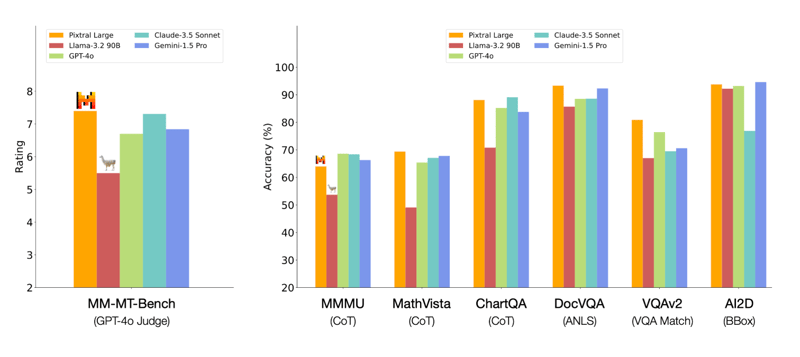
来源:Mistral AI
Pixtral Large 124B 与 Pixtral 12B
Pixtral Large 124B 与 Pixtral 12B 共享部分架构基础,但并不完全相同。虽然 Pixtral Large 建立在 Pixtral 12B 打下的基础之上,但其在架构、上下文窗口大小以及多模态融合方面的改进幅度很大,从而在多项任务上表现更佳。以下是两者之间的一些差异。
- 规模上的显著差异使 Pixtral Large 能够处理更复杂的任务和更大的数据集。
- 更大的上下文窗口让 Pixtral Large 能够处理并理解更长的文本序列和更复杂的图像。
- 两款模型都面向多模态任务,能够融合文本与图像数据。然而,Pixtral Large 引入了专门的交叉注意力层,更好地在不同模态间融合信息,从而提升了在图像理解与文档处理等任务中的表现。
- 与 Pixtral 12B 相比,Pixtral Large 需要更多的计算资源,包括超过 200GB 的数据和强大的 GPU。这凸显了该大型模型更高的复杂度与能力。
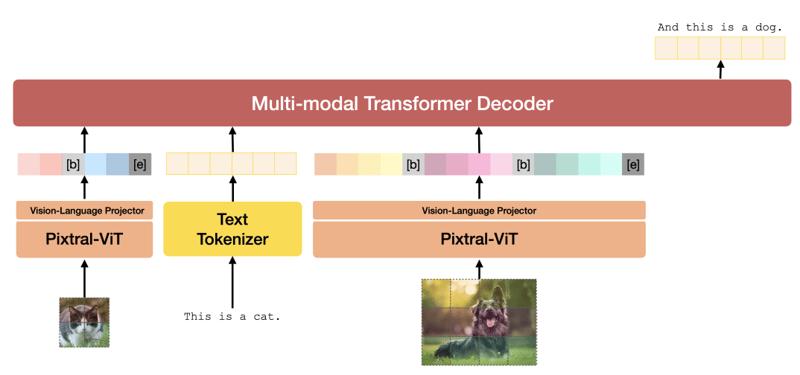
Pixtral 架构。来源:Pixtral 12B 技术报告。
如果您想更深入地了解模型架构,请参阅 Pixtral 12B 的技术报告。Pixtral Large 的技术报告目前尚未公开。
如何在 Le Chat 上使用 Pixtral Large
Le Chat 提供类似于热门 ChatGPT 的聊天式界面。
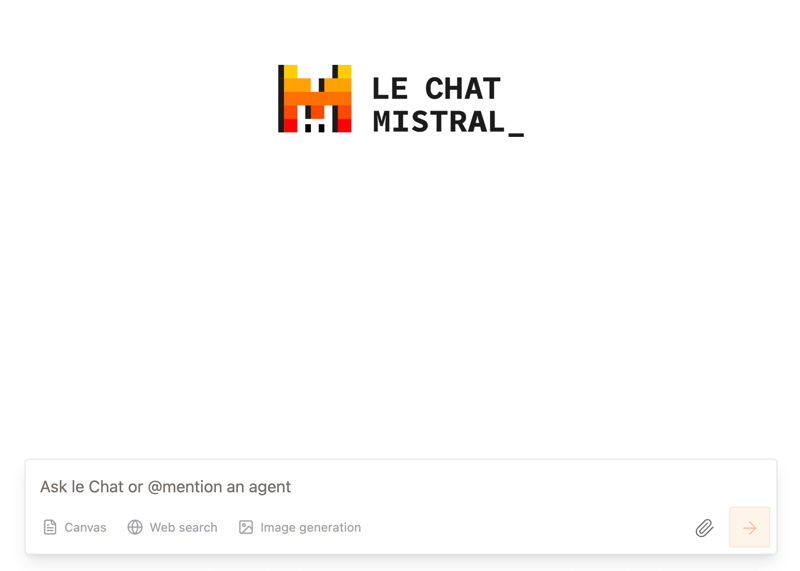
虽然我们无法在其中专门选择 Pixtral Large 模型,但公告文章 明确表示,“最先进的文档与图像理解”由新的多模态 Pixtral Large 提供支持。
我首先在一篇关于Transformer-Lite 的论文上试用了 Pixtral Large,其中包含大量文本与图表。我让模型为该文档做一个摘要:
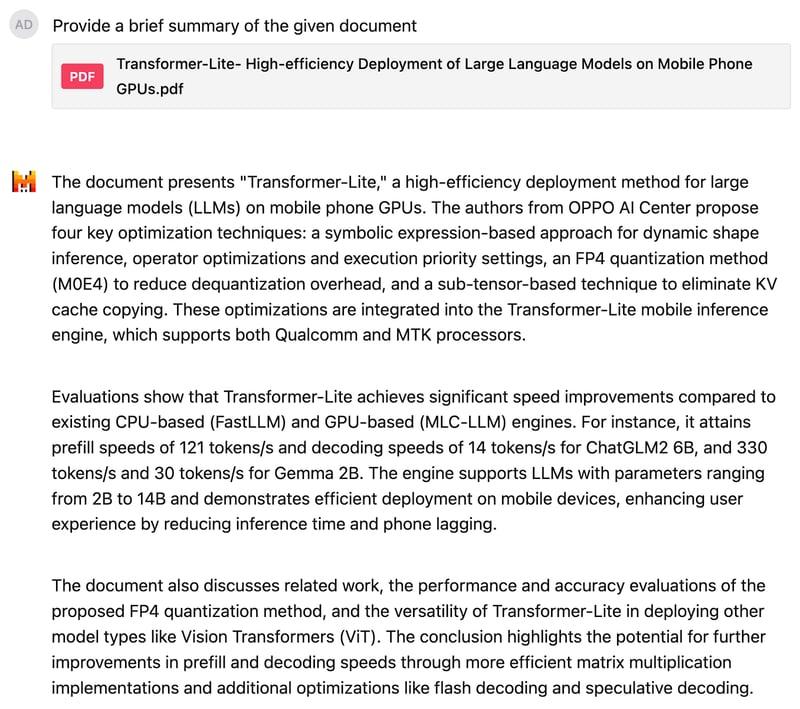
结果让我相当满意。接着,我让 Pixtral 解释一张智能手机品牌分布的饼图,但我特意保持提示语含糊其辞,并未透露饼图的主题。
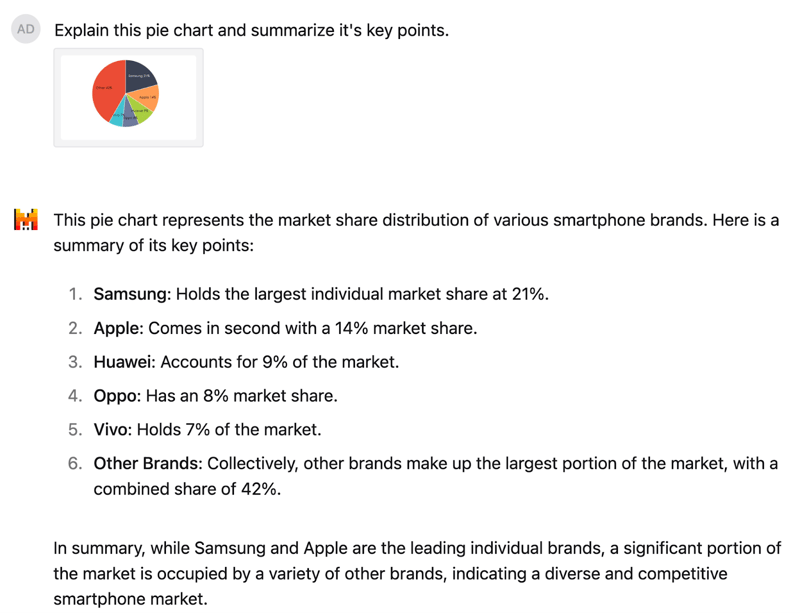
模型读懂了该饼图并正确识别了数值。回复结构清晰,解读也很到位:尽管三星与苹果处于领先地位,但相当一部分市场由多家其他品牌占据。
如何在 La Plateforme 上使用 Pixtral Large 的 API
对于大多数日常场景,Le Chat 已足够好用,但如果我们希望以编程方式使用 Pixtral Large,就需要通过其 API 进行连接。我将先演示如何通过 La Plateforme 连接 API,然后在我自己的手绘图上测试 Pixtral Large。
连接 La Plateforme
要通过 API 使用 Pixtral Large,可按以下步骤操作:
1. 登录La Plateforme。
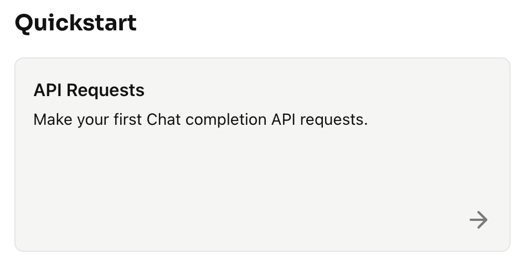
2. 点击 Quickstart → API Requests
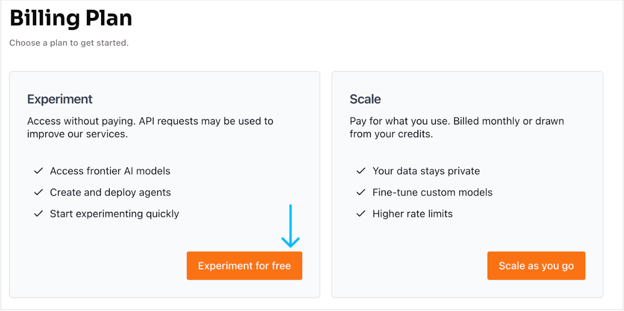
3. 选择免费账户选项。点击免费试用,随后跳转至通过手机号码和一次性验证码(OTP)验证并创建新账户的页面。
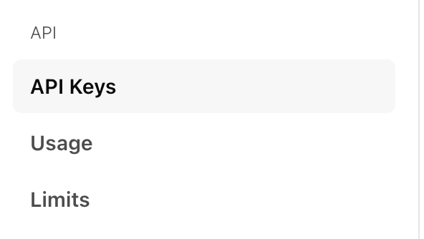
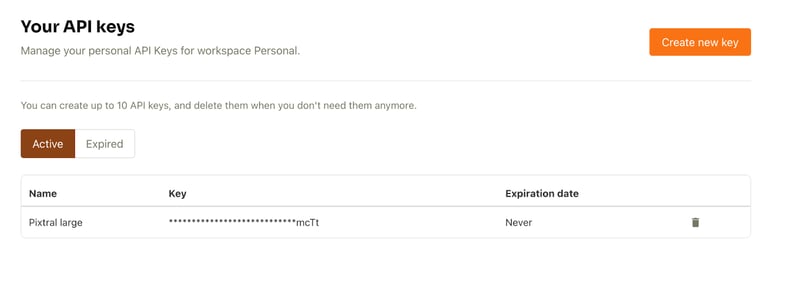
4. 账户设置完成后,从左侧的 API 选项卡中选择API keys。
5. 然后点击Create new key。可填写可选信息并点击Create key。
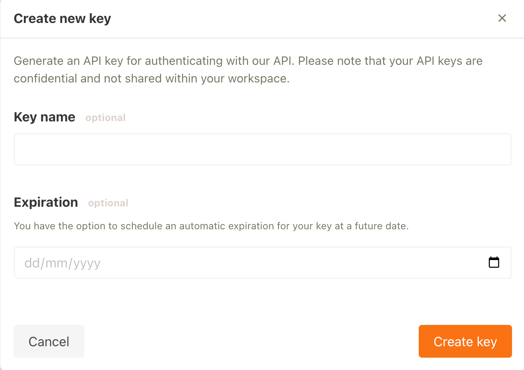
API key 现已可用。
使用 API 为我的手绘图生成图像描述
现在我们用 API 创建一个图像描述生成器。目标是将任意图像与提示中的问题一同传入模型(例如:“请对给定图像进行详细描述”),并获得响应。
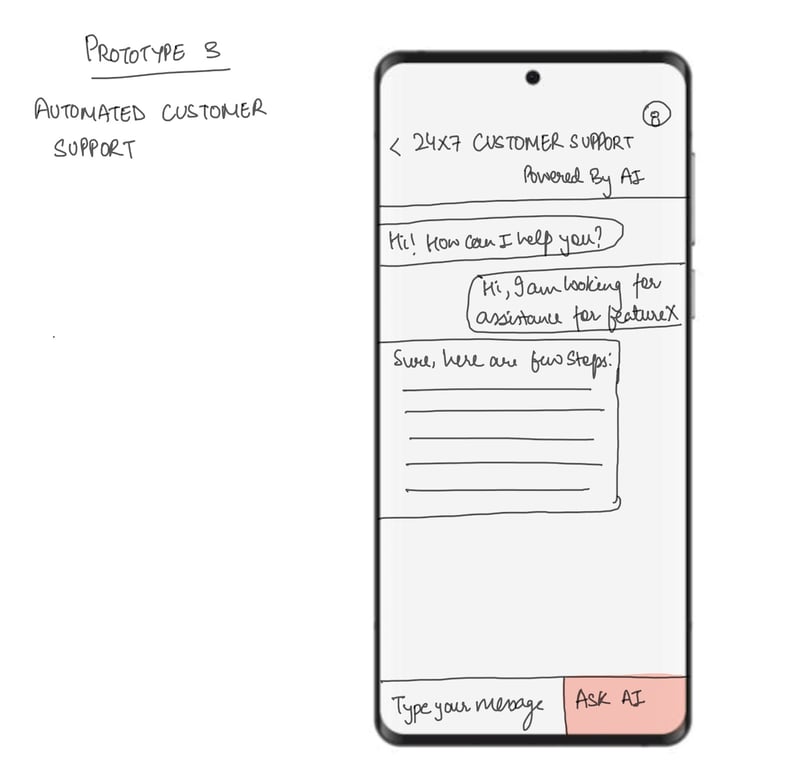
我将以我的一幅手绘图来测试,下图所示。该图展示了一个 24/7 客服聊天机器人应用的移动端框架。
开始之前,请确保完成以下准备:
- GPU:本设置需要 T4 GPU。您可以使用提供免费 T4 GPU 的 Google Colab。
- Mistral AI 库: 安装命令如下:
!pip install -U mistralai我们开始吧:
步骤 1:导入
接下来设置导入。在本教程中我们将使用以下库:
- Pillow(PIL)用于图像处理
- Base64 用于将二进制数据编码/解码为 base64 格式
- io.BytesIO 提供内存中字节流接口
import base64from io import BytesIOfrom PIL import Imagefrom mistralai import Mistral步骤 2:Pixtral API 客户端
接下来使用 API key。在 Google Colab 中设置 API key:进入 Secrets 选项卡,点击左侧边栏的钥匙图标,粘贴您的 API key 并为该 secret 指定名称。之后切换开关以在代码中启用该 secret。这样我们就可以在应用中使用以下代码。
from google.colab import userdatauserdata.get('secretName') # pass in your secretName here设置好 secret key 后,创建名为 API_KEY 的变量并传入我们的 secret 名称,如下所示。接着将该 API key 传给 Mistral 函数并初始化客户端。
from google.colab import userdataAPI_KEY = userdata.get('secretName') # Replace with your actual secret nameclient = Mistral(api_key=API_KEY) 注意: 我们也可以直接传入 API key,但出于安全与隐私考虑不推荐这样做。
步骤 3:编码图像
客户端设置完成后,开始处理将作为 Pixtral Large 模型输入的图像。
# Helper function to encode an image to base64def encode_image(image_obj): if isinstance(image_obj, Image.Image): # Check if it's already a PIL Image img = image_obj else: # Otherwise, try opening it as a path img = Image.open(image_obj) buffered = BytesIO() img.save(buffered, format="PNG") return base64.b64encode(buffered.getvalue()).decode("utf-8")上述函数的主要目的,是接收一张图像(文件路径或预加载的 PIL.Image.Image 对象),并返回其 Base64 字符串表示。这有助于:
- 将图像直接嵌入到 JSON 对象或 API 请求中。
- 无需将图像作为单独文件发送。
步骤 4:图像推理
得到图像后,我们希望使用 Pixtral Large API 生成其描述。流程包括对图像进行编码、编写提示、向 Pixtral API 发送请求并接收描述性响应。如下代码的工作方式为:
- 将图像编码为 Base64,与提示一起按结构化消息发送至 Pixtral API。
- Pixtral Large 模型处理提示与图像,生成关于图像内容的详细文本描述。
- 解析响应以提取描述,并展示给用户。
注意: 请确保在 client.chat.complete 中将模型设为 "pixtral-large-latest",这是目前唯一对公众开放的 Pixtral Large 模型。
# Function to perform inference for image descriptiondef describe_image(image_path): # Load and encode the image image_base64 = encode_image(image_path) # Prompt for the Pixtral model prompt = "Please provide a detailed description of the given image." # Prepare input for the Pixtral API messages = [ { "role": "user", "content": [ {"type": "text", "text": prompt}, {"type": "image_url", "image_url": {"url": f"data:image/png;base64,{image_base64}"}} ] } ] # Perform inference response = client.chat.complete( model="pixtral-large-latest", messages=messages, max_tokens=300 ) # Return the model's output return response.choices[0].message.content# Usageif __name__ == "__main__": # Provide the path to your image file image_path = "image.png" # Replace with the path to your image # Get the description of the image description = describe_image(image_path) # Print the result print("Image Description:") print(description)Image Description:The image is a sketch of a mobile app prototype for automated customer support. The sketch depicts a smartphone screen with a customer support interface.At the top of the screen, there is a header that reads "24x7 Customer Support Powered By AI." Below the header, there is a chat window where a conversation between a user and an AI-powered support system is taking place.The conversation starts with the AI greeting the user: "Hi! How can I help you?" The user responds: "Hi, I am looking for assistance for featureX." The AI then provides a response: "Sure, here are a few steps:" followed by a placeholder for the steps, which are represented by horizontal lines.At the bottom of the screen, there is a text input box labeled "Type your message" and a button labeled "Ask AI." The button is highlighted in red, indicating it is an actionable element for the user to interact with.Overall, the sketch illustrates a user-friendly interface for automated customer support, utilizing AI to provide assistance and guidance to users.下面是我画的另一棵圣诞树,图像下方是 Pixtral Large 对它的描述。

Image Description:The image presents a charming scene of a Christmas tree, standing tall and proud. ..This description is based on the visible content of the image and does not include any speculative or imaginary elements.结语
Pixtral Large 在多模态 AI 上迈出了一步,具备更好的图像理解与文本处理能力。本文通过 Le Chat 与 La Plateforme 两种方式带您了解了该模型的能力,希望本指南对您有所帮助。

我是一名 Google Developers 机器学习(生成式 AI)领域的专家、Kaggle 三项专家,以及 Women Techmakers 大使,拥有 3 年以上的技术从业经验。2020 年我共同创办了一家健康科技初创公司,目前在佐治亚理工学院攻读计算机科学硕士,专攻机器学习。
Mistral AI 近日发布了 Pixtral Large,这是一款多模态模型,是Pixtral 12B 的更强版本,后者于今年早些时候发布。
Pixtral Large 是一款 124B 的多模态模型,能够处理高级图像理解任务,同时保留了Mistral Large 2 出色的文本处理能力。凭借高达 128K 的超大上下文窗口,该模型可在文本的同时分析最多 30 张高分辨率图像,非常适合处理文档、图表和自然图像。
在本教程中,我将通过各种示例,并提供详细的分步说明,演示如何通过 Le Chat 网页端和 API 使用 Pixtral Large。在上手操作之前,我们先来了解一下 Pixtral Large 背后的关键理论概念。