学习路径
Python 编程
19 小时
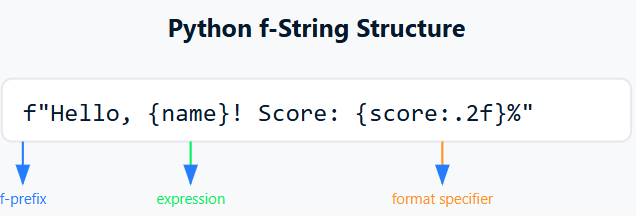
Python 的 f-string 是一种强大且直观的字符串格式化方式。f-string 改变了开发者在 Python 中处理字符串格式化的方式,让代码比以往更加易读、易维护。
图片由作者提供
F-string 是在字符串字面量前加上前缀 'f' 或 'F',并在花括号 {} 中包含表达式的字符串。这些表达式会在运行时求值,然后通过 __format__ 协议进行格式化。与传统的字符串格式化方法不同,f-string 提供了一种更直接、更易读的方式,将 Python 表达式直接嵌入到字符串字面量中。
考虑一个常见场景:您需要格式化一条简单的问候语:
name = "Alice"
age = 25
# Using % operator (old style)
print("My name is %s and I'm %d years old" % (name, age))
# Using str.format()
print("My name is {} and I'm {} years old".format(name, age))
# Using f-string
print(f"My name is {name} and I'm {age} years old")
注意到 f-string 免去了将变量与占位符逐一对应的心智负担了吗?在真实应用中处理复杂数据格式时,这种清晰度就更为宝贵,如下所示:
price = 49.99
quantity = 3
print(f"Total cost: ${price * quantity:.2f}")  # Calculations right in the string!
除了可读性,f-string 在性能上也很出色。它们比 %-formatting 和 str.format() 更快,因为它们在运行时求值,而不是依赖多次字符串操作。Python 对 f-string 的求值做了优化,使其成为高效的字符串格式化选择。
从 Python 3.8 开始,f-string 通过新增的“=”说明符在调试方面更为实用。这个便捷特性可以在一行中同时显示变量名及其值:
x = 10
y = 20
print(f"{x=}, {y=}")  # Output: x=10, y=20
在本文中,我们将系统地了解 f-string,从基础语法到高级格式化技巧。我们将学习如何求值表达式、格式化数字和日期、处理多行字符串,并在代码中应用最佳实践。
F-string 通过简单的前缀与表达式语法,为 Python 的字符串格式化提供了现代且直观的方式。先从创建 f-string 的基本方法开始。
要创建 f-string,只需在字符串字面量前添加字母 'f' 或 'F'。大小写前缀作用相同,仅是编码风格的偏好。如下是创建基础 f-string 的方法:
# Both 'f' and 'F' prefixes work exactly the same way message1 = f”This is an f-string”message2 = F”This is also an f-string”
# Without the prefix, it's just a regular string regular_string =  “This is a normal string”
f-string 的真正威力在于其可在花括号 {} 中嵌入表达式。这些表达式会在运行时求值,并将其值插入到字符串中。来看下面的示例:
# You can put the expression directly inside the braces
print(f"The result is {10 + 5}")
输出
The result is 15了解了如何创建 f-string 之后,来看如何高效地嵌入变量。f-string 允许您将变量直接插入字符串中,简洁且易读。在处理不同数据类型时,f-string 也能优雅地应对。
先看看 f-string 如何处理基础字符串变量:
# Working with string variables
first_name = "John"
last_name = "Doe"
print(f"Full name: {first_name} {last_name}")
输出
Full name: John Doe在处理不同数据类型时,f-string 都能优雅应对。下面看看 f-string 如何处理各种 Python 数据类型:
# Working with numeric types
integer_value = 42
float_value = 23.5
print(f"Integer: {integer_value}")
print(f"Float: {float_value}")
输出
Integer: 42

Float: 23.5
f-string 与列表配合顺畅,既可访问单个元素,也可展示整个列表:
# Working with lists
fruits = ["apple", "banana", "orange"]
print(f"First fruit: {fruits[0]}")
print(f"All fruits: {', '.join(fruits)}")
输出
First fruit: apple

All fruits: apple, banana, orange
处理字典时,也可轻松访问并格式化字典值,如下所示:
# Working with dictionaries
user_info = {
    "name": "Alice",
    "age": 28,
    "city": "New York"
}
print(f"User: {user_info['name']} from {user_info['city']}")
输出
User: Alice from New York布尔值也可以直接嵌入到 f-string 中,如下所示:
# Working with boolean values
is_active = True
is_admin = False
print(f"Active status: {is_active}")
print(f"Admin privileges: {is_admin}")
输出
Active status: True

Admin privileges: False
理解 f-string 与不同数据类型的配合方式,有助于写出更易读、易维护的代码。下一节,我们将探索 f-string 的更高级用法。
f-string 在处理表达式和计算时表现出色,您可以直接在字符串中运算,而无需事先计算好值。
先看一些基础算术操作。注意我们如何直接在字符串格式化中进行计算:
# Basic arithmetic operations
x = 10
y = 5
print(f"Addition: {x + y}")
print(f"Multiplication: {x * y}")
print(f"Division with 2 decimal places: {x / y:.2f}")
输出
Addition: 15

Multiplication: 50

Division with 2 decimal places: 2.00
您还可以在 f-string 中使用 Python 内置函数,使其在数据处理方面更具通用性。如下展示如何在字符串中就地处理数据。
numbers = [1, 2, 3, 4, 5]
text = "python"
print(f"List length: {len(numbers)}")
print(f"Maximum value: {max(numbers)}")
print(f"Uppercase text: {text.upper()}")
输出
List length: 5

Maximum value: 5

Uppercase text: PYTHONf-string 的一大强项是可包含条件逻辑。您可以使用三元运算符让字符串格式化根据条件而变化。先看一些使用三元运算符的简明示例:
# Simple conditional formatting
score = 85
print(f"Result: {'Pass' if score >= 70 else 'Fail'}")
# Multiple conditions in data analysis
value = 42
print(f"Status: {'High' if value > 75 else 'Medium' if value > 25 else 'Low'}")
输出
Result: Pass

Status: Medium
在真实的数据分析中,常需要将条件与计算相结合。我们可以这样创建更复杂的格式化场景。
stock_level = 15
reorder_point = 20
price = 49.99
print(f"Stock Alert: {'Order more' if stock_level < reorder_point else 'Stock OK'}")
print(f"Total Value: ${stock_level * price:.2f}")
输出
Stock Alert: Order more

Total Value: $749.85
当表达式较长时,可将其拆分为更小的部分以提升可读性。如下所示,我们对较长表达式进行拆分,让代码更易维护:
# Complex expression broken down for clarity
value = 75
threshold = 50
multiplier = 1.5
result = value > threshold
adjusted_value = value * multiplier if result else value
print(f"Adjusted Value: {adjusted_value}")
print(f"Status: {'Exceeds threshold' if result else 'Within limits'}")
输出
Adjusted Value: 112.5

Status: Exceeds threshold
f-string 还能借助在 Python 3.8 引入的“=”说明符来辅助调试,同时显示变量名和变量值,如下所示:
# Debugging with f-strings
x = 100
y = 200
print(f"{x=}, {y=}")
print(f"{x + y=}")
输出
x=100, y=200

x + y=300
f-string 让复杂的字符串格式化更直观、更易读。下一节我们将学习如何通过精确的数字格式化与文本对齐来微调输出外观——这是生成专业数据输出的必备技能。
f-string 提供了强大的数据美化能力,使输出更易读、更专业。借助简洁的格式说明符,我们可以控制从小数位到文本对齐的一切,确保数据能有效传达信息。
下面看看如何用 f-string 控制不同的格式化细节。
处理数值数据时,精确的格式化能让输出更专业、更易读。
要控制小数位,f-string 使用冒号后跟一个点和所需的小数位数。例如:
# Controlling decimal places
pi = 3.14159
price = 19.99999
percentage = 0.8525
print(f"Pi to 2 decimal places: {pi:.2f}")
print(f"Price rounded to 2 decimals: {price:.2f}")
print(f"Percentage with 1 decimal: {percentage:.1%}")
输出
Pi to 2 decimal places: 3.14

Price rounded to 2 decimals: 20.00

Percentage with 1 decimal: 85.2%
处理大数时,我们通常希望添加千位分隔符以提升可读性。f-string 可以这样帮助我们格式化数字:
# Formatting large numbers
population = 1234567
revenue = 1234567.89
# Using comma as thousand separator
print(f"Population: {population:,}")
print(f"Revenue: ${revenue:,.2f}")
# Using underscore as thousand separator
print(f"Population: {population:_}")
print(f"Revenue: ${revenue:_.2f}")
输出
Population: 1,234,567

Revenue: $1,234,567.89

Population: 1_234_567

Revenue: $1_234_567.89清晰的数据呈现通常需要正确对齐文本。看看 f-string 如何帮助我们实现整齐的输出。
可以分别使用 '<'、'>' 和 '^' 运算符将文本左对齐、右对齐或居中:
# Basic text alignment
name = "Python"
width = 20
print(f"Left aligned:   |{name:<20}|")
print(f"Right aligned:  |{name:>20}|")
print(f"Center aligned: |{name:^20}|")
输出
Left aligned:   |Python              |
Right aligned:  |              Python|
Center aligned: |       Python       |
对于表格数据,将对齐与自定义填充字符结合使用,可以创建专业的输出。下面展示如何构建格式良好的表格:
# Creating a simple data table
languages = ["Python", "R", "SQL"]
scores = [85, 92, 78]
print("Programming Language Scores")
print("-" * 30)
for lang, score in zip(languages, scores):
    print(f"{lang:<10} | {score:>5}")
输出
Programming Language Scores
------------------------------
Python     |    85
R          |    92
SQL        |    78
有时需要用零填充数字,尤其在处理代码或 ID 时。下面是一些数字填充技巧:
# Padding numbers with zeros
customer_id = 42
invoice_number = 157
print(f"Customer ID: {customer_id:04d}")
print(f"Invoice: INV-{invoice_number:05d}")
输出
Customer ID: 0042

Invoice: INV-00157
掌握这些格式化技巧,对于需要专业展示分析结果的数据从业者尤为重要。下一节我们将介绍多行 f-string,当需要格式化较大文本块或构建更复杂的报告模板时,它尤其有用。
在处理较大文本块或复杂的字符串格式化时,单行 f-string 可能会变得笨拙且难以阅读。Python 的多行 f-string 优雅地解决了这个问题,让我们可以跨多行创建结构清晰、易读的文本。下面介绍如何高效使用这一强大特性。
多行 f-string 使用三引号(""" 或 ''')跨越多行,同时保持代码整洁、可读。可将其视为一块画布,您可以按希望的样子摆放文本。示例如下:
# Basic multiline f-string
name = "Alice"
role = "Data Scientist"
experience = 5
profile = f"""
Team Member Profile:
------------------
Name: {name}
Role: {role}
Experience: {experience} years
"""
print(profile)
输出
Team Member Profile:
------------------
Name: Alice
Role: Data Scientist
Experience: 5 years
理解多行 f-string 的缩进对于保持整洁的格式很重要。三引号内的缩进会成为字符串本身的一部分,如下所示:
# Working with indentation
data = {
    'title': 'Monthly Report',
    'month': 'October',
    'value': 1234.56
}
report = f"""
    {data['title']}
    Month: {data['month']}
    Value: ${data['value']:,.2f}
        - Generated automatically
        - All values in USD
"""
print(report)
输出
    Monthly Report
    Month: October
    Value: $1,234.56
        - Generated automatically
- All values in USD有时我们需要逐步构建复杂字符串。Python 允许我们以不同方式组合多个 f-string,以达成所需的精确格式化,如下所示:
# Building a report with multiple f-strings
title = "Sales Analysis"
period = "Q3 2024"
sales = 150000
growth = 27.5
header = f"""
{title}
{'=' * len(title)}
Period: {period}
"""
metrics = f"""
Performance Metrics:
- Total Sales: ${sales:,}
- Growth Rate: {growth}%
"""
notes = f"""
Additional Notes:
- All figures are preliminary
- Data updated as of {period}
"""
# Combining all sections
full_report = f"{header}\n{metrics}\n{notes}"
print(full_report)
输出
Sales Analysis
=============
Period: Q3 2024
Performance Metrics:
- Total Sales: $150,000
- Growth Rate: 27.5%
Additional Notes:
- All figures are preliminary
- Data updated as of Q3 2024
在数据分析报告中,您可能需要以结构化方式格式化多个数据点。多行 f-string 非常适合创建清晰、有条理的输出,如下所示:
# Creating a data analysis summary
metrics = {
    'mean': 75.32,
    'median': 72.50,
    'std_dev': 12.45,
    'sample_size': 1000
}
summary = f"""
Statistical Summary
------------------
Sample Size: {metrics['sample_size']:,}
Central Tendency:
    Mean:   {metrics['mean']:.2f}
    Median: {metrics['median']:.2f}
Variation:
    Std Dev: {metrics['std_dev']:.2f}
"""
print(summary)
输出
Statistical Summary
------------------
Sample Size: 1,000
Central Tendency:
    Mean:   75.32
    Median: 72.50
Variation:
    Std Dev: 12.45
多行 f-string 让您能轻松为数据分析工作创建可读、格式良好的文本输出。下一节,我们将介绍一些常见陷阱与最佳实践,帮助您确保字符串格式化既高效又易维护。
即便是经验丰富的 Python 开发者,在使用 f-string 时也可能遇到意外问题。了解这些常见陷阱并掌握最佳实践,将帮助我们编写更可靠、可维护的代码。下面看看一些需要特别注意的关键点。
使用 f-string 时,处理文本中的字面量花括号是最常见的挑战之一。由于 f-string 使用花括号来放置表达式,因此当我们希望显示实际的花括号时,就需要特殊处理。
先看看错误使用花括号时会发生什么:
# Incorrect way - will raise an error
try:
    print(f"This {variable} is inside {braces}")
except NameError:
    print("The above code would raise an error")
输出
The above code would raise an error若要正确显示字面量花括号,需要将其写成两个。正确做法如下:
# Correct way - doubling the braces
print(f"This {{variable}} is inside {{braces}}")
# Mixing literal and expression braces
name = "Python"
print(f"{{Here's a name in braces: {name}}}")
输出
This {variable} is inside {braces}

{Here's a name in braces: Python}
在处理嵌套结构时,正确转义花括号就更为重要:
# Working with nested dictionary
data = {"name": "Alice", "score": 95}
# Demonstrating nested dictionary formatting
print(f"Data: {{key: {data['name']}, value: {data['score']}}}")
输出
Data: {key: Alice, value: 95}对于更复杂的嵌套结构,使用三引号可以提升可读性,如下所示:
# Using triple quotes for complex structures
data = {"name": "Alice", "score": 95}
template = f"""
Dictionary Format:
    {{'name': '{data["name"]}',
     'score': {data['score']}}}
"""
print(template)
输出
Dictionary Format:

    {'name': 'Alice',

'score': 95}F-string 不仅仅是方便——它们也很高效。先看一个简单的字符串连接示例:
# Basic string formatting comparison
import timeit
name = "Python"
version = 3.9
# Using + operator (slowest for multiple items)
def concat_plus():
    return "Running " + name + " version " + str(version)
# Using % formatting (old style)
def format_percent():
    return "Running %s version %s" % (name, version)
# Using str.format()
def format_method():
    return "Running {} version {}".format(name, version)
# Using f-string
def format_fstring():
    return f"Running {name} version {version}"
# Let's time each method
print("Time taken (microseconds):")
print(f"+ operator: {timeit.timeit(concat_plus, number=100000):.2f}")
print(f"% operator: {timeit.timeit(format_percent, number=100000):.2f}")
print(f"str.format: {timeit.timeit(format_method, number=100000):.2f}")
print(f"f-string:   {timeit.timeit(format_fstring, number=100000):.2f}")
输出
Time taken (microseconds):

+ operator: 0.14

% operator: 0.15

str.format: 0.14

f-string:   0.13
在循环中,合理使用 f-string 尤其重要。下面比较不同方法:
# Loop performance comparison
data = [("Alice", 95), ("Bob", 87), ("Charlie", 92)]
# Less efficient approach - creating new format string each time
def format_inefficient():
    result = []
    for name, score in data:
        result.append("Name: {} | Score: {}".format(name, score))
    return "\n".join(result)
# More efficient approach - create template once
def format_efficient():
    template = "Name: {} | Score: {}"
    result = []
    for name, score in data:
        result.append(template.format(name, score))
    return "\n".join(result)
# F-string approach
def format_fstring():
    result = []
    for name, score in data:
        result.append(f"Name: {name} | Score: {score}")
    return "\n".join(result)
# Time comparison
print("Time taken (microseconds):")
print(f"Inefficient: {timeit.timeit(format_inefficient, number=10000):.2f}")
print(f"Efficient:   {timeit.timeit(format_efficient, number=10000):.2f}")
print(f"F-string:    {timeit.timeit(format_fstring, number=10000):.2f}")
输出
Time taken (microseconds):

Inefficient: 0.02

Efficient:   0.02

F-string:    0.01
对于复杂计算,最好在 f-string 之外完成:
import math
radius = 5
# Bad practice - complex expression inside f-string
print(f"Circle area: {math.pi * radius ** 2:.2f}")
# Better practice - calculate complex expressions separately
area = math.pi * radius ** 2
print(f"Circle area: {area:.2f}")
使用 f-string 时请牢记以下最佳实践:
在创建清晰、易读的输出时,f-string 是不可或缺的工具。下面看看一些实际场景,重点关注数据格式化与调试,了解 f-string 如何让代码更优雅、输出更专业。
在进行数据分析时,清晰地呈现信息对有效沟通至关重要。f-string 擅长将原始数据转化为格式良好、易理解的输出。以下是您工作中会遇到的一些常见数据格式化场景。
财务数据的格式化需要精确的小数处理与正确的货币表示。考虑以下对销售数据的分析示例:
# Financial data formatting
monthly_sales = 123456.789
profit_margin = 0.1856
units_sold = 1234
sales_report = f"""
Monthly Sales Report
-------------------
Total Sales:    ${monthly_sales:,.2f}
Profit  {profit_">Units Sold:     {units_sold:,}
Profit:         ${monthly_sales * profit_">"""
print(sales_report)
输出
Monthly Sales Report
-------------------
Total Sales:    $123,456.79
Profit  18.6%
Units Sold:     1,234
Profit:         $22,912.94
处理统计数据时,合理的对齐与格式化有助于让分析结果更易读。下面看看 f-string 如何帮助格式化统计摘要:
# Statistical data presentation
dataset = {
    'mean': 67.89123,
    'median': 65.5,
    'std_dev': 12.34567,
    'min_value': 42.5,
    'max_value': 95.75
}
stats_summary = f"""
Statistical Analysis
-------------------
Mean:        {dataset['mean']:.2f}
Median:      {dataset['median']:.1f}
Std Dev:     {dataset['std_dev']:.3f}
Range:       {dataset['min_value']:.1f} - {dataset['max_value']:.1f}
"""
print(stats_summary)
输出
Statistical Analysis
-------------------
Mean:        67.89
Median:      65.5
Std Dev:     12.346
Range: 42.5 - 95.8在开发与数据分析过程中,合理的日志与调试必不可少。f-string 能让这些任务更直接、更具信息量。下面是一些实用的调试场景:
# Enhanced debugging with f-strings
def analyze_data(data_list, threshold):
    # Debug information about input parameters
    print(f"[DEBUG] Processing {len(data_list)} items with threshold {threshold}")

    filtered_data = [x for x in data_list if x > threshold]

    # Debug information about processing results
    print(f"[DEBUG] Found {len(filtered_data)} items above threshold")
    print(f"[DEBUG] Filtered ratio: {len(filtered_data)/len(data_list):.1%}")

    return filtered_data
# Example usage
data = [1, 5, 3, 7, 2, 9, 4, 6]
result = analyze_data(data, 5)
输出
[DEBUG] Processing 8 items with threshold 5
[DEBUG] Found 3 items above threshold
[DEBUG] Filtered ratio: 37.5%
调试复杂数据结构时,f-string 帮助我们创建清晰、信息量足的输出。以下展示如何调试一个数据处理流程:
# Debugging data transformations
def process_user_data(user_info):
    print(f"""
[DEBUG] Processing user data:
    Input type: {type(user_info)}
    Fields present: {', '.join(user_info.keys())}
    Data sample: {
        {k: user_info[k] for k in list(user_info.keys())[:3]}
    }
""")

    # Example processing
    user_data = {
        'name': user_info['name'].upper(),
        'age': user_info['age'] + 1  # Simulated transformation
    }

    print(f"[DEBUG] Transformation complete: {user_data}")
    return user_data
# Example usage
sample_data = {
    'name': 'alice',
    'age': 30,
    'city': 'New York',
    'occupation': 'Data Scientist'
}
processed = process_user_data(sample_data)
输出
[DEBUG] Processing user data:
    Input type: <class 'dict'>
    Fields present: name, age, city, occupation
    Data sample: {'name': 'alice', 'age': 30, 'city': 'New York'}
[DEBUG] Transformation complete: {'name': 'ALICE', 'age': 31}
这些实践示例展示了 f-string 如何提升数据从业者的日常工作。不论是格式化分析结果、调试复杂数据转换,还是创建信息丰富的日志消息,f-string 都能以简洁、高效的方式处理字符串格式化任务。
f-string 重塑了 Python 开发者处理字符串格式化的方式,兼具可读性、性能与灵活性。正如本指南所示,它为我们提供了一种直观的方法,将表达式与数据格式化直接嵌入字符串,使代码更简洁、更易维护。
使用 f-string 的优势不仅体现在语法上,还包括:
如果您想进一步提升 Python 技能,欢迎查看我们的Python Programming 技能路径。