

尽管预告片令人印象深刻,但我始终怀疑,用于展示模型的示例往往是精挑细选的,而现实常常与宣传不符。
在本文中,我将教您如何使用 Runway 4.5,并展示未筛选的示例,看看 Runway 4.5 是否名副其实。
什么是 Runway 4.5?
Runway 4.5 是来自 Runway ML 的文生视频 AI 生成模型。而 Runway 4 侧重于由图像生成视频,Runway 4.5 则专注于文本提示。根据 Runway 的说法,新模型目前尚不支持声音,但应会很快推出。
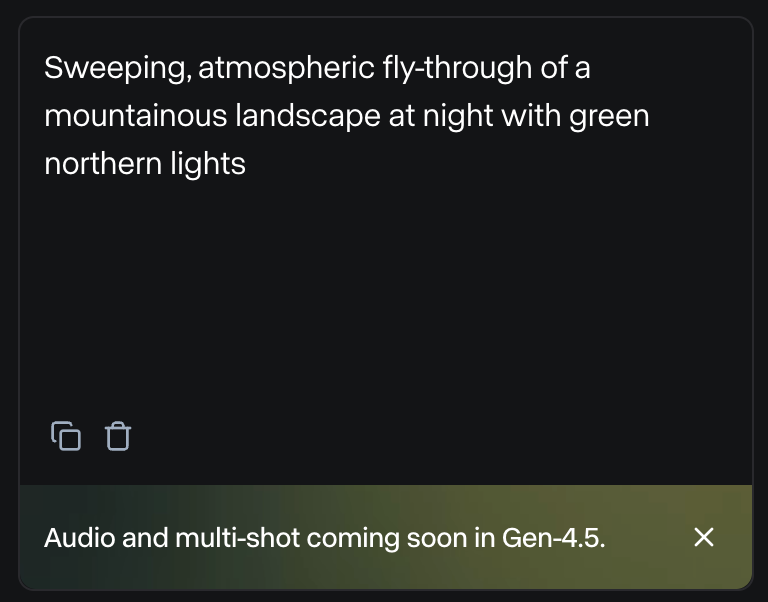
不支持音频也意味着,他们在发布预告片中的声音是外部制作的,并非由 Runway 4.5 生成。
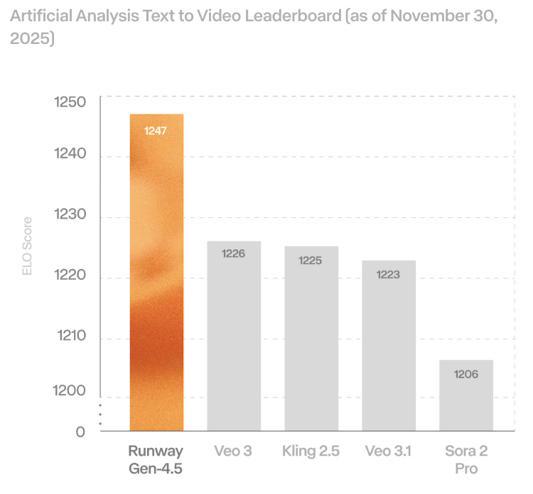
虽然该新模型在文生视频的基准测试中击败了其他现有模型,但这感觉像是倒退了一步,因为他们之前的模型在声音和图像支持方面表现不错。
根据我的经验,图像支持对于创作一致的故事至关重要,因为即使模型能完全遵循文本提示,也很难仅靠文本维持角色的一致性。
如果您是 Runway 新手,我们建议您查看我们关于 Runway ML 的其他文章:
如何访问 Runway 4.5?
可以通过 其网页应用 访问 Runway 4.5。
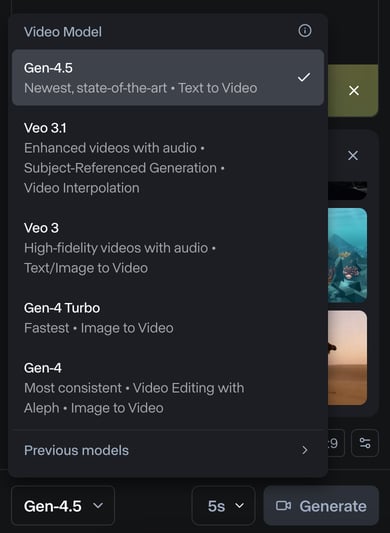
使用并非免费,需要订阅。更多详情请参阅 其定价页面。
Gen 4.5 每生成一秒视频需要 25 个积分。其最便宜的订阅包含 625 个积分,只能生成 25 秒视频。
Runway Gen-4.5 有哪些新特性?
让我们来看一下 Runway Gen 4.5 的新功能:
严格遵循提示
在其发布文章中,他们声称 Runway 4.5 能高度准确地遵循复杂提示。具体来说,它可以:
- 精准渲染由多元素组成的复杂场景。
- 处理细致的构图,允许对场景中物体的精确布局以及角色与物体的流畅运动。
- 准确处理物理交互,呈现可信的碰撞和自然的运动。
- 生成富有表现力的角色,呈现细腻情绪、自然手势和逼真细节。
下方视频汇集了其官网上每项功能对应的一个示例:
风格控制与视觉一致性
与 Veo3.1 等现代文生视频模型类似,Gen-4.5 支持从逼真的电影影像到高度风格化的动画等广泛的视觉风格,同时保持一致统一的视觉识别。具体可以:
- 生成与真实拍摄难以区分的视频,细节逼真且准确。
- 在不受写实约束的情况下,创造风格化、富有表现力的运动。
- 制作看起来与日常生活相仿的视频。
- 渲染具有鲜明景深与电影质感的视频。
下面是他们在官方公告中展示的对应功能示例:
测试 Runway 4.5
上面的示例来自其官方网站。看起来相当出色,但在 AI 视频生成模型中,我们通常需要用同一提示生成一堆视频,才能得到较好的结果。
要牢记的一点是,新模型发布时展示的结果通常是从众多生成视频中精心挑选出来的最佳作品。
在本节中,我展示了自己使用 Runway 4.5 的实验结果。在这些实验中,我没有挑选。我对每个想法只生成一个视频,不会反复尝试直到得到可接受的版本。
要编写好的提示,我建议遵循他们的 提示指南,其建议使用以下结构:
[Camera] shot of [a subject/object] [action] in [environment]. [Supporting component descriptions]物理准确性
我对 Runway 4.5 的第一个测试是看看模型是否理解物理规律。
为此,我想到把一头大象和一只老鼠放在跷跷板上,看看它会向哪边倾斜。我不想在提示中说明会发生什么,以此测试模型是否已学会在没有描述的情况下生成符合现实的物理效果。
我没有只生成一个视频,而是决定生成两个:
- 老鼠独自坐在跷跷板一端,大象跳到另一端。我预期老鼠会被弹飞。
- 大象独自坐在跷跷板一端,老鼠跳到另一端。我预期不会发生什么,因为大象重得多。
以下是我使用的提示:
Side-on static camera shot of a mouse sitting alone on one end of a wooden see-saw as an elephant falls onto the opposite end in an open grassy field.
The full see-saw and pivot remain visible, the fall completes within the shot, the motion is shown in real-time, and the take is continuous with no cuts.Side-on static camera shot of an elephant sitting alone on one end of a wooden see-saw as a mouse falls onto the opposite end in an open grassy field.
The full see-saw and pivot remain visible, the fall completes within the shot, the motion is shown in real-time, and the take is continuous with no cuts.以下是结果:
尽管结果与我设想的不完全一致,但就物理层面而言,我觉得 Runway 4.5 处理得相对不错。
在第一个视频中,大象并没有真的“落”在跷跷板上,但当它踏上去时,确实把老鼠抬了起来,尽管存在一些小的不一致。
在第二个视频中,如预期那样,老鼠落在跷跷板上没有产生任何效果,这很好。
角色情绪
接下来,我想看看是否能在角色身上唤起强烈的情绪。起初,我想通过让两个人在对话结束后彼此对视、无事可做,来生成一个尴尬的瞬间。我用了这个提示:
Two-shot eye-level camera shot of two people holding eye contact after a conversation ends in a small elevator.
Neither speaks, the doors remain closed, and the moment extends slightly longer than comfortable in real time.以下是 Runway Gen 4.5 生成的视频:
这个视频没让我感到尴尬。我知道我没有在提示中明确要求这种情绪,而这种情绪是否会从长时间对视中产生也可能是主观的。
尽管不如我所愿,但我觉得视频中人物的面部表情与场景保持了一致。对我来说,更像是他们在准备应对一场艰难的状况。
我又做了第二个实验:一位女性收到一条令人伤心的短信并作出反应。我使用的提示是:
Locked-off close-up camera shot of a young woman reading a very sad message on her phone and slowly lowering it in a quiet subway station.
Her face remains fully visible, background movement continues naturally, and the moment plays out in a single continuous take.生成复杂场景
我见过 AI 模型一再难以做到的一点是:生成有很多人的繁忙场景。通常会出现大量伪影,人或物会凭空消失或出现。
为了测试 Runway 4.5 生成复杂场景的能力,我让它用如下提示生成一个拥挤的夜市视频:
A crowded open-air night market just after a sudden rainstorm.
Steam rises from food stalls while neon signs in different languages reflect in puddles on the ground.
Dozens of people move through the narrow aisles: vendors cooking, customers eating, children weaving through the crowd, a street musician performing near an intersection.
Some people carry umbrellas, others shake water from their clothes.
Plastic tarps flutter overhead, partially blocking strings of warm lights.
In the background, scooters pass by, and apartment windows glow at different heights.
The scene feels alive, messy, and authentic, with many small interactions happening at once.结果如下:
总体而言,效果不算差。前景中的人保持了一致性,视频包含了大部分所要求的元素。
不过,它也存在其他模型同样的问题,即难以维持运动的一致性。
例如,某个时刻,背景中的一辆踏板车消失了。有些人也是如此。
生成贴近生活的场景
公告中的一项主张是模型能够生成简单的日常生活场景。为测试这一点,我让它生成我能想到的最常见的日常场景之一:有人在超市结账。
我使用的提示是:
Eye-level handheld camera shot of a customer placing items on a checkout counter and waiting in a small local grocery store.
The cashier scans items off-screen, the line behind shifts slightly, and ambient motion continues.虽然结果不算太差,但我确实感觉模型在遵循提示方面遇到了很大困难:
没有看到排队的顾客,传送带上的物品以奇怪的方式滚动,并堆在末端。对我来说,这个场景显得不自然、很“AI 生成”。
生成奇幻世界
有件事我一直想生成,但在我试过的所有模型上都失败了,所以我决定用 Runway 4.5 再试一次。我想创建一个拿着魔法画笔的角色,他用它来化险为夷。
例如,他可能在被坏人追赶时,用画笔画出一把梯子,从死胡同里逃走。
我让 Runway 4.5 用以下提示生成这一场景:
A fantastical world where painted objects can become real.
A lone character carrying a glowing magical paintbrush runs through a surreal alley as shadowy pursuers close in behind him.
He reaches a dead end: a tall, blank wall with no exits.
Panicked but focused, he turns, presses the brush against the wall, and quickly paints a ladder.
As the final stroke is completed, the painted ladder transforms into a physical object attached to the wall.
The character climbs the ladder and escapes upward just as the pursuers reach the wall below.
The environment feels dreamlike and imaginative, with subtle magical effects reinforcing that art and reality blend together in this world.视频存在一些不一致之处,比如开头坏人实际上在远离主角奔跑,最后坏人也没有去爬梯子。尽管如此,在其他模型上尝试过这个想法之后,我得说这是我第一次得到与我想法相当接近的结果。
生成电影感视频
最后一个实验,我尝试生成一段具有电影化观感的视频。我使用的提示是:
A cinematic sequence at dusk in a vast desert landscape.
A solitary figure walks along a windswept ridge as the sky shifts from deep blue to burning orange.
The camera begins wide and slowly pushes in, revealing dust catching the light and fabric moving in the wind.
The character stops, turns toward the horizon, and exhales as distant thunder rolls.
Subtle lens flares, natural motion blur, and layered sound cues suggest scale and tension.
The moment feels quiet, dramatic, and intentional, like a scene from a high-budget film.结果如下:
就观感而言,我认为非常准确,也很有电影感。唯一让我不满意的是角色在跑而不是走。我觉得这改变了整段视频的氛围。
Runway 4.5 与 Veo 3.1 对比
我在 Runway 4.5 和我认为最直接的竞品 Veo 3.1 上用相同提示做了几个示例测试(注意 Veo 3.1 生成的视频稍长)。
让我有点意外的是,Runway 4.5 在这三个示例中表现都更好。以下是关于跷跷板上大象坐着的示例,两者生成视频的对比:
Veo 3.1 的视频有很多错误。例如,当老鼠落下时,第二只老鼠突然凭空出现。随后看起来像是跷跷板打到了大象,但之后大象实际上在跷跷板前面。
我又尝试了最后一个包含复杂运动和物理交互的示例:
Slow-motion dolly shot of a line of shopping carts colliding one after another in a steep supermarket parking garage.
Each impact transfers momentum unevenly, carts crumple differently, loose items fly forward, and the final cart barely moves.在这种情况下,两种模型都失败了,但 Veo 3.1 失败得更明显:
结论
在这篇实测中,我展示了如何使用 Runway 4.5,并用未筛选的提示对其在物理、情绪、复杂人群、日常瞬间、奇幻逃脱和电影化场景等方面进行了压力测试。我还将 Runway 4.5 与 Veo 3.1 进行了直接对比。
Runway 4.5 的确可以生成外观出色、连贯的视频,能够较好地遵循提示,偶尔也有亮眼时刻,但没有让我觉得真正突破性。
Runway 4.5 仍有明显局限,最显著的是缺乏原生声音支持——他们表示很快会推出——此外,在繁忙或细粒度交互中仍存在一致性问题。
总体而言,基于我的实验和其公布的基准,Runway 4.5 目前看起来强于 Veo 3.1。
Runway Gen 4.5 常见问答
如何访问 Runway 4.5?
您可以通过 Runway 网页应用访问 Runway 4.5。需要付费订阅。
生成一次 Runway 4.5 要花多少钱?
每秒 25 积分;最便宜的套餐包含 625 积分(总计约 25 秒)。
Runway 4.5 是否支持音频?
在撰写本文时尚不支持;发布预告片中的音频是外部添加的,官方承诺很快会有原生声音。尚未支持;发布预告片中的音频为外部添加,原生声音预计很快推出。
Runway 4.5 与 Veo 3.1 相比如何?
在我们的并排对比中,Runway 4.5 生成的结果更干净、更连贯,尽管二者在复杂的连锁反应物理上都会失误。
我该如何为 Runway 4.5 编写提示?
使用推荐结构——相机 + 主体/客体 + 动作 + 环境 + 支撑细节——并明确连续性(单镜头、实时、取景)。

Runway ML 最近发布了 Runway 4.5,这是其文生视频 AI 生成模型的最新迭代。他们声称这是迄今为止最好的文生视频模型。