
Our biggest-ever sale. 60% off AI & data skills
Buy Now

अभ्यास और ट्रैक अपनी प्रगति को।
Google के साथ जारी रखेंजारी रखकर, आप हमारी उपयोग की शर्तें, हमारी गोपनीयता नीति को स्वीकार करते हैं और यह भी कि आपका डेटा USA में संग्रहीत है।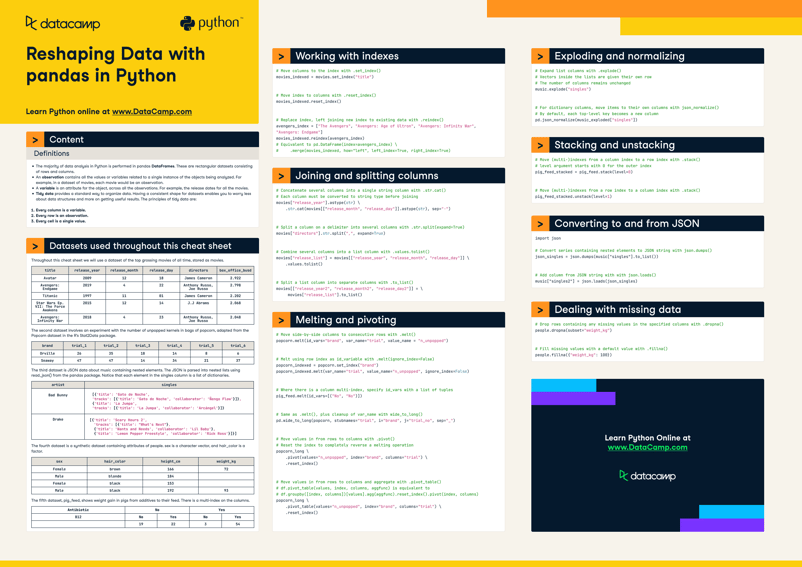
यह चीट शीट हमेशा पास रखें
PDF डाउनलोड करेंThroughout this cheat sheet we will use a dataset of the top grossing movies of all time, stored as movies.
|
title |
release_year |
release_month |
release_day |
directors |
box_office_busd |
|
Avatar |
2009 |
12 |
18 |
James Cameron |
2.922 |
|
Avengers: Endgame |
2019 |
4 |
22 |
Anthony Russo,Joe Russo |
2.798 |
|
Titanic |
1997 |
11 |
01 |
James Cameron |
2.202 |
|
Star Wars Ep. VII: The Force Awakens |
2015 |
12 |
14 |
J. J. Abrams |
2.068 |
|
Avengers: Infinity War |
2018 |
4 |
23 |
Anthony Russo,Joe Russo |
2.048 |
The second dataset involves an experiment with the number of unpopped kernels in bags of popcorn, adapted from the Popcorn dataset in the R's Stat2Data package.
|
brand |
trial_1 |
trial_2 |
trial_3 |
trial_4 |
trial_5 |
trial_6 |
|
Orville |
26 |
35 |
18 |
14 |
8 |
6 |
|
Seaway |
47 |
47 |
14 |
34 |
21 |
37 |
The third dataset is JSON data about music containing nested elements. The JSON is parsed into nested lists using read_json() from the pandas package. Notice that each element in the singles column is a list of dictionaries.
The fourth dataset is a synthetic dataset containing attributes of people. sex is a character vector, and hair_color is a factor.
|
sex |
hair_color |
height_cm |
weight_kg |
|
female |
brown |
166 |
72 |
|
male |
blonde |
184 | |
|
female |
black |
153 | |
|
male |
black |
192 |
93 |
The fifth dataset, pig_feed, shows weight gain in pigs from additives to their feed. There is a multi-index on the columns.
|
Antibiotic |
No |
Yes | ||
|
B12 |
No |
Yes |
No |
Yes |
|
19 |
22 |
3 |
54 | |
# Move columns to the index with .set_index()
movies_indexed = movies.set_index("title")# Move index to columns with .reset_index()
movies_indexed.reset_index()# Replace index, left joining new index to existing data with .reindex()
avengers_index = ["The Avengers", "Avengers: Age of Ultron", "Avengers: Infinity War", "Avengers: Endgame"]
movies_indexed.reindex(avengers_index)
# Equivalent to pd.DataFrame(index=avengers_index) \
# .merge(movies_indexed, how="left", left_index=True, right_index=True)# Concatenate several columns into a single string column with .str.cat()
# Each column must be converted to string type before joining
movies["release_year"].astype(str) \
.str.cat(movies[["release_month", "release_day"]].astype(str), sep="-")# Split a column on a delimiter into several columns with .str.split(expand=True)
movies["directors"].str.split(",", expand=True)# Combine several columns into a list column with .values.tolist()
movies["release_list"] = movies[["release_year", "release_month", "release_day"]] \
.values.tolist()# Split a list column into separate columns with .to_list()
movies[["release_year2", "release_month2", "release_day2"]] = \
movies["release_list"].to_list()# Move side-by-side columns to consecutive rows with .melt()
popcorn.melt(id_vars="brand", var_name="trial", value_name = "n_unpopped")# Melt using row index as id_variable with .melt(ignore_index=False)
popcorn_indexed = popcorn.set_index("brand")
popcorn_indexed.melt(var_name="trial", value_name = "n_unpopped", ignore_index=False)# Where there is a column multi-index, specify id_vars with a list of tuples
pig_feed.melt(id_vars=[("No", "No")])# Same as .melt(), plus cleanup of var_name with wide_to_long()
pd.wide_to_long(popcorn, stubnames="trial", i="brand", j="trial_no", sep="_")# Move values in from rows to columns with .pivot()
# Reset the index to completely reverse a melting operation
popcorn_long \
.pivot(values="n_unpopped", index="brand", columns="trial") \
.reset_index()# Move values in from rows to columns and aggregate with .pivot_table()
# df.pivot_table(values, index, columns, aggfunc) is equivalent to
# df.groupby([index, columns])[values].agg(aggfunc).reset_index().pivot(index, columns)
popcorn_long \
.pivot_table(values="n_unpopped", index="brand", columns="trial") \
.reset_index()# Expand list columns with .explode()
# Vectors inside the lists are given their own row
# The number of columns remains unchanged
music.explode("singles")# For dictionary columns, move items to their own columns with json_normalize()
# By default, each top-level key becomes a new column
pd.json_normalize(music_exploded["singles"])import json# Convert series containing nested elements to JSON string with json.dumps()
json_singles = json.dumps(music["singles"].to_list())# Add column from JSON string with with json.loads()
music["singles2"] = json.loads(json_singles)# Move (multi-)indexes from a column index to a row index with .stack()
# level argument starts with 0 for the outer index
pig_feed_stacked = pig_feed.stack(level=0)# Move (multi-)indexes from a row index to a column index with .stack()
pig_feed_stacked.unstack(level=1)# Drop rows containing any missing values in the specified columns with .dropna()
people.dropna(subset="weight_kg")# Fill missing values with a default value with .fillna()
people.fillna({"weight_kg": 100})
चीट शीट
 Karlijn Willems• 4 मि॰
चीट शीट
Karlijn Willems• 4 मि॰
ट्यूटोरियल
Karlijn Willems• 15 मि॰


