%22%3E%3Cpath%20d%3D%22m-369%200h408v79h-408z%22%20fill%3D%22%237933ff%22%2F%3E%3Cpath%20d%3D%22m-148%200h306v45h-306z%22%20fill%3D%22%23974dff%22%2F%3E%3C%2Fg%3E%3C%2Fsvg%3E)
%22%2F%3E%3C%2FclipPath%3E%3Cg%20clip-path%3D%22url(%23a)%22%3E%3Cpath%20d%3D%22m76%200h484v36h-484z%22%20fill%3D%22%23974dff%22%2F%3E%3Cpath%20d%3D%22m0%200h384v24h-384z%22%20fill%3D%22%2306bdfc%22%20transform%3D%22matrix(1%200%200%20-1%200%2060)%22%2F%3E%3C%2Fg%3E%3C%2Fsvg%3E)
LEFT JOIN vs. LEFT OUTER JOIN
Tidak ada perbedaan antara LEFT JOIN dan LEFT OUTER JOIN. Keduanya adalah fungsi SQL yang dapat dipertukarkan. Keduanya melakukan hal yang sama persis: mengambil semua baris dari tabel kiri dan baris yang cocok dari tabel kanan.
Mari kita lihat contoh nyata agar kita bisa melihat sendiri bahwa LEFT JOIN dan LEFT OUTER JOIN itu sama. Untuk itu, kita akan membuat dan menggunakan dua tabel contoh: Employees dan Departments.
CREATE TABLE Departments (
DepartmentID INT PRIMARY KEY,
DepartmentName VARCHAR(50)
);
INSERT INTO Departments (DepartmentID, DepartmentName) VALUES
(1, 'HR'),
(2, 'IT'),
(3, 'Finance'),
(4, 'Marketing');
CREATE TABLE Employees (
EmployeeID INT PRIMARY KEY,
EmployeeName VARCHAR(50),
DepartmentID INT,
FOREIGN KEY (DepartmentID) REFERENCES Departments(DepartmentID)
);
INSERT INTO Employees (EmployeeID, EmployeeName, DepartmentID) VALUES
(1, 'Alice', 1),
(2, 'Bob', 2),
(3, 'Charlie', NULL),
(4, 'David', 3);LEFT JOIN
Sekarang kedua tabel sudah siap, mari coba kueri dengan LEFT JOIN.
SELECT Employees.EmployeeID, Employees.EmployeeName,
Departments.DepartmentName
FROM Employees
LEFT JOIN Departments ON Employees.DepartmentID = Departments.DepartmentID;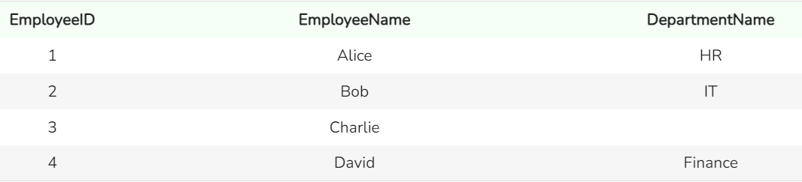
Keluaran dari fungsi LEFT JOIN. Gambar oleh Penulis
Kueri kita dengan LEFT JOIN mengembalikan semua baris dari tabel kiri, Employees, dan baris yang cocok dari tabel kanan, Departments. Jika tidak ada kecocokan, nilai NULL atau hilang akan dikembalikan untuk kolom dari tabel Departments, yaitu tabel di sebelah kanan.
LEFT OUTER JOIN
Sekarang mari kita coba dengan LEFT OUTER JOIN:
SELECT Employees.EmployeeID, Employees.EmployeeName, Departments.DepartmentName
FROM Employees
LEFT OUTER JOIN Departments ON Employees.DepartmentID = Departments.DepartmentID;
Keluaran dari fungsi LEFT OUTER JOIN. Gambar oleh Penulis
Anda dapat melihat bahwa kedua kueri menghasilkan keluaran yang sama.
Kasus Penggunaan untuk LEFT JOIN atau LEFT OUTER JOIN
LEFT JOIN / LEFT OUTER JOIN sangat bermanfaat dalam berbagai skenario. Berikut beberapa contohnya.
-
Mengidentifikasi Rekaman yang Tidak Cocok: Anda dapat menggunakan
LEFT JOINatauLEFT OUTER JOINuntuk menemukan rekaman dalam satu tabel yang tidak memiliki pasangan yang cocok di tabel lain. Dalam kueri di atas, Anda dapat melihat bahwa teman kita, Charlie, belum dipetakan ke departemen mana pun. -
Pemeriksaan Integritas Data: Anda dapat menggunakan
LEFT JOINatauLEFT OUTER JOINuntuk memastikan konsistensi data di seluruh tabel dengan memeriksa rekaman yang hilang atau tidak cocok. Misalnya, kita bisa menggunakan klausaWHEREuntuk memfilter himpunan hasil agar hanya menyertakan baris di mana rekamanDepartments.DepartmentIDbernilaiNULLatau hilang. -
Menggabungkan Data Terkait: Gunakan
LEFT JOINatauLEFT OUTER JOINuntuk menggabungkan data dari tabel terkait menjadi satu laporan yang komprehensif. Pendekatan ini mengonsolidasikan informasi dari berbagai sumber, memberikan pandangan menyeluruh atas data Anda.
Pertimbangan Kinerja dan Teknik Lanjutan
Meskipun LEFT JOIN dan LEFT OUTER JOIN sederhana, ada beberapa pertimbangan kinerja dan teknik lanjutan yang perlu diingat.
Dampak pada kinerja kueri
LEFT JOIN/ LEFT OUTER JOIN dapat memengaruhi kinerja saat bekerja dengan dataset besar. Seiring bertambahnya jumlah baris dalam tabel Anda, waktu yang dibutuhkan untuk memproses join dan mengambil hasil juga meningkat. Oleh karena itu, penting untuk mempertimbangkan ukuran tabel yang terlibat dan mengoptimalkan kueri Anda agar efisien.
Strategi pengindeksan untuk meningkatkan kinerja
Menggunakan indeks pada kolom yang terlibat dalam kondisi join dapat secara signifikan mempercepat waktu pemrosesan. Indeks membantu database dengan cepat menemukan dan mencocokkan baris antar tabel. Misalnya, jika Anda sering melakukan join tabel pada DepartmentID, membuat indeks pada kolom DepartmentID di kedua tabel akan mempercepat proses, membuat kueri Anda lebih efisien dan responsif.
Perbandingan dengan jenis join lainnya
Memahami kapan menggunakan jenis join yang berbeda (INNER JOIN, RIGHT JOIN, FULL OUTER JOIN) penting untuk mengoptimalkan kueri. LEFT JOIN atau LEFT OUTER JOIN sangat berguna saat Anda membutuhkan semua rekaman dari tabel kiri. Jika Anda tidak memerlukan semua rekaman dari tabel kiri, pertimbangkan opsi lain.
Penggunaan dengan subkueri
Subkueri, juga dikenal sebagai inner query atau nested query, dapat membantu dalam skenario pengambilan data yang kompleks. Saat digunakan dengan LEFT JOIN atau LEFT OUTER JOIN, subkueri dapat membantu Anda memfilter dan mengagregasi data, melakukan join bersyarat, dan memecah kueri kompleks menjadi bagian yang lebih mudah dikelola.
Penutup
Memahami fungsi LEFT JOIN dan LEFT OUTER JOIN dalam SQL sangat penting untuk pengelolaan data, pelaporan, dan analisis yang efektif. Meskipun fungsionalitasnya identik, mengetahui kasus penggunaan, implikasi kinerja, dan teknik lanjutannya dapat membantu Anda memanfaatkan keduanya dengan lebih baik. Untuk pembelajaran lebih lanjut, pertimbangkan sumber berikut:
- Introduction to SQL: Pelajari cara membuat dan membuat kueri database relasional menggunakan SQL.
- SQL Fundamentals: Kuasai keterampilan dasar SQL yang Anda perlukan untuk berinteraksi dengan dan mengkueri data Anda.
- Learn SQL: Dapatkan pengetahuan bahasa pemrograman yang banyak diminati untuk mengelola data dalam database relasional.
- Reporting in SQL: Dengan kursus praktik ini, Anda akan belajar membangun laporan dan dasbor SQL sendiri, sekaligus mengasah keterampilan eksplorasi, pembersihan, dan validasi data.

Profesional berpengalaman di bidang ilmu data, kecerdasan buatan, analitik, dan strategi data.
Pertanyaan SQL yang Sering Diajukan
Apa perbedaan antara LEFT JOIN dan LEFT OUTER JOIN?
Tidak ada perbedaan; LEFT JOIN dan LEFT OUTER JOIN menjalankan fungsi yang sama dan dapat digunakan secara bergantian.
Kapan saya harus menggunakan LEFT JOIN?
Gunakan LEFT JOIN saat Anda memerlukan semua rekaman dari tabel kiri dan rekaman yang cocok dari tabel kanan. Rekaman yang tidak cocok dari tabel kanan akan bernilai NULL.
Apakah LEFT JOIN akan mengembalikan lebih banyak baris daripada tabel kiri?
Tidak, LEFT JOIN mengembalikan semua baris dari tabel kiri dan mencocokkan baris dari tabel kanan. Ini tidak menambah jumlah baris tabel kiri.
Bagaimana cara menangani nilai NULL dalam hasil LEFT JOIN?
Anda dapat menggunakan fungsi COALESCE untuk mengganti nilai yang hilang dengan nilai default dalam himpunan hasil.
Apa saja kasus penggunaan umum untuk LEFT JOIN?
Kasus penggunaan umum termasuk mengidentifikasi rekaman yang tidak cocok, melakukan pemeriksaan integritas data, dan menggabungkan dataset dalam proses ETL.
%22%3E%0A%20%20%20%20%20%20%20%20%3Crect%20fill%3D%22%23EFEBE4%22%20height%3D%22180%22%20width%3D%22336%22%20%2F%3E%0A%20%20%20%20%20%20%20%20%3Crect%0A%20%20%20%20%20%20%20%20%20%20fill%3D%22%23DD3400%22%0A%20%20%20%20%20%20%20%20%20%20height%3D%22106.6%22%0A%20%20%20%20%20%20%20%20%20%20transform%3D%22rotate(-30%20-208.588%20220.18)%22%0A%20%20%20%20%20%20%20%20%20%20width%3D%22456.125%22%0A%20%20%20%20%20%20%20%20%20%20x%3D%22-208.588%22%0A%20%20%20%20%20%20%20%20%20%20y%3D%22220.18%22%0A%20%20%20%20%20%20%20%20%2F%3E%0A%20%20%20%20%20%20%20%20%3Crect%0A%20%20%20%20%20%20%20%20%20%20fill%3D%22%23FFEC3C%22%0A%20%20%20%20%20%20%20%20%20%20height%3D%2235.875%22%0A%20%20%20%20%20%20%20%20%20%20transform%3D%22rotate(-30%20-208.588%20220.18)%22%0A%20%20%20%20%20%20%20%20%20%20width%3D%22347.576%22%0A%20%20%20%20%20%20%20%20%20%20x%3D%22-208.588%22%0A%20%20%20%20%20%20%20%20%20%20y%3D%22220.18%22%0A%20%20%20%20%20%20%20%20%2F%3E%0A%20%20%20%20%20%20%20%20%3Crect%0A%20%20%20%20%20%20%20%20%20%20fill%3D%22%23FF931E%22%0A%20%20%20%20%20%20%20%20%20%20height%3D%2235.875%22%0A%20%20%20%20%20%20%20%20%20%20transform%3D%22rotate(-30%20-226.525%20189.111)%22%0A%20%20%20%20%20%20%20%20%20%20width%3D%22347.576%22%0A%20%20%20%20%20%20%20%20%20%20x%3D%22-226.525%22%0A%20%20%20%20%20%20%20%20%20%20y%3D%22189.111%22%0A%20%20%20%20%20%20%20%20%2F%3E%0A%20%20%20%20%20%20%20%20%3Crect%0A%20%20%20%20%20%20%20%20%20%20fill%3D%22%23DD3400%22%0A%20%20%20%20%20%20%20%20%20%20height%3D%22106.6%22%0A%20%20%20%20%20%20%20%20%20%20transform%3D%22rotate(-30%2085.5879%20256.055)%22%0A%20%20%20%20%20%20%20%20%20%20width%3D%22456.125%22%0A%20%20%20%20%20%20%20%20%20%20x%3D%2285.5879%22%0A%20%20%20%20%20%20%20%20%20%20y%3D%22256.055%22%0A%20%20%20%20%20%20%20%20%2F%3E%0A%20%20%20%20%20%20%20%20%3Crect%0A%20%20%20%20%20%20%20%20%20%20fill%3D%22%23FFEC3C%22%0A%20%20%20%20%20%20%20%20%20%20height%3D%2235.875%22%0A%20%20%20%20%20%20%20%20%20%20transform%3D%22rotate(-30%2085.5879%20256.055)%22%0A%20%20%20%20%20%20%20%20%20%20width%3D%22184.5%22%0A%20%20%20%20%20%20%20%20%20%20x%3D%2285.5879%22%0A%20%20%20%20%20%20%20%20%20%20y%3D%22256.055%22%0A%20%20%20%20%20%20%20%20%2F%3E%0A%20%20%20%20%20%20%20%20%3Crect%0A%20%20%20%20%20%20%20%20%20%20fill%3D%22%23FF931E%22%0A%20%20%20%20%20%20%20%20%20%20height%3D%2235.875%22%0A%20%20%20%20%20%20%20%20%20%20transform%3D%22rotate(-30%20227.432%20132.736)%22%0A%20%20%20%20%20%20%20%20%20%20width%3D%22271.625%22%0A%20%20%20%20%20%20%20%20%20%20x%3D%22227.432%22%0A%20%20%20%20%20%20%20%20%20%20y%3D%22132.736%22%0A%20%20%20%20%20%20%20%20%2F%3E%0A%20%20%20%20%20%20%3C%2Fg%3E%0A%20%20%20%20%20%20%3Cdefs%3E%0A%20%20%20%20%20%20%20%20%3CclipPath%20id%3D%22clip%22%3E%0A%20%20%20%20%20%20%20%20%20%20%3Crect%20fill%3D%22white%22%20height%3D%22180%22%20width%3D%22336%22%20%2F%3E%0A%20%20%20%20%20%20%20%20%3C%2FclipPath%3E%0A%20%20%20%20%20%20%3C%2Fdefs%3E%0A%20%20%20%20%3C%2Fsvg%3E)

%22%3E%0A%20%20%20%20%20%20%20%20%3Crect%20fill%3D%22%23EFEBE4%22%20height%3D%22180%22%20width%3D%22336%22%20%2F%3E%0A%20%20%20%20%20%20%20%20%3Crect%0A%20%20%20%20%20%20%20%20%20%20fill%3D%22%23FF931E%22%0A%20%20%20%20%20%20%20%20%20%20height%3D%22106.6%22%0A%20%20%20%20%20%20%20%20%20%20transform%3D%22rotate(-30%20-208.588%20220.18)%22%0A%20%20%20%20%20%20%20%20%20%20width%3D%22456.125%22%0A%20%20%20%20%20%20%20%20%20%20x%3D%22-208.588%22%0A%20%20%20%20%20%20%20%20%20%20y%3D%22220.18%22%0A%20%20%20%20%20%20%20%20%2F%3E%0A%20%20%20%20%20%20%20%20%3Crect%0A%20%20%20%20%20%20%20%20%20%20fill%3D%22%23F7F3EB%22%0A%20%20%20%20%20%20%20%20%20%20height%3D%2235.875%22%0A%20%20%20%20%20%20%20%20%20%20transform%3D%22rotate(-30%20-208.588%20220.18)%22%0A%20%20%20%20%20%20%20%20%20%20width%3D%22347.576%22%0A%20%20%20%20%20%20%20%20%20%20x%3D%22-208.588%22%0A%20%20%20%20%20%20%20%20%20%20y%3D%22220.18%22%0A%20%20%20%20%20%20%20%20%2F%3E%0A%20%20%20%20%20%20%20%20%3Crect%0A%20%20%20%20%20%20%20%20%20%20fill%3D%22%23000820%22%0A%20%20%20%20%20%20%20%20%20%20height%3D%2235.875%22%0A%20%20%20%20%20%20%20%20%20%20transform%3D%22rotate(-30%20-226.525%20189.111)%22%0A%20%20%20%20%20%20%20%20%20%20width%3D%22347.576%22%0A%20%20%20%20%20%20%20%20%20%20x%3D%22-226.525%22%0A%20%20%20%20%20%20%20%20%20%20y%3D%22189.111%22%0A%20%20%20%20%20%20%20%20%2F%3E%0A%20%20%20%20%20%20%20%20%3Crect%0A%20%20%20%20%20%20%20%20%20%20fill%3D%22%23000820%22%0A%20%20%20%20%20%20%20%20%20%20height%3D%22106.6%22%0A%20%20%20%20%20%20%20%20%20%20transform%3D%22rotate(-30%2085.5879%20256.055)%22%0A%20%20%20%20%20%20%20%20%20%20width%3D%22456.125%22%0A%20%20%20%20%20%20%20%20%20%20x%3D%2285.5879%22%0A%20%20%20%20%20%20%20%20%20%20y%3D%22256.055%22%0A%20%20%20%20%20%20%20%20%2F%3E%0A%20%20%20%20%20%20%20%20%3Crect%0A%20%20%20%20%20%20%20%20%20%20fill%3D%22%23D87300%22%0A%20%20%20%20%20%20%20%20%20%20height%3D%2235.875%22%0A%20%20%20%20%20%20%20%20%20%20transform%3D%22rotate(-30%2085.5879%20256.055)%22%0A%20%20%20%20%20%20%20%20%20%20width%3D%22184.5%22%0A%20%20%20%20%20%20%20%20%20%20x%3D%2285.5879%22%0A%20%20%20%20%20%20%20%20%20%20y%3D%22256.055%22%0A%20%20%20%20%20%20%20%20%2F%3E%0A%20%20%20%20%20%20%20%20%3Crect%0A%20%20%20%20%20%20%20%20%20%20fill%3D%22%23FF931E%22%0A%20%20%20%20%20%20%20%20%20%20height%3D%2235.875%22%0A%20%20%20%20%20%20%20%20%20%20transform%3D%22rotate(-30%20227.432%20132.736)%22%0A%20%20%20%20%20%20%20%20%20%20width%3D%22271.625%22%0A%20%20%20%20%20%20%20%20%20%20x%3D%22227.432%22%0A%20%20%20%20%20%20%20%20%20%20y%3D%22132.736%22%0A%20%20%20%20%20%20%20%20%2F%3E%0A%20%20%20%20%20%20%3C%2Fg%3E%0A%20%20%20%20%20%20%3Cdefs%3E%0A%20%20%20%20%20%20%20%20%3CclipPath%20id%3D%22clip%22%3E%0A%20%20%20%20%20%20%20%20%20%20%3Crect%20fill%3D%22white%22%20height%3D%22180%22%20width%3D%22336%22%20%2F%3E%0A%20%20%20%20%20%20%20%20%3C%2FclipPath%3E%0A%20%20%20%20%20%20%3C%2Fdefs%3E%0A%20%20%20%20%3C%2Fsvg%3E)

%22%3E%0A%20%20%20%20%20%20%20%20%3Crect%20fill%3D%22%2305192D%22%20height%3D%22180%22%20width%3D%22336%22%20%2F%3E%0A%20%20%20%20%20%20%20%20%3Crect%0A%20%20%20%20%20%20%20%20%20%20fill%3D%22%23B08EFF%22%0A%20%20%20%20%20%20%20%20%20%20height%3D%22106.6%22%0A%20%20%20%20%20%20%20%20%20%20transform%3D%22rotate(-30%20-208.588%20220.18)%22%0A%20%20%20%20%20%20%20%20%20%20width%3D%22456.125%22%0A%20%20%20%20%20%20%20%20%20%20x%3D%22-208.588%22%0A%20%20%20%20%20%20%20%20%20%20y%3D%22220.18%22%0A%20%20%20%20%20%20%20%20%2F%3E%0A%20%20%20%20%20%20%20%20%3Crect%0A%20%20%20%20%20%20%20%20%20%20fill%3D%22%237933FF%22%0A%20%20%20%20%20%20%20%20%20%20height%3D%2235.875%22%0A%20%20%20%20%20%20%20%20%20%20transform%3D%22rotate(-30%20-208.588%20220.18)%22%0A%20%20%20%20%20%20%20%20%20%20width%3D%22347.576%22%0A%20%20%20%20%20%20%20%20%20%20x%3D%22-208.588%22%0A%20%20%20%20%20%20%20%20%20%20y%3D%22220.18%22%0A%20%20%20%20%20%20%20%20%2F%3E%0A%20%20%20%20%20%20%20%20%3Crect%0A%20%20%20%20%20%20%20%20%20%20fill%3D%22%2372E5FE%22%0A%20%20%20%20%20%20%20%20%20%20height%3D%2235.875%22%0A%20%20%20%20%20%20%20%20%20%20transform%3D%22rotate(-30%20-226.525%20189.111)%22%0A%20%20%20%20%20%20%20%20%20%20width%3D%22347.576%22%0A%20%20%20%20%20%20%20%20%20%20x%3D%22-226.525%22%0A%20%20%20%20%20%20%20%20%20%20y%3D%22189.111%22%0A%20%20%20%20%20%20%20%20%2F%3E%0A%20%20%20%20%20%20%20%20%3Crect%0A%20%20%20%20%20%20%20%20%20%20fill%3D%22%235EB1FF%22%0A%20%20%20%20%20%20%20%20%20%20height%3D%22106.6%22%0A%20%20%20%20%20%20%20%20%20%20transform%3D%22rotate(-30%2085.5879%20256.055)%22%0A%20%20%20%20%20%20%20%20%20%20width%3D%22456.125%22%0A%20%20%20%20%20%20%20%20%20%20x%3D%2285.5879%22%0A%20%20%20%20%20%20%20%20%20%20y%3D%22256.055%22%0A%20%20%20%20%20%20%20%20%2F%3E%0A%20%20%20%20%20%20%20%20%3Crect%0A%20%20%20%20%20%20%20%20%20%20fill%3D%22%23B08EFF%22%0A%20%20%20%20%20%20%20%20%20%20height%3D%2235.875%22%0A%20%20%20%20%20%20%20%20%20%20transform%3D%22rotate(-30%2085.5879%20256.055)%22%0A%20%20%20%20%20%20%20%20%20%20width%3D%22184.5%22%0A%20%20%20%20%20%20%20%20%20%20x%3D%2285.5879%22%0A%20%20%20%20%20%20%20%20%20%20y%3D%22256.055%22%0A%20%20%20%20%20%20%20%20%2F%3E%0A%20%20%20%20%20%20%20%20%3Crect%0A%20%20%20%20%20%20%20%20%20%20fill%3D%22%2372E5FE%22%0A%20%20%20%20%20%20%20%20%20%20height%3D%2235.875%22%0A%20%20%20%20%20%20%20%20%20%20transform%3D%22rotate(-30%20227.432%20132.736)%22%0A%20%20%20%20%20%20%20%20%20%20width%3D%22271.625%22%0A%20%20%20%20%20%20%20%20%20%20x%3D%22227.432%22%0A%20%20%20%20%20%20%20%20%20%20y%3D%22132.736%22%0A%20%20%20%20%20%20%20%20%2F%3E%0A%20%20%20%20%20%20%3C%2Fg%3E%0A%20%20%20%20%20%20%3Cdefs%3E%0A%20%20%20%20%20%20%20%20%3CclipPath%20id%3D%22clip%22%3E%0A%20%20%20%20%20%20%20%20%20%20%3Crect%20fill%3D%22white%22%20height%3D%22180%22%20width%3D%22336%22%20%2F%3E%0A%20%20%20%20%20%20%20%20%3C%2FclipPath%3E%0A%20%20%20%20%20%20%3C%2Fdefs%3E%0A%20%20%20%20%3C%2Fsvg%3E)



Memahami seluk-beluk join SQL adalah keharusan bagi siapa pun yang bekerja dengan database relasional. Dalam tutorial ini, kita akan menelaah dengan saksama
LEFT JOINdanLEFT OUTER JOINdalam SQL.Dan jika Anda ingin menguasai SQL dan meningkatkan kemampuan membuat kueri, ikuti kursus seperti Joining Data in SQL yang akan sangat membantu Anda memahami perbedaan halus namun penting dalam join satu tabel dan dua tabel.