
Free access is closing! 700+ free courses are waiting.
Ends in:
Start Now
There is no difference between a LEFT JOIN and a LEFT OUTER JOIN. They're interchangeable SQL functions. They both do exactly the same work of getting all the rows from the left table and the matched rows from the right table.
Let's look at a real example so we can see for ourselves that LEFT JOIN and LEFT OUTER JOIN are the same. To do this, we'll create and use two sample tables: Employees and Departments.
CREATE TABLE Departments (
    DepartmentID INT PRIMARY KEY,
    DepartmentName VARCHAR(50)
);
INSERT INTO Departments (DepartmentID, DepartmentName) VALUES
(1, 'HR'),
(2, 'IT'),
(3, 'Finance'),
(4, 'Marketing');
CREATE TABLE Employees (
    EmployeeID INT PRIMARY KEY,
    EmployeeName VARCHAR(50),
    DepartmentID INT,
    FOREIGN KEY (DepartmentID) REFERENCES Departments(DepartmentID)
);
INSERT INTO Employees (EmployeeID, EmployeeName, DepartmentID) VALUES
(1, 'Alice', 1),
(2, 'Bob', 2),
(3, 'Charlie', NULL),
(4, 'David', 3);Now that we have our two tables ready, let's try a query with a LEFT JOIN.
SELECT Employees.EmployeeID, Employees.EmployeeName,
Departments.DepartmentName
FROM Employees
LEFT JOIN Departments ON Employees.DepartmentID = Departments.DepartmentID;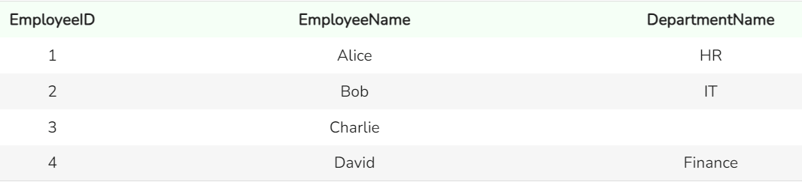
Output from the LEFT JOIN function. Image by Author
Our query with LEFT JOIN returns all the rows from the left table, Employees, and the matched rows from the right table, Departments. If there is no match, NULL or missing values are returned for columns from theDepartments table, which is the one on the right.
Let’s now try it with LEFT OUTER JOIN:
SELECT Employees.EmployeeID, Employees.EmployeeName, Departments.DepartmentName
FROM Employees
LEFT OUTER JOIN Departments ON Employees.DepartmentID = Departments.DepartmentID;
Output from the LEFT OUTER JOIN function. Image by Author
You can see that both the queries have produced the same output.
LEFT JOIN / LEFT OUTER JOIN is incredibly useful in various scenarios. Here are some examples.
Identify Unmatched Records: You can use a LEFT JOIN or LEFT OUTER JOIN to find records in one table that do not have matching records in another table. In the above query, you can see that it's our friend, Charlie, who has not been mapped to any department.
Data Integrity Checks: You can use LEFT JOIN or LEFT OUTER JOIN to ensure data consistency across tables by checking for missing or mismatched records. For example, we could have used a WHERE clause to filter the result set to include only the rows where Departments.DepartmentID record is NULL or missing.
Combining Related Data: Use LEFT JOIN or LEFT OUTER JOIN to combine data from related tables into a single, comprehensive report. This approach aggregates information from multiple sources, providing a complete view of your data.
While LEFT JOIN and LEFT OUTER JOIN are straightforward, there are several performance considerations and advanced techniques to keep in mind.
LEFT JOIN/ LEFT OUTER JOIN can impact performance while working with large datasets. As the number of rows in your tables increases, the time required to process the join and retrieve the results also increases. It's, therefore, essential to consider the size of the tables involved and optimize your queries for efficiency.
Using indexes on the columns involved in your join conditions can significantly improve processing time. An index helps the database quickly find and match rows between tables. For example, if you frequently join tables on DepartmentID, creating an index on the DepartmentID column in both tables will speed up the process, making your queries more efficient and responsive.
Understanding when to use different joins (INNER JOIN, RIGHT JOIN, FULL OUTER JOIN) is important for optimizing queries. LEFT JOIN or LEFT OUTER JOIN is particularly useful when you need all records from the left table. If you don't need all the records from the left table, consider something else.
Subqueries, also known as inner queries or nested queries, can help in complex data retrieval scenarios. When used with LEFT JOIN or LEFT OUTER JOIN, subqueries can help you filter and aggregate data, conditionally join tables, and break down complex queries into more manageable ones.
It is imperative to understand the LEFT JOIN and LEFT OUTER JOIN functions in SQL for effective data management, reporting and analysis. Though they have identical functionality, knowing their use cases, performance implications, and advanced techniques can help you utilize either of these functions in a better way. For further learning, consider exploring the following sources:

Seasoned professional in data science, artificial intelligence, analytics, and data strategy.
There is no difference; LEFT JOIN and LEFT OUTER JOIN perform the same function and can be used interchangeably.
Use LEFT JOIN when you need all records from the left table and the matching records from the right table. Unmatched records from the right table will have NULL values.
No, LEFT JOIN returns all rows from the left table and matches rows from the right table. It does not increase the row count of the left table.
You can use the COALESCE function to replace missing values with a default value in the result set.
Common use cases include identifying unmatched records, performing data integrity checks, and combining datasets in the ETL processes.

Tutorial
 Allan Ouko• 4 min.

Tutorial
Allan Ouko• 9 min.
Tutorial
 Sayak Paul• 9 min.
Learn SQL with DataCamp
Curs
Îmbunătățește-ți cunoștințele de SQL și învață să unești tabele, să aplici teoria mulțimilor relaționale și să lucrezi cu subinterogări.
Curs
Află cum să creezi una dintre cele mai eficiente modalități de stocare a datelor - bazele de date relaționale!
Curs
Învață să scrii interogări SQL pentru a calcula metrici cheie folosite de companii pentru a măsura performanța.






Understanding the subtleties of SQL joins is a must for anyone working with relational databases. In this tutorial, we will look closely at
LEFT JOINandLEFT OUTER JOINin SQL.And if you're looking to master SQL and elevate your querying abilities, enroll in a course like Joining Data in SQL which will really help you understand the subtle but important differences in both single-table and two-table joins.