
Our biggest-ever sale. 60% off AI & data skills
Buy Now

Ćwicz i monitoruj swoje postępy.
Kontynuuj z GoogleKontynuując, akceptujesz nasz Warunki użytkowania, nasz Polityka prywatności i że Twoje dane są przechowywane w USA.Computer use is currently in the experimental phase, and Anthropic is allowing developers to try it out and report bugs. Over time, the technology will improve, and it has the potential to be incredibly efficient, handling tasks across all kinds of roles, from developers to admin roles.
Organizations such as Canva, DoorDash, and Replit have already started experimenting with computer use to automate tasks that require dozens, and sometimes even hundreds, of steps to complete.
This new capability is made possible with the new and improved Claude 3.5 Sonnet model, which is available for all users. You can access it through Anthropic API, Amazon Bedrock, and Google Cloud’s Vertex AI.
Anthropic computer use performs four steps in the background. First, it receives the API request from the user. By using the prompt, Claude then selects the tool to use. After that, it takes screenshots of the desktop and evaluates if the task is completed. If not, it will keep using the tools until the goal is achieved. Let’s explore that in more detail.
We will begin by using the Python API to access the latest Claude 3.5 Sonnet model and employ two tools: text_editor and bash. Currently, we only have access to three Anthropic-defined tools:
{ "type": "computer_20241022", "name": "computer" }{ "type": "text_editor_20241022", "name": "str_replace_editor" }{ "type": "bash_20241022", "name": "bash" }The "type" field is used to identify the tools, and the "name" field is exposed to the model. Then, we will provide it with the user prompt and computer use parameter.
import anthropic
client = anthropic.Anthropic()
response = client.beta.messages.create(
model="claude-3-5-sonnet-20241022",
max_tokens=1024,
tools=[
{
"type": "computer_20241022",
"name": "computer",
"display_width_px": 1024,
"display_height_px": 768,
"display_number": 1,
},
{
"type": "text_editor_20241022",
"name": "str_replace_editor"
},
{
"type": "bash_20241022",
"name": "bash"
}
],
messages=[{"role": "user", "content": "Download a picture of a sports car to my desktop."}],
betas=["computer-use-2024-10-22"],
)
print(response)Claude checks the tool definitions and access to see if certain tools can be used with the user query. When the tool is selected, Claude performs a tool request.
Computer use will extract the tool input, use the input to perform the process on the computer, and then return the result as a screenshot. After that, it will continue the conversation with a new user message that contains the tool's result.
Claude processes and interprets the tool's results to determine if the task is completed or if more tools are required. If it decides to use another tool, it will repeat step three again. The repetition of steps three and four without user input is known as the “agent loop.” This is a repetitive process where Claude interacts with your desktop environment using the tools and evaluates the results.
Computer use is in beta and, as such, poses various risks. These risks are heightened if the computer tries to access the internet via a browser. That's why we will use a Docker container with minimal privileges to prevent direct system attacks or accidents.
We will use a reference implementation that contains commands to start computer use with Docker. The Docker image contains all the components needed for Claude to use a computer.
Prerequisite:
Type the following command in the terminal or bash. Replace the %your_api_key% with the Anthropic API key you can get from the console.
export ANTHROPIC_API_KEY=%your_api_key%
docker run \
-e ANTHROPIC_API_KEY=$ANTHROPIC_API_KEY \
-v $HOME/.anthropic:/home/computeruse/.anthropic \
-p 5900:5900 \
-p 8501:8501 \
-p 6080:6080 \
-p 8080:8080 \
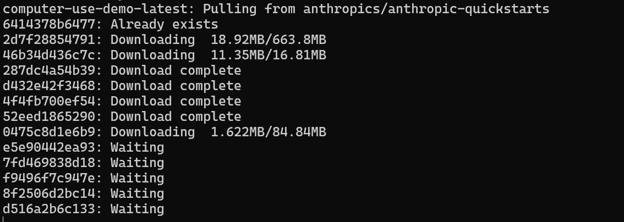
-it ghcr.io/anthropics/anthropic-quickstarts:computer-use-demo-latestIt will download all the necessary packages and run them in the docker container.
Once the container is running, we can access Claude computer use by typing the local URL http://localhost:8080 in the browser.
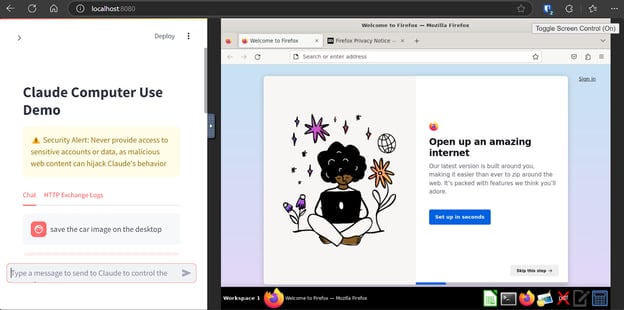
Start typing the prompt, and computer use will perform all the necessary steps to finish the task.
Writing the prompt for computer use is completely different from using Claude 3.5 Sonnet for chat or general response generation. You need to follow some simple rules in order to achieve accurate results.
Computer use has hundreds of use cases in everyday life and in the workplace. It can automate a variety of complex tasks for you. For example, you can ask a computer to plan a meetup with a friend at the Golden Gate Bridge.
As shown in the video, it can perform a Google search, open maps to find the distance, check the sunset time, and add the event to the calendar. This is amazing for everyday tasks that would normally require hours of research and organization. AI can do it in just a few minutes with minimal supervision.
In another example, Alex is asking the computer to launch a Chrome browser and use a website called claude.ai to create a personal website with a 90s theme. After that, he asked it to download the file, open it in VS Code, and run it locally. Within a few minutes, he has created a proper website.
Before you start using Claude's computer for AI experimentation, be aware of its limitations and warnings, such as:
The cost of computer use is similar to that of making API calls to the Claude models. However, there is an additional cost associated with the use of a special system prompt, as well as extra input tokens. You can view the pricing details for the models at Anthropic's pricing page.
The special system prompt requires an additional 466 tokens for automated tool selection and 499 tokens for any tool. These figures apply to the Claude 3.5 Sonnet (new) model, which is priced at $3 per million input tokens and $15 per million output tokens.
For using the Anthropic-defined tools, the following additional input tokens are required:
There are countless applications for computer use, and businesses can automate much of their manual work to increase productivity. It can also save the average computer user time on routine tasks such as ordering a coffee or booking a flight.
Computer use has the potential to handle all kinds of tasks, and all you have to do is supervise. You simply need to give it a command and evaluate its work. If it's not accurate, you can ask it to iterate and improve. This tool is a potential game changer and could be more impactful than the introduction of the OpenAI o1 model.
We have learned about Anthropic's new feature and how it can interact with and modify the desktop environment with the help of Claude AI. We have also learned about how it works, built the Docker image, and used it locally, learned about its use cases, limitations, and pricing. In short, all you have to do now is try it on your own to experience the amazing features. If you’re new to Anthropic and Claude, check out our resources:
As a certified data scientist, I am passionate about leveraging cutting-edge technology to create innovative machine learning applications. With a strong background in speech recognition, data analysis and reporting, MLOps, conversational AI, and NLP, I have honed my skills in developing intelligent systems that can make a real impact. In addition to my technical expertise, I am also a skilled communicator with a talent for distilling complex concepts into clear and concise language. As a result, I have become a sought-after blogger on data science, sharing my insights and experiences with a growing community of fellow data professionals. Currently, I am focusing on content creation and editing, working with large language models to develop powerful and engaging content that can help businesses and individuals alike make the most of their data.

blog
 Josef Waples• 10 min

Samouczek
 Bexruz (Bex) Tuychiev• 11 min

Samouczek
Bexruz (Bex) Tuychiev• 9 minTop DataCamp Courses
Kurs
Poznaj podstawy LLM-ów i rewolucyjną architekturę transformer, na której się opierają!
Ścieżka
Naucz się tworzyć duże modele językowe (LLM) z użyciem PyTorch i Hugging Face, korzystając z najnowszych technik głębokiego uczenia i przetwarzania języka naturalnego (NLP).
Ćwicz i monitoruj swoje postępy.
Kontynuuj z GoogleKontynuując, akceptujesz nasz Warunki użytkowania, nasz Polityka prywatności i że Twoje dane są przechowywane w USA.


Recently, Anthropic AI has improved their Claude 3.5 Sonnet and Claude 3.5 Haiku. With this update, they have introduced a new feature that will revolutionize how we work and interact with AI in general. They have introduced computer use, a groundbreaking new capability that can look at your screen, move the mouse, click on buttons, and type text.
Essentially, it can do everything for you based on a simple prompt. All you have to do is write the prompt, and Claude will perform all the necessary steps to reach the goal.
Here, we will learn about Anthropic computer use, how it works, and how you can start using it with Docker. We will also learn how to improve the model's performance, use cases, limitations, and pricing. You can also check out our guide to Gemini 2.5 Computer Use to see how it compares.
Image by Author
What is Anthropic Computer Use?
Computer use is a new feature by Anthropic, where Claude can interact with tools to manipulate a computer desktop environment. Like humans, it can take a command and perform the necessary steps to reach the goal.
As we can see in the demo video below, Sam, one of the Anthropic researchers, has asked Claude AI to fill out the vendor request form using the spreadsheet or the search port. Claude AI has filled out the form after verifying it, automating the manual work.