In this tutorial, I will explain the difference between SQL INNER JOIN and OUTER JOIN and use examples. After we solve this issue, you might want to take our Joining Data in SQL course, which covers other joins, which are interesting, like SELF JOIN and CROSS JOIN, as well as larger ideas, like set theory.
Quick Answer
INNER JOIN returns only the matching rows between tables based on a common column, excluding non-matching rows. For example, the query below shows orders with customer details only when there is a match.
SELECT o.OrderID, c.CustomerName
FROM Orders o
INNER JOIN Customers c ON o.CustomerID = c.CustomerID;
OUTER JOIN includes matching rows as well as non-matching rows from one or both tables. The query below returns all customers, including those without orders.
SELECT c.CustomerName, o.OrderID
FROM Customers c
LEFT JOIN Orders o ON c.CustomerID = o.CustomerID;
A Close Look at SQL INNER JOIN and OUTER JOIN
Let’s now take a closer look at SQL INNER JOIN and OUTER JOIN, one at a time. As we look at each, consider the following two tables:
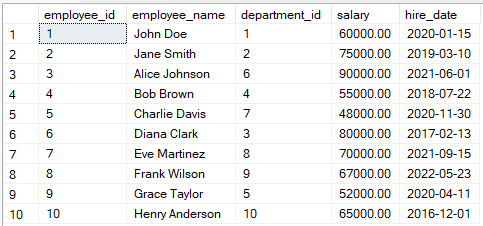
Example of employees table. Image by Author.
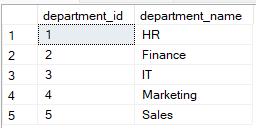
Example of departments table. Image by Author.
How INNER JOIN Works
An INNER JOIN retrieves only the rows with a match in both tables based on the specified condition.
The following query selects the employee_id, demployee_name, department_name, and salary and then returns the rows where department_id exists.
SELECT employees.employee_id, employees.employee_name, departments.department_name, employees.salary
FROM employees
INNER JOIN departments
ON employees.department_id = departments.department_id;
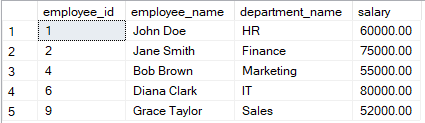
Example of table merged using SQL INNER JOIN. Image by Author.
How OUTER JOIN works
The OUTER JOIN includes unmatched rows from one or both tables, depending on the type of OUTER JOIN used.
LEFT OUTER JOIN (LEFT JOIN)
The LEFT OUTER JOIN returns all records from the left table and matched records from the right table. If there is no match, NULL values are returned for columns from the right table.
The following example retrieves all the records from the employees table, even where there are unmatched records. Missing department_name for employees is returned as NULL.
SELECT employees.employee_id, employees.employee_name, departments.department_name, employees.salary
FROM employees
LEFT JOIN departments
ON employees.department_id = departments.department_id;
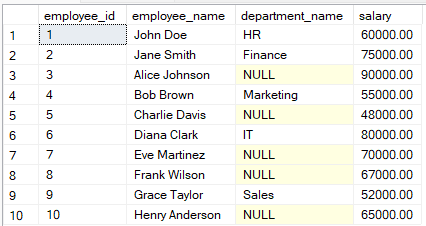
Example of table joined using SQL left outer join. Image by Author.
LEFT JOIN and LEFT OUTER JOIN are used interchangeably in SQL since both queries fetch all the rows from the left table and the matched rows from the right table.
RIGHT OUTER JOIN (RIGHT JOIN)
The RIGHT OUTER JOIN returns all records from the right table and matched records from the left table. Unmatched rows in the left table return NULL.
The query below returns all records from the departments table, even where there are no matching employees.
SELECT employees.employee_id, employees.employee_name, departments.department_name, employees.salary
FROM employees
RIGHT JOIN departments
ON employees.department_id = departments.department_id;
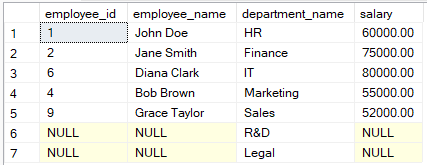
Example of tale joined using SQL Right outer join. Image by Author.
FULL OUTER JOIN
The FULL OUTER JOIN combines results from both left and right outer joins. It returns all records from both tables, filling in NULL where no matches exist.
The query below returns all records for the employees and departments table, even with unmatched rows.
SELECT employees.employee_id, employees.employee_name, departments.department_name, employees.salary
FROM employees
FULL JOIN departments
ON employees.department_id = departments.department_id;
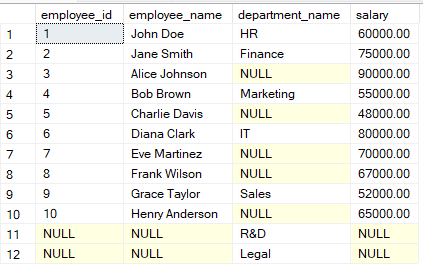
Example of table joined using SQL Full outer join. Image by Author.
INNER JOIN vs. OUTER JOIN: Key Differences
INNER JOIN and OUTER JOIN differ fundamentally in how they handle unmatched rows when merging tables. Understanding these differences is important for choosing the right join type in your database queries. Let's compare these differences.
What INNER JOIN returns
INNER JOIN returns only the rows with matching values in both tables. This type of join is used when you need data in both datasets.
The following query retrieves records from employees with matching rows from the departments table.
SELECT employees.employee_id, employees.employee_name, departments.department_name
FROM employees
INNER JOIN departments
ON employees.department_id = departments.department_id;
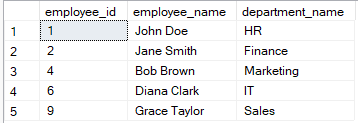
Example of table joined using SQL INNER JOIN. Image by Author.
What OUTER JOIN returns
OUTER JOIN includes unmatched rows from one or both tables, depending on the type of OUTER JOIN. For example, the LEFT OUTER JOIN returns all rows from the left table and matched rows from the right table. Unmatched rows from the right table will have NULLs.
The following query retrieves employee records, even those without a department.
SELECT employees.employee_id, employees.employee_name, departments.department_name
FROM employees
LEFT JOIN departments
ON employees.department_id = departments.department_id;
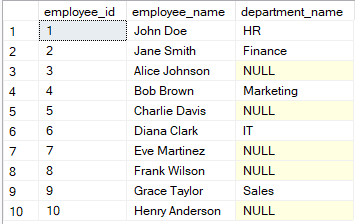
Example of data retrieved using SQL LEFT OUTER JOIN. Image by Author.
When to Use SQL INNER JOIN and OUTER JOIN
INNER JOIN and OUTER JOIN also differ in their practical use cases in data retrieval.
When to use INNER JOIN
INNER JOIN is most effective when you need only the intersecting data from two tables. For example, you may use INNER JOIN when analyzing sales data to find products that have been sold, such as when both product and sales tables have matching entries.
When to use OUTER JOIN
OUTER JOIN is appropriate when you need to return a complete dataset, including unmatched rows. For example, when generating a report to show all employees, including those without a department assignment, or all departments, including those without employees.
Conclusion
Understanding the difference between INNER JOIN and OUTER JOIN is important in writing efficient queries. Learning these techniques also helps in improving query optimization for faster data retrieval. I encourage you to keep practicing to learn more skills in database management.
I recommend trying out our Associate Data Analyst in SQL career track to become a good data analyst. Our Reporting in SQL course will also help you become proficient in building complex reports and dashboards for effective data presentation. If you are preparing for an interview that includes showcasing your SQL skills, I recommend checking our blog, 20 Top SQL Joins Interview Questions, to help you prepare for the interview.


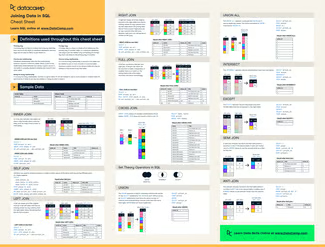






In this tutorial, I will explain the difference between SQL
INNER JOINandOUTER JOINand use examples. After we solve this issue, you might want to take our Joining Data in SQL course, which covers other joins, which are interesting, likeSELF JOINandCROSS JOIN, as well as larger ideas, like set theory.Quick Answer
INNER JOINreturns only the matching rows between tables based on a common column, excluding non-matching rows. For example, the query below shows orders with customer details only when there is a match.OUTER JOINincludes matching rows as well as non-matching rows from one or both tables. The query below returns all customers, including those without orders.A Close Look at SQL INNER JOIN and OUTER JOIN
Let’s now take a closer look at SQL
INNER JOINandOUTER JOIN, one at a time. As we look at each, consider the following two tables:Example of employees table. Image by Author.
Example of departments table. Image by Author.
How INNER JOIN Works
An
INNER JOINretrieves only the rows with a match in both tables based on the specified condition.The following query selects the
employee_id,demployee_name,department_name, andsalaryand then returns the rows wheredepartment_idexists.Example of table merged using SQL INNER JOIN. Image by Author.
How OUTER JOIN works
The
OUTER JOINincludes unmatched rows from one or both tables, depending on the type ofOUTER JOINused.LEFT OUTER JOIN (LEFT JOIN)
The
LEFT OUTER JOINreturns all records from the left table and matched records from the right table. If there is no match,NULLvalues are returned for columns from the right table.The following example retrieves all the records from the
employeestable, even where there are unmatched records. Missingdepartment_namefor employees is returned asNULL.Example of table joined using SQL left outer join. Image by Author.
LEFT JOIN and LEFT OUTER JOIN are used interchangeably in SQL since both queries fetch all the rows from the left table and the matched rows from the right table.
RIGHT OUTER JOIN (RIGHT JOIN)
The
RIGHT OUTER JOINreturns all records from the right table and matched records from the left table. Unmatched rows in the left table returnNULL.The query below returns all records from the
departmentstable, even where there are no matching employees.Example of tale joined using SQL Right outer join. Image by Author.
FULL OUTER JOIN
The
FULL OUTER JOINcombines results from both left and right outer joins. It returns all records from both tables, filling inNULLwhere no matches exist.The query below returns all records for the
employeesanddepartmentstable, even with unmatched rows.Example of table joined using SQL Full outer join. Image by Author.
INNER JOIN vs. OUTER JOIN: Key Differences
INNER JOINandOUTER JOINdiffer fundamentally in how they handle unmatched rows when merging tables. Understanding these differences is important for choosing the right join type in your database queries. Let's compare these differences.What INNER JOIN returns
INNER JOINreturns only the rows with matching values in both tables. This type of join is used when you need data in both datasets.The following query retrieves records from
employeeswith matching rows from thedepartmentstable.Example of table joined using SQL INNER JOIN. Image by Author.
What OUTER JOIN returns
OUTER JOINincludes unmatched rows from one or both tables, depending on the type ofOUTER JOIN. For example, theLEFT OUTER JOINreturns all rows from the left table and matched rows from the right table. Unmatched rows from the right table will have NULLs.The following query retrieves employee records, even those without a department.
Example of data retrieved using SQL LEFT OUTER JOIN. Image by Author.
When to Use SQL INNER JOIN and OUTER JOIN
INNER JOINandOUTER JOINalso differ in their practical use cases in data retrieval.When to use INNER JOIN
INNER JOINis most effective when you need only the intersecting data from two tables. For example, you may useINNER JOINwhen analyzing sales data to find products that have been sold, such as when both product and sales tables have matching entries.When to use OUTER JOIN
OUTER JOINis appropriate when you need to return a complete dataset, including unmatched rows. For example, when generating a report to show all employees, including those without a department assignment, or all departments, including those without employees.Conclusion
Understanding the difference between
INNER JOINandOUTER JOINis important in writing efficient queries. Learning these techniques also helps in improving query optimization for faster data retrieval. I encourage you to keep practicing to learn more skills in database management.I recommend trying out our Associate Data Analyst in SQL career track to become a good data analyst. Our Reporting in SQL course will also help you become proficient in building complex reports and dashboards for effective data presentation. If you are preparing for an interview that includes showcasing your SQL skills, I recommend checking our blog, 20 Top SQL Joins Interview Questions, to help you prepare for the interview.